| Candidates should be able to: | Notes and guidance |
|---|---|
| Show understanding of the purpose and benefits of networking devices | |
| Show understanding of the characteristics of a LAN (local area network) and a WAN (wide area network) | |
| Explain the client-server and peer-to-peer models of networked computers | Roles of the different computers within the network and subnetwork models Benefits and drawbacks of each model Justify the use of a model for a given situation |
| Show understanding of thin-client and thick-client and the differences between them | |
| Show understanding of the bus, star, mesh and hybrid topologies | Understand how packets are transmitted between two hosts for a given topology Justify the use of a topology for a given situation |
| Show understanding of cloud computing | Including the use of public and private clouds Benefits and drawbacks of cloud computing |
| Show understanding of the differences between and implications of the use of wireless and wired networks | Describe the characteristics of copper cable, fibre-optic cable, radio waves (including WiFi), microwaves, satellites |
| Describe the hardware that is used to support a LAN | Including switch, server, Network Interface Card (NIC), Wireless Network Interface Card (WNIC), Wireless Access Points (WAP), cables, bridge, repeater |
| Describe the role and function of a router in a network | |
| Show understanding of Ethernet and how collisions are detected and avoided | Including Carrier Sense Multiple Access/Collision Detection (CSMA/CD) |
| Show understanding of bit streaming | Methods of bit streaming, i.e. real-time and on-demand Importance of bit rates broadband speed on bit streaming |
| Show understanding of the differences between the World Wide Web (WWW) and the internet | |
| Describe the hardware that is used to support the internet | Including modems, PSTN (Public Switched Telephone Network), dedicated lines, cell phone network |
| Explain the use of IP addresses in the transmission of data over the internet | Including: • format of an IP address including IPv4 and IPv6 • use of subnetting in a network • how an IP address is associated with a device on a network • difference between a public IP address and a private IP address and the implications for security • difference between a static IP address and a dynamic IP address |
| Explain how a Uniform Resource Locator (URL) is used to locate a resource on the World Wide Web (WWW) and the role of the Domain Name Service (DNS) |
Communication
A-Level Computer Science · Topic 2
2.1
Networks: purpose and benefits
Syllabus
Source: Cambridge International syllabus
A network 网络 is a set of computing devices connected so they can communicate and share resources. Benefits:
- sharing resources (printers, file servers, internet) — cheaper than equipping each computer.
- sharing data — many users access the same files.
- central management — install software, manage users and back up once on a server.
- communication — email, video calls, messaging.
- remote access — work from anywhere.
Explore
Network route lab
Follow data from a device through network hardware and protocols.
Vocabulary
Train
| English | Chinese | Pinyin |
|---|---|---|
| network | 网络 | wǎng luò |
2.1
LAN vs WAN
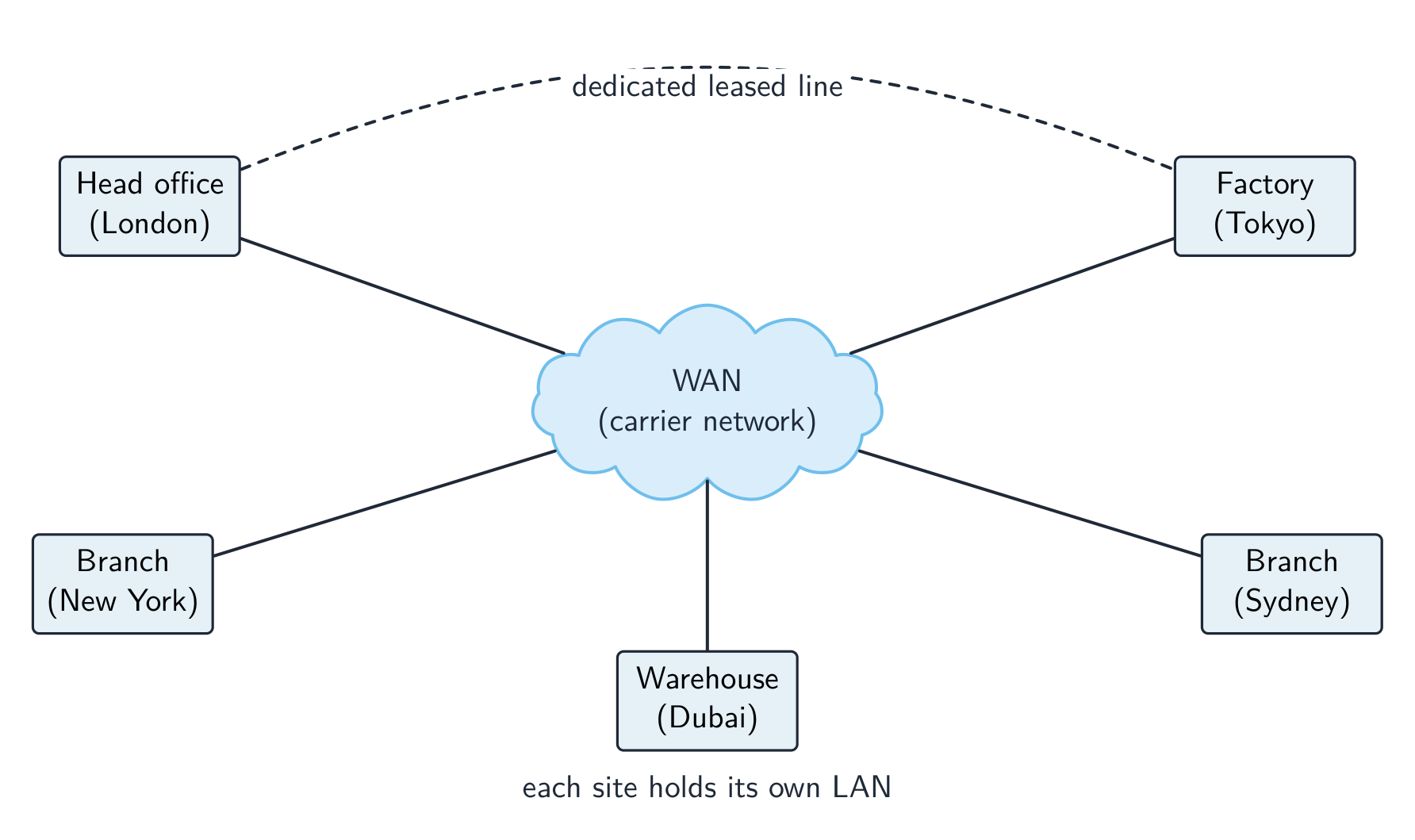
A local area network 局域网 (LAN) covers a small area — a home, office or school, usually owned by the organisation, with high data rates and low latency 延迟.
A wide area network 广域网 (WAN) covers a large area — a city, country, or the world (the internet is the largest WAN). It uses telecom-company infrastructure — often the Public Switched Telephone Network 公共交换电话网 (PSTN), leased lines or fibre — with lower data rates and higher latency. A WAN connects LANs together.
For "give two characteristics of a LAN": it covers a small geographical area (one site or building); the hardware is owned by the organisation, not leased from a telecom company; it connects through its own switches, cables and access points. For "two ways a WAN is different": it covers a large geographical area; it uses third-party (leased or public) infrastructure; data rates are lower and latency higher; it usually joins several LANs. A school on one site is a LAN; a company with offices in two cities needs a WAN, with a leased line or the internet between the sites. Justify the choice with the area covered and who owns the links.
Vocabulary
Train
| English | Chinese | Pinyin |
|---|---|---|
| local area network | 局域网 | jú yù wǎng |
| latency | 延迟 | yán chí |
| wide area network | 广域网 | guǎng yù wǎng |
| Public Switched Telephone Network | 公共交换电话网 | gōng gòng jiāo huàn diàn huà wǎng |
2.1
Client-server and peer-to-peer

Client-server
- powerful machines act as servers 服务器, providing services (files, web pages, email).
- other machines are clients 客户端 that request services.
- central and easy to manage, but the server is a single point of failure unless backed up.
Peer-to-peer (P2P)
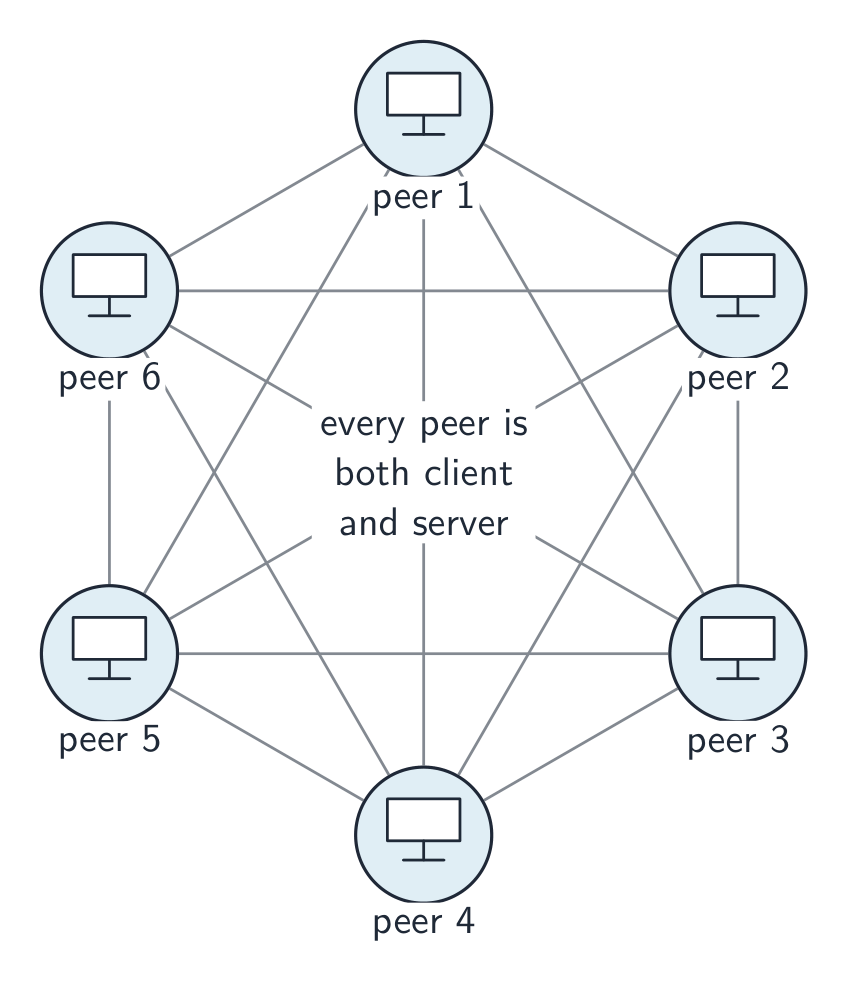
- all machines are equal peers; each can be both client and server (peer-to-peer 对等网络).
- resources are spread across the peers — no central server. Robust to one failure, but harder to keep secure and consistent.
Choosing a model. Client-server suits a school or a business: files are stored and backed up centrally, a user logs in with one account from any machine, software and security are managed once, and the server can be a powerful machine. The drawbacks are the cost of the server and of a technician, and that the server is a single point of failure. Peer-to-peer suits a few friends sharing files or a game: no server to buy, easy to set up, and each user keeps control of their own machine. The drawbacks the scheme lists: files are spread across many machines, so they are hard to back up and a file is unavailable when its owner's machine is off; each machine must be secured separately; and a peer that serves the others slows down. An online game played through a web browser with other users is the client-server model: the browser is the client, and the game and its shared virtual world run on the company's server, which keeps every player's view consistent.
Vocabulary
Train
| English | Chinese | Pinyin |
|---|---|---|
| servers | 服务器 | fú wù qì |
| clients | 客户端 | kè hù duān |
| peer-to-peer | 对等网络 | duì děng wǎng luò |
2.1
Thin and thick clients
A thin client 瘦客户端 does little processing locally and relies on a powerful server (web terminals, remote desktops). A thick client 胖客户端 has strong local processing and storage and runs full applications itself (a normal desktop PC).
| Feature | Thin client | Thick client |
|---|---|---|
| Local processing | minimal | substantial |
| Local storage | minimal | substantial |
| Reliance on network | high | lower |
| Server load | high | lower |
The roles: in a thin-client model the server does the processing and stores the data, and the client only sends input and shows the output. A cheap terminal is enough, and everything is backed up and updated on the server, but nothing works if the network or the server fails. In a thick-client model the client runs the software and stores files itself, so it can work with no network connection and puts less load on the server, at the cost of more powerful (and more expensive) clients that must each be updated and secured. A school computer room can run thin clients (cheap, centrally managed); a video editor needs a thick client.
Vocabulary
Train
| English | Chinese | Pinyin |
|---|---|---|
| thin client | 瘦客户端 | shòu kè hù duān |
| thick client | 胖客户端 | pàng kè hù duān |
2.1
Network topologies
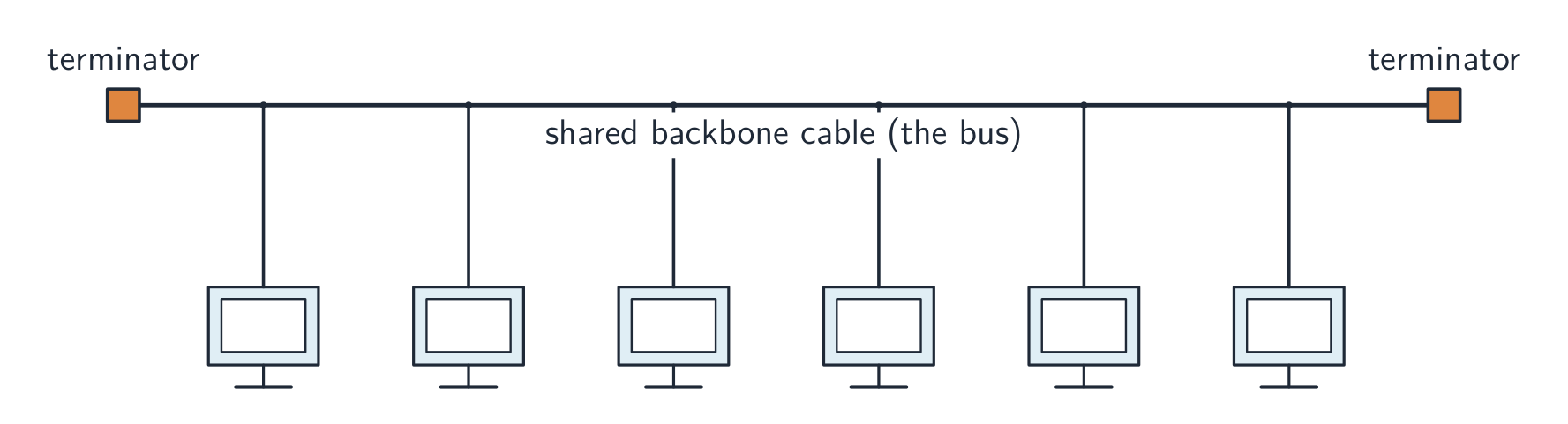
The topology 拓扑 is how the nodes and links are arranged.
- bus 总线 — all devices on one shared cable. Cheap; the whole LAN fails if the bus fails; performance drops as more devices share the bandwidth 带宽.
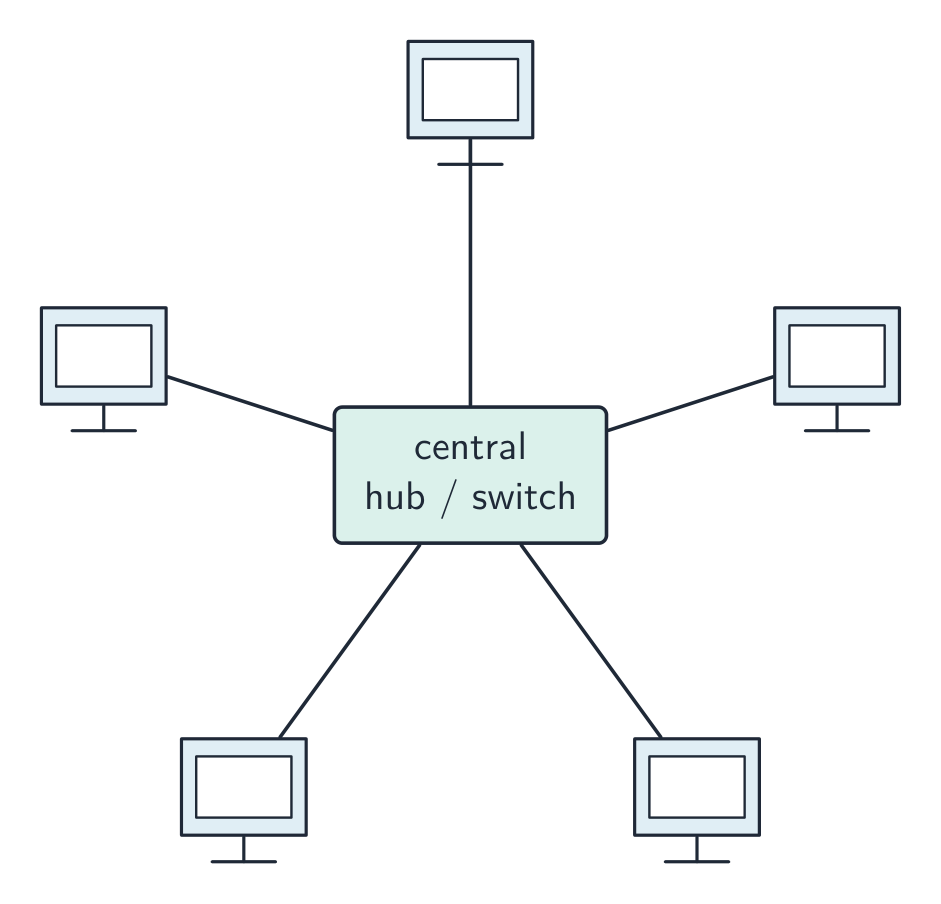
- star 星形 — every device connects to a central switch. One device failing does not affect others; the switch failing brings all down. Most common today.
- mesh 网状 — every device links directly to others, with many paths. Very fault-tolerant 容错 (traffic reroutes) but needs lots of cabling.
- hybrid — a mix (a star in each office, mesh links between offices).

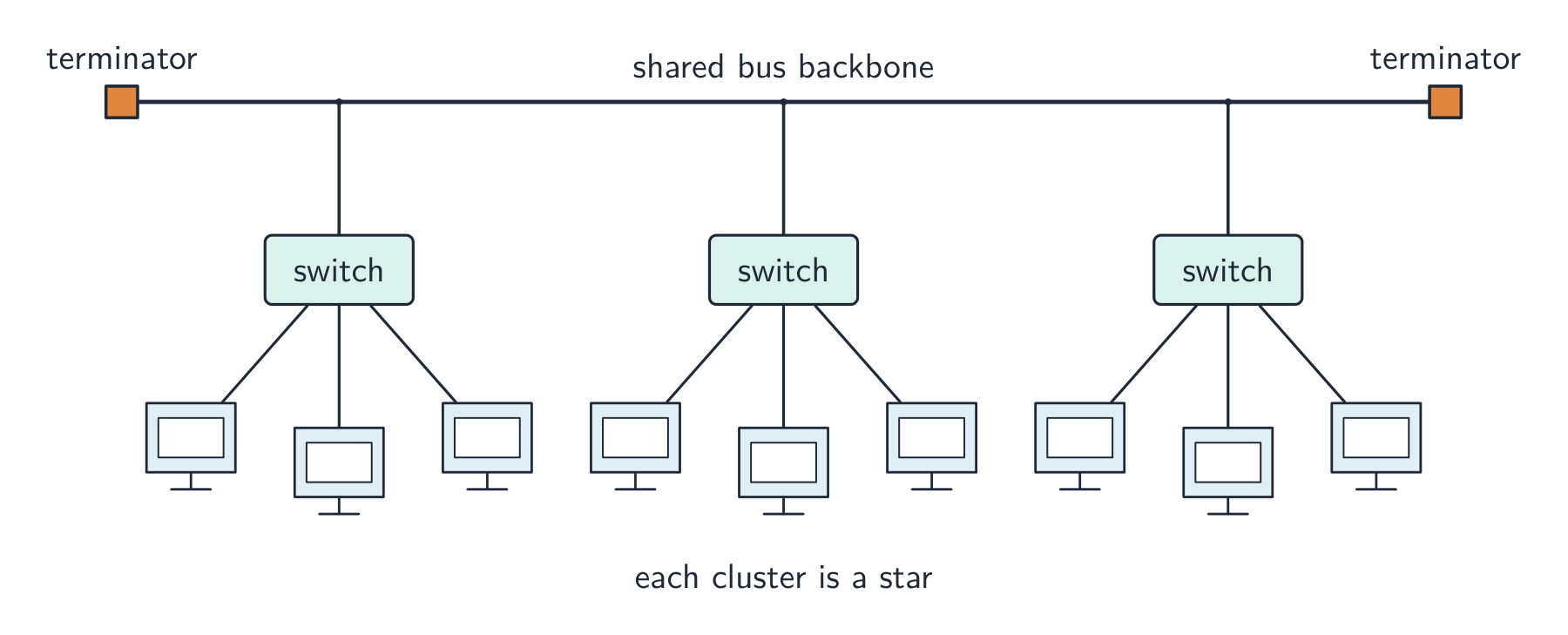
How packets travel in each topology
Bus: the sending device puts the packet on the shared cable; every device sees it, and only the one whose address matches accepts it. Only one device can transmit at a time, so collisions happen (CSMA/CD, below). Star: the sender passes the packet to the central switch, which reads the destination address and forwards it only down the cable to that device; two other devices can talk at the same time. Mesh: the packet is passed from node to node along one of several possible routes until it reaches the destination; if a link fails, another route is used.
To justify a topology: a star for a classroom or an office (a failed cable affects one device; a device is easy to add; with a switch there are no collisions); a mesh where reliability matters most (a hospital, the internet's backbone); a bus only where cost matters and few devices share it. "Draw the star topology" means: the switch in the middle, one line from the switch to each computer, and the server (and the router, if there is one) on their own lines to the switch.
Explore
Compare the network topologies
Tap through the four topologies. Each trades off cost, speed and how well it survives a failure — notice what breaks the whole network in each one.
Vocabulary
Train
| English | Chinese | Pinyin |
|---|---|---|
| topology | 拓扑 | tuò pū |
| bus | 总线 | zǒng xiàn |
| bandwidth | 带宽 | dài kuān |
| star | 星形 | xīng xíng |
| mesh | 网状 | wǎng zhuàng |
| fault-tolerant | 容错 | róng cuò |
2.1
Cloud computing
Cloud computing 云计算 delivers computing services (servers, storage, software) over the internet, hosted by a third party. Benefits: scalability 可扩展性 (pay for what you need), lower cost, access from anywhere, and reliable redundant data centres. Drawbacks: needs internet, your data is held by a third party, and possible vendor lock-in.
For the one-mark definition: cloud computing is on-demand computing services (storage, processing, software) provided over the internet by a third party. A public cloud 公有云 is owned by a provider and shared by many customers over the internet; a private cloud 私有云 is dedicated to one organisation, on its own hardware or hosted for it alone. Benefits the scheme accepts: files are accessible from any device with an internet connection; storage scales up and down as needed; the provider handles the hardware, backups and security updates; there is no local server to buy or maintain. Drawbacks: no access without an internet connection; the data is on a third party's hardware, so security and privacy depend on the provider; an ongoing subscription cost; the provider could fail or be attacked; large files may be slow to transfer. A "why does the company use a public cloud" answer says that they need no hardware of their own, pay only for what they use, and their users can reach it from anywhere.
Vocabulary
Train
| English | Chinese | Pinyin |
|---|---|---|
| Cloud computing | 云计算 | yún jì suàn |
| scalability | 可扩展性 | kě kuò zhǎn xìng |
| public cloud | 公有云 | gōng yǒu yún |
| private cloud | 私有云 | sī yǒu yún |
2.1
Wired vs wireless
- wired (Ethernet 以太网 over twisted-pair 双绞线 or fibre-optic 光纤): higher speed, lower latency, fewer errors, more secure.
- wireless (Wi-Fi, Bluetooth, cellular): no cables, devices can move, but slower, prone to interference and eavesdropping.
For the same generation, wired wins on speed and reliability; wireless wins on convenience.
Transmission media
| Medium | Characteristics |
|---|---|
| copper cable (twisted pair, coaxial) | cheap and easy to install; carries an electrical signal; affected by electromagnetic interference; the signal weakens with distance, so repeaters are needed; lower bandwidth than fibre |
| fibre-optic cable | light pulses in a glass core; very high bandwidth; long distances without repeaters; immune to interference; hard to tap, so secure; expensive and needs skilled installation |
| radio waves (including WiFi) | no cable, so devices can move; a range of tens of metres, weakened by walls; a shared frequency, so interference and lower speed; can be intercepted, so needs encryption |
| microwaves | higher-frequency radio for point-to-point links; needs a line of sight; affected by rain and buildings; high bandwidth |
| satellites | reach remote areas and the whole globe; a long delay (latency), because the signal travels to orbit and back; affected by weather; expensive |
The exam asks for the comparison in both directions. Wired beats wireless on speed, reliability (no interference), security (a cable must be physically tapped) and consistency; wireless beats wired on mobility, the cost of installation, and adding a device without cabling. Allowing both lets students move around with laptops and phones while the fixed desktops keep the faster, more secure connection, and a device with no network port can still connect. Satellite instead of copper reaches places no cable can, but with more delay, weather interference and higher cost.
Vocabulary
Train
| English | Chinese | Pinyin |
|---|---|---|
| Ethernet | 以太网 | yǐ tài wǎng |
| twisted-pair | 双绞线 | shuāng jiǎo xiàn |
| fibre-optic | 光纤 | guāng xiān |
2.1
LAN hardware

- network interface card 网络接口卡 (NIC) — lets a device send and receive on the network; has a unique MAC address MAC地址 (a 48-bit hardware address). A wireless device uses a wireless network interface card 无线网络接口卡 (WNIC).
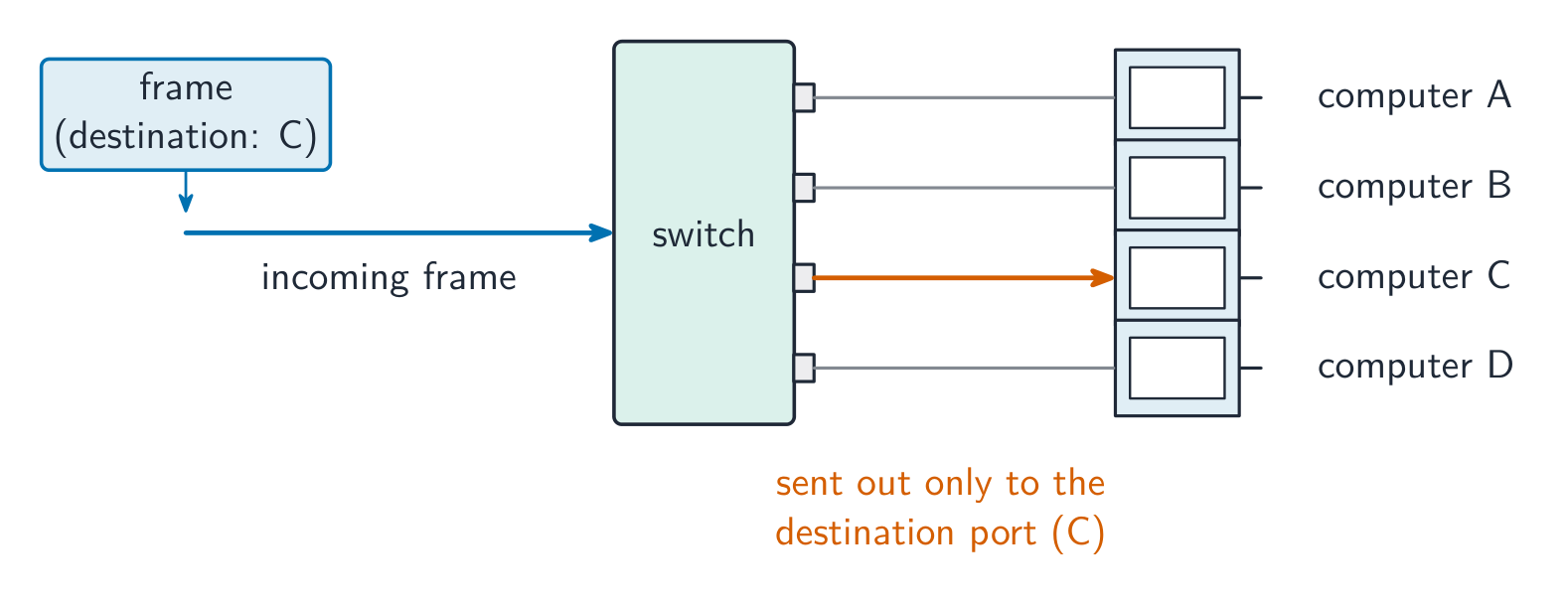
- switch 交换机 — forwards Ethernet frames only to the port for the destination MAC address.
- hub 集线器 — a simpler device that copies traffic to all ports (now obsolete).
- wireless access point 无线接入点 (WAP) — lets wireless clients join a wired LAN.
- cabling — twisted-pair for short runs; fibre-optic for longer, faster runs.
- server — a computer that provides a service to the other devices: files, printing, web pages, email storage.
- bridge 网桥 — joins two LAN segments into one network, passing traffic between them.
- repeater 中继器 — receives a weakened signal and retransmits it at full strength, to extend a cable's reach.
A WNIC's functions, for a four-mark describe: it converts the data into radio signals and back; it carries the device's unique MAC address; it connects the device to a wireless access point and follows the wireless protocol (which channel and frequency to use); and it decodes the incoming signals for the device. Two devices that can physically connect thirty computers with NICs: a switch, or a hub.

Vocabulary
Train
| English | Chinese | Pinyin |
|---|---|---|
| network interface card | 网络接口卡 | wǎng luò jiē kǒu kǎ |
| wireless network interface card | 无线网络接口卡 | wú xiàn wǎng luò jiē kǒu kǎ |
| switch | 交换机 | jiāo huàn jī |
| hub | 集线器 | jí xiàn qì |
| wireless access point | 无线接入点 | wú xiàn jiē rù diǎn |
| bridge | 网桥 | wǎng qiáo |
| repeater | 中继器 | zhōng jì qì |
| MAC address | MAC地址 | MAC dì zhǐ |
2.1
Routers
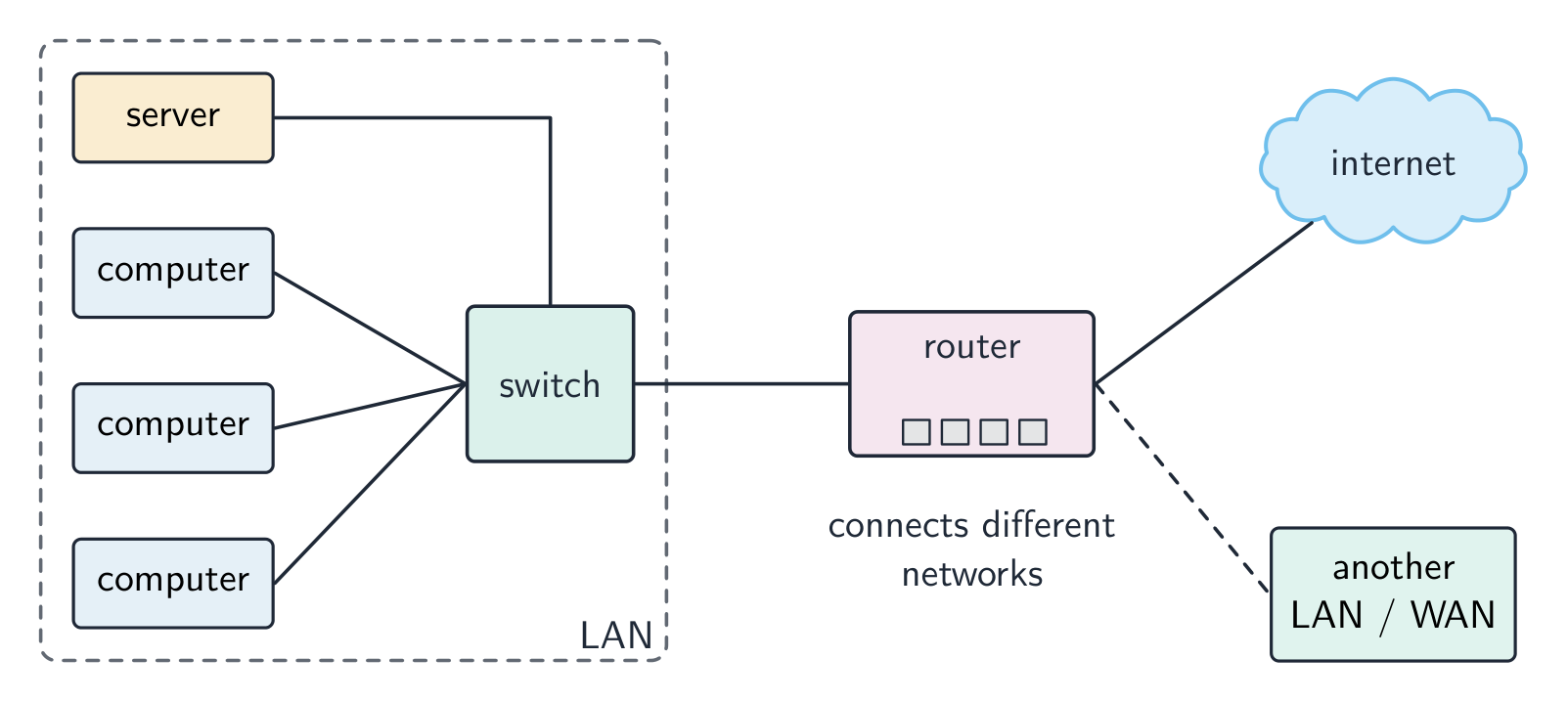
A router 路由器 connects different networks and forwards data between them — usually at the boundary of a LAN and the internet. It does:
- forwarding — reads each packet 数据包's destination IP address IP地址 and sends it out the right port, using a routing table 路由表.
- network address translation 网络地址转换 (NAT) — lets many private LAN addresses share one public IP.
- DHCP 动态主机配置协议 — hands out private IP addresses to LAN devices.
- firewall 防火墙 — blocks unwanted incoming traffic.
In packet switching 分组交换 a message is split into packets that are sent independently. Each router reads a packet's destination IP address, looks up the next hop in its routing table and forwards it, so the packets of one message may take different routes and are reassembled in order at the destination. A router does receive packets, forward them between networks and hand out IP addresses; it does not find the IP address for a URL (DNS does that) and it does not store web pages. A home router also contains the modem and the wireless access point, so one box connects the LAN to the internet.
Vocabulary
Train
| English | Chinese | Pinyin |
|---|---|---|
| router | 路由器 | lù yóu qì |
| packet | 数据包 | shù jù bāo |
| routing table | 路由表 | lù yóu biǎo |
| network address translation | 网络地址转换 | wǎng luò dì zhǐ zhuǎn huàn |
| DHCP | 动态主机配置协议 | dòng tài zhǔ jī pèi zhì xié yì |
| firewall | 防火墙 | fáng huǒ qiáng |
| packet switching | 分组交换 | fēn zǔ jiāo huàn |
| IP address | IP地址 | IP dì zhǐ |
2.1
Ethernet and CSMA/CD

Ethernet is the standard (protocol) for wired LANs: devices are joined by twisted-pair or fibre cable, data is sent in frames that carry the source and destination MAC addresses, and a shared medium uses CSMA/CD to deal with collisions. On shared media a collision 冲突 can happen when two devices send at once. The protocol is CSMA/CD 载波侦听多路访问/冲突检测 (Carrier Sense Multiple Access with Collision Detection):
- carrier sense — listen before sending; wait if the cable is busy.
- multiple access — many devices share the medium.
- collision detection — keep listening while sending; a clash is a collision.
- on a collision, both stop, send a brief "jam" signal, then wait a random backoff time before retrying.
The three tasks, in the scheme's words: the device listens (senses the carrier) before transmitting; it keeps checking for a collision while it transmits; on a collision it stops, sends a jam signal, waits a random time and retransmits.
Modern switched Ethernet uses full-duplex 全双工 point-to-point links, so collisions no longer happen.
Vocabulary
Train
| English | Chinese | Pinyin |
|---|---|---|
| collision | 冲突 | chōng tū |
| CSMA/CD | 载波侦听多路访问/冲突检测 | zài bō zhēn tīng duō lù fǎng wèn / chōng tū jiǎn cè |
| full-duplex | 全双工 | quán shuāng gōng |
2.1
Bit streaming

Bit streaming 流式传输 sends multimedia as a continuous stream that the receiver plays as it arrives, instead of downloading the whole file first.
- real-time (live): captured and streamed as it happens (live sport, video calls). You cannot rewind; low latency is vital.
- on-demand: pre-recorded on a server (YouTube, Netflix). You can pause and rewind; the server can buffer 缓冲 ahead.
Real-time streaming works as a short pipeline:
- capture and sample the source (a camera or microphone).
- encode it, using compression 压缩 to shrink the data.
- send it across the network as packets.
- the receiver buffers a little, then plays it live — dropping any packet that arrives late, because a live stream cannot wait for it.
Lossy 有损 compression is used here: moving pictures hide small losses, and the stream must be small enough to fit the bandwidth.
Why a video is compressed before real-time streaming: the uncompressed stream would need more bandwidth than the connection has, so frames would arrive late and the playback would stall. Compression cuts the number of bits, so the bit rate 比特率 stays below the broadband speed, the delay stays small, and less storage and cost are needed at both ends. The bit rate must be lower than the connection's speed: a higher bit rate gives better quality but needs a faster connection, and if the data arrives more slowly than it is played, the buffer empties and the video freezes. On-demand streaming can buffer more of the file ahead, so it copes with a slower connection; real-time streaming cannot.
Vocabulary
Train
| English | Chinese | Pinyin |
|---|---|---|
| Bit streaming | 流式传输 | liú shì chuán shū |
| buffer | 缓冲 | huǎn chōng |
| compression | 压缩 | yā suō |
| Lossy | 有损 | yǒu sǔn |
| bit rate | 比特率 | bǐ tè lǜ |
2.1
The internet and the World Wide Web

The internet 互联网 is a global network of networks using a common protocol 协议 suite (TCP/IP). The World Wide Web 万维网 (WWW) is a service that runs over it: hyperlinked documents identified by URLs, viewed in browsers via HTTP/HTTPS. Email and file transfer are other internet services that are not part of the WWW.
Webmail uses both: the WWW, because the mailbox is a web page reached through a URL in a browser over HTTP; and the internet, because the email itself travels across the network of networks (email is a separate internet service from the web).
Hardware that supports the internet
- modem 调制解调器 — converts the computer's digital signal into an analogue signal for a telephone line, and back again at the other end (modulation and demodulation).
- PSTN — the public telephone network of exchanges and lines; a dial-up or DSL connection carries internet data over it.
- dedicated line 专线 — a leased line between an organisation and its ISP: always on, with a fixed bandwidth that is not shared, so faster and more reliable, but expensive.
- cell phone network 蜂窝网络 — the phone sends data by radio to the nearest cell tower (base station); the towers are linked to the phone company's network, which routes the data to the internet; as the phone moves, it is handed over from one cell to the next.

Vocabulary
Train
| English | Chinese | Pinyin |
|---|---|---|
| internet | 互联网 | hù lián wǎng |
| protocol | 协议 | xié yì |
| World Wide Web | 万维网 | wàn wéi wǎng |
| modem | 调制解调器 | tiáo zhì jiě tiáo qì |
| dedicated line | 专线 | zhuān xiàn |
| cell phone network | 蜂窝网络 | fēng wō wǎng luò |
2.1
IP addresses
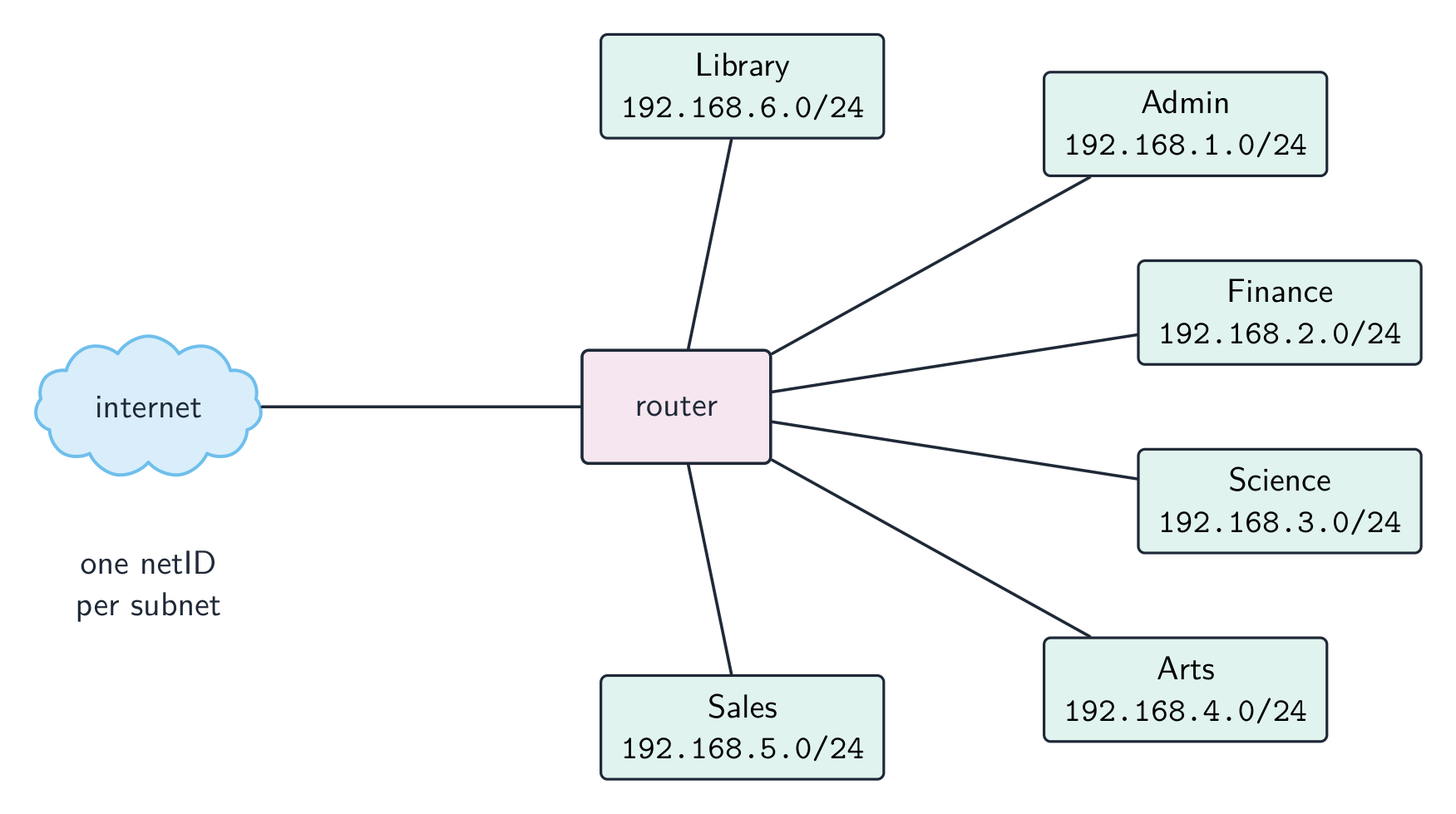
An IP address uniquely identifies a device.
- IPv4 — 32-bit, four denary numbers 0–255 (
192.168.1.10); about $4.3 \times 10^{9}$ addresses (now exhausted). - IPv6 — 128-bit, eight groups of four hex digits; about $3.4 \times 10^{38}$ addresses.
IPv4 is written as four groups of denary numbers separated by dots; each group is an 8-bit number, so it runs from 0 to 255. IPv6 is written as eight groups of four hexadecimal digits separated by colons, 2001:0db8:0000:0000:0000:ff00:0042:8329, and a run of zero groups can be shortened to ::. So 192.168.3.2 is not IPv6: it has four groups, not eight, separated by dots rather than colons, and its groups are denary, not hexadecimal. 256.0.0.A is not a valid address of either kind: an IPv4 group cannot exceed 255 and cannot be a letter, and IPv6 would need colons and eight groups.
Subnetting
A network can be split into subnets 子网. The IP address splits into a network part and a host part, given by a subnet mask 子网掩码 (e.g. 255.255.255.0 = first 24 bits are network). Subnetting improves management, cuts broadcast traffic, and improves security.
The two parts of an address in a subnetwork: the network ID (the first bits, the same for every device in that subnet, given by the ones in the mask) and the host ID (the remaining bits, unique to each device). Benefits of subnetting, for "describe two benefits": less traffic on each part, because broadcasts stay inside their subnet; better security, because one department's traffic is kept from the others; easier management and fault-finding; more efficient use of the addresses. Two devices with the mask 255.255.255.0 are in different subnets when their first three groups differ.
Public vs private addresses
- private addresses are used within a LAN and are not routable on the internet (e.g.
192.168.0.0/16). - a public IP address is globally unique and routable, assigned by an ISP 互联网服务提供商.
Devices behind NAT with private addresses are not directly reachable from the internet, giving some protection.
The descriptions the tables want: a public address is visible on the internet and unique across it, allocated by the ISP; a private address is visible only inside the LAN, is reused by many LANs, and needs NAT to reach the internet. A static address never changes (set by hand or reserved, as a server needs); a dynamic address is allocated by DHCP each time the device connects and may change.
Static vs dynamic
- a static IP address is fixed; used for servers that must be found at a known address.
- a dynamic IP address is assigned by DHCP and may change; easier for client devices and uses a limited address pool efficiently.
Worked example. A host has IP address 192.168.10.130 with subnet mask 255.255.255.192. Which network is it on, and is 192.168.10.200 on the same one? The mask's last octet, 192, is 11000000 in binary, so the first 26 bits are the network part and the last 6 bits address the host. That makes the subnets step in blocks of $256 - 192 = 64$: .0, .64, .128, .192. The address 130 falls in the block starting at .128, so the host is on network 192.168.10.128/26, whose usable hosts run .129 to .190 (.191 is the broadcast address). 200 falls in the next block (.192), so it is on a different subnet and traffic between the two must pass through a router. Get the block size from the mask first ($256$ minus the mask octet) - guessing from the first three octets is what makes these go wrong.
Vocabulary
Train
| English | Chinese | Pinyin |
|---|---|---|
| subnets | 子网 | zi wǎng |
| subnet mask | 子网掩码 | zi wǎng yǎn mǎ |
| ISP | 互联网服务提供商 | hù lián wǎng fú wù tí gōng shāng |
2.1
URL and DNS
A URL 统一资源定位符 (Uniform Resource Locator) locates a resource on the WWW:
https://www.example.com/about/contact.html
protocol     domain name        path
- protocol:
http,https, etc. - domain name 域名: a readable server address.
- path: the resource on that server.
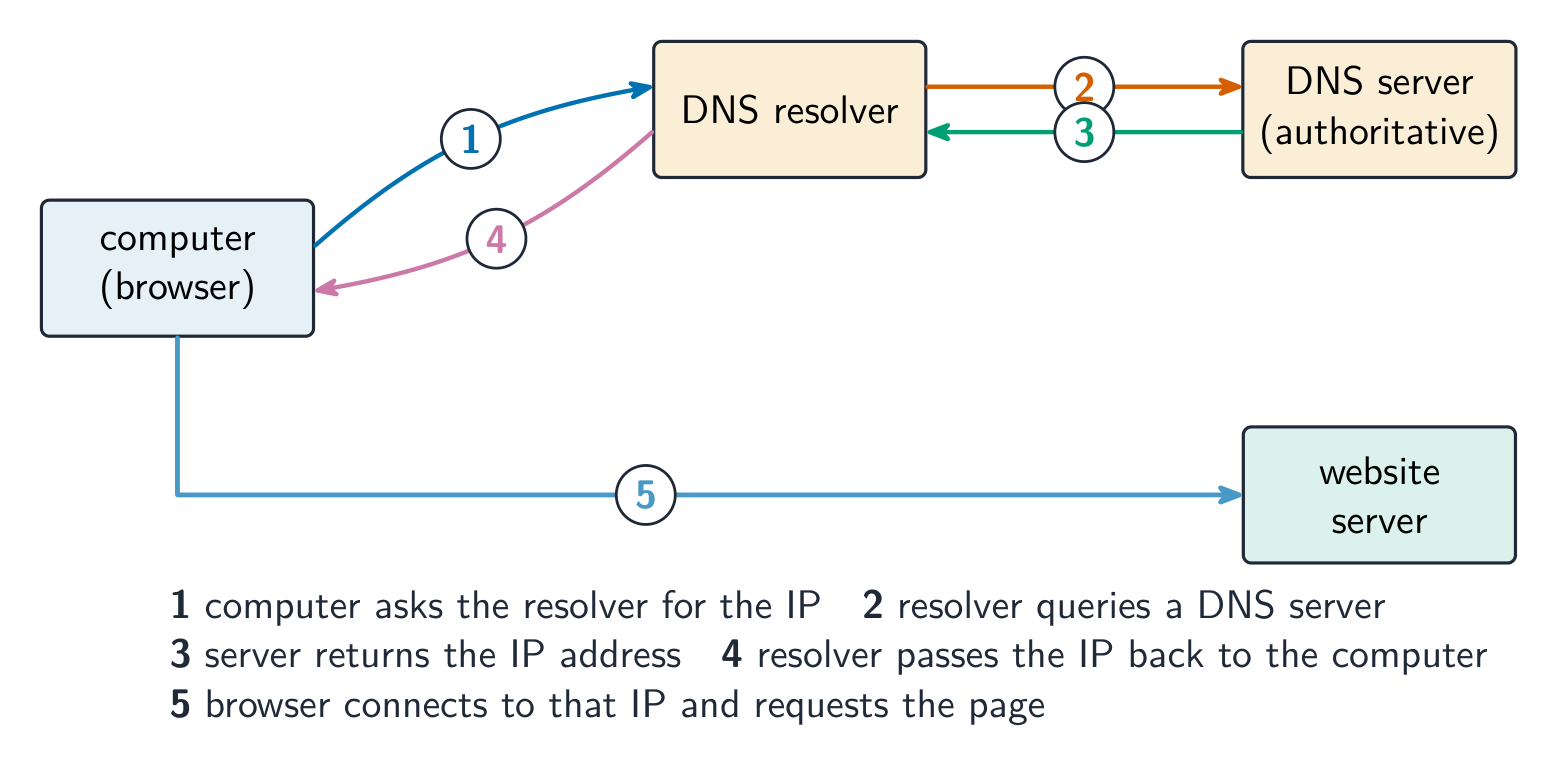
The Domain Name System 域名系统 (DNS, also called the Domain Name Service) is a distributed set of servers that turns domain names into IP addresses. When you type a URL, the browser asks a DNS resolver for the IP, which queries DNS servers (root → top-level → authoritative) until it finds it; the browser then connects to that IP and requests the path. DNS saves humans from memorising IP addresses and lets a site change server without changing its name.
For "explain how the browser uses the URL": the browser splits the URL into the protocol, the domain name and the path; it sends the domain name to a DNS server, which returns the matching IP address (a cache on the computer or at the ISP may answer first); it opens a connection to that IP address using the protocol (HTTPS on port 443); it sends a request for the path; and the web server returns the page, which the browser renders. If the DNS lookup fails, the browser reports that the server cannot be found.
Explore
How DNS finds a website
Step through a DNS lookup. The network routes by IP, not by name — so before anything loads, DNS must turn the domain name into an IP address.
Vocabulary
Train
| English | Chinese | Pinyin |
|---|---|---|
| URL | 统一资源定位符 | tǒng yī zī yuán dìng wèi fú |
| domain name | 域名 | yù míng |
| Domain Name System | 域名系统 | yù míng xì tǒng |
2.1
Definitions the examiner accepts
A definition question is marked against fixed wording. Learn these exactly.
| Term | Definition |
|---|---|
| LAN | a network covering a small geographical area, usually one site, whose hardware is owned by the organisation |
| WAN | a network covering a large geographical area, joining LANs through third-party (leased or public) links |
| client-server | a model in which client computers request services from a central, more powerful server that provides them |
| peer-to-peer | a model in which every computer is equal and can act as both client and server, with no central server |
| thin client | a client that does little processing or storage itself and depends on the server for both |
| thick client | a client that does its own processing and storage and can work without the server |
| mesh topology | a topology in which each device is connected directly to many others, giving more than one route between two devices |
| cloud computing | on-demand computing services (storage, processing, software) provided over the internet by a third party |
| Ethernet | the standard protocol for wired LANs, sending data in frames and using CSMA/CD on a shared medium |
| switch | a device that forwards each frame only to the port of its destination MAC address, within a LAN |
| router | a device that connects networks and forwards packets between them by their destination IP address |
| bit streaming | sending a continuous stream of bits so that the receiver plays the media as it arrives, without downloading the whole file first |
| internet | the global network of networks that uses the TCP/IP protocols |
| World Wide Web | the collection of hyperlinked web pages, identified by URLs and accessed over the internet through a browser |
| URL | the address that locates a resource on the web: protocol, domain name and path |
| DNS | the service that translates a domain name into the IP address of the server that holds the resource |
2.1
Exam tips
- Distinguish LAN vs WAN and client-server vs peer-to-peer by who stores and controls the resources.
- Match each topology (bus, star, mesh) to its advantages and drawbacks (cost, reliability, collisions).
- Know the job of each device: a switch directs within a LAN by MAC address, a router routes between networks by IP.
- Explain bit streaming and why buffering is needed (data arrives at a different rate from playback).
- Distinguish IPv4 vs IPv6 and public vs private addresses; DNS turns a URL into an IP address.
Common mistakes
- Saying a switch works by IP address. A switch forwards by MAC address inside the LAN; the router forwards by IP address between networks.
- Treating the internet and the World Wide Web as the same thing. The web is one service that runs over the internet; email and file transfer are others.
- Giving "faster" as the whole comparison of wired and wireless. Say faster and more reliable and more secure, and give the wireless side (mobility, no cabling) when the question asks for a comparison.
- Writing that a router finds the IP address for a URL. DNS does that; the router forwards packets to it.
- Describing IPv6 with dots and denary groups. Eight groups of four hexadecimal digits, separated by colons.
- Drawing a star topology as a ring or a chain. Every device has its own line to the switch in the middle.
Interactive lessons on this topic
Work through it step by step, with instant-check exercises.
A-Level Computer Science Past Papers