Skip to content · ⁨Bỏ qua nội dung⁩

Securing Applications and Data · ⁨Bảo vệ Ứng dụng và Dữ liệu⁩

AP Cybersecurity · ⁨AP An ninh mạng⁩ · Topic 5 · ⁨Chủ đề 5⁩

Video lesson for this topic · ⁨Bài học video cho chủ đề này⁩ Open the video page · ⁨Mở trang video⁩
9:47

Bảo vệ Ứng dụng và Dữ liệu

Một công ty đã tiêu tốn một khoản tiền lớn cho tường lửa, cửa khóa chặt và mật khẩu mạnh. Sau đó, ai đó đã gõ vài ký tự kỳ lạ vào ô đăng nhập — và cơ sở dữ liệu…

English narration · English + 中文 subtitles burned in · ⁨Giọng đọc tiếng Anh · phụ đề tiếng Anh + 中文 được ghi trực tiếp⁩

5.1

Application and Data Vulnerabilities and Attacks · ⁨Lỗ hổng và Cuộc tấn Công vào Ứng dụng và Dữ liệu⁩

Syllabus · ⁨Chương trình⁩
English

Learning Objective 5.1.A: Explain how adversaries can exploit application and file vulnerabilities to cause loss, damage, disruption, or destruction.

  • 5.1.A.1 An adversary can read any unencrypted files if they have access to the device or drive storing the files.
  • 5.1.A.2 Computers have standard users and administrative users. Administrative users have access to control system settings and can typically access any files or applications on a system. If regular users are given administrative privileges on a computer, and an adversary can compromise a user’s account, then the adversary will have elevated privileges on the system.
  • 5.1.A.3 When access control settings are weakly configured, many users often have permission to view and sometimes even edit files on a system. Adversaries can take advantage of weak access control settings to steal or destroy files or disrupt an application.

Learning Objective 5.1.B: Explain how application attacks exploit vulnerabilities.

  • 5.1.B.1 Applications are programs that run instructions on computers; they are executable data. Some applications run locally on a user’s computer, while other applications, like web applications, run on a server and are accessed by users through a network.
  • 5.1.B.2 Many applications take user input through open-ended input fields where users can type characters (e.g., letters, numbers, punctuation). Developers should include user input checks in their application, such as numeric input when asked for a number of items, to ensure that the user input matches what is expected; the application should reject input outside of the expected parameters. This process of verifying that user input meets expected criteria before processing it is called data validation. Applications that fail to validate user input are vulnerable to injection-type attacks, where adversaries insert unexpected character strings in input fields to alter the behavior of a program.
  • 5.1.B.3 Structured query language (SQL) is a computer language used to request information from databases and make changes to databases or entries in databases. Applications that query a database using unvalidated or unsanitized input from users are vulnerable.
  • 5.1.B.4 An SQL-injection attack places SQL commands and control characters into a user-input field in an application, which can lead to a breach of confidentiality by causing the application to return more information than it should, or a breach of integrity by modifying or deleting data in the database.
  • 5.1.B.5 Websites are written using hypertext markup language (HTML), and many websites use Javascript to create dynamic content on websites or web applications. Because Javascript commands run in the browser of the user visiting the website, those commands can access sensitive data stored in the browser like usernames, passwords, and cryptographic keys.
  • 5.1.B.6 A cross site scripting (XSS) attack injects malicious code into a website that a user’s browser then executes. The malicious code can be embedded in a link the user clicks (a Type I or Reflected XSS attack) or it can be inserted onto a website through a comment field, forum post, or visitor log, which would affect any user visiting that website (a Type II or Stored XSS attack).
  • 5.1.B.7 When applications take user input, that input is written to a buffer. A buffer is a designated section of computer memory with a fixed size. If the amount of data the user enters exceeds the size of the buffer, it can overflow into adjacent memory locations and overwrite other parts of the computer’s memory.
  • 5.1.B.8 A buffer overflow attack feeds more data into memory than was allotted, which can cause a system to crash or to execute code outside the scope of a program’s security policy, effectively allowing the adversary to perform unauthorized actions on a computer, such as accessing, modifying, or deleting files.
  • 5.1.B.9 The files that run web applications are stored in directories on servers. When users access web applications, their browsers send GET requests using hypertext transfer protocol (HTTP). A GET request accesses a file somewhere in the filesystem of the server.
  • 5.1.B.10 In a directory traversal attack, adversaries modify URLs and GET requests to attempt to access sensitive data (e.g., usernames and passwords) on a server’s file system.
    • Illustrative examples for 5.1.B.10:
      • A web server stores images for a website it hosts in the /var/www/images/ directory. An adversary modifies a URL requesting an image to ../../../etc/passwd. The .. moves one directory up in the file system; so the three consecutive .. returns the path to the root, and from there the adversary is attempting to access the passwd file that would return a list of all the authorized usernames on the device.

Learning Objective 5.1.C: Assess and document risks from application and data vulnerabilities.

  • 5.1.C.1 Data security risks can involve a compromise of confidentiality when unauthorized persons can access sensitive data, integrity when data can be manipulated or altered from its intended state, and availability when data can be destroyed or encrypted to prevent others from accessing it.
  • 5.1.C.2 High risks from data vulnerabilities often involve highly sensitive data (e.g., data that is governed by laws or regulations) that could be compromised through a highly likely exploit.
    • Illustrative examples for 5.1.C.2:
      • The company developing the next jet engine that will be used by the Air Force in its planes is storing the technical specifications for the engine on an unencrypted drive.
  • 5.1.C.3 Moderate risks from data vulnerabilities often involve sensitive data not having strong enough encryption or strict enough access controls.
    • Illustrative examples for 5.1.C.3:
      • A company stores its customers’ PII in a spreadsheet, and the spreadsheet is encrypted using a small key.
  • 5.1.C.4 Low risks from data vulnerabilities often involve less sensitive information being encrypted with shorter keys or having access controls that are not strict enough.
    • Illustrative examples for 5.1.C.4:
      • An organization’s CEO stores his private memos to his executive staff on a company share drive that is unencrypted and has no access controls.
Tiếng Việt

Mục tiêu học tập 5.1.A: Giải thích cách đối thủ có thể khai thác lỗ hổng ứng dụng và tệp để gây mất mát, hư hỏng, gián đoạn hoặc phá hủy.

  • 5.1.A.1 Đối thủ có thể đọc bất kỳ tệp không được mã hóa nào nếu họ có quyền truy cập vào thiết bị hoặc ổ đĩa lưu trữ các tệp đó.
  • 5.1.A.2 Máy tính có người dùng tiêu chuẩn và người dùng quản trị. Người dùng quản trị có quyền truy cập để điều khiển các cài đặt hệ thống và thường có thể truy cập bất kỳ tệp tin hoặc ứng dụng nào trên hệ thống. Nếu người dùng thông thường được cấp quyền quản trị trên máy tính, và một kẻ tấn công có thể chiếm đoạt tài khoản của người dùng đó, thì kẻ tấn công sẽ có quyền hạn nâng cao trên hệ thống.
  • 5.1.A.3 Khi các cài đặt kiểm soát truy cập được cấu hình yếu, nhiều người dùng thường có quyền xem và đôi khi cả chỉnh sửa các tệp tin trên hệ thống. Kẻ tấn công có thể lợi dụng các cài đặt kiểm soát truy cập yếu để đánh cắp, phá hủy tệp tin hoặc làm gián đoạn một ứng dụng.

Mục tiêu học tập 5.1.B: Giải thích cách các cuộc tấn công vào ứng dụng khai thác lỗ hổng bảo mật.

  • 5.1.B.1 Ứng dụng là các chương trình chạy các lệnh trên máy tính; chúng là dữ liệu có thể thực thi. Một số ứng dụng chạy cục bộ trên máy tính của người dùng, trong khi các ứng dụng khác, như ứng dụng web, chạy trên máy chủ và được người dùng truy cập thông qua mạng lưới.
  • 5.1.B.2 Nhiều ứng dụng nhận đầu vào từ người dùng thông qua các trường nhập liệu mở rộng, nơi người dùng có thể gõ ký tự (ví dụ: chữ cái, số, dấu câu). Các nhà phát triển nên bao gồm các kiểm tra đầu vào người dùng trong ứng dụng của họ, chẳng hạn như yêu cầu đầu vào số khi cần số lượng mặt hàng, để đảm bảo đầu vào người dùng khớp với những gì mong đợi; ứng dụng nên từ chối đầu vào nằm ngoài tham số mong đợi. Quá trình xác minh rằng đầu vào người dùng đáp ứng các tiêu chí mong đợi trước khi xử lý nó được gọi là xác thực dữ liệu. Các ứng dụng không xác thực được đầu vào người dùng sẽ dễ bị các cuộc tấn công kiểu chèn, nơi kẻ tấn công chèn chuỗi ký tự không mong muốn vào các trường nhập liệu để thay đổi hành vi của chương trình.
  • 5.1.B.3 Ngôn ngữ truy vấn có cấu trúc (SQL) là ngôn ngữ máy tính được sử dụng để yêu cầu thông tin từ cơ sở dữ liệu và thực hiện các thay đổi đối với cơ sở dữ liệu hoặc các mục trong cơ sở dữ liệu. Các ứng dụng truy vấn cơ sở dữ liệu bằng cách sử dụng đầu vào không được xác thực hoặc không được loại bỏ đặc biệt an toàn từ người dùng sẽ dễ bị tổn thương.
  • 5.1.B.4 Một cuộc tấn công chèn SQL đưa các lệnh SQL và ký tự điều khiển vào một trường nhập liệu của người dùng trong ứng dụng, điều này có thể dẫn đến vi phạm tính bảo mật bằng cách khiến ứng dụng trả về nhiều thông tin hơn mức cho phép, hoặc vi phạm tính toàn vẹn bằng cách sửa đổi hoặc xóa dữ liệu trong cơ sở dữ liệu.
  • 5.1.B.5 Các trang web được viết bằng ngôn ngữ đánh dấu siêu văn bản (HTML), và nhiều trang web sử dụng Javascript để tạo nội dung động trên trang web hoặc ứng dụng web. Vì các lệnh Javascript chạy trong trình duyệt của người dùng đang truy cập trang web, các lệnh đó có thể truy cập dữ liệu nhạy cảm được lưu trữ trong trình duyệt như tên người dùng, mật khẩu và khóa mã hóa.
  • 5.1.B.6 Một cuộc tấn công chèn mã xuyên trang (XSS) chèn mã độc hại vào một trang web mà sau đó trình duyệt của người dùng sẽ thực thi. Mã độc hại có thể được nhúng vào liên kết mà người dùng nhấp vào (cuộc tấn công XSS phản xạ Type I hoặc Reflected XSS) hoặc nó có thể được chèn vào trang web thông qua trường bình luận, bài đăng diễn đàn hoặc nhật ký khách访问, điều này sẽ ảnh hưởng đến bất kỳ người dùng nào truy cập trang web đó (cuộc tấn công XSS lưu trữ Type II hoặc Stored XSS).
  • 5.1.B.7 Khi các ứng dụng nhận đầu vào từ người dùng, đầu vào đó được ghi vào bộ đệm. Bộ đệm là một phần bộ nhớ máy tính được chỉ định với kích thước cố định. Nếu lượng dữ liệu người dùng nhập vào vượt quá kích thước của bộ đệm, nó có thể tràn sang các vị trí bộ nhớ liền kề và ghi đè lên các phần khác của bộ nhớ máy tính.
  • 5.1.B.8 Một cuộc tấn công tràn bộ đệm cung cấp nhiều dữ liệu vào bộ nhớ hơn mức được phân bổ, điều này có thể khiến hệ thống bị treo hoặc thực thi mã nằm ngoài phạm vi chính sách bảo mật của chương trình, về cơ bản cho phép kẻ tấn công thực hiện các hành vi trái phép trên máy tính, chẳng hạn như truy cập, sửa đổi hoặc xóa tệp tin.
  • 5.1.B.9 Các tệp chạy ứng dụng web được lưu trữ trong các thư mục trên máy chủ. Khi người dùng truy cập ứng dụng web, trình duyệt của họ gửi yêu cầu GET bằng giao thức truyền tải siêu văn bản (HTTP). Yêu cầu GET truy cập vào một tệp ở đâu đó trong hệ thống tệp của máy chủ.
  • 5.1.B.10 Trong cuộc tấn công duyệt thư mục, kẻ tấn công sửa đổi URL và yêu cầu GET để cố gắng truy cập dữ liệu nhạy cảm (ví dụ: tên người dùng và mật khẩu) trên hệ thống tệp của máy chủ.
    • Ví dụ minh họa cho 5.1.B.10:
      • Một máy chủ web lưu trữ hình ảnh cho một trang web mà nó托管 trong thư mục /var/www/images/. Một kẻ tấn công sửa đổi URL yêu cầu một hình ảnh thành ../../../etc/passwd. Hai chấm .. di chuyển lên một thư mục trong hệ thống tệp; vì vậy, ba dấu .. liên tiếp trả về đường dẫn đến gốc, và từ đó kẻ tấn công đang cố truy cập tệp passwd sẽ trả về danh sách tất cả các tên người dùng được ủy quyền trên thiết bị.

Mục tiêu học tập 5.1.C: Đánh giá và ghi lại rủi ro từ các lỗ hổng bảo mật ứng dụng và dữ liệu.

  • 5.1.C.1 Rủi ro bảo mật dữ liệu có thể bao gồm sự xâm phạm tính bảo mật khi những người không có thẩm quyền truy cập dữ liệu nhạy cảm, tính toàn vẹn khi dữ liệu có thể bị thao túng hoặc thay đổi so với trạng thái ban đầu, và khả năng sẵn có khi dữ liệu có thể bị phá hủy hoặc mã hóa để ngăn người khác truy cập vào nó.
  • 5.1.C.2 Rủi ro cao từ các lỗ hổng dữ liệu thường liên quan đến dữ liệu cực kỳ nhạy cảm (ví dụ: dữ liệu chịu sự điều tiết bởi luật pháp hoặc quy định) có thể bị xâm phạm thông qua việc khai thác rất có khả năng xảy ra.
    • Ví dụ minh họa cho 5.1.C.2:
      • Công ty đang phát triển động cơ phản lực tiếp theo sẽ được Không quân sử dụng trong máy bay của họ đang lưu trữ các thông số kỹ thuật của động cơ trên ổ đĩa chưa được mã hóa.
  • 5.1.C.3 Rủi ro trung bình từ các lỗ hổng dữ liệu thường liên quan đến dữ liệu nhạy cảm không có độ mã hóa đủ mạnh hoặc kiểm soát truy cập đủ nghiêm ngặt.
    • Ví dụ minh họa cho 5.1.C.3:
      • Một công ty lưu trữ PII của khách hàng trong một bảng tính, và bảng tính đó được mã hóa bằng một khóa nhỏ.
  • 5.1.C.4 Rủi ro thấp từ các lỗ hổng dữ liệu thường liên quan đến việc mã hóa thông tin ít nhạy cảm hơn bằng khóa ngắn hoặc có kiểm soát truy cập không đủ nghiêm ngặt.
    • Ví dụ minh họa cho 5.1.C.4:
      • CEO của một tổ chức lưu trữ các bản ghi nhớ riêng tư gửi nhân viên điều hành trên ổ chia sẻ công ty không được mã hóa và không có kiểm soát truy cập nào.

Source: College Board AP Course and Exam Description · ⁨Nguồn: Mô tả Khóa học và Bài thi College Board AP⁩

English
SQL injection

Applications 应用程序 are the programs that run on computers, and data is what they process - both are prime targets. If files are stored unencrypted, anyone with access to the drive can read them. If a normal user is given administrative 管理性 privileges, an adversary who steals that account gains sweeping power.

The biggest application danger is bad user input. When a program does not check what a user types, an adversary can slip in commands - an injection attack 注入攻击. Data validation 数据验证 (checking input meets expected rules) is the defense. Key attacks:

  • SQL injection SQL注入 - inserting SQL commands into an input field to read or change a database.
  • Cross-site scripting (XSS) 跨站脚本 - injecting malicious script into a website that runs in another user's browser.

What a SQL injection actually looks like

SQL is a language for querying a database, and its control words are always written in capital letters — SELECT, FROM, WHERE, IN, OR, AND. A login form usually builds a query by pasting what you typed into one:

An attacker types SQL into the field instead of a name. Two tricks do most of the damage:

  • A condition that is always true. Entering ' OR '1'='1 makes the WHERE clause true for every row, so the database returns every user.
  • A double dash, which begins a comment in SQL. Entering admin' -- ends the name string and comments out the whole rest of the line, including the password check, so the query becomes … WHERE name = 'admin' and the attacker is logged in as the administrator without a password.

The defence is not to filter for the word SELECT. It is to stop the input being treated as code at all: use parameterised queries 参数化查询 (also called prepared statements), where the database is given the query and the values separately and never mixes them, and add input validation to reject characters the field has no reason to contain.

  • Buffer overflow 缓冲区溢出 - sending more data than a memory buffer 缓冲区 can hold, so it overflows into nearby memory and may run the adversary's code.
  • Directory traversal 目录遍历 - using ../ sequences in a URL to reach files outside the intended folder, such as /etc/passwd.

We rate data risk by sensitivity: unencrypted military plans are high risk; customer data with a weak key is moderate; low-value data with short keys is low.

Tiếng Việt
Xâm nhập SQL

Ứng dụng là các chương trình chạy trên máy tính, và dữ liệu là thứ chúng xử lý - cả hai đều là mục tiêu hàng đầu. Nếu tệp được lưu trữ không được mã hóa, bất kỳ ai có quyền truy cập ổ đĩa cũng có thể đọc chúng. Nếu một người dùng thường được cấp quyền quản trị viên, kẻ tấn công đánh cắp tài khoản đó sẽ có quyền kiểm soát toàn diện.

Nguy hiểm lớn nhất đối với ứng dụng là dữ liệu đầu vào của người dùng kém an toàn. Khi chương trình không kiểm tra những gì người dùng nhập, kẻ tấn công có thể chèn lệnh - một cuộc tấn công nhúng. Xác thực dữ liệu (kiểm tra đầu vào tuân thủ các quy tắc mong đợi) là biện pháp phòng vệ. Các cuộc tấn công chính:

  • Xâm nhập SQL: Chèn các lệnh SQL vào trường nhập liệu để đọc hoặc thay đổi cơ sở dữ liệu.
  • Tấn công script xuyên trang (XSS): Nhúng mã độc vào website chạy trên trình duyệt của người dùng khác.

Một cuộc xâm nhập SQL thực tế trông như thế nào

SQL là ngôn ngữ truy vấn cơ sở dữ liệu, và các từ khóa điều khiển luôn được viết hoa — SELECT, FROM, WHERE, IN, OR, AND. Một biểu mẫu đăng nhập thường xây dựng truy vấn bằng cách dán nội dung bạn nhập vào một:

SELECT * FROM users WHERE name = 'alice' AND password = 'secret'

Kẻ tấn công nhập SQL vào trường thay vì tên. Hai thủ thuật gây ra hầu hết thiệt hại:

  • Một điều kiện luôn đúng. Nhập ' OR '1'='1 khiến mệnh đề WHERE đúng cho mọi dòng, do đó cơ sở dữ liệu trả về tất cả người dùng.
  • Hai dấu gạch ngang, bắt đầu một chú thích trong SQL. Nhập admin' -- kết thúc chuỗi tên và comment cả phần còn lại của dòng, bao gồm cả kiểm tra mật khẩu, nên truy vấn trở thành … WHERE name = 'admin' và kẻ tấn công đăng nhập với tư cách quản trị viên mà không cần mật khẩu.

Biện pháp phòng vệ không phải là lọc từ SELECT. Đó là ngăn chặn đầu vào được coi là mã: sử dụng truy vấn tham số (còn gọi là câu lệnh chuẩn bị sẵn), nơi cơ sở dữ liệu nhận được truy vấn và các giá trị riêng biệt và không bao giờ trộn lẫn chúng, và thêm xác thực đầu vào để từ chối các ký tự mà trường không có lý do gì để chứa đựng.

  • Vượt bộ nhớ đệm: Gửi nhiều dữ liệu hơn bộ nhớ đệm có thể chứa, khiến nó tràn sang bộ nhớ lân cận và có thể chạy mã của kẻ tấn công.
  • Duyệt thư mục: Sử dụng ../ trong URL để truy cập các tệp ngoài thư mục dự định, chẳng hạn như /etc/passwd.

Chúng tôi đánh giá rủi ro dữ liệu theo mức độ nhạy cảm: kế hoạch quân sự không được mã hóa là rủi ro cao; dữ liệu khách hàng có khóa yếu là vừa phải; dữ liệu ít giá trị với khóa ngắn là thấp.

Vocabulary · ⁨Từ vựng⁩ Train · ⁨Luyện tập⁩
English Tiếng Việt
SQL injection/ˌes kjuː ˈel ɪnˈdʒekʃn/ Inject SQL
Watch lesson · ⁨Xem bài học⁩
5.2

Protecting Applications and Data: Managerial Controls and Access Controls · ⁨Bảo vệ Ứng dụng và Dữ liệu: Kiểm soát Quản trị và Kiểm soát Truy cập⁩

Syllabus · ⁨Chương trình⁩
English

Learning Objective 5.2.A: Explain how the state or classification of data impacts the type and degree of security applied to that data.

  • 5.2.A.1 Organizations implement specific security controls to comply with legal requirements based on the types of data they collect, store, process, and transmit.
  • 5.2.A.2 Data can be classified by their state.
    • Data at rest are stored on a drive. It is important to protect the physical drive storing the data from destruction or theft. Data at rest can also be encrypted so that if an adversary steals it, they can’t immediately read the data.
    • Data in transit are being sent from one device to another. If the data are being transferred over physical media (e.g., cables) it is important to protect the media. Data in transit can also be encrypted so that if an adversary intercepts it, they can’t immediately read the data.
    • Data in use are being processed by software or a person. Access controls can be used to limit who or what has the ability to use data in different ways (e.g., view or edit). Data must be unencrypted to be used.
  • 5.2.A.3 Organizations often categorize data according to their sensitivity and prioritize a higher degree of security for more sensitive information.
  • 5.2.A.4 Laws and regulations can require certain types of data to be stored, transmitted, and handled according to specific rules.
    • Personally identifiable information (PII) is any data that allows someone to be identified and includes (but is not limited to): name, signature, phone number, address, biometric data (e.g., fingerprints), social security number, date of birth, and email address. The protection of this data is covered by many laws but most notably The Privacy Act of 1974 and for children under the age of 13 the Children’s Online Privacy Protection Act of 1998.
    • Protected health information (PHI) is any data related to an individual’s health, treatment, payment for healthcare at any time and includes (but is not limited to): test results, treatment records, hospital records, doctor visit notes, and health provider payment records. The protection of PHI is included in the Health Insurance Portability and Accountability Act of 1996.
    • Payment card information (PCI) is the data collected by organizations to process payments via cards (e.g., credit cards) and includes the following: name, account number, expiration date, address, and CVV code. The protection of this data is regulated by the Payment Card Industry Data Security Standard (PCI-DSS).
  • 5.2.A.5 Organizations that collect regulated data will label them and have policies that comply with the legal or regulatory requirements for the safe storage, transmission, and handling of these data.

Learning Objective 5.2.B: Identify managerial controls related to application and data security.

  • 5.2.B.1 A cryptography policy will describe the acceptable encryption protocols and key parameters for an organization and may include:
    • A list of encryption algorithms approved for specific uses
    • Minimum or maximum key lengths
    • Cryptographic key-generation requirements and parameters
    • Cryptographic key-storage requirements
  • 5.2.B.2 A web application security policy will outline the requirements and parameters for testing and mitigating web application vulnerabilities in an organization, and it may include:
    • Parameters for when an application is subject to a security assessment
    • Timelines for remediating vulnerabilities based on level of risk
    • Parameters for how an application security assessment is to be carried out (e.g., using specific tools or according to specific frameworks)

Learning Objective 5.2.C: Determine an appropriate access control model to protect applications and data.

  • 5.2.C.1 Access control enforces which users or applications (called subjects) can access, modify, add, or remove (called operations) which files or applications (called objects). Access control models describe how to determine which subjects have what type of access to which objects.
  • 5.2.C.2 Role-based access control (RBAC) assigns every subject to a role and defines which roles have which types of access to which objects.
    • Illustrative examples for 5.2.C.2:
      • An example of a role at a company might be “accountant,” and one type of object could be the payroll software. Role-based access could be used to ensure that only subjects who are assigned to the role of “accountant” have access to the payroll software object.
  • 5.2.C.3 Rule-based access control (RuBAC) checks a set of rules to determine what type of access a subject should have for a specific object and then allows or denies types of access based on the rules. This access control model is typically layered on top of another access control model.
    • Illustrative examples for 5.2.C.3:
      • There is a rule that prohibits subjects (even those who would normally have access) from accessing a certain database (the object) outside of local working hours. When a subject attempts to access the database, even if they are authorized to access it, they will be denied access if it is outside the time designated by the rule.
  • 5.2.C.4 Discretionary access control (DAC) gives individual subjects the ability to set the type of access that other subjects have on objects they own. In DAC models some subjects are designated as administrators or super users, and they have the ability to override the access controls established by other subjects.
    • Illustrative examples for 5.2.C.4:
      • Bob creates a file (an object) and decides to give Alice permission to edit the file, to give Frank permission to view the file only, and to deny everyone else access to the file altogether.
  • 5.2.C.5 Mandatory access control (MAC) follows strict rules for which types of access each subject level has for objects that are above their level, at their level, or below their level. Subject and object levels are assigned by an external administrator.
  • 5.2.C.6 The Bell-LaPadula model is a MAC model that is often used by governments and military organizations to control the security of information. This model has the following two important properties:
    • i. The Simple Security Property states that subjects may not read objects that are above their level.
    • ii. The * (Star) Security Property states that subjects may not write to objects below their level.
    • These rules taken together are often summarized as “write up, read down” (WURD).
  • 5.2.C.7 The principle of least privilege is the idea that entities should be given exactly as much access as they need to perform their function and no more.

Learning Objective 5.2.D: Configure access control settings on a Linux-based system.

  • 5.2.D.1 Authorization is when an entity is granted permission to have a certain type of access to a resource. Access controls are put in place to control which users have what types of access to which data.
  • 5.2.D.2 There are three types of access to a file in Linux that can be set, and they always come in the following order:
    • i. Read access allows a user to view the contents of a file.
    • ii. Write access allows a user to make changes to a file.
    • iii. Execute access allows a user to run a binary file such as a program.
    • These are abbreviated rwx, respectively. If a user only has read and execute permissions (not write), then it would display as r-x. The - symbol indicates the absence of that permission.
  • 5.2.D.3 There are three default entities for which permissions are set and always in this order: (1) the file owner, (2) the file group, and (3) all other users. The three sets are displayed with no spaces (e.g., rwxrwxrwx).
  • 5.2.D.4 To view the current permission settings for a file, use the command ls -l, which will show the current settings for the default entities. If there is a + symbol at the end of the permissions, this means that other permissions have been set for that file and it can be viewed with the getfacl command.
  • 5.2.D.5 To modify the permission settings for a file, use the chmod command. This command can be used with the numeric method or the symbolic method.
  • 5.2.D.6 To use chmod in the numeric method the syntax is chmod ### filename. Each of the three ### represents one of the three entities mentioned above (the owner, the group, other nongroup users).
    • The first # = the owner
    • The second # = the group
    • The third # = other nongroup users
    • The permission for each entity is determined by adding up the values for the types of access to be granted:
    • 0 = no permissions
    • 1 = execute
    • 2 = write
    • 4 = read
    • Therefore 3 sets permission to write and execute, 5 sets permission to read and execute, 6 sets permission to read and write, and 7 sets permission to read, write, and execute.
    • Illustrative examples for 5.2.D.6:
      • The command chmod 750 test would set the permissions for the owner to read, write, and execute, for the group to read and execute, and for everyone else to no access at all.
      • The command chmod 543 test would set the permissions for the owner to read and execute, for the group to read only, and for everyone else to write and execute.
      • The command chmod 777 test would set the permissions for all three entities to read, write, and execute for the file test.
  • 5.2.D.7 To use chmod in the symbolic method the syntax is chmod entity +(or –) permission filename. The entities are the user owner, the group, and other nongroup users. Each entity is represented with a single letter.
    • u = user owner
    • g = group
    • o = others
    • a = all
    • Permission can be either added or removed to any combination of entities.
      • = add the permission
    • – = remove the permission
    • The permissions that can be set are read, write, and execute.
    • r = read
    • w = write
    • x = execute
    • Entities and permissions can be combined in a single command. To add the read and execute permissions for the group and user owner for a file called testfile, the command would be chmod ug+rx testfile.
Tiếng Việt

Mục tiêu Học tập 5.2.A: Giải thích cách trạng thái hoặc phân loại dữ liệu ảnh hưởng đến loại và mức độ bảo mật áp dụng cho dữ liệu đó.

  • 5.2.A.1 Các tổ chức triển khai các kiểm soát bảo mật cụ thể để tuân thủ yêu cầu pháp lý dựa trên các loại dữ liệu họ thu thập, lưu trữ, xử lý và truyền tải.
  • 5.2.A.2 Dữ liệu có thể được phân loại theo trạng thái của chúng.
    • Dữ liệu khi nghỉ (at rest) được lưu trữ trên ổ đĩa. Việc bảo vệ vật lý ổ đĩa chứa dữ liệu khỏi bị phá hủy hoặc đánh cắp là rất quan trọng. Dữ liệu khi nghỉ cũng có thể được mã hóa để nếu kẻ tấn công lấy trộm nó, họ sẽ không thể đọc ngay lập tức dữ liệu đó.
    • Dữ liệu khi truyền (in transit) đang được gửi từ thiết bị này sang thiết bị khác. Nếu dữ liệu được chuyển qua phương tiện vật lý (ví dụ: cáp), việc bảo vệ phương tiện đó là rất quan trọng. Dữ liệu khi truyền cũng có thể được mã hóa để nếu kẻ tấn công chặn đứng nó, họ sẽ không thể đọc ngay lập tức dữ liệu đó.
    • Dữ liệu khi sử dụng (in use) đang được phần mềm hoặc con người xử lý. Kiểm soát truy cập có thể được sử dụng để hạn chế ai hoặc cái gì có khả năng sử dụng dữ liệu theo các cách khác nhau (ví dụ: xem hoặc chỉnh sửa). Dữ liệu phải được giải mã để có thể sử dụng.
  • 5.2.A.3 Các tổ chức thường phân loại dữ liệu theo mức độ nhạy cảm và ưu tiên mức độ bảo mật cao hơn đối với thông tin nhạy cảm hơn.
  • 5.2.A.4 Luật và quy định có thể yêu cầu một số loại dữ liệu được lưu trữ, truyền tải và xử lý theo các quy tắc cụ thể.
    • Thông tin nhận dạng cá nhân (PII) là bất kỳ dữ liệu nào cho phép xác định một người và bao gồm (nhưng không giới hạn ở): tên, chữ ký, số điện thoại, địa chỉ, dữ liệu sinh trắc học (ví dụ: dấu vân tay), số an sinh xã hội, ngày sinh và địa chỉ email. Việc bảo vệ dữ liệu này được che chở bởi nhiều luật pháp nhưng nổi bật nhất là Đạo luật Bảo mật năm 1974 và đối với trẻ em dưới 13 tuổi là Đạo luật Bảo vệ Quyền riêng tư trực tuyến của Trẻ em năm 1998.
    • Thông tin sức khỏe được bảo vệ (PHI) là bất kỳ dữ liệu nào liên quan đến sức khỏe, điều trị, thanh toán dịch vụ chăm sóc sức khỏe của một cá nhân tại bất kỳ thời điểm nào và bao gồm (nhưng không giới hạn ở): kết quả xét nghiệm, hồ sơ điều trị, hồ sơ bệnh viện, ghi chú thăm khám bác sĩ và hồ sơ thanh toán nhà cung cấp dịch vụ y tế. Việc bảo vệ PHI được bao gồm trong Đạo luật Di chuyển và Trách nhiệm Bảo hiểm Y tế năm 1996.
    • Thông tin thẻ thanh toán (PCI) là dữ liệu được tổ chức thu thập để xử lý thanh toán qua thẻ (ví dụ: thẻ tín dụng) và bao gồm các thông tin sau: tên, số tài khoản, ngày hết hạn, địa chỉ và mã CVV. Việc bảo vệ dữ liệu này được quản lý bởi Tiêu chuẩn Bảo mật Dữ liệu Ngành Thanh toán Thẻ (PCI-DSS).
  • 5.2.A.5 Các tổ chức thu thập dữ liệu được quản lý sẽ gán nhãn cho chúng và có các chính sách tuân thủ các yêu cầu pháp lý hoặc quy định về việc lưu trữ, truyền tải và xử lý an toàn những dữ liệu này.

Mục tiêu Học tập 5.2.B: Xác định các kiểm soát quản trị liên quan đến bảo mật ứng dụng và dữ liệu.

  • 5.2.B.1 Chính sách mã hóa sẽ mô tả các giao thức mã hóa và tham số khóa được chấp nhận cho một tổ chức và có thể bao gồm:
    • Danh sách các thuật toán mã hóa được phê duyệt cho các mục đích cụ thể
    • Độ dài khóa tối thiểu hoặc tối đa
    • Yêu cầu và tham số tạo khóa mã hóa
    • Yêu cầu lưu trữ khóa mã hóa
  • 5.2.B.2 Chính sách bảo mật ứng dụng web sẽ nêu rõ các yêu cầu và tham số cho việc kiểm tra và khắc phục các lỗ hổng ứng dụng web trong một tổ chức, và có thể bao gồm:
    • Tham số về thời điểm một ứng dụng chịu trách nhiệm đánh giá bảo mật
    • Thời hạn khắc phục lỗ hổng dựa trên mức độ rủi ro
    • Tham số về cách thức tiến hành đánh giá bảo mật ứng dụng (ví dụ: sử dụng các công cụ cụ thể hoặc theo các khung làm việc cụ thể)

Mục tiêu Học tập 5.2.C: Xác định mô hình kiểm soát truy cập phù hợp để bảo vệ ứng dụng và dữ liệu.

  • 5.2.C.1 Kiểm soát truy cập enforce (thực thi) những người dùng hoặc ứng dụng nào (được gọi là chủ thể) có thể truy cập, sửa đổi, thêm vào hoặc xóa bỏ (được gọi là thao tác) những tệp hoặc ứng dụng nào (được gọi là đối tượng). Các mô hình kiểm soát truy cập mô tả cách xác định những chủ thể nào có loại truy cập gì vào những đối tượng nào.
  • 5.2.C.2 Kiểm soát truy cập theo vai trò (RBAC) gán mỗi chủ thể vào một vai trò và xác định các vai trò nào có loại truy cập nào vào các đối tượng nào.
    • Ví dụ minh họa cho 5.2.C.2:
      • Một ví dụ về vai trò trong công ty có thể là "kế toán viên", và một loại đối tượng có thể là phần mềm trả lương. Kiểm soát truy cập theo vai trò có thể được sử dụng để đảm bảo rằng chỉ những chủ thể được gán vào vai trò "kế toán viên" mới có quyền truy cập vào đối tượng phần mềm trả lương.
  • 5.2.C.3 Kiểm soát truy cập theo quy tắc (RuBAC) kiểm tra một bộ quy tắc để xác định loại truy cập mà một chủ thể nên có cho một đối tượng cụ thể, sau đó cho phép hoặc từ chối các loại truy cập dựa trên các quy tắc này. Mô hình kiểm soát truy cập này thường được lớp phủ lên trên một mô hình kiểm soát truy cập khác.
    • Ví dụ minh họa cho 5.2.C.3:
      • Có một quy tắc cấm các chủ thể (ngay cả những người thường có quyền truy cập) truy cập một cơ sở dữ liệu nhất định (đối tượng) ngoài giờ làm việc tại văn phòng. Khi một chủ thể cố gắng truy cập cơ sở dữ liệu, ngay cả khi họ được ủy quyền truy cập, họ sẽ bị từ chối truy cập nếu đó là ngoài thời gian do quy tắc chỉ định.
  • 5.2.C.4 Điều khiển truy cập tùy chọn (DAC) cho phép các chủ thể cá nhân xác định loại truy cập mà các chủ thể khác có đối với các đối tượng mà họ sở hữu. Trong các mô hình DAC, một số chủ thể được chỉ định là quản trị viên hoặc siêu người dùng, và họ có khả năng bỏ qua các điều khiển truy cập do các chủ thể khác thiết lập.
    • Ví dụ minh họa cho 5.2.C.4:
      • Bob tạo một tệp (một đối tượng) và quyết định cấp cho Alice quyền chỉnh sửa tệp, cấp cho Frank quyền xem tệp duy nhất, và từ chối truy cập vào tệp hoàn toàn cho tất cả những người còn lại.
  • 5.2.C.5 Điều khiển truy cập bắt buộc (MAC) tuân theo các quy tắc nghiêm ngặt về các loại truy cập mà mỗi cấp độ chủ thể có đối với các đối tượng ở trên cấp độ của họ, ở cùng cấp độ hoặc dưới cấp độ của họ. Cấp độ chủ thể và đối tượng được phân bổ bởi một quản trị viên bên ngoài.
  • 5.2.C.6 Mô hình Bell-LaPadula là một mô hình MAC thường được chính phủ và các tổ chức quân đội sử dụng để kiểm soát an ninh thông tin. Mô hình này có hai thuộc tính quan trọng sau:
    • i. Thuộc tính An toàn Đơn giản quy định rằng các chủ thể không được đọc các đối tượng nằm trên cấp độ của họ.
    • ii. Thuộc tính An toàn * (Star) quy định rằng các chủ thể không được ghi vào các đối tượng nằm dưới cấp độ của họ.
    • Các quy tắc này khi kết hợp lại thường được tóm tắt là “ghi lên, đọc xuống” (WURD).
  • 5.2.C.7 Nguyên tắc tối thiểu hóa đặc quyền là ý tưởng rằng các thực thể chỉ nên được cấp đúng lượng truy cập cần thiết để thực hiện chức năng của chúng và không nhiều hơn.

Mục tiêu học tập 5.2.D: Cấu hình cài đặt điều khiển truy cập trên hệ thống dựa trên Linux.

  • 5.2.D.1 Cấp quyền (Authorization) là khi một thực thể được cấp quyền truy cập vào một tài nguyên theo một loại cụ thể. Các điều khiển truy cập được thiết lập để kiểm soát người dùng nào có loại truy cập gì vào dữ liệu nào.
  • 5.2.D.2 Có ba loại truy cập vào một tệp trong Linux có thể được thiết lập, và chúng luôn xuất hiện theo thứ tự sau:
    • i. Truy cập Đọc cho phép người dùng xem nội dung của tệp.
    • ii. Truy cập Ghi cho phép người dùng thay đổi nội dung của tệp.
    • iii. Truy cập Thực thi cho phép người dùng chạy một tệp nhị phân như một chương trình.
    • Những loại này được viết tắt là rwx tương ứng. Nếu người dùng chỉ có quyền Đọc và Thực thi (không có quyền Ghi), thì nó sẽ hiển thị là r-x. Ký hiệu - biểu thị sự vắng mặt của quyền đó.
  • 5.2.D.3 Có ba thực thể mặc định mà quyền được thiết lập và luôn theo thứ tự này: (1) chủ sở hữu tệp, (2) nhóm tệp, và (3) tất cả người dùng khác. Ba bộ này được hiển thị không có khoảng trắng (ví dụ: rwxrwxrwx).
  • 5.2.D.4 Để xem cài đặt quyền hiện tại của một tệp, hãy sử dụng lệnh ls -l, lệnh này sẽ hiển thị các cài đặt hiện tại cho các thực thể mặc định. Nếu có ký hiệu + ở cuối phần quyền, điều này có nghĩa là các quyền khác đã được thiết lập cho tệp đó và có thể xem bằng lệnh getfacl.
  • 5.2.D.5 Để thay đổi cài đặt quyền của một tệp, hãy sử dụng lệnh chmod. Lệnh này có thể được sử dụng với phương pháp số hoặc phương pháp ký hiệu.
  • 5.2.D.6 Để sử dụng chmod theo phương pháp số, cú pháp là chmod ### filename. Mỗi trong số ba ### đại diện cho một trong ba thực thể được đề cập ở trên (chủ sở hữu, nhóm, người dùng phi nhóm khác).
    • đầu tiên = chủ sở hữu

    • thứ hai = nhóm

    • thứ ba = người dùng phi nhóm khác

    • Quyền của mỗi thực thể được xác định bằng cách cộng giá trị của các loại truy cập được cấp:
    • 0 = không có quyền nào
    • 1 = thực thi
    • 2 = ghi
    • 4 = đọc
    • Do đó, 3 thiết lập quyền ghi và thực thi, 5 thiết lập quyền đọc và thực thi, 6 thiết lập quyền đọc và ghi, và 7 thiết lập quyền đọc, ghi và thực thi.
    • Ví dụ minh họa cho 5.2.D.6:
      • Lệnh chmod 750 test sẽ thiết lập quyền cho chủ sở hữu là đọc, ghi và thực thi, cho nhóm là đọc và thực thi, và cho tất cả mọi người khác là không có quyền truy cập nào.
      • Lệnh chmod 543 test sẽ thiết lập quyền cho chủ sở hữu là đọc và thực thi, cho nhóm là đọc duy nhất, và cho tất cả mọi người khác là ghi và thực thi.
      • Lệnh chmod 777 test sẽ thiết lập quyền cho cả ba thực thể là đọc, ghi và thực thi cho tệp test.
  • 5.2.D.7 Để sử dụng chmod theo phương pháp ký hiệu, cú pháp là chmod entity +(or –) permission filename. Các thực thể là chủ sở hữu người dùng, nhóm, và người dùng phi nhóm khác. Mỗi thực thể được đại diện bằng một chữ cái.
    • u = chủ sở hữu người dùng
    • g = nhóm
    • o = người khác
    • a = tất cả
    • Quyền có thể được thêm hoặc xóa khỏi bất kỳ tổ hợp thực thể nào.
      • = thêm quyền
    • – = xóa quyền
    • Các quyền có thể được thiết lập là đọc, ghi và thực thi.
    • r = đọc
    • w = ghi
    • x = thực thi
    • Thực thể và quyền có thể được kết hợp trong một lệnh duy nhất. Để thêm quyền đọc và thực thi cho nhóm và chủ sở hữu người dùng của một tệp tên là testfile, lệnh sẽ là chmod ug+rx testfile.

Source: College Board AP Course and Exam Description · ⁨Nguồn: Mô tả Khóa học và Bài thi College Board AP⁩

English

Data is classified by its state - at rest 静态数据 (stored on a drive), in transit 传输中数据 (moving between devices), and in use 使用中数据 (being processed). Data at rest and in transit can be encrypted so a thief cannot read it; data in use must be decrypted, so access controls guard it instead.

Some data types are regulated 受监管 - the law dictates how they must be stored, transmitted and handled - so an organisation must achieve compliance 合规 by matching its controls to the rules. The exam expects you to pair each data type with its governing law:

Regulated data What it is Governing law
personally identifiable information (PII) 个人身份信息 anything identifying a person: name, address, SSN, biometrics, date of birth The Privacy Act (1974); COPPA for under-13s
protected health information (PHI) 受保护健康信息 health, treatment and healthcare-payment records HIPAA (1996)
payment card information (PCI) 支付卡信息 card number, expiry, CVV, cardholder name PCI-DSS

An organisation that collects regulated data must label it and hold policies that keep its storage, transmission and handling compliant - the higher the sensitivity, the higher the required degree of security.

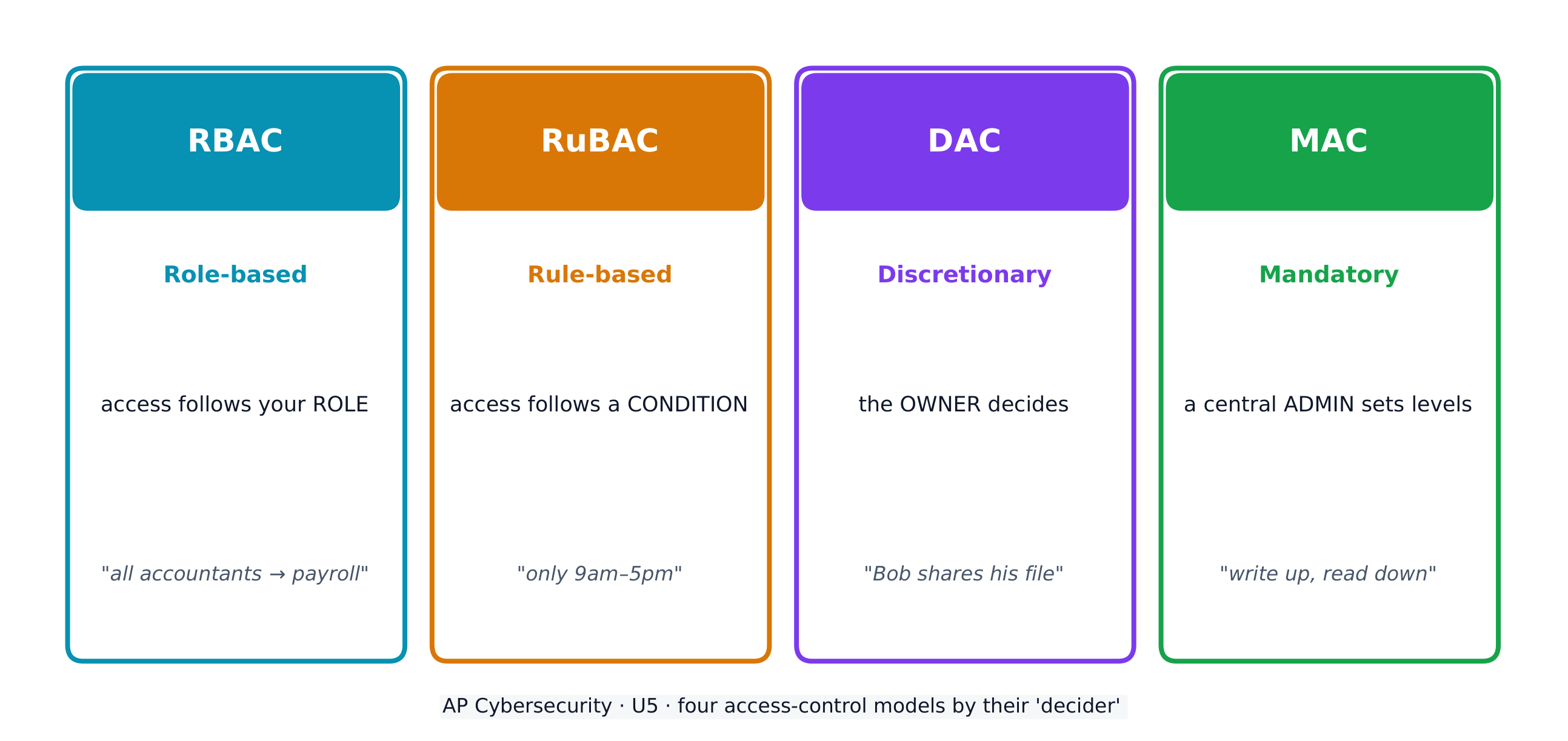
Access control decides which subjects (users) may perform which operations on which objects (files). Four models:

  • Role-based (RBAC) 基于角色的访问控制 - access follows your role (all "accountants" reach the payroll software).
  • Rule-based (RuBAC) 基于规则的访问控制 - access follows conditions (only during business hours), layered on another model.
  • Discretionary (DAC) 自主访问控制 - the owner of a file decides who else may use it.
  • Mandatory (MAC) 强制访问控制 - a central administrator sets strict levels; the Bell-LaPadula model summarises it as "write up, read down".

A guiding idea across all models is the principle of least privilege 最小权限原则 - give each entity exactly the access it needs and no more.

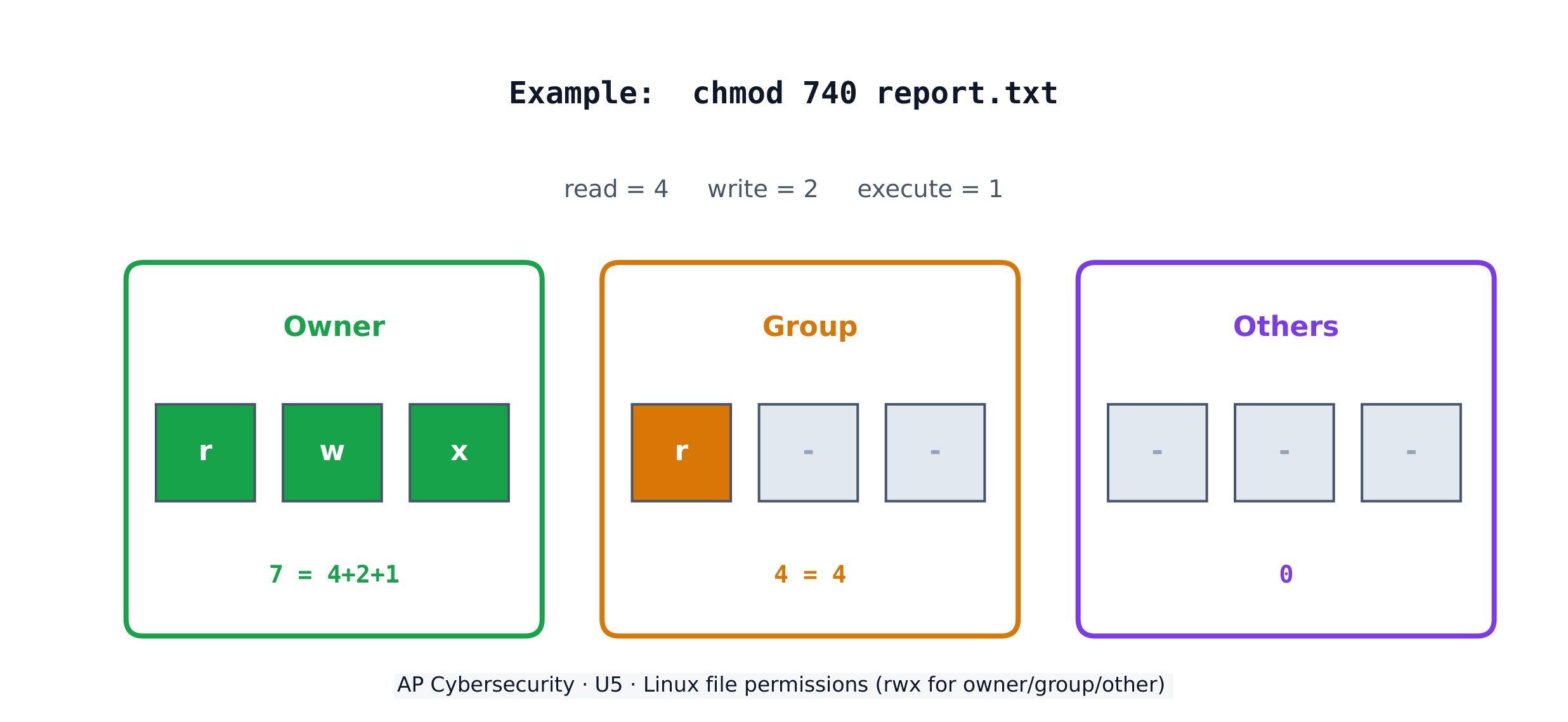
On a Linux system, each file has three permissions - read (r), write (w), execute (x) - for three groups: the owner, the group, and others. The chmod command sets them with numbers, adding 4 (read) + 2 (write) + 1 (execute). So chmod 640 means owner read+write (6), group read (4), others nothing (0).

Worked example. A principal wants only herself to read and edit a file, her staff group to read it, and no one else to touch it. Read+write = 4+2 = 6 for the owner, read = 4 for the group, nothing = 0 for others, giving chmod 640 file. The listing then shows -rw-r-----. To also let the owner run the file as a program you would add execute (7 = 4+2+1), giving chmod 740.

Tiếng Việt

Dữ liệu được phân loại theo trạng thái của nó - khi lưu trữ (được lưu trên ổ đĩa), khi di chuyển (di chuyển giữa các thiết bị), và khi sử dụng (đang được xử lý). Dữ liệu khi lưu trữ và khi di chuyển có thể được mã hóa để kẻ trộm không thể đọc được; dữ liệu khi sử dụng phải được giải mã, nên kiểm soát truy cập sẽ bảo vệ nó thay thế.

Một số loại dữ liệu bị giám sát bởi luật pháp - luật quy định cách chúng phải được lưu trữ, truyền tải và xử lý - vì vậy tổ chức phải đạt được sự tuân thủ bằng cách điều chỉnh các biện pháp kiểm soát của mình tương ứng với các quy tắc. Kỳ thi yêu cầu bạn ghép mỗi loại dữ liệu với luật điều chỉnh:

Dữ liệu bị giám sát Nội dung Luật điều chỉnh
thông tin nhận dạng cá nhân (PII) mọi thứ có thể xác định một người: tên, địa chỉ, số an sinh xã hội, dữ liệu sinh trắc học, ngày sinh Đạo luật Bảo mật (1974); COPPA cho trẻ dưới 13 tuổi
thông tin sức khỏe được bảo vệ (PHI) hồ sơ về sức khỏe, điều trị và thanh toán dịch vụ y tế HIPAA (1996)
thông tin thẻ thanh toán (PCI) số thẻ, ngày hết hạn, CVV, tên chủ thẻ PCI-DSS

Một tổ chức thu thập dữ liệu quy định bắt buộc phải đánh dấu nó và duy trì các chính sách để đảm bảo việc lưu trữ, truyền tải và xử lý tuân thủ - mức độ nhạy cảm càng cao thì yêu cầu về cấp độ bảo mật càng lớn.

Kiểm soát truy cập quyết định những chủ thể (người dùng) nào được phép thực hiện những thao tác nào trên những đối tượng (tệp tin). Bốn mô hình:

  • Dựa trên vai trò (RBAC) - quyền truy cập dựa vào vai trò của bạn (tất cả "kế toán viên" đều có thể truy cập phần mềm lương).
  • Dựa trên quy tắc (RuBAC) - quyền truy cập tuân theo điều kiện (chỉ trong giờ làm việc), được áp đặt lên trên một mô hình khác.
  • Tự do (DAC) - chủ sở hữu của một tệp tin quyết định ai khác cũng có thể sử dụng nó.
  • Bắt buộc (MAC) - một quản trị viên trung tâm thiết lập các mức độ nghiêm ngặt; mô hình Bell-LaPadula tóm tắt là "ghi lên, đọc xuống".
Bốn mô hình kiểm soát truy cập quyết định ai tiếp cận đối tượng nào và như thế nào

Một ý tưởng hướng dẫn xuyên suốt tất cả các mô hình là nguyên tắc tối thiểu đặc quyền - cấp cho mỗi thực thể đúng chính quyền truy cập cần thiết và không nhiều hơn.

Trên hệ thống Linux, mỗi tệp tin có ba quyền - đọc (r), ghi (w), thực thi (x) - cho ba nhóm: chủ sở hữu, nhóm và khác. Lệnh chmod thiết lập chúng bằng số, cộng 4 (đọc) + 2 (ghi) + 1 (thực thi). Vì vậy, chmod 640 có nghĩa là chủ sở hữu đọc+ghi (6), nhóm đọc (4), không gì cả (0).

Quyền hạn tệp Linux: đọc/ghi/thực thi cho chủ sở hữu, nhóm và người khác
Quyền tệp tin Linux: đọc/ghi/thực thi cho chủ sở hữu, nhóm, và khác

Ví dụ minh họa. Một giáo viên muốn chỉ mình cô ấy mới được đọc và chỉnh sửa một tệp tin, nhóm nhân viên của cô ấy được đọc tệp đó, và không ai khác được chạm vào. Đọc+ghi = 4+2 = 6 cho chủ sở hữu, đọc = 4 cho nhóm, không gì = 0 cho người khác, tạo thành chmod 640 file. Danh sách sau đó sẽ hiển thị -rw-r-----. Để cho phép chủ sở hữu chạy tệp tin như một chương trình, bạn cần thêm quyền thực thi (7 = 4+2+1), tạo ra chmod 740.

Explore · ⁨Khám phá⁩

Which access-control model fits the rule? · ⁨Mô hình kiểm soát truy cập nào phù hợp với quy tắc?⁩

Each access-control model has a different decider: RBAC by your role, RuBAC by a condition, DAC by the file's owner, and MAC by a central administrator's levels. · ⁨Mỗi mô hình kiểm soát truy cập có một người quyết định khác nhau: RBAC dựa trên vai trò của bạn, RuBAC dựa trên một điều kiện, DAC dựa trên chủ sở hữu tệp, và MAC dựa trên cấp độ của quản trị viên trung tâm.⁩

5.3

Protecting Stored Data with Cryptography · ⁨Bảo vệ Dữ liệu Lưu trữ bằng Mật mã học⁩

Syllabus · ⁨Chương trình⁩
English

Learning Objective 5.3.A: Explain how encryption can be used to protect files.

  • 5.3.A.1 The purpose of cryptography is to hide information. A cryptographic algorithm defines a process for encrypting and decrypting information. Encryption is the process of hiding the information, and decryption is the process of reversing the encryption to retrieve the original information.
  • 5.3.A.2 An encryption algorithm defines a process for combining the information to be encrypted with a predefined key. The information to be encrypted is called the plaintext. The output of the encryption algorithm is called the ciphertext.
  • 5.3.A.3 The number of possible keys that can be used in an encryption algorithm is called the keyspace. The larger the keyspace, the longer it will take an adversary to discover the correct key by random chance.
  • 5.3.A.4 Cryptographic algorithms are classified by whether they use one key or two keys.
    • Symmetric encryption algorithms use the same key to encrypt and decrypt information.
    • Asymmetric encryption algorithms use two different keys—one to encrypt information and the other to decrypt information.
  • 5.3.A.5 Cryptographic algorithms are also classified by whether they process information one bit at a time or in fixed-size chunks of bits.
    • Block encryption handles information in fixed-size chunks called blocks, producing an output block for each input block.
    • Stream encryption handles input information continuously, producing output one element at a time.

Learning Objective 5.3.B: Apply symmetric encryption algorithms to encrypt and decrypt data.

  • 5.3.B.1 Computer-based encryption algorithms operate on binary data. The most common symmetric encryption algorithm is the Advanced Encryption Standard (AES). AES encryption is used to secure Wi-Fi transmissions, internet browsing, file encryption on disks, and hardware-level encryption on processors.
  • 5.3.B.2 AES is a symmetric key block cipher that encrypts data in 128-bit blocks (16 bytes). AES can operate with keys of varying lengths. Longer keys produce more secure encryption but require more time to encrypt and decrypt.
  • 5.3.B.3 Symmetric encryption and decryption can be performed using the command line, specialized software, or web-based tools.
    • On a command line interface, users can encrypt or decrypt with OpenSSL.
    • Specialized software like AES Crypt is an open source tool that can encrypt and decrypt files.
    • There are many web-based tools for encrypting and decrypting files.
  • 5.3.B.4 Using OpenSSL in a CLI, a user can encrypt and decrypt a file using the following commands (note that the encryption key is derived from the password provided):
    • To encrypt a file named test with AES using a 128-bit key, use the command: openssl enc -aes-128-cbc -e -in test -k password -out test.enc
    • To decrypt the encrypted file using the same key, use the command: openssl enc -aes-128-cbc -d -in test.enc -k password -out text
Tiếng Việt

Mục tiêu học tập 5.3.A: Giải thích cách mã hóa có thể được sử dụng để bảo vệ tệp.

  • 5.3.A.1 Mục đích của mật mã học là ẩn thông tin. Một thuật toán mật mã học xác định một quy trình để mã hóa và giải mã thông tin. Mã hóa là quá trình ẩn thông tin, và giải mã là quá trình đảo ngược việc mã hóa để lấy lại thông tin gốc.
  • 5.3.A.2 Một thuật toán mã hóa xác định quy trình kết hợp thông tin cần mã hóa với một khóa được định nghĩa trước. Thông tin cần mã hóa được gọi là văn bản rõ (plaintext). Kết quả của thuật toán mã hóa được gọi là văn bản mã hóa (ciphertext).
  • 5.3.A.3 Số lượng khóa có thể sử dụng trong một thuật toán mã hóa được gọi là không gian khóa (keyspace). Không gian khóa càng lớn, thời gian mà kẻ tấn công mất để phát hiện ra khóa chính xác bằng cách ngẫu nhiên sẽ càng dài.
  • 5.3.A.4 Các thuật toán mật mã được phân loại dựa trên việc chúng sử dụng một khóa hay hai khóa.
    • Thuật toán mã hóa đối xứng sử dụng cùng một khóa để mã hóa và giải mã thông tin.
    • Thuật toán mã hóa bất đối xứng sử dụng hai khóa khác nhau—one để mã hóa thông tin và một để giải mã thông tin.
  • 5.3.A.5 Các thuật toán mật mã cũng được phân loại dựa trên việc chúng xử lý thông tin từng bit một hay theo các khối bit có kích thước cố định.
    • Mã hóa khối xử lý thông tin theo các khối có kích thước cố định được gọi là khối, tạo ra một khối đầu ra cho mỗi khối đầu vào.
    • Mã hóa dòng xử lý thông tin đầu vào liên tục, tạo ra đầu ra từng phần tử một.

Mục tiêu học tập 5.3.B: Áp dụng các thuật toán mã hóa đối xứng để mã hóa và giải mã dữ liệu.

  • 5.3.B.1 Các thuật toán mã hóa dựa trên máy tính hoạt động trên dữ liệu nhị phân. Thuật toán mã hóa đối xứng phổ biến nhất là Tiêu chuẩn Mã hóa Nâng cao (AES). Mã hóa AES được sử dụng để bảo vệ truyền dẫn Wi-Fi, duyệt web, mã hóa tệp trên đĩa và mã hóa ở cấp phần cứng trên bộ xử lý.
  • 5.3.B.2 AES là một mã khối khóa đối xứng mã hóa dữ liệu theo khối 128-bit (16 byte). AES có thể hoạt động với các khóa có độ dài khác nhau. Khóa càng dài thì tạo ra mã hóa an toàn hơn nhưng đòi hỏi nhiều thời gian hơn để mã hóa và giải mã.
  • 5.3.B.3 Mã hóa và giải mã đối xứng có thể thực hiện qua dòng lệnh, phần mềm chuyên dụng hoặc công cụ dựa trên web.
    • Trên giao diện dòng lệnh, người dùng có thể mã hóa hoặc giải mã với OpenSSL.
    • Phần mềm chuyên dụng như AES Crypt là một công cụ mã nguồn mở có thể mã hóa và giải mã tệp.
    • Có rất nhiều công cụ dựa trên web để mã hóa và giải mã tệp.
  • 5.3.B.4 Sử dụng OpenSSL trong CLI, người dùng có thể mã hóa và giải mã một tệp bằng các lệnh sau (lưu ý rằng khóa mã hóa được suy ra từ mật khẩu được cung cấp):
    • Để mã hóa một tệp tên là test với AES sử dụng khóa 128-bit, sử dụng lệnh: openssl enc -aes-128-cbc -e -in test -k password -out test.enc
    • Để giải mã tệp đã mã hóa sử dụng cùng khóa, sử dụng lệnh: openssl enc -aes-128-cbc -d -in test.enc -k password -out text

Source: College Board AP Course and Exam Description · ⁨Nguồn: Mô tả Khóa học và Bài thi College Board AP⁩

English
Symmetric vs asymmetric encryption
Hashing and the avalanche effect

Cryptography 密码学 hides information. An encryption algorithm combines the plaintext 明文 with a key 密钥 to produce ciphertext 密文; decryption reverses it. The keyspace 密钥空间 is the number of possible keys - the bigger it is, the longer an adversary needs to guess. An n-bit key has a keyspace of $2^n$.

Symmetric encryption 对称加密 uses the same key to encrypt and decrypt. The standard is AES 高级加密标准, a block cipher 分组密码 that works on 128-bit blocks and secures Wi-Fi, browsing, and stored files. Because both sides need the same secret key, sharing that key safely is the challenge.

Tiếng Việt
Máy Enigma: mã hóa bảo vệ dữ liệu được lưu trữ và truyền tải khỏi kẻ nghe lén
Một máy Enigma: mật mã học bảo vệ dữ liệu lưu trữ và truyền tải khỏi kẻ nghe lén
Mật mã hóa đối xứng và bất đối xứng
Hashing và hiệu ứng tuyết lở

Mật mã học ẩn đi thông tin. Một thuật toán mật mã hóa kết hợp bản rõ với một khóa để tạo ra bản mã; giải mã đảo ngược lại quá trình này. Không gian khóa là số lượng khóa có thể có - càng lớn thì thời gian kẻ thù cần để đoán càng lâu. Một khóa n-bit có không gian khóa là $2^n$.

Mật mã hóa đối xứng sử dụng cùng một khóa để mã hóa và giải mã. Tiêu chuẩn là AES, một mã khối hoạt động trên các khối 128-bit và bảo vệ Wi-Fi, duyệt web, và tệp tin lưu trữ. Vì cả hai bên đều cần cùng một khóa bí mật, việc chia sẻ khóa đó an toàn là thách thức.

Máy mã hóa Enigma Thế chiến II kèm khóa và rotor
Máy Enigma đã xáo trộn tin nhắn bằng các rotor — một ví dụ sớm, có thể bị phá vỡ, của mã hóa
Explore · ⁨Khám phá⁩

Encrypt a message by shifting letters · ⁨Mã hóa một thông điệp bằng cách dịch chuyển các chữ cái⁩

Encryption combines plaintext with a key to make ciphertext. In this simple cipher the key is the shift amount; only someone who knows the shift can decrypt the message back. · ⁨Mã hóa kết hợp văn bản rõ với khóa để tạo thành văn bản mã hóa. Trong thuật ngữ đơn giản này, khóa chính là lượng dịch chuyển; chỉ những ai biết lượng dịch chuyển mới giải mã được thông điệp trở lại.⁩

Vocabulary · ⁨Từ vựng⁩ Train · ⁨Luyện tập⁩
English Tiếng Việt
Applications/ˌæplɪˈkeɪʃnz/ Ứng dụng
administrative/ədˈmɪnɪstrətɪv/ về hành chính
injection attack/ɪnˈdʒekʃn əˈtæk/ tấn công nhúng
Data validation/ˈdeɪtə ˌvælɪˈdeɪʃn/ Xác minh dữ liệu
Cross-site scripting (XSS)/krɒs saɪt ˈskrɪptɪŋ/ tấn công chèn trang web (XSS)
parameterised queries/ˌpærəˈmetəraɪzd ˈkwɪərɪz/ truy vấn tham số hóa
Buffer overflow/ˈbʌfə ˌəʊvəˈfləʊ/ Tràn bộ đệm
buffer/ˈbʌfə/ dung dịch đệm
Directory traversal/daɪˈrektəri træˈvɜːsl/ Duyệt thư mục
at rest/æt rest/ đứng yên
in transit/ɪn ˈtrænsɪt/ trong quá trình truyền
in use/ɪn juːs/ đang sử dụng
regulated/ˈreɡjʊleɪtɪd/ được quy định
compliance/kəmˈplaɪəns/ tuân thủ
personally identifiable information (PII)/ˈpɜːsənəli aɪˈdentɪfaɪəbl ˌɪnfəˈmeɪʃn/ thông tin cá nhân có thể xác định được (PII)
protected health information (PHI)/prəˈtektɪd helθ ˌɪnfəˈmeɪʃn/ thông tin y tế được bảo vệ (PHI)
payment card information (PCI)/ˈpeɪmənt kɑːd ˌɪnfəˈmeɪʃn/ thông tin thẻ thanh toán (PCI)
Role-based (RBAC)/rəʊl beɪst/ Dựa trên vai trò (RBAC)
Rule-based (RuBAC)/ruːl beɪst/ Dựa trên quy tắc (RuBAC)
Discretionary (DAC)/dɪˈskreʃənəri/ Tùy ý (DAC)
Mandatory (MAC)/ˈmændətəri/ Bắt buộc (MAC)
principle of least privilege/ˈprɪnsɪpl ɒv liːst ˈprɪvɪlɪdʒ/ nguyên tắc quyền tối thiểu
Cryptography/krɪpˈtɒɡrəfi/ Mã hóa
plaintext/ˈpleɪntekst/ văn bản rõ
key/kiː/ key
ciphertext/ˈsaɪfətekst/ văn bản mã hóa
keyspace/ˈkiːspeɪs/ không gian khóa
Symmetric encryption/sɪˈmetrɪk enˈkrɪpʃn/ Mã hóa đối xứng
AES/ˌeɪ iː ˈes/ AES
block cipher/blɒk ˈsaɪfə/ bảo mã khối
Asymmetric encryption/ˌeɪsɪˈmetrɪk enˈkrɪpʃn/ Mã hóa bất đối xứng
key pair/kiː peə/ cặp khóa
public key/ˈpʌblɪk kiː/ khóa công khai
private key/ˈpraɪvət kiː/ khóa riêng tư
elliptic curve cryptography (ECC)/ɪˈlɪptɪk kɜːv krɪpˈtɒɡrəfi/ mã hóa đường cong elip (ECC)
Secure by design/sɪˈkjʊə baɪ dɪˈzaɪn/ An toàn trong thiết kế
Secure by default/sɪˈkjʊə baɪ dɪˈfɒlt/ An toàn theo mặc định
input sanitization/ˈɪnpʊt ˌsænɪtaɪˈzeɪʃn/ chuẩn hóa đầu vào
special characters/ˈspeʃl ˈkærɪktəz/ ký tự đặc biệt
accounting/əˈkaʊntɪŋ/ kế toán
Watch lesson · ⁨Xem bài học⁩
5.4

Asymmetric Cryptography · ⁨Mật mã học Bất đối xứng⁩

Syllabus · ⁨Chương trình⁩
English

Learning Objective 5.4.A: Determine the appropriate asymmetric key to use when sending or receiving encrypted data.

  • 5.4.A.1 Asymmetric encryption allows users to communicate securely without prearranging a shared secret key.
  • 5.4.A.2 When using asymmetric encryption, each entity that will be receiving data must first generate a key pair. Key pairs are binary strings of equal length that are generated at the same time through a mathematical process. One key is designated as the public key and the other as the private key. The keys are mathematical inverses of each other— each key reverses its partner. Either key can be used to encrypt information, but only the other key in the key pair will then be able to decrypt it.
  • 5.4.A.3 Once the receiver generates the key pair, the private key must be stored securely. If the private key is exposed, shared, stolen, corrupted, or compromised the key pair must be deleted and a new key pair must be generated, because the security of the encryption algorithm rests on the security of the private key. The public key is published for anyone to view and use.
  • 5.4.A.4 To send information securely to someone, the sender will use the receiver’s public key to encrypt the data and send it. Only the receiver who has the private key will be able to decrypt and read the information.

Learning Objective 5.4.B: Explain why the length of a key impacts the security of encrypted data.

  • 5.4.B.1 Longer keys result in larger keyspaces. For binary keys, an n-bit length key has a keyspace of $2^n$.
  • 5.4.B.2 Using an application to randomly guess an n-bit length encryption key means that on average an adversary will be able to guess the correct key in $2^n \div 2$ (or $2^{n-1}$) guesses.
  • 5.4.B.3 Although longer keys are more secure, they also require more time to encrypt and decrypt messages.
  • 5.4.B.4 Computational processing power and efficiency continue to improve, allowing software to guess keys faster. Key-length recommendations for both symmetric and asymmetric encryption algorithms are periodically increased to account for increased processing power.
  • 5.4.B.5 Key-length comparison is only valid when comparing keys for the same cryptographic algorithm.
    • Illustrative examples for 5.4.B.5:
      • An AES 256-bit key is more secure than an AES 128-bit key.
      • An RSA 4096-bit key is more secure than an RSA 2048-bit key.
      • RSA and AES keys cannot be directly compared to one another in determining the level of security.

Learning Objective 5.4.C: Apply asymmetric encryption algorithms to encrypt and decrypt data.

  • 5.4.C.1 Common asymmetric encryption algorithms include RSA and elliptic curve cryptography (ECC). Asymmetric algorithms are used in many applications, including digital signatures and digital certificates.
  • 5.4.C.2 As with symmetric encryption, asymmetric encryption and decryption can be performed using the command line, specialized software, or web-based tools.
    • On a command line interface, users can encrypt or decrypt with OpenSSL.
    • Specialized software like RSA Encryption Tool is an open source tool that can encrypt and decrypt files.
    • There are many web-based tools for encrypting and decrypting files.
  • 5.4.C.3 In a CLI, a user can generate an asymmetric key pair and encrypt or decrypt files as necessary.
    • To generate a 2048-bit RSA key pair and save the key to a file named rsa.pem use the command: openssl genrsa -out rsa.pem 2048
    • To extract the public key from rsa.pem into a file named public.pem, use the command: openssl rsa -pubout -in rsa.pem -outform PEM -out public.pem
    • To encrypt the file test using RSA encryption and the key file public.pem, use the command: openssl pkeyutl -encrypt -pubin -inkey public.pem -in test -out test.enc
    • To decrypt the test.enc file using the rsa.pem file, run the command: openssl pkeyutl -decrypt -inkey rsa.pem -in test.enc -out test
Tiếng Việt

Mục tiêu học tập 5.4.A: Xác định khóa bất đối xứng phù hợp khi gửi hoặc nhận dữ liệu đã mã hóa.

  • 5.4.A.1 Mã hóa bất đối xứng cho phép người dùng giao tiếp an toàn mà không cần thiết lập trước một khóa bí mật chung.
  • 5.4.A.2 Khi sử dụng mã hóa bất đối xứng, mỗi thực thể nhận dữ liệu cần phải tạo trước một cặp khóa. Cặp khóa là các chuỗi nhị phân có độ dài bằng nhau, được sinh ra đồng thời thông qua một quy trình toán học. Một khóa được chỉ định làm khóa công khai và khóa còn lại là khóa riêng tư. Các khóa này là nghịch đảo toán học của nhau—mỗi khóa sẽ đảo ngược hoạt động của khóa kia. Có thể dùng bất kỳ khóa nào để mã hóa thông tin, nhưng sau đó chỉ có khóa còn lại trong cặp khóa mới giải mã được nó.
  • 5.4.A.3 Sau khi người nhận sinh cặp khóa, khóa riêng tư phải được lưu trữ an toàn. Nếu khóa riêng tư bị lộ, chia sẻ, đánh cắp, hư hỏng hoặc bị xâm phạm, cặp khóa phải bị xóa và một cặp khóa mới phải được tạo ra, vì tính an toàn của thuật toán mã hóa dựa vào tính an toàn của khóa riêng tư. Khóa công khai được xuất bản để mọi người có thể xem và sử dụng.
  • 5.4.A.4 Để gửi thông tin an toàn đến ai đó, người gửi sẽ sử dụng khóa công khai của người nhận để mã hóa dữ liệu và gửi đi. Chỉ có người nhận có khóa riêng tư mới có thể giải mã và đọc thông tin.

Mục tiêu học tập 5.4.B: Giải thích tại sao độ dài của khóa ảnh hưởng đến tính an toàn của dữ liệu đã mã hóa.

  • 5.4.B.1 Khóa càng dài dẫn đến không gian khóa càng lớn. Đối với khóa nhị phân, khóa có độ dài n-bit có không gian khóa là $2^n$.
  • 5.4.B.2 Sử dụng ứng dụng để đoán ngẫu nhiên một khóa mã hóa có độ dài n-bit có nghĩa là trung bình kẻ tấn công sẽ có thể đoán đúng khóa trong $2^n \div 2$ (hoặc $2^{n-1}$) lần đoán.
  • 5.4.B.3 Mặc dù khóa dài hơn an toàn hơn, nhưng chúng cũng đòi hỏi nhiều thời gian hơn để mã hóa và giải mã tin nhắn.
  • 5.4.B.4 Sức mạnh tính toán và hiệu suất liên tục được cải thiện, cho phép phần mềm đoán khóa nhanh hơn. Các khuyến nghị về độ dài khóa cho cả thuật toán mã hóa đối xứng và bất đối xứng định kỳ được tăng lên để tính đến sức mạnh tính toán gia tăng.
  • 5.4.B.5 So sánh độ dài khóa chỉ có giá trị khi so sánh các khóa cho cùng một thuật toán mật mã.
    • Ví dụ minh họa cho 5.4.B.5:
      • Khóa AES 256-bit an toàn hơn khóa AES 128-bit.
      • Khóa RSA 4096-bit an toàn hơn khóa RSA 2048-bit.
      • Khóa RSA và AES không thể so sánh trực tiếp với nhau để xác định mức độ an toàn.

Mục tiêu học tập 5.4.C: Áp dụng các thuật toán mã hóa bất đối xứng để mã hóa và giải mã dữ liệu.

  • 5.4.C.1 Các thuật toán mã hóa bất đối xứng phổ biến bao gồm RSA và mật mã đường cong elip (ECC). Các thuật toán bất đối xứng được sử dụng trong nhiều ứng dụng, bao gồm chữ ký số và chứng chỉ số.
  • 5.4.C.2 Tương tự như mã hóa đối xứng, mã hóa và giải mã bất đối xứng có thể thực hiện qua dòng lệnh, phần mềm chuyên dụng hoặc công cụ dựa trên web.
    • Trên giao diện dòng lệnh, người dùng có thể mã hóa hoặc giải mã với OpenSSL.
    • Phần mềm chuyên dụng như RSA Encryption Tool là một công cụ mã nguồn mở có khả năng mã hóa và giải mã tập tin.
    • Có rất nhiều công cụ dựa trên web để mã hóa và giải mã tệp.
  • 5.4.C.3 Trong CLI, người dùng có thể tạo cặp khóa bất đối xứng và mã hóa hoặc giải mã tệp khi cần thiết.
    • Để tạo cặp khóa RSA 2048-bit và lưu khóa vào tệp có tên rsa.pem, hãy sử dụng lệnh: openssl genrsa -out rsa.pem 2048
    • Để trích xuất khóa công khai từ rsa.pem ra tệp có tên public.pem, hãy sử dụng lệnh: openssl rsa -pubout -in rsa.pem -outform PEM -out public.pem
    • Để mã hóa tệp test bằng mã hóa RSA và tệp khóa public.pem, hãy sử dụng lệnh: openssl pkeyutl -encrypt -pubin -inkey public.pem -in test -out test.enc
    • Để giải mã tệp test.enc sử dụng tệp rsa.pem, chạy lệnh: openssl pkeyutl -decrypt -inkey rsa.pem -in test.enc -out test

Source: College Board AP Course and Exam Description · ⁨Nguồn: Mô tả Khóa học và Bài thi College Board AP⁩

English

Asymmetric encryption 非对称加密 solves the key-sharing problem with a key pair 密钥对 - a public key 公钥 anyone may see and a private key 私钥 kept secret. The keys are mathematical inverses: whatever one locks, only the other unlocks. To send you a secret, I encrypt with your public key, and only your private key can decrypt it - so we never had to share a secret in advance.

Longer keys mean larger keyspaces and more security, but slower encryption. Common asymmetric algorithms are RSA and elliptic curve cryptography (ECC) 椭圆曲线密码学, used in digital signatures and certificates. Remember: you can only compare key lengths within the same algorithm - an RSA 4096-bit key is not directly comparable to an AES 256-bit key.

Tiếng Việt

Mật mã hóa bất đối xứng giải quyết vấn đề chia sẻ khóa bằng một cặp khóa - một khóa công khai mà bất kỳ ai cũng có thể xem và một khóa riêng tư được giữ bí mật. Các khóa là nghịch đảo toán học: cái gì một khóa khóa, thì chỉ khóa kia mới mở được. Để gửi cho bạn một tin bí mật, tôi mã hóa bằng khóa công khai của bạn, và chỉ có khóa riêng tư của bạn mới giải mã được nó - vì vậy chúng ta chưa bao giờ cần chia sẻ một khóa bí mật trước đó.

Mã hóa bất đối xứng: mã hóa bằng khóa công khai, giải mã bằng khóa riêng tư
Mật mã hóa bất đối xứng: mã hóa bằng khóa công khai, giải mã bằng khóa riêng tư

Khóa dài hơn có nghĩa là không gian khóa lớn hơn và bảo mật tốt hơn, nhưng tốc độ mã hóa chậm hơn. Các thuật toán bất đối xứng phổ biến là RSA và mật mã đường cong elip (ECC), được sử dụng trong chữ ký số và chứng chỉ. Hãy nhớ: bạn chỉ có thể so sánh độ dài khóa trong cùng một thuật toán - một khóa RSA 4096-bit không thể so sánh trực tiếp với khóa AES 256-bit.

Một chiếc ổ khóa: mã hóa khóa dữ liệu lại để chỉ người có khóa tương ứng mới mở được
Một ổ khóa: mật mã học khóa dữ liệu lại sao cho chỉ người có khóa phù hợp mới mở được
Watch lesson · ⁨Xem bài học⁩
5.5

Protecting Applications · ⁨Bảo vệ Ứng dụng⁩

Syllabus · ⁨Chương trình⁩
English

Learning Objective 5.5.A: Identify the application security principles of secure by design and security by default.

  • 5.5.A.1 Secure by design is an initiative that encourages companies to include security in all phases of product development including design. When organizations implement secure by design, security is a design principle not just a technical feature.
  • 5.5.A.2 Secure by design includes three design principles:
    • i. Companies should take ownership of customer security outcomes. Companies should build products that meet the security needs of their customers.
    • ii. Companies should embrace radical transparency and accountability. Sharing relevant security-related product news and updates quickly increases security for everyone.
    • iii. Companies should build organizational structure and leadership to implement secure by design. Companies need leaders who are focused on security and have a security-first posture.
  • 5.5.A.3 Secure by design includes the concept of secure by default, which is the idea that security features for software and devices should be enabled by default. Devices and software should be secure to use out of the box, with security features already enabled.

Learning Objective 5.5.B: Explain how user input sanitization protects applications.

  • 5.5.B.1 When users enter input into an application, the application typically encases that input in special characters to process it. The characters that encase the user input are called control characters and include the single quote, the double quote, and the semicolon.
  • 5.5.B.2 When creating a program that takes user input, programmers should use a function to verify that user input meets their expected criteria and does not include any control characters that could be used to manipulate the system. This verification function can sanitize user input by removing potentially malicious characters, or it can give the user an error and force the user to provide different input. This can protect against many application attacks, including:
    • SQL injection attacks
    • XSS attacks
    • Directory traversal attacks
Tiếng Việt

Mục tiêu Học tập 5.5.A: Xác định các nguyên tắc bảo mật ứng dụng dựa trên thiết kế an toàn và bảo mật mặc định.

  • 5.5.A.1 Thiết kế an toàn (Secure by design) là một sáng kiến khuyến khích các công ty tích hợp bảo mật vào tất cả các giai đoạn của quá trình phát triển sản phẩm, bao gồm cả thiết kế. Khi các tổ chức áp dụng thiết kế an toàn, bảo mật là một nguyên tắc thiết kế chứ không chỉ là một tính năng kỹ thuật.
  • 5.5.A.2 Thiết kế an toàn bao gồm ba nguyên tắc thiết kế:
    • i. Các công ty nên chủ động chịu trách nhiệm về kết quả bảo mật của khách hàng. Các công ty nên xây dựng các sản phẩm đáp ứng nhu cầu bảo mật của khách hàng.
    • ii. Các công ty nên chấp nhận sự minh bạch cực đoan và trách nhiệm giải trình. Chia sẻ tin tức và cập nhật liên quan đến bảo mật sản phẩm nhanh chóng sẽ tăng cường bảo mật cho tất cả mọi người.
    • iii. Các công ty nên xây dựng cấu trúc tổ chức và lãnh đạo để triển khai thiết kế an toàn. Các công ty cần những nhà lãnh đạo tập trung vào bảo mật và có tư duy ưu tiên bảo mật.
  • 5.5.A.3 Thiết kế an toàn bao gồm khái niệm bảo mật mặc định (secure by default), đó là ý tưởng rằng các tính năng bảo mật cho phần mềm và thiết bị nên được bật sẵn mặc định. Thiết bị và phần mềm phải an toàn khi sử dụng ngay từ khi mở hộp, với các tính năng bảo mật đã được kích hoạt sẵn.

Mục tiêu Học tập 5.5.B: Giải thích cách việc làm sạch dữ liệu đầu vào của người dùng giúp bảo vệ ứng dụng.

  • 5.5.B.1 Khi người dùng nhập dữ liệu vào ứng dụng, ứng dụng thường bao bọc dữ liệu đầu vào đó trong các ký tự đặc biệt để xử lý. Các ký tự bao bọc dữ liệu đầu vào của người dùng được gọi là ký tự điều khiển và bao gồm dấu ngoặc đơn, dấu ngoặc kép, và dấu chấm phẩy.
  • 5.5.B.2 Khi tạo chương trình chấp nhận dữ liệu đầu vào từ người dùng, lập trình viên nên sử dụng hàm để xác minh rằng dữ liệu đầu vào đáp ứng các tiêu chí mong muốn và không chứa bất kỳ ký tự điều khiển nào có thể bị lợi dụng để thao túng hệ thống. Hàm xác minh này có thể làm sạch dữ liệu đầu vào của người dùng bằng cách loại bỏ các ký tự tiềm ẩn nguy hiểm, hoặc nó có thể trả về lỗi cho người dùng và buộc họ cung cấp dữ liệu đầu vào khác. Điều này có thể bảo vệ khỏi nhiều cuộc tấn công vào ứng dụng, bao gồm:
    • Cuộc tấn công chèn SQL
    • Cuộc tấn công XSS
    • Cuộc tấn công duyệt thư mục

Source: College Board AP Course and Exam Description · ⁨Nguồn: Mô tả Khóa học và Bài thi College Board AP⁩

English

Two design principles keep applications safe from the start. Secure by design 安全设计 builds security into every phase of development, not as an afterthought. Secure by default 默认安全 means the product ships with its security features already enabled - safe straight out of the box.

Secure by design rests on three principles a company must adopt: (1) take ownership of its customers' security outcomes rather than shifting blame onto users, (2) embrace radical transparency and accountability – sharing security-relevant news and updates quickly so everyone becomes safer, and (3) build the organisational structure and leadership that makes security a first-class goal.

The key defense against injection attacks is input sanitization 输入清理. Certain special characters 特殊字符 - the single quote, double quote, and semicolon - can be used to manipulate a system, so a good program removes or rejects them before processing. Sanitization protects against SQL injection, XSS, and directory-traversal attacks alike.

Tiếng Việt

Hai nguyên tắc thiết kế giúp ứng dụng an toàn ngay từ đầu. An toàn ngay từ thiết kế tích hợp bảo mật vào mọi giai đoạn phát triển, chứ không phải như một suy nghĩ phụ sau này. An toàn theo mặc định có nghĩa là sản phẩm được giao với các tính năng bảo mật đã được bật sẵn - an toàn ngay khi mới mở hộp.

An toàn ngay từ thiết kế dựa trên ba nguyên tắc mà một công ty phải áp dụng: (1) chấp nhận trách nhiệm cho kết quả bảo mật của khách hàng thay vì đổ lỗi cho người dùng, (2) đón nhận sự minh bạch tuyệt đối và trách nhiệm giải trình – chia sẻ tin tức và bản cập nhật liên quan đến bảo mật nhanh chóng để mọi người trở nên an toàn hơn, và (3) xây dựng cấu trúc tổ chức và lãnh đạo khiến bảo mật trở thành mục tiêu ưu tiên hàng đầu.

Phòng thủ chính chống lại các cuộc tấn công nhúng (injection) là làm sạch đầu vào. Certain ký tự đặc biệt - dấu ngoặc đơn đơn, dấu ngoặc đôi và dấu chấm phẩy - có thể được sử dụng để thao túng hệ thống, vì vậy một chương trình tốt sẽ loại bỏ hoặc từ chối chúng trước khi xử lý. Việc làm sạch bảo vệ chống lại các cuộc tấn công nhúng SQL, XSS và traversing thư mục.

5.6

Detecting Attacks on Data and Applications · ⁨Phát hiện các cuộc tấn công vào dữ liệu và ứng dụng⁩

Syllabus · ⁨Chương trình⁩
English

Learning Objective 5.6.A: Explain how to detect attacks on data.

  • 5.6.A.1 Devices track and log when data are accessed and by whom. The process of recording and monitoring user activities is called accounting. Analysis of these logs can reveal malicious activity when an adversary attempts to access, copy, move, or delete data. Suspicious activity can include:
    • Accessing files that aren’t typically accessed
    • Accessing files or applications outside of a user’s normal patterns (including time of day, location, and device type)
    • Attempts to delete or copy sensitive files
  • 5.6.A.2 A honeypot is a file that appears as if it contains valuable data (e.g., credit card information, PII, passwords), but the data in the file are fake. A system can alert defenders if someone attempts to access the honeypot. Since the honeypot is a fake file, there is no legitimate reason to be accessing it, and any attempted access would be an indicator of malicious activity.
  • 5.6.A.3 Cryptographic hash functions can generate a digest for data and can reveal if data have been altered. If a file has changed unexpectedly, this can be a sign of malicious activity.

Learning Objective 5.6.B: Determine controls for detecting attacks against applications or data.

  • 5.6.B.1 Cost is a criterion in determining detective controls. Detective controls like honeypots and using hash values to check data integrity are inexpensive. Some organizations invest in third-party data loss prevention (DLP) services, which monitor data access, usage, and transmission by users throughout the organization to detect suspicious activity; DLP services provide strong detection capabilities at a higher cost.
  • 5.6.B.2 Sensitivity or criticality of data or applications is a criterion in determining detective controls. More sensitive or critical data or applications are more likely targets of an adversary and should be monitored more closely.
  • 5.6.B.3 Classification of data is a criterion in determining detective controls. Data that have been classified as private, educational, healthcare, or financial often have legal or regulatory detection and monitoring requirements.

Learning Objective 5.6.C: Evaluate the impact of a method for detecting attacks against an application or data.

  • 5.6.C.1 To operate at an effective speed, log analysis needs to be augmented with some automation. Honeypots offer near instantaneous detection capabilities.
  • 5.6.C.2 Some DLP tools, honeypots, and realtime automated log analysis provide alerts as an attack is happening. These tools allow for a prompt response that can stop an attack before it does more harm. Retrospective log analysis and the use of cryptographic hashes to verify data integrity identify attacks after they have occurred.
  • 5.6.C.3 False negatives can occur in applications and data attack detection. Cryptographic hash functions only detect if data have been altered. An adversary could view and steal data without altering it, and a cryptographic hash function would not detect this. Honeypots cannot detect adversaries that do not attempt to access them.

Learning Objective 5.6.D: Identify whether a file has been altered by verifying its hash.

  • 5.6.D.1 Cryptographic hash functions can help identify changes in a file because they are repeatable: the same input always produces the same output for a given hash function.
  • 5.6.D.2 Hashes can be calculated using the command line on a computer, a website, or specialized software.
    • In Windows Powershell, if a user wanted to generate the SHA256 hash for a file named testfile, they would use the command: Get-FileHash testfile -Algorithm SHA256
    • In BASH the same could be accomplished with the command: sha256sum testfile
    • In zsh, the common command line terminal on Apple computers, this could be accomplished with the command: shasum -a 256 testfile
  • 5.6.D.3 A file can be hashed and its hash output recorded. Then it can be hashed again later, and the second hash output can be compared to the previous hash output for the same file. If a file’s hash changes, then the file was altered between when the first and second hashes were generated.

Learning Objective 5.6.E: Apply detection techniques to identify and report indicators of application attacks by analyzing log files.

  • 5.6.E.1 SQL injection attacks can be detected by reviewing application and server logs of user input for SQL control words and symbols such as:
    • A single (') or double (") quote character
    • Boolean conditions like OR 1=1
    • A double dash (which indicates a comment in SQL): --
    • SQL control words (always in capital letters) like WHERE, IN, FROM
  • 5.6.E.2 XSS attacks can be detected by reviewing user input for suspicious tags, particularly the tag.
  • 5.6.E.3 For web applications, buffer overflows can be detected by checking the amount of data the user is sending to the web application in their request. The fields commonly checked are the URL length, cookie length, query string length, and total request length. Long strings in any of these fields can be an indicator of an attempted buffer overflow attack.
  • 5.6.E.4 Directory traversal attacks can be detected by reviewing application and server logs. HTTP GET requests that include paths with sequences of ../ are indicators of an adversary attempting a directory traversal.
Tiếng Việt

Mục tiêu Học tập 5.6.A: Giải thích cách phát hiện các cuộc tấn công vào dữ liệu.

  • 5.6.A.1 Thiết bị theo dõi và ghi lại thời điểm dữ liệu được truy cập và bởi ai. Quá trình ghi chép và giám sát hoạt động của người dùng được gọi là kế toán. Phân tích các nhật ký này có thể tiết lộ hoạt động độc hại khi kẻ thù cố gắng truy cập, sao chép, di chuyển hoặc xóa dữ liệu. Hoạt động đáng ngờ có thể bao gồm:
    • Truy cập các tệp không thường xuyên được truy cập
    • Truy cập tệp hoặc ứng dụng bên ngoài các mẫu hành vi bình thường của người dùng (bao gồm thời gian trong ngày, vị trí và loại thiết bị)
    • Các nỗ lực xóa hoặc sao chép tệp nhạy cảm
  • 5.6.A.2 Một honeypot (răng cưa) là một tệp trông giống như chứa dữ liệu có giá trị (ví dụ: thông tin thẻ tín dụng, PII, mật khẩu), nhưng dữ liệu trong tệp lại giả. Hệ thống có thể cảnh báo cho đội phòng thủ nếu có ai đó cố truy cập vào honeypot. Vì honeypot là một tệp giả, không có lý do chính đáng nào để truy cập vào nó, và mọi nỗ lực truy cập đều là dấu hiệu của hoạt động độc hại.
  • 5.6.A.3 Các hàm băm mã hóa có thể tạo ra digest (bản tóm tắt) cho dữ liệu và có thể tiết lộ xem dữ liệu đã bị thay đổi hay chưa. Nếu một tệp thay đổi không mong muốn, đây có thể là dấu hiệu của hoạt động độc hại.

Mục tiêu Học tập 5.6.B: Xác định các biện pháp kiểm soát để phát hiện các cuộc tấn công vào ứng dụng hoặc dữ liệu.

  • 5.6.B.1 Chi phí là một tiêu chí trong việc xác định các biện pháp kiểm soát phát hiện. Các biện pháp kiểm soát phát hiện như honeypots và sử dụng giá trị hash để kiểm tra tính toàn vẹn của dữ liệu khá tốn kém thấp. Một số tổ chức đầu tư vào các dịch vụ ngăn chặn thất thoát dữ liệu bên thứ ba (DLP), dịch vụ này giám sát việc truy cập, sử dụng và truyền tải dữ liệu của người dùng trong suốt tổ chức để phát hiện hoạt động đáng ngờ; các dịch vụ DLP cung cấp khả năng phát hiện mạnh mẽ nhưng với chi phí cao hơn.
  • 5.6.B.2 Mức độ nhạy cảm hoặc tính quan trọng của dữ liệu hoặc ứng dụng là một tiêu chí trong việc xác định các biện pháp kiểm soát phát hiện. Dữ liệu hoặc ứng dụng càng nhạy cảm hoặc quan trọng thì càng dễ trở thành mục tiêu của kẻ thù và cần được giám sát chặt chẽ hơn.
  • 5.6.B.3 Phân loại dữ liệu là một tiêu chí trong việc xác định các biện pháp kiểm soát phát hiện. Dữ liệu được phân loại là riêng tư, giáo dục, chăm sóc sức khỏe hoặc tài chính thường có các yêu cầu về phát hiện và giám sát theo quy định pháp luật.

Mục tiêu Học tập 5.6.C: Đánh giá tác động của một phương pháp phát hiện các cuộc tấn công vào ứng dụng hoặc dữ liệu.

  • 5.6.C.1 Để vận hành ở tốc độ hiệu quả, phân tích nhật ký cần được bổ sung bằng một số tự động hóa. Honeypots cung cấp khả năng phát hiện gần như tức thì.
  • 5.6.C.2 Một số công cụ DLP, honeypots và phân tích nhật ký tự động thời gian thực cung cấp cảnh báo khi cuộc tấn công đang diễn ra. Những công cụ này cho phép phản ứng nhanh chóng nhằm ngăn chặn cuộc tấn công trước khi gây thêm thiệt hại. Phân tích nhật ký mang tính hồi tưởng và sử dụng hàm băm mã hóa để xác minh tính toàn vẹn của dữ liệu giúp phát hiện các cuộc tấn công sau khi chúng đã xảy ra.
  • 5.6.C.3 Lỗi âm giả có thể xảy ra trong việc phát hiện ứng dụng và tấn công dữ liệu. Các hàm băm mã hóa chỉ phát hiện xem dữ liệu có bị thay đổi hay không. Kẻ tấn công có thể xem và đánh cắp dữ liệu mà không làm thay đổi nó, và một hàm băm mã hóa sẽ không phát hiện được điều này. Honeypots không thể phát hiện những kẻ tấn công không cố gắng truy cập vào chúng.

Mục tiêu học tập 5.6.D: Xác định xem một tệp tin đã bị thay đổi bằng cách kiểm tra giá trị hash của nó.

  • 5.6.D.1 Các hàm băm mã hóa có thể giúp xác định sự thay đổi trong một tệp tin vì chúng có tính lặp lại: cùng một đầu vào luôn tạo ra cùng một đầu ra đối với một hàm hash nhất định.
  • 5.6.D.2 Hashes có thể được tính toán thông qua dòng lệnh trên máy tính, trang web hoặc phần mềm chuyên dụng.
    • Trong Windows Powershell, nếu người dùng muốn tạo hash SHA256 cho một tệp tên là testfile, họ sẽ sử dụng lệnh: Get-FileHash testfile -Algorithm SHA256
    • Trong BASH, điều tương tự có thể thực hiện được với lệnh: sha256sum testfile
    • Trong zsh, dòng lệnh terminal phổ biến trên các máy tính Apple, điều này có thể thực hiện được với lệnh: shasum -a 256 testfile
  • 5.6.D.3 Một tệp có thể được tạo hash và kết quả hash của nó được ghi lại. Sau đó, nó có thể được tạo hash lại ở một thời điểm khác, và kết quả hash thứ hai có thể so sánh với kết quả hash trước đó của cùng một tệp. Nếu hash của một tệp thay đổi, thì tệp đó đã bị thay đổi giữa lúc tạo hash lần đầu và lần thứ hai.

Mục tiêu học tập 5.6.E: Áp dụng các kỹ thuật phát hiện để xác định và báo cáo các chỉ báo của cuộc tấn ứng dụng bằng cách phân tích các tệp nhật ký.

  • 5.6.E.1 Các cuộc tấn công SQL injection có thể được phát hiện bằng cách xem xét nhật ký ứng dụng và server từ đầu vào của người dùng tìm kiếm các từ khóa và ký hiệu điều khiển SQL như:
    • Ký tự dấu ngoặc đơn đơn (') hoặc dấu ngoặc đơn kép (")
    • Điều kiện logic như OR 1=1
    • Dấu gạch ngang đôi (chỉ ra một comment trong SQL): --
    • Các từ khóa điều khiển SQL (luôn viết hoa) như WHERE, IN, FROM
  • 5.6.E.2 Các cuộc tấn công XSS có thể được phát hiện bằng cách xem xét đầu vào của người dùng tìm kiếm các thẻ đáng ngờ, đặc biệt là thẻ .
  • 5.6.E.3 Đối với các ứng dụng web, tràn bộ đệm (buffer overflows) có thể được phát hiện bằng cách kiểm tra lượng dữ liệu người dùng gửi đến ứng dụng web trong yêu cầu của họ. Các trường thường được kiểm tra là độ dài URL, độ dài cookie, độ dài chuỗi truy vấn và tổng độ dài yêu cầu. Các chuỗi dài trong bất kỳ trường nào trong số này có thể là chỉ báo của một cuộc attempted buffer overflow attack.
  • 5.6.E.4 Các cuộc tấn công duyệt thư mục (directory traversal) có thể được phát hiện bằng cách xem xét nhật ký ứng dụng và server. Các yêu cầu HTTP GET bao gồm đường dẫn có chứa chuỗi ../ là chỉ báo của kẻ tấn công đang cố gắng thực hiện duyệt thư mục.

Source: College Board AP Course and Exam Description · ⁨Nguồn: Mô tả Khóa học và Bài thi College Board AP⁩

English

To detect data attacks, systems perform accounting 审计记录 - logging who accessed what and when. But logs are huge, so log analysis must be automated to run at a useful speed; a human reading raw logs is far too slow. A clever complement is a honeypot 蜜罐 - a fake file that looks valuable; since no one has a real reason to open it, any access is a clear, near-instantaneous sign of an attack. Watch especially for attempts to delete or copy sensitive files. Cryptographic hashes also help: re-hash a file and compare - if the digest changed, the file was altered.

Choosing detective controls means weighing cost (honeypots are cheap; a data loss prevention (DLP) 数据泄露防护 service is powerful but pricey) against the sensitivity of the data. To read a specific attack from logs, look for its signature: SQL injection shows OR 1=1 and --; XSS shows <script> tags; directory traversal shows ../ sequences; a buffer overflow shows unusually long input strings.

Checking that a file has not been altered

A cryptographic hash turns a file of any size into a short fixed-length value. Change one byte of the file and the hash changes completely, so comparing a downloaded file's hash with the one the publisher lists proves the file arrived intact. You do this at the command line:

Shell Command
BASH (Linux, and most servers) sha256sum testfile
zsh, the usual terminal on Apple computers shasum -a 256 testfile

Both print the SHA-256 hash of testfile. If it differs from the published value by even one character, the file has been altered — by corruption in transit, or by an attacker who replaced it.

⚠️ A hash proves integrity, not authenticity. An attacker who can replace the file on a web page can usually replace the published hash beside it too; that is why a signed hash, or one fetched over a separate trusted channel, is stronger evidence.

Tiếng Việt

Để phát hiện các cuộc tấn công vào dữ liệu, hệ thống thực hiện giao dịch kế toán - ghi lại ai đã truy cập cái gì và khi nào. Nhưng nhật ký rất lớn, nên phân tích nhật ký phải được tự động hóa để chạy ở tốc độ hữu ích; một người đọc nhật ký thô chậm hơn nhiều. Một giải pháp bổ sung thông minh là bẫy mật mã (honeypot) - một tệp giả tưởng như thể nó có giá trị; vì không ai có lý do chính đáng để mở nó, mọi lần truy cập đều là dấu hiệu rõ ràng, gần như tức thì của một cuộc tấn công. Hãy đặc biệt chú ý đến các nỗ lực xóa hoặc sao chép các tệp nhạy cảm. Bảng băm mã hóa cũng giúp ích: tạo lại bảng băm của một tệp và so sánh - nếu digest thay đổi, tệp đã bị chỉnh sửa.

Việc chọn các biện pháp kiểm tra phát hiện đòi hỏi cân nhắc giữa chi phí (honeypot rẻ; một dịch vụ ngăn chặn thất thoát dữ liệu (DLP) mạnh mẽ nhưng đắt tiền) với mức độ nhạy cảm của dữ liệu. Để đọc được một cuộc tấn công cụ thể từ nhật ký, hãy tìm dấu ấn của nó: SQL injection hiển thị OR 1=1 và --; XSS hiển thị thẻ <script>; duyệt thư mục hiển thị chuỗi ../; tràn bộ đệm hiển thị chuỗi đầu vào dài bất thường.

Kiểm tra xem một tệp có bị chỉnh sửa hay không

Một bảng băm mã hóa biến một tệp có kích thước bất kỳ thành một giá trị cố định độ dài ngắn. Thay đổi một byte của tệp và bảng băm sẽ thay đổi hoàn toàn, do đó so sánh bảng băm của tệp đã tải về với bảng băm mà nhà xuất bản liệt kê chứng minh rằng tệp đã đến nguyên vẹn. Bạn làm điều này ở dòng lệnh:

Shell Lệnh
BASH (Linux, và hầu hết các máy chủ) sha256sum testfile
zsh, terminal tiêu chuẩn trên máy tính Apple shasum -a 256 testfile

Cả hai đều in bảng băm SHA-256 của testfile. Nếu nó khác với giá trị được công bố dù chỉ một ký tự, tệp đã bị chỉnh sửa — do lỗi trong quá trình truyền tải, hoặc bởi kẻ tấn công đã thay thế nó.

⚠️ Bảng băm chứng minh tính toàn vẹn, chứ không phải tính xác thực. Một kẻ tấn công có thể thay thế tệp trên trang web thường cũng có thể thay thế bảng băm được công bố bên cạnh nó; đó là lý do tại sao bảng băm được ký, hoặc bảng băm được lấy qua một kênh tin cậy riêng biệt, là bằng chứng mạnh hơn.

Vocabulary · ⁨Từ vựng⁩ Train · ⁨Luyện tập⁩
English Tiếng Việt
honeypot/ˈhʌnɪpɒt/ honeypot
data loss prevention (DLP)/ˈdeɪtə lɒs prɪˈvenʃn/ ngăn ngừa mất mát dữ liệu (DLP)
5.6

Exam tips · ⁨Mẹo làm bài thi⁩

English
  • Match each application attack to its evidence in a log: OR 1=1 / -- = SQL injection; <script> = XSS; ../ = directory traversal; very long input = buffer overflow.
  • Learn the four access-control models by their decider: RBAC = your role, RuBAC = a condition, DAC = the file's owner, MAC = a central admin. Least privilege underlies them all.
  • Read Linux permissions by adding 4+2+1 per group - chmod 750 = owner rwx (7), group r-x (5), others none (0). Practice converting both ways.
  • Symmetric = one shared key (fast, AES); asymmetric = a public/private key pair (solves key sharing, RSA/ECC). Encrypt with the recipient's public key.
  • Input sanitization is the single best answer for preventing injection attacks; a honeypot is the classic cheap detective control.
Tiếng Việt
  • Khớp mỗi cuộc tấn công ứng dụng với bằng chứng trong nhật ký: OR 1=1 / -- = SQL injection; <script> = XSS; ../ = duyệt thư mục; đầu vào rất dài = tràn bộ đệm.
  • Học bốn mô hình kiểm soát truy cập theo người quyết định của chúng: RBAC = vai trò của bạn, RuBAC = điều kiện, DAC = chủ sở hữu tệp, MAC = quản trị viên trung tâm. Quyền tối thiểu nằm ở nền tảng của tất cả chúng.
  • Đọc quyền Linux bằng cách cộng 4+2+1 cho mỗi nhóm - chmod 750 = chủ sở hữu rwx (7), nhóm r-x (5), những người khác không có (0). Thực hành chuyển đổi theo cả hai chiều.
  • Đối xứng = một khóa chung (nhanh, AES); bất đối xứng = cặp khóa công khai/riêng tư (giải quyết vấn đề chia sẻ khóa, RSA/ECC). Mã hóa bằng khóa công khai của người nhận.
  • Vệ sinh đầu vào là câu trả lời tốt nhất để ngăn chặn các cuộc tấn công xâm nhập; một honeypot là biện pháp kiểm tra phát hiện điển hình và rẻ tiền.

Interactive lessons on this topic · ⁨Bài học tương tác về chủ đề này⁩

Work through it step by step, with instant-check exercises. · ⁨Làm theo từng bước, kèm theo bài tập kiểm tra ngay lập tức.⁩

Past Papers · ⁨Đề thi cũ⁩

More topics in AP Cybersecurity · ⁨AP An ninh mạng⁩ · ⁨Nhiều chủ đề hơn trong AP Cybersecurity · ⁨AP An ninh mạng⁩⁩

Log in or create account · ⁨Đăng nhập hoặc tạo tài khoản⁩

IGCSE, A-Level & AP