Moving around · Di chuyển xung quanh
This page needs a recent browser (with SharedArrayBuffer support). Please update Chrome, Edge, Firefox or Safari to the latest version. · Trang này cần trình duyệt gần đây (hỗ trợ SharedArrayBuffer). Vui lòng cập nhật Chrome, Edge, Firefox hoặc Safari lên phiên bản mới nhất.
English
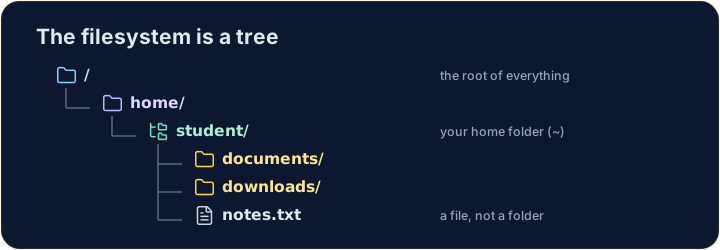
The filesystem is a tree
- Folders (called directories) hold files and other folders, like branches on a tree.
- The very top is
/, the root. Your personal folder is your home, written~.
Tiếng Việt
Hệ thống tập tin giống như cây
- Các thư mục (được gọi là directories) chứa các file và các thư mục khác, giống như cành cây.
- Phần trên cùng nhất là
/, root (gốc). Thư mục cá nhân của bạn là home, được viết là~.
English
Looking and moving
lslists what is in the current folder.cdchanges directory — it moves you into a folder:
- After
cd documents, you are inside documents. Runpwdany time to check where you are.
Tiếng Việt
Xem và di chuyển
lsliệt kê những gì đang có trong thư mục hiện tại.cdđổi thư mục — nó đưa bạn vào một thư mục:
ls
cd documents
- Sau khi
cd documents, bạn đang bên trong các tài liệu. Chạypwdbất cứ lúc nào để kiểm tra vị trí.
English
Handy shortcuts
cd ..goes up one level (to the parent folder).cdwith nothing, orcd ~, jumps straight back to your home.- A path can be relative (
documents/work) or absolute (starts with/, like/home/student).
Tiếng Việt
Phím tắt hữu ích
cd ..đi lên một mức (về thư mục cha).cdkhông có đối số, hoặccd ~, nhảy thẳng về thư mục cá nhân của bạn.- Đường dẫn có thể là tương đối (
documents/work) hoặc tuyệt đối (bắt đầu bằng/, như/home/student).
English
Common mistakes
cdwith no argument goes to your home folder;cd ..goes up one level.pwdshows the folder you are in.
Tiếng Việt
Lỗi thường gặp
cdkhông có đối số sẽ đến thư mục cá nhân;cd ..sẽ đi lên một mức.pwdhiển thị thư mục bạn đang ở.
Explore · Khám phá
Moving around the tree · Di chuyển trong cây thư mục
The filesystem is one tree; an absolute path is the trail from /. · Hệ thống tệp là một cây; đường dẫn tuyệt đối là hành trình từ /.
Use ls (list) to see what is in your home folder. · Dùng ls (list) để xem những gì có trong thư mục home của bạn.
Move into the documents folder with cd documents, then run pwd to prove you are there. · Di chuyển vào thư mục documents với cd documents, sau đó chạy pwd để chứng minh bạn đang ở đó.