| Learning Objective | Essential Knowledge |
|---|---|
5.1.A |
|
5.1.B |
|
5.1.C |
|
Securing Applications and Data · การป้องกันแอปพลิเคชันและข้อมูล
AP Cybersecurity · AP ความปลอดภัยทางไซเบอร์ · Topic 5 · หัวข้อ 5
 9:47
9:47
การป้องกันแอปพลิเคชันและข้อมูล
บริษัทหนึ่งใช้จ่ายเงินมหาศาลไปกับไฟร์วอลล์ ประตูล็อค และรหัสผ่านที่แข็งแรง จากนั้นมีคนพิมพ์ตัวอักษรแปลกๆ เข้าในช่องล็อกอิน — และฐานข้อมูล...
English narration · English + 中文 subtitles burned in · การบรรยายภาษาอังกฤษ · คำบรรยายภาษาอังกฤษ + 中文 ลอยตัวบนภาพ
5.1
Application and Data Vulnerabilities and Attacks · ความเสี่ยงและการโจมตีด้านแอปพลิเคชันและข้อมูล
Syllabus · หลักสูตร
Source: College Board AP Course and Exam Description · แหล่งที่มา: คำอธิบายหลักสูตรและข้อสอบ College Board AP
English
Applications 应用程序 are the programs that run on computers, and data is what they process - both are prime targets. If files are stored unencrypted, anyone with access to the drive can read them. If a normal user is given administrative 管理性 privileges, an adversary who steals that account gains sweeping power.
The biggest application danger is bad user input. When a program does not check what a user types, an adversary can slip in commands - an injection attack 注入攻击. Data validation 数据验证 (checking input meets expected rules) is the defense. Key attacks:
- SQL injection SQL注入 - inserting SQL commands into an input field to read or change a database.
- Cross-site scripting (XSS) 跨站脚本 - injecting malicious script into a website that runs in another user's browser.
What a SQL injection actually looks like
SQL is a language for querying a database, and its control words are always written in capital letters — SELECT, FROM, WHERE, IN, OR, AND. A login form usually builds a query by pasting what you typed into one:
An attacker types SQL into the field instead of a name. Two tricks do most of the damage:
- A condition that is always true. Entering
' OR '1'='1makes theWHEREclause true for every row, so the database returns every user. - A double dash, which begins a comment in SQL. Entering
admin' --ends the name string and comments out the whole rest of the line, including the password check, so the query becomes… WHERE name = 'admin'and the attacker is logged in as the administrator without a password.
The defence is not to filter for the word SELECT. It is to stop the input being treated as code at all: use parameterised queries 参数化查询 (also called prepared statements), where the database is given the query and the values separately and never mixes them, and add input validation to reject characters the field has no reason to contain.
- Buffer overflow 缓冲区溢出 - sending more data than a memory buffer 缓冲区 can hold, so it overflows into nearby memory and may run the adversary's code.
- Directory traversal 目录遍历 - using
../sequences in a URL to reach files outside the intended folder, such as/etc/passwd.
We rate data risk by sensitivity: unencrypted military plans are high risk; customer data with a weak key is moderate; low-value data with short keys is low.
ไทย
แอปพลิเคชันคือโปรแกรมที่รันบนคอมพิวเตอร์ และ ข้อมูลคือสิ่งที่มันประมวลผล — ทั้งสองเป็นเป้าหมายหลัก หากไฟล์ถูกจัดเก็บแบบ ไม่มีการเข้ารหัส ใครก็ตามที่มีสิทธิ์เข้าถึงไดรฟ์ก็สามารถอ่านไฟล์เหล่านั้นได้ หากผู้ใช้ทั่วไปได้รับสิทธิ์ ผู้ดูแลระบบ ผู้ไม่ประสงค์ดีที่ขโมยบัญชีนี้จะได้รับอำนาจในการควบคุมทั้งระบบ
ภัยคุกคามด้านแอปพลิเคชันที่ใหญ่ที่สุดคือการป้อนข้อมูลจากผู้ใช้ที่ไม่เหมาะสม เมื่อโปรแกรมไม่ตรวจสอบสิ่งที่ผู้ใช้พิมพ์ ผู้ไม่ประสงค์ดีสามารถแทรกคำสั่งเข้าไปได้ — ซึ่งเรียกว่า การโจมตีแบบแทรก (injection attack) การป้องกันคือ การตรวจสอบความถูกต้องของข้อมูล (Data validation) (การตรวจสอบว่าข้อมูลเข้าข่ายกฎที่กำหนดไว้หรือไม่) การโจมตีที่สำคัญมีดังนี้:
- SQL injection การใส่คำสั่ง SQL ลงในช่องรับข้อมูลเพื่ออ่านหรือแก้ไขฐานข้อมูล
- Cross-site scripting (XSS) การแทรกสคริปต์ที่เป็นอันตรายลงในเว็บไซต์ที่จะรันในเบราว์เซอร์ของผู้ใช้รายอื่น
ตัวอย่างจริงของการโจมตีด้วย SQL injection
SQL เป็นภาษาสำหรับค้นหาข้อมูลในฐานข้อมูล และ คำควบคุมจะถูกเขียนด้วยตัวพิมพ์ใหญ่เสมอ — SELECT, FROM, WHERE, IN, OR, AND. ฟอร์มเข้าสู่ระบบมักจะสร้างคำสั่งค้นหาโดยการนำสิ่งที่พิมพ์ลงไปมาแปะในคำสั่งหนึ่ง:
SELECT * FROM users WHERE name = 'alice' AND password = 'secret'
ผู้โจมตีพิมพ์ SQL ลงในช่องแทนที่จะพิมพ์ชื่อ technique หลักที่ทำให้เกิดความเสียหายคือ:
- เงื่อนไขที่เป็นจริงเสมอ การใส่
' OR '1'='1จะทำให้ clauseWHEREเป็นจริงสำหรับทุกบรรทัด ทำให้ฐานข้อมูลส่งข้อมูลผู้ใช้ทั้งหมดออกมา - ขีดคู่ (double dash) ซึ่งเริ่มส่วน_heading ใน SQL การใส่
admin' --จะปิดสาย string ของชื่อและทำส่วนที่เหลือของบรรทัดให้เป็น_heading بماรวมถึงการตรวจสอบรหัสผ่าน ทำให้คำสั่งกลายเป็น… WHERE name = 'admin'และผู้โจมตีเข้าสู่ระบบในฐานะผู้ดูแลระบบโดยไม่ต้องใช้รหัสผ่าน
การป้องกันไม่ใช่การกรองคำว่า SELECT แต่เป็นการไม่ให้ข้อมูลถูกตีความว่าเป็นโค้ดเลย: ใช้ คำสั่งพารามิเตอร์ (parameterised queries) (หรือที่เรียกว่า prepared statements) ซึ่งฐานข้อมูลจะได้รับคำสั่งและค่าแยกต่างหากและไม่ pernahผสมกัน รวมถึงเพิ่ม การตรวจสอบข้อมูลขาเข้า (input validation) เพื่อปฏิเสธตัวอักษรที่ช่องรับข้อมูลไม่มีเหตุผลที่จะต้องรองรับ
- Buffer overflow การส่งข้อมูลมากเกินไปจน buffer ในหน่วยความจำรับไม่ไหว ทำให้ไหลเข้าไปในหน่วยความจำใกล้เคียงและอาจรันโค้ดของผู้ไม่ประสงค์ดี
- Directory traversal การใช้ลำดับ
../ใน URL เพื่อเข้าถึงไฟล์นอกโฟลเดอร์ที่กำหนด เช่น/etc/passwd
เราประเมินความเสี่ยงของข้อมูลตามระดับความสำคัญ: แผนการทหารที่ไม่มีการเข้ารหัสคือ ความเสี่ยงสูง; ข้อมูลลูกค้าที่มีกุญแจ Weak คือ ความเสี่ยงปานกลาง; ข้อมูลมูลค่าต่ำที่มีกุญแจสั้นคือ ความเสี่ยงต่ำ
Vocabulary · คำศัพท์
Train · ฝึกฝน
| English | ไทย |
|---|---|
| Applications/ˌæplɪˈkeɪʃnz/ | การประยุกต์ใช้ |
| administrative/ədˈmɪnɪstrətɪv/ | ด้านการบริหาร |
| injection attack/ɪnˈdʒekʃn əˈtæk/ | การโจมตีการแทรก |
| Data validation/ˈdeɪtə ˌvælɪˈdeɪʃn/ | การตรวจสอบข้อมูล |
| Cross-site scripting (XSS)/krɒs saɪt ˈskrɪptɪŋ/ | การเขียนสคริปต์ข้ามเว็บไซต์ (XSS) |
| parameterised queries/ˌpærəˈmetəraɪzd ˈkwɪərɪz/ | คำสั่งที่มีพารามิเตอร์ |
| Buffer overflow/ˈbʌfə ˌəʊvəˈfləʊ/ | Buffer overflow |
| buffer/ˈbʌfə/ | buffer |
| Directory traversal/daɪˈrektəri træˈvɜːsl/ | Directory traversal |
| SQL injection/ˌes kjuː ˈel ɪnˈdʒekʃn/ | SQL injection |
5.2
Protecting Applications and Data: Managerial Controls and Access Controls · การปกป้องแอปพลิเคชันและข้อมูล: มาตรการบริหารจัดการและการควบคุมการเข้าถึง
Syllabus · หลักสูตร
English
Learning Objective 5.2.A: Explain how the state or classification of data impacts the type and degree of security applied to that data.
- 5.2.A.1 Organizations implement specific security controls to comply with legal requirements based on the types of data they collect, store, process, and transmit.
- 5.2.A.2 Data can be classified by their state.
- Data at rest are stored on a drive. It is important to protect the physical drive storing the data from destruction or theft. Data at rest can also be encrypted so that if an adversary steals it, they can’t immediately read the data.
- Data in transit are being sent from one device to another. If the data are being transferred over physical media (e.g., cables) it is important to protect the media. Data in transit can also be encrypted so that if an adversary intercepts it, they can’t immediately read the data.
- Data in use are being processed by software or a person. Access controls can be used to limit who or what has the ability to use data in different ways (e.g., view or edit). Data must be unencrypted to be used.
- 5.2.A.3 Organizations often categorize data according to their sensitivity and prioritize a higher degree of security for more sensitive information.
- 5.2.A.4 Laws and regulations can require certain types of data to be stored, transmitted, and handled according to specific rules.
- Personally identifiable information (PII) is any data that allows someone to be identified and includes (but is not limited to): name, signature, phone number, address, biometric data (e.g., fingerprints), social security number, date of birth, and email address. The protection of this data is covered by many laws but most notably The Privacy Act of 1974 and for children under the age of 13 the Children’s Online Privacy Protection Act of 1998.
- Protected health information (PHI) is any data related to an individual’s health, treatment, payment for healthcare at any time and includes (but is not limited to): test results, treatment records, hospital records, doctor visit notes, and health provider payment records. The protection of PHI is included in the Health Insurance Portability and Accountability Act of 1996.
- Payment card information (PCI) is the data collected by organizations to process payments via cards (e.g., credit cards) and includes the following: name, account number, expiration date, address, and CVV code. The protection of this data is regulated by the Payment Card Industry Data Security Standard (PCI-DSS).
- 5.2.A.5 Organizations that collect regulated data will label them and have policies that comply with the legal or regulatory requirements for the safe storage, transmission, and handling of these data.
Learning Objective 5.2.B: Identify managerial controls related to application and data security.
- 5.2.B.1 A cryptography policy will describe the acceptable encryption protocols and key parameters for an organization and may include:
- A list of encryption algorithms approved for specific uses
- Minimum or maximum key lengths
- Cryptographic key-generation requirements and parameters
- Cryptographic key-storage requirements
- 5.2.B.2 A web application security policy will outline the requirements and parameters for testing and mitigating web application vulnerabilities in an organization, and it may include:
- Parameters for when an application is subject to a security assessment
- Timelines for remediating vulnerabilities based on level of risk
- Parameters for how an application security assessment is to be carried out (e.g., using specific tools or according to specific frameworks)
Learning Objective 5.2.C: Determine an appropriate access control model to protect applications and data.
- 5.2.C.1 Access control enforces which users or applications (called subjects) can access, modify, add, or remove (called operations) which files or applications (called objects). Access control models describe how to determine which subjects have what type of access to which objects.
- 5.2.C.2 Role-based access control (RBAC) assigns every subject to a role and defines which roles have which types of access to which objects.
- Illustrative examples for 5.2.C.2:
- An example of a role at a company might be “accountant,” and one type of object could be the payroll software. Role-based access could be used to ensure that only subjects who are assigned to the role of “accountant” have access to the payroll software object.
- Illustrative examples for 5.2.C.2:
- 5.2.C.3 Rule-based access control (RuBAC) checks a set of rules to determine what type of access a subject should have for a specific object and then allows or denies types of access based on the rules. This access control model is typically layered on top of another access control model.
- Illustrative examples for 5.2.C.3:
- There is a rule that prohibits subjects (even those who would normally have access) from accessing a certain database (the object) outside of local working hours. When a subject attempts to access the database, even if they are authorized to access it, they will be denied access if it is outside the time designated by the rule.
- Illustrative examples for 5.2.C.3:
- 5.2.C.4 Discretionary access control (DAC) gives individual subjects the ability to set the type of access that other subjects have on objects they own. In DAC models some subjects are designated as administrators or super users, and they have the ability to override the access controls established by other subjects.
- Illustrative examples for 5.2.C.4:
- Bob creates a file (an object) and decides to give Alice permission to edit the file, to give Frank permission to view the file only, and to deny everyone else access to the file altogether.
- Illustrative examples for 5.2.C.4:
- 5.2.C.5 Mandatory access control (MAC) follows strict rules for which types of access each subject level has for objects that are above their level, at their level, or below their level. Subject and object levels are assigned by an external administrator.
- 5.2.C.6 The Bell-LaPadula model is a MAC model that is often used by governments and military organizations to control the security of information. This model has the following two important properties:
- i. The Simple Security Property states that subjects may not read objects that are above their level.
- ii. The * (Star) Security Property states that subjects may not write to objects below their level.
- These rules taken together are often summarized as “write up, read down” (WURD).
- 5.2.C.7 The principle of least privilege is the idea that entities should be given exactly as much access as they need to perform their function and no more.
Learning Objective 5.2.D: Configure access control settings on a Linux-based system.
- 5.2.D.1 Authorization is when an entity is granted permission to have a certain type of access to a resource. Access controls are put in place to control which users have what types of access to which data.
- 5.2.D.2 There are three types of access to a file in Linux that can be set, and they always come in the following order:
- i. Read access allows a user to view the contents of a file.
- ii. Write access allows a user to make changes to a file.
- iii. Execute access allows a user to run a binary file such as a program.
- These are abbreviated rwx, respectively. If a user only has read and execute permissions (not write), then it would display as r-x. The - symbol indicates the absence of that permission.
- 5.2.D.3 There are three default entities for which permissions are set and always in this order: (1) the file owner, (2) the file group, and (3) all other users. The three sets are displayed with no spaces (e.g., rwxrwxrwx).
- 5.2.D.4 To view the current permission settings for a file, use the command ls -l, which will show the current settings for the default entities. If there is a + symbol at the end of the permissions, this means that other permissions have been set for that file and it can be viewed with the getfacl command.
- 5.2.D.5 To modify the permission settings for a file, use the chmod command. This command can be used with the numeric method or the symbolic method.
- 5.2.D.6 To use chmod in the numeric method the syntax is chmod ### filename. Each of the three ### represents one of the three entities mentioned above (the owner, the group, other nongroup users).
- The first # = the owner
- The second # = the group
- The third # = other nongroup users
- The permission for each entity is determined by adding up the values for the types of access to be granted:
- 0 = no permissions
- 1 = execute
- 2 = write
- 4 = read
- Therefore 3 sets permission to write and execute, 5 sets permission to read and execute, 6 sets permission to read and write, and 7 sets permission to read, write, and execute.
- Illustrative examples for 5.2.D.6:
- The command chmod 750 test would set the permissions for the owner to read, write, and execute, for the group to read and execute, and for everyone else to no access at all.
- The command chmod 543 test would set the permissions for the owner to read and execute, for the group to read only, and for everyone else to write and execute.
- The command chmod 777 test would set the permissions for all three entities to read, write, and execute for the file test.
- 5.2.D.7 To use chmod in the symbolic method the syntax is chmod entity +(or –) permission filename. The entities are the user owner, the group, and other nongroup users. Each entity is represented with a single letter.
- u = user owner
- g = group
- o = others
- a = all
- Permission can be either added or removed to any combination of entities.
-
- = add the permission
- – = remove the permission
- The permissions that can be set are read, write, and execute.
- r = read
- w = write
- x = execute
- Entities and permissions can be combined in a single command. To add the read and execute permissions for the group and user owner for a file called testfile, the command would be chmod ug+rx testfile.
ไทย
วัตถุประสงค์การเรียนรู้ 5.2.A: อธิบายว่าสถานะหรือระดับความจำเพาะของข้อมูลส่งผลต่อประเภทและระดับของการคุ้มครองความปลอดภัยที่นำไปใช้กับข้อมูลนั้นๆ อย่างไร
- 5.2.A.1 องค์กรนำการควบคุมความปลอดภัยเฉพาะด้านมา实施了เพื่อปฏิบัติตามข้อกำหนดทางกฎหมายตามประเภทของข้อมูลที่ตนเองเก็บรวบรวม จัดเก็บ ประมวลผล และส่งต่อ
- 5.2.A.2 ข้อมูลสามารถถูกจำแนกตามสถานะของตนได้
- ข้อมูลขณะพัก (Data at rest) คือข้อมูลที่จัดเก็บอยู่ในไดรฟ์ สิ่งสำคัญคือต้องปกป้องไดรฟ์ทางกายภาพที่จัดเก็บข้อมูลจากการถูกทำลายหรือถูกขโมย ข้อมูลขณะพักยังสามารถถูกเข้ารหัสเพื่อให้หากผู้โจมตีขโมยข้อมูลไปได้他们也无法立即读取数据。
- ข้อมูลขณะส่ง (Data in transit) คือข้อมูลที่กำลังถูกส่งจากอุปกรณ์หนึ่งไปยังอีกอุปกรณ์หนึ่ง หากข้อมูลกำลังถูกถ่ายโอนผ่านสื่อทางกายภาพ (เช่น สายเคเบิล) สิ่งสำคัญคือต้องปกป้องสื่อเหล่านั้น ข้อมูลขณะส่งยังสามารถถูกเข้ารหัสเพื่อให้หากผู้โจมตีดักจับข้อมูลได้ They also cannot immediately read the data.
- ข้อมูลขณะใช้งาน (Data in use) คือข้อมูลที่กำลังถูกประมวลผลโดยซอฟต์แวร์หรือบุคคล สามารถใช้การควบคุมการเข้าถึงเพื่อจำกัดใครหรืออะไรที่มีสิทธิ์ใช้งานข้อมูลในรูปแบบต่างๆ (เช่น ดูหรือแก้ไข) ข้อมูลจำเป็นต้องไม่มีการเข้ารหัสจึงจะสามารถใช้งานได
- 5.2.A.3 องค์กรมักจำแนกข้อมูลตามระดับความไว้วางใจและให้ความสำคัญกับการรักษาความปลอดภัยในระดับสูงสำหรับข้อมูลที่มีความละเอียดอ่อนมากขึ้น
- 5.2.A.4 กฎหมายและข้อบังคับอาจกำหนดให้ต้องจัดเก็บ ส่งต่อ และจัดการข้อมูลบางประเภทตามกฎระเบียบที่กำหนดไว้อย่างชัดเจน
- ข้อมูลที่ระบุตัวตนได้ (PII) คือข้อมูลใด ๆ ที่ทำให้สามารถระบุตัวบุคคลได้ ซึ่งรวมถึง (แต่ไม่จำกัดเพียง): ชื่อ, ลายมือชื่อ, เบอร์โทรศัพท์, ที่อยู่, ข้อมูลชีวภาพ (เช่น รอยนิ้วมือ), เลขประจำตัวผู้เสียภาษี, วันเดือนปีเกิด และอีเมล การปกป้องข้อมูลนี้ถูกครอบคลุมด้วยกฎหมายหลายฉบับ แต่ที่สำคัญที่สุดคือ พระราชบัญญัติความเป็นส่วนตัว พ.ศ. 1974 และสำหรับเด็กที่มีอายุต่ำกว่า 13 จะอยู่ภายใต้พระราชบัญญัติการปกป้องความเป็นส่วนตัวออนไลน์ของเด็ก พ.ศ. 1998
- ข้อมูลสุขภาพที่保护的 (PHI) คือข้อมูลที่เกี่ยวข้องกับสุขภาพ การรักษา และการชำระเงินค่ารักษาพยาบาลของบุคคล在任何เวลา ซึ่งรวมถึง (แต่ไม่จำกัดเพียง): ผลการตรวจ, บันทึกการรักษา, บันทึกโรงพยาบาล, บันทึกการพบแพทย์ และบันทึกการชำระเงินของผู้ให้บริการด้านสุขภาพ การปกป้อง PHI อยู่ภายใต้พระราชบัญญัติความรับผิดชอบและพกพาประกันสุขภาพ พ.ศ. 1996
- ข้อมูลบัตรชำระเงิน (PCI) คือข้อมูลที่องค์กรรวบรวมเพื่อประมวลผลpaymentsผ่านบัตร (เช่น บัตรเครดิต) ซึ่งประกอบด้วย: ชื่อ, หมายเลขบัญชี, วันที่หมดอายุ, ที่อยู่ และรหัส CVV การปกป้องข้อมูลนี้ถูกควบคุมโดยมาตรฐานความปลอดภัยข้อมูลอุตสาหกรรมบัตรชำระเงิน (PCI-DSS)
- 5.2.A.5 องค์กรที่รวบรวมข้อมูลตามข้อบังคับจะติดฉลากข้อมูลเหล่านี้และมีนโยบายที่สอดคล้องกับข้อกำหนดทางกฎหมายหรือกฎระเบียบสำหรับการจัดเก็บ ส่งต่อ และจัดการข้อมูลเหล่านี้อย่างปลอดภัย
วัตถุประสงค์การเรียนรู้ 5.2.B: ระบุการควบคุมระดับผู้บริหารที่เกี่ยวข้องกับความปลอดภัยของแอปพลิเคชันและข้อมูล
- 5.2.B.1 นโยบายด้านคริปโตกราฟิกจะอธิบายโปรโตคอลการเข้ารหัสและพารามิเตอร์คีย์ที่ยอมรับได้สำหรับองค์กร และอาจรวมถึง:
- รายการอัลกอริทึมการเข้ารหัสที่ได้รับการอนุมัติสำหรับการใช้งานเฉพาะ
- ความยาวคีย์ขั้นต่ำหรือสูงสุด
- ข้อกำหนดและพารามิเตอร์ในการสร้างคีย์คริปโตกราฟิก
- ข้อกำหนดในการจัดเก็บคีย์คริปโตกราฟิก
- 5.2.B.2 นโยบายความปลอดภัยของเว็บแอปพลิเคชันจะระบุรายละเอียดและพารามิเตอร์สำหรับการทดสอบและลดความเสี่ยงจากช่องโหว่ของเว็บแอปพลิเคชันในองค์กร และอาจรวมถึง:
- พารามิเตอร์สำหรับเวลาที่แอปพลิเคชันต้องได้รับการประเมินความปลอดภัย
- กรอบเวลาในการแก้ไขช่องโหว่ตามระดับความเสี่ยง
- พารามิเตอร์สำหรับวิธีการดำเนินการประเมินความปลอดภัยของแอปพลิเคชัน (เช่น การใช้เครื่องมือเฉพาะหรือตามกรอบการทำงานเฉพาะ)
วัตถุประสงค์การเรียนรู้ 5.2.C: กำหนดโมเดลการควบคุมการเข้าถึงที่เหมาะสมเพื่อปกป้องแอปพลิเคชันและข้อมูล
- 5.2.C.1 การควบคุมการเข้าถึงกำหนดว่าผู้ใช้หรือแอปพลิเคชัน (ซึ่งเรียกว่า วัตถุต้นทาง) คนใดสามารถเข้าถึง แก้ไข เพิ่ม หรือลบ (ซึ่งเรียกว่า การดำเนินการ) ไฟล์หรือแอปพลิเคชันใด (ซึ่งเรียกว่า วัตถุ) โมเดลการควบคุมการเข้าถึงอธิบายวิธีการกำหนดว่าวัตถุต้นทางแต่ละตัวมีสิทธิ์เข้าถึงวัตถุใดในรูปแบบใด
- 5.2.C.2 การควบคุมการเข้าถึงตามบทบาท (RBAC)assigns ทุกวัตถุต้นทางเข้ากับบทบาทหนึ่ง และกำหนดว่าบทบาทใดมีสิทธิ์เข้าถึงวัตถุใดในรูปแบบใด
- ตัวอย่างประกอบสำหรับ 5.2.C.2:
- ตัวอย่างของบทบาทในบริษัทอาจเป็น "นักบัญชี" และประเภทหนึ่งของวัตถุอาจเป็นซอฟต์แวร์การจ่ายเงินเดือน การใช้การควบคุมการเข้าถึงตามบทบาทสามารถใช้เพื่อให้มั่นใจว่าเฉพาะวัตถุต้นทางที่ได้รับมอบหมายบทบาท "นักบัญชี" เท่านั้นที่จะเข้าถึงวัตถุซอฟต์แวร์การจ่ายเงินเดือน
- ตัวอย่างประกอบสำหรับ 5.2.C.2:
- 5.2.C.3 การควบคุมการเข้าถึงแบบกำหนดกฎเกณฑ์ (RuBAC) จะตรวจสอบชุดกฎเพื่อกำหนดประเภทการเข้าถึงที่ผู้ใช้งานควรมีสำหรับออบเจ็กต์ที่กำหนด จากนั้นจะอนุญาตหรือปฏิเสธการเข้าถึงตามกฎเหล่านั้น แบบจำลองการควบคุมการเข้าถึงนี้มักถูกวางซ้อนอยู่บนแบบจำลองการควบคุมการเข้าถึงอื่น ๆ
- ตัวอย่างประกอบสำหรับ 5.2.C.3:
- มีกฎที่ห้ามผู้ใช้งาน (แม้แต่ผู้ที่โดยปกติจะมีสิทธิ์เข้าถึง) เข้าถึงฐานข้อมูลบางแห่ง (ออบเจ็กต์) นอกเหนือจากเวลาทำงานภายในท้องถิ่น เมื่อผู้ใช้งานพยายามเข้าถึงฐานข้อมูล แม้ว่าจะได้รับอนุญาตให้เข้าถึงก็ตาม แต่จะถูกปฏิเสธการเข้าถึงหากเป็นช่วงเวลาที่อยู่นอกกรอบเวลาที่กฎกำหนดไว้
- ตัวอย่างประกอบสำหรับ 5.2.C.3:
- 5.2.C.4 การควบคุมการเข้าถึงแบบเลือกปฏิบัติ (DAC) ให้สิทธิ์ผู้ใช้งานรายบุคคลในการกำหนดประเภทการเข้าถึงที่ผู้ใช้งานอื่นมีต่อวัตถุที่ตนเองเป็นเจ้าของ ในโมเดล DAC บางกรณีมีการกำหนดให้บางผู้ใช้งานเป็นแอดมินหรือซูเปอร์ยูเซอร์ ซึ่ง他们有权限 Overrides การควบคุมการเข้าถึงที่กำหนดโดยผู้ใช้งาน其他人
- ตัวอย่างประกอบสำหรับ 5.2.C.4:
- บ็อบสร้างไฟล์ (ซึ่งถือเป็นวัตถุ) และตัดสินใจให้อลิซสิทธิ์ในการแก้ไขไฟล์, ให้แฟรงค์สิทธิ์ในการดูไฟล์เท่านั้น, และปฏิเสธสิทธิ์การเข้าถึงไฟล์นี้ให้กับผู้อื่นทั้งหมด
- ตัวอย่างประกอบสำหรับ 5.2.C.4:
- 5.2.C.5 การควบคุมการเข้าถึงแบบบังคับใช้ (MAC)遵循严格规则 regarding哪种类型的访问每个主体级别对高于、等于或低于其级别的对象具有。主体和对象的级别由外部管理员分配。
- 5.2.C.6 โมเดล Bell-LaPadula เป็นโมเดล MAC ที่มักถูกหน่วยงานรัฐบาลและองค์กรทหารใช้เพื่อควบคุมความปลอดภัยของข้อมูล โมเดลนี้มีคุณสมบัติสำคัญดังนี้:
- i. คุณสมบัติความปลอดภัยพื้นฐาน (Simple Security Property) ระบุว่า主体ไม่อาจอ่านวัตถุที่มีระดับสูงกว่าระดับของตนได้
- ii. คุณสมบัติความปลอดภัย * (Star Security Property) ระบุว่า主体ไม่อาจเขียนลงในวัตถุที่มีระดับต่ำกว่าระดับของตนได้
- กฎเหล่านี้รวมกันมักสรุปสั้นๆ ว่า “เขียนขึ้น อ่านลง” (WURD)
- 5.2.C.7 หลักการสิทธิ์น้อยที่สุด (Principle of Least Privilege) คือแนวคิดที่ว่าเอนทิตีควรได้รับสิทธิ์การเข้าถึงเท่าที่จำเป็นต่อการดำเนินงานเท่านั้น โดยไม่มีส่วนเกิน
วัตถุประสงค์การเรียนรู้ 5.2.D: ตั้งค่าการควบคุมการเข้าถึงบนระบบปฏิบัติการ Linux
- 5.2.D.1 การอนุญาต (Authorization) คือการมอบสิทธิ์ให้กับเอนทิตีเพื่อให้สามารถเข้าถึงทรัพยากรในรูปแบบเฉพาะได้ ระบบควบคุมการเข้าถึงถูกติดตั้งไว้เพื่อควบคุมว่าผู้ใช้แต่ละคนมีสิทธิ์เข้าถึงข้อมูลรูปแบบใดบ้าง
- 5.2.D.2 ในระบบ Linux มีสิทธิ์การเข้าถึงไฟล์ 3 ประเภทที่สามารถตั้งค่าได้ และมีลำดับดังนี้เสมอ:
- i. สิทธิ์การอ่าน (Read access) อนุญาตให้ผู้ใช้งานสามารถดูเนื้อหาภายในไฟล์ได้
- ii. สิทธิ์การเขียน (Write access) อนุญาตให้ผู้ใช้งานสามารถเปลี่ยนแปลงข้อมูลในไฟล์ได้
- iii. สิทธิ์การใช้งาน (Execute access) อนุญาตให้ผู้ใช้งานสามารถรันไฟล์บINARY เช่น โปรแกรมได้
- คำotional分别为 rwx หากผู้ใช้งานมีเพียงสิทธิ์การอ่านและการใช้งาน (ไม่มีการเขียน) จะแสดงเป็น r-x สัญลักษณ์ - หมายถึงการขาดสิทธิ์นั้น
- 5.2.D.3 มีเอนทิตีเริ่มต้น 3 กลุ่มสำหรับการตั้งค่าสิทธิ์และมีลำดับดังนี้: (1) เจ้าของไฟล์, (2) กลุ่มไฟล์, และ (3) ผู้ใช้งานทุกคน其余。ทั้งสามชุดจะแสดงผลโดยไม่เว้นวรรค (เช่น rwxrwxrwx)
- 5.2.D.4 เพื่อตรวจสอบการตั้งค่าสิทธิ์ปัจจุบันของไฟล์ ให้ใช้คำสั่ง ls -l ซึ่งจะแสดงการตั้งค่าปัจจุบันสำหรับเอนทิตีเริ่มต้น หากท้ายรายการสิทธิ์มีสัญลักษณ์ + แสดงว่ามีสิทธิ์อื่นๆ ถูกตั้งค่าไว้สำหรับไฟล์นั้นและสามารถตรวจสอบด้วยคำสั่ง getfacl
- 5.2.D.5 เพื่อแก้ไขการตั้งค่าสิทธิ์ของไฟล์ ให้ใช้คำสั่ง chmod คำสั่งนี้สามารถใช้ได้ทั้งวิธีตัวเลขและวิธีสัญลักษณ์
- 5.2.D.6 ในการใช้ chmod ด้วยวิธีตัวเลข Syntax คือ chmod ### filename ตัวเลข ### ทั้งสามตำแหน่งแทนเอนทิตีทั้งสามที่กล่าวถึงข้างต้น (เจ้าของ, กลุ่ม, ผู้ใช้งานอื่นที่ไม่ใช่กลุ่ม)
- ตำแหน่งแรก # = เจ้าของ
- ตำแหน่งที่สอง # = กลุ่ม
- ตำแหน่งที่สาม # = ผู้ใช้งานอื่นที่ไม่ใช่กลุ่ม
- สิทธิ์ของแต่ละเอนทิตีคำนวณโดยการบวกค่าของประเภทสิทธิ์ที่ต้องการมอบ:
- 0 = ไม่มีสิทธิ์
- 1 =右执行
- 2 =写
- 4 =读
- ดังนั้น 3 ตั้งค่าสิทธิ์เขียนและ execute, 5 ตั้งค่าสิทธิ์read และ execute, 6 ตั้งค่าสิทธิ์read และ write, และ 7 ตั้งค่าสิทธิ์read, write และ execute
- ตัวอย่างประกอบสำหรับ 5.2.D.6:
- คำสั่ง chmod 750 test จะตั้งค่าสิทธิ์สำหรับเจ้าของให้ read, write และ execute, สำหรับกลุ่มให้ read และ execute, และสำหรับทุกคน else ให้ไม่มีสิทธิ์เข้าถึงเลย
- คำสั่ง chmod 543 test จะตั้งค่าสิทธิ์สำหรับ owner ให้ read และ execute, สำหรับ group ให้ read เท่านั้น, และสำหรับ everyone else ให้ write และ execute
- คำสั่ง chmod 777 test จะตั้งค่าสิทธิ์สำหรับเอนทิตีทั้งสามให้ read, write และ execute สำหรับไฟล์ test
- 5.2.D.7 ในการใช้ chmod ด้วยวิธีสัญลักษณ์ Syntax คือ chmod entity +(or –) permission filename เอนทิตีคือ user owner, group และ other nongroup users แต่ละเอนทิตีแทนด้วยตัวอักษรเดียว
- u = user owner
- g = group
- o = others
- a = all
- สิทธิ์สามารถเพิ่มหรือลบออกให้กับเอนทิตีใดก็ได้ตามต้องการ
-
- = เพิ่มสิทธิ์
- – = ลบสิทธิ์
- สิทธิ์ที่สามารถตั้งค่าได้คือ read, write และ execute
- r = read
- w = write
- x = execute
- เอนทิตีและสิทธิ์สามารถรวมอยู่ในคำสั่งเดียวได้ เพื่อให้เพิ่มสิทธิ์ read และ execute ให้กับ group และ user owner สำหรับไฟล์ชื่อ testfile คำสั่งจะเป็น chmod ug+rx testfile
Source: College Board AP Course and Exam Description · แหล่งที่มา: คำอธิบายหลักสูตรและข้อสอบ College Board AP
English
Data is classified by its state - at rest 静态数据 (stored on a drive), in transit 传输中数据 (moving between devices), and in use 使用中数据 (being processed). Data at rest and in transit can be encrypted so a thief cannot read it; data in use must be decrypted, so access controls guard it instead.
Some data types are regulated 受监管 - the law dictates how they must be stored, transmitted and handled - so an organisation must achieve compliance 合规 by matching its controls to the rules. The exam expects you to pair each data type with its governing law:
| Regulated data | What it is | Governing law |
|---|---|---|
| personally identifiable information (PII) 个人身份信息 | anything identifying a person: name, address, SSN, biometrics, date of birth | The Privacy Act (1974); COPPA for under-13s |
| protected health information (PHI) 受保护健康信息 | health, treatment and healthcare-payment records | HIPAA (1996) |
| payment card information (PCI) 支付卡信息 | card number, expiry, CVV, cardholder name | PCI-DSS |
An organisation that collects regulated data must label it and hold policies that keep its storage, transmission and handling compliant - the higher the sensitivity, the higher the required degree of security.
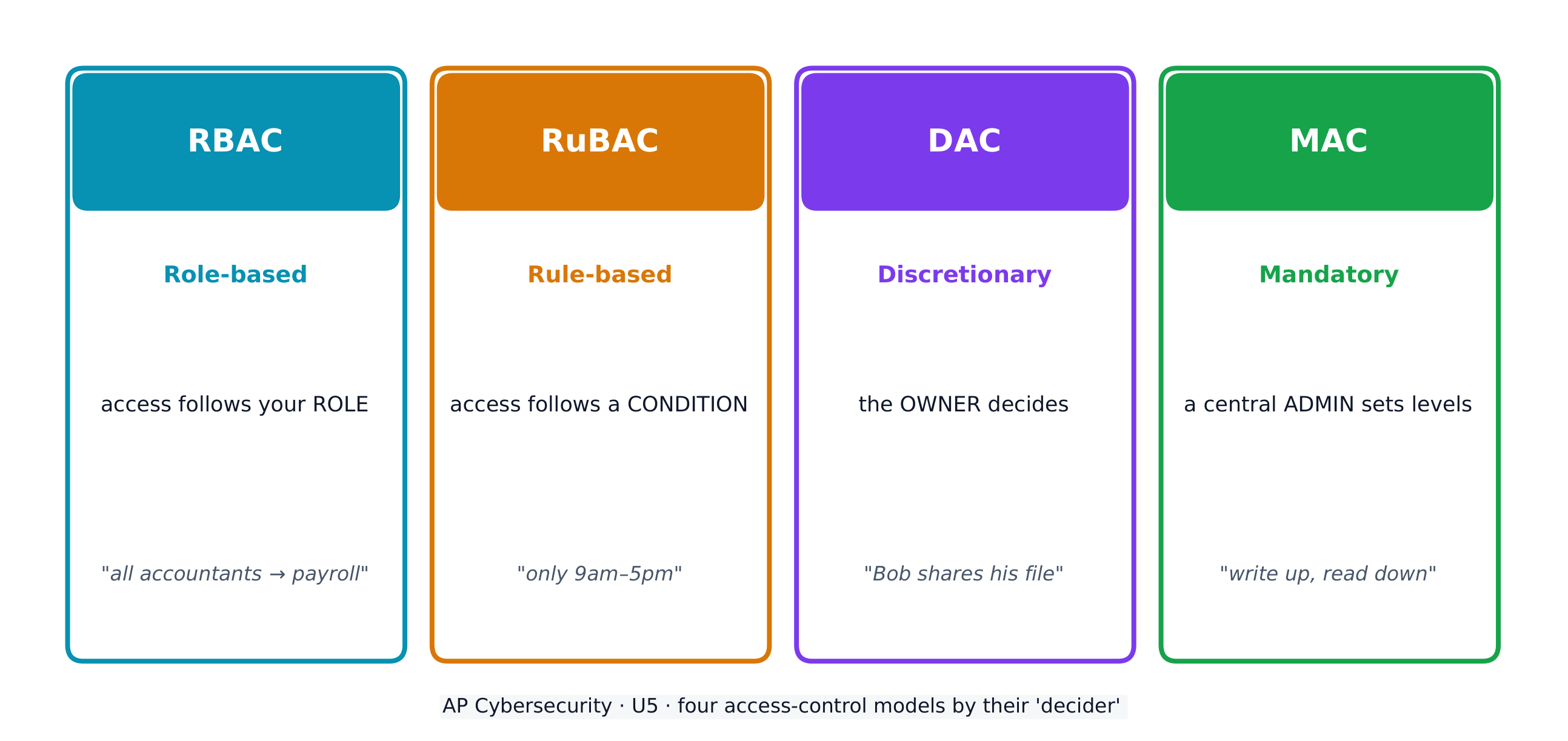
Access control decides which subjects (users) may perform which operations on which objects (files). Four models:
- Role-based (RBAC) 基于角色的访问控制 - access follows your role (all "accountants" reach the payroll software).
- Rule-based (RuBAC) 基于规则的访问控制 - access follows conditions (only during business hours), layered on another model.
- Discretionary (DAC) 自主访问控制 - the owner of a file decides who else may use it.
- Mandatory (MAC) 强制访问控制 - a central administrator sets strict levels; the Bell-LaPadula model summarises it as "write up, read down".
A guiding idea across all models is the principle of least privilege 最小权限原则 - give each entity exactly the access it needs and no more.
On a Linux system, each file has three permissions - read (r), write (w), execute (x) - for three groups: the owner, the group, and others. The chmod command sets them with numbers, adding 4 (read) + 2 (write) + 1 (execute). So chmod 640 means owner read+write (6), group read (4), others nothing (0).
Worked example. A principal wants only herself to read and edit a file, her staff group to read it, and no one else to touch it. Read+write = 4+2 = 6 for the owner, read = 4 for the group, nothing = 0 for others, giving chmod 640 file. The listing then shows -rw-r-----. To also let the owner run the file as a program you would add execute (7 = 4+2+1), giving chmod 740.
ไทย
ข้อมูลถูกจำแนกตาม สถานะ ของมัน — ขณะนิ่ง (at rest) (จัดเก็บอยู่ในไดรฟ์), ระหว่างส่ง (in transit) (เคลื่อนย้ายระหว่างอุปกรณ์), และ ขณะใช้งาน (in use) (กำลังถูกประมวลผล) ข้อมูลขณะนิ่งและระหว่างส่งสามารถ เข้ารหัส เพื่อให้โจรอ่านไม่ได้; ส่วนข้อมูลขณะใช้งานจำเป็นต้องถอดรหัสออก ดังนั้นจึงใช้ การควบคุมการเข้าถึง มาปกป้องแทน
บางประเภทของข้อมูลถูก ควบคุมโดยกฎหมาย — กฎหมายกำหนดวิธีการจัดเก็บ ส่งต่อ และการจัดการข้อมูล tersebut — ดังนั้นองค์กรต้องบรรลุ ความเป็นไปตามกฎระเบียบ (compliance) โดยการปรับมาตรการของตนให้สอดคล้องกับกฎเกณฑ์ ข้อสอบคาดหวังให้คุณจับคู่ประเภทข้อมูลกับกฎหมายที่เกี่ยวข้อง:
| ข้อมูลที่ถูกควบคุมโดยกฎหมาย | ความหมาย | กฎหมายที่เกี่ยวข้อง |
|---|---|---|
| ข้อมูลระบุตัวตน (PII) | ข้อมูลที่บ่งบอกถึงบุคคล: ชื่อ, ที่อยู่, เลขประกันสังคม, ข้อมูลชีวภาพ, วันเกิด | พระราชบัญญัติคุ้มครองข้อมูลส่วนบุคคล (1974); COPPA สำหรับผู้ที่มีอายุต่ำกว่า 13 ปี |
| ข้อมูลสุขภาพที่ถูกปกป้อง (PHI) | บันทึกด้านสุขภาพ การรักษา และการชำระเงินด้านสุขภาพ | HIPAA (1996) |
| ข้อมูลบัตรชำระเงิน (PCI) | หมายเลขบัตร, วันหมดอายุ, CVV, ชื่อบัตร holders | PCI-DSS |
องค์กรที่เก็บรวบรวมข้อมูลภายใต้กฎหมายต้อง ติดป้ายกำกับ และมี นโยบาย ที่ทำให้การจัดเก็บ การส่งผ่าน และการจัดการข้อมูลเป็นไปตามข้อบังคับ - ยิ่งความละเอียดอ่อนสูงเท่าใด ก็ยิ่งต้องการระดับความปลอดภัยที่สูงขึ้นเท่านั้น
การควบคุมการเข้าถึง กำหนดว่า ตัวรับ (subjects) (ผู้ใช้) สามารถดำเนินการ การกระทำ (operations) กับ วัตถุ (objects) (ไฟล์) ได้อย่างใด สี่รูปแบบหลัก:
- ตามบทบาท (RBAC) - การเข้าถึงขึ้นอยู่กับ บทบาท ของคุณ (บัญชี "นักบัญชี" ทั้งหมดสามารถเข้าถึงซอฟต์แวร์เงินเดือนได้)
- ตามกฎ (RuBAC) - การเข้าถึงขึ้นอยู่กับ เงื่อนไข (เช่น ในช่วงเวลาทำการ), ซึ่งวางซ้อนอยู่บนโมเดลอื่น
- ตามใจชอบ (DAC) - เจ้าของ ไฟล์เป็นผู้ตัดสินใจว่าใครสามารถใช้ไฟล์นั้นได้อีกบ้าง
- แบบบังคับใช้ (MAC) - ผู้ดูแลระบบส่วนกลางกำหนดระดับความเข้มงวด; โมเดล Bell-LaPadula สรุปสั้นๆ ว่า "เขียนขึ้น อ่านลง"
แนวคิดหลักที่ครอบคลุมทุกโมเดลคือ หลักการสิทธิ์ต่ำสุด - มอบสิทธิ์การเข้าถึงที่จำเป็นต่อแต่ละเอนทิตีอย่างพอดีโดยไม่เกินความจำเป็น
ในระบบ Linux ไฟล์แต่ละไฟล์มีสามสิทธิ์ - อ่าน (r), เขียน (w), รัน (x) สำหรับสามกลุ่ม: เจ้าของ, กลุ่ม, และ ผู้อื่น คำสั่ง chmod ใช้เลขเพื่อตั้งค่า โดยนำ 4 (อ่าน) + 2 (เขียน) + 1 (รัน) มาบวกกัน ดังนั้น chmod 640 หมายถึง เจ้าของอ่าน+เขียน (6), กลุ่มอ่าน (4), ผู้อื่นไม่มีสิทธิ์ (0)
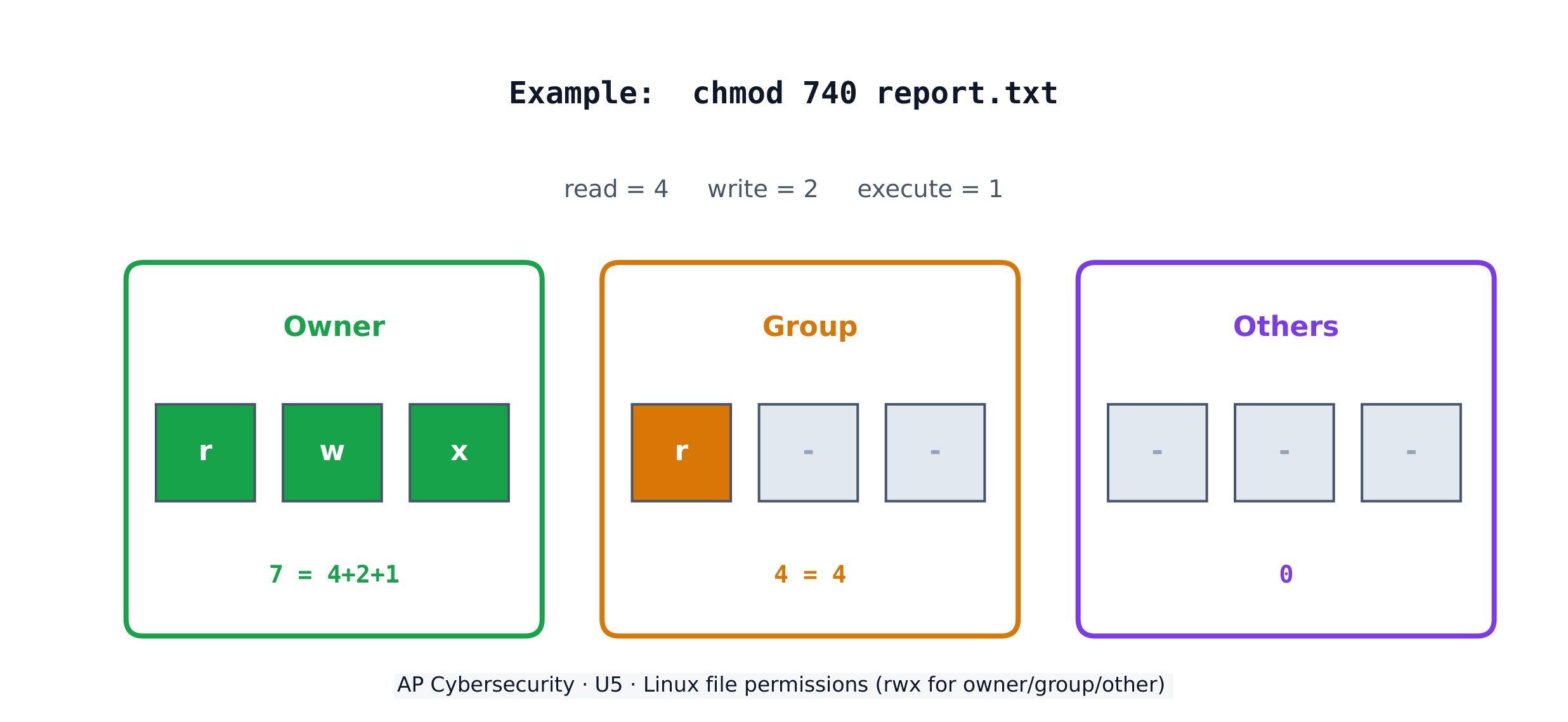
ตัวอย่างฝึกปฏิบัติ. เจ้าของต้องการให้ตัวเองอ่าน และ แก้ไขไฟล์ได้เพียงคนเดียว กลุ่มพนักงานอ่านได้ และไม่มีใคร其他人แตะต้อง อ่าน+เขียน = 4+2 = 6 สำหรับเจ้าของ, อ่าน = 4 สำหรับกลุ่ม, ไม่มีสิทธิ์ = 0 สำหรับผู้อื่น จะได้ค่า chmod 640 file รายการไฟล์จะแสดง -rw-r----- หากต้องการให้เจ้าของรันไฟล์เป็นโปรแกรมได้ด้วย ให้เพิ่มสิทธิ์รัน (7 = 4+2+1) จะได้ค่า chmod 740
Explore · สำรวจ
Which access-control model fits the rule? · โมเดลการควบคุมการเข้าถึงแบบใดสอดคล้องกับกฎ?
Each access-control model has a different decider: RBAC by your role, RuBAC by a condition, DAC by the file's owner, and MAC by a central administrator's levels. · แต่ละโมเดลการควบคุมการเข้าถึงมีผู้ตัดสินใจต่างกัน: RBAC ตามบทบาทของคุณ, RuBAC ตามเงื่อนไข, DAC ตามเจ้าของไฟล์, และ MAC ตามระดับของผู้ดูแลระบบกลาง
Vocabulary · คำศัพท์
Train · ฝึกฝน
| English | ไทย |
|---|---|
| at rest/æt rest/ | หยุดนิ่ง |
| in transit/ɪn ˈtrænsɪt/ | ระหว่างส่ง |
| in use/ɪn juːs/ | ขณะใช้งาน |
| regulated/ˈreɡjʊleɪtɪd/ | อยู่ภายใต้การควบคุม |
| compliance/kəmˈplaɪəns/ | การปฏิบัติตาม |
| personally identifiable information (PII)/ˈpɜːsənəli aɪˈdentɪfaɪəbl ˌɪnfəˈmeɪʃn/ | ข้อมูลระบุตัวตนส่วนบุคคล (PII) |
| protected health information (PHI)/prəˈtektɪd helθ ˌɪnfəˈmeɪʃn/ | ข้อมูลสุขภาพที่ถูกปกป้อง (PHI) |
| payment card information (PCI)/ˈpeɪmənt kɑːd ˌɪnfəˈmeɪʃn/ | ข้อมูลบัตรชำระเงิน (PCI) |
| Role-based (RBAC)/rəʊl beɪst/ | ตามบทบาท (RBAC) |
| Rule-based (RuBAC)/ruːl beɪst/ | ตามกฎเกณฑ์ (RuBAC) |
| Discretionary (DAC)/dɪˈskreʃənəri/ | แบบ自由选择 (DAC) |
| Mandatory (MAC)/ˈmændətəri/ | แบบบังคับ (MAC) |
| principle of least privilege/ˈprɪnsɪpl ɒv liːst ˈprɪvɪlɪdʒ/ | หลักการสิทธิ์ต่ำสุด |
| Cryptography/krɪpˈtɒɡrəfi/ | วิทยาการเข้ารหัสลับ |
| plaintext/ˈpleɪntekst/ | plaintext |
5.3
Protecting Stored Data with Cryptography · การปกป้องข้อมูลที่จัดเก็บด้วยคริปโตกราฟิก

Syllabus · หลักสูตร
English
Learning Objective 5.3.A: Explain how encryption can be used to protect files.
- 5.3.A.1 The purpose of cryptography is to hide information. A cryptographic algorithm defines a process for encrypting and decrypting information. Encryption is the process of hiding the information, and decryption is the process of reversing the encryption to retrieve the original information.
- 5.3.A.2 An encryption algorithm defines a process for combining the information to be encrypted with a predefined key. The information to be encrypted is called the plaintext. The output of the encryption algorithm is called the ciphertext.
- 5.3.A.3 The number of possible keys that can be used in an encryption algorithm is called the keyspace. The larger the keyspace, the longer it will take an adversary to discover the correct key by random chance.
- 5.3.A.4 Cryptographic algorithms are classified by whether they use one key or two keys.
- Symmetric encryption algorithms use the same key to encrypt and decrypt information.
- Asymmetric encryption algorithms use two different keys—one to encrypt information and the other to decrypt information.
- 5.3.A.5 Cryptographic algorithms are also classified by whether they process information one bit at a time or in fixed-size chunks of bits.
- Block encryption handles information in fixed-size chunks called blocks, producing an output block for each input block.
- Stream encryption handles input information continuously, producing output one element at a time.
Learning Objective 5.3.B: Apply symmetric encryption algorithms to encrypt and decrypt data.
- 5.3.B.1 Computer-based encryption algorithms operate on binary data. The most common symmetric encryption algorithm is the Advanced Encryption Standard (AES). AES encryption is used to secure Wi-Fi transmissions, internet browsing, file encryption on disks, and hardware-level encryption on processors.
- 5.3.B.2 AES is a symmetric key block cipher that encrypts data in 128-bit blocks (16 bytes). AES can operate with keys of varying lengths. Longer keys produce more secure encryption but require more time to encrypt and decrypt.
- 5.3.B.3 Symmetric encryption and decryption can be performed using the command line, specialized software, or web-based tools.
- On a command line interface, users can encrypt or decrypt with OpenSSL.
- Specialized software like AES Crypt is an open source tool that can encrypt and decrypt files.
- There are many web-based tools for encrypting and decrypting files.
- 5.3.B.4 Using OpenSSL in a CLI, a user can encrypt and decrypt a file using the following commands (note that the encryption key is derived from the password provided):
- To encrypt a file named test with AES using a 128-bit key, use the command: openssl enc -aes-128-cbc -e -in test -k password -out test.enc
- To decrypt the encrypted file using the same key, use the command: openssl enc -aes-128-cbc -d -in test.enc -k password -out text
ไทย
วัตถุประสงค์การเรียนรู้ 5.3.A: อธิบายวิธีการใช้ encryption ในการปกป้องไฟล์
- 5.3.A.1 วัตถุประสงค์ของการทำ cryptography คือการซ่อนข้อมูลอัลกอริทึม cryptographic กำหนดกระบวนการสำหรับการ encrypt และ decrypt ข้อมูล Encryption คือกระบวนการซ่อนข้อมูล และการ decrypt คือกระบวนการย้อนกลับจาก encryption เพื่อดึงข้อมูลเดิมกลับมา
- 5.3.A.2 อัลกอริทึมการเข้ารหัสกำหนดกระบวนการในการรวมข้อมูลที่ต้องการเข้ารหัสกับกุญแจที่กำหนดไว้ล่วงหน้า ข้อมูลที่ต้องการเข้ารหัสเรียกว่าข้อความต้นฉบับ (plaintext) ส่วนผลลัพธ์ที่ได้จากอัลกอริทึมการเข้ารหัสเรียกว่าข้อความที่เข้ารหัส (ciphertext)
- 5.3.A.3 จำนวนกุญแจที่เป็นไปได้ทั้งหมดที่สามารถใช้ในอัลกอริทึมการเข้ารหัสเรียกว่าพื้นที่กุญแจ (keyspace) พื้นที่กุญแจยิ่งใหญ่ ผู้โจมตีจะยิ่งใช้เวลานานในการค้นพบกุญแจที่ถูกต้องจากการสุ่ม
- 5.3.A.4 อัลกอริทึมคริปโตกราฟิกถูกจำแนกตามการใช้กุญแจหนึ่งหรือสองกุญแจ
- อัลกอริทึมการเข้ารหัสแบบสมมาตร (Symmetric encryption algorithms) ใช้กุญแจเดียวกันในการเข้ารหัสและถอดรหัสข้อมูล
- อัลกอริทึมการเข้ารหัสแบบอสมมาตร (Asymmetric encryption algorithms) ใช้กุญแจที่แตกต่างกันสองตัว—one用于加密信息,另一个用于解密信息。——หนึ่งสำหรับเข้ารหัสข้อมูล และอีกตัวหนึ่งสำหรับถอดรหัสข้อมูล
- 5.3.A.5 อัลกอริทึมคริปโตกราฟิกยังถูกจำแนกตาม处理方式ของข้อมูล:要么逐位处理,要么以固定大小的数据块处理。——处理方式: Either ประมวลผลข้อมูลทีละบิต หรือประมวลผลเป็นกลุ่มข้อมูลที่มีขนาดคงที่ (chunks of bits)
- การเข้ารหัสแบบบล็อก (Block encryption) จัดการข้อมูลเป็นกลุ่มที่มีขนาดคงที่เรียกว่า บล็อก (blocks) โดยสร้างบล็อกผลลัพธ์สำหรับแต่ละบล็อกอินพุต
- การเข้ารหัสแบบสตรีม (Stream encryption) จัดการข้อมูลอินพุตอย่างต่อเนื่อง สร้างเอาต์พุตทีละองค์ประกอบ
วัตถุประสงค์การเรียนรู้ 5.3.B: ใช้อัลกอริทึมการเข้ารหัสแบบสมมาตรเพื่อเข้ารหัสและถอดรหัสข้อมูล
- 5.3.B.1 อัลกอริทึมการเข้ารหัสบนคอมพิวเตอร์ทำงานกับข้อมูลแบบไบนารี อัลกอริทึมการเข้ารหัสแบบสมมาตรที่พบบ่อยที่สุดคือ Advanced Encryption Standard (AES) AES ถูกใช้ในการรักษาความปลอดภัยของการส่งผ่าน Wi-Fi การท่องอินเทอร์เน็ต การเข้ารหัสไฟล์บนดิสก์ และการเข้ารหัสระดับฮาร์ดแวร์ในโปรเซสเซอร์
- 5.3.B.2 AES เป็น block cipher แบบกุญแจสมมาตรที่เข้ารหัสข้อมูลเป็นบล็อกขนาด 128 บิต (16 ไบต์) AES สามารถทำงานได้ด้วยกุญแจที่มีความยาวหลากหลาย กุญแจที่ยาวขึ้นให้ระดับความปลอดภัยที่สูงขึ้นแต่ต้องใช้เวลามากขึ้นในการเข้ารหัสและถอดรหัส
- 5.3.B.3 การเข้ารหัสและถอดรหัสแบบสมมาตรสามารถดำเนินการได้ผ่าน command line, ซอฟต์แวร์เฉพาะทาง หรือเครื่องมือบนเว็บ
- บนอินเทอร์เฟซ command line ผู้ใช้สามารถเข้ารหัสหรือถอดรหัสด้วย OpenSSL
- ซอฟต์แวร์เฉพาะทางอย่าง AES Crypt เป็นเครื่องมือ open source ที่สามารถเข้ารหัสและถอดรหัสไฟล์ได้
- มีเครื่องมือบนเว็บมากมายสำหรับการเข้ารหัสและถอดรหัสไฟล์
- 5.3.B.4 การใช้ OpenSSL ใน CLI ผู้ใช้สามารถเข้ารหัสและถอดรหัสไฟล์โดยใช้คำสั่งต่อไปนี้ (หมายเหตุว่ากุญแจการเข้ารหัสได้มาจากคำรหัสที่ระบุ):
- เพื่อเข้ารหัสไฟล์ชื่อ test โดยใช้ AES กับกุญแจขนาด 128 บิต ให้ใช้คำสั่ง: openssl enc -aes-128-cbc -e -in test -k password -out test.enc
- เพื่อถอดรหัสไฟล์ที่เข้ารหัสแล้วโดยใช้กุญแจเดียวกัน ให้ใช้คำสั่ง: openssl enc -aes-128-cbc -d -in test.enc -k password -out text
Source: College Board AP Course and Exam Description · แหล่งที่มา: คำอธิบายหลักสูตรและข้อสอบ College Board AP
English
Cryptography 密码学 hides information. An encryption algorithm combines the plaintext 明文 with a key 密钥 to produce ciphertext 密文; decryption reverses it. The keyspace 密钥空间 is the number of possible keys - the bigger it is, the longer an adversary needs to guess. An n-bit key has a keyspace of $2^n$.
Symmetric encryption 对称加密 uses the same key to encrypt and decrypt. The standard is AES 高级加密标准, a block cipher 分组密码 that works on 128-bit blocks and secures Wi-Fi, browsing, and stored files. Because both sides need the same secret key, sharing that key safely is the challenge.
ไทย
คริปโตกราฟิก ซ่อนข้อมูล อัลกอริทึมการเข้ารหัส ผสาน ข้อความต้นฉบับ เข้ากับ กุญแจ เพื่อสร้าง ข้อความรหัส; การถอดรหัส ทำการย้อนกลับ กุญแจทั้งหมด (keyspace) คือจำนวนกุญแจที่เป็นไปได้ - ยิ่งมากเท่าไร ผู้โจมตีก็ยิ่งต้องใช้เวลานานในการเดา越 n-bit มี keyspace เท่ากับ $2^n$
การเข้ารหัสแบบสมมาตร ใช้ กุญแจเดียวกัน ทั้งในการเข้ารหัสและการถอดรหัส มาตรฐานคือ AES ซึ่งเป็น block cipher ทำงานบนบล็อกขนาด 128 บิต และปกป้อง Wi-Fi การท่องเว็บ และไฟล์ที่จัดเก็บ เนื่องจากทั้งสองฝ่ายต้องใช้กุญแจลับเดียวกัน การแบ่งปันกุญแจนี้ให้ปลอดภัยจึงเป็นความท้าทาย

Explore · สำรวจ
Encrypt a message by shifting letters · เข้ารหัสข้อความด้วยการเลื่อนตัวอักษร
Encryption combines plaintext with a key to make ciphertext. In this simple cipher the key is the shift amount; only someone who knows the shift can decrypt the message back. · การเข้ารหัสผสมข้อความต้นฉบับกับกุญแจเพื่อให้เป็นข้อความรหัส ในระบบรหัสง่ายๆ นี้ กุญแจคือจำนวนการเลื่อน; มีเพียงคนที่รู้การเลื่อนเท่านั้นที่จะถอดรหัสข้อความกลับได้
Vocabulary · คำศัพท์
Train · ฝึกฝน
| English | ไทย |
|---|---|
| key/kiː/ | คีย์ |
| ciphertext/ˈsaɪfətekst/ | ciphertext |
| keyspace/ˈkiːspeɪs/ | พื้นที่กุญแจ |
| Symmetric encryption/sɪˈmetrɪk enˈkrɪpʃn/ | Symmetric encryption |
| AES/ˌeɪ iː ˈes/ | AES |
| block cipher/blɒk ˈsaɪfə/ | บล็อกไซเฟอร์ |
| Asymmetric encryption/ˌeɪsɪˈmetrɪk enˈkrɪpʃn/ | Asymmetric encryption |
| key pair/kiː peə/ | คู่กุญแจ |
| public key/ˈpʌblɪk kiː/ | public key |
| private key/ˈpraɪvət kiː/ | กุญแจส่วนตัว |
| elliptic curve cryptography (ECC)/ɪˈlɪptɪk kɜːv krɪpˈtɒɡrəfi/ | การเข้ารหัสเส้นโค้งวงรี (ECC) |
5.4
Asymmetric Cryptography · คริปโตกราฟิกแบบอสมมาตร

Syllabus · หลักสูตร
English
Learning Objective 5.4.A: Determine the appropriate asymmetric key to use when sending or receiving encrypted data.
- 5.4.A.1 Asymmetric encryption allows users to communicate securely without prearranging a shared secret key.
- 5.4.A.2 When using asymmetric encryption, each entity that will be receiving data must first generate a key pair. Key pairs are binary strings of equal length that are generated at the same time through a mathematical process. One key is designated as the public key and the other as the private key. The keys are mathematical inverses of each other— each key reverses its partner. Either key can be used to encrypt information, but only the other key in the key pair will then be able to decrypt it.
- 5.4.A.3 Once the receiver generates the key pair, the private key must be stored securely. If the private key is exposed, shared, stolen, corrupted, or compromised the key pair must be deleted and a new key pair must be generated, because the security of the encryption algorithm rests on the security of the private key. The public key is published for anyone to view and use.
- 5.4.A.4 To send information securely to someone, the sender will use the receiver’s public key to encrypt the data and send it. Only the receiver who has the private key will be able to decrypt and read the information.
Learning Objective 5.4.B: Explain why the length of a key impacts the security of encrypted data.
- 5.4.B.1 Longer keys result in larger keyspaces. For binary keys, an n-bit length key has a keyspace of $2^n$.
- 5.4.B.2 Using an application to randomly guess an n-bit length encryption key means that on average an adversary will be able to guess the correct key in $2^n \div 2$ (or $2^{n-1}$) guesses.
- 5.4.B.3 Although longer keys are more secure, they also require more time to encrypt and decrypt messages.
- 5.4.B.4 Computational processing power and efficiency continue to improve, allowing software to guess keys faster. Key-length recommendations for both symmetric and asymmetric encryption algorithms are periodically increased to account for increased processing power.
- 5.4.B.5 Key-length comparison is only valid when comparing keys for the same cryptographic algorithm.
- Illustrative examples for 5.4.B.5:
- An AES 256-bit key is more secure than an AES 128-bit key.
- An RSA 4096-bit key is more secure than an RSA 2048-bit key.
- RSA and AES keys cannot be directly compared to one another in determining the level of security.
- Illustrative examples for 5.4.B.5:
Learning Objective 5.4.C: Apply asymmetric encryption algorithms to encrypt and decrypt data.
- 5.4.C.1 Common asymmetric encryption algorithms include RSA and elliptic curve cryptography (ECC). Asymmetric algorithms are used in many applications, including digital signatures and digital certificates.
- 5.4.C.2 As with symmetric encryption, asymmetric encryption and decryption can be performed using the command line, specialized software, or web-based tools.
- On a command line interface, users can encrypt or decrypt with OpenSSL.
- Specialized software like RSA Encryption Tool is an open source tool that can encrypt and decrypt files.
- There are many web-based tools for encrypting and decrypting files.
- 5.4.C.3 In a CLI, a user can generate an asymmetric key pair and encrypt or decrypt files as necessary.
- To generate a 2048-bit RSA key pair and save the key to a file named rsa.pem use the command: openssl genrsa -out rsa.pem 2048
- To extract the public key from rsa.pem into a file named public.pem, use the command: openssl rsa -pubout -in rsa.pem -outform PEM -out public.pem
- To encrypt the file test using RSA encryption and the key file public.pem, use the command: openssl pkeyutl -encrypt -pubin -inkey public.pem -in test -out test.enc
- To decrypt the test.enc file using the rsa.pem file, run the command: openssl pkeyutl -decrypt -inkey rsa.pem -in test.enc -out test
ไทย
วัตถุประสงค์การเรียนรู้ 5.4.A: กำหนดประเภทกุญแจแบบอสมมาตรที่เหมาะสมในการส่งหรือรับข้อมูลที่ถูกเข้ารหัส
- 5.4.A.1 การเข้ารหัสแบบอสมมาตรช่วยให้ผู้ใช้สื่อสารกันอย่างปลอดภัยโดยไม่ต้องกำหนด shared secret key ล่วงหน้า
- 5.4.A.2 เมื่อใช้การเข้ารหัสแบบไม่สมมาตร (Asymmetric encryption) ทุกเอนทิตี้ที่จะรับข้อมูลต้องสร้างคู่กุญแจก่อน คู่กุญแจคือ一串ข้อความแบบไบนารีที่มีความยาวเท่ากัน ซึ่งถูกสร้างขึ้นพร้อมกันผ่านกระบวนการทางคณิตศาสตร์ กุญแจหนึ่งถูกกำหนดให้เป็นกุญแจสาธารณะ (Public key) และอีกกุญแจหนึ่งเป็นกุญแจส่วนตัว (Private key) กุญแจทั้งสองเป็นผล역ทางคณิตศาสตร์ต่อกัน โดยแต่ละกุญแจจะย้อนกลับคู่ของมัน กุญแจใดก็ได้สามารถใช้เข้ารหัสข้อมูลได้ แต่จะเพียงกุญแจอีกตัวหนึ่งในคู่เท่านั้นที่จะสามารถถอดรหัสข้อมูลนั้นได้
- 5.4.A.3 เมื่อผู้รับสร้างคู่กุญแจแล้ว กุญแจส่วนตัวต้องถูกเก็บรักษาไว้อย่างปลอดภัย หากกุญแจส่วนตัวถูกเปิดเผย ถูกแชร์ ถูกขโมย เสียหาย หรือถูกทำลาย ความปลอดภัยของอัลกอริทึมการเข้ารหัสจะขึ้นอยู่กับความปลอดภัยของกุญแจส่วนตัว ดังนั้นต้องลบคู่กุญแจเก่าออกและสร้างคู่กุญแจใหม่ กุญแจสาธารณะจะถูกเผยแพร่ให้ทุกคนมองเห็นและใช้งานได้
- 5.4.A.4 ในการส่งข้อมูลอย่างปลอดภัยไปยังผู้อื่น ผู้ส่งจะใช้กุญแจสาธารณะของผู้รับเพื่อเข้ารหัสข้อมูลและส่งไป เพียงผู้รับซึ่งมีกุญแจส่วนตัวเท่านั้นที่จะสามารถถอดรหัสและอ่านข้อมูลได้
วัตถุประสงค์การเรียนรู้ 5.4.B: อธิบายเหตุผลที่ความยาวของกุญแจมีผลต่อความปลอดภัยของข้อมูลที่ถูกเข้ารหัส
- 5.4.B.1 กุญแจที่ยาวขึ้นจะทำให้พื้นที่กุญแจ (Keyspace) กว้างขึ้น สำหรับกุญแจแบบไบนารี กุญแจที่มีความยาว n บิต จะมีพื้นที่กุญแจจำนวน $2^n$
- 5.4.B.2 การใช้แอปพลิเคชันในการสุ่มทายกุญแจเข้ารหัสความยาว n บิต หมายความว่าโดยเฉลี่ยแล้วผู้โจมตีจะสามารถทายกุญแจที่ถูกต้องได้ใน $2^n \div 2$ (หรือ $2^{n-1}$) ครั้ง
- 5.4.B.3 แม้กุญแจที่ยาวจะปลอดภัยกว่า แต่ก็ต้องใช้เวลามากขึ้นในการเข้ารหัสและถอดรหัสข้อความ
- 5.4.B.4 กำลังการประมวลผลและความมีประสิทธิภาพของคอมพิวเตอร์ยังคงพัฒนาขึ้น ทำให้ซอฟต์แวร์สามารถทายกุญแจได้เร็วขึ้น คำแนะนำเกี่ยวกับความยาวกุญแจสำหรับอัลกอริทึมการเข้ารหัสแบบสมมาตรและอสมมาตรจะถูกปรับปรุงเป็นระยะเพื่อรองรับการเพิ่มขึ้นของกำลังการประมวลผล
- 5.4.B.5 การเปรียบเทียบความยาวกุญแจจะมีนัยสำคัญเมื่อเปรียบเทียบกุญแจของอัลกอริทึมคริปโตกราฟิกชนิดเดียวกันเท่านั้น
- ตัวอย่างประกอบสำหรับ 5.4.B.5:
- กุญแจ AES ขนาด 256 บิต ปลอดภัยมากกว่ากุญแจ AES ขนาด 128 บิต
- กุญแจ RSA ขนาด 4096 บิต ปลอดภัยมากกว่ากุญแจ RSA ขนาด 2048 บิต
- กุญแจ RSA และ AES ไม่สามารถเปรียบเทียบกันโดยตรงเพื่อตัดสินระดับความปลอดภัย
- ตัวอย่างประกอบสำหรับ 5.4.B.5:
วัตถุประสงค์การเรียนรู้ 5.4.C: ใช้อัลกอริทึมการเข้ารหัสแบบอสมมาตรเพื่อเข้ารหัสและถอดรหัสข้อมูล
- 5.4.C.1 อัลกอริทึมการเข้ารหัสแบบอสมมาตรที่พบบ่อย ได้แก่ RSA และ elliptic curve cryptography (ECC) อัลกอริทึมแบบอสมมาตรถูกใช้งานในหลายแอปพลิเคชัน รวมถึงลายเซ็นดิจิทัลและใบรับรองดิจิทัล
- 5.4.C.2 เหมือนกับการเข้ารหัสแบบสมมาตร การเข้ารหัสและถอดรหัสแบบอสมมาตรสามารถดำเนินการได้ผ่าน command line, ซอฟต์แวร์เฉพาะทาง หรือเครื่องมือบนเว็บ
- บนอินเทอร์เฟซ command line ผู้ใช้สามารถเข้ารหัสหรือถอดรหัสด้วย OpenSSL
- ซอฟต์แวร์เฉพาะทางเช่น RSA Encryption Tool เป็นเครื่องมือโอเพนซอร์สที่สามารถเข้ารหัสและถอดรหัสไฟล์ได้
- มีเครื่องมือบนเว็บมากมายสำหรับการเข้ารหัสและถอดรหัสไฟล์
- 5.4.C.3 ใน CLI ผู้ใช้สามารถสร้างคู่กุญแจแบบอสมมาตร และเข้ารหัสหรือถอดรหัสไฟล์ได้ตามความจำเป็น
- เพื่อสร้างคู่กุญแจ RSA ขนาด 2048 บิตและบันทึกกุญแจลงในไฟล์ชื่อ rsa.pem ให้ใช้คำสั่ง: openssl genrsa -out rsa.pem 2048
- เพื่อดึงกุญแจสาธารณะจาก rsa.pem ลงในไฟล์ชื่อ public.pem ให้ใช้คำสั่ง: openssl rsa -pubout -in rsa.pem -outform PEM -out public.pem
- เพื่อเข้ารหัสไฟล์ test โดยใช้การเข้ารหัส RSA และไฟล์กุญแจ public.pem ให้ใช้คำสั่ง: openssl pkeyutl -encrypt -pubin -inkey public.pem -in test -out test.enc
- เพื่อถอดรหัสไฟล์ test.enc โดยใช้ไฟล์ rsa.pem ให้รันคำสั่ง: openssl pkeyutl -decrypt -inkey rsa.pem -in test.enc -out test
Source: College Board AP Course and Exam Description · แหล่งที่มา: คำอธิบายหลักสูตรและข้อสอบ College Board AP
English
Asymmetric encryption 非对称加密 solves the key-sharing problem with a key pair 密钥对 - a public key 公钥 anyone may see and a private key 私钥 kept secret. The keys are mathematical inverses: whatever one locks, only the other unlocks. To send you a secret, I encrypt with your public key, and only your private key can decrypt it - so we never had to share a secret in advance.
Longer keys mean larger keyspaces and more security, but slower encryption. Common asymmetric algorithms are RSA and elliptic curve cryptography (ECC) 椭圆曲线密码学, used in digital signatures and certificates. Remember: you can only compare key lengths within the same algorithm - an RSA 4096-bit key is not directly comparable to an AES 256-bit key.
ไทย
การเข้ารหัสแบบอสมมาตร แก้ปัญหาการแบ่งปันกุญแจโดยใช้ คู่กุญแจ - กุญแจสาธารณะ ที่ใครก็ตามมองเห็นได้ และ กุญแจส่วนตัว ที่เก็บเป็นความลับ กุญแจทั้งสองเป็นผล역ทางคณิตศาสตร์: สิ่งใดที่หนึ่งล็อกไว้ อีกหนึ่งจะเปิดออก หากฉันต้องการส่งข้อความลับให้คุณ ฉันจะเข้ารหัสด้วย กุญแจสาธารณะของคุณ และเฉพาะ กุญแจส่วนตัวของคุณ เท่านั้นที่จะถอดรหัสได้ - เราจึงไม่ต้องแบ่งปันความลับล่วงหน้า
กุญแจที่ยาวขึ้นหมายถึง keyspaces ที่ใหญ่ขึ้นและความปลอดภัยที่สูงขึ้น แต่ความเร็วในการเข้ารหัสจะลดลง อัลกอริทึมอสมมาตรที่พบบ่อยคือ RSA และ คริปโตกราฟิกวงรี (ECC) ใช้ในลายเซ็นดิจิทัลและใบรับรอง จำไว้ว่า: คุณเปรียบเทียบความยาวกุญแจได้เฉพาะ ภายในอัลกอริทึมเดียวกัน - กุญแจ RSA ขนาด 4096 บิต ไม่สามารถเทียบโดยตรงกับ AES 256 บิตได้

5.5
Protecting Applications · การปกป้องแอปพลิเคชัน
Syllabus · หลักสูตร
English
Learning Objective 5.5.A: Identify the application security principles of secure by design and security by default.
- 5.5.A.1 Secure by design is an initiative that encourages companies to include security in all phases of product development including design. When organizations implement secure by design, security is a design principle not just a technical feature.
- 5.5.A.2 Secure by design includes three design principles:
- i. Companies should take ownership of customer security outcomes. Companies should build products that meet the security needs of their customers.
- ii. Companies should embrace radical transparency and accountability. Sharing relevant security-related product news and updates quickly increases security for everyone.
- iii. Companies should build organizational structure and leadership to implement secure by design. Companies need leaders who are focused on security and have a security-first posture.
- 5.5.A.3 Secure by design includes the concept of secure by default, which is the idea that security features for software and devices should be enabled by default. Devices and software should be secure to use out of the box, with security features already enabled.
Learning Objective 5.5.B: Explain how user input sanitization protects applications.
- 5.5.B.1 When users enter input into an application, the application typically encases that input in special characters to process it. The characters that encase the user input are called control characters and include the single quote, the double quote, and the semicolon.
- 5.5.B.2 When creating a program that takes user input, programmers should use a function to verify that user input meets their expected criteria and does not include any control characters that could be used to manipulate the system. This verification function can sanitize user input by removing potentially malicious characters, or it can give the user an error and force the user to provide different input. This can protect against many application attacks, including:
- SQL injection attacks
- XSS attacks
- Directory traversal attacks
ไทย
วัตถุประสงค์การเรียนรู้ 5.5.A: ระบุหลักการความปลอดภัยของแอปพลิเคชันแบบออกแบบมาเพื่อความปลอดภัย (secure by design) และความปลอดภัยโดยค่าเริ่มต้น (security by default)
- 5.5.A.1 Secure by design เป็นโครงการที่ส่งเสริมให้บริษัทรวมความปลอดภัยไว้ในทุกขั้นตอนของการพัฒนาผลิตภัณฑ์ รวมถึงการออกแบบ เมื่อองค์กรนำ secure by design มาใช้ ความปลอดภัยจะเป็นหลักการออกแบบ ไม่ใช่เพียงฟีเจอร์ทางเทคนิคเท่านั้น
- 5.5.A.2 Secure by design ประกอบด้วยหลักการออกแบบสามประการ:
- i. บริษัทควรรับผิดชอบผลลัพธ์ด้านความปลอดภัยของลูกค้า บริษัทควรสร้างผลิตภัณฑ์ที่ตอบสนองความต้องการด้านความปลอดภัยของลูกค้า
- ii. บริษัทควรยอมรับความโปร่งใสอย่างเต็มที่และความรับผิดชอบ การแบ่งปันข่าวสารและอัปเดตเกี่ยวกับผลิตภัณฑ์ที่เกี่ยวข้องกับความปลอดภัยอย่างรวดเร็วจะช่วยเพิ่มความปลอดภัยให้กับทุกคน
- iii. บริษัทควรสร้างโครงสร้างองค์กรและการผู้นำเพื่อดำเนินการตามหลัก secure by design บริษัทต้องการผู้นำที่มุ่งเน้นความปลอดภัยและมีทัศนคติที่ความปลอดภัยเป็นอันดับหนึ่ง
- 5.5.A.3 Secure by design รวมถึงแนวคิดเรื่อง secure by default ซึ่งหมายถึง идеяที่ว่าคุณสมบัติความปลอดภัยสำหรับซอฟต์แวร์และอุปกรณ์ควรถูกเปิดใช้งานโดยค่าเริ่มต้น อุปกรณ์และซอฟต์แวร์ควรปลอดภัยในการใช้งานทันทีเมื่อออกจากกล่อง โดยมีการเปิดใช้งานคุณสมบัติความปลอดภัยไว้ล่วงหน้าแล้ว
วัตถุประสงค์การเรียนรู้ 5.5.B: อธิบายว่าการล้างข้อมูลอินพุตของผู้ใช้ช่วยปกป้องแอปพลิเคชันได้อย่างไร
- 5.5.B.1 เมื่อผู้ใช้ป้อนข้อมูลลงในแอปพลิเคชัน แอปพลิเคชันมักจะห่อหุ้มข้อมูลนั้นด้วยตัวอักษรพิเศษเพื่อประมวลผล ตัวอักษรที่ใช้ห่อหุ้มข้อมูลผู้ใช้เรียกว่า control characters ได้แก่เครื่องหมายอ Wich apostrophe, เครื่องหมายคำพูดคู่ และเครื่องหมายกึ่งจุด
- 5.5.B.2 ในการสร้างโปรแกรมที่รับข้อมูลผู้ใช้ นักเขียนโปรแกรมควรใช้ฟังก์ชันเพื่อยืนยันว่าข้อมูลผู้ใช้สอดคล้องกับเกณฑ์ที่กำหนดและไม่รวม control characters ที่อาจถูกใช้เพื่อ dimanipulate ระบบ ฟังก์ชันยืนยันนี้สามารถล้างข้อมูลผู้ใช้โดยการลบตัวอักษรที่เป็นอันตราย potensial หรือสามารถแสดงข้อผิดพลาดแก่ผู้ใช้และบังคับให้ผู้ใช้ป้อนข้อมูลอื่น ฟังก์ชันนี้สามารถป้องกันโจมตีแอปพลิเคชันหลายประเภทได้ รวมถึง:
- การโจมตี SQL injection
- การโจมตี XSS
- การโจมตี Directory traversal
Source: College Board AP Course and Exam Description · แหล่งที่มา: คำอธิบายหลักสูตรและข้อสอบ College Board AP
English
Two design principles keep applications safe from the start. Secure by design 安全设计 builds security into every phase of development, not as an afterthought. Secure by default 默认安全 means the product ships with its security features already enabled - safe straight out of the box.
Secure by design rests on three principles a company must adopt: (1) take ownership of its customers' security outcomes rather than shifting blame onto users, (2) embrace radical transparency and accountability – sharing security-relevant news and updates quickly so everyone becomes safer, and (3) build the organisational structure and leadership that makes security a first-class goal.
The key defense against injection attacks is input sanitization 输入清理. Certain special characters 特殊字符 - the single quote, double quote, and semicolon - can be used to manipulate a system, so a good program removes or rejects them before processing. Sanitization protects against SQL injection, XSS, and directory-traversal attacks alike.
ไทย
หลักออกแบบสองประการช่วยให้แอปพลิเคชันปลอดภัยตั้งแต่ต้น ออกแบบมาเพื่อความปลอดภัย (Secure by design) สร้างความปลอดภัยเข้าในทุกขั้นตอนการพัฒนา ไม่ใช่เป็นการแก้ทีหลัง ปลอดภัยโดยค่าเริ่มต้น (Secure by default) หมายความว่าผลิตภัณฑ์ออกมาพร้อมฟีเจอร์ความปลอดภัยที่ เปิดใช้งาน แล้ว ปลอดภัยทันทีจากกล่อง
设计理念 Secure by design rests on three principles a company must adopt: (1) ยอมรับความรับผิดชอบต่อผลลัพธ์ด้านความปลอดภัยของลูกค้า แทนที่จะโยนความผิดให้ผู้ใช้, (2) ยอมรับ ความโปร่งใสอย่างรุนแรงและความรับผิดชอบ – แจ้งข่าวสารและอัปเดตที่เกี่ยวข้องกับความปลอดภัยอย่างรวดเร็วเพื่อให้ทุกคนปลอดภัยมากขึ้น, และ (3) สร้าง โครงสร้างองค์กรและการนำ ที่ทำให้ความปลอดภัยเป็นเป้าหมายสำคัญ
การป้องกันหลัก ضد的攻击 injection คือ การทำความสะอาดอินพุต (input sanitization) ตัวอักษรพิเศษ บางชนิด - เช่นเครื่องหมายอ Wich apostrophe,เครื่องหมาย quotation marks, และเครื่องหมาย semicolon - สามารถถูกใช้เพื่อ manipulated ระบบ ดังนั้นโปรแกรมที่ดีจะลบหรือปฏิเสธตัวอักษรเหล่านี้ก่อนการประมวลผล การทำความสะอาดนี้ช่วยป้องกัน SQL injection, XSS, และการโจมตี directory-traversal ได้
Vocabulary · คำศัพท์
Train · ฝึกฝน
| English | ไทย |
|---|---|
| Secure by design/sɪˈkjʊə baɪ dɪˈzaɪn/ | ปลอดภัยด้วยการออกแบบ |
| Secure by default/sɪˈkjʊə baɪ dɪˈfɒlt/ | ปลอดภัยโดยค่าเริ่มต้น |
| input sanitization/ˈɪnpʊt ˌsænɪtaɪˈzeɪʃn/ | input sanitization |
| special characters/ˈspeʃl ˈkærɪktəz/ | อักขระพิเศษ |
| accounting/əˈkaʊntɪŋ/ | บัญชี |
5.6
Detecting Attacks on Data and Applications · การตรวจจับการโจมตีต่อข้อมูลและแอปพลิเคชัน
Syllabus · หลักสูตร
English
Learning Objective 5.6.A: Explain how to detect attacks on data.
- 5.6.A.1 Devices track and log when data are accessed and by whom. The process of recording and monitoring user activities is called accounting. Analysis of these logs can reveal malicious activity when an adversary attempts to access, copy, move, or delete data. Suspicious activity can include:
- Accessing files that aren’t typically accessed
- Accessing files or applications outside of a user’s normal patterns (including time of day, location, and device type)
- Attempts to delete or copy sensitive files
- 5.6.A.2 A honeypot is a file that appears as if it contains valuable data (e.g., credit card information, PII, passwords), but the data in the file are fake. A system can alert defenders if someone attempts to access the honeypot. Since the honeypot is a fake file, there is no legitimate reason to be accessing it, and any attempted access would be an indicator of malicious activity.
- 5.6.A.3 Cryptographic hash functions can generate a digest for data and can reveal if data have been altered. If a file has changed unexpectedly, this can be a sign of malicious activity.
Learning Objective 5.6.B: Determine controls for detecting attacks against applications or data.
- 5.6.B.1 Cost is a criterion in determining detective controls. Detective controls like honeypots and using hash values to check data integrity are inexpensive. Some organizations invest in third-party data loss prevention (DLP) services, which monitor data access, usage, and transmission by users throughout the organization to detect suspicious activity; DLP services provide strong detection capabilities at a higher cost.
- 5.6.B.2 Sensitivity or criticality of data or applications is a criterion in determining detective controls. More sensitive or critical data or applications are more likely targets of an adversary and should be monitored more closely.
- 5.6.B.3 Classification of data is a criterion in determining detective controls. Data that have been classified as private, educational, healthcare, or financial often have legal or regulatory detection and monitoring requirements.
Learning Objective 5.6.C: Evaluate the impact of a method for detecting attacks against an application or data.
- 5.6.C.1 To operate at an effective speed, log analysis needs to be augmented with some automation. Honeypots offer near instantaneous detection capabilities.
- 5.6.C.2 Some DLP tools, honeypots, and realtime automated log analysis provide alerts as an attack is happening. These tools allow for a prompt response that can stop an attack before it does more harm. Retrospective log analysis and the use of cryptographic hashes to verify data integrity identify attacks after they have occurred.
- 5.6.C.3 False negatives can occur in applications and data attack detection. Cryptographic hash functions only detect if data have been altered. An adversary could view and steal data without altering it, and a cryptographic hash function would not detect this. Honeypots cannot detect adversaries that do not attempt to access them.
Learning Objective 5.6.D: Identify whether a file has been altered by verifying its hash.
- 5.6.D.1 Cryptographic hash functions can help identify changes in a file because they are repeatable: the same input always produces the same output for a given hash function.
- 5.6.D.2 Hashes can be calculated using the command line on a computer, a website, or specialized software.
- In Windows Powershell, if a user wanted to generate the SHA256 hash for a file named testfile, they would use the command: Get-FileHash testfile -Algorithm SHA256
- In BASH the same could be accomplished with the command: sha256sum testfile
- In zsh, the common command line terminal on Apple computers, this could be accomplished with the command: shasum -a 256 testfile
- 5.6.D.3 A file can be hashed and its hash output recorded. Then it can be hashed again later, and the second hash output can be compared to the previous hash output for the same file. If a file’s hash changes, then the file was altered between when the first and second hashes were generated.
Learning Objective 5.6.E: Apply detection techniques to identify and report indicators of application attacks by analyzing log files.
- 5.6.E.1 SQL injection attacks can be detected by reviewing application and server logs of user input for SQL control words and symbols such as:
- A single (
') or double (") quote character - Boolean conditions like OR 1=1
- A double dash (which indicates a comment in SQL): --
- SQL control words (always in capital letters) like WHERE, IN, FROM
- A single (
- 5.6.E.2 XSS attacks can be detected by reviewing user input for suspicious tags, particularly the tag.
- 5.6.E.3 For web applications, buffer overflows can be detected by checking the amount of data the user is sending to the web application in their request. The fields commonly checked are the URL length, cookie length, query string length, and total request length. Long strings in any of these fields can be an indicator of an attempted buffer overflow attack.
- 5.6.E.4 Directory traversal attacks can be detected by reviewing application and server logs. HTTP GET requests that include paths with sequences of ../ are indicators of an adversary attempting a directory traversal.
ไทย
วัตถุประสงค์การเรียนรู้ 5.6.A: อธิบายวิธีการตรวจจับการโจมตีต่อข้อมูล
- 5.6.A.1 อุปกรณ์ติดตามและบันทึกลงบันทึกเมื่อมีผู้เข้าถึงข้อมูลและใครเป็นผู้เข้าถึง กระบวนการบันทึกและตรวจสอบกิจกรรมของผู้ใช้เรียกว่า accounting การวิเคราะห์บันทึกเหล่านี้สามารถเปิดเผยกิจกรรมที่เป็นอันตรายเมื่อนักโจมตีพยายามเข้าถึง คัดลอก ย้าย หรือลบข้อมูล กิจกรรมที่สงสัยอาจรวมถึง:
- การเข้าถึงไฟล์ที่ไม่ใช่ไฟล์ที่ถูกเข้าถึงโดยทั่วไป
- การเข้าถึงไฟล์หรือแอปพลิเคชันนอกเหนือจากรูปแบบปกติของผู้ใช้ (รวมถึงเวลาของวัน ตำแหน่งที่ตั้ง และประเภทอุปกรณ์)
- ความพยายามที่จะลบหรือคัดลอกไฟล์ที่มีข้อมูลสำคัญ
- 5.6.A.2 Honeypot คือไฟล์ที่ดูเหมือนจะมีข้อมูลที่มีค่า (เช่น ข้อมูลบัตรเครดิต PII รหัสผ่าน) แต่ข้อมูลในไฟล์นั้นเป็นเท็จ ระบบสามารถแจ้งเตือนผู้ป้องกันหากมีใครพยายามเข้าถึง honeypot เนื่องจาก honeypot เป็นไฟล์ปลอม ไม่มีเหตุผลอันชอบธรรมใดที่จะเข้าถึงมัน และการเข้าถึงใดๆ จึงเป็นสัญญาณของกิจกรรมที่เป็นอันตราย
- 5.6.A.3 ฟังก์ชันแฮชแบบCODE สามารถสร้าง digest สำหรับข้อมูลและสามารถเปิดเผยได้ว่าข้อมูลถูกเปลี่ยนแปลงหรือไม่ หากไฟล์มีการเปลี่ยนแปลงโดยไม่คาดเห็น อาจเป็นสัญญาณของกิจกรรมที่เป็นอันตราย
วัตถุประสงค์การเรียนรู้ 5.6.B: กำหนดมาตรการควบคุมสำหรับการตรวจจับการโจมตีต่อแอปพลิเคชันหรือข้อมูล
- 5.6.B.1 ค่าใช้จ่ายเป็นเกณฑ์ในการกำหนด detective controls Detective controls เช่น honeypots และการใช้ค่า hash เพื่อตรวจสอบความสมบูรณ์ของข้อมูลมีค่าใช้จ่ายต่ำ บางองค์กรลงทุนในบริการ DLP จากบุคคลที่สามซึ่งตรวจสอบการเข้าถึง การใช้ และการส่งต่อข้อมูลโดยผู้ใช้ตลอดทั้งองค์กรเพื่อตรวจจับกิจกรรมที่สงสัย บริการ DLP ให้ความสามารถในการตรวจจับที่แข็งแกร่งแต่มีต้นทุนสูงกว่า
- 5.6.B.2 ระดับความไว้วางใจหรือความสำคัญของข้อมูลหรือแอปพลิเคชันเป็นเกณฑ์ในการกำหนด detective controls ข้อมูลหรือแอปพลิเคชันที่มีความไว้วางใจหรือความสำคัญมากกว่ามักจะเป็นเป้าหมายของนักโจมตีและควรได้รับการตรวจสอบอย่างใกล้ชิด
- 5.6.B.3 การจัดหมวดหมู่ของข้อมูลเป็นเกณฑ์ในการกำหนด detective controls ข้อมูลที่ถูกจัดหมวดหมู่ว่าเป็นส่วนตัว การศึกษา การดูแลสุขภาพ หรือการเงิน มักมีข้อกำหนดด้านการตรวจสอบและการเฝ้าระวังตามกฎหมายหรือกฎระเบียบ
วัตถุประสงค์การเรียนรู้ 5.6.C: ประเมินผลกระทบของวิธี用於ตรวจจับการโจมตีต่อแอปพลิเคชันหรือข้อมูล
- 5.6.C.1 เพื่อให้ทำงานด้วยความเร็วที่มีประสิทธิภาพ การวิเคราะห์บันทึกจำเป็นต้องเสริมด้วยการอัตโนมัติบางส่วน Honeypots เสนอความสามารถในการตรวจจับที่เกือบจะทันที
- 5.6.C.2 เครื่องมือ DLP บางชนิด, honeypots และระบบวิเคราะห์บันทึกข้อมูลแบบเรียลไทม์สามารถส่งการแจ้งเตือนเมื่อมีการโจมตีเกิดขึ้น เครื่องมือเหล่านี้ช่วยให้สามารถตอบสนองได้อย่างรวดเร็วเพื่อหยุดการโจมตีก่อนที่ความเสียหายจะเพิ่มขึ้น การวิเคราะห์บันทึกข้อมูลย้อนหลังและการใช้ cryptographic hashes เพื่อตรวจสอบความสมบูรณ์ของข้อมูลช่วยระบุการโจมตีที่เกิดขึ้นแล้ว
- 5.6.C.3 False negatives อาจเกิดขึ้นในการตรวจจับการโจมตีในแอปพลิเคชันและข้อมูล ฟังก์ชัน cryptographic hash จะตรวจจับได้เฉพาะว่าข้อมูลถูกแก้ไขหรือไม่ ผู้โจมตีอาจดูหรือขโมยข้อมูลโดยไม่มีการแก้ไข และฟังก์ชัน cryptographic hash จะไม่สามารถตรวจจับสิ่งนี้ได้ Honeypots ไม่สามารถตรวจจับผู้โจมตีที่ไม่พยายามเข้าถึงมันได้
วัตถุประสงค์การเรียนรู้ 5.6.D: ระบุ files ว่าถูกแก้ไขหรือไม่โดยการตรวจสอบ hash ของไฟล์นั้น
- 5.6.D.1 ฟังก์ชัน cryptographic hash ช่วยระบุการเปลี่ยนแปลงในไฟล์ได้เนื่องจากมีความซ้ำซ้อน: ข้อมูลเข้าเดียวกันจะให้ผลลัพธ์เดียวกันสำหรับฟังก์ชัน hash ที่กำหนดไว้เสมอ
- 5.6.D.2 Hash สามารถคำนวณได้ผ่าน command line บนคอมพิวเตอร์ เว็บไซต์ หรือซอฟต์แวร์เฉพาะทาง
- ใน Windows PowerShell หากผู้ใช้ต้องการสร้าง SHA256 hash สำหรับไฟล์ชื่อ testfile ให้ใช้คำสั่ง: Get-FileHash testfile -Algorithm SHA256
- ใน BASH สามารถทำได้โดยใช้คำสั่ง: sha256sum testfile
- ใน zsh ซึ่งเป็น command line terminal ทั่วไปบนเครื่อง Apple สามารถทำได้โดยใช้คำสั่ง: shasum -a 256 testfile
- 5.6.D.3 สามารถทำ hash ไฟล์และบันทึกผลลัพธ์ hash ได้ จากนั้นสามารถทำ hash อีกครั้งในอนาคต แล้วนำผลลัพธ์ hash ครั้งที่สองมาเทียบกับผลลัพธ์ hash ก่อนหน้าของไฟล์เดียวกัน หาก hash ของไฟล์เปลี่ยนไป แสดงว่าไฟล์ถูกแก้ไขระหว่างช่วงเวลาของการสร้าง hash ครั้งแรกและครั้งที่สอง
วัตถุประสงค์การเรียนรู้ 5.6.E: ใช้เทคนิคการตรวจจับเพื่อระบุและรายงาน indicators ของการโจมตีแอปพลิเคชันโดยวิเคราะห์ log files
- 5.6.E.1 การโจมตี SQL injection สามารถตรวจจับได้โดยการทบทวน application logs และ server logs ของ user input เพื่อหา SQL control words และสัญลักษณ์ เช่น:
- ตัวอักษร quotes แบบเดี่ยว (
') หรือแบบคู่ (") - Boolean conditions เช่น OR 1=1
- Double dash (ซึ่งบ่งชี้ถึง comment ใน SQL): --
- SQL control words (ตัวพิมพ์ใหญ่ทั้งหมด) เช่น WHERE, IN, FROM
- ตัวอักษร quotes แบบเดี่ยว (
- 5.6.E.2 การโจมตี XSS สามารถตรวจจับได้โดยการทบทวน user input เพื่อหา tags ที่น่าสงสัย โดยเฉพาะ tag
- 5.6.E.3 สำหรับ web applications buffer overflows สามารถตรวจจับได้โดยการตรวจสอบปริมาณข้อมูลที่ผู้ใช้ส่งไปยัง web application ใน request ของ他们 Fields ที่มักตรวจสอบคือ ความยาว URL, ความยาว cookie, ความยาว query string และความยาว request รวม String ยาวใน fields ใด field หนึ่งอาจเป็น indicators ของการพยายามโจมตี buffer overflow
- 5.6.E.4 การโจมตี directory traversal สามารถตรวจจับได้โดยการทบทวน application logs และ server logs HTTP GET requests ที่รวม paths ที่มีลำดับ ../ เป็น indicators ของผู้โจมตีที่กำลังพยายาม directory traversal
Source: College Board AP Course and Exam Description · แหล่งที่มา: คำอธิบายหลักสูตรและข้อสอบ College Board AP
English
To detect data attacks, systems perform accounting 审计记录 - logging who accessed what and when. But logs are huge, so log analysis must be automated to run at a useful speed; a human reading raw logs is far too slow. A clever complement is a honeypot 蜜罐 - a fake file that looks valuable; since no one has a real reason to open it, any access is a clear, near-instantaneous sign of an attack. Watch especially for attempts to delete or copy sensitive files. Cryptographic hashes also help: re-hash a file and compare - if the digest changed, the file was altered.
Choosing detective controls means weighing cost (honeypots are cheap; a data loss prevention (DLP) 数据泄露防护 service is powerful but pricey) against the sensitivity of the data. To read a specific attack from logs, look for its signature: SQL injection shows OR 1=1 and --; XSS shows <script> tags; directory traversal shows ../ sequences; a buffer overflow shows unusually long input strings.
Checking that a file has not been altered
A cryptographic hash turns a file of any size into a short fixed-length value. Change one byte of the file and the hash changes completely, so comparing a downloaded file's hash with the one the publisher lists proves the file arrived intact. You do this at the command line:
| Shell | Command |
|---|---|
| BASH (Linux, and most servers) | sha256sum testfile |
| zsh, the usual terminal on Apple computers | shasum -a 256 testfile |
Both print the SHA-256 hash of testfile. If it differs from the published value by even one character, the file has been altered — by corruption in transit, or by an attacker who replaced it.
⚠️ A hash proves integrity, not authenticity. An attacker who can replace the file on a web page can usually replace the published hash beside it too; that is why a signed hash, or one fetched over a separate trusted channel, is stronger evidence.
ไทย
เพื่อตรวจจับการโจมตีต่อข้อมูล ระบบจะดำเนินการ การบันทึกบัญชี - โดยจดบันทึกว่าใครเข้าถึงอะไร และเมื่อไหร่ แต่เนื่องจากไฟล์บันทึกมีขนาดใหญ่มาก ดังนั้นการ วิเคราะห์ไฟล์บันทึก จึงต้องถูก ทำให้เป็นอัตโนมัติ เพื่อทำงานด้วยความเร็วที่ใช้งานได้จริง; การที่มนุษย์อ่านไฟล์บันทึกต้นฉบับโดยตรงนั้นช้าเกินไปมาก วิธีการเสริมที่ชาญฉลาดคือ ** honeypot** (กับดัก) - ซึ่งเป็นไฟล์ปลอมที่ดูเหมือนมีค่ามาก เนื่องจากไม่มีใครมีเหตุผลจริงที่จะเปิดมัน การเข้าถึงใดๆ จึงเป็นสัญญาณของการโจมตีที่ชัดเจนและ เกือบทันที ให้ระวังความพยายามในการ ลบหรือคัดลอกไฟล์ที่มี sensitiveness สูง Additionally, ** cryptographic hashes** ช่วยได้: ทำ hash ไฟล์ใหม่แล้วเปรียบเทียบ - หาก digest เปลี่ยนแปลง ไฟล์也被改变了。
การเลือกการควบคุมแบบตรวจสอบต้องชั่งน้ำหนักระหว่าง ต้นทุน (honeypot มีราคาถูก; บริการ ป้องกันข้อมูลรั่วไหล (DLP) มีประสิทธิภาพแต่มีราคาแพง) เทียบกับความไวต่อการถูกโจมตีของข้อมูล Чтобыอ่านการโจมตีเฉพาะเจาะจงจาก logs, ให้มองหา signature ของมัน: SQL injection แสดง OR 1=1 และ --; XSS แสดง <script> tags; directory traversal แสดง ../ sequences; buffer overflow แสดง input strings ที่ยาวผิดปกติ。
ตรวจสอบว่าไฟล์ไม่ถูกแก้ไข
Cryptographic hash แปลงไฟล์ขนาดใดก็ได้ให้เป็นค่าความยาวคงที่สั้นๆ เปลี่ยน byte เดียวในไฟล์ และ hash จะเปลี่ยนไปทั้งหมด ดังนั้นการเปรียบเทียบ hash ของไฟล์ที่ดาวน์โหลดกับที่ผู้จัดจำหน่ายระบุไว้ จึงพิสูจน์ได้ว่าไฟล์มาถึงอย่างสมบูรณ์ คุณทำได้ที่ command line:
| Shell | คำสั่ง |
|---|---|
| BASH (Linux และเซิร์ฟเวอร์ส่วนใหญ่) | sha256sum testfile |
| zsh, terminal มาตรฐานบนคอมพิวเตอร์ Apple | shasum -a 256 testfile |
ทั้งสองแสดง SHA-256 hash ของ testfile หากต่างจากค่าที่ประกาศไว้เพียงหนึ่งตัวอักษร ไฟล์ก็ถูกแก้ไข - ทั้งจากการเสียหายระหว่างการส่งผ่าน หรือโดยผู้โจมตีที่แทนที่ไฟล์นั้น
⚠️ Hash ยืนยัน ความสมบูรณ์ ไม่ใช่ ความถูกต้อง ผู้โจมตีที่สามารถแทนที่ไฟล์หน้าเว็บได้มักจะสามารถแทนที่ hash ที่เผยแพร่ไว้ข้างเคียงได้ด้วย นั่นคือเหตุผลที่ hash ที่ลงนาม หรือหนึ่งที่ได้มาจากช่องทางที่เชื่อถือได้แยกต่างหาก เป็นหลักฐานที่แข็งแกร่งกว่า
Vocabulary · คำศัพท์
Train · ฝึกฝน
| English | ไทย |
|---|---|
| honeypot/ˈhʌnɪpɒt/ | honeypot |
| data loss prevention (DLP)/ˈdeɪtə lɒs prɪˈvenʃn/ | การป้องกันการสูญเสียข้อมูล (DLP) |
5.6
Exam tips · ข้อแนะนำสำหรับการสอบ
English
- Match each application attack to its evidence in a log:
OR 1=1/--= SQL injection;<script>= XSS;../= directory traversal; very long input = buffer overflow. - Learn the four access-control models by their decider: RBAC = your role, RuBAC = a condition, DAC = the file's owner, MAC = a central admin. Least privilege underlies them all.
- Read Linux permissions by adding 4+2+1 per group -
chmod 750= owner rwx (7), group r-x (5), others none (0). Practice converting both ways. - Symmetric = one shared key (fast, AES); asymmetric = a public/private key pair (solves key sharing, RSA/ECC). Encrypt with the recipient's public key.
- Input sanitization is the single best answer for preventing injection attacks; a honeypot is the classic cheap detective control.
ไทย
- จับคู่การโจมตีแอปพลิเคชันแต่ละชนิดกับ หลักฐานในล็อก:
OR 1=1/--= SQL injection;<script>= XSS;../= directory traversal; ข้อมูลป้อนที่ยาวมาก = buffer overflow. - เรียนรู้โมเดลการควบคุมการเข้าถึงสี่ประเภทตาม ผู้ตัดสินใจ: RBAC = บทบาทของคุณ, RuBAC = เงื่อนไข, DAC = เจ้าของไฟล์, MAC = ผู้ดูแลระบบส่วนกลาง สิทธิ์ขั้นต่ำ เป็นรากฐานของทั้งหมดนี้
- อ่านสิทธิ์ Linux โดยการบวก 4+2+1 ต่อกลุ่ม -
chmod 750= Owner rwx (7), Group r-x (5), Others ไม่มีอะไรเลย (0). ฝึกฝนการแปลงทั้งสองทาง - Symmetric = คีย์ร่วมเพียงหนึ่งตัว (เร็ว, AES); asymmetric = คู่คีย์สาธารณะ/ส่วนตัว (แก้ปัญหาค่าแบ่งปันคีย์, RSA/ECC). เข้ารหัสด้วย คีย์สาธารณะของผู้รับ
- Input sanitization คือคำตอบที่ดีที่สุดเพียงข้อเดียวสำหรับการป้องกันการโจมตีแบบแทรกซึม; honeypot คือการควบคุมนักสืบราคาถูกคลาสสิก
Interactive lessons on this topic · บทเรียนเชิงโต้ตอบสำหรับหัวข้อนี้
Work through it step by step, with instant-check exercises. · ทำทีละขั้นตอน พร้อมแบบฝึกหัดตรวจสอบผลทันที
- Application and Data Vulnerabilities and Attacks · ช่องโหว่และการโจมตีด้านแอปพลิเคชันและข้อมูล
- Protecting Applications and Data: Managerial Controls and Access Controls · การปกป้องแอปพลิเคชันและข้อมูล: การควบคุมด้านการบริหารและการควบคุมการเข้าถึง
- Protecting Stored Data with Cryptography · การปกป้องข้อมูลที่จัดเก็บด้วย Cryptography
- Asymmetric Cryptography · การเข้ารหัสแบบอสมมาตร
- Protecting Applications · Protection of Applications
- Detecting Attacks on Data and Applications
Past Papers · ข้อสอบย้อนหลัง