Malware · มัลแวร์
This page needs a recent browser (with SharedArrayBuffer support). Please update Chrome, Edge, Firefox or Safari to the latest version. · หน้านี้ต้องใช้เบราว์เซอร์ล่าสุด (รองรับ SharedArrayBuffer) กรุณาอัปเดต Chrome, Edge, Firefox หรือ Safari เป็นเวอร์ชันล่าสุด
English
Malware = malicious software
- Malware is any program written to harm a computer or steal from it.
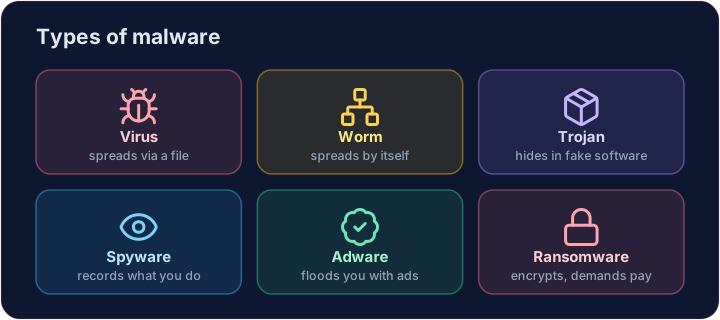
- The exam expects you to know the main types and how they differ. Here they are.
ไทย
Malware = โปรแกรมร้าย
- Malware คือโปรแกรมใดๆ ที่เขียนขึ้นเพื่อทำลายหรือขโมยจากคอมพิวเตอร์
- การสอบคาดหวังให้คุณรู้ประเภทหลักและวิธีการแตกต่างของแต่ละชนิด นี่คือรายการ将它们
English
Spreading types
- Virus — attaches to a file; runs and spreads when you open that file.
- Worm — spreads by itself across a network, with no file to open. The Morris worm was one.
- Trojan horse — pretends to be useful software, but hides something harmful inside.
ไทย
ประเภทการแพร่กระจาย
- Virus — ติดตั้งอยู่กับไฟล์; ทำงานและแพร่กระจายเมื่อคุณเปิดไฟล์นั้น
- Worm — แพร่กระจาย เอง Across a network, without a file to open. The Morris worm was one.
- Trojan horse — Pretends to be useful software, but hides something harmful inside.
English
Stealing and spying types
- Spyware — secretly records what you do, such as the keys you type (your passwords).
- Adware — floods you with adverts; often bundled with free downloads.
ไทย
ประเภทการขโมยและการสอดแนม
- สไพล์แวร์ — บันทึกการกระทำของคุณโดยลับๆ เช่น คีย์ที่คุณกด (รหัสผ่านของคุณ)
- แอดแวร์ — เติมเต็มหน้าจอด้วยโฆษณา; มักมาพร้อมกับการดาวน์โหลดฟรี
English
Holding data hostage
- Ransomware — encrypts your files and demands payment for the key to unlock them.
- It has shut down hospitals and companies. The best defence is backups you can restore from.
Covers: IGCSE 5.3 (Cyber security threats), A-Level 6.1, AP CSP Big Idea 5.
ไทย
การถือข้อมูลเป็น hostage
- แรนซัมแวร์ — เข้ารหัสไฟล์ของคุณ และทวงค่าตัวเพื่อรับกุญแจในการปลดล็อก
- มันทำให้โรงพยาบาลและบริษัทหยุดชะงัก การป้องกันที่ดีที่สุดคือ การสำรองข้อมูล ที่คุณสามารถกู้คืนได้
ครอบคลุม: IGCSE 5.3 (ภัยคุกคามด้านความปลอดภัยไซเบอร์), A-Level 6.1, AP CSP Big Idea 5.
English
Now you try
- First, read three behaviours and name the malware type each one describes.
- Then play defender: ransomware has struck, and you must count how many files your backup can restore.
ไทย
ลองดูเลย
- ขั้นแรก อ่านพฤติกรรมสามอย่างแล้วระบุชื่อประเภทของมัลแวร์ที่แต่ละข้ออธิบาย
- จากนั้นเล่นบทบาทผู้พิทักษ์: แรนซัมแวร์ได้โจมตีแล้ว และคุณต้องนับว่าข้อมูลสำรองของคุณสามารถกู้คืนไฟล์ได้กี่ไฟล์
English
Common mistakes
- A virus needs a host file to spread; a worm spreads by itself across a network.
- A Trojan hides inside useful-looking software.
ไทย
ข้อผิดพลาดที่พบบ่อย
- ไวรัสต้องการไฟล์โฮสต์เพื่อแพร่กระจาย; วอร์มจะแพร่กระจายเอง across เครือข่าย
- ไทรทันซ่อนอยู่ภายในซอฟต์แวร์ที่มีประโยชน์
Name the malware. Read each behaviour and set the variable to virus, worm or trojan. · ชื่อมัลแวร์ อ่านพฤติกรรมแต่ละข้อและตั้งค่าตัวแปรเป็น virus, worm หรือ trojan
Click Run to see the output here. · คลิก Run เพื่อดูผลลัพธ์ที่นี่
Ransomware has encrypted the laptop, but you kept a backup. Count how many of the files also appear in backup — that is how many you can restore. Print the count. · Ransomware ได้เข้ารหัสแล็ปท็อปแล้ว但你保留了备份. นับว่า files ของคุณปรากฏใน backup กี่ครั้ง — นั่นคือจำนวนที่คุณสามารถกู้คืนได้. พิมพ์จำนวนนั้น
Click Run to see the output here. · คลิก Run เพื่อดูผลลัพธ์ที่นี่