Getting input · Obtendo entrada
Ask the user with input
input()waits for the user to type a line and press Enter.- It gives back what they typed. Store it in a variable.
- Join two strings together with
+.
Perguntar ao usuário com input
input()espera o usuário digitar uma linha e pressionar Enter.- Ele devolve o que foi digitado. Armazene em uma variável.
- Junte duas strings usando
+.
name = input()
print("Welcome, " + name)
When your program waits
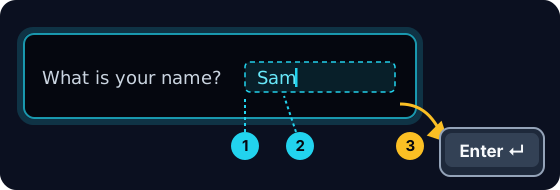
- When you press Run, the program stops at
input()and waits for you. - A highlighted box appears under the code: type here, then press Enter.
- Click the box, type your answer and press Enter. Then the program continues.
Quando seu programa espera
- Ao clicar em Executar, o programa para em
input()e espera por você. - Uma caixa destacada aparece abaixo do código: digite aqui, depois pressione Enter.
- Clique na caixa, digite sua resposta e pressione Enter. Então o programa continua.
input always gives a string
- Whatever the user types comes back as a string.
- Even if they type
5, you get the text"5", not the number. - So
"5" + "5"is"55"(joined text), not10.
input sempre retorna string
- Tudo o que o usuário digita retorna como string.
- Mesmo que digitem
5, você recebe o texto"5", não o número. - Portanto,
"5" + "5"é"55"(texto juntado), não10.
print("5" + "5") # 55 — joined text, not the number 10
Turn text into a number
int(...)turns text into a whole number:int("5")→5.float(...)turns text into a decimal:float("2.5")→2.5.- Convert first, then you can do maths.
Transformar texto em número
int(...)transforma texto em número inteiro:int("5")→5.float(...)transforma texto em decimal:float("2.5")→2.5.- Converta primeiro, depois faça matemática.
age = int(input())
print(age + 1)
Common mistakes
input()always returns a string, so wrap it inint(...)before doing maths.- The text inside
input("...")is the prompt shown to the user.
Erros comuns
input()sempre retorna uma string, então envolva-a emint(...)antes de fazer matemática.- O texto dentro de
input("...")é o prompt mostrado ao usuário.
Now you try
- When you Run, type the input yourself in the box and press Enter.
- Check answer types the task's input for you, so just read it with
input(). - Each task needs only one
input().
Agora você tenta
- Quando você clica em Executar, digite a entrada manualmente na caixa e pressione Enter.
- Verificar resposta digita a entrada da tarefa para você, então basta ler com
input(). - Cada tarefa precisa apenas de uma
input().
Input → process → output · Entrada → processamento → saída
Most programs follow one shape: get input, do something, show output. · A maioria dos programas segue uma forma: obter entrada, fazer algo, mostrar saída.
Read a name with input(), then print Hi, then the name then !. For the input Sam, the output should be Hi, Sam!. · Leia um nome com input(), depois imprima Hi, , em seguida o nome e então !. Para a entrada Sam, a saída deve ser Hi, Sam!.
Click Run to see the output here. · Clique em Executar para ver a saída aqui.
Read a whole number with input(), convert it with int(...), then print the number plus 100. For input 7, the output should be 107. · Leia um número inteiro com input(), converta com int(...), depois imprima o número mais 100. Para entrada 7, a saída deve ser 107.
Click Run to see the output here. · Clique em Executar para ver a saída aqui.
Read a whole number, convert it with int(...), then print its square (the number times itself). For input 5, the output should be 25. · Leia um número inteiro, converta com int(...), depois imprima seu quadrado (o número vezes ele mesmo). Para entrada 5, a saída deve ser 25.
Click Run to see the output here. · Clique em Executar para ver a saída aqui.
Read the width · largura, then the height, each with int(input()). Print the area on one line and the perimeter on the next. For the inputs 3 and · e 5 the output is Area: 15 and · e Perimeter: 16. · Leia a largura, depois a altura, cada uma com int(input()). Imprima a área em uma linha e o perímetro na próxima. Para as entradas 3 e 5, a saída é Area: 15 e Perimeter: 16.
Click Run to see the output here. · Clique em Executar para ver a saída aqui.