Tables · Tabelas
This page needs a recent browser (with SharedArrayBuffer support). Please update Chrome, Edge, Firefox or Safari to the latest version. · Esta página precisa de um navegador recente (com suporte a SharedArrayBuffer). Por favor, atualize Chrome, Edge, Firefox ou Safari para a versão mais recente.
English
Tables
- A table uses the
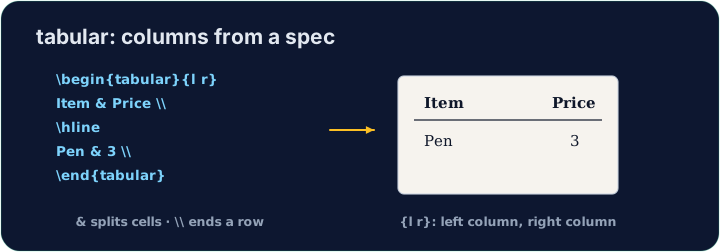
tabularenvironment. You first describe the columns:
{l c r}means three columns: left-aligned, centred, right-aligned.
Português
Tabelas
- Uma tabela usa o ambiente
tabular. Primeiro você descreve as colunas:
\begin{tabular}{l c r}
  left & centre & right \\
\end{tabular}
{l c r}significa três colunas: left-alinhado, centralizado, right-alinhado.
English
Rows and cells
- Inside,
&jumps to the next column and\\starts a new row:
- The number of cells in each row must match the number of columns you declared.
Português
Linhas e células
- Dentro,
&pula para a próxima coluna e\\inicia uma nova linha:
\begin{tabular}{l l}
  Apple & 5 \\
  Banana & 3 \\
\end{tabular}
- O número de células em cada linha deve corresponder ao número de colunas que você declarou.
English
Lines (optional)
- Add
|between column letters for vertical lines, and\hlinefor horizontal ones:
- For a cleaner look, professionals use the
booktabspackage instead of many lines.
Português
Linhas (opcional)
- Adicione
|entre letras de coluna para linhas verticais, e\hlinepara horizontais:
\begin{tabular}{|l|l|}
  \hline
  Apple & 5 \\ \hline
\end{tabular}
- Para uma aparência mais limpa, profissionais usam o pacote
booktabsem vez de muitas linhas.
English
Common mistakes
tabularneeds a column spec like{lcr}; separate cells with&and end rows with\\.- The number of
&per row must fit the column spec.
Português
Erros comuns
tabularprecisa de uma especificação de coluna como{lcr}; separe células com&e termine linhas com\\.- O número de
&por linha deve caber na especificação de coluna.
Build a small two-column table with \begin{tabular}{l l}. Separate the two cells in a row with &, and end each row with \\. Add the rows for Bob (30) and Mei (25). · Construa uma pequena tabela de duas colunas com \begin{tabular}{l l}. Separe as duas células em uma linha com &, e termine cada linha com \\. Adicione as linhas para Bob (30) e Mei (25).
Click Run to compile and preview the PDF. · Clique em Executar para compilar e visualizar o PDF.
Add lines to the table. Put \hline at the top, after the header row, and at the bottom, and use |l|l| in the column spec for vertical lines. · Adicione linhas à tabela. Coloque \hline no topo, após a linha de cabeçalho, e na parte inferior, e use |l|l| na especificação de coluna para linhas verticais.
Click Run to compile and preview the PDF. · Clique em Executar para compilar e visualizar o PDF.