HTTPS, SSL/TLS and certificates · HTTPS, SSL/TLS e certificados
The padlock in your browser
- When you see HTTPS and a padlock, your connection to the website is encrypted.
- The "S" stands for Secure. It uses a protocol called TLS (the modern version of SSL).
O cadeado no seu navegador
- Quando você vê HTTPS e um cadeado, sua conexão com o site está criptografada.
- O "S" significa Seguro. Usa um protocolo chamado TLS (a versão moderna do SSL).
How the secure connection is set up
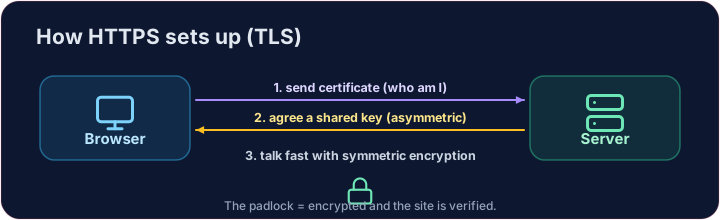
- TLS cleverly combines both kinds of encryption you have learned:
- It uses asymmetric encryption to safely agree on a shared secret key.
- Then it switches to fast symmetric encryption for the rest of the conversation.
- This "handshake" happens in a fraction of a second, before any page loads.
Como a conexão segura é estabelecida
- TLS combina astutamente ambos os tipos de criptografia que você aprendeu:
- Usa criptografia assimétrica para combinar com segurança uma chave secreta compartilhada.
- Depois, muda para criptografia simétrica rápida para o resto da conversa.
- Esse "aperto de mãos" acontece em fração de segundo, antes de qualquer página carregar.
How do you know the site is real?
- Encryption is useless if you are talking to an impostor. That is what digital certificates solve.
- A website's certificate is issued by a trusted Certificate Authority (CA) and signed with the CA's key.
- Your browser checks the signature. If it is valid, you know the site is who it claims to be.
Como saber se o site é real?
- Criptografia é inútil se você estiver falando com um impostor. É isso que os certificados digitais resolvem.
- O certificado de um site é emitido por uma Autoridade Certificadora (CA) confiável e assinado com a chave da CA.
- Seu navegador verifica a assinatura. Se for válida, você sabe que o site é quem diz ser.
Putting it together
- Certificate → proves who the site is. TLS → keeps the conversation secret.
- That tiny padlock means: encrypted, and verified. No padlock on a login page? Walk away.
Covers: IGCSE 5.3 (SSL), A-Level 17.1 (SSL/TLS, digital certificates).
Juntando tudo
- Certificado → prova quem o site é. TLS → mantém a conversa secreta.
- Aquele pequeno cadeado significa: criptografado e verificado. Sem cadeado na página de login? Vá embora.
Cobertura: IGCSE 5.3 (SSL), A-Level 17.1 (SSL/TLS, certificados digitais).
Now you try
- First put the four handshake steps in the right order — the exam loves this sequence.
- Then be the browser: look at a certificate's details and decide whether to trust it.
Agora você tenta
- Primeiro coloque as quatro etapas do aperto de mãos na ordem certa — a prova adora essa sequência.
- Depois seja o navegador: olhe os detalhes de um certificado e decida se deve confiá-lo.
Common mistakes
- HTTPS encrypts the traffic; the certificate proves the site's identity.
- A certificate warning is a real warning — do not click through it.
Erros comuns
- HTTPS criptografa o tráfego; o certificado prova a identidade do site.
- Um aviso de certificado é um aviso real — não passe por cima dele.
The TLS handshake · O handshake TLS
HTTPS sets up a secure channel before · antes any data is sent. · HTTPS estabelece um canal seguro antes de qualquer dado ser enviado.
Put the TLS handshake in order. Fill the list order with the four steps, first to last: hello, certificate, key exchange, secure data. · Coloque a troca de chaves TLS em ordem. Preencha a lista order com os quatro passos, do primeiro ao último: hello, certificate, key exchange, secure data.
Click Run to see the output here. · Clique em Executar para ver a saída aqui.
Be the browser. Trust the certificate only if the name matches the site you asked for, the issuer is trusted, AND it has not expired (expires ≥ 2026). Print valid or · ou invalid. · Seja o navegador. Confiar no certificado apenas se o name corresponde ao site que você pediu, o emissor é confiável, E ele não expirou (expires ≥ 2026). Imprima valid ou invalid.
Click Run to see the output here. · Clique em Executar para ver a saída aqui.