AP Cybersecurity は CIA triad、threats and vulnerabilities、access control and authentication、暗号化、ネットワークセキュリティ、secure software、incident response、および security policy, law and ethics を cover。 It is a new course, so no released exams exist yet and the Course and Exam Description is the authority on what is examinable.
reasoning は防御的である。 問題は通常「here is a system, what could go wrong and what would you do about it」であり、これには named threat、named control、および control がその threat を how address する理由が必要である。
vocabulary を正確に学べ。Authentication is not authorisation;hashing is not encryption;a vulnerability is not a threat。これらの distinctions が problems are built on。
notes はCED across threats, cryptography, networking and defence、ブラウザ上で試せる practical examples を follow。Because the course is new, the library carries the sample questions released so far rather than a run of past papers.
The weakest part of any computer system is often the human using it. Social engineering 社会工程学 is the art of tricking people into breaking security - giving away a password, opening a bad file, or clicking a bad link. The attacker (we call them an adversary 对手) does not need to break the code; they only need to fool a person.
Most social engineering happens by email, text message, or social media, though it can also happen in person or by phone. The goal is elicitation 套取信息 - getting sensitive information out of someone without them realising.
Adversaries lean on two powerful feelings:
Intimidation 恐吓 - the adversary threatens a bad result if you do not obey. Fear pushes you to act.
Urgency 紧迫感 - the adversary invents a deadline ("reply in the next hour or your account closes"). When we feel rushed, we stop thinking carefully about whether an action is safe.
Social engineering uses psychological pressure to make a victim act before they think
The impact 影响 on a victim can be serious. They might reveal personal details (name, address, pet's name, birthday) that are later used to answer security challenge questions 安全问题 and impersonate 冒充 them. They might hand over a one-time password (OTP) 一次性密码, letting the adversary log in as them. Or they might download malware 恶意软件 that steals data from their browser.
Worked example. A phishing email reads: "Over 90% of staff have already verified their account - confirm yours in the next hour or lose payroll access." Two tactics are stacked here. "In the next hour" is urgency (a deadline that rushes you), and "over 90% of staff have already" is consensus (social pressure to follow the crowd). Naming each tactic - not just calling the email "suspicious" - is exactly what an exam answer needs.
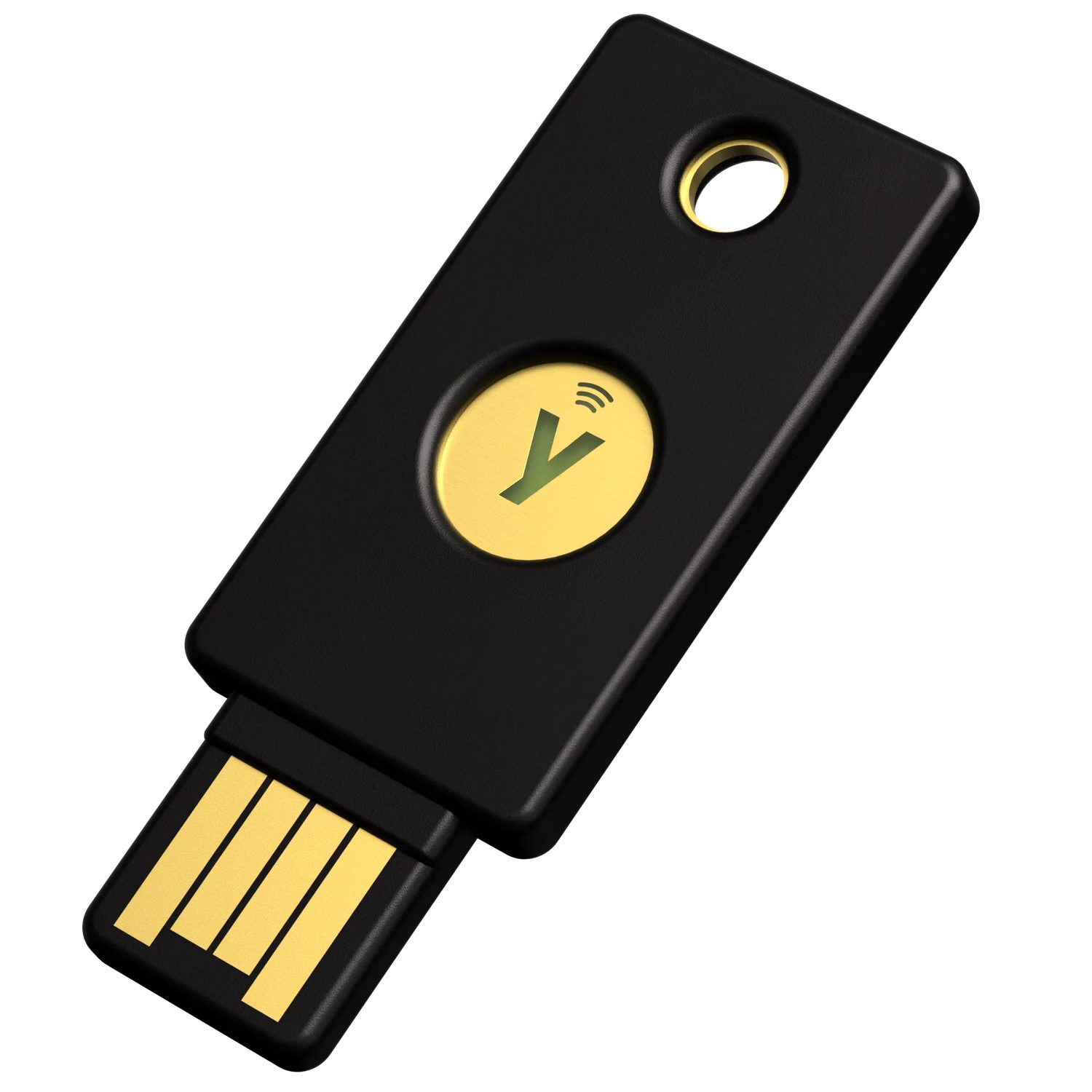
A hardware security key: strong authentication reduces damage when a password is phished
A password attack 密码攻击 is any attempt to log in using guessed or stolen passwords. In an online password attack the adversary tries passwords against a real login page. The warning signs are visible in the logs:
many failed logins in a short time,
login attempts at unusual hours,
login attempts from unknown devices.
Adversaries succeed because people choose weak 弱 passwords. Common patterns include a word plus a two-digit year plus a special character (like Summer24!), or a pet's or family member's name. Because these patterns are so common, an adversary can build a dictionary 字典 of likely passwords from information gathered about you and let an automated tool try each one.
To make authentication 身份验证 stronger:
Create passwords that are long, random, and unique - a password manager 密码管理器 can generate and store them for you.
Avoid names, dates, and meaningful words.
Turn on multifactor authentication (MFA) 多因素身份验证, which asks for extra proof (like a texted code) on top of the password.
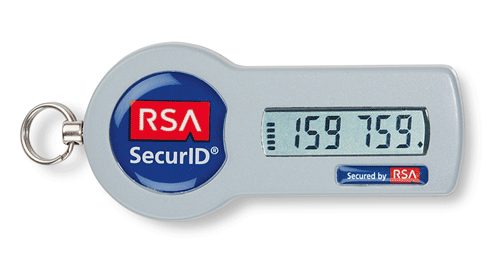
A security token: one-time codes and tokens stop password-only logins from being enough
Not all adversaries are the same. We classify them by skill: low-skilled attackers buy ready-made tools online and reuse known exploits 漏洞利用, while high-skilled attackers write their own tools and can discover brand-new holes called zero days 零日漏洞. Their motivation 动机 varies too - greed, revenge, politics, or belief.
Public Wi-Fi is a favourite hunting ground. Three wireless attacks you must know:
Evil twin 双胞胎恶意热点 - the adversary sets up a fake access point 接入点 with a name (SSID 服务集标识符) copied from the real network. Victims connect to the fake one, and the adversary reads their traffic (though encrypted 加密的 sites like HTTPS stay safe).
Jamming 干扰攻击 - the adversary floods the air with a strong radio signal so no one can connect. This is one kind of denial of service (DoS) 拒绝服务 attack.
War driving 战争驾驶 - the adversary drives around detecting wireless networks and where their signal leaks outside a building.
An evil-twin access point copies the real network's name so victims connect to the attacker
To protect yourself on public networks: check that the network name exactly matches the one you intend to join, prefer encrypted sites, and consider a virtual private network (VPN) 虚拟专用网络, which encrypts all of your traffic to the VPN operator.
1.4.A
Explain how adversaries use AI-powered tools to augment cyberattacks.
1.4.A.1 Adversaries can use AI-powered tools that leverage existing voice and image samples of a person to create a digital avatar of that person. The use of these technologies enables adversaries to impersonate someone over the phone or even on a video call, which can lead to financial loss or the sharing of sensitive or private information. As more organizations adopt voice-based authentication, the impact of voice-impersonation has a larger potential impact.
1.4.A.2 Adversaries can use generative AI tools, like large language models (LLMs), to create convincing phishing messages in any target language. Because traditional phishing messages are sometimes written by non-native speakers of the target’s language, unnatural language is a feature that has been used to distinguish phishing messages from legitimate messages. However, with AI tools, adversaries can now craft phishing messages in any language that read as though they were written by a native speaker.
1.4.A.3 Adversaries can craft prompts that extract secure or sensitive information from LLMs. Secure or sensitive information in LLMs can come from user input and the large data sets used to train LLMs.
1.4.A.4 Adversaries can publish websites or modify existing websites to contain false information so that the false information will be included in the training sets for LLMs, causing the LLMs to repeat the false information.
1.4.A.5 Adversaries can perform reconnaissance on a target using AI-powered tools that scan the internet to gather information posted on social media and public websites.
1.4.A.6 Adversaries can use AI-enhanced coding tools to help them write new malware, modify existing application code to perform malicious activities, or to find vulnerabilities in large code bases.
1.4.B
Explain how to protect against some AI-augmented cyberattacks.
1.4.B.1 Shared secrets with close friends and relatives that can be used to verify each other’s identities should be established. A secret word or phrase known only to two parties can be used to authenticate identities in high-stakes situations.
1.4.B.2 Multifactor authentication (MFA) should be enabled. If an adversary clones a target’s voice to access a system with voice authentication, requiring a second authentication factor could prevent an adversary from gaining access to accounts.
1.4.B.3 Personal or sensitive data should not be entered into any AI-powered tools, such as chatbots or virtual assistants. Some AI-powered tools feed user input back into the model to provide continuous training. Adversaries could extract data that users have included in prompts.
1.4.B.4 Output from AI-powered tools should be carefully evaluated. Verify information from AI-powered tools using reputable, stable, non-AI-based sources.
出典: College Board AP コースおよび試験説明書
Artificial intelligence gives adversaries powerful new tools. With enough voice and image samples, an adversary can build a deepfake 深度伪造 avatar to impersonate someone on a call. Large language models (LLMs) 大语言模型 let them write convincing phishing 钓鱼 emails in perfect, native-sounding language - removing the clumsy wording that once gave scams away.
AI also helps adversaries on the back end: crafting prompts that pull secret data out of an LLM, planting false information on websites so it poisons an LLM's training data, scanning the internet to gather facts about a target, and even writing new malware.
You can defend against many AI-augmented attacks: agree on a shared secret 共享秘密 word with close contacts to verify identity, enable MFA (so a cloned voice alone cannot log in), never type sensitive data into a chatbot, and always double-check AI output against reliable, non-AI sources.
AI writes code, and that cuts both ways. Adversaries use AI-enhanced coding tools 人工智能辅助编程工具 to write new malware faster than they could by hand, to modify existing application code so that it performs malicious activity, and to scan a codebase for vulnerabilities 漏洞 to attack. The skill barrier falls: someone who could not previously write an exploit can now ask for one, so the number of capable attackers rises even when no new technique is invented.
The same technology defends us. AI tools can analyse an application's own source code, identify vulnerabilities in it and recommend mitigations; they can also review firewall rules and access settings and recommend safer options - though a human expert must always check the advice before applying it. AI can scan application code for weaknesses and suggest detection rules.
⚠️ A recommendation is not a fix. The CED is explicit that the advice must be reviewed and implemented by a knowledgeable programmer: an AI tool can be confidently wrong about whether a flaw is exploitable, and applying a suggested patch without understanding it can introduce a new fault of its own.
Its biggest advantage is scale. A medium network produces millions of events every day - far too many for people to read. AI can quickly sort the harmless events from the likely-malicious ones, alert human staff, or take an automatic action. This lets defenders catch an attack and respond in seconds instead of days, preventing loss and damage.
That scale is what makes threat detection and response 威胁检测与响应 possible in practice: an AI system flags malicious activity as it happens, so the response team can intervene quickly enough to prevent loss, harm, or destruction of digital infrastructure — rather than reading the logs days later and finding out what was taken.
threat detection and response/θret dɪˈtekʃn ænd rɪˈspɒns/
脅威検知と対応
1.5
Exam tips
When a question asks you to rank risks, remember high risk = high impact AND easy to exploit. A parking-lot Wi-Fi leak matters less than an open internal port that lets an adversary spoof a device.
Learn the social-engineering tactics by name - intimidation, urgency, pretexting, authority, consensus, scarcity, familiarity - and be ready to spot which one an email is using.
Encryption still protects you on an evil twin: the adversary sees your traffic but cannot read HTTPS. Say what is exposed, not just "it's unsafe".
For "how to make authentication stronger", MFA is almost always part of the answer, plus long/unique passwords from a manager.
AI is dual-use: the same tool (LLMs, code analysis) appears on both the attack and the defense side. Read the question carefully to see which side it asks about.
** worked example.** 病院が鍵のかからない部屋にある未暗号化のサーバーに患者記録を保管している場合、リスクを評価します:資産は非常に敏感(法的に保護されている患者データ)であり、かつ脆弱性は悪用されやすい(暗号化なし、アクセス制御なし)ため、これは高リスクです。次に、一つの解決策であるドアロックを分類します:種類別では物理的制御であり、機能別では予防的です(攻撃が始まる前に入室を阻止するため)。
2.2.A.5 ダンプスター・ダイビングとは、攻撃者がターゲットの物理ゴミを翻し searching for information that could be used to help the adversary reach their goal. 翻译:攻击者通过翻找目标的实体垃圾来寻找可能帮助其达成目标的信息的攻击方式。
次に物理的統制により建物を強化します。フェンス、ゲート、ボーラードはアクセスを妨害し、錠前は扉やキャビネットを守ります。カードリーダーは出入りを記録し制限します。アクセスコントロール・ウェスティブル(Access control vestibule)(2つの扉を持つエアロック)はピグバックを防ぎ、USBポートの無効化はマルウェアドライブの導入をブロックし、無停電装置(UPS: Uninterruptible Power Supply) は停電時にもデバイスを稼働させ続けます。組織はこれらの優先順位を、管理統制のコストとリスクの深刻さのバランスに合わせて決定します。
2.4.A.4 物理空間で働く従業員は、 often the first to notice the presence of an unauthorized person and can alert security.
学習目標 2.4.B: 物理攻撃を検知するためのセキュリティ統制の有効な配置を決定する。
2.4.B.1 カメラを設置する際は、視覚的カバレッジ、角度、および攻撃者による操作の可否を考慮すべきである。特定の領域にあるカメラが攻撃者の何を撮影できるか、そしてその情報がどのように役立つかも考慮すべきである。入退口は often monitored by camera.
2.4.B.2 動作センサーは、サーバールームのような予期せぬ交通量がある場所や、敏感な資料が保管されておりアクセスできる人が少ない場所に設置すべきである。高交通量の領域にある動作センサーは多くの誤警報を引き起こすため、実際のセキュリティイベント发生时 alarms less likely to be taken seriously when there is a real security event.
3.1.A.1 アドレス解像プロトコル (ARP) は、ネットワーク上のデフォルトゲートウェイによって使用され、インターネットプロトコル (IP) アドレスとメディアアクセスコントロール (MAC) アドレスをペアにするテーブルを構築するために用いられる。ARP ポイズニング攻撃とは、敵対者が偽造された ARP パケットをデフォルトゲートウェイに送信し、ターゲットの IP アドレスを敵対者の MAC アドレスにリンクすることで、ターゲット宛てのトラフィックを敵対者のデバイスに転送するようにテーブルを変更することである。MAC アダプタを偽装することを MAC スPUフィングという。これはオンパス攻撃(またはミドルマン攻撃)の例であり、敵対者が2者間のデータストリームを遮断し、両者のデータをキャッチし、送信する前にデータをコピーまたは改変する攻撃である。双方は互いに直接通信していると思っているが、実際には各自が敵対者と通信しており、そのメッセージが密かに傍受されている状態となる。
3.1.A.2 MAC フラッディング攻撃とは、敵対者が異なる MAC アダプタを持つ多数のエターネットフレームをターゲットスイッチに送信することである。これによりスイッチがブロードキャストモードに強制され、敵対者はネットワーク上のすべてのフレームを収集できる(これらはブロードキャストされているため)。これにより、敵対者は機密情報へのアクセスが可能になる可能性がある。これはイブスドロップ(またはスニフィング)の例であり、敵対者が進行中のデータをキャッチし、記録・コピーできる攻撃である。
3.1.A.3 DNS ポイズニング攻撃とは、敵対者が権威あるネームサーバー (NS) を装い、DNS サーバーに偽の DNS レコード植入して、認証情報を盗むために設計された悪意のあるウェブサイトへブラウザのトラフィックをリダイレクトすることである。これはクレデンシャルハーベストingの例であり、敵対者が本物のように見える偽のログインサイトを设置し、無邪気なユーザーが本物の認証情報を入力すると、それらを敵対者がキャッチして利用する攻撃である。
3.1.A.4 スマーフ攻撃は、インターネットコントロールメッセージプロトコル (ICMP) リクエストでネットワークを飽和させようとする攻撃である。これは denial of service (DoS) 攻撃の一種であり、システムやリソースを authorized users が利用できないようにする攻撃である。スマーフ攻撃中、敵対者は被害者のアドレスを含む多数の ICMP リクエストをネットワークのブロードキャストアドレスに送信する。ネットワークのゲートウェイはこれらのリクエストをネットワーク上のすべてのデバイスに送信する。各デバイスは被害者のアドレスに返信し、正規のメッセージをブロックする可能性のあるトラフィックの洪水を生み出す。複数のデバイスが同時に同じターゲットを攻撃する場合、これを分散 denial of service (DDoS) 攻撃と呼ぶ。
3.4.A.1 A firewall is used to allow or deny network traffic in or out of a network. The firewall itself is software that can be hosted on a standalone device or integrated into another network device, such as a router.
3.4.A.2 A stateless firewall filters traffic based on information in packet headers, such as IP addresses, ports, and protocols.
3.4.A.3 A stateful firewall (also known as dynamic packet filtering) tracks the state of network connections passing through the firewall and can filter according to connection-related rules in addition to the filtering done by a stateless firewall. This allows for more control over content allowed in and out of a network.
3.4.A.4 A next-generation firewall (NGFW) has both the capabilities of typical stateless and stateful firewalls and additional advanced features, such as intrusion prevention, deep packet inspection, and filtering by application type.
3.4.B
Explain how a firewall uses an access control list to allow or deny traffic entering or leaving a network.
3.4.B.1 Network administrators create a set of rules, called an access control list (ACL), that a firewall uses to permit or deny inbound and outbound network traffic.
3.4.B.2 ACL rules are checked in order and the first rule that matches the criteria will be executed for the specified data.
3.4.B.3 A typical ACL will specify the direction of traffic (inbound or outbound), the criterion to filter by (IP addresses, logical port, service, or application), and the action to take (permit or deny).
3.4.C
Determine the effective placement of firewalls in a network.
3.4.C.1 Each segment of a network should have a firewall to control the flow of data in and out of that segment.
3.4.C.2 Network segments may have different security needs based on the data and services within them. The level of security for each firewall can be set independently.
3.4.C.3 Each point of data ingress and egress between the internal network and the public internet should have a firewall.
3.4.D
Configure a firewall to manage the flow of network traffic.
3.4.D.1 The requirements for a firewall will specify what type of traffic from which sources or to which destinations should be allowed or denied.
3.4.D.2 Specific rules for a firewall can allow or deny inbound or outbound traffic based on source or destination port or IP address, service, protocol, or application.
Illustrative examples for 3.4.D.2:
Allow inbound TCP port 22 from ALL; (this rule will allow all inbound TCP traffic with destination port 22, which is the designated port for the SSH protocol)
Deny inbound TCP port 80 from 192.168.1.0/24; (this rule will deny inbound TCP traffic with destination port 80 from IP addresses in the 192.168.1.0-192.168.1.255 range)
3.4.D.3 Rules are implemented in order, and changing the order of a set of rules can change which traffic is allowed or denied. Consideration must be given to the precedence of filtering priorities when establishing the order of rules.
Illustrative examples for 3.4.D.3:
This set of rules would allow SSH traffic and deny other inbound TCP traffic
Rule 1: ALLOW inbound TCP port 22 from ALL;
Rule 2: DENY inbound TCP ALL from ALL;
Reversing the order of those rules would deny all inbound TCP traffic including SSH traffic.
4.1.A.5 エンベッドドコンピュータを搭載した日常的なデバイスは、Often Internet of Things (IoT) デバイスと呼ばれます。エンベッドドコンピュータは、輸送機器(例:自動車、鉄道、航空機)、重要インフラを稼働させるデバイス(例:変電所の遮断器操作、浄水場のポンプ)、医療機器(例:点滴ポンプ、MRIスキャナー、ペースメーカー、インスリンポンプ)、そして洗濯機、コーヒーメーカー、サーモスタットなどの日常品に見られます。
4.1.D.1 デバイスの脆弱性からのリスクは、不正アクセスやマルウェアにより、攻撃者が authorized user を騙り、デバイスに遠隔でアクセスし、デバイスのドライブを暗号化してデータを拉致したり、デバイスのメモリを消去してデータを破棄したり、デバイスを機能不全に陥らせたりすることを可能にする。リスクの程度は、デバイスの重要性や、デバイスが提供するサービスや保持するデータの重さに応じて異なる。
A device is any computer - a server, a personal laptop, a smartphone, or an embedded computer 嵌入式计算机 built into a machine. Everyday devices with embedded computers are called Internet of Things (IoT) 物联网 devices, and they run everything from water pumps to washing machines.
The four classes of device, and why the class matters
Class
What it is
Security consequence
servers
shared machines running services for many users
the highest-value target; one compromise reaches everyone
personal computers
desktops and laptops
general purpose, so they run anything the user installs
handheld computers 手持计算机 (also called mobile computers or information appliances)
smaller than a PC and running on battery power — smartphones, tablets, smart watches and other wearable technology
easily lost or stolen, and often carried across untrusted networks
embedded computers
a computer that is part of a machine — a car's engine controller, a thermostat, a medical pump
has a specialised instruction set for interfacing with its components, and tends to be slower, cheaper and to have minimal storage, so security features are often left out and updates are rare
That last row is the reason embedded and IoT devices appear so often in attack scenarios: the constraints that make them cheap are the same constraints that make them hard to defend.
The main threat to a device is malware 恶意软件 - malicious software. Learn the types:
Virus 病毒 - must be activated by a user opening a file.
Worm 蠕虫 - spreads by itself, with no human action.
Trojan 木马 - hides inside software that looks safe; a remote access trojan (RAT) 远程访问木马 gives the adversary remote control.
Ransomware 勒索软件 - encrypts your files and demands payment for the key.
Spyware 间谍软件 - secretly tracks what you do.
Keylogger 键盘记录器 - records every keystroke to steal passwords.
Logic bomb 逻辑炸弹 - triggers only when a condition is met (a date, a version).
Rootkit - deeply hides in the operating system and can even make itself invisible.
Most malware is a file, but fileless malware 无文件恶意软件 is different: it lives only in RAM 内存 and abuses legitimate programs already on the device, leaving no file for a scanner to find.
Adversaries exploit unpatched software 未打补丁的软件, weak passwords, unprotected BIOS/UEFI startup settings, and open ports. We rate device risk by the value and criticality of the device - a hospital's unpatched email server is high risk, while an employee's laptop with one unused open port is low.
4.2.A
Explain why hashes (also called hash outputs, checksums, message digests, or digests) are used to store passwords.
4.2.A.1 A cryptographic hash function (also called a message digest function) is a mathematical algorithm that takes binary data of an arbitrary length, processes it according to a set of instructions, and outputs a fixed-length binary string called the hash (or checksum or message digest). Well known cryptographic hashes include:
MD5
SHA-1, SHA-256, SHA-512 (SHA stands for Secure Hash Algorithm)
NTHash
RIPEMD-160
4.2.A.2 An n-bit hash has $2^n$ possible outputs. The number of inputs is infinite, and so inevitably two different inputs will produce the same hash. This is called a collision.
4.2.A.3 Cryptographic hash functions have the following properties:
Hashes are collision resistant; it is difficult to find two different inputs to the same hash function that produce the same output.
Hashes have pre-image resistance; given a hash, it is infeasible to figure out the input that generated the hash.
Hashes are repeatable; the same input will always produce the same hash.
Hashes have a fixed length; the length in bits of the hash for a specific hash function is constant regardless of the size of the input.
4.2.A.4 Adversaries try to compromise hashing functions by forcing collisions in their output. If an efficient algorithm exists to force a collision for a specific hash function, then that hash function will be deprecated (no longer used in secure settings). MD5 and SHA1 are examples of deprecated hash functions.
4.2.A.5 Password-based authentication services shouldn’t store passwords in plaintext, so that if an adversary gains access to the user:password directory they won’t immediately know the passwords for all users. Instead, user passwords should be hashed and the hash stored in a database. When a user enters their password, it is hashed, and the hash is compared to the hash stored on file. If the hashes match, then the user is authenticated.
4.2.A.6 If two users had the same password, then their passwords would have identical hashes in the user:password directory. To prevent this, a few random bits (called salt) are hashed with a user’s password to generate the hash. Each user’s salt is unique, so even if two users have the same password they will have a different password hash because they have different salt.
4.2.B
Explain how password attacks exploit vulnerabilities.
4.2.B.1 If an adversary can compromise the password of a legitimate user, and that user’s organization has not enabled MFA or other authentication protections, then the adversary can act within that organization with all the access and rights available to the user.
4.2.B.2 Password attacks can be classified as online or offline.
Online password attacks attempt user:password combinations in an active authentication portal.
Offline password attacks have captured a user:password database and can run password attacks against the database on their own computer. This method bypasses any account lock out protections that may be in place.
4.2.B.3 Many users reuse the same passwords (or variations of the same password) for all the services and accounts they have, despite warnings not to. When an organization’s user database is stolen, the usernames, emails, and passwords are sold to adversaries or posted online. Adversaries often begin an attempt to compromise an account by trying stolen or leaked credentials for a target individual.
4.2.B.4 Many users set passwords that are easy to guess, and adversaries will attempt to guess common passwords for a user’s account. Password spraying is an attack where an adversary attempts a common password against many different user accounts.
4.2.B.5 Some services and devices (e.g., switches, routers, and IoT devices) are preconfigured with a default administrative user and password. Credential stuffing is an attack where an adversary attempts to gain access to these services or devices using common default credentials or account credentials that have been stolen.
4.2.B.6 Offline password attacks use automated hash-cracking tools to hash possible passwords and compare them against a captured hash. Although hashes can’t be reversed, an adversary can use these tools to hash many potential passwords and compare them to the target hash. If an adversary finds a hash that matches, they can use the password that generated the hash to login to the user’s account. Offline attacks include:
Brute force attacks, where an adversary uses an automated tool to test all the potential passwords that a user could have
Dictionary attacks, where an adversary uses an automated tool to test a list of common passwords
4.2.B.7 A rainbow table attack uses a list of common passwords to generate a rainbow table. A rainbow table is a table that contains each potential password and its hash. The table is then sorted by the hashes, and the adversary uses an automated tool to search the list of hashes for the captured hash. If the hashes match, then the adversary has found a password that generates the same hash, and the password will allow the adversary to login to the user’s account.
4.2.C
Determine the type of authentication used to verify the identity of a user.
4.2.C.1 Authentication mechanisms are technical controls that verify the identity of a user to ensure that only authorized users access a system. The proof the user provides to identify themselves is called a factor. Common authentication factors include:
Something the user knows (knowledge factor)
Something the user has (possession factor)
Something the user is (biometric factor)
Somewhere the user is (location factor)
4.2.C.2 Knowledge factors can be passwords, PINs, or answers to preselected challenge questions. For a knowledge factor to be effective it needs to be something an adversary can’t easily guess; however, knowledge factors that are difficult for an adversary to figure out can also be harder for a user to remember.
4.2.C.3 A possession factor is an object a user has that is unique to them, such as an access card, a bank card, a cell phone, or an authentication token. The more difficult it is for an adversary to obtain the object (or a copy of it), the more secure the possession factor is.
4.2.C.4 Biometric factors measure features of the human body and can include fingerprints, palm prints, facial recognition, iris or retina scans, or voice identification. Biometric factors are difficult for an adversary to duplicate because they are unique to an individual.
4.2.C.5 Location factors use information about Wi-Fi signals, GPS data, time zone settings, and even IP address information to make determinations about location. Rules can be established for allowing or denying access based on a location factor.
4.2.C.6 Multifactor authentication (MFA) is when a system uses more than one factor to authenticate a user. MFA is more secure than single-factor authentication because it requires the user to provide at least two separate factors of authentication.
4.2.D
Configure login settings to make a device more secure.
4.2.D.1 Requiring complexity in passwords is a login setting that can be configured. When enabled, users setting a new password must include at least one character from each character set. Passwords with characters from each character set are significantly harder for an adversary to crack than passwords that use characters from only one or two character sets. The main character sets often required are:
Uppercase letters (A–Z)
Lowercase letters (a–z)
Numeric digits (0–9)
Special characters (!”#$%&’()*+,-./:;<=>?@ [ \ ] ^_`{|}~)
4.2.D.2 Requiring a minimum password length is a login setting that can be configured. This means that users must have at least a certain number of characters in their password. The longer and more complex a password is, the longer it will take a digital tool to crack the password.
4.2.D.3 Requiring a maximum password age is a login setting that can be configured. When configured, users will receive a prompt to change their password a certain number of days after their last password change, usually every 90 or 120 days. If a user’s password has been compromised, changing it could prevent an adversary from gaining access to the user’s account. However, some national standards recommend that organizations not require users to change their passwords on predefined intervals to discourage users from developing password patterns (e.g., PasswordFall2028).
4.2.D.4 Requiring the system to store a certain number of previous user passwords is a login setting that can be configured. This prevents a user from reusing a password. Many organizations store users’ previous 5–10 password hashes to prevent reuse.
4.2.D.5 Requiring a lockout period after a certain number of invalid login attempts is a login setting that can be configured. This prevents an adversary from continuously randomly attempting wrong passwords. Many organizations lock a user’s account after 3–5 invalid login attempts. The period of the lockout varies.
出典: College Board AP コースおよび試験説明書
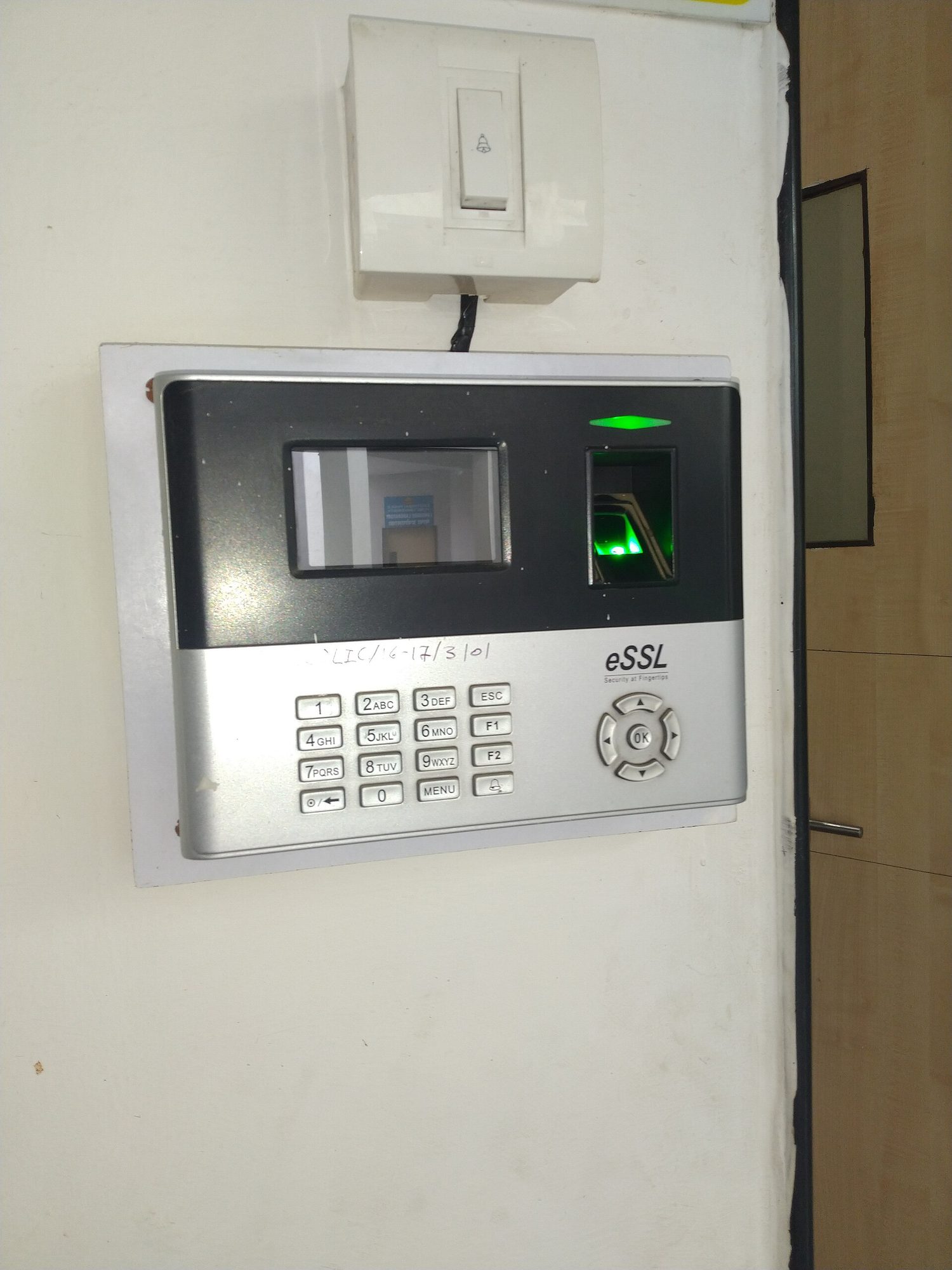
Multi-factor authenticationA fingerprint scanner: biometric authentication checks something you ARE, which is much harder for an attacker to steal or guess than a password
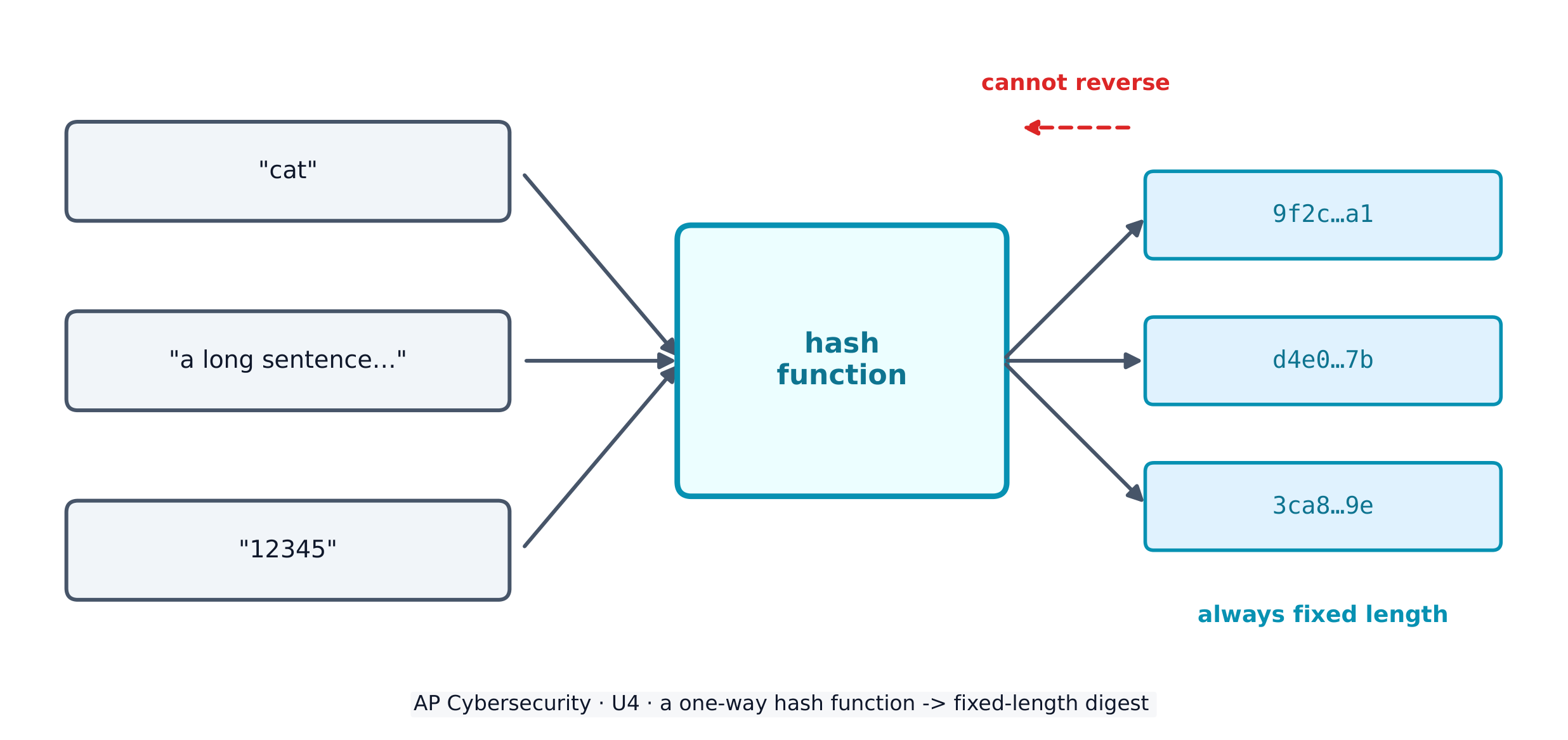
To store passwords safely, systems use a cryptographic hash function 密码散列函数 - a one-way maths algorithm that turns any input into a fixed-length string called a hash 散列值 (or digest). Hashes have three vital properties: they are collision resistant 抗碰撞 (hard to find two inputs with the same output), have pre-image resistance 抗原像 (you cannot work backwards to the input), and are repeatable (the same input always gives the same hash).
A hash function turns any input into a fixed-length digest, and cannot be reversed
Real hash functions have names. The Secure Hash Algorithm (SHA) family – SHA-256 and SHA-512 – is today's standard. Adversaries attack a hash function by trying to force a collision (two different inputs with the same hash); once an efficient collision attack exists, that function is deprecated 弃用 (retired from secure use). MD5 and SHA-1 are the classic deprecated examples – never rely on them to protect data today.
A service never stores your plaintext password. It stores the hash; when you log in, it hashes what you typed and compares. To stop two identical passwords producing identical hashes, a few random bits called salt 盐值 are added before hashing, so every stored hash is unique.
Worked example. Two users both choose the password sunshine. Without salt, both stored hashes would be identical, so cracking one instantly cracks the other. Give each user a unique salt - say x7 and q2 - and the service hashes sunshinex7 and sunshineq2 instead. The two stored hashes now look completely different, so the adversary must attack each account separately. This is why a stolen hash database is far less dangerous when the hashes are salted.
Adversaries fight back with password attacks. Online attacks guess against a live login; offline attacks steal the hash database and crack it on their own machine (which bypasses any account-lockout protection). Techniques include:
brute force 暴力破解 - an automated tool tries every possible password in turn; guaranteed to work eventually, but slow, and it grows explosively with password length.
a dictionary attack 字典攻击 - the tool tries a list of common words and known passwords first, because most people pick guessable ones.
password spraying 密码喷洒 - one common password against many accounts (this dodges lockout, which counts failures per account).
credential stuffing 撞库 - reusing stolen or default credentials, exploiting that people reuse passwords across sites.
a rainbow table 彩虹表 - a precomputed table of passwords and their hashes, sorted by hash, so a captured hash can be looked up instead of recomputed.
Password policy settings
An administrator hardens accounts by configuring login settings - and the exam expects you to name them and say what each defends against:
Setting
What it does
The attack it slows
complexity 复杂度
require a character from each set (upper, lower, digit, special)
brute force / dictionary
minimum length 最小长度
require N characters - length matters more than anything
brute force (grows exponentially)
maximum age 最长有效期
force a change every ~90-120 days
limits how long a stolen password is useful
password history 密码历史
store the last 5-10 hashes, block reuse
stops recycling an old (possibly leaked) password
lockout 锁定
lock the account after 3-5 wrong tries
brute force / online guessing
One subtlety worth a mark: some national standards now advise against forced expiry, because regular changes push users into predictable patterns like PasswordFall2028. A password manager 密码管理器 solves the real problem - it generates and stores a long, unique password per site, so none is ever reused or guessable.
Authentication factors prove who you are, and fall into categories: something you know (a password), something you have (a token or phone), something you are (a biometric 生物特征 like a fingerprint or retina scan), and somewhere you are (a location factor). Using two or more is multifactor authentication (MFA) 多因素身份验证 - far stronger than a password alone.
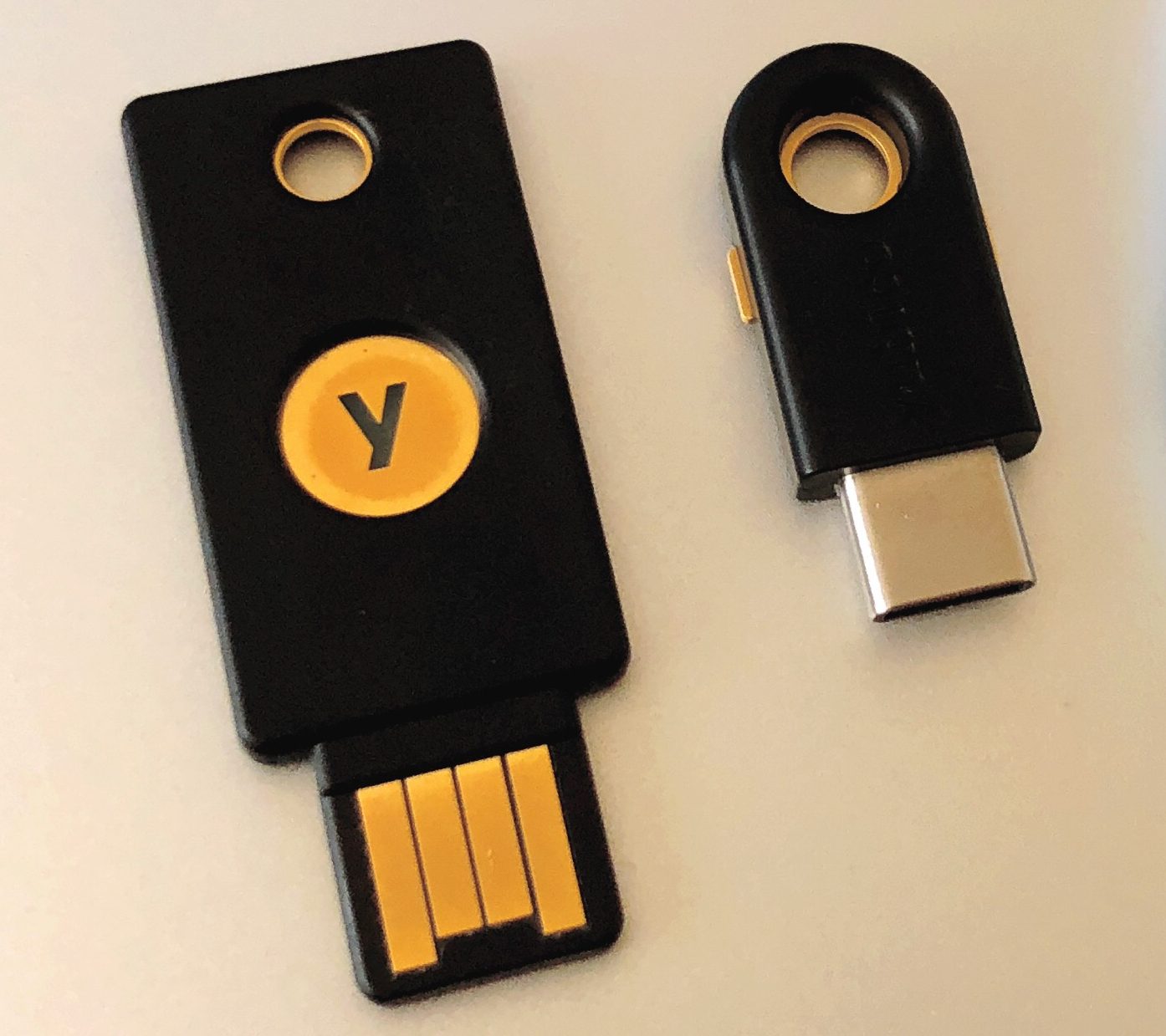
A hardware security key proves who you are with something you physically hold — a strong second factor
Removable media, and the autorun problem
An adversary can load malware onto an external drive — a USB stick, a portable disc — and leave it where someone will pick it up. If autorun 自动运行 is enabled, the device runs a program from that drive the moment it is inserted, with no click required, so the malware executes before the user has decided to trust anything.
Two controls answer this, and the exam wants both named:
Disable autorun, so inserting a drive never runs anything by itself.
Prohibit users from connecting external drives or media at all — enforced by policy and by a technical control that blocks the USB ports — which is why so many secure environments physically or logically disable them.
4.3.D.4 ホストベースのファイアウォールのルールは、ソースまたは dest port、IPアドレス、サービス、プロトコル、またはアプリケーションに基づいて、トラフィックを許可または拒否できます。
出典: College Board AP コースおよび試験説明書
Managerial controls set the rules: an acceptable use policy 可接受使用政策 lists what users may and may not do, a password policy sets length and reuse rules, and a software installation policy controls what can be installed.
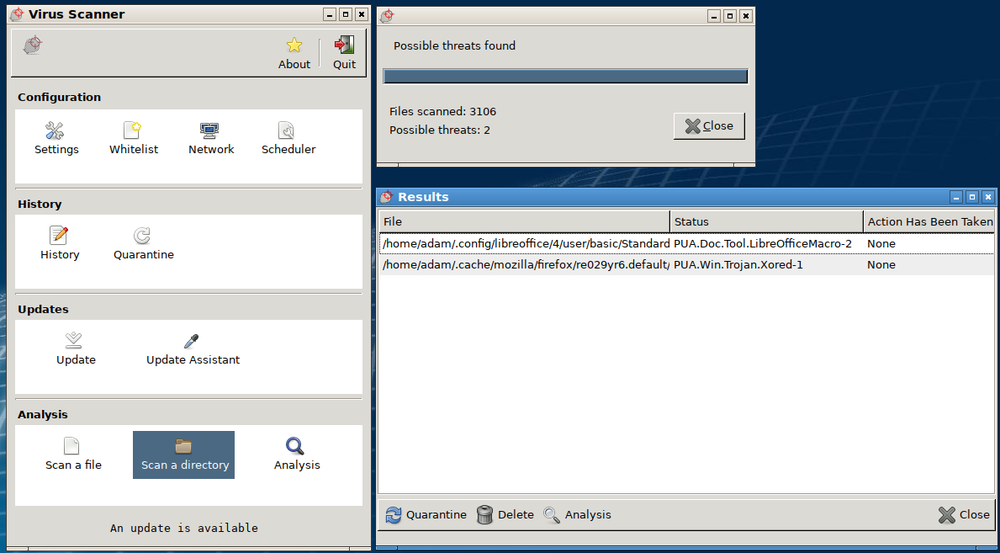
Technical controls do the work. Anti-malware software 反恶意软件 keeps a database of malware signatures and quarantines any file that matches. Keeping the operating system and applications updated - installing each patch 补丁 - closes known holes before adversaries can use them. A host-based firewall 主机防火墙 controls traffic in and out of one single device, blocking ports and services it does not need.
Anti-malware software scans files against a signature database and quarantines any matches — this scan has flagged two threats
Devices log logins, file changes, and processes, and these logs reveal an indicator of compromise (IoC) 入侵指标 - evidence that an adversary got in. Host-based IoCs show up as unexpected processes or changed settings; file-based IoCs are files whose hash matches known malware; behaviour-based IoCs are things like many failed logins or unusual login times.
Choosing a detection method means weighing performance (signature-based is lighter, better for weak devices), cost (an endpoint detection and response (EDR) 端点检测与响应 service is powerful but expensive), and how sensitive the device is. Reading authentication logs exposes password attacks: many wrong passwords for one user signals a guessing attack; many users failing from one IP signals password spraying; a burst of default credentials signals credential stuffing. Offline attacks, though, cannot be detected - they happen on the adversary's own computer.
Speed is itself a security factor.Signature-based detection compares what it sees against a list of known-bad patterns, so it is faster than anomaly-based detection, which must first learn what normal looks like and then measure every event against that model. Anomaly-based detection catches attacks that have no signature yet, but it costs far more processing power — and on a device that lacks it, the effect compounds: the detection runs slowly, the device degrades, and the method ends up not being implemented effectively at all.
Know each malware type by its defining trait: a worm self-spreads, a virus needs a user, ransomware encrypts for money, a RAT gives remote control, a rootkit hides.
A hash is one-way and fixed-length; salt makes identical passwords hash differently. Never say a service "stores the password" - it stores the salted hash.
Name real algorithms: SHA-256/SHA-512 are current; MD5 and SHA-1 are deprecated because efficient collision attacks exist.
Match the password attack to its log signature: one user + many wrong passwords = guessing; many users + one IP = spraying; default credentials = stuffing.
Sort authentication factors into know / have / are / where, and remember MFA combines two or more - a fingerprint plus a password, not two passwords.
Offline password attacks cannot be detected because the cracking happens on the adversary's machine - a favourite exam "gotcha".
5.1.B.5 ウェブサイトはhypertext markup language (HTML) で記述されており、多くのウェブサイトではdynamic content(動的コンテンツ)を作成するためにJavascriptを使用しています。 Javascriptコマンドは訪問者のブラウザ内で実行されるため、それらのコマンドはブラウザ内に格納されたユーザー名、パスワード、暗号鍵などの敏感なデータにアクセスできます。
5.1.B.6 A cross site scripting (XSS) attack(クロスサイトスクリプティング攻撃)では、悪意のあるコードがウェブサイトへ注入され、ユーザーのブラウザによって実行されます。悪意のあるコードは、ユーザーがクリックするリンクに埋め込まれている場合(Type I または Reflected XSS 攻撃)や、コメント欄、フォーラム投稿、访客日志(visitor log)を介してサイトに挿入され、そのサイトを訪問するすべてのユーザーに影響を与える場合(Type II または Stored XSS 攻撃)があります。
5.2.A
Explain how the state or classification of data impacts the type and degree of security applied to that data.
5.2.A.1 Organizations implement specific security controls to comply with legal requirements based on the types of data they collect, store, process, and transmit.
5.2.A.2 Data can be classified by their state.
Data at rest are stored on a drive. It is important to protect the physical drive storing the data from destruction or theft. Data at rest can also be encrypted so that if an adversary steals it, they can’t immediately read the data.
Data in transit are being sent from one device to another. If the data are being transferred over physical media (e.g., cables) it is important to protect the media. Data in transit can also be encrypted so that if an adversary intercepts it, they can’t immediately read the data.
Data in use are being processed by software or a person. Access controls can be used to limit who or what has the ability to use data in different ways (e.g., view or edit). Data must be unencrypted to be used.
5.2.A.3 Organizations often categorize data according to their sensitivity and prioritize a higher degree of security for more sensitive information.
5.2.A.4 Laws and regulations can require certain types of data to be stored, transmitted, and handled according to specific rules.
Personally identifiable information (PII) is any data that allows someone to be identified and includes (but is not limited to): name, signature, phone number, address, biometric data (e.g., fingerprints), social security number, date of birth, and email address. The protection of this data is covered by many laws but most notably The Privacy Act of 1974 and for children under the age of 13 the Children’s Online Privacy Protection Act of 1998.
Protected health information (PHI) is any data related to an individual’s health, treatment, payment for healthcare at any time and includes (but is not limited to): test results, treatment records, hospital records, doctor visit notes, and health provider payment records. The protection of PHI is included in the Health Insurance Portability and Accountability Act of 1996.
Payment card information (PCI) is the data collected by organizations to process payments via cards (e.g., credit cards) and includes the following: name, account number, expiration date, address, and CVV code. The protection of this data is regulated by the Payment Card Industry Data Security Standard (PCI-DSS).
5.2.A.5 Organizations that collect regulated data will label them and have policies that comply with the legal or regulatory requirements for the safe storage, transmission, and handling of these data.
5.2.B
Identify managerial controls related to application and data security.
5.2.B.1 A cryptography policy will describe the acceptable encryption protocols and key parameters for an organization and may include:
A list of encryption algorithms approved for specific uses
Minimum or maximum key lengths
Cryptographic key-generation requirements and parameters
Cryptographic key-storage requirements
5.2.B.2 A web application security policy will outline the requirements and parameters for testing and mitigating web application vulnerabilities in an organization, and it may include:
Parameters for when an application is subject to a security assessment
Timelines for remediating vulnerabilities based on level of risk
Parameters for how an application security assessment is to be carried out (e.g., using specific tools or according to specific frameworks)
5.2.C
Determine an appropriate access control model to protect applications and data.
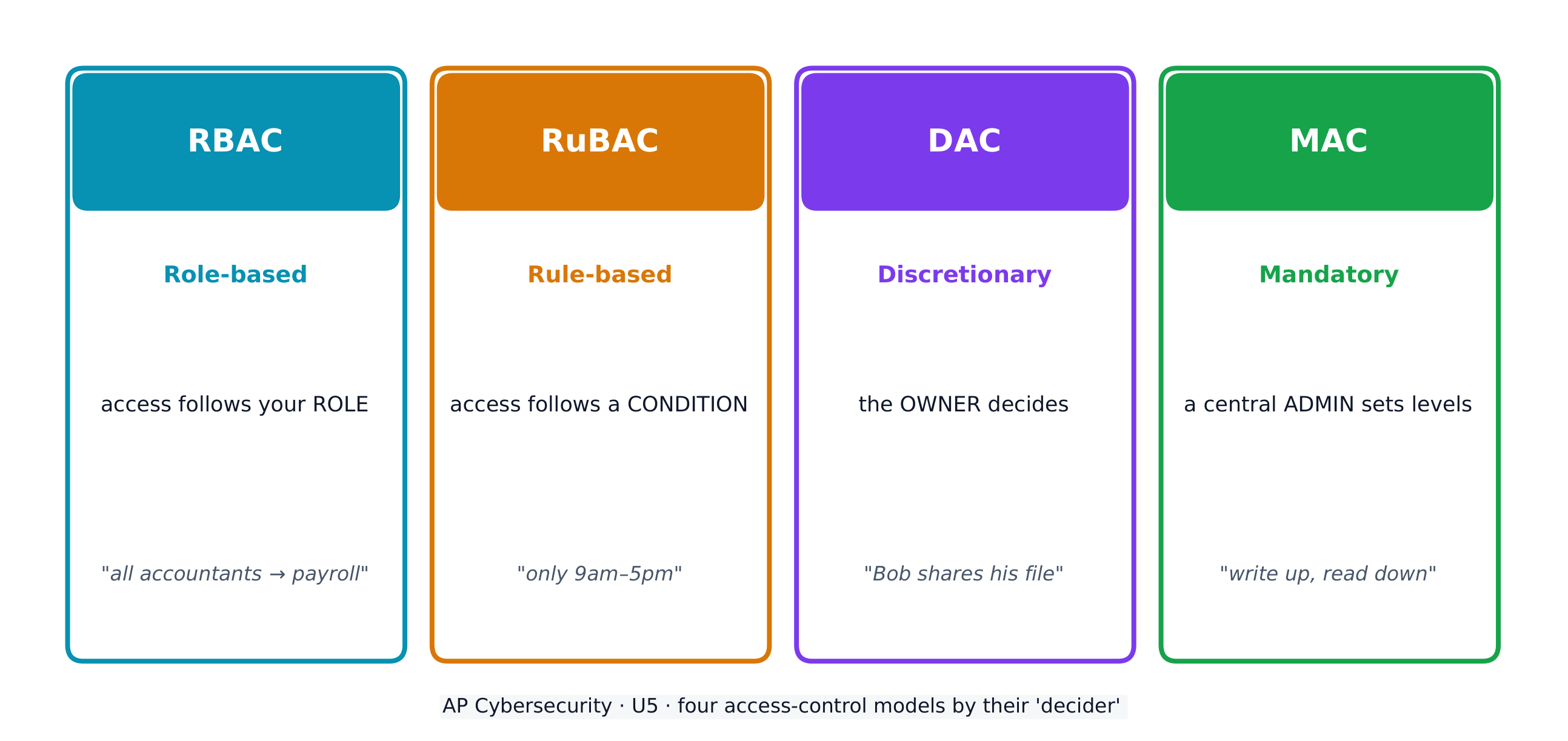
5.2.C.1 Access control enforces which users or applications (called subjects) can access, modify, add, or remove (called operations) which files or applications (called objects). Access control models describe how to determine which subjects have what type of access to which objects.
5.2.C.2 Role-based access control (RBAC) assigns every subject to a role and defines which roles have which types of access to which objects.
Illustrative examples for 5.2.C.2:
An example of a role at a company might be “accountant,” and one type of object could be the payroll software. Role-based access could be used to ensure that only subjects who are assigned to the role of “accountant” have access to the payroll software object.
5.2.C.3 Rule-based access control (RuBAC) checks a set of rules to determine what type of access a subject should have for a specific object and then allows or denies types of access based on the rules. This access control model is typically layered on top of another access control model.
Illustrative examples for 5.2.C.3:
There is a rule that prohibits subjects (even those who would normally have access) from accessing a certain database (the object) outside of local working hours. When a subject attempts to access the database, even if they are authorized to access it, they will be denied access if it is outside the time designated by the rule.
5.2.C.4 Discretionary access control (DAC) gives individual subjects the ability to set the type of access that other subjects have on objects they own. In DAC models some subjects are designated as administrators or super users, and they have the ability to override the access controls established by other subjects.
Illustrative examples for 5.2.C.4:
Bob creates a file (an object) and decides to give Alice permission to edit the file, to give Frank permission to view the file only, and to deny everyone else access to the file altogether.
5.2.C.5 Mandatory access control (MAC) follows strict rules for which types of access each subject level has for objects that are above their level, at their level, or below their level. Subject and object levels are assigned by an external administrator.
5.2.C.6 The Bell-LaPadula model is a MAC model that is often used by governments and military organizations to control the security of information. This model has the following two important properties:
i. The Simple Security Property states that subjects may not read objects that are above their level.
ii. The * (Star) Security Property states that subjects may not write to objects below their level.
These rules taken together are often summarized as “write up, read down” (WURD).
5.2.C.7 The principle of least privilege is the idea that entities should be given exactly as much access as they need to perform their function and no more.
5.2.D
Configure access control settings on a Linux-based system.
5.2.D.1 Authorization is when an entity is granted permission to have a certain type of access to a resource. Access controls are put in place to control which users have what types of access to which data.
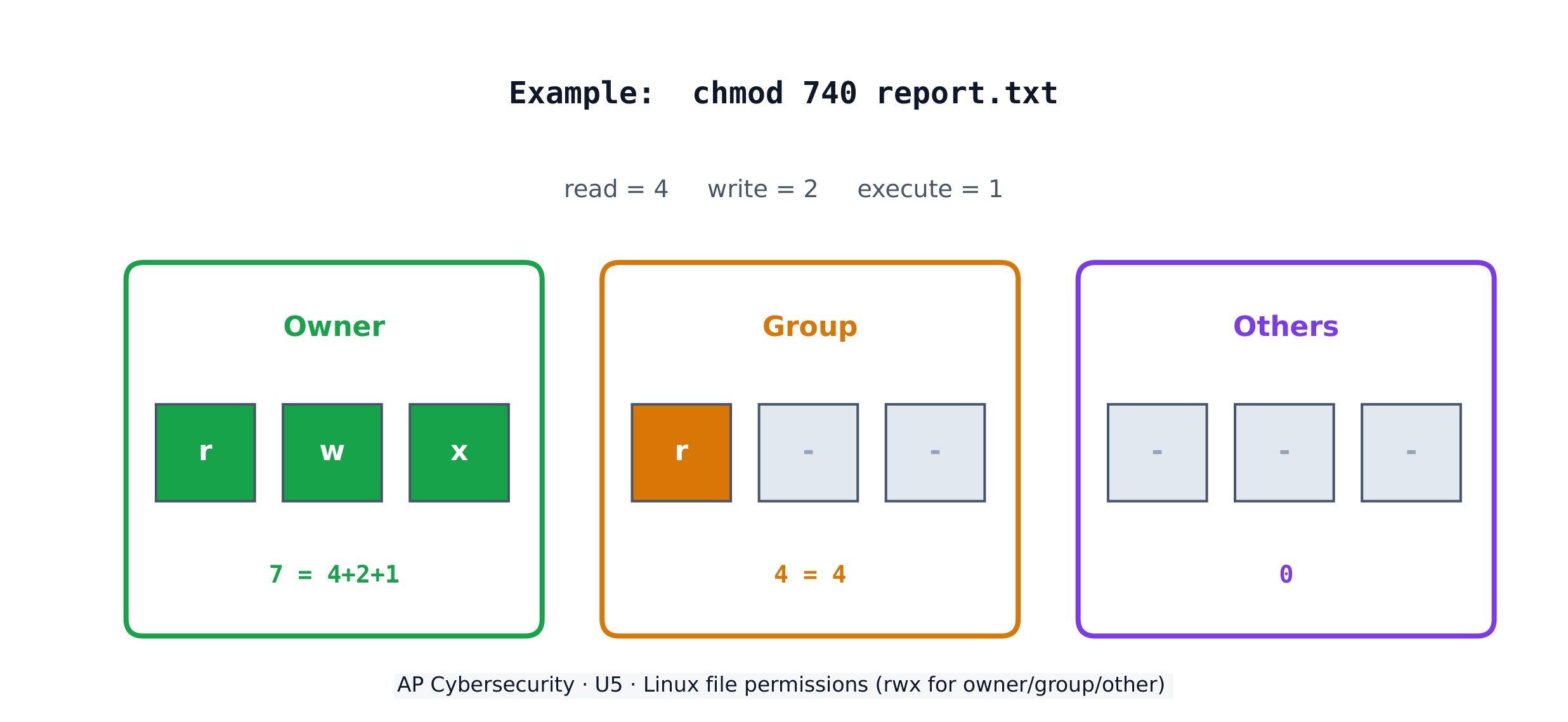
5.2.D.2 There are three types of access to a file in Linux that can be set, and they always come in the following order:
i. Read access allows a user to view the contents of a file.
ii. Write access allows a user to make changes to a file.
iii. Execute access allows a user to run a binary file such as a program.
These are abbreviated rwx, respectively. If a user only has read and execute permissions (not write), then it would display as r-x. The - symbol indicates the absence of that permission.
5.2.D.3 There are three default entities for which permissions are set and always in this order: (1) the file owner, (2) the file group, and (3) all other users. The three sets are displayed with no spaces (e.g., rwxrwxrwx).
5.2.D.4 To view the current permission settings for a file, use the command ls -l, which will show the current settings for the default entities. If there is a + symbol at the end of the permissions, this means that other permissions have been set for that file and it can be viewed with the getfacl command.
5.2.D.5 To modify the permission settings for a file, use the chmod command. This command can be used with the numeric method or the symbolic method.
5.2.D.6 To use chmod in the numeric method the syntax is chmod ### filename. Each of the three ### represents one of the three entities mentioned above (the owner, the group, other nongroup users).
The first # = the owner
The second # = the group
The third # = other nongroup users
The permission for each entity is determined by adding up the values for the types of access to be granted:
0 = no permissions
1 = execute
2 = write
4 = read
Therefore 3 sets permission to write and execute, 5 sets permission to read and execute, 6 sets permission to read and write, and 7 sets permission to read, write, and execute.
Illustrative examples for 5.2.D.6:
The command chmod 750 test would set the permissions for the owner to read, write, and execute, for the group to read and execute, and for everyone else to no access at all.
The command chmod 543 test would set the permissions for the owner to read and execute, for the group to read only, and for everyone else to write and execute.
The command chmod 777 test would set the permissions for all three entities to read, write, and execute for the file test.
5.2.D.7 To use chmod in the symbolic method the syntax is chmod entity +(or –) permission filename. The entities are the user owner, the group, and other nongroup users. Each entity is represented with a single letter.
u = user owner
g = group
o = others
a = all
Permission can be either added or removed to any combination of entities.
= add the permission
– = remove the permission
The permissions that can be set are read, write, and execute.
r = read
w = write
x = execute
Entities and permissions can be combined in a single command. To add the read and execute permissions for the group and user owner for a file called testfile, the command would be chmod ug+rx testfile.
Each access-control model has a different decider: RBAC by your role, RuBAC by a condition, DAC by the file's owner, and MAC by a central administrator's levels.
Encryption combines plaintext with a key to make ciphertext. In this simple cipher the key is the shift amount; only someone who knows the shift can decrypt the message back.
アプリケーションを最初から安全にするための2つの設計原則があります。Secure by design(設計段階からのセキュリティ) は、セキュリティを後付けではなく開発の各フェーズに組み込むことです。Secure by default(デフォルトでのセキュリティ有効化) は、製品出荷時にすでにセキュリティ機能が有効化されており、箱を開けた瞬間から安全であることを意味します。
Secure by design は企業が採用すべき3つの原則に基づいています。(1) ユーザーへの責任転嫁ではなく、顧客のセキュリティ成果に対する自身の所有権を担うこと、(2) 極端な透明性と説明責任を擁護し、セキュリティ関連のニュースやアップデートを迅速に共有することで皆をより安全にすること、(3) セキュリティを最優先事項とするための組織体制とリーダーシップを構築すること。
5.6.A.1 Devices track and log when data are accessed and by whom. The process of recording and monitoring user activities is called accounting. Analysis of these logs can reveal malicious activity when an adversary attempts to access, copy, move, or delete data. Suspicious activity can include:
Accessing files that aren’t typically accessed
Accessing files or applications outside of a user’s normal patterns (including time of day, location, and device type)
Attempts to delete or copy sensitive files
5.6.A.2 A honeypot is a file that appears as if it contains valuable data (e.g., credit card information, PII, passwords), but the data in the file are fake. A system can alert defenders if someone attempts to access the honeypot. Since the honeypot is a fake file, there is no legitimate reason to be accessing it, and any attempted access would be an indicator of malicious activity.
5.6.A.3 Cryptographic hash functions can generate a digest for data and can reveal if data have been altered. If a file has changed unexpectedly, this can be a sign of malicious activity.
5.6.B
Determine controls for detecting attacks against applications or data.
5.6.B.1 Cost is a criterion in determining detective controls. Detective controls like honeypots and using hash values to check data integrity are inexpensive. Some organizations invest in third-party data loss prevention (DLP) services, which monitor data access, usage, and transmission by users throughout the organization to detect suspicious activity; DLP services provide strong detection capabilities at a higher cost.
5.6.B.2 Sensitivity or criticality of data or applications is a criterion in determining detective controls. More sensitive or critical data or applications are more likely targets of an adversary and should be monitored more closely.
5.6.B.3 Classification of data is a criterion in determining detective controls. Data that have been classified as private, educational, healthcare, or financial often have legal or regulatory detection and monitoring requirements.
5.6.C
Evaluate the impact of a method for detecting attacks against an application or data.
5.6.C.1 To operate at an effective speed, log analysis needs to be augmented with some automation. Honeypots offer near instantaneous detection capabilities.
5.6.C.2 Some DLP tools, honeypots, and realtime automated log analysis provide alerts as an attack is happening. These tools allow for a prompt response that can stop an attack before it does more harm. Retrospective log analysis and the use of cryptographic hashes to verify data integrity identify attacks after they have occurred.
5.6.C.3 False negatives can occur in applications and data attack detection. Cryptographic hash functions only detect if data have been altered. An adversary could view and steal data without altering it, and a cryptographic hash function would not detect this. Honeypots cannot detect adversaries that do not attempt to access them.
5.6.D
Identify whether a file has been altered by verifying its hash.
5.6.D.1 Cryptographic hash functions can help identify changes in a file because they are repeatable: the same input always produces the same output for a given hash function.
5.6.D.2 Hashes can be calculated using the command line on a computer, a website, or specialized software.
In Windows Powershell, if a user wanted to generate the SHA256 hash for a file named testfile, they would use the command: Get-FileHash testfile -Algorithm SHA256
In BASH the same could be accomplished with the command: sha256sum testfile
In zsh, the common command line terminal on Apple computers, this could be accomplished with the command: shasum -a 256 testfile
5.6.D.3 A file can be hashed and its hash output recorded. Then it can be hashed again later, and the second hash output can be compared to the previous hash output for the same file. If a file’s hash changes, then the file was altered between when the first and second hashes were generated.
5.6.E
Apply detection techniques to identify and report indicators of application attacks by analyzing log files.
5.6.E.1 SQL injection attacks can be detected by reviewing application and server logs of user input for SQL control words and symbols such as:
A single (') or double (") quote character
Boolean conditions like OR 1=1
A double dash (which indicates a comment in SQL): --
SQL control words (always in capital letters) like WHERE, IN, FROM
5.6.E.2 XSS attacks can be detected by reviewing user input for suspicious tags, particularly the tag.
5.6.E.3 For web applications, buffer overflows can be detected by checking the amount of data the user is sending to the web application in their request. The fields commonly checked are the URL length, cookie length, query string length, and total request length. Long strings in any of these fields can be an indicator of an attempted buffer overflow attack.
5.6.E.4 Directory traversal attacks can be detected by reviewing application and server logs. HTTP GET requests that include paths with sequences of ../ are indicators of an adversary attempting a directory traversal.