Moving around · 移動
This page needs a recent browser (with SharedArrayBuffer support). Please update Chrome, Edge, Firefox or Safari to the latest version. · このページには最新のブラウザ(SharedArrayBuffer対応)が必要です。Chrome、Edge、Firefox、Safariを最新バージョンに更新してください。
English
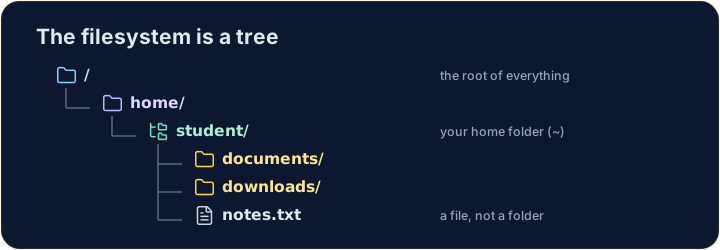
The filesystem is a tree
- Folders (called directories) hold files and other folders, like branches on a tree.
- The very top is
/, the root. Your personal folder is your home, written~.
日本語
ファイルシステムはツリー構造
- フォルダ(ディレクトリとも呼ばれる)はファイルや他のフォルダを保持しており、木の枝のように配置されています。
- 最上部は
/で、ルートです。あなたの個人用フォルダはホームディレクトリで、~と表記されます。
English
Looking and moving
lslists what is in the current folder.cdchanges directory — it moves you into a folder:
- After
cd documents, you are inside documents. Runpwdany time to check where you are.
日本語
確認と移動
lsは現在のフォルダの内容をリスト表示します。cdはディレクトリを変更します — フォルダ内に移動します:
ls
cd documents
cd documentsの後、あなたは文書の内部にいます。いつでもpwdを実行して現在位置を確認してください。
English
Handy shortcuts
cd ..goes up one level (to the parent folder).cdwith nothing, orcd ~, jumps straight back to your home.- A path can be relative (
documents/work) or absolute (starts with/, like/home/student).
日本語
便利なショートカット
cd ..は1つ上の階層(親フォルダ)に行きます。cdは引数なし、またはcd ~で、ホームディレクトリに直接戻ります。- パスは相対パス(
documents/work)か絶対パス(/で始まり、/home/studentのように)のいずれかです。
English
Common mistakes
cdwith no argument goes to your home folder;cd ..goes up one level.pwdshows the folder you are in.
日本語
よくあるミス
cdは引数なしでホームディレクトリに行き、cd ..は1つ上の階層に行きます。pwdは現在いるフォルダを表示します。
Explore · 探索
Moving around the tree · ツリー内での移動
The filesystem is one tree; an absolute path is the trail from /. · ファイルシステムは1つの ツリー です。絶対パスは / からの軌跡です。
Use ls (list) to see what is in your home folder. · ls (list) を使ってホームフォルダの中身を確認する。
Move into the documents folder with cd documents, then run pwd to prove you are there. · documents フォルダに cd documents で移動し、pwd を実行してそこにいることを証明する。