Malware · マルウェア
This page needs a recent browser (with SharedArrayBuffer support). Please update Chrome, Edge, Firefox or Safari to the latest version. · このページには最新のブラウザ(SharedArrayBuffer対応)が必要です。Chrome、Edge、Firefox、Safariを最新バージョンに更新してください。
English
Malware = malicious software
- Malware is any program written to harm a computer or steal from it.
- The exam expects you to know the main types and how they differ. Here they are.
日本語
マルウェア = 悪意のあるソフトウェア
- マルウェアとは、コンピュータを損なったり、情報を盗んだりするために作成されたあらゆるプログラムのことです。
- 試験では主な種類とそれらの違いを理解していることを求めます。以下がその一覧です。
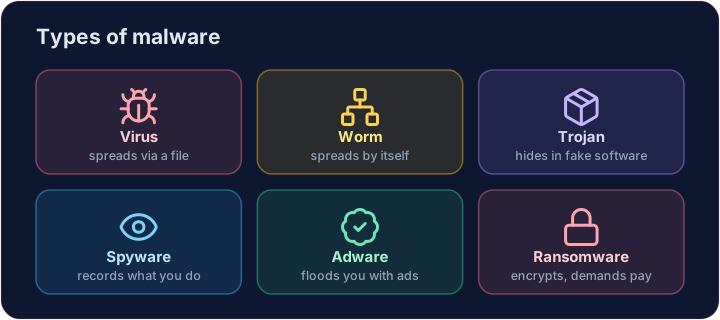
English
Spreading types
- Virus — attaches to a file; runs and spreads when you open that file.
- Worm — spreads by itself across a network, with no file to open. The Morris worm was one.
- Trojan horse — pretends to be useful software, but hides something harmful inside.
日本語
拡散方法による分類
- ウイルス — ファイルに付着し、そのファイルを開いたときに実行・拡散します。
- ワーム — 開くファイルがなくとも、自身でネットワーク上を拡散します。「モリスのワーム」がその一例です。
- トロイの木馬 — 有用なソフトウェアであるふりをしており、内部に有害なコードを隠しています。
English
Stealing and spying types
- Spyware — secretly records what you do, such as the keys you type (your passwords).
- Adware — floods you with adverts; often bundled with free downloads.
日本語
窃取・監視目的のタイプ
- スパイウェア — キーボード入力(パスワードなど)を含むあなたの操作を密かに記録します。
- アダウェア — 広告を大量に表示させます。フリーソフトのダウンロードに同梱されることが多いです。
English
Holding data hostage
- Ransomware — encrypts your files and demands payment for the key to unlock them.
- It has shut down hospitals and companies. The best defence is backups you can restore from.
Covers: IGCSE 5.3 (Cyber security threats), A-Level 6.1, AP CSP Big Idea 5.
日本語
データを人質にする手法
- ランサムウェア — ファイルを暗号化して解錠キーの支払いを要求します。
- 病院や企業のシステムを停止させた事例があります。最善の対策は、復元可能なバックアップを保持することです。
対象科目: IGCSE 5.3 (サイバーセキュリティ脅威)、A-Level 6.1、AP CSP Big Idea 5.
English
Now you try
- First, read three behaviours and name the malware type each one describes.
- Then play defender: ransomware has struck, and you must count how many files your backup can restore.
日本語
あなたも試してみよう
- まず、3つの挙動を読み取って、それぞれがどのマルウェア種類を記述しているかを答えてください。
- 次にディフェンダーとして振る舞い、ランサムウェア攻撃が発生した前提で、バックアップから復元できるファイル数を数えましょう。
English
Common mistakes
- A virus needs a host file to spread; a worm spreads by itself across a network.
- A Trojan hides inside useful-looking software.
日本語
よくあるミス
- ユーザーにはホストファイルが必要ですが、ワームはネットワーク上で自身で拡散します。
- トロイの木馬は、一見Utilityなソフトウェアの中に潜み込みます。
Name the malware. Read each behaviour and set the variable to virus, worm or trojan. · マルウェアの名前を答える。各挙動を読み取り、変数をvirus、worm、またはtrojanに設定する。
Click Run to see the output here. · 実行ボタンをクリックして出力を確認してください。
Ransomware has encrypted the laptop, but you kept a backup. Count how many of the files also appear in backup — that is how many you can restore. Print the count. · ラップトップがランサムウェアによって暗号化されたが、バックアップは保持している。filesにbackupが含まれているものを数え、復元可能な数を求める。その数を出力する。
Click Run to see the output here. · 実行ボタンをクリックして出力を確認してください。