Skip to content · ⁨דלג לתוכן⁩

Securing Applications and Data · ⁨ביטחון תוכניות ומידע⁩

AP Cybersecurity · ⁨אבטחת מידע והסייבר - AP⁩ · Topic 5 · ⁨נושא 5⁩

Video lesson for this topic · ⁨שיעור וידאו לנושא זה⁩ Open the video page · ⁨פתח את עמוד הוידאו⁩
9:47

ביטחון תוכניות ומידע

חברה הוציאה הון רב על מצלתי אש, דלתות נעולות וסיסמאות חזקות. אז מישהי הקלידה מספר תווים מוזרים בתיבת כניסה — והבסיס נתונים…

English narration · English + 中文 subtitles burned in · ⁨קריאת קול באנגלית · תרגום אנגלי + סינית שרוף בתוך הסרטון⁩

5.1

Application and Data Vulnerabilities and Attacks

Syllabus · ⁨סיילבוס⁩
English

Learning Objective 5.1.A: Explain how adversaries can exploit application and file vulnerabilities to cause loss, damage, disruption, or destruction.

  • 5.1.A.1 An adversary can read any unencrypted files if they have access to the device or drive storing the files.
  • 5.1.A.2 Computers have standard users and administrative users. Administrative users have access to control system settings and can typically access any files or applications on a system. If regular users are given administrative privileges on a computer, and an adversary can compromise a user’s account, then the adversary will have elevated privileges on the system.
  • 5.1.A.3 When access control settings are weakly configured, many users often have permission to view and sometimes even edit files on a system. Adversaries can take advantage of weak access control settings to steal or destroy files or disrupt an application.

Learning Objective 5.1.B: Explain how application attacks exploit vulnerabilities.

  • 5.1.B.1 Applications are programs that run instructions on computers; they are executable data. Some applications run locally on a user’s computer, while other applications, like web applications, run on a server and are accessed by users through a network.
  • 5.1.B.2 Many applications take user input through open-ended input fields where users can type characters (e.g., letters, numbers, punctuation). Developers should include user input checks in their application, such as numeric input when asked for a number of items, to ensure that the user input matches what is expected; the application should reject input outside of the expected parameters. This process of verifying that user input meets expected criteria before processing it is called data validation. Applications that fail to validate user input are vulnerable to injection-type attacks, where adversaries insert unexpected character strings in input fields to alter the behavior of a program.
  • 5.1.B.3 Structured query language (SQL) is a computer language used to request information from databases and make changes to databases or entries in databases. Applications that query a database using unvalidated or unsanitized input from users are vulnerable.
  • 5.1.B.4 An SQL-injection attack places SQL commands and control characters into a user-input field in an application, which can lead to a breach of confidentiality by causing the application to return more information than it should, or a breach of integrity by modifying or deleting data in the database.
  • 5.1.B.5 Websites are written using hypertext markup language (HTML), and many websites use Javascript to create dynamic content on websites or web applications. Because Javascript commands run in the browser of the user visiting the website, those commands can access sensitive data stored in the browser like usernames, passwords, and cryptographic keys.
  • 5.1.B.6 A cross site scripting (XSS) attack injects malicious code into a website that a user’s browser then executes. The malicious code can be embedded in a link the user clicks (a Type I or Reflected XSS attack) or it can be inserted onto a website through a comment field, forum post, or visitor log, which would affect any user visiting that website (a Type II or Stored XSS attack).
  • 5.1.B.7 When applications take user input, that input is written to a buffer. A buffer is a designated section of computer memory with a fixed size. If the amount of data the user enters exceeds the size of the buffer, it can overflow into adjacent memory locations and overwrite other parts of the computer’s memory.
  • 5.1.B.8 A buffer overflow attack feeds more data into memory than was allotted, which can cause a system to crash or to execute code outside the scope of a program’s security policy, effectively allowing the adversary to perform unauthorized actions on a computer, such as accessing, modifying, or deleting files.
  • 5.1.B.9 The files that run web applications are stored in directories on servers. When users access web applications, their browsers send GET requests using hypertext transfer protocol (HTTP). A GET request accesses a file somewhere in the filesystem of the server.
  • 5.1.B.10 In a directory traversal attack, adversaries modify URLs and GET requests to attempt to access sensitive data (e.g., usernames and passwords) on a server’s file system.
    • Illustrative examples for 5.1.B.10:
      • A web server stores images for a website it hosts in the /var/www/images/ directory. An adversary modifies a URL requesting an image to ../../../etc/passwd. The .. moves one directory up in the file system; so the three consecutive .. returns the path to the root, and from there the adversary is attempting to access the passwd file that would return a list of all the authorized usernames on the device.

Learning Objective 5.1.C: Assess and document risks from application and data vulnerabilities.

  • 5.1.C.1 Data security risks can involve a compromise of confidentiality when unauthorized persons can access sensitive data, integrity when data can be manipulated or altered from its intended state, and availability when data can be destroyed or encrypted to prevent others from accessing it.
  • 5.1.C.2 High risks from data vulnerabilities often involve highly sensitive data (e.g., data that is governed by laws or regulations) that could be compromised through a highly likely exploit.
    • Illustrative examples for 5.1.C.2:
      • The company developing the next jet engine that will be used by the Air Force in its planes is storing the technical specifications for the engine on an unencrypted drive.
  • 5.1.C.3 Moderate risks from data vulnerabilities often involve sensitive data not having strong enough encryption or strict enough access controls.
    • Illustrative examples for 5.1.C.3:
      • A company stores its customers’ PII in a spreadsheet, and the spreadsheet is encrypted using a small key.
  • 5.1.C.4 Low risks from data vulnerabilities often involve less sensitive information being encrypted with shorter keys or having access controls that are not strict enough.
    • Illustrative examples for 5.1.C.4:
      • An organization’s CEO stores his private memos to his executive staff on a company share drive that is unencrypted and has no access controls.
עברית

מטרת למידה 5.1.A: הסבר כיצד תוקפים יכולים לנצל פגיעות באפליקציות ובקבצים כדי לגרום לאובדן, נזק, הפרעה או הרס.

  • 5.1.A.1 תוקף יכול לקרוא כל קובץ שאינו מוצפן אם יש לו גישה למכשיר או לכונן האוחז את הקבצים.
  • 5.1.A.2 למחשבים יש משתמשים רגילים ומשתמשים מנהלים. למשתמשים מנהלים יש גישה להגדרות שליטה במערכת והם יכולים בדרך כלל לגשת לכל הקבצים או האפליקציות במערכת. אם משתמשים רגילים מקבלים זכויות מנהל במחשב, ובתוקף מצליח לפגוע בחשבון המשתמש, אז התוקף יקבל זכויות מוגברות במערכת.
  • 5.1.A.3 כאשר הגדרות בקרת הגישה חלשות, למשתמשים רבים יש לעיתים קרובות רשות לצפות ולפעמים גם לערוך קבצים במערכת. תוקפים יכולים לנצל הגדרות בקרת גישה חלשות לגנוב או להרס קבצים או להפריע באפליקציה.

מטרת למידה 5.1.B: הסבר כיצד תקיפות באפליקציות מנצלות פגיעות.

  • 5.1.B.1 אפליקציות הן תוכניות המבצענות פקודות במחשבים; הן נתונים ביצועיים. חלקן רצה על מחשב המשתמש המקומי, בעוד שאחרות, כמו אפליקציות אתר, רוצות על שרত ומוגשות למשתמשים דרך רשת.
  • 5.1.B.2 למספר אפליקציות יש שדות כניסה פתוחים בהם משתמשים יכולים להקליד תווים (למשל, אותיות, מספרים, סימני פיסוק). מת開發ים צריכים לכלול בדיקות כניסת משתמש באפליקציה, כגון כניסה מספרית כאשר מבוקש מספר פריטים, כדי להבטיח שכניסת המשתמש תתאים למצופה; האפליקציה אמורה לדחות כניסה מחוץ לפארמטרים המצופים. תהליך זה של וידוא שכניסת המשתמש עומדת בקריטריונים מצופים לפני העיבוד נקרא תקפות נתונים. אפליקציות שלא מבצענות תקפות בכניסת המשתמש הן פגיעות לתקיפות מסוג הזרקת קוד, שבהן תוקפים מזריקים שרשרות תווים בלתי צפויות בשדות הכניסה כדי לשנות את התנהגות התוכנית.
  • 5.1.B.3 שפת SQL (Structured Query Language) היא שפת מחשב המשמשת לבקשת מידע ממאגרי נתונים ולביצוע שינויים במאגרי נתונים או בהקלטות במאגר. אפליקציות המבקשות מידע ממאגר נתונים באמצעות כניסה שאינה תקפה או לא נוקאת משמשת המשתמשים הן פגיעות.
  • 5.1.B.4 תקפת הזרקת SQL (SQL-injection) מניחה פקודות SQL ותווים שלט בשדה כניסת משתמש באפליקציה, מה שעשוי להוביל לפגיעה בסודיות על ידי גרירה לאפליקציה להחזיר יותר מידע ממה שצריך, או לפגיעה באמינות על ידי שינוי או מחיקת נתונים במאגר הנתונים.
  • 5.1.B.5 אתרים נכתבים באמצעות HTML (hypertext markup language), והרבה אתרים משתמשים ב-Javascript ליצירת תוכן דינמי באתרים או באפליקציות אתר. מכיוון שפקודות Javascript רוצות בדפדפן של המשתמש המבקר באתר, פקודות אלו יכולות לגשת למידע רגיש שנשמר בדפדפן כמו שמות משתמש, סיסמאות ומפתחות קריפטוגרפיים.
  • 5.1.B.6 תקפת XSS (cross site scripting) מזריקה קוד רע לאתר שהדפדפן של המשתמש מבצע לאחר מכן. הקוד הרע יכול להיות משולב בקישור שמשתמש לוחץ עליו (תקפת Type I או Reflected XSS) או שהוא יכול להיות מוזרק לאתר דרך שדה תגובה, פרסום בפורום או לוג ביקורים, מה שישפיע על כל משתמש המבקר באתר הזה (תקפת Type II או Stored XSS).
  • 5.1.B.7 כאשר אפליקציות לוקחות כניסת משתמש, כניסה זו נכתבת לבאפר. באפר הוא אזור מוגדר בזיכרון המחשב בגודל קבוע. אם כמות הנתונים שמשתמש מכניס עולה על גודל הבאפר, היא עלולה להתפשט לזיכרון סמוך ולהחליף חלקים אחרים של זיכרון המחשב.
  • 5.1.B.8 תקפת overflow באפר (buffer overflow) מזריקה יותר נתונים לזיכרון מאשר הוקצב, מה שעשוי לגרום למערכת לקרוש או לבצע קוד מחוץ לתחום מדיניות הביטחון של התוכנית, ומאפשר בפועל לתוקף לבצע פעולות בלתי מורשות במחשב, כגון גישה, שינוי או מחיקת קבצים.
  • 5.1.B.9 הקבצים המפעילים אפליקציות אינטרנט מאוחסנים בתיקיות על שרתים. כאשר משתמשים נכנסים לאפליקציות אינטרנט, הדפדפנים שלהם שולחים בקשות GET באמצעות פרוטוקול העברת טקסט היפר (HTTP). בקשת GET גישה לקובץ כלשהו במערכת הקבצים של השרת.
  • 5.1.B.10 בתקיפת דילוג בתיקיות, מתקיפים מעבירים את הכיתובים (URLs) ואת הבקשות GET כדי לנסות לגשת למידע רגיש (למשל, שמות משתמש וסיסמאות) במערכת הקבצים של השרת.
    • דוגמאות להמחיה עבור 5.1.B.10:
      • שרת אינטרנט מאחסן תמונות לאתר שהוא מארח בתיקיה /var/www/images/. מתקיף מעביר כיתוב (URL) בבקשה לתמונה ל- ../../../etc/passwd. ה- .. מייצג מעבר תיקיה אחת כלפי מעלה במערכת הקבצים; לכן, שלושת ה- .. הרציפים מחזירים את הנתיב לשורש, ומשם המתקיף מנסה לגשת לקובץ passwd שיחזיר רשימה של כל שמות המשתמשים המורשים על המכשיר.

מטרות לימוד 5.1.C: הערכה ותיעוד סיכונים הנובעים ממעבירות באפליקציות ובנתונים.

  • 5.1.C.1 סיכוני אבטחת נתונים עשויים לכלול פגיעה בסודיות כאשר אנשים בלתי מורשים יכולים לגשת למידע רגיש, שלמות כאשר נתונים ניתנים לעיוות או שינוי מהמצב המקורי שלהם, וזמינות כאשר נתונים ניתנים להריסה או הצפנה כדי למנוע מגישה אליהם.
  • 5.1.C.2 סיכונים גבוהים ממעבירות נתונים כוללים לעיתים קרובות נתונים רגישים מאוד (למשל, נתונים הנשלטים על ידי חוקים או תקנות) שעשויים להיות חשופים דרך ניצול סביר מאוד.
    • דוגמאות להמחיה עבור 5.1.C.2:
      • החברה המפתחת את מנוע הסילון הבא שימשמש במטוסי צה"ל מאחסנת את המפרטים הטכניים של המנוע על דיסק שאינו מצופה הצפנה.
  • 5.1.C.3 סיכונים בינוניים ממעבירות נתונים כוללים לעיתים קרובות נתונים רגישים שאין להם הצפנה חזקה מספיק או הגבלות גישה מחמירות מספיק.
    • דוגמאות להמחיה עבור 5.1.C.3:
      • חברה מאחסנת את המידע האישי של לקוחותיה (PII) בגיליון עבודה, והגיליון מצופה הצפנה בעזרת מפתח קטן.
  • 5.1.C.4 סיכונים נמוכים ממעבירות נתונים כוללים לעיתים קרובות מידע פחות רגיש המצופה במפתחים קצרים או עם הגבלות גישה שאינן מחמירות מספיק.
    • דוגמאות להמחיה עבור 5.1.C.4:
      • נשיא מועצה מנהלת מאחסן את המכתבים הפרטיים שלו לצוות המנהלים בחברה על נתיב שיתוף בחברה שאינו מצופה הצפנה ואינו כולל הגבלות גישה.

Source: College Board AP Course and Exam Description · ⁨מקור: תיאור הקורס והמבחן של College Board AP⁩

English
SQL injection

Applications 应用程序 are the programs that run on computers, and data is what they process - both are prime targets. If files are stored unencrypted, anyone with access to the drive can read them. If a normal user is given administrative 管理性 privileges, an adversary who steals that account gains sweeping power.

The biggest application danger is bad user input. When a program does not check what a user types, an adversary can slip in commands - an injection attack 注入攻击. Data validation 数据验证 (checking input meets expected rules) is the defense. Key attacks:

  • SQL injection SQL注入 - inserting SQL commands into an input field to read or change a database.
  • Cross-site scripting (XSS) 跨站脚本 - injecting malicious script into a website that runs in another user's browser.

What a SQL injection actually looks like

SQL is a language for querying a database, and its control words are always written in capital letters — SELECT, FROM, WHERE, IN, OR, AND. A login form usually builds a query by pasting what you typed into one:

An attacker types SQL into the field instead of a name. Two tricks do most of the damage:

  • A condition that is always true. Entering ' OR '1'='1 makes the WHERE clause true for every row, so the database returns every user.
  • A double dash, which begins a comment in SQL. Entering admin' -- ends the name string and comments out the whole rest of the line, including the password check, so the query becomes … WHERE name = 'admin' and the attacker is logged in as the administrator without a password.

The defence is not to filter for the word SELECT. It is to stop the input being treated as code at all: use parameterised queries 参数化查询 (also called prepared statements), where the database is given the query and the values separately and never mixes them, and add input validation to reject characters the field has no reason to contain.

  • Buffer overflow 缓冲区溢出 - sending more data than a memory buffer 缓冲区 can hold, so it overflows into nearby memory and may run the adversary's code.
  • Directory traversal 目录遍历 - using ../ sequences in a URL to reach files outside the intended folder, such as /etc/passwd.

We rate data risk by sensitivity: unencrypted military plans are high risk; customer data with a weak key is moderate; low-value data with short keys is low.

עברית
SQL injection

אפליקציות הן התוכניות הפועלות במחשבים, ו-נתונים הם מה שהן מעבדות - שניהם יעדים מרכזיים. אם קבצים מאוחזים ללא הצפנה, כל מי שיש לו גישה לדיסק יכול לקרוא אותם. אם למשתמש רגיל ניתנות זכויות מנהל, מתקיף שגונב את החשבון שלו מקבל כוח נרחב.

הסכנה הגדולה ביותר לאפליקציה היא תקלט משתמש רע. כאשר תוכנית אינה בודקת מה המשתמש מקליד, מתקיף יכול להכניס פקודות - מתקפת הזרקה. אימות נתונים (בדיקה שהתקלט עומד בתנאים צפויים) הוא ההגנה. מתקפות מפתח:

  • הזרקת SQL: הכנסת פקודות SQL לשדה תקלט כדי לקרוא או לשנות מסד נתונים.
  • התקפת סריקת אתרים (XSS): הזרקה של סקריפט מזיק לאתר הרץ בדפדפן של משתמש אחר.

What a SQL injection actually looks like

SQL is a language for querying a database, and its control words are always written in capital letters — SELECT, FROM, WHERE, IN, OR, AND. A login form usually builds a query by pasting what you typed into one:

SELECT * FROM users WHERE name = 'alice' AND password = 'secret'

מתקיף מקליד SQL בשדה במקום שם. שתי טריקים עושים את רוב הנזק:

  • תנאי שתמיד נכון. הכנסת ' OR '1'='1 הופכת את סעיף ה-WHERE לנכון לכל שורה, ולכן מסד הנתונים מחזיר את כל המשתמשים.
  • מקש כפול (- -), המהווה תחילת הערה ב-SQL. הזנת admin' -- מסתיימת במחרוזת השם ומעבירה את שאר השורה להערות, כולל בדיקת הסיסמה, כך שהשאלה הופכת ל-… WHERE name = 'admin' והמתקפה מצליחה להתחבר כמנהל ללא סיסמה.

ההגנה אינה לה filtrate (לסנן) את המילה SELECT. ההגנה היא למנוע מהכניסה להיות מטופלת כקוד: השתמשו ב-שאלות פאראמטריות (ידועות גם כ-הצהרות מוכנות), שבהן הבסיס מקבל את השאלה ואת הערכים בנפרד ולעולם אינו מערבב ביניהם, והוסיפו אימות כניסה כדי לדחות תווים ששדה זה לא אמור להכיל.

  • התפשטות באזור בואפר - שליחת יותר נתונים מאשר בואפר זמין יכול להכיל, כך שהוא זורם לתוך זיכרון סמוך ועשוי להריץ קוד של המתקיף.
  • ניווט בתיקיות - שימוש ב-תצורות ../ ב-URL כדי לגשת לקבצים מחוץ לתיקיה הרצויה, כמו /etc/passwd.

אנו מדרגים סיכון נתונים לפי רגישות: תוכניות צבאיות בלתי מוצפנות הן סיכון גבוה; נתוני לקוח עם מפתח חלש הם סיכון בינוני; נתונים בעלי ערך נמוך עם מפתحات קצרים הם סיכון נמוך.

Vocabulary · ⁨מילון מונחים⁩ Train · ⁨אימון⁩
English עברית
SQL injection/ˌes kjuː ˈel ɪnˈdʒekʃn/ הזרקת SQL
Watch lesson · ⁨צפה בשיעור⁩
5.2

Protecting Applications and Data: Managerial Controls and Access Controls · ⁨הגנה על אפליקציות ונתונים: בקרות מנהליות ובקרות גישה⁩

Syllabus · ⁨סיילבוס⁩
Learning ObjectiveEssential Knowledge

5.2.A
Explain how the state or classification of data impacts the type and degree of security applied to that data.

  • 5.2.A.1 Organizations implement specific security controls to comply with legal requirements based on the types of data they collect, store, process, and transmit.
  • 5.2.A.2 Data can be classified by their state.
    • Data at rest are stored on a drive. It is important to protect the physical drive storing the data from destruction or theft. Data at rest can also be encrypted so that if an adversary steals it, they can’t immediately read the data.
    • Data in transit are being sent from one device to another. If the data are being transferred over physical media (e.g., cables) it is important to protect the media. Data in transit can also be encrypted so that if an adversary intercepts it, they can’t immediately read the data.
    • Data in use are being processed by software or a person. Access controls can be used to limit who or what has the ability to use data in different ways (e.g., view or edit). Data must be unencrypted to be used.
  • 5.2.A.3 Organizations often categorize data according to their sensitivity and prioritize a higher degree of security for more sensitive information.
  • 5.2.A.4 Laws and regulations can require certain types of data to be stored, transmitted, and handled according to specific rules.
    • Personally identifiable information (PII) is any data that allows someone to be identified and includes (but is not limited to): name, signature, phone number, address, biometric data (e.g., fingerprints), social security number, date of birth, and email address. The protection of this data is covered by many laws but most notably The Privacy Act of 1974 and for children under the age of 13 the Children’s Online Privacy Protection Act of 1998.
    • Protected health information (PHI) is any data related to an individual’s health, treatment, payment for healthcare at any time and includes (but is not limited to): test results, treatment records, hospital records, doctor visit notes, and health provider payment records. The protection of PHI is included in the Health Insurance Portability and Accountability Act of 1996.
    • Payment card information (PCI) is the data collected by organizations to process payments via cards (e.g., credit cards) and includes the following: name, account number, expiration date, address, and CVV code. The protection of this data is regulated by the Payment Card Industry Data Security Standard (PCI-DSS).
  • 5.2.A.5 Organizations that collect regulated data will label them and have policies that comply with the legal or regulatory requirements for the safe storage, transmission, and handling of these data.

5.2.B
Identify managerial controls related to application and data security.

  • 5.2.B.1 A cryptography policy will describe the acceptable encryption protocols and key parameters for an organization and may include:
    • A list of encryption algorithms approved for specific uses
    • Minimum or maximum key lengths
    • Cryptographic key-generation requirements and parameters
    • Cryptographic key-storage requirements
  • 5.2.B.2 A web application security policy will outline the requirements and parameters for testing and mitigating web application vulnerabilities in an organization, and it may include:
    • Parameters for when an application is subject to a security assessment
    • Timelines for remediating vulnerabilities based on level of risk
    • Parameters for how an application security assessment is to be carried out (e.g., using specific tools or according to specific frameworks)

5.2.C
Determine an appropriate access control model to protect applications and data.

  • 5.2.C.1 Access control enforces which users or applications (called subjects) can access, modify, add, or remove (called operations) which files or applications (called objects). Access control models describe how to determine which subjects have what type of access to which objects.
  • 5.2.C.2 Role-based access control (RBAC) assigns every subject to a role and defines which roles have which types of access to which objects.
    • Illustrative examples for 5.2.C.2:
      • An example of a role at a company might be “accountant,” and one type of object could be the payroll software. Role-based access could be used to ensure that only subjects who are assigned to the role of “accountant” have access to the payroll software object.
  • 5.2.C.3 Rule-based access control (RuBAC) checks a set of rules to determine what type of access a subject should have for a specific object and then allows or denies types of access based on the rules. This access control model is typically layered on top of another access control model.
    • Illustrative examples for 5.2.C.3:
      • There is a rule that prohibits subjects (even those who would normally have access) from accessing a certain database (the object) outside of local working hours. When a subject attempts to access the database, even if they are authorized to access it, they will be denied access if it is outside the time designated by the rule.
  • 5.2.C.4 Discretionary access control (DAC) gives individual subjects the ability to set the type of access that other subjects have on objects they own. In DAC models some subjects are designated as administrators or super users, and they have the ability to override the access controls established by other subjects.
    • Illustrative examples for 5.2.C.4:
      • Bob creates a file (an object) and decides to give Alice permission to edit the file, to give Frank permission to view the file only, and to deny everyone else access to the file altogether.
  • 5.2.C.5 Mandatory access control (MAC) follows strict rules for which types of access each subject level has for objects that are above their level, at their level, or below their level. Subject and object levels are assigned by an external administrator.
  • 5.2.C.6 The Bell-LaPadula model is a MAC model that is often used by governments and military organizations to control the security of information. This model has the following two important properties:
    • i. The Simple Security Property states that subjects may not read objects that are above their level.
    • ii. The * (Star) Security Property states that subjects may not write to objects below their level.
    • These rules taken together are often summarized as “write up, read down” (WURD).
  • 5.2.C.7 The principle of least privilege is the idea that entities should be given exactly as much access as they need to perform their function and no more.

5.2.D
Configure access control settings on a Linux-based system.

  • 5.2.D.1 Authorization is when an entity is granted permission to have a certain type of access to a resource. Access controls are put in place to control which users have what types of access to which data.
  • 5.2.D.2 There are three types of access to a file in Linux that can be set, and they always come in the following order:
    • i. Read access allows a user to view the contents of a file.
    • ii. Write access allows a user to make changes to a file.
    • iii. Execute access allows a user to run a binary file such as a program.
    • These are abbreviated rwx, respectively. If a user only has read and execute permissions (not write), then it would display as r-x. The - symbol indicates the absence of that permission.
  • 5.2.D.3 There are three default entities for which permissions are set and always in this order: (1) the file owner, (2) the file group, and (3) all other users. The three sets are displayed with no spaces (e.g., rwxrwxrwx).
  • 5.2.D.4 To view the current permission settings for a file, use the command ls -l, which will show the current settings for the default entities. If there is a + symbol at the end of the permissions, this means that other permissions have been set for that file and it can be viewed with the getfacl command.
  • 5.2.D.5 To modify the permission settings for a file, use the chmod command. This command can be used with the numeric method or the symbolic method.
  • 5.2.D.6 To use chmod in the numeric method the syntax is chmod ### filename. Each of the three ### represents one of the three entities mentioned above (the owner, the group, other nongroup users).
    • The first # = the owner
    • The second # = the group
    • The third # = other nongroup users
    • The permission for each entity is determined by adding up the values for the types of access to be granted:
    • 0 = no permissions
    • 1 = execute
    • 2 = write
    • 4 = read
    • Therefore 3 sets permission to write and execute, 5 sets permission to read and execute, 6 sets permission to read and write, and 7 sets permission to read, write, and execute.
    • Illustrative examples for 5.2.D.6:
      • The command chmod 750 test would set the permissions for the owner to read, write, and execute, for the group to read and execute, and for everyone else to no access at all.
      • The command chmod 543 test would set the permissions for the owner to read and execute, for the group to read only, and for everyone else to write and execute.
      • The command chmod 777 test would set the permissions for all three entities to read, write, and execute for the file test.
  • 5.2.D.7 To use chmod in the symbolic method the syntax is chmod entity +(or –) permission filename. The entities are the user owner, the group, and other nongroup users. Each entity is represented with a single letter.
    • u = user owner
    • g = group
    • o = others
    • a = all
    • Permission can be either added or removed to any combination of entities.
      • = add the permission
    • – = remove the permission
    • The permissions that can be set are read, write, and execute.
    • r = read
    • w = write
    • x = execute
    • Entities and permissions can be combined in a single command. To add the read and execute permissions for the group and user owner for a file called testfile, the command would be chmod ug+rx testfile.

Source: College Board AP Course and Exam Description · ⁨מקור: תיאור הקורס והמבחן של College Board AP⁩

English

Data is classified by its state - at rest 静态数据 (stored on a drive), in transit 传输中数据 (moving between devices), and in use 使用中数据 (being processed). Data at rest and in transit can be encrypted so a thief cannot read it; data in use must be decrypted, so access controls guard it instead.

Some data types are regulated 受监管 - the law dictates how they must be stored, transmitted and handled - so an organisation must achieve compliance 合规 by matching its controls to the rules. The exam expects you to pair each data type with its governing law:

Regulated data What it is Governing law
personally identifiable information (PII) 个人身份信息 anything identifying a person: name, address, SSN, biometrics, date of birth The Privacy Act (1974); COPPA for under-13s
protected health information (PHI) 受保护健康信息 health, treatment and healthcare-payment records HIPAA (1996)
payment card information (PCI) 支付卡信息 card number, expiry, CVV, cardholder name PCI-DSS

An organisation that collects regulated data must label it and hold policies that keep its storage, transmission and handling compliant - the higher the sensitivity, the higher the required degree of security.

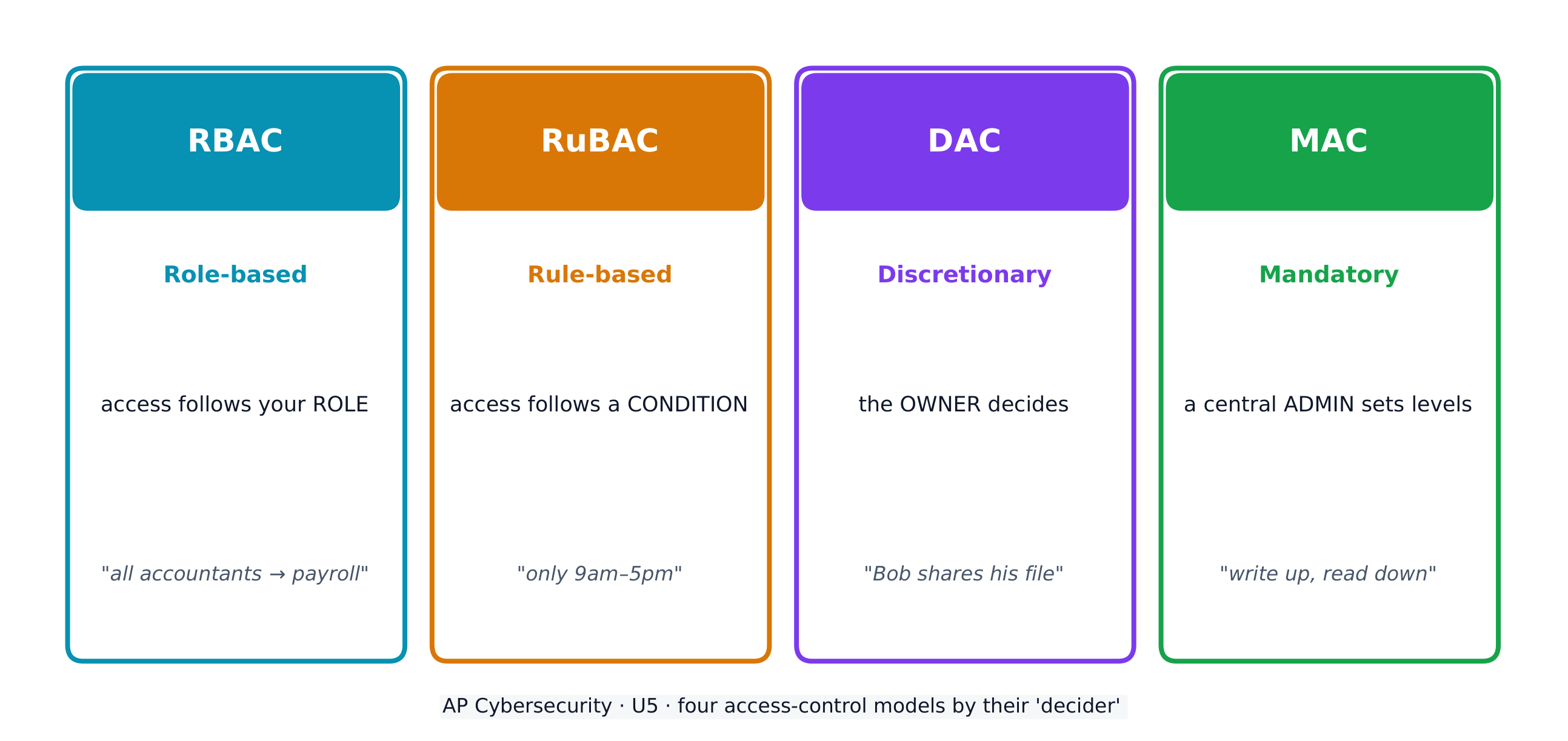
Access control decides which subjects (users) may perform which operations on which objects (files). Four models:

  • Role-based (RBAC) 基于角色的访问控制 - access follows your role (all "accountants" reach the payroll software).
  • Rule-based (RuBAC) 基于规则的访问控制 - access follows conditions (only during business hours), layered on another model.
  • Discretionary (DAC) 自主访问控制 - the owner of a file decides who else may use it.
  • Mandatory (MAC) 强制访问控制 - a central administrator sets strict levels; the Bell-LaPadula model summarises it as "write up, read down".

A guiding idea across all models is the principle of least privilege 最小权限原则 - give each entity exactly the access it needs and no more.

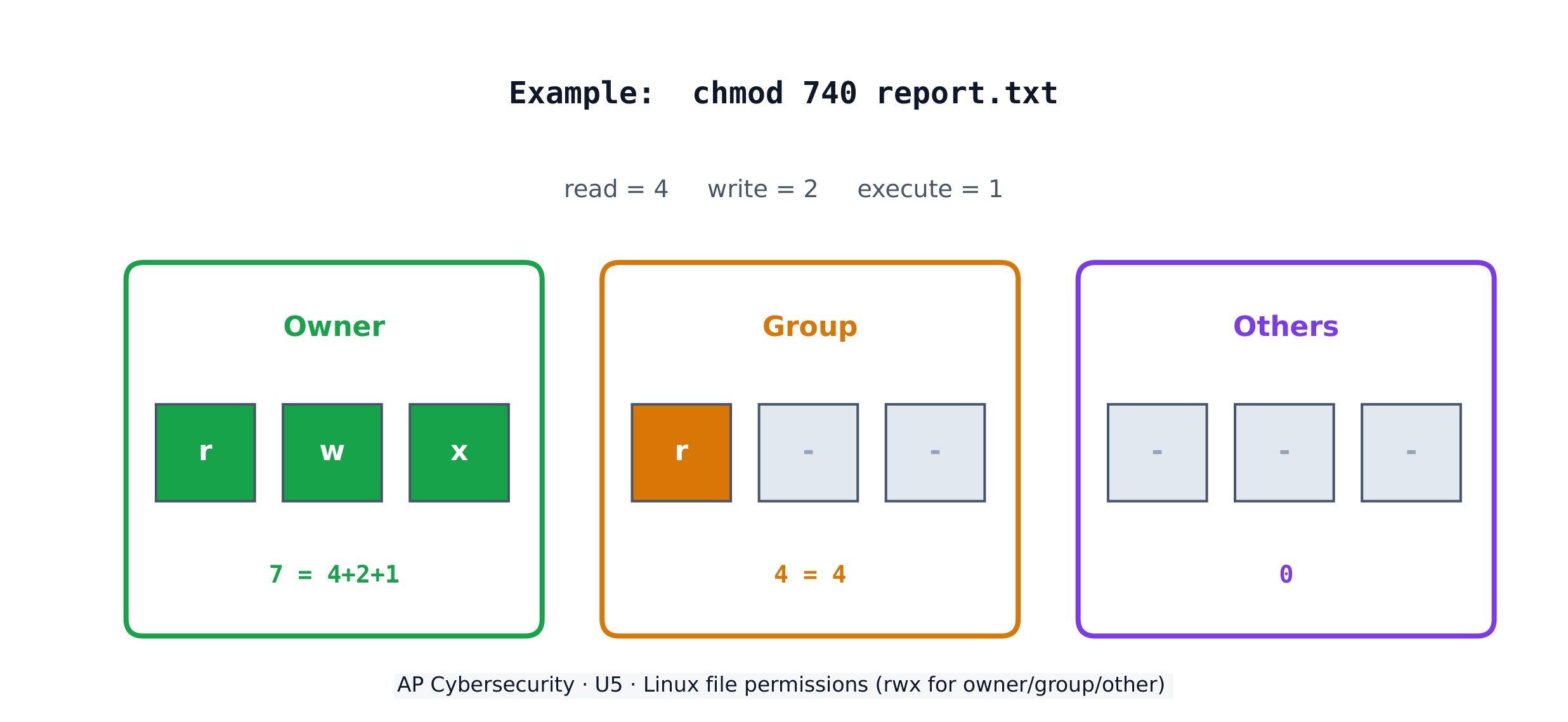
On a Linux system, each file has three permissions - read (r), write (w), execute (x) - for three groups: the owner, the group, and others. The chmod command sets them with numbers, adding 4 (read) + 2 (write) + 1 (execute). So chmod 640 means owner read+write (6), group read (4), others nothing (0).

Worked example. A principal wants only herself to read and edit a file, her staff group to read it, and no one else to touch it. Read+write = 4+2 = 6 for the owner, read = 4 for the group, nothing = 0 for others, giving chmod 640 file. The listing then shows -rw-r-----. To also let the owner run the file as a program you would add execute (7 = 4+2+1), giving chmod 740.

עברית

נתונים מסווגים לפי מצבם - בשקט (אחסון על דיסק), במעבר (זז בין מכשירים) ובשימוש (עיבוד). נתונים בשקט ובמעבר יכולים להיות מוצפנים כך שגנב לא יוכל לקרוא אותם; נתונים בשימוש חייבים להיות מופיענים, ולכן בקרות גישה מגנות עליהם במקום זאת.

חלק מסוגי הנתונים מווסתים - החוק קובע כיצד יש לאחסן, לשדרוג ולטפל בהם - כך שהארגון חייב להשיג עמידה על ידי התאמת הבקרות שלו לכללים. המבחן מצפה שתתאימו כל סוג נתונים לחוק המחייב אותו:

נתונים מוסתרים מהי המשמעות חוק מחייב
מידע מזהה אישי (PII) כל דבר המזהה אדם: שם, כתובת, SSN, ביומטריה, תאריך לידה חוק הפרטיות (1974); COPPA עבור מתחת לגיל 13
מידע רפואי מוגן (PHI) רשומות רפואיות, טיפול ותשלום על שירותי רפואה HIPAA (1996)
מידע כרטיסי תשלום (PCI) מספר כרטיס, תאריך תפוגה, CVV, שם מחזיק הכרטיס PCI-DSS

ארגון שאוסף נתונים מוסתרים חייב תווית אותם ולהחזיק ב-מדיניות שמבטיחה עמידה באחסון, שידור וטיפול בהם - ככל שהרגישות גבוהה יותר, כך דרגת הביטחון הנדרשת גבוהה יותר.

בקרת גישה קובעת אילו סובייקטים (משתמשים) יכולים לבצע אילו פעולות על אילו אובייקטים (קבצים). ארבעה מודלים:

  • מבוסס תפקיד (RBAC) - הגישה נקבעת לפי ה-תפקיד שלך (כל "חשבונאים" מגיעים לתוכנת משכורות).
  • מבוסס כללים (RuBAC) - הגישה נקבעת לפי תנאים (רק בתוך שעות עבודה), משולב על מודל אחר.
  • דיסקרציונלי (DAC) - ה-בעלים של קובץ קובה מי יכול להשתמש בו נוספים.
  • חובה (MAC) - מנהל מרכזי קובה רמות מחמירות; מודל Bell-LaPadula מסכם זאת כ"כתיבה למעלה, קריאה למטה".
ארבעה מודולי בקרת גישה קובעים מי מגיע לאיזה אובייקט וכיצד

רעיון מנחה בכל המודלים הוא עקרון הזכויות המינימליות - להעניק לכל ערכה בדיוק את ההגישה שהיא צריכה ולא יותר.

מערכת Linux בעלת שלושה רשומות, כל אחת עם שלוש הרשאות: קריאה (r), כתיבה (w), ביצוע (x) עבור שלושה קבוצות: בעל, קבוצה, ואחרים. הפקודה chmod מגדירה אותן באמצעות מספרים, על ידי חיבור 4 (קריאה) + 2 (כתיבה) + 1 (ביצוע). לכן chmod 640 משמעותו בעל קריאה+כתיבה (6), קבוצה קריאה (4), ואחרים ללא גישה (0).

הרשאות קובץ ב-Linux: קריאה/כתיבה/ביצוע עבור בעל, קבוצה ואחרים

דוגמה פותרת. ראש מוסד מעוניין שרק היא תוכל לקרוא ולערוך קובץ, קבוצת העובדים שלה תוכל רק לקרוא אותו, ואף אחד אחר לא יגיע אליו. קריאה+כתיבה = 4+2 = 6 עבור בעל, קריאה = 4 עבור הקבוצה, ללא גישה = 0 עבור האחרים, מה שמניב chmod 640 file. רשימת הרשאות תציג אז -rw-r-----. כדי לאפשר גם לבעל להריץ את הקובץ כתוכנית יש להוסיף ביצוע (7 = 4+2+1), מה שמניב chmod 740.

Explore · ⁨חקור⁩

Which access-control model fits the rule? · ⁨איזו דגם של בקרת גישה מתאים לכלל זה?⁩

Each access-control model has a different decider: RBAC by your role, RuBAC by a condition, DAC by the file's owner, and MAC by a central administrator's levels. · ⁨לכל דגם ניהול בדיקת גישה יש מחליט שונה: RBAC לפי התפקיד שלך, RuBAC לפי תנאי מסוים, DAC לפי בעל הקובץ, ו-MAC לפי רמות מנהל מרכזי.⁩

5.3

Protecting Stored Data with Cryptography · ⁨הגנת נתונים מאוחזים באמצעות קריפטוגרפיה⁩

Syllabus · ⁨סיילבוס⁩
English

Learning Objective 5.3.A: Explain how encryption can be used to protect files.

  • 5.3.A.1 The purpose of cryptography is to hide information. A cryptographic algorithm defines a process for encrypting and decrypting information. Encryption is the process of hiding the information, and decryption is the process of reversing the encryption to retrieve the original information.
  • 5.3.A.2 An encryption algorithm defines a process for combining the information to be encrypted with a predefined key. The information to be encrypted is called the plaintext. The output of the encryption algorithm is called the ciphertext.
  • 5.3.A.3 The number of possible keys that can be used in an encryption algorithm is called the keyspace. The larger the keyspace, the longer it will take an adversary to discover the correct key by random chance.
  • 5.3.A.4 Cryptographic algorithms are classified by whether they use one key or two keys.
    • Symmetric encryption algorithms use the same key to encrypt and decrypt information.
    • Asymmetric encryption algorithms use two different keys—one to encrypt information and the other to decrypt information.
  • 5.3.A.5 Cryptographic algorithms are also classified by whether they process information one bit at a time or in fixed-size chunks of bits.
    • Block encryption handles information in fixed-size chunks called blocks, producing an output block for each input block.
    • Stream encryption handles input information continuously, producing output one element at a time.

Learning Objective 5.3.B: Apply symmetric encryption algorithms to encrypt and decrypt data.

  • 5.3.B.1 Computer-based encryption algorithms operate on binary data. The most common symmetric encryption algorithm is the Advanced Encryption Standard (AES). AES encryption is used to secure Wi-Fi transmissions, internet browsing, file encryption on disks, and hardware-level encryption on processors.
  • 5.3.B.2 AES is a symmetric key block cipher that encrypts data in 128-bit blocks (16 bytes). AES can operate with keys of varying lengths. Longer keys produce more secure encryption but require more time to encrypt and decrypt.
  • 5.3.B.3 Symmetric encryption and decryption can be performed using the command line, specialized software, or web-based tools.
    • On a command line interface, users can encrypt or decrypt with OpenSSL.
    • Specialized software like AES Crypt is an open source tool that can encrypt and decrypt files.
    • There are many web-based tools for encrypting and decrypting files.
  • 5.3.B.4 Using OpenSSL in a CLI, a user can encrypt and decrypt a file using the following commands (note that the encryption key is derived from the password provided):
    • To encrypt a file named test with AES using a 128-bit key, use the command: openssl enc -aes-128-cbc -e -in test -k password -out test.enc
    • To decrypt the encrypted file using the same key, use the command: openssl enc -aes-128-cbc -d -in test.enc -k password -out text
עברית

מטרת הלמידה 5.3.A: הסבר כיצד ניתן להשתמש בהצפנה כדי להגן על קבצים.

  • 5.3.A.1 מטרת הקריפטוגרפיה היא להסתיר מידע. אלגוריתם קריפטוגרפי מגדיר תהליך להצפנה ופענוח של מידע. הצפנה היא התהליך של הסתרת המידע, ופענוח הוא התהליך של הפיכת ההצפנה לחזור למידע המקורי.
  • 5.3.A.2 אלגוריתם הצפנה מגדיר תהליך לשילוב המידע שהצפנה עם מפתח מוגדר מראש. המידע שהצפנה נקרא טקסט גלוי. תוצאת אלגוריתם ההצפנה נקראת טקסט מוצפן.
  • 5.3.A.3 מספר המפתחות האפשריים שיכולים לשמש באלגוריתם הצפנה נקרא חלל מפתחות. ככל שחלל המפתחות גדול יותר, כך ייקח לאויב זמן רב יותר לגלות את המפתח הנכון באמצעות מקרה אקראי.
  • 5.3.A.4 אלגוריתמים קריפטוגרפיים מחולקים לפי השימוש במפתח אחד או בשני מפתחות.
    • אלגוריתמי הצפנה סימטרית משתמשים באותו מפתח להצפנה ופענוח של מידע.
    • אלגוריתמי הצפנה א-סימטרית משתמשים בשני מפתחות שונים—אחד להצפנת מידע והשני לפענוחו.
  • 5.3.A.5 אלגוריתמים קריפטוגרפיים מסווגים גם לפי האם הם מעבדים מידע ביט אחד באחד או בקבוצות בעלת גודל קבוע של ביטים.
    • הצפנה בבלוקים מטפלת במידע בקבוצות בעלת גודל קבוע הנקראות בלוקים, ומייצרת בלוק תוצאה עבור כל בלוק כניסה.
    • הצפנת זרם מטפלת במידע הכניסה ברציפות, ומייצרת תוצאת ביט אחת בכל פעם.

מטרות למידה 5.3.B: יישום אלגוריתמי הצפנה סימטרית להצפנה ופענוח נתונים.

  • 5.3.B.1 אלגוריתמי הצפנה המבוססי מחשב פועלים על נתונים בינאריים. אלגוריתם ההצפנה הסימטרית הנפוץ ביותר הוא סטנדרט ההצפנה המתקדם (AES). הצפנת AES משמשת להגנת שידורי Wi-Fi, גלישה באינטרנט, הצפנת קבצים על דיסקים והצפנה ברמת חומרה במעבדים.
  • 5.3.B.2 AES הוא ציפר בלוק סימטרי עם מפתח שמצפן נתונים בבלוקים בגודל 128 ביט (16 בytes). AES יכול לפעול עם מפתחות באורכים משתנים. מפתחות ארוכים יותר מייצרים הצפנה בטוחה יותר אך דורשים יותר זמן להצפנה ופענוח.
  • 5.3.B.3 הצפנה ופענוח סימטריים ניתן לבצע באמצעות שורת הפקודות, תוכנה ייעודית או כלים מבוססי אינטרנט.
    • בממשק שורת פקודות, משתמשים יכולים להצפין או לפתוח באמצעות OpenSSL.
    • תוכנה ייעודית כמו AES Crypt היא כלי קוד פתוח שיכול להצפין ולפתוח קבצים.
    • קיימים כלים רבים מבוססי אינטרנט להצפנה ופענוח קבצים.
  • 5.3.B.4 שימוש ב-OpenSSL בשורת פקודות מאפשר למשתמש להצפין ולפתוח קובץ באמצעות הפקודות הבאות (שימו לב שהמפתח בהצפנה נגזר מהסיסמה שסופקה):
    • להצפנת קובץ בשם test באמצעות AES עם מפתח בגודל 128 ביט, השתמש בפקודה: openssl enc -aes-128-cbc -e -in test -k password -out test.enc
    • לפתוח את הקובץ המוצפן באמצעות אותו מפתח, השתמש בפקודה: openssl enc -aes-128-cbc -d -in test.enc -k password -out text

Source: College Board AP Course and Exam Description · ⁨מקור: תיאור הקורס והמבחן של College Board AP⁩

English
Symmetric vs asymmetric encryption
Hashing and the avalanche effect

Cryptography 密码学 hides information. An encryption algorithm combines the plaintext 明文 with a key 密钥 to produce ciphertext 密文; decryption reverses it. The keyspace 密钥空间 is the number of possible keys - the bigger it is, the longer an adversary needs to guess. An n-bit key has a keyspace of $2^n$.

Symmetric encryption 对称加密 uses the same key to encrypt and decrypt. The standard is AES 高级加密标准, a block cipher 分组密码 that works on 128-bit blocks and secures Wi-Fi, browsing, and stored files. Because both sides need the same secret key, sharing that key safely is the challenge.

עברית
מכונת אנאגמה: קריפטוגרפיה מגנה על נתונים מאוחזים ומועברים ממטריקים
הצפנה סימטרית לעומת חסר-סימטרית
הישור והשפעת השלג

קריפטוגרפיה מחביאה מידע. אלגוריתם הצפנה משלב טקסט גלוי עם מפתח ליצירת טקסט מוצפן; פענוח הופך את התהליך. מרחב המפתחות הוא מספר המפתחות האפשריים - ככל שהוא גדול יותר, כך נדרש זמן ארוך יותר לצד אויב כדי לנחש. מפתח בגודל ⟦n⟩-ביט מכיל מרחב מפתחות של $2^n$.

הצפנה סימטרית משתמשת במפתח זהה להצפנה ולפענוח. הסטנדרט הוא AES, צפנת בלוקים הפועלת על בלוקים בגודל 128 ביט ומגנה על Wi-Fi, גלישה וקבצים מאוחזים. מכיוון ששני הצדדים זקוקים למפתח סוד זהה, חלוקת מפתח זה בבטיחות מהווה את האתגר.

מכונת הצפנה אנלוגית ממלחמת העולם השנייה עם מקלדת וגלגלים
מכונת אנאגמה היסת הודעות באמצעות גלגלים — דוגמה מוקדמת להצפנה שנפרצה
Explore · ⁨חקור⁩

Encrypt a message by shifting letters · ⁨מכנס הודעה על ידי הזזת אותיות⁩

Encryption combines plaintext with a key to make ciphertext. In this simple cipher the key is the shift amount; only someone who knows the shift can decrypt the message back. · ⁨הצפנה משלבת טקסט גלוי עם מפתח ליצירת טקסט מוצפן. בקוד הפשוט הזה המפתח הוא כמות ההזזה; רק מי שמכיר את ההזזה יכול לפענח את ההודעה בחזרה.⁩

Vocabulary · ⁨מילון מונחים⁩ Train · ⁨אימון⁩
English עברית
Applications/ˌæplɪˈkeɪʃnz/ יישומים
administrative/ədˈmɪnɪstrətɪv/ מינהלי
injection attack/ɪnˈdʒekʃn əˈtæk/ תקיפת הזרקה
Data validation/ˈdeɪtə ˌvælɪˈdeɪʃn/ אישור נתונים
Cross-site scripting (XSS)/krɒs saɪt ˈskrɪptɪŋ/ הצגת קוד צד-לצד (XSS)
parameterised queries/ˌpærəˈmetəraɪzd ˈkwɪərɪz/ שאלות מופרדות פרמטרים
Buffer overflow/ˈbʌfə ˌəʊvəˈfləʊ/ שפיכת בואפר
buffer/ˈbʌfə/ מגן (Buffer)
Directory traversal/daɪˈrektəri træˈvɜːsl/ ניווט בתיקיות
at rest/æt rest/ במצב רוגע
in transit/ɪn ˈtrænsɪt/ במעבר
in use/ɪn juːs/ בשימוש פעיל
regulated/ˈreɡjʊleɪtɪd/ מווסת
compliance/kəmˈplaɪəns/ התאמה
personally identifiable information (PII)/ˈpɜːsənəli aɪˈdentɪfaɪəbl ˌɪnfəˈmeɪʃn/ מידע זיהוי אישי (PII)
protected health information (PHI)/prəˈtektɪd helθ ˌɪnfəˈmeɪʃn/ מידע רפואי מוגן (PHI)
payment card information (PCI)/ˈpeɪmənt kɑːd ˌɪnfəˈmeɪʃn/ מידע כרטיסי תשלום (PCI)
Role-based (RBAC)/rəʊl beɪst/ בסמך תפקידים (RBAC)
Rule-based (RuBAC)/ruːl beɪst/ בסמך כללים (RuBAC)
Discretionary (DAC)/dɪˈskreʃənəri/ שולטי (DAC)
Mandatory (MAC)/ˈmændətəri/ חובה (MAC)
principle of least privilege/ˈprɪnsɪpl ɒv liːst ˈprɪvɪlɪdʒ/ עקרון הזכויות המינימליות
Cryptography/krɪpˈtɒɡrəfi/ קריפטוגרפיה
plaintext/ˈpleɪntekst/ טקסט פשוט
key/kiː/ מפתח
ciphertext/ˈsaɪfətekst/ טקסט מוצפן
keyspace/ˈkiːspeɪs/ מרחב מפתחות
Symmetric encryption/sɪˈmetrɪk enˈkrɪpʃn/ הצפנה סימטרית
AES/ˌeɪ iː ˈes/ AES
block cipher/blɒk ˈsaɪfə/ צפנה בבלוקים
Asymmetric encryption/ˌeɪsɪˈmetrɪk enˈkrɪpʃn/ הצפנה א-סימטרית
key pair/kiː peə/ זוג מפתחות
public key/ˈpʌblɪk kiː/ מפתח ציבורי
private key/ˈpraɪvət kiː/ מפתח פרטי
elliptic curve cryptography (ECC)/ɪˈlɪptɪk kɜːv krɪpˈtɒɡrəfi/ קריפטוגרפיה מעגל אלפטי (ECC)
Secure by design/sɪˈkjʊə baɪ dɪˈzaɪn/ בטוח בעיצוב
Secure by default/sɪˈkjʊə baɪ dɪˈfɒlt/ בטחותברירת מחדל
input sanitization/ˈɪnpʊt ˌsænɪtaɪˈzeɪʃn/ ניקוי קלט
special characters/ˈspeʃl ˈkærɪktəz/ תווים מיוחדים
accounting/əˈkaʊntɪŋ/ חשבונאות
honeypot/ˈhʌnɪpɒt/ גיג' חלבון (Honeypot)
data loss prevention (DLP)/ˈdeɪtə lɒs prɪˈvenʃn/ מניעת אובדן נתונים (DLP)
Watch lesson · ⁨צפה בשיעור⁩
5.4

Asymmetric Cryptography · ⁨קריפטוגרפיה חסר-סימטרית⁩

Syllabus · ⁨סיילבוס⁩
English

Learning Objective 5.4.A: Determine the appropriate asymmetric key to use when sending or receiving encrypted data.

  • 5.4.A.1 Asymmetric encryption allows users to communicate securely without prearranging a shared secret key.
  • 5.4.A.2 When using asymmetric encryption, each entity that will be receiving data must first generate a key pair. Key pairs are binary strings of equal length that are generated at the same time through a mathematical process. One key is designated as the public key and the other as the private key. The keys are mathematical inverses of each other— each key reverses its partner. Either key can be used to encrypt information, but only the other key in the key pair will then be able to decrypt it.
  • 5.4.A.3 Once the receiver generates the key pair, the private key must be stored securely. If the private key is exposed, shared, stolen, corrupted, or compromised the key pair must be deleted and a new key pair must be generated, because the security of the encryption algorithm rests on the security of the private key. The public key is published for anyone to view and use.
  • 5.4.A.4 To send information securely to someone, the sender will use the receiver’s public key to encrypt the data and send it. Only the receiver who has the private key will be able to decrypt and read the information.

Learning Objective 5.4.B: Explain why the length of a key impacts the security of encrypted data.

  • 5.4.B.1 Longer keys result in larger keyspaces. For binary keys, an n-bit length key has a keyspace of $2^n$.
  • 5.4.B.2 Using an application to randomly guess an n-bit length encryption key means that on average an adversary will be able to guess the correct key in $2^n \div 2$ (or $2^{n-1}$) guesses.
  • 5.4.B.3 Although longer keys are more secure, they also require more time to encrypt and decrypt messages.
  • 5.4.B.4 Computational processing power and efficiency continue to improve, allowing software to guess keys faster. Key-length recommendations for both symmetric and asymmetric encryption algorithms are periodically increased to account for increased processing power.
  • 5.4.B.5 Key-length comparison is only valid when comparing keys for the same cryptographic algorithm.
    • Illustrative examples for 5.4.B.5:
      • An AES 256-bit key is more secure than an AES 128-bit key.
      • An RSA 4096-bit key is more secure than an RSA 2048-bit key.
      • RSA and AES keys cannot be directly compared to one another in determining the level of security.

Learning Objective 5.4.C: Apply asymmetric encryption algorithms to encrypt and decrypt data.

  • 5.4.C.1 Common asymmetric encryption algorithms include RSA and elliptic curve cryptography (ECC). Asymmetric algorithms are used in many applications, including digital signatures and digital certificates.
  • 5.4.C.2 As with symmetric encryption, asymmetric encryption and decryption can be performed using the command line, specialized software, or web-based tools.
    • On a command line interface, users can encrypt or decrypt with OpenSSL.
    • Specialized software like RSA Encryption Tool is an open source tool that can encrypt and decrypt files.
    • There are many web-based tools for encrypting and decrypting files.
  • 5.4.C.3 In a CLI, a user can generate an asymmetric key pair and encrypt or decrypt files as necessary.
    • To generate a 2048-bit RSA key pair and save the key to a file named rsa.pem use the command: openssl genrsa -out rsa.pem 2048
    • To extract the public key from rsa.pem into a file named public.pem, use the command: openssl rsa -pubout -in rsa.pem -outform PEM -out public.pem
    • To encrypt the file test using RSA encryption and the key file public.pem, use the command: openssl pkeyutl -encrypt -pubin -inkey public.pem -in test -out test.enc
    • To decrypt the test.enc file using the rsa.pem file, run the command: openssl pkeyutl -decrypt -inkey rsa.pem -in test.enc -out test
עברית

מטרות למידה 5.4.A: קביעת המפתח הלא-סימטרי המתאים לשימוש בעת שליחה או קבלת נתונים מוצפנים.

  • 5.4.A.1 הצפנה לא-סימטרית מאפשרת למשתמשים לתקשר בבטחה ללא התארגנות מראש למפתח סוד משותף.
  • 5.4.A.2 בעת שימוש בהצפנה לא-סימטרית, כל ישות שתקבל נתונים חייבת לייצר תחילה זוג מפתחות. זוגות מפתחות הם מחרוזות בינאריות באורך שווה המיוצרות בו-זמנית באמצעות תהליך מתמטי. מפתח אחד מוגדר כמפתח הציבורי והאחר כמפתח הפרטי. המפתחות הם הפכיים מתמטיים זה לזה—כל מפתח הופך את הזוג שלו. ניתן להשתמש בכל מפתח להצפנת מידע, אך רק המפתח השני בזוג המפתחות יהיה מסוגל לפתוח אותו.
  • 5.4.A.3 לאחר שהקבלן ייצר את זוג המפתחות, יש לאחסן את המפתח הפרטי בצורה בטוחה. אם המפתח הפרטי נחשף, משותף, נגנב, פוגם או מופקע, יש למחוק את זוג המפתחות ולייצר זוג מפתחות חדש, מכיוון שהבטחת אלגוריתם ההצפנה נשענת על הבטחת המפתח הפרטי. המפתח הציבורי מפורסם לכל אחד לצפייה ולהשתמש בו.
  • 5.4.A.4 כדי לשלוח מידע באופן בטוח למישהו, השולח ישמש במפתח הציבורי של המקבל להצפנת הנתונים ולישלח אותם. רק המקבל שיש לו את המפתח הפרטי יהיה מסוגל לפתוח לקרוא את המידע.

מטרות למידה 5.4.B: הסבר מדוע אורך המפתח משפיע על הבטחת הנתונים המוצפנים.

  • 5.4.B.1 מקשי ארוכים מובילים למרחבי מקשים גדולים יותר. עבור מקשי בינאריים, מקש באורך n-ביט בעל מרחב מקשים של $2^n$.
  • 5.4.B.2 שימוש באפליקציה לניחוש מקש הצפנה באורך n-ביט באופן אקראי מציע שבערך האויב יוכל לנחש את המקש הנכון ב$2^n \div 2$ (או $2^{n-1}$) ניסיונות.
  • 5.4.B.3 למרות שמקשים ארוכים הם בטוחים יותר, הם דורשים גם זמן רב יותר להצפנה ופענוח הודעות.
  • 5.4.B.4 כוח עיבוד מחשובי ויעילות ממשיכים לשפר, ומאפשרים לתוכנה לנחש מקשים מהר יותר. המלצות לגבי אורך מקש עבור אלגוריתמי הצפנה סימטרית וא-סימטרית מוגדלות באופן תקופתי כדי להתחשב בכוח העיבוד המוגבר.
  • 5.4.B.5 השוואת אורך מקש היא רק תקפה כאשר משווים מקשים עבור אותו אלגוריתם קריפטוגרפי.
    • דוגמאות הדמיה ל-5.4.B.5:
      • מקש AES באורך 256 ביט הוא בטוח יותר ממקש AES באורך 128 ביט.
      • מקש RSA באורך 4096 ביט הוא בטוח יותר ממקש RSA באורך 2048 ביט.
      • לא ניתן להשוות מקשי RSA ו-AES ישירות זה לזה כדי לקבוע את רמת הבטיחות.

מטרת הלמידה 5.4.C: יישום אלגוריתמי הצפנה א-סימטריים להצפנה ופענוח נתונים.

  • 5.4.C.1 אלגוריתמי הצפנה א-סימטרית נפוצים כוללים RSA והצפנת מעגל אלכסוני (ECC). אלגוריתמים א-סימטריים משמשים באפליקציות רבות, כולל חתימות דיגיטליות ותעודות דיגיטליות.
  • 5.4.C.2 כמו בהצפנה סימטרית, הצפנה ופענוח א-סימטריים יכולים להתבצע באמצעות פקודות בשורת הפקודות, תוכנה ייעודית או כלים מבוססי רשת.
    • בממשק שורת פקודות, משתמשים יכולים להצפין או לפתוח באמצעות OpenSSL.
    • תוכנה ייעודית כמו RSA Encryption Tool היא כלי קוד פתוח המסוגל להצפין ולפענח קבצים.
    • קיימים כלים רבים מבוססי אינטרנט להצפנה ופענוח קבצים.
  • 5.4.C.3 בממשק CLI, משתמש יכול ליצור זוג מקשים א-סימטרי ולהצפין או לפענח קבצים לפי הצורך.
    • ליצירת זוג מקשי RSA באורך 2048 ביט ולאחסון המקש בקובץ בשם rsa.pem, השתמש בפקודה: openssl genrsa -out rsa.pem 2048
    • לחילוץ המקש הציבורי מקובץ rsa.pem לקובץ בשם public.pem, השתמש בפקודה: openssl rsa -pubout -in rsa.pem -outform PEM -out public.pem
    • להצפנת הקובץ test באמצעות הצפנת RSA וקובץ המקש public.pem, השתמש בפקודה: openssl pkeyutl -encrypt -pubin -inkey public.pem -in test -out test.enc
    • לפענוח הקובץ test.enc באמצעות קובץ rsa.pem, הרץ את הפקודה: openssl pkeyutl -decrypt -inkey rsa.pem -in test.enc -out test

Source: College Board AP Course and Exam Description · ⁨מקור: תיאור הקורס והמבחן של College Board AP⁩

English

Asymmetric encryption 非对称加密 solves the key-sharing problem with a key pair 密钥对 - a public key 公钥 anyone may see and a private key 私钥 kept secret. The keys are mathematical inverses: whatever one locks, only the other unlocks. To send you a secret, I encrypt with your public key, and only your private key can decrypt it - so we never had to share a secret in advance.

Longer keys mean larger keyspaces and more security, but slower encryption. Common asymmetric algorithms are RSA and elliptic curve cryptography (ECC) 椭圆曲线密码学, used in digital signatures and certificates. Remember: you can only compare key lengths within the same algorithm - an RSA 4096-bit key is not directly comparable to an AES 256-bit key.

עברית

הצפנה חסר-סימטרית פותרת את בעיית חלוקת המפתחים באמצעות זוג מפתחות: מפתח ציבורי שכל אחד יכול לראות ומפתח פרטי שנשמר בסוד. המפתחות הם הפוך מתמטי אחד לשני: מה שאחד נעול, רק השני פותח. כדי לשלוח לך סוד, אני מצפן במפתח הציבורי שלך, ורק המפתח הפרטי שלך יכול לפתוח אותו - כך מעולם לא היינו צריכים לחלק סוד מראש.

הצפנה לא-סימטרית: הצפנה עם המפתח הציבורי, פירוק עם המפתח הפרטי
הצפנה חסר-סימטרית: הצפנה במפתח הציבורי, פענוח במפתח הפרטי

מפתחות ארוכים יותר מצביעים על מרחב מפתחות גדול יותר ובטיחות מוגברת, אך מהירות הצפנה נמוכה. אלגוריתמים א-סימטריים נפוצים הם RSA ו-קריפטוגרפיה מעגלית (ECC), המשמשים בחתימות דיגיטליות ותעודות. זכרו: ניתן להשוות בין אורך המפתחות רק בתוך אותו אלגוריתם - מפתח RSA באורך 4096 ביט אינו ניתן להשוואה ישירה למפתח AES באורך 256 ביט.

סגנאל נעילה: קריפטוגרפיה נועלת נתונים כך שרק מי עם המפתח המתאים יכול לפתוח אותם
Watch lesson · ⁨צפה בשיעור⁩
5.5

Protecting Applications · ⁨הגנת יישומים⁩

Syllabus · ⁨סיילבוס⁩
English

Learning Objective 5.5.A: Identify the application security principles of secure by design and security by default.

  • 5.5.A.1 Secure by design is an initiative that encourages companies to include security in all phases of product development including design. When organizations implement secure by design, security is a design principle not just a technical feature.
  • 5.5.A.2 Secure by design includes three design principles:
    • i. Companies should take ownership of customer security outcomes. Companies should build products that meet the security needs of their customers.
    • ii. Companies should embrace radical transparency and accountability. Sharing relevant security-related product news and updates quickly increases security for everyone.
    • iii. Companies should build organizational structure and leadership to implement secure by design. Companies need leaders who are focused on security and have a security-first posture.
  • 5.5.A.3 Secure by design includes the concept of secure by default, which is the idea that security features for software and devices should be enabled by default. Devices and software should be secure to use out of the box, with security features already enabled.

Learning Objective 5.5.B: Explain how user input sanitization protects applications.

  • 5.5.B.1 When users enter input into an application, the application typically encases that input in special characters to process it. The characters that encase the user input are called control characters and include the single quote, the double quote, and the semicolon.
  • 5.5.B.2 When creating a program that takes user input, programmers should use a function to verify that user input meets their expected criteria and does not include any control characters that could be used to manipulate the system. This verification function can sanitize user input by removing potentially malicious characters, or it can give the user an error and force the user to provide different input. This can protect against many application attacks, including:
    • SQL injection attacks
    • XSS attacks
    • Directory traversal attacks
עברית

מטרת הלמידה 5.5.A: זיהוי עקרונות בטיחות אפליקציות של "בטיחות בתכנון" ו"בטיחות כברירת מחדל".

  • 5.5.A.1 עיצוב בטוח הוא יוזמה המעודדת חברות לכלול את הביטחון בכל שלבי פיתוח המוצר, כולל העיצוב. כאשר ארגונים מיישמים עיצוב בטוח, הביטחון הוא עקרון עיצוב ולא רק תכונה טכנית.
  • 5.5.A.2 עיצוב בטוח כולל שלושה עקרונות עיצוב:
    • i. חברות צריכות לקחת אחריות על תוצאות הביטחון של הלקוחות. חברות צריכות לבנות מוצרים העונים לצרכי הביטחון של לקוחותיהן.
    • ii. חברות צריכות לאמץ שקיפות רדיקלית ואחריות אישית. שיתוף חדשות ועדכונים רלוונטיים הקשורים לביטחון המוצר מהר יותר מגביר את הביטחון עבור כולם.
    • iii. חברות צריכות לבנות מבנה ארגוני ומנהיגות כדי ליישם עיצוב בטוח. לחברות נדרשים מנהיגים המתמקדים בביטחון ויש להם גישה ראשונית לביטחון.
  • 5.5.A.3 עיצוב בטוח כולל את המושג הגדרת ברירת מחדל בטוחה, והוא הרעיון לפיו מאפייני ביטחון לתוכנה ולמכשירים צריכים להיות מופעלים כברירת מחדל. מכשירים ותוכנה צריכים להיות בטוחים לשימוש מיידית מהאריזה, עם מאפייני ביטחון שכבר מופעלים.

מטרות למידה 5.5.B: הסבר כיצד ניקוי קלט משתמש מגן על אפליקציות.

  • 5.5.B.1 כאשר משתמשים מזנים קלט לתוך אפליקציה, האפליקציה בדרך כלל חוסמת את הקלט בתווים מיוחדים כדי לעבד אותו. התווים החוסמים את קלט המשתמש נקראים תווים בקרה וכוללים הפסיקת תנכ"ס, סימון ההפסקה (quote) והנקודה-פסיק.
  • 5.5.B.2 בעת יצירת תוכנית המקבלת קלט ממשתמש, מתכנתים צריכים להשתמש בפונקציה לאמת שהקלט עומד בקריטריונים הצפויים שלהם ואינו כולל תווים בקרה שיכולים לשמש להתערבות במערכת. פונקציית האמת הזו יכולה לנקות את קלט המשתמש על ידי הסרת תווים פוטנציאלית מסוכנים, או להעניק למשתמש הודעת שגיאה ולהחייב אותו לספק קלט שונה. זאת יכולה להגן מפני许多 סוגי תקיפת אפליקציות, כולל:
    • תקיפות השתלת SQL
    • תקיפות XSS
    • תקיפות ניווט בתיקיות

Source: College Board AP Course and Exam Description · ⁨מקור: תיאור הקורס והמבחן של College Board AP⁩

English

Two design principles keep applications safe from the start. Secure by design 安全设计 builds security into every phase of development, not as an afterthought. Secure by default 默认安全 means the product ships with its security features already enabled - safe straight out of the box.

Secure by design rests on three principles a company must adopt: (1) take ownership of its customers' security outcomes rather than shifting blame onto users, (2) embrace radical transparency and accountability – sharing security-relevant news and updates quickly so everyone becomes safer, and (3) build the organisational structure and leadership that makes security a first-class goal.

The key defense against injection attacks is input sanitization 输入清理. Certain special characters 特殊字符 - the single quote, double quote, and semicolon - can be used to manipulate a system, so a good program removes or rejects them before processing. Sanitization protects against SQL injection, XSS, and directory-traversal attacks alike.

עברית

שני עקרונות עיצוב שומרים על בטיחות היישומים משלב ההתחלה. בטיחות בעיצוב בונה אבטחה בכל שלב בתהום הפיתוח, ולא כאחר מחשבה. בטיחות ברירת מחדל פירושה שהמוצר יוצא לשוק עם תכונות הבטיחות שלו כבר פעילות - בטוח מהקופסה.

בטיחות בהנחה נשענת על שלושה עקרונות שמחייבת לחברה לאמץ: (1) לקחת אחריות לתוצאות הבטיחות של הלקוחות במקום להעמיס אשמה על המשתמשים, (2) לאמץ שקיפות וחובה ארגונית רדיקליות – שיתוף חדשות ועדכונים רלוונטיים לבטיחות במהירות כדי שכולם יהיו בטוחים יותר, ו-(3) לבנות את המבנה הארגוני והנהגה שהופכים את הבטיחות למטרה בעלת ערך ראשוני.

ההגנה המרכזית נגד מתקפות הזרקה היא ניקוי תקלט. מספר תווים מיוחדים - המקשית היחידה, המקשית הכפולה והנקודה-פסוקה - יכולים לשמש לעריכת מערכת, ולכן תוכנית טובה מסירה או דוחה אותם לפני העיבוד. ניקוי מגן נגד הזרקת SQL, XSS, ומתקפות ניווט בתיקיות.

5.6

Detecting Attacks on Data and Applications · ⁨זיהוי מתקפות על נתונים ואפליקציות⁩

Syllabus · ⁨סיילבוס⁩
Learning ObjectiveEssential Knowledge

5.6.A
Explain how to detect attacks on data.

  • 5.6.A.1 Devices track and log when data are accessed and by whom. The process of recording and monitoring user activities is called accounting. Analysis of these logs can reveal malicious activity when an adversary attempts to access, copy, move, or delete data. Suspicious activity can include:
    • Accessing files that aren’t typically accessed
    • Accessing files or applications outside of a user’s normal patterns (including time of day, location, and device type)
    • Attempts to delete or copy sensitive files
  • 5.6.A.2 A honeypot is a file that appears as if it contains valuable data (e.g., credit card information, PII, passwords), but the data in the file are fake. A system can alert defenders if someone attempts to access the honeypot. Since the honeypot is a fake file, there is no legitimate reason to be accessing it, and any attempted access would be an indicator of malicious activity.
  • 5.6.A.3 Cryptographic hash functions can generate a digest for data and can reveal if data have been altered. If a file has changed unexpectedly, this can be a sign of malicious activity.

5.6.B
Determine controls for detecting attacks against applications or data.

  • 5.6.B.1 Cost is a criterion in determining detective controls. Detective controls like honeypots and using hash values to check data integrity are inexpensive. Some organizations invest in third-party data loss prevention (DLP) services, which monitor data access, usage, and transmission by users throughout the organization to detect suspicious activity; DLP services provide strong detection capabilities at a higher cost.
  • 5.6.B.2 Sensitivity or criticality of data or applications is a criterion in determining detective controls. More sensitive or critical data or applications are more likely targets of an adversary and should be monitored more closely.
  • 5.6.B.3 Classification of data is a criterion in determining detective controls. Data that have been classified as private, educational, healthcare, or financial often have legal or regulatory detection and monitoring requirements.

5.6.C
Evaluate the impact of a method for detecting attacks against an application or data.

  • 5.6.C.1 To operate at an effective speed, log analysis needs to be augmented with some automation. Honeypots offer near instantaneous detection capabilities.
  • 5.6.C.2 Some DLP tools, honeypots, and realtime automated log analysis provide alerts as an attack is happening. These tools allow for a prompt response that can stop an attack before it does more harm. Retrospective log analysis and the use of cryptographic hashes to verify data integrity identify attacks after they have occurred.
  • 5.6.C.3 False negatives can occur in applications and data attack detection. Cryptographic hash functions only detect if data have been altered. An adversary could view and steal data without altering it, and a cryptographic hash function would not detect this. Honeypots cannot detect adversaries that do not attempt to access them.

5.6.D
Identify whether a file has been altered by verifying its hash.

  • 5.6.D.1 Cryptographic hash functions can help identify changes in a file because they are repeatable: the same input always produces the same output for a given hash function.
  • 5.6.D.2 Hashes can be calculated using the command line on a computer, a website, or specialized software.
    • In Windows Powershell, if a user wanted to generate the SHA256 hash for a file named testfile, they would use the command: Get-FileHash testfile -Algorithm SHA256
    • In BASH the same could be accomplished with the command: sha256sum testfile
    • In zsh, the common command line terminal on Apple computers, this could be accomplished with the command: shasum -a 256 testfile
  • 5.6.D.3 A file can be hashed and its hash output recorded. Then it can be hashed again later, and the second hash output can be compared to the previous hash output for the same file. If a file’s hash changes, then the file was altered between when the first and second hashes were generated.

5.6.E
Apply detection techniques to identify and report indicators of application attacks by analyzing log files.

  • 5.6.E.1 SQL injection attacks can be detected by reviewing application and server logs of user input for SQL control words and symbols such as:
    • A single (') or double (") quote character
    • Boolean conditions like OR 1=1
    • A double dash (which indicates a comment in SQL): --
    • SQL control words (always in capital letters) like WHERE, IN, FROM
  • 5.6.E.2 XSS attacks can be detected by reviewing user input for suspicious tags, particularly the tag.
  • 5.6.E.3 For web applications, buffer overflows can be detected by checking the amount of data the user is sending to the web application in their request. The fields commonly checked are the URL length, cookie length, query string length, and total request length. Long strings in any of these fields can be an indicator of an attempted buffer overflow attack.
  • 5.6.E.4 Directory traversal attacks can be detected by reviewing application and server logs. HTTP GET requests that include paths with sequences of ../ are indicators of an adversary attempting a directory traversal.

Source: College Board AP Course and Exam Description · ⁨מקור: תיאור הקורס והמבחן של College Board AP⁩

English

To detect data attacks, systems perform accounting 审计记录 - logging who accessed what and when. But logs are huge, so log analysis must be automated to run at a useful speed; a human reading raw logs is far too slow. A clever complement is a honeypot 蜜罐 - a fake file that looks valuable; since no one has a real reason to open it, any access is a clear, near-instantaneous sign of an attack. Watch especially for attempts to delete or copy sensitive files. Cryptographic hashes also help: re-hash a file and compare - if the digest changed, the file was altered.

Choosing detective controls means weighing cost (honeypots are cheap; a data loss prevention (DLP) 数据泄露防护 service is powerful but pricey) against the sensitivity of the data. To read a specific attack from logs, look for its signature: SQL injection shows OR 1=1 and --; XSS shows <script> tags; directory traversal shows ../ sequences; a buffer overflow shows unusually long input strings.

Checking that a file has not been altered

A cryptographic hash turns a file of any size into a short fixed-length value. Change one byte of the file and the hash changes completely, so comparing a downloaded file's hash with the one the publisher lists proves the file arrived intact. You do this at the command line:

Shell Command
BASH (Linux, and most servers) sha256sum testfile
zsh, the usual terminal on Apple computers shasum -a 256 testfile

Both print the SHA-256 hash of testfile. If it differs from the published value by even one character, the file has been altered — by corruption in transit, or by an attacker who replaced it.

⚠️ A hash proves integrity, not authenticity. An attacker who can replace the file on a web page can usually replace the published hash beside it too; that is why a signed hash, or one fetched over a separate trusted channel, is stronger evidence.

עברית

כדי לזהות התקפות על נתונים, מערכות מבצעות חשבונאות - רישום מי גיש למה וכאן. אבל הלוגים הם עצומים, ולכן ניתוח לוגים חייב להיות אוטומטי כדי לפעול בקצב שימושי; אדם הקורא לוגים גולמים איטי מאוד. משלים חכם הוא עץ דבש - קובץ מזויף שנראה חשוב; מכיוון שאין למי סיבה אמיתית לפתוח אותו, כל גישה היא סימן ברור, כמעט מיידי להתקפה. שימו לב במיוחד לניסיונות מחיקה או העתקה של קבצים רגישים. חשיבות קריפטוגרפיות גם עוזרות: לחשב מחדש קובץ ולהשוות - אם הגישר השתנה, הקובץ עובר שינוי.

בחירת בקרות גילוי דורשת משקולת בין עלות (עצי דבש זולים; שירות מניעת אובדן נתונים (DLP) חזק אך יקר) לבין רגישות הנתונים. לקרוא התקעה ספציפית מלוגים, יש לחפש את החתימה שלה: הזרקת SQL מציגה OR 1=1 ו--; XSS מציגה תגי <script>; ניווט תיקיות מציגה רצפי ../; פריצת буфер מציגה מחרוזות תקלט ארוכות במיוחד.

בדיקה שקובץ לא עבר שינוי

חשיבה קריפטוגרפית הופכת קובץ בכל גודל לערך קצר באורך קבוע. שינוי בייט אחד בקובץ משנה את החשיבה לגמרי, ולכן השוואת חשיבה של קובץ מורד עם זו שהמפרסם מציינת מוכיחה שהקובץ הגיע שלם. עושים זאת בשורת הפקودות:

שורת פקודות פקודה
BASH (Linux, ורוב השרתים) sha256sum testfile
zsh, הממשק הקומנדי הסטנדרטי במחשבי Apple shasum -a 256 testfile

שניהם מדפסים את חישוי ה-SHA-256 של testfile. אם הערך שונה מהערך המפורסם באף על פי בסימול אחד, המשמעות היא שהקובץ שונה — בשל פגם בהעברה או בגלל התקפה שמחליפה אותו.

⚠️ חישון מוכיח התאמה ולא אותנטיות. מתקף שיכול להחליף קובץ בדף האתר יכול לרוב להחליף גם את החישון המפורסם לצדו; לכן חישון חתום או חישון שנלקח דרך ערוץ אמינה נפרדת מהווים ראיה חזקה יותר.

5.6

Exam tips · ⁨טיפים לבחינות⁩

English
  • Match each application attack to its evidence in a log: OR 1=1 / -- = SQL injection; <script> = XSS; ../ = directory traversal; very long input = buffer overflow.
  • Learn the four access-control models by their decider: RBAC = your role, RuBAC = a condition, DAC = the file's owner, MAC = a central admin. Least privilege underlies them all.
  • Read Linux permissions by adding 4+2+1 per group - chmod 750 = owner rwx (7), group r-x (5), others none (0). Practice converting both ways.
  • Symmetric = one shared key (fast, AES); asymmetric = a public/private key pair (solves key sharing, RSA/ECC). Encrypt with the recipient's public key.
  • Input sanitization is the single best answer for preventing injection attacks; a honeypot is the classic cheap detective control.
עברית
  • התאם כל תקיפת יישום ל-הוכחה ביומן: OR 1=1 / -- = הזרקת SQL; <script> = XSS; ../ = ניווט בתיקיות; קלט ארוך מדי = גרימת ספיגה.
  • למד את ארבעת דגמי בקרת הגישה לפי קובעי ההחלטה: RBAC = תפקידך, RuBAC = תנאי, DAC = בעל הקובץ, MAC = מנהל מרכזי. עקרון הזכויות המינימליות הוא הבסיס שלהם כולם.
  • לקרוא הרשאות Linux על ידי חיבור 4+2+1 לכל קבוצה - chmod 750 = בעלים rwx (7), קבוצה r-x (5), אחרים אין (0). תרגל המרה בשתי הכיוונים.
  • סימטרי = מפתח משותף אחד (מהיר, AES); א-סימטרי = זוג מפתחות ציבורי/פרטי (פותר שיתוף מפתחות, RSA/ECC). הצפנת עם המפתח הציבורי של המקבל.
  • ניקוי קלט הוא התשובה הטובה ביותר למניעת תקפות הזרקה; סל דבש הוא הבקרת חוקרים קלאסית וזולה.

Interactive lessons on this topic · ⁨שיעורים אינטראקטיביים בנושא זה⁩

Work through it step by step, with instant-check exercises. · ⁨לעבור על הדברים צעד אחר צעד, עם תרגילים לבדיקה מיידית.⁩

Past Papers · ⁨מבחני עבר⁩

More topics in AP Cybersecurity · ⁨אבטחת מידע והסייבר - AP⁩ · ⁨נושאים נוספים בAP Cybersecurity · ⁨אבטחת מידע והסייבר - AP⁩⁩

Log in or create account · ⁨היכנס או צור חשבון⁩

IGCSE, A-Level & AP