English
Learning Objective 4.1.A: Identify types of computing devices.
- 4.1.A.1 Server computers are devices that provide one or more services to other computers (e.g., DNS, DHCP, FTP). Any computer can be a server, and in an enterprise environment servers typically have more processing power and storage than a personal computer.
- 4.1.A.2 Personal computers are devices that are designed to be used by one person for work or recreational purposes (e.g., word processing, graphic design, web browsing, and media production or viewing). These include desktop, laptop, and notebook computers.
- 4.1.A.3 Handheld computers (also called mobile computers or information appliances) are smaller than personal computers and run on battery power. These include tablets, smartphones, and wearable technology like smart watches.
- 4.1.A.4 Embedded computers are devices that are part of a machine. Embedded devices have specific instruction sets for interfacing with the specialized components of the machine they’re embedded in. Embedded computers tend to be slower and cheaper than other computers and have minimal storage.
- 4.1.A.5 Everyday devices with embedded computers are often called Internet of Things (IoT) devices. Embedded computers are found in transportation (e.g., cars, trains, and airplanes), devices that operate critical infrastructure (e.g., operating circuit breakers at electrical substations and pumps at water treatment plants), medical equipment (e.g., IV pumps, MRI scanners, pacemakers, and insulin pumps), and everyday devices like washing machines, coffee makers, and thermostats.
Learning Objective 4.1.B: Identify the type of malware used in a cyberattack.
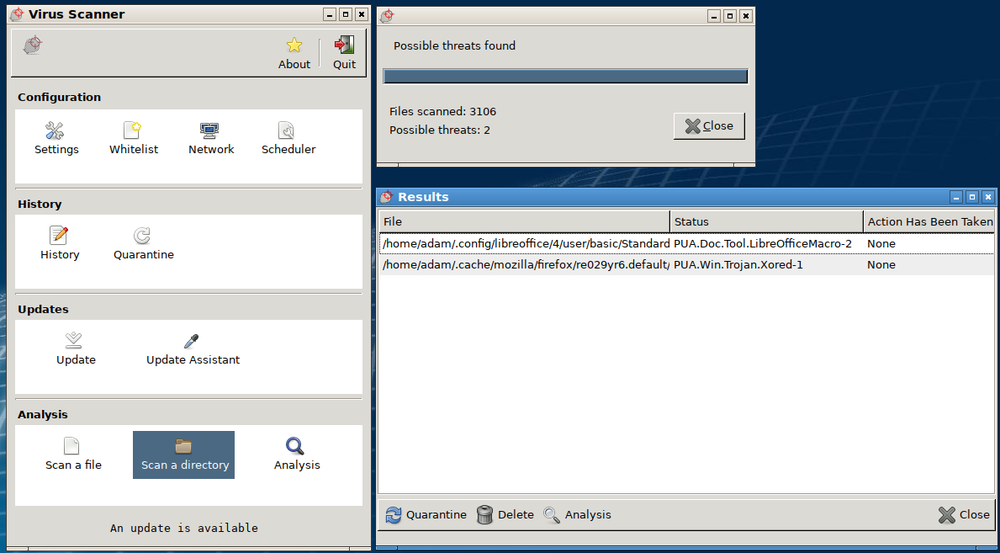
- 4.1.B.1 Malware is malicious software that can damage or destroy a device or network, or allow an adversary access to a device and the data on the device.
- 4.1.B.2 Malware is often used as a tool to accomplish part of an adversary’s plan to achieve their ultimate goal(s). There are many types of malware, such as:
- Viruses are malware that must be activated by a user executing or opening a file.
- Worms spread from one computer to another without human interaction.
- Trojans are malware embedded in other software that seems harmless. Remote access trojans (RATs) provide an adversary with remote access to the target system.
- Ransomware encrypts a device’s files, preventing the user from accessing files on the device. The ransomware typically presents the user with a screen demanding payment and promising to give the user a decryption key for their files if the user pays within a fixed amount of time.
- Spyware tracks a user’s actions on a computer and sends information back to an adversary.
- A keylogger is software or hardware that logs the users keystrokes and sends the information back to the adversary. Adversaries can often extract usernames and passwords from keylogger data.
- Logic bombs are set to trigger their effect only when a specific set of conditions are met; the conditions can include time and date, specific type or version of the operating system, character set the computer is using, etc.
- A rootkit is sophisticated malware that gets into the target computer’s operating system and can control nearly every aspect of the system, including making the rootkit itself invisible to detection.
- 4.1.B.3 While most malware is a file or a collection of files, fileless malware is malicious code that lives in RAM and uses legitimate programs already installed on a device to compromise it.
Learning Objective 4.1.C: Explain how adversaries can exploit common device vulnerabilities to cause loss, damage, disruption, or destruction.
- 4.1.C.1 Adversaries can develop exploits for known vulnerabilities in software (including operating systems). Devices with unpatched software are vulnerable to these exploits, which could allow an adversary to crash a system, view user actions, enable or disable various services or components on the device (e.g., turning on a webcam or microphone), or even take control of the device to issue their own commands including commands to steal or destroy information on the device.
- 4.1.C.2 Adversaries can take advantage of weak authentication requirements by guessing a user’s password or using social engineering to get a user to divulge their password.
- 4.1.C.3 When systems don’t have a password on the basic input output system (BIOS) or unified extensible firmware interface (UEFI), an adversary can boot a computer into a special mode (e.g., “recovery mode”) that gives them higher-level privileges. Without BIOS or UEFI protection, adversaries can load their own operating system onto a device from an external drive and use specialized tools to alter or create user profiles, including changing user passwords.
- 4.1.C.4 Adversaries can load malware onto an external drive, and if autorun is enabled, then a device will run the malware when the external drive is inserted.
- 4.1.C.5 Adversaries can leverage open ports to connect to a device.
- 4.1.C.6 Adversaries can send malicious data to devices to disrupt them or attempt to take control of them. Devices that have no firewall (or a misconfigured firewall) cannot filter out this malicious data.
- 4.1.C.7 Adversaries often attempt to install malware on a device to disrupt or control it. Devices lacking anti-malware software are more vulnerable to this type of attack.
Learning Objective 4.1.D: Assess and document risks from device vulnerabilities.
- 4.1.D.1 Risk from device vulnerabilities can come from unauthorized access or malware that allow an adversary to impersonate an authorized user, remotely control a device, encrypt a device’s drive to ransom the data, or wipe a device’s memory, destroying data or rendering the device inoperable. The level of risk varies depending on the criticality of the device or the services the device provides or data it stores.
- 4.1.D.2 High risks from device vulnerabilities involve potentially compromising sensitive data or critical operations.
- Illustrative examples for 4.1.D.2:
- An organization has not installed the most recent update for their email server which included a patch for a known critical vulnerability.
- Illustrative examples for 4.1.D.2:
- 4.1.D.3 Moderate risks from device vulnerabilities can arise from weak authentication requirements or from vulnerabilities that would be less likely to be exploited.
- Illustrative examples for 4.1.D.3:
- A water treatment plant has embedded systems controlling pumps. The pumps can be remotely accessed via username and password for remote management for the plant, but the devices do not require multi-factor authentication (MFA).
- Illustrative examples for 4.1.D.3:
- 4.1.D.4 Low risks from device vulnerabilities are typically related to vulnerabilities that, if exploited, would have little impact.
- Illustrative examples for 4.1.D.4:
- An employee’s laptop has telnet port 23 open.
- Illustrative examples for 4.1.D.4:
עברית
מטרות למידה 4.1.A: זיהוי סוגי מכשירי מחשוב.
- 4.1.A.1 מחשבי שרת הם מכשירים המספקים שירות אחד או יותר למחשבים אחרים (למשל: DNS, DHCP, FTP). כל מחשב יכול להיות שרת, ובסביבת עסקים שרתים בדרך כלל בעלי יכולת עיבוד ואחסון גדולה יותר ממחשב אישי.
- 4.1.A.2 מחשבים אישיים הם מכשירים המיועדים לשימוש על ידי אדם אחד לצורך עבודה או הפעלה (למשל: עיבוד טקסט, עיצוב גרפי, גלישת אינטרנט, וייצור או צפייה במדיה). הם כוללים מחשבים שולחניים, ניידים וnotebook.
- 4.1.A.3 מחשבים ניידים (הנקראים גם מחשבים ניידים או מכשירי מידע) הם קטנים ממחשבים אישיים ופועלים על בסיס סוללה. כאלו כולל טאבלטים, סמארטפונים וטכנולוגיה נשית כמו שעונים חכמים.
- 4.1.A.4 מחשבים מובנים הם התקנים החלקים ממכונה. למכשירים המובנים ישנם סטות הוראות ספציפיות להתחברות עם רכיבים ייעודיים של המכונה שבהם הם מובנים. מחשבים מובנים נוטים להיות איטיים וזולים יותר ממחשבים אחרים ולעבור על אחסון מינימלי.
- 4.1.A.5 מכשירים יומיומיים עם מחשבים מובנים נקראים לעיתים קרובות מכשירי אינטרנט של דברים (IoT). מחשבים מובנים נמצאים בתחבורה (למשל: מכוניות, רכבות ומטוסים), במכשירים הפועלים תשתית קריטית (למשל: הפעלת מפסקי זרם בבתי חשמל ומשאבות במפעלי טיפול במים), ציוד רפואי (למשל: משאבות תנובה, סורקי MRI, מתקפי לב ומשאבות אינסולין) ובמכשירים יומיומיים כמו מכונות כביסה, מכונות קפה ותרמוסטטים.
מטרת למידה 4.1.B: לזהות את סוג התוכנה הרעה המשמשת בהתקפת אבטחת מידע.
- 4.1.B.1 תוכנה רעה היא תוכנה מזיקה שיכולה לפגוע או להרוס התקן או רשת, או לאפשר לגורם עוין גישה להתקן ולנתונים הנמצאים בו.
- 4.1.B.2 תוכנה רעה משמשת לעיתים קרובות ככלי להשגת חלק מהתוכנית של הגורם העוין להשגת המטרה/מטרות הסופיות שלו. קיימים סוגים רבים של תוכנה רעה, כגון:
- וירוסים הם תוכנה רעה הדורשים הפעלה על ידי משתמש שמבצע או פותח קובץ.
- תולעים מתפשטות ממחשב אחד לאחר ללא מעורבות אנושית.
- טרויאנים הם תוכנה רעה המובנית בתוכנה אחרת שנראית חסרת נזק. טרויאנים לגישה מרחוק (RATs) מספקים לגורם עוין גישה מרחוק למערכת היעד.
- תוכנת קפאי (Ransomware) מצפנת קבצים של התקן, ומונעת מהמשתמש גישה לקבצים על ההתקן. תוכנת הקפאי מציגה לרוב למשתמש מסך הדורש תשלום ומבטיח לספק לו מפתח פינוי לקבצים שלו אם השילם בתוך תקופת זמן קבועה.
- תוכנת ריגול (Spyware) עוקבת אחר פעולות המשתמש במחשב ושולחת מידע חזרה לגורם עוין.
- מקליד (Keylogger) הוא תוכנה או חומרה שמקלדת הקישות של המשתמש ושולחת את המידע חזרה לגורם עוין. גורמים עוינים יכולים לעיתים קרובות לחשוף שמות משתמש וסיסמאות מתוך נתוני המקליד.
- בומבי לוגיקה מוגדרים כדי להפעיל את השפעתם רק כאשר מתקיים סט ספציפי של תנאים; התנאים יכולים לכלול זמן ותאריך, סוג או גרסה ספציפיים של מערכת ההפעלה, קבוצת האותיות שבה המחשב משתמש, ועוד.
- רוטקית (Rootkit) היא תוכנה רעה מתוחכמת החודרת למערכת ההפעלה של המחשב היעד ויכולה לשלוט בכל פרט כמעט במערכת, כולל הופעת עצמה לחסרות גילוי.
- 4.1.B.3 בעוד שהרוב מן התוכנה הרעה הוא קובץ או אוסף קבצים, תוכנה רעה ללא קבצים (Fileless malware) היא קוד מזיק הנמצא בזיכרון RAM ומשתמש בתוכנות חוקיות שמוקמות כבר על ההתקן כדי לפגוע בו.
מטרת למידה 4.1.C: להסביר כיצד גורמים עוינים יכולים לנצל פגמים נפוצים בהתקנים כדי לגרום להפסד, נזק, הפרעה או הרס.
- 4.1.C.1 גורמים עוינים יכולים לפתח ניצול (Exploits) לפגמים ידועים בתוכנה (כולל מערכות הפעלה). התקנים עם תוכנה שאינה מדובקת (Unpatched) חשופים לניצולים אלו, שיכולים לאפשר לגורם עוין להקריס מערכת, לצפות בפעולות המשתמש, לאפשר או לנטרל שירותים או רכיבים שונים בהתקן (למשל: הדלקת מצלמת ווב או מיקרופון), או אף לקחת שליטה בהתקן כדי להנפיק פקודות משלו, כולל פקודות לגניבה או הרס מידע על ההתקן.
- 4.1.C.2 גורמים עוינים יכולים לנצל דרישות אימות חלשות על ידי ניחוש סיסמת משתמש או באמצעות הנדסה חברתית כדי לגרום למשתמש לחשוף את סיסמתו.
- 4.1.C.3 כאשר למערכות אין סיסמה במערכת הבסיס (BIOS) או בממשק הרקמה המורחב המאוחד (UEFI), גורם עוין יכול להדליק מחשב למצב מיוחד (למשל: "מצב התאוששות") שמעניק לו זכויות גבוהות יותר. ללא הגנה BIOS או UEFI, גורמים עוינים יכולים להטמיע מערכת הפעלה משלהם על ההתקן מתוך כונן חיצוני ולהשתמש בכלים ייעודיים כדי לשנות או ליצור פרופילי משתמש, כולל שינוי סיסמות משתמש.
- 4.1.C.4 גורמים עוינים יכולים להטמיע תוכנה רעה על כונן חיצוני, ואם הפעלה אוטומטית מופעלת, אזי ההתקן יפעיל את התוכנה הרעה בעת חיבור הכונן החיצוני.
- 4.1.C.5 התוקפים יכולים לנצל יציאות פתוחות כדי להתחבר למכשיר.
- 4.1.C.6 התוקפים יכולים לשלוח נתונים רעים למכשירים כדי להפרעם או לנסות לקחת את השליטה עליהם. מכשירים שאינם כוללים חומת מגן (או שיש בה הגדרות לא נכונות) אינם מסוגלים לסנן נתונים אלו.
- 4.1.C.7 התוקפים לעיתים קרובות מנסים להתקין תוכנות זדוניות במכשיר כדי להפריע לו או לשלוט בו. מכשירים שאינם כוללים תוכנת אנטי-מאלוור, רגישים יותר לסוג זה של התקפה.
מטרות למידה 4.1.D: הערכה ותיעוד סיכונים הנגזרים ממפגעי מכשירים.
- 4.1.D.1 הסיכון ממפגעי מכשירים עשוי לנגוע בגישה בלתי מורשת או בתוכנות זדוניות המאפשרות להתוקף לחקות משתמש מורשה, לשלוט במכשיר מרחוק, לקודד את הדיסק במכשיר תמורת פיצויים, או למחוק את הזיכרון במכשיר, מה שמסכן את הנתונים או גורם למכשיר להיות לא שימושי. רמת הסיכון משתנה בהתאם למעמד החיוני של המכשיר, לשירותים שהמכשיר מספק או לנתונים שהוא מאחסן.
- 4.1.D.2 סיכונים גבוהים ממפגעי מכשירים מעורבים באפשרות לפגוע בנתונים רגישים או בתפעול קריטי.
- דוגמאות לדוגמאות ל-4.1.D.2:
- ארגון לא התקין את העדכון האחרון עבור שרת הדואל שלו, שהכלל תיקון לפגוע קריטי ידוע.
- דוגמאות לדוגמאות ל-4.1.D.2:
- 4.1.D.3 סיכונים בינוניים ממפגעי מכשירים עשויים לנבוע מדרישות אימות חלשות או מפגעים שהסתברות לניצולם היא נמוכה יותר.
- דוגמאות לדוגמאות ל-4.1.D.3:
- מתקן טיפול במים כולל מערכות מובנות המשליטות בפומפיות. הפומפיות ניתנות לגישה מרחוק באמצעות שם משתמש וסיסמה לניהול מרחוק במתקן, אך המכשירים אינם דורשים אימות רב-שלבי (MFA).
- דוגמאות לדוגמאות ל-4.1.D.3:
- 4.1.D.4 סיכונים נמוכים ממפגעי מכשירים קשורים בדרך כלל לפגעים שעלולים לייצר השפעה מזערית אם יושגו.
- דוגמאות לדוגמאות ל-4.1.D.4:
- מחשב נייד של עובד כולל יציאת Telnet 23 פתוחה.
- דוגמאות לדוגמאות ל-4.1.D.4: