Skip to content · ⁨דלג לתוכן⁩

Creative Development · ⁨פיתוח יצירתי⁩

AP Computer Science Principles · ⁨עקרונות מדעי המחשב - AP⁩ · Topic 1 · ⁨נושא 1⁩

Video lesson for this topic · ⁨שיעור וידאו לנושא זה⁩ Open the video page · ⁨פתח את עמוד הוידאו⁩
6:15

פיתוח יצירתי

הנה תוכנית שצריכה להדפיס את הממוצע של שני מספרים. היא פועלת. היא לא קורסת. היא מדפיסה תשובה — והתשובה שגויה. הניחו ארבע ושיש…

English narration · English + 中文 subtitles burned in · ⁨קריאת קול באנגלית · תרגום אנגלי + סינית שרוף בתוך הסרטון⁩

1.1

Collaboration · ⁨שיתוף פעולה⁩

Syllabus · ⁨סיילבוס⁩
English

Enduring Understanding (CRD-1): Incorporating multiple perspectives through collaboration improves computing innovations as they are developed.

Learning Objective CRD-1.A: Explain how computing innovations are improved through collaboration. [Skill 1.C]

  • CRD-1.A.1 A computing innovation includes a program as an integral part of its function.
  • CRD-1.A.2 A computing innovation can be physical (e.g., self-driving car), nonphysical computing software (e.g., picture editing software), or a nonphysical computing concept (e.g., e-commerce).
  • CRD-1.A.3 Effective collaboration produces a computing innovation that reflects the diversity of talents and perspectives of those who designed it.
  • CRD-1.A.4 Collaboration that includes diverse perspectives helps avoid bias in the development of computing innovations.
  • CRD-1.A.5 Consultation and communication with users are important aspects of the development of computing innovations.
  • CRD-1.A.6 Information gathered from potential users can be used to understand the purpose of a program from diverse perspectives and to develop a program that fully incorporates these perspectives.

Learning Objective CRD-1.B: Explain how computing innovations are developed by groups of people. [Skill 1.C]

  • CRD-1.B.1 Online tools support collaboration by allowing programmers to share and provide feedback on ideas and documents.
  • CRD-1.B.2 Common models such as pair programming exist to facilitate collaboration.

Learning Objective CRD-1.C: Demonstrate effective interpersonal skills during collaboration. [Skill 1.C]

  • CRD-1.C.1 Effective collaborative teams practice interpersonal skills, including but not limited to:
    • communication
    • consensus building
    • conflict resolution
    • negotiation
עברית

הבנה מתמשכת (CRD-1): שילוב של מספר זוויות מבט דרך שיתוף פעולה משפר חדשנות מחושבת בעת פיתוחן.

מטרת למידה CRD-1.A: הסבר כיצד חדשנות מחושבת משופרת באמצעות שיתוף פעולה. [מיומנות 1.C]

  • CRD-1.A.1 חדשנות מחושבת כוללת תוכנה כחלק אינטגרלי מפונקצייתה.
  • CRD-1.A.2 חדשנות מחושבת יכולה להיות פיזית (למשל, רכב נהיגה אוטונומי), תוכנת מחשוב לא פיזית (למשל, תוכנת עריכת תמונות) או מושג מחשוב לא פיזי (למשל, סחר אלקטרוני).
  • CRD-1.A.3 שיתוף פעולה יעיל מייצר חדשנות מחושבת המשקפת את מגוון הכישורים והזוויות מבט של אנשי העיצוב שלה.
  • CRD-1.A.4 שיתוף פעולה הכולל זוויות מבט מגוונות עוזר למנוע טיפוס בהתפתחות חדשנות מחושבות.
  • CRD-1.A.5 ייעוץ ותקשורת עם משתמשים הם היבטים חשובים בהתפתחות חדשנות מחושבות.
  • CRD-1.A.6 מידע שנאסף ממשתמשים פוטנציאליים יכול לשמש להבנת מטרת התוכנה מזוויות מבט מגוונות ולפיתוח תוכנה המכלילה במלואה את הזוויות הללו.

מטרת למידה CRD-1.B: הסבר כיצד חדשנות מחושבת מפותחת על ידי קבוצות אנשים. [מיומנות 1.C]

  • CRD-1.B.1 כלים מקוונים תומכים בשיתוף פעולה על ידי האפשרת למוכשרים לחלוק ולהעריך משוב על רעיונות ומסמכים.
  • CRD-1.B.2 מודלים נפוצים כמו תכנות בזוגיים קיימים כדי לפשוט את שיתוף הפעולה.

מטרת למידה CRD-1.C: הדגמת מיומנויות אישיות יעילות במהלך שיתוף פעולה. [מיומנות 1.C]

  • CRD-1.C.1 צוותי שיתוף פעולה יעילים מתאמנים במיומנויות אישיות, לרבות אך לא רק:
    • תקשורת
    • בניית קונסנסוס
    • פתרון סכסוכים
    • משא ומתן

Source: College Board AP Course and Exam Description · ⁨מקור: תיאור הקורס והמבחן של College Board AP⁩

English

Computing is a collaborative 协作 activity. Working in a team brings more perspectives, catches more errors, and produces better programs than working alone. Good collaboration uses consensus building, clear communication, and each member's strengths. Pair programming 结对编程 – two people at one computer, one typing and one reviewing – is a common practice. On the exam, you should be able to explain how collaboration improved a program (more ideas, fewer bugs, wider testing).

עברית
פאזל בתהליך ביצוע: שיתוף פעולה ועיצוב מודולרי מאגדים יחד את הפתרון

חישוב הוא פעילות שוטפת. עבודה בצוות מביאה נקודות מבט רבות יותר, חושפת טעויות רבות יותר ויוצרת תוכנות טובות יותר לעומת עבודה עצמאית. שיתוף פעולה איכותי משתמש בבניית הסכמה, תקשורת ברורה וחוזקות של כל חבר בצוות. תכנות בזוגיות – שני אנשים מול מחשב אחד, אחד מקליד ואחד בוחן – היא שיטה נפוצה. במבחן עליך להסביר כיצד שיתוף הפעולה שיפר את התוכנה (רעיונות נוספים, פחות באגים, בדיקה רחבה יותר).

1.2

Program Function and Purpose · ⁨פונקציה ומטרה של תוכנה⁩

Syllabus · ⁨סיילבוס⁩
English

Enduring Understanding (CRD-2): Developers create and innovate using an iterative design process that is user-focused, that incorporates implementation/feedback cycles, and that leaves ample room for experimentation and risk-taking.

Learning Objective CRD-2.A: Describe the purpose of a computing innovation. [Skill 1.A]

  • CRD-2.A.1 The purpose of computing innovations is to solve problems or to pursue interests through creative expression.
  • CRD-2.A.2 An understanding of the purpose of a computing innovation provides developers with an improved ability to develop that computing innovation.

Learning Objective CRD-2.B: Explain how a program or code segment functions. [Skill 4.A]

  • CRD-2.B.1 A program is a collection of program statements that performs a specific task when run by a computer. A program is often referred to as software.
  • CRD-2.B.2 A code segment is a collection of program statements that is part of a program.
  • CRD-2.B.3 A program needs to work for a variety of inputs and situations.
  • CRD-2.B.4 The behavior of a program is how a program functions during execution and is often described by how a user interacts with it.
  • CRD-2.B.5 A program can be described broadly by what it does, or in more detail by both what the program does and how the program statements accomplish this function.

Learning Objective CRD-2.C: Identify input(s) to a program. [Skill 3.A]

  • CRD-2.C.1 Program inputs are data sent to a computer for processing by a program. Input can come in a variety of forms, such as tactile, audio, visual, or text.
  • CRD-2.C.2 An event is associated with an action and supplies input data to a program.
  • CRD-2.C.3 Events can be generated when a key is pressed, a mouse is clicked, a program is started, or any other defined action occurs that affects the flow of execution.
  • CRD-2.C.4 Inputs usually affect the output produced by a program.
  • CRD-2.C.5 In event-driven programming, program statements are executed when triggered rather than through the sequential flow of control.
  • CRD-2.C.6 Input can come from a user or other programs.

Learning Objective CRD-2.D: Identify output(s) produced by a program. [Skill 3.A]

  • CRD-2.D.1 Program outputs are any data sent from a program to a device. Program output can come in a variety of forms, such as tactile, audio, visual, or text.
  • CRD-2.D.2 Program output is usually based on a program's input or prior state (e.g., internal values).
עברית

הבנה מתמשכת (CRD-2): מפתחים יוצרים וחדשנים באמצעות תהליך עיצוב איטרטיבי הממוקד במשתמש, המשלב מחזורי מימוש ומשוב, ומשאיר שטח נרחב לניסוי ולקבלת סיכונים.

מטרות למידה CRD-2.A: תאר את מטרת חדשנות מחשובית. [מיומנות 1.A]

  • CRD-2.A.1 מטרת חידושים מחשוביים היא לפתור בעיות או לעסוק בתחומי עניין דרך ביטוי יצירתי.
  • CRD-2.A.2 הבנת מטרת חדשנות מחשובית מעניקה למפתחים יכולת משופרת לפתח את החדשנות המחשובית הזו.

מטרות למידה CRD-2.B: הסבר כיצד תוכנית או קטע קוד פועלים. [מיומנות 4.A]

  • CRD-2.B.1 תוכנית היא סדרה של פקודות תוכנה המבצעות משימה ספציפית כאשר הן מופעלות על ידי מחשב. תוכנית מכונה לעיתים קרובות תוכנה.
  • CRD-2.B.2 קטע קוד הוא סדרה של פקודות תוכנה המהווה חלק מתוכנית.
  • CRD-2.B.3 תוכנית צריכה לפעול עבור מגוון רחב של קלטות ומצבים.
  • CRD-2.B.4 ההתנהגות של תוכנית היא אופן פעולתה במהלך ביצוע, והיא מתוארת לעיתים קרובות על ידי אופן האינטראקציה של המשתמש איתה.
  • CRD-2.B.5 ניתן לתאר תוכנית באופן כללי לפי מה שהיא עושה, או בפירוט רב יותר גם לפי מה שהיא עושה וגם כיצד פקודות התוכנה מבצעות פונקציה זו.

מטרות למידה CRD-2.C: זיהוי קלט(ות) לתוכנית. [מיומנות 3.A]

  • CRD-2.C.1 קלטות לתוכנית הן נתונים שנשלחים למחשב לעיבוד על ידי תוכנית. הקלט יכול להתקבל בצורות שונות, כגון מגע, שמע, ויזואלי או טקסט.
  • CRD-2.C.2 אירוע מקושר לפעולה ומספק נתוני קלט לתוכנית.
  • CRD-2.C.3 אירועים יכולים להיות מופעים כאשר מקשי לחץ, העכבר נלחץ, תוכנית מופעלת, או כל פעולה מוגדרת אחרת מתרחשת המשפיעה על זרימת הביצוע.
  • CRD-2.C.4 קלטות בדרך כלל משפיעות על הפלט שמיוצר על ידי תוכנית.
  • CRD-2.C.5 בתכנות מופע-תגובה, פקודות התוכנית מתבצעות כאשר הן מופעלות ולא דרך זרימת בקרה רציפה.
  • CRD-2.C.6 קלט יכול להגיע ממשתמש או מתוכניות אחרות.

מטרת הלמידה CRD-2.D: זיהוי הפלט(ים) המיוצר(ים) על ידי תוכנית. [מיומנות 3.A]

  • CRD-2.D.1 פלט של תוכנית הוא כל נתון הנשלח מתוכנית למכשיר. פלט של תוכנית יכול להיות במגוון צורות, כגון מגע, שמיעה, ויזואלי או טקסט.
  • CRD-2.D.2 פלט של תוכנית בדרך כלל מבוסס על הקלט של התוכנית או על מצבה הקודם (למשל, ערכים פנימיים).

Source: College Board AP Course and Exam Description · ⁨מקור: תיאור הקורס והמבחן של College Board AP⁩

English

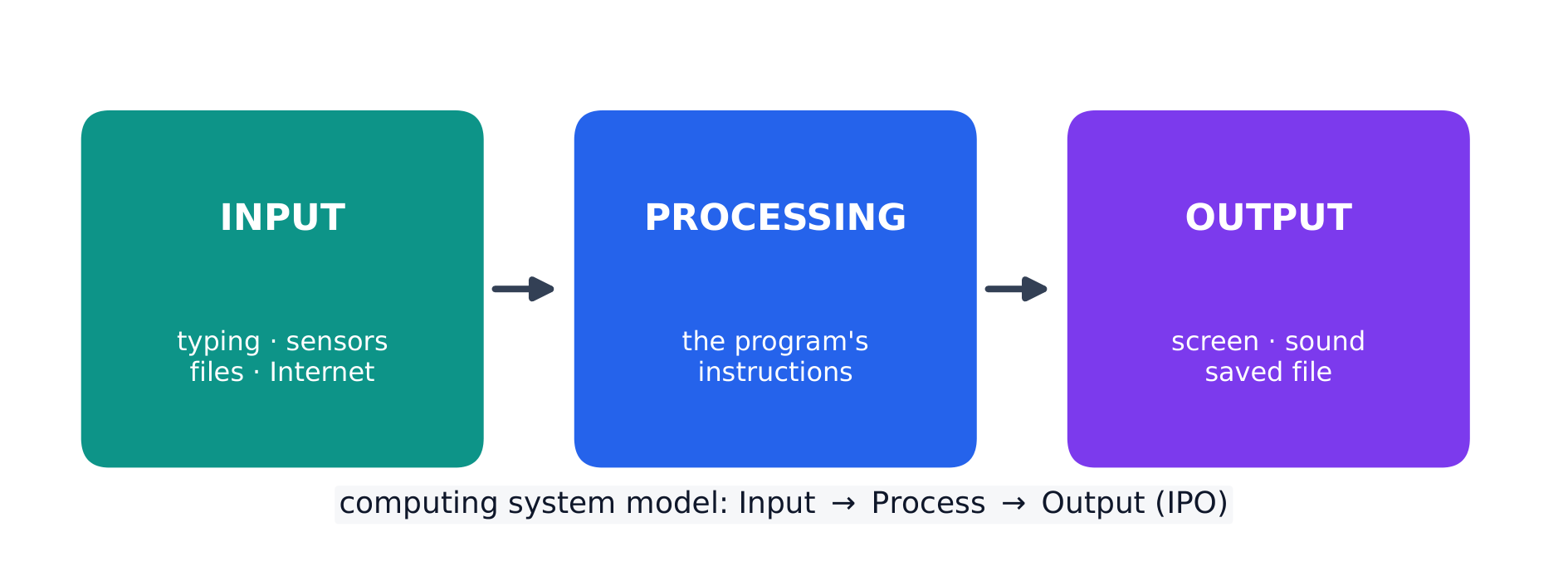
Every program is written for a purpose – it solves a problem or pursues an interest. A program takes input 输入, processes it, and produces output 输出. Inputs can come from a user, a device, a file, or another program; outputs can be visual, audible, textual, or a signal to a device. Being able to state a program's purpose, and describe its inputs and outputs clearly, is a core skill (and part of the Create performance task).

עברית

כל תוכנה נכתבת למטרות ספציפיות – היא פותרת בעיה או רודפת אחר עניין. תוכנה לוקחת נתוני כניסה, מעבדת אותם ומייצרת תוצאת יציאה. נתוני הכניסה יכולים לבוא ממשתמש, מכשיר, קובץ או תוכנה אחרת; תוצאות היציאה יכולות להיות ויזואליות, שמיעתיות, טקסטואליות או אות למכשיר. יכולת לנסח את המטרה של תוכנה ולתאר את נתוני הכניסה והיציאה שלה בבירור היא מיומנות ליבה ( וחלק ממשימת הביצוע Create).

כל תוכנה מתפרקת לכניסה, עיבוד ויציאה
כל תוכנה עוקבת אחרי דגם הכניסה-עיבוד-יציאה
Explore · ⁨חקור⁩

Explore the input → processing → output model · ⁨חקור את דגם הקלט → עיבוד → תפוקה⁩

Step through the IPO model. Every program takes some input, performs processing on it by following its instructions, then produces output — trace one weather-app example along the pipeline. · ⁨צעד דרך דגם IPO. כל תוכנה לוקחת קלט, מבצעת עליו עיבוד באמצעות הוראותיה, ולאחר מכן מייצרת תפוקה — עקוב אחת לדוגמה של אפליקציית מזג אוויר לאורך הזרם.⁩

1.3

Program Design and Development · ⁨עיצוב ופיתוח תוכנה⁩

Syllabus · ⁨סיילבוס⁩
English

Enduring Understanding (CRD-2): Developers create and innovate using an iterative design process that is user-focused, that incorporates implementation/feedback cycles, and that leaves ample room for experimentation and risk-taking.

Learning Objective CRD-2.E: Develop a program using a development process. [Skill 1.B]

  • CRD-2.E.1 A development process can be ordered and intentional, or exploratory in nature.
  • CRD-2.E.2 There are multiple development processes. The following phases are commonly used when developing a program:
    • investigating and reflecting
    • designing
    • prototyping
    • testing
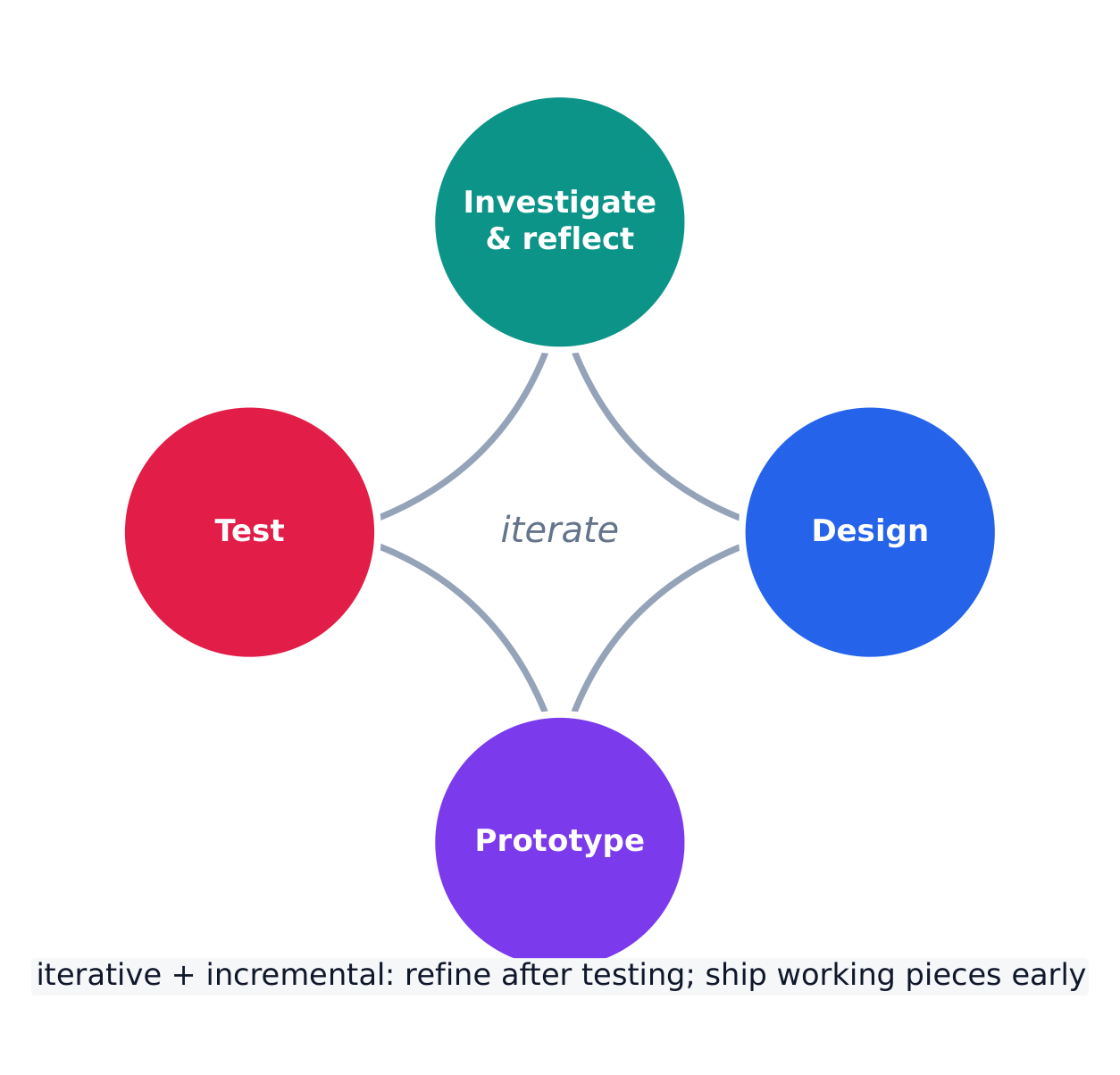
  • CRD-2.E.3 A development process that is iterative requires refinement and revision based on feedback, testing, or reflection throughout the process. This may require revisiting earlier phases of the process.
  • CRD-2.E.4 A development process that is incremental is one that breaks the problem into smaller pieces and makes sure each piece works before adding it to the whole.

Learning Objective CRD-2.F: Design a program and its user interface. [Skill 1.B]

  • CRD-2.F.1 The design of a program incorporates investigation to determine its requirements.
  • CRD-2.F.2 Investigation in a development process is useful for understanding and identifying the program constraints, as well as the concerns and interests of the people who will use the program.
  • CRD-2.F.3 Some ways investigation can be performed are as follows:
    • collecting data through surveys
    • user testing
    • interviews
    • direct observations
  • CRD-2.F.4 Program requirements describe how a program functions and may include a description of user interactions that a program must provide.
  • CRD-2.F.5 A program's specification defines the requirements for the program.
  • CRD-2.F.6 In a development process, the design phase outlines how to accomplish a given program specification.
  • CRD-2.F.7 The design phase of a program may include:
    • brainstorming
    • planning and storyboarding
    • organizing the program into modules and functional components
    • creation of diagrams that represent the layouts of the user interface
    • development of a testing strategy for the program

Learning Objective CRD-2.G: Describe the purpose of a code segment or program by writing documentation. [Skill 4.A]

  • CRD-2.G.1 Program documentation is a written description of the function of a code segment, event, procedure, or program and how it was developed.
  • CRD-2.G.2 Comments are a form of program documentation written into the program to be read by people and do not affect how a program runs.
  • CRD-2.G.3 Programmers should document a program throughout its development.
  • CRD-2.G.4 Program documentation helps in developing and maintaining correct programs when working individually or in collaborative programming environments.
  • CRD-2.G.5 Not all programming environments support comments, so other methods of documentation may be required.

Learning Objective CRD-2.H: Acknowledge code segments used from other sources. [Skill 1.C]

  • CRD-2.H.1 It is important to acknowledge any code segments that were developed collaboratively or by another source.
  • CRD-2.H.2 Acknowledgement of a code segment(s) written by someone else and used in a program can be in the program documentation. The acknowledgement should include the origin or original author's name.
עברית

הבנה מתמשכת (CRD-2): מפתחים יוצרים וחדשנים באמצעות תהליך עיצוב איטרטיבי הממוקד במשתמש, המשלב מחזורי מימוש ומשוב, ומשאיר שטח נרחב לניסוי ולקבלת סיכונים.

מטרת הלמידה CRD-2.E: פיתוח תוכנית באמצעות תהליך פיתוח. [מיומנות 1.B]

  • CRD-2.E.1 תהליך פיתוח יכול להיות מסודר ומכוון, או חקרני בעברו.
  • CRD-2.E.2 קיימים מספר תהליכי פיתוח. השלבים הבאים משמשים לרוב בפיתוח תוכנית:
    • חקירה והתבוננות
    • עיצוב
    • בניית אב-טיפוס
    • בדיקה
  • CRD-2.E.3 תהליך פיתוח איטרטיבי דורש שיפור ועדכון בהתבסס על משוב, בדיקות או התבוננות לאורך כל תהליך זה.这可能 necessitates returning to earlier phases of the process.
  • CRD-2.E.4 תהליך פיתוח אינקרמנטלי הוא אחד שמפר את הבעיה לחלקים קטנים יותר ומבטיח שכל חלק עובד לפני שמוסיפים אותו לכלל.

מטרת הלמידה CRD-2.F: עיצוב תוכנית והממשק המשתמש שלה. [מיומנות 1.B]

  • CRD-2.F.1 עיצוב תוכנית כולל חקירה כדי לקבוע את הדרישות שלה.
  • CRD-2.F.2 חקירה בתהליך פיתוח היא שימושית להבנה ולזיהוי הגבלות התוכנית, כמו גם החששות והעניינים של האנשים שתשתמשו בתוכנית.
  • CRD-2.F.3 כמה דרכים שבהן ניתן לבצע חקירה הן כדלקמן:
    • איסוף נתונים באמצעות סקירות
    • בדיקות שימוש
    • ראיונות
    • צפייה ישירה
  • CRD-2.F.4 דרישות התוכנית מתארות כיצד תוכנית פועלת ועשויות לכלול תיאור של אינטראקציות משתמש שהתוכנית חייבת לספק.
  • CRD-2.F.5 המפרט של תוכנית מגדיר את הדרישות עבורה.
  • CRD-2.F.6 בתהליך הפיתוח, שלב העיצוב מפרט כיצד לבצע מפרט תוכנית נתון.
  • CRD-2.F.7 שלב העיצוב של תוכנית עשוי לכלול:
    • שיח מוחות
    • תכנון וסיפורבورد
    • ארגון התוכנית למודולים ולרכיבים פונקציונליים
    • יצירת דיאגרמות המייצגות את עיצוב הממשק
    • פיתוח אסטרטגיית בדיקה לתוכנית

מטרת לימוד CRD-2.G: לתאר את מטרת מקטע קוד או תוכנית על ידי כתיבת מסמכות. [מיומנות 4.A]

  • CRD-2.G.1 מסמכות תוכנה היא תיאור כתוב של פונקציה של מקטע קוד, אירוע, פרוצדורה או תוכנית וכיצד נפתחה.
  • CRD-2.G.2 תגובות הן צורת מסמכות תוכנה שנכתבת בתוך התוכנית לקריאה על ידי אנשים ואינה משפיעה על אופן פעולת התוכנית.
  • CRD-2.G.3 מתכנתים צריכים לנסח מסמכות לתוכנית לאורך כל תהליך הפיתוח שלה.
  • CRD-2.G.4 מסמכות תוכנה מסייעת בפיתוח ובתחזוקה של תוכניות תקינות בעבודה עצמאית או בסביבות פיתוח שיתופי.
  • CRD-2.G.5 לא כל סביבות הפיתוח תומכות בתגובות, ולכן עשוי להיות צורך במתודולוגיות מסמכות אחרות.

מטרת לימוד CRD-2.H: להכיר במקטעי קוד המשמשים ממקורות אחרים. [מיומנות 1.C]

  • CRD-2.H.1 חשוב להכיר בכל מקטעי קוד שנפתחו בשיתוף פעולה או על ידי מקור אחר.
  • CRD-2.H.2 הכרה בקטע קוד שנכתב על ידי מישהו אחר ושימש בתוכנית יכולה להיות מופיעה בתיעוד התוכנית. ההכרה צריכה לכלול את שם המקור או השם של המחבר המקורי.

Source: College Board AP Course and Exam Description · ⁨מקור: תיאור הקורס והמבחן של College Board AP⁩

English

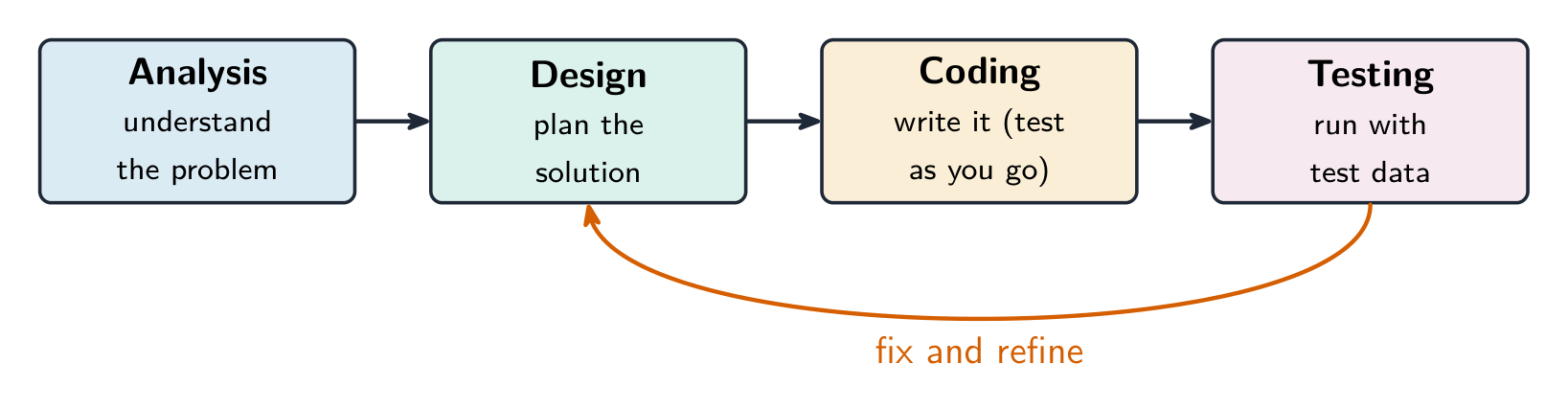
Programs are built through an iterative 迭代 process, not in one straight line: investigate the problem and users, design (often with a diagram or written plan), implement in code, and test – then repeat. A large problem is broken into smaller pieces (decomposition 分解). Comments 注释 and clear naming document the design so others (and your future self) can understand it. Development is incremental – build and test a small piece, then add the next.

Investigating what users actually need

Before any code is written, the developer investigates the problem and the people who will use the program. Three ways to do that:

  • surveys 调查问卷 sent to potential users, which collect data from many people quickly;
  • interviews and direct observation of users doing the task by hand;
  • studying existing solutions to see what already works and what frustrates people.

The findings are turned into a design. Two artefacts do that: a program requirements list saying exactly what the program must do, and diagrams representing the layout of the user interface 用户界面 — sketches showing which controls appear where, and what each one does when used. Designing the interface on paper first is cheaper than discovering after coding that the buttons are in the wrong place.

Events, and programs that wait

Not every program runs straight through from top to bottom. An event 事件 is generated when a key is pressed, a mouse is clicked, a program is started, or any other defined action occurs — and an event changes the flow of execution: the program pauses what it was doing and runs the code attached to that event, called an event handler 事件处理程序.

This is why a program with a graphical interface can appear to be doing nothing: it is waiting for the next event. The order in which those events arrive is decided by the user, not by the programmer, so the same program can run its blocks in a different order each time it is used.

עברית
מתכנת מתקן שגיאות בעמדת עבודה עם מספר מסכים — עיצוב וביצוע איטרטיבי
מתכנת מבצע דיבוג בעמדת עבודה רב-מסכים – עיצוב ובדיקה איטרטיביים

תוכנות נבנות באמצעות תהליך איטרטיבי, ולא בקו ישר אחד: חקירת הבעיה והמשתמשים, עיצוב (לעיתים עם תרשים או תוכנית כתובה), מימוש בקוד ובדיקה – ולאחר מכן חזרה לתהליך. בעיה גדולה מפוצלת לחלקים קטנים (פירוק למרכיבים). הערות (Comments) ושמות ברורים מסמכים את העיצוב כך שאחרים (וגם אתה בעתיד) יוכלו להבין אותו. הפיתוח הוא אינקרמנטלי – בונה ובודק חלק קטן, ולאחר מכן מוסיף את הבא.

שלבי פיתוח התוכנה, כאשר הבדיקה מספקת משוב לתיקון ולשיפור
תוכנה נבנת על ידי תהליך פיתוח איטרטיבי ואינקרמנטלי

בחינת הצרכים האמיתיים של משתמשים

לפני כתיבת קוד כלשהו, המתכנן בוחן את הבעיה ואת האנשים שיעבדו עם התוכנה. שלושה דרכים לעשות זאת:

  • מסורות שנשלחים למשתמשים פוטנציאליים, ואוספים נתונים ממספר רב אנשים במהירות;
  • ראיונות ותצפית ישירה על משתמשים המבצעים את המשימה ידנית;
  • עיון בפתרונות קיימים כדי לראות מה עובד ומה מגרה את האנשים.

הממצאים מומשים לתכנון. שני סוגי תוצרים עושים זאת: רשימת דרישות לתוכנה המגדירה בדיוק מה שהתוכנה חייבת לבצע, ותרשימים המייצגים את מבנה ממשק המשתמש — ציורים המראים אילו בקרים מופיעים באיזה מקום, ומה כל אחד מהם עושה כאשר משתמשים בו. תכנון הממשק על נייר קודם לכן זול יותר מאשר לגלות לאחר כתיבת הקוד שהכפתורים נמצאים במקום הלא נכון.

אירועים ותוכניות המתנות

לא כל תוכנית רצה בהמשך ישר מלמעלה למטה. אירוע נוצר כאשר מקש נלחץ, העכבר נלחץ, תוכנית מופעלת או מתרחש כל פעולה מוגדרת אחרת – ואירוע משנה את זרימת הביצוע: התוכנית מעצרת את מה שהיא עושה ורצה את הקוד הקשור לאירוע זה, הנקרא מטפל אירועים (Event Handler).

זהו הסיבה שתוכנית בעלת ממשק גרפי יכולה להיראות כאילו היא אינה עושה כלום: היא מחכה לאירוע הבא. הסדר שבו אירועים אלו מגיעים נקבע על ידי המשתמש, ולא על ידי המתכנן, ולכן אותה תוכנית יכולה לבצע את בלוקי הקוד שלה בסדר שונה בכל פעם שהיא משמשת.

Explore · ⁨חקור⁩

Loop through the iterative development process · ⁨חזור בתהליך הפיתוח האיטרטיבי⁩

Development is iterative — you repeat the stages, improving the program a little on each pass. Step around the loop and notice it returns to the start rather than ending after one run. · ⁨הפיתוח הוא איטרטיבי — אתה חוזר על השלבים, ומשפר את התוכנה מעט בכל מעבר. צעד סביב הלולאה ושים לב שהיא חוזרת להתחלה ולא מסתיימת לאחר פעם אחת.⁩

Vocabulary · ⁨מילון מונחים⁩ Train · ⁨אימון⁩
English עברית
collaborative/kəˈlæbrətɪv/ שיתוף פעולה
Pair programming/peə ˈprəʊɡræmɪŋ/ תכנות זוגי
input/ˈɪnpʊt/ כניסה
output/ˈaʊtpʊt/ תפוקה
iterative/ˈɪtərətɪv/ איטרטיבי
decomposition/ˌdiːkɒmpəˈzɪʃn/ פירוק
Comments/ˈkɒments/ הערות
surveys/ˈsɜːveɪz/ מסרים/סקרים
diagrams representing the layout of the user interface תרשימים המייצגים את פריסת ממשק המשתמש
event/ɪˈvent/ אירוע
event handler/ɪˈvent ˈhændlə/ מעבד אירועים
debugging/ˈdiːbʌɡɪŋ/ דיבוג
syntax error/ˈsɪntæks ˈerə/ שגיאת סינטקס
runtime error/ˈrʌntaɪm ˈerə/ שגיאת ריצה
logic error/ˈlɒdʒɪk ˈerə/ שגיאת לוגיקה
1.4

Identifying and Correcting Errors · ⁨זיהוי ותיקון שגיאות⁩

Syllabus · ⁨סיילבוס⁩
English

Enduring Understanding (CRD-2): Developers create and innovate using an iterative design process that is user-focused, that incorporates implementation/feedback cycles, and that leaves ample room for experimentation and risk-taking.

Learning Objective CRD-2.I: For errors in an algorithm or program: a. Identify the error. [Skill 4.C] b. Correct the error. [Skill 4.C]

  • CRD-2.I.1 A logic error is a mistake in the algorithm or program that causes it to behave incorrectly or unexpectedly.
  • CRD-2.I.2 A syntax error is a mistake in the program where the rules of the programming language are not followed.
  • CRD-2.I.3 A run-time error is a mistake in the program that occurs during the execution of a program. Programming languages define their own run-time errors.
  • CRD-2.I.4 An overflow error is an error that occurs when a computer attempts to handle a number that is outside of the defined range of values.
  • CRD-2.I.5 The following are effective ways to find and correct errors:
    • test cases
    • hand tracing
    • visualizations
    • debuggers
    • adding extra output statement(s)

Learning Objective CRD-2.J: Identify inputs and corresponding expected outputs or behaviors that can be used to check the correctness of an algorithm or program. [Skill 4.C]

  • CRD-2.J.1 In the development process, testing uses defined inputs to ensure that an algorithm or program is producing the expected outcomes. Programmers use the results from testing to revise their algorithms or programs.
  • CRD-2.J.2 Defined inputs used to test a program should demonstrate the different expected outcomes that are at or just beyond the extremes (minimum and maximum) of input data.
  • CRD-2.J.3 Program requirements are needed to identify appropriate defined inputs for testing.
עברית

הבנה מתמשכת (CRD-2): מפתחים יוצרים וחדשנים באמצעות תהליך עיצוב איטרטיבי הממוקד במשתמש, המשלב מחזורי מימוש ומשוב, ומשאיר שטח נרחב לניסוי ולקבלת סיכונים.

מטרות למידה CRD-2.I: לגבי שגיאות באלגוריתם או בתוכנית: א. זיהוי השגיאה. [מיומנות 4.C] ב. תיקון השגיאה. [מיומנות 4.C]

  • CRD-2.I.1 שגיאת לוגיקה היא טעות באלגוריתם או בתוכנית הגורמת לה להתנהג בצורה לא נכונה או בלתי צפויה.
  • CRD-2.I.2 שגיאת סינטקס היא טעות בתוכנית שבה הכללים של שפת התכנות אינם נצבים.
  • CRD-2.I.3 שגיאת ריצה היא טעות בתוכנית המתרחשת במהלך ביצוע התוכנית. שפות תכנות מגדירות לעצמן שגיאות ריצה משלהן.
  • CRD-2.I.4 שגיאת גלישה (overflow) היא שגיאה המתרחשת כאשר מחשב מנסה לטפל במספר הנמצא מחוץ לטווח הערכים המוגדר.
  • CRD-2.I.5 הדרכים הבאות הן יעילות למציאת ושיופוך שגיאות:
    • מקרי בדיקה (test cases)
    • מעקב ידני (hand tracing)
    • ויזואליזציות
    • מתקני תיקון שגיאות (debuggers)
    • הוספת פקודת/פקודות הפלט נוסף(ות)

מטרות למידה CRD-2.J: זיהוי קלט ופלט/התנהגות מצופים המתאימים לבדיקת נכונות האלגוריתם או התוכנית. [מיומנות 4.C]

  • CRD-2.J.1 בתהליך הפיתוח, בדיקה משתמשת בקלט מוגדר כדי לוודא שהאלגוריתם או התוכנית מייצרים את התוצאות המצופות. מתכנתים משתמשים בתוצאות הבדיקה כדי לשפר את האלגוריתמים או התוכניות שלהם.
  • CRD-2.J.2 הקלט המוגדר לביצוע בדיקות לתוכנית אמור להראות את התוצאות המצופות השונות הנמצאות בטווח הקצה (מינימום ומקסימום) של נתוני הקלט או סמוך אליהם.
  • CRD-2.J.3 דרישות התוכנית נדרשות כדי לזהות קלט מוגדר מתאים לבדיקות.

Source: College Board AP Course and Exam Description · ⁨מקור: תיאור הקורס והמבחן של College Board AP⁩

English

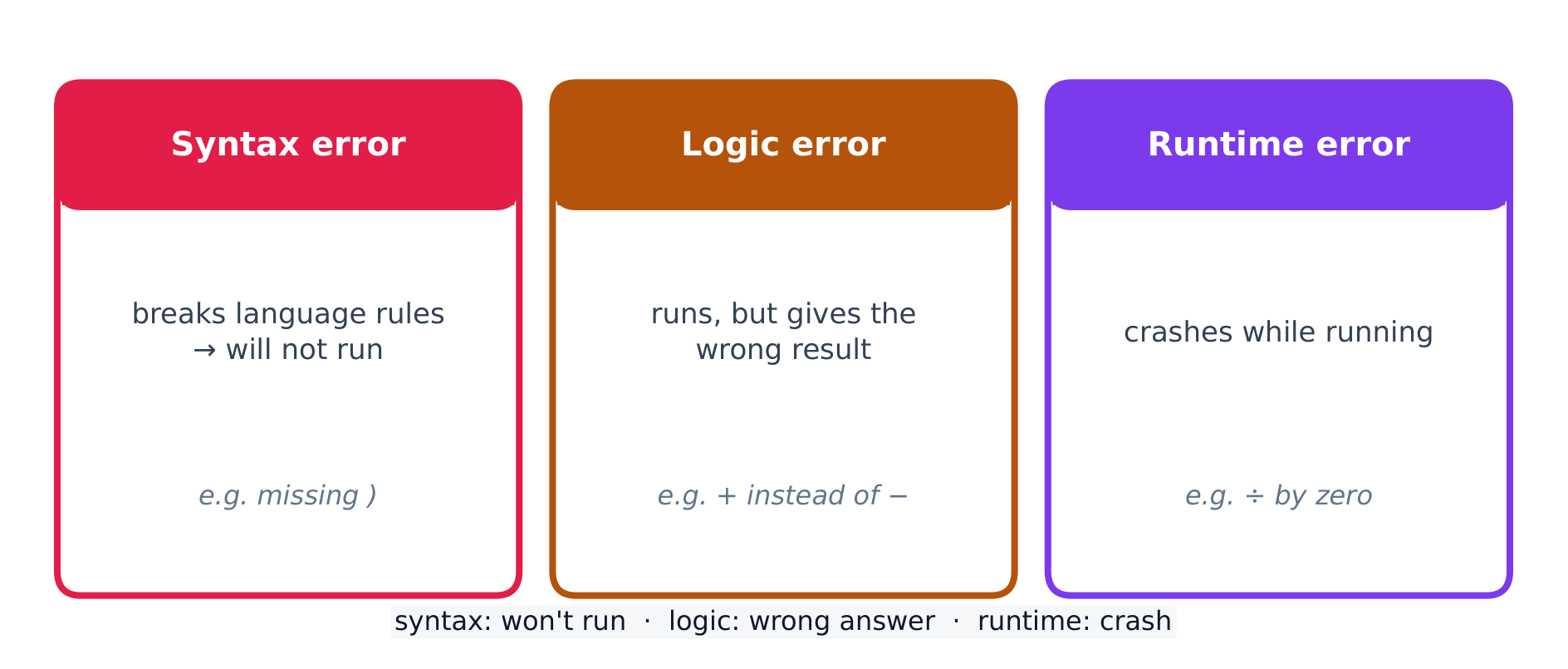
A bug is an error in a program; debugging 调试 is finding and fixing it. Three kinds:

  • a syntax error 语法错误 breaks the language's rules, so the program will not run;
  • a runtime error 运行时错误 crashes the program while it runs (e.g. dividing by zero);
  • a logic error 逻辑错误 lets it run but gives the wrong result.

Find bugs by testing with different inputs, adding print statements to see values, and hand-tracing the code. Choose the test inputs deliberately: they should demonstrate the different expected outcomes at or just beyond the extremes — the minimum and maximum values the program should accept, and a value just outside each of them. A program that works on ordinary data very often fails on an empty list, a zero, or a value one past the end of a range, so those are the inputs worth trying first. Fixing one bug at a time and re-testing is the reliable method.

Exam skill: be able to name the type of an error and describe a testing strategy that would catch it – a recurring multiple-choice and Create-task theme.

Worked example. A program meant to print the average of two numbers instead runs avg = a + b / 2. Tracing the order of operations, / runs before +, so it computes $a+\tfrac{b}{2}$ rather than the average. Add parentheses to fix it: avg = (a + b) / 2. Testing with $a=4,\ b=6$ confirms the fix — the buggy line gives $4+3=7$, the corrected line gives $\tfrac{10}{2}=5$. Testing with known inputs is exactly how you find and confirm a logic error.

עברית

באג הוא שגיאה בתוכנה; דיבאג הוא מציאתה ותיקונה. שלושה סוגים:

טבלת עקבות מקליטה את ערך כל משתנה בזמן ביצוע התוכנה, למציאת באגים
  • שגיאת סינטקס מפרה את הכללים של השפה, ולכן התוכנית לא תרצה;
  • שגיאת ריצה גורמת לקרוש התוכנית בזמן ביצועה (למשל, חילוק באפס);
  • שגיאת לוגיקה מאפשרת לה להמשיך לרצות אך נותנת תוצאה שגויה.

מצאו באגים על ידי בדיקה עם קלטות שונות, הוספת הודעות הדפסה לצפייה בערכים, ועקוב ידנית על הקוד. בחרו קלטות בדיקה במידת רצון: הן צריכות להמחיש תוצאות מצופיות שונות בנקודות הקיצוניות או מיד אחריהן – הערכים המינימליים והמקסימליים שהתוכנית אמורה לקבל, וערך אחד מעבר לכל אחד מהם. תוכנית שעובדת עם נתונים רגילים לעיתים קרובות נכשלת עם רשימה ריקה, אפס, או ערך אחד מעבר לסוף טווח, ולכן אלו הקלטות ששווה לנסות קודם כל. תיקון באג אחד בכל פעם ובדיקה מחודשת היא השיטה האמינה.

מיומנות לבחינה: ניתן לשמו את סוג השגיאה ולתאר אסטרטגיית בדיקה שתוכל to catch it – נושא חוזר בבחירת רב-בחירה ומשימות יצירה.

שלושה סוגים של שגיאת תכנות: סינטקס, לוגיקה ורציה

דוגמה מפורטת. תוכנית שנועדה להדפיס את הממוצע של שני מספרים מפיקה במקום זאת avg = a + b / 2. בעקבות סדר הפעולות, / מתבצע לפני +, ולכן היא מחשבת $a+\tfrac{b}{2}$ במקום הממוצע. הוסיפו סוגריים כדי לתקן: avg = (a + b) / 2. בדיקה עם $a=4,\ b=6$ מאשרת את התקון — השורה המכילה את השגיאה נותנת $4+3=7$, והשורה המתוקנת נותנת $\tfrac{10}{2}=5$. בדיקה עם קלט ידוע הוא בדיוק האופן שבו מוצאים ומאשרים שגיאת לוגיקה.

Explore · ⁨חקור⁩

Trace the guessing-game logic and spot a logic error · ⁨עקוב אחרי לוגיקת משחק הניחוש וזהה שגיאת לוגיקה⁩

Drag the guess and watch which branch runs. A logic error would send the same guess down the wrong branch — the program still runs, but gives the wrong message. The secret number here is 50. · ⁨גרור את הניחוש וצפה איזה ערוץ פועל. שגיאת לוגיקה תשלח את אותה ניחוש לערוץ הלא נכון — התוכנה עדיין פועלת, אך נותנת הודעה שגויה. המספר הסודי כאן הוא 50.⁩

1.4

Exam tips · ⁨טיפים לבחינות⁩

English
  • Much of CSP is assessed through the Create and written performance tasks — explain your reasoning clearly, not just your result.
  • Know the benefits of collaboration and how diverse perspectives reduce bias in a program.
  • Use precise vocabulary (iterative development, program requirements) when you describe a design process.
  • Give and take feedback constructively; credit collaborators and sources.
  • Break a large problem into smaller modules that a team can build in parallel.
עברית
  • חלק ניכר מה-CSP מוערך באמצעות משימות היצירה ביצוע וכתוביות — הסבירו את הסיבה שלכם בבירור, לא רק את התוצאה.
  • הכירו את היתרונות של עבודה משותפת ואיך זוויות מבט מגוונות מצמצמות טיעון בתוכנית.
  • השתמשו במונחים מדויקים (פיתוח איטרטיבי, דרישות התוכנית) כאשר אתם מתארים תהליך עיצוב.
  • תנו וקבלו משוב בצורה בונה; תנו כבוד לשותפים ולמקורות.
  • פצלו בעיה גדולה למודולים קטנים יותר שהצוות יכול לבנות במקביל.

Interactive lessons on this topic · ⁨שיעורים אינטראקטיביים בנושא זה⁩

Work through it step by step, with instant-check exercises. · ⁨לעבור על הדברים צעד אחר צעד, עם תרגילים לבדיקה מיידית.⁩

Past Papers · ⁨מבחני עבר⁩

More topics in AP Computer Science Principles · ⁨עקרונות מדעי המחשב - AP⁩ · ⁨נושאים נוספים בAP Computer Science Principles · ⁨עקרונות מדעי המחשב - AP⁩⁩

Log in or create account · ⁨היכנס או צור חשבון⁩

IGCSE, A-Level & AP