Skip to content · ⁨الانتقال إلى المحتوى⁩

Securing Applications and Data · ⁨تأمين التطبيقات والبيانات⁩

AP Cybersecurity · ⁨الأمن السيبراني (AP)⁩ · Topic 5 · ⁨الموضوع 5⁩

Video lesson for this topic · ⁨درس فيديو لهذا الموضوع⁩ Open the video page · ⁨افتح صفحة الفيديو⁩
9:47

تأمين التطبيقات والبيانات

أنفقت شركة مبالغ طائلة على جدران الحماية والأبواب المغلقة وكلمات المرور القوية. ثم قام شخص ما بكتابة بعض الأحرف الغريبة في مربع تسجيل الدخول — وقاعدة البيانات…

English narration · English + 中文 subtitles burned in · ⁨سرد باللغة الإنجليزية · ترجمة مدمجة بالإنجليزية + الصينية⁩

5.1

Application and Data Vulnerabilities and Attacks · ⁨ثغرات التطبيقات والبيانات والهجمات⁩

Syllabus · ⁨المنهج⁩
English

Learning Objective 5.1.A: Explain how adversaries can exploit application and file vulnerabilities to cause loss, damage, disruption, or destruction.

  • 5.1.A.1 An adversary can read any unencrypted files if they have access to the device or drive storing the files.
  • 5.1.A.2 Computers have standard users and administrative users. Administrative users have access to control system settings and can typically access any files or applications on a system. If regular users are given administrative privileges on a computer, and an adversary can compromise a user’s account, then the adversary will have elevated privileges on the system.
  • 5.1.A.3 When access control settings are weakly configured, many users often have permission to view and sometimes even edit files on a system. Adversaries can take advantage of weak access control settings to steal or destroy files or disrupt an application.

Learning Objective 5.1.B: Explain how application attacks exploit vulnerabilities.

  • 5.1.B.1 Applications are programs that run instructions on computers; they are executable data. Some applications run locally on a user’s computer, while other applications, like web applications, run on a server and are accessed by users through a network.
  • 5.1.B.2 Many applications take user input through open-ended input fields where users can type characters (e.g., letters, numbers, punctuation). Developers should include user input checks in their application, such as numeric input when asked for a number of items, to ensure that the user input matches what is expected; the application should reject input outside of the expected parameters. This process of verifying that user input meets expected criteria before processing it is called data validation. Applications that fail to validate user input are vulnerable to injection-type attacks, where adversaries insert unexpected character strings in input fields to alter the behavior of a program.
  • 5.1.B.3 Structured query language (SQL) is a computer language used to request information from databases and make changes to databases or entries in databases. Applications that query a database using unvalidated or unsanitized input from users are vulnerable.
  • 5.1.B.4 An SQL-injection attack places SQL commands and control characters into a user-input field in an application, which can lead to a breach of confidentiality by causing the application to return more information than it should, or a breach of integrity by modifying or deleting data in the database.
  • 5.1.B.5 Websites are written using hypertext markup language (HTML), and many websites use Javascript to create dynamic content on websites or web applications. Because Javascript commands run in the browser of the user visiting the website, those commands can access sensitive data stored in the browser like usernames, passwords, and cryptographic keys.
  • 5.1.B.6 A cross site scripting (XSS) attack injects malicious code into a website that a user’s browser then executes. The malicious code can be embedded in a link the user clicks (a Type I or Reflected XSS attack) or it can be inserted onto a website through a comment field, forum post, or visitor log, which would affect any user visiting that website (a Type II or Stored XSS attack).
  • 5.1.B.7 When applications take user input, that input is written to a buffer. A buffer is a designated section of computer memory with a fixed size. If the amount of data the user enters exceeds the size of the buffer, it can overflow into adjacent memory locations and overwrite other parts of the computer’s memory.
  • 5.1.B.8 A buffer overflow attack feeds more data into memory than was allotted, which can cause a system to crash or to execute code outside the scope of a program’s security policy, effectively allowing the adversary to perform unauthorized actions on a computer, such as accessing, modifying, or deleting files.
  • 5.1.B.9 The files that run web applications are stored in directories on servers. When users access web applications, their browsers send GET requests using hypertext transfer protocol (HTTP). A GET request accesses a file somewhere in the filesystem of the server.
  • 5.1.B.10 In a directory traversal attack, adversaries modify URLs and GET requests to attempt to access sensitive data (e.g., usernames and passwords) on a server’s file system.
    • Illustrative examples for 5.1.B.10:
      • A web server stores images for a website it hosts in the /var/www/images/ directory. An adversary modifies a URL requesting an image to ../../../etc/passwd. The .. moves one directory up in the file system; so the three consecutive .. returns the path to the root, and from there the adversary is attempting to access the passwd file that would return a list of all the authorized usernames on the device.

Learning Objective 5.1.C: Assess and document risks from application and data vulnerabilities.

  • 5.1.C.1 Data security risks can involve a compromise of confidentiality when unauthorized persons can access sensitive data, integrity when data can be manipulated or altered from its intended state, and availability when data can be destroyed or encrypted to prevent others from accessing it.
  • 5.1.C.2 High risks from data vulnerabilities often involve highly sensitive data (e.g., data that is governed by laws or regulations) that could be compromised through a highly likely exploit.
    • Illustrative examples for 5.1.C.2:
      • The company developing the next jet engine that will be used by the Air Force in its planes is storing the technical specifications for the engine on an unencrypted drive.
  • 5.1.C.3 Moderate risks from data vulnerabilities often involve sensitive data not having strong enough encryption or strict enough access controls.
    • Illustrative examples for 5.1.C.3:
      • A company stores its customers’ PII in a spreadsheet, and the spreadsheet is encrypted using a small key.
  • 5.1.C.4 Low risks from data vulnerabilities often involve less sensitive information being encrypted with shorter keys or having access controls that are not strict enough.
    • Illustrative examples for 5.1.C.4:
      • An organization’s CEO stores his private memos to his executive staff on a company share drive that is unencrypted and has no access controls.
العربية

هدف التعلم 5.1.A: شرح كيف يمكن للخصوم استغلال ثغرات التطبيقات والملفات لإحداث خسائر أو أضرار أو اضطراب أو تدمير.

  • 5.1.A.1 يمكن للخصوم قراءة أي ملفات غير مشفرة إذا حصلوا على وصول إلى الجهاز أو المحرك الذي يخزن الملفات.
  • 5.1.A.2 تمتلك الحواسيب مستخدمين عاديين ومستخدمي إدارة النظام. يمتلك مستمرو النظام صلاحية الوصول إلى إعدادات التحكم في النظام ويمكنهم عادةً الوصول إلى أي ملفات أو تطبيقات على النظام. إذا مُنح مستخدمون عاديون صلاحيات إدارية على حاسوب، واستطاع مهاجم اختراق حساب مستخدم، فسيكتسب المهاجم صلاحيات مرتفعة على النظام.
  • 5.1.A.3 عندما تكون إعدادات التحكم في الوصول ضعيفة، غالبًا ما يكون لدى العديد من المستخدمين إذن عرض الملفات وأحيانًا حتى تعديلها على النظام. يمكن للمهاجمين الاستفادة من إعدادات التحكم في الوصول الضعيفة لسرقة أو تدمير الملفات أو تعطيل تطبيق.

الهدف التعليمي 5.1.B: اشرح كيف تستغل هجمات التطبيقات الثغرات.

  • 5.1.B.1 التطبيقات هي برامج تنفذ تعليمات على الحواسيب؛ وهي بيانات قابلة للتنفيذ. تعمل بعض التطبيقات محليًا على حاسوب المستخدم، بينما تعمل تطبيقات أخرى، مثل تطبيقات الويب، على خادم وتتم الوصول إليها من قبل المستخدمين عبر شبكة.
  • 5.1.B.2 تأخذ العديد من التطبيقات مدخلات المستخدم من خلال حقول إدخال مفتوحة حيث يمكن للمستخدمين كتابة أحرف (مثل الأحرف الأبجدية والأرقام وعلامات الترقيم). يجب على المطورين تضمين فحص لمدخلات المستخدم في تطبيقاتهم، مثل المدخلات الرقمية عند طلب عدد من العناصر، للتأكد من أن مدخلات المستخدم تتطابق مع المتوقع؛ ويجب على التطبيق رفض المدخلات خارج المعايير المتوقعة. يُسمى هذه العملية، التي تتضمن التحقق من أن مدخلات المستخدم تلبي المعايير المتوقعة قبل معالجتها، بالتحقق من صحة البيانات. التطبيقات التي تفشل في التحقق من صحة مدخلات المستخدم تكون عرضة لهجمات الحقن، حيث يقوم المهاجمون بإدخال سلاسل أحرف غير متوقعة في حقول الإدخال لتغيير سلوك البرنامج.
  • 5.1.B.3 لغة الاستعلام المهيكل (SQL) هي لغة حاسوب تُستخدم لطلب المعلومات من قواعد البيانات وإجراء تغييرات عليها أو على سجلاتها. التطبيقات التي تقوم بالاستعلام عن قاعدة بيانات باستخدام مدخلات غير مصادق عليها أو غير معقمة من المستخدمين تكون عرضة للخطر.
  • 5.1.B.4 هجوم حقن SQL يوضع فيه أوامر SQL وأحرف تحكم في حقل إدخال المستخدم داخل تطبيق، مما قد يؤدي إلى انتهاك السرية من خلال جعل التطبيق يعيد معلومات أكثر مما ينبغي، أو انتهاك النزاهة من خلال تعديل أو حذف البيانات في قاعدة البيانات.
  • 5.1.B.5 تُكتب المواقع باستخدام لغة علامات النص التشعبي (HTML)، وتستخدم العديد من المواقع جافاسكريبت لإنشاء محتوى ديناميكي على المواقع أو تطبيقات الويب. نظرًا لأن أوامر جافاسكريبت تعمل في متصفح المستخدم الذي يزور الموقع، فإن تلك الأوامر يمكنها الوصول إلى البيانات الحساسة المخزنة في المتصفح مثل أسماء المستخدمين وكلمات المرور والمفاتيح المشفرة.
  • 5.1.B.6 هجوم البرمجة عبر المواقع (XSS) يحقن كودًا ضارًا في موقع ويب يقوم متصفح المستخدم بتنفيذه بعد ذلك. يمكن دمج الكود الضار في رابط يضغط عليه المستخدم (هجوم XSS المنعكس من النوع الأول أو Type I) أو يمكن إدراجه في موقع ويب من خلال حقل تعليقات أو منشور منتدى أو سجل الزوار، مما سيؤثر على أي مستخدم يزور ذلك الموقع (هجوم XSS المخزن من النوع الثاني أو Type II).
  • 5.1.B.7 عندما تأخذ التطبيقات مدخلات المستخدم، يتم كتابة هذه المدخلات إلى ذاكرة مؤقتة (Buffer). الذاكرة المؤقتة هي جزء مخصص من ذاكرة الحاسوب بحجم ثابت. إذا تجاوزت كمية البيانات التي يدخلها المستخدم حجم الذاكرة المؤقتة، فقد تتدفق إلى مواقع الذاكرة المجاورة وتغطي أجزاء أخرى من ذاكرة الحاسوب.
  • 5.1.B.8 هجوم تجاوز الذاكرة المؤقتة (Buffer Overflow) يغذي المزيد من البيانات إلى الذاكرة مما تم تخصيصه لها، مما قد يتسبب في انهيار النظام أو تنفيذ كود خارج نطاق سياسة أمان البرنامج، مما يسمح عمليًا للمهاجم بإجراء إجراءات غير مصرح بها على الحاسوب، مثل الوصول إلى الملفات أو تعديلها أو حذفها.
  • 5.1.B.9 يتم تخزين ملفات تشغيل تطبيقات الويب في مجلدات على الخوادم. عندما يصل المستخدمون إلى تطبيقات الويب، يرسل متصفحوهم طلبات GET باستخدام بروتوكول نقل النصوص التشعبي (HTTP). يطلب طلب GET ملفًا موجودًا في أي مكان في نظام الملفات الخاص بالخادم.
  • 5.1.B.10 في هجوم تجوال المجلدات (Directory Traversal)، يعدل المهاجمون روابط URL وطلبات GET لمحاولة الوصول إلى بيانات حساسة (مثل أسماء المستخدمين وكلمات المرور) على نظام ملفات الخادم.
    • أمثلة توضيحية لـ 5.1.B.10:
      • يخزن خادم الويب الصور لموقع ويب يستضيفه في مجلد /var/www/images/. يعدل المهاجم رابط طلب صورة إلى ../../../etc/passwd. ينقل .. مجلدًا واحدًا للأعلى في نظام الملفات؛ لذا فإن ثلاث نقاط متتالية .. تعيد مسار الجذر، ومن هناك يحاول المهاجم الوصول إلى ملف passwd الذي سيُرجع قائمة بجميع أسماء المستخدمين المصرح لهم على الجهاز.

الهدف التعليمي 5.1.C: تقييم ومخاطر من ثغرات التطبيقات والبيانات.

  • 5.1.C.1 يمكن أن تشمل مخاطر أمن البيانات انتهاك السرية عندما يتمكن أشخاص غير مصرح لهم من الوصول إلى بيانات حساسة، والنزاهة عندما يمكن التلاعب بالبيانات أو تغييرها عن حالتها المقصودة، والتوافر عندما يمكن تدمير البيانات أو تشفيرها لمنع الآخرين من الوصول إليها.
  • 5.1.C.2 غالبًا ما تتعلق المخاطر العالية الناتجة عن ثغرات البيانات بالبيانات عالية الحساسية (مثل البيانات الخاضعة للقوانين أو اللوائح) التي يمكن أن تتعرض للاختراق من خلال استغلال محتمل بشكل كبير.
    • أمثلة توضيحية لـ 5.1.C.2:
      • تخزن الشركة المطورة لمحرك الطائرات النفاثة القادم الذي سيتم استخدامه من قبل سلاح الجو في طائراتها المواصفات الفنية للمحرك على قرص غير مشفر.
  • 5.1.C.3 غالبًا ما تتعلق المخاطر المتوسطة الناتجة عن ثغرات البيانات بعدم امتلاك بيانات حساسة تشفيرًا قويًا بما يكفي أو ضوابط وصول صارمة بما يكفي.
    • أمثلة توضيحية لـ 5.1.C.3:
      • تخزن شركة ما المعلومات الشخصية للعملاء (PII) الخاصة بهم في جدول بيانات، ويتم تشفير جدول البيانات باستخدام مفتاح صغير.
  • 5.1.C.4 المخاطر المنخفضة الناتجة عن ثغرات البيانات غالباً ما تتضمن تشفير معلومات أقل حساسية بمفاتيح أقصر أو امتلاك ضوابط وصول غير صارمة بما يكفي.
    • أمثلة توضيحية لـ 5.1.C.4:
      • يخزن رئيس تنفيذي المؤسسة مذكراته الخاصة لموظفي الإدارة التنفيذية على محرك مشاركة تابع للشركة، وهو غير مشفر ولا يحتوي على ضوابط وصول.

Source: College Board AP Course and Exam Description · ⁨المصدر: وصف دورة وامتحان College Board AP⁩

English
SQL injection

Applications 应用程序 are the programs that run on computers, and data is what they process - both are prime targets. If files are stored unencrypted, anyone with access to the drive can read them. If a normal user is given administrative 管理性 privileges, an adversary who steals that account gains sweeping power.

The biggest application danger is bad user input. When a program does not check what a user types, an adversary can slip in commands - an injection attack 注入攻击. Data validation 数据验证 (checking input meets expected rules) is the defense. Key attacks:

  • SQL injection SQL注入 - inserting SQL commands into an input field to read or change a database.
  • Cross-site scripting (XSS) 跨站脚本 - injecting malicious script into a website that runs in another user's browser.

What a SQL injection actually looks like

SQL is a language for querying a database, and its control words are always written in capital letters — SELECT, FROM, WHERE, IN, OR, AND. A login form usually builds a query by pasting what you typed into one:

An attacker types SQL into the field instead of a name. Two tricks do most of the damage:

  • A condition that is always true. Entering ' OR '1'='1 makes the WHERE clause true for every row, so the database returns every user.
  • A double dash, which begins a comment in SQL. Entering admin' -- ends the name string and comments out the whole rest of the line, including the password check, so the query becomes … WHERE name = 'admin' and the attacker is logged in as the administrator without a password.

The defence is not to filter for the word SELECT. It is to stop the input being treated as code at all: use parameterised queries 参数化查询 (also called prepared statements), where the database is given the query and the values separately and never mixes them, and add input validation to reject characters the field has no reason to contain.

  • Buffer overflow 缓冲区溢出 - sending more data than a memory buffer 缓冲区 can hold, so it overflows into nearby memory and may run the adversary's code.
  • Directory traversal 目录遍历 - using ../ sequences in a URL to reach files outside the intended folder, such as /etc/passwd.

We rate data risk by sensitivity: unencrypted military plans are high risk; customer data with a weak key is moderate; low-value data with short keys is low.

العربية
حقن SQL

التطبيقات هي البرامج التي تعمل على الحواسيب، والبيانات هي ما تعالجه - وكلاهما أهداف رئيسية. إذا تم تخزين الملفات بدون تشفير، يمكن لأي شخص لديه وصول إلى القرء قراءتها. إذا مُنح مستخدم عادي صلاحيات إدارية، فإن مهاجمًا يسرق هذا الحساب يحصل على نفوذ شامل.

أكبر خطر على التطبيقات هو إدخال المستخدم السيئ. عندما لا يفحص البرنامج ما يكتبه المستخدم، يمكن للمهاجم إدخال أوامر - وهو هجوم حقن. التحقق من صحة البيانات (التحقق من أن الإدخال يطابق القواعد المتوقعة) هو الدفاع. الهجمات الرئيسية:

  • حقن SQL: إدراج أوامر SQL في حقل إدخال لقراءة قاعدة بيانات أو تغييرها.
  • التنفيذ عبر المواقع (XSS): حقن سكربت ضار في موقع ويب يتم تشغيله في متصفح مستخدم آخر.

ما يبدو عليه حقن SQL فعلياً

SQL هي لغة لاستعلام قاعدة البيانات، وكلمات التحكم الخاصة بها تُكتب دائماً بحروف كبيرة — SELECT، FROM، WHERE، IN، OR، AND. عادةً ما يُبنى نموذج تسجيل الدخول استعلاماً عن طريق لصق ما كتبته فيه:

SELECT * FROM users WHERE name = 'alice' AND password = 'secret'

يدخل المهاجم SQL في الحقل بدلاً من الاسم. تقنيتان تسببان معظم الضرر:

  • شرط يكون صحيحاً دائماً. إدخال ' OR '1'='1 يجعل جملة WHERE صحيحة لكل صف، فتُرجع قاعدة البيانات كل المستخدمين.
  • شرطان مزدوجان، يبدأان تعليقاً في SQL. إدخال admin' -- ينهي سلسلة الاسم ويعلق باقي السطر بأكمله، بما في ذلك التحقق من كلمة المرور، فتصبح الاستعلام … WHERE name = 'admin' ويُسجل المهاجم كمدير بدون كلمة مرور.

الدفاع ليس تصفية الكلمة SELECT. بل منع المعالجة ككود على الإطلاق: استخدام الاستعلامات المعلمة (تسمى أيضاً العبارات المحضرة)، حيث تُعطى قاعدة البيانات الاستعلام والقيم بشكل منفصل دون خلطها، وإضافة التحقق من صحة الإدخال لرفض الأحرف التي لا يوجد سبب لحقلها لاحتوائها.

  • تجاوز البافر: إرسال بيانات أكثر مما يستطيع مخزن مؤقت (buffer) في الذاكرة استيعابه، مما يؤدي إلى انسيابها إلى الذاكرة المجاورة وقد تشغيل كود المهاجم.
  • التنقل عبر المجلدات: استخدام متسلسلات ../ في رابط URL للوصول إلى ملفات خارج المجلد المقصود، مثل /etc/passwd.

نقيس مخاطر البيانات حسب الحساسية: الخطط العسكرية المشفرة غير مشفرة عالية المخاطر؛ بيانات العملاء بمفتاح ضعيف متوسطة؛ بيانات منخفضة القيمة بمفاتيح قصيرة منخفضة.

Vocabulary · ⁨مفردات⁩ Train · ⁨تدريب⁩
English العربية
Applications/ˌæplɪˈkeɪʃnz/ التطبيقات
administrative/ədˈmɪnɪstrətɪv/ إداري
injection attack/ɪnˈdʒekʃn əˈtæk/ هجوم الحقن
Data validation/ˈdeɪtə ˌvælɪˈdeɪʃn/ التحقق من صحة البيانات
Cross-site scripting (XSS)/krɒs saɪt ˈskrɪptɪŋ/ الت scripting عبر المواقع (XSS)
parameterised queries/ˌpærəˈmetəraɪzd ˈkwɪərɪz/ الاستعلامات المعلمة
Buffer overflow/ˈbʌfə ˌəʊvəˈfləʊ/ تجاوز المعرّف
buffer/ˈbʌfə/ منظم
Directory traversal/daɪˈrektəri træˈvɜːsl/ التجول في المجلدات
at rest/æt rest/ ساكن
in transit/ɪn ˈtrænsɪt/ أثناء النقل
in use/ɪn juːs/ أثناء الاستخدام
regulated/ˈreɡjʊleɪtɪd/ منظم
compliance/kəmˈplaɪəns/ الامتثال
personally identifiable information (PII)/ˈpɜːsənəli aɪˈdentɪfaɪəbl ˌɪnfəˈmeɪʃn/ المعلومات الشخصية التي يمكن تحديد هوية شخص بها (PII)
protected health information (PHI)/prəˈtektɪd helθ ˌɪnfəˈmeɪʃn/ المعلومات الصحية المحمية (PHI)
payment card information (PCI)/ˈpeɪmənt kɑːd ˌɪnfəˈmeɪʃn/ معلومات بطاقات الدفع (PCI)
Role-based (RBAC)/rəʊl beɪst/ قائم على الدور (RBAC)
Rule-based (RuBAC)/ruːl beɪst/ قائم بالقواعد (RuBAC)
Discretionary (DAC)/dɪˈskreʃənəri/ تقديري (DAC)
Mandatory (MAC)/ˈmændətəri/ إلزامي (MAC)
principle of least privilege/ˈprɪnsɪpl ɒv liːst ˈprɪvɪlɪdʒ/ مبدأ أقل امتياز
Cryptography/krɪpˈtɒɡrəfi/ علم التشفير
plaintext/ˈpleɪntekst/ نص واضح
key/kiː/ بحث مفتاح القاموس إلى القيمة؛ التفاصيل في البطاقات أدناه.
ciphertext/ˈsaɪfətekst/ النص المشفر
keyspace/ˈkiːspeɪs/ فضاء المفتاح
Symmetric encryption/sɪˈmetrɪk enˈkrɪpʃn/ التشفير المتماثل
SQL injection/ˌes kjuː ˈel ɪnˈdʒekʃn/ حقن SQL
Watch lesson · ⁨شاهد الدرس⁩
5.2

Protecting Applications and Data: Managerial Controls and Access Controls · ⁨حماية التطبيقات والبيانات: الضوابط الإدارية وضوابط الوصول⁩

Syllabus · ⁨المنهج⁩
Learning ObjectiveEssential Knowledge

5.2.A
Explain how the state or classification of data impacts the type and degree of security applied to that data.

  • 5.2.A.1 Organizations implement specific security controls to comply with legal requirements based on the types of data they collect, store, process, and transmit.
  • 5.2.A.2 Data can be classified by their state.
    • Data at rest are stored on a drive. It is important to protect the physical drive storing the data from destruction or theft. Data at rest can also be encrypted so that if an adversary steals it, they can’t immediately read the data.
    • Data in transit are being sent from one device to another. If the data are being transferred over physical media (e.g., cables) it is important to protect the media. Data in transit can also be encrypted so that if an adversary intercepts it, they can’t immediately read the data.
    • Data in use are being processed by software or a person. Access controls can be used to limit who or what has the ability to use data in different ways (e.g., view or edit). Data must be unencrypted to be used.
  • 5.2.A.3 Organizations often categorize data according to their sensitivity and prioritize a higher degree of security for more sensitive information.
  • 5.2.A.4 Laws and regulations can require certain types of data to be stored, transmitted, and handled according to specific rules.
    • Personally identifiable information (PII) is any data that allows someone to be identified and includes (but is not limited to): name, signature, phone number, address, biometric data (e.g., fingerprints), social security number, date of birth, and email address. The protection of this data is covered by many laws but most notably The Privacy Act of 1974 and for children under the age of 13 the Children’s Online Privacy Protection Act of 1998.
    • Protected health information (PHI) is any data related to an individual’s health, treatment, payment for healthcare at any time and includes (but is not limited to): test results, treatment records, hospital records, doctor visit notes, and health provider payment records. The protection of PHI is included in the Health Insurance Portability and Accountability Act of 1996.
    • Payment card information (PCI) is the data collected by organizations to process payments via cards (e.g., credit cards) and includes the following: name, account number, expiration date, address, and CVV code. The protection of this data is regulated by the Payment Card Industry Data Security Standard (PCI-DSS).
  • 5.2.A.5 Organizations that collect regulated data will label them and have policies that comply with the legal or regulatory requirements for the safe storage, transmission, and handling of these data.

5.2.B
Identify managerial controls related to application and data security.

  • 5.2.B.1 A cryptography policy will describe the acceptable encryption protocols and key parameters for an organization and may include:
    • A list of encryption algorithms approved for specific uses
    • Minimum or maximum key lengths
    • Cryptographic key-generation requirements and parameters
    • Cryptographic key-storage requirements
  • 5.2.B.2 A web application security policy will outline the requirements and parameters for testing and mitigating web application vulnerabilities in an organization, and it may include:
    • Parameters for when an application is subject to a security assessment
    • Timelines for remediating vulnerabilities based on level of risk
    • Parameters for how an application security assessment is to be carried out (e.g., using specific tools or according to specific frameworks)

5.2.C
Determine an appropriate access control model to protect applications and data.

  • 5.2.C.1 Access control enforces which users or applications (called subjects) can access, modify, add, or remove (called operations) which files or applications (called objects). Access control models describe how to determine which subjects have what type of access to which objects.
  • 5.2.C.2 Role-based access control (RBAC) assigns every subject to a role and defines which roles have which types of access to which objects.
    • Illustrative examples for 5.2.C.2:
      • An example of a role at a company might be “accountant,” and one type of object could be the payroll software. Role-based access could be used to ensure that only subjects who are assigned to the role of “accountant” have access to the payroll software object.
  • 5.2.C.3 Rule-based access control (RuBAC) checks a set of rules to determine what type of access a subject should have for a specific object and then allows or denies types of access based on the rules. This access control model is typically layered on top of another access control model.
    • Illustrative examples for 5.2.C.3:
      • There is a rule that prohibits subjects (even those who would normally have access) from accessing a certain database (the object) outside of local working hours. When a subject attempts to access the database, even if they are authorized to access it, they will be denied access if it is outside the time designated by the rule.
  • 5.2.C.4 Discretionary access control (DAC) gives individual subjects the ability to set the type of access that other subjects have on objects they own. In DAC models some subjects are designated as administrators or super users, and they have the ability to override the access controls established by other subjects.
    • Illustrative examples for 5.2.C.4:
      • Bob creates a file (an object) and decides to give Alice permission to edit the file, to give Frank permission to view the file only, and to deny everyone else access to the file altogether.
  • 5.2.C.5 Mandatory access control (MAC) follows strict rules for which types of access each subject level has for objects that are above their level, at their level, or below their level. Subject and object levels are assigned by an external administrator.
  • 5.2.C.6 The Bell-LaPadula model is a MAC model that is often used by governments and military organizations to control the security of information. This model has the following two important properties:
    • i. The Simple Security Property states that subjects may not read objects that are above their level.
    • ii. The * (Star) Security Property states that subjects may not write to objects below their level.
    • These rules taken together are often summarized as “write up, read down” (WURD).
  • 5.2.C.7 The principle of least privilege is the idea that entities should be given exactly as much access as they need to perform their function and no more.

5.2.D
Configure access control settings on a Linux-based system.

  • 5.2.D.1 Authorization is when an entity is granted permission to have a certain type of access to a resource. Access controls are put in place to control which users have what types of access to which data.
  • 5.2.D.2 There are three types of access to a file in Linux that can be set, and they always come in the following order:
    • i. Read access allows a user to view the contents of a file.
    • ii. Write access allows a user to make changes to a file.
    • iii. Execute access allows a user to run a binary file such as a program.
    • These are abbreviated rwx, respectively. If a user only has read and execute permissions (not write), then it would display as r-x. The - symbol indicates the absence of that permission.
  • 5.2.D.3 There are three default entities for which permissions are set and always in this order: (1) the file owner, (2) the file group, and (3) all other users. The three sets are displayed with no spaces (e.g., rwxrwxrwx).
  • 5.2.D.4 To view the current permission settings for a file, use the command ls -l, which will show the current settings for the default entities. If there is a + symbol at the end of the permissions, this means that other permissions have been set for that file and it can be viewed with the getfacl command.
  • 5.2.D.5 To modify the permission settings for a file, use the chmod command. This command can be used with the numeric method or the symbolic method.
  • 5.2.D.6 To use chmod in the numeric method the syntax is chmod ### filename. Each of the three ### represents one of the three entities mentioned above (the owner, the group, other nongroup users).
    • The first # = the owner
    • The second # = the group
    • The third # = other nongroup users
    • The permission for each entity is determined by adding up the values for the types of access to be granted:
    • 0 = no permissions
    • 1 = execute
    • 2 = write
    • 4 = read
    • Therefore 3 sets permission to write and execute, 5 sets permission to read and execute, 6 sets permission to read and write, and 7 sets permission to read, write, and execute.
    • Illustrative examples for 5.2.D.6:
      • The command chmod 750 test would set the permissions for the owner to read, write, and execute, for the group to read and execute, and for everyone else to no access at all.
      • The command chmod 543 test would set the permissions for the owner to read and execute, for the group to read only, and for everyone else to write and execute.
      • The command chmod 777 test would set the permissions for all three entities to read, write, and execute for the file test.
  • 5.2.D.7 To use chmod in the symbolic method the syntax is chmod entity +(or –) permission filename. The entities are the user owner, the group, and other nongroup users. Each entity is represented with a single letter.
    • u = user owner
    • g = group
    • o = others
    • a = all
    • Permission can be either added or removed to any combination of entities.
      • = add the permission
    • – = remove the permission
    • The permissions that can be set are read, write, and execute.
    • r = read
    • w = write
    • x = execute
    • Entities and permissions can be combined in a single command. To add the read and execute permissions for the group and user owner for a file called testfile, the command would be chmod ug+rx testfile.

Source: College Board AP Course and Exam Description · ⁨المصدر: وصف دورة وامتحان College Board AP⁩

English

Data is classified by its state - at rest 静态数据 (stored on a drive), in transit 传输中数据 (moving between devices), and in use 使用中数据 (being processed). Data at rest and in transit can be encrypted so a thief cannot read it; data in use must be decrypted, so access controls guard it instead.

Some data types are regulated 受监管 - the law dictates how they must be stored, transmitted and handled - so an organisation must achieve compliance 合规 by matching its controls to the rules. The exam expects you to pair each data type with its governing law:

Regulated data What it is Governing law
personally identifiable information (PII) 个人身份信息 anything identifying a person: name, address, SSN, biometrics, date of birth The Privacy Act (1974); COPPA for under-13s
protected health information (PHI) 受保护健康信息 health, treatment and healthcare-payment records HIPAA (1996)
payment card information (PCI) 支付卡信息 card number, expiry, CVV, cardholder name PCI-DSS

An organisation that collects regulated data must label it and hold policies that keep its storage, transmission and handling compliant - the higher the sensitivity, the higher the required degree of security.

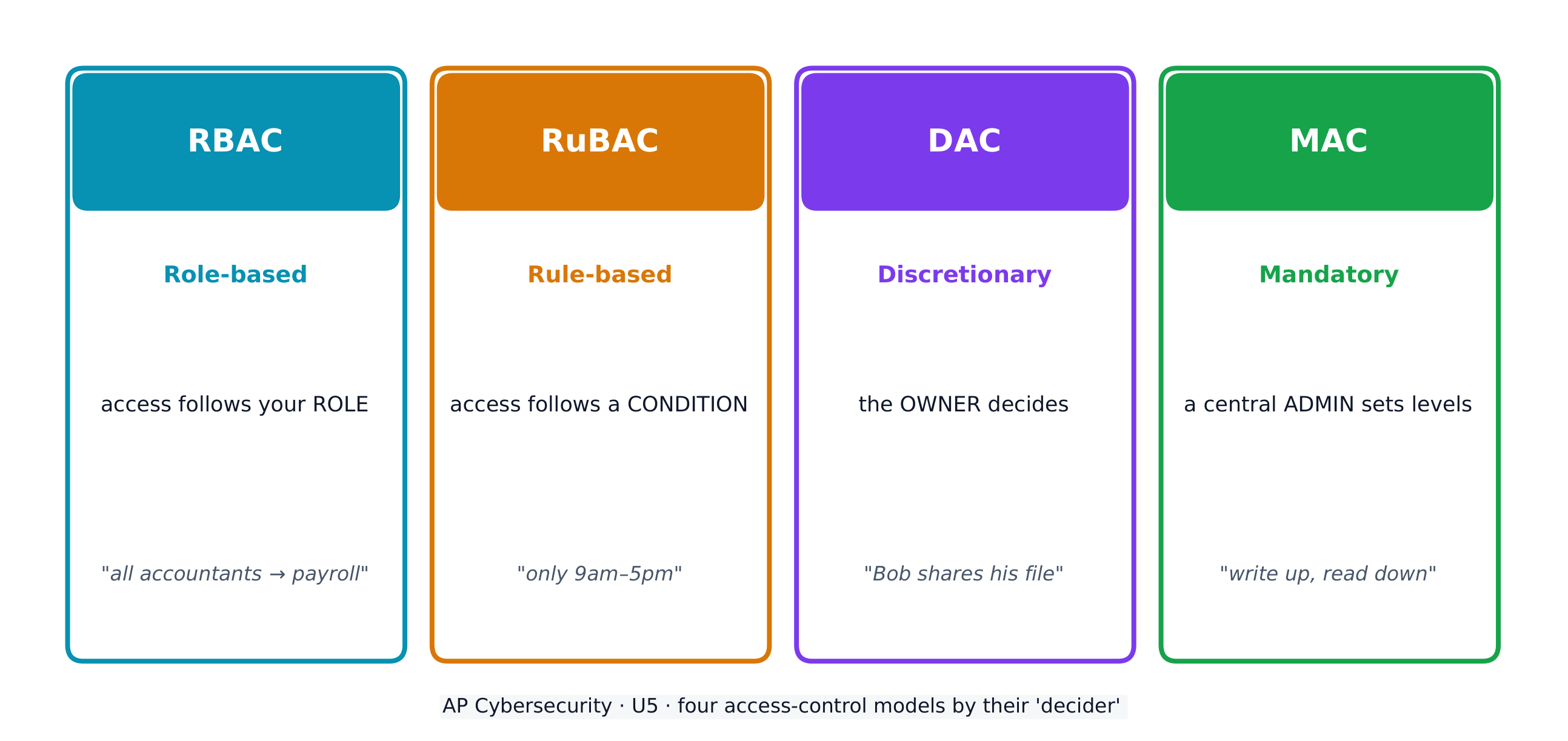
Access control decides which subjects (users) may perform which operations on which objects (files). Four models:

  • Role-based (RBAC) 基于角色的访问控制 - access follows your role (all "accountants" reach the payroll software).
  • Rule-based (RuBAC) 基于规则的访问控制 - access follows conditions (only during business hours), layered on another model.
  • Discretionary (DAC) 自主访问控制 - the owner of a file decides who else may use it.
  • Mandatory (MAC) 强制访问控制 - a central administrator sets strict levels; the Bell-LaPadula model summarises it as "write up, read down".

A guiding idea across all models is the principle of least privilege 最小权限原则 - give each entity exactly the access it needs and no more.

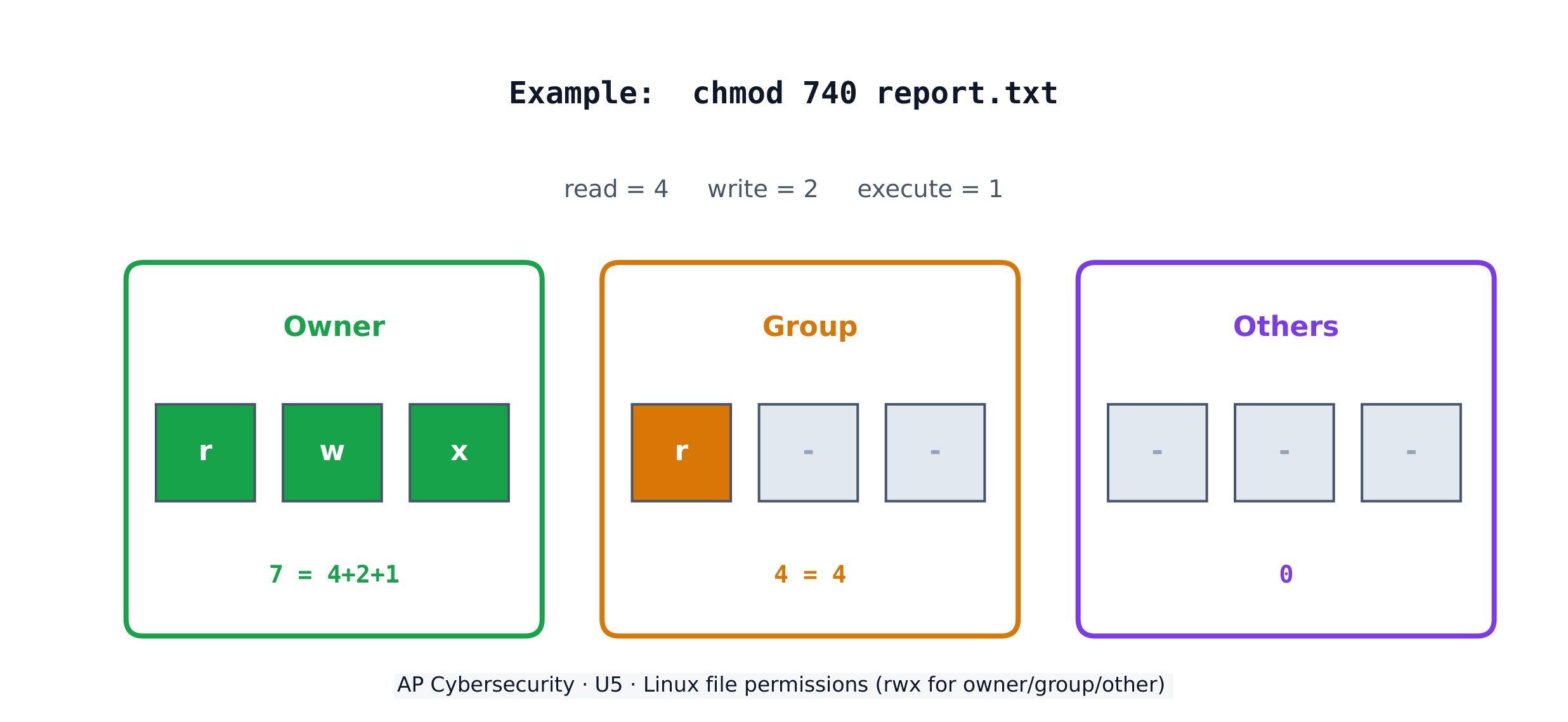
On a Linux system, each file has three permissions - read (r), write (w), execute (x) - for three groups: the owner, the group, and others. The chmod command sets them with numbers, adding 4 (read) + 2 (write) + 1 (execute). So chmod 640 means owner read+write (6), group read (4), others nothing (0).

Worked example. A principal wants only herself to read and edit a file, her staff group to read it, and no one else to touch it. Read+write = 4+2 = 6 for the owner, read = 4 for the group, nothing = 0 for others, giving chmod 640 file. The listing then shows -rw-r-----. To also let the owner run the file as a program you would add execute (7 = 4+2+1), giving chmod 740.

العربية

تُصنف البيانات حسب حالتها - أثناء السكون (محفوظة على قرء)، أثناء النقل (تتحرك بين الأجهزة)، وأثناء الاستخدام (تُعالج). يمكن تشفير البيانات أثناء السكون والنقل حتى لا يتمكن اللص من قراءتها؛ أما البيانات أثناء الاستخدام فلا بد من فك تشفيرها، لذا تحميها ضوابط الوصول بدلاً من ذلك.

بعض أنواع البيانات خاضعة للتنظيم - حيث dictates القانون كيفية تخزينها ونقلها والتعامل معها - لذلك يجب على المنظمة تحقيق الامتثال بمطابقة ضوابطها مع القواعد. يتوقع الامتحان منك مطابقة كل نوع بيانات بالقانون الحاكم له:

البيانات الخاضعة للتنظيم ما هي القانون الحاكم
المعلومات الشخصية القابلة للتحديد (PII) أي شيء يحدد هوية شخص: الاسم، العنوان، رقم الضمان الاجتماعي، البصمة الحيوية، تاريخ الميلاد قانون الخصوصية (1974)؛ COPPA لمن هم دون 13 عامًا
معلومات الصحة المحمية (PHI) سجلات الرعاية الصحية والعلاج والدفع HIPAA (1996)
معلومات بطاقات الدفع (PCI) رقم البطاقة، تاريخ الانتهاء، CVV، اسم حامل البطاقة PCI-DSS

يجب على المنظمة التي تجمع بيانات خاضعة للرقابة أن تُصنّفها وتحتفظ بـسياسات تضمن امتثال تخزينها ونقلها ومعالجتها - كلما زادت الحساسية، زاد مستوى الأمان المطلوب.

التحكم في الوصول يحدد أي ذوات الصلة (مستخدمون) يمكنهم تنفيذ أي عمليات على أي أغراض (ملفات). أربعة نماذج:

  • قائم على الأدوار (RBAC) - يتبع الوصول دورك (جميع "المحاسبين" يصلون إلى برنامج الرواتب).
  • قائم بالقواعد (RuBAC) - يتبع الوصول شروطًا (فقط خلال ساعات العمل)، مدمج فوق نموذج آخر.
  • اختياري (DAC) - يقرر مالك الملف من يمكنه استخدامه أيضًا.
  • إلزامي (MAC) - يضع مسؤول مركزي مستويات صارمة؛ يلخص نموذج Bell-LaPadula ذلك بقوله "الكتابة للأعلى، القراءة للأسفل".
أربعة نماذج للتحكم في الوصول تحدد من يصل إلى أي غرض، وكيف

فكرة محورية عبر جميع النماذج هي مبدأ أقل الامتياز - منح كل كيان بالضبط ما يحتاجه من وصول ولا أكثر.

في نظام Linux، لكل ملف ثلاث صلاحيات - القراءة (r)، الكتابة (w)، التنفيذ (x) - لثلاث مجموعات: المالك، المجموعة، والآخرين. أمر chmod يضبطها بأرقام، بإضافة 4 (قراءة) + 2 (كتابة) + 1 (تنفيذ). لذا chmod 640 تعني قراءة+كتابة للمالك (6)، قراءة للمجموعة (4)، لا شيء للآخرين (0).

صلاحيات ملفات Linux: قراءة/كتابة/تنفيذ للمالك والمجموعة والآخرين

مثال محلل. يريد المالك أن يقرأ و يعدّل ملفًا واحدًا فقط هو، ومجموعته من الموظفين قراءته فقط، وألا يلمسه أحد آخر. قراءة+كتابة = 4+2 = 6 للمالك، قراءة = 4 للمجموعة، لا شيء = 0 للآخرين، مما يعطي chmod 640 file. ثم يعرض القائمة -rw-r-----. ولتمكين المالك من تشغيل الملف كتطبيق، يجب إضافة التنفيذ (7 = 4+2+1)، مما يعطي chmod 740.

Explore · ⁨استكشف⁩

Which access-control model fits the rule?

Each access-control model has a different decider: RBAC by your role, RuBAC by a condition, DAC by the file's owner, and MAC by a central administrator's levels.

5.3

Protecting Stored Data with Cryptography · ⁨حماية البيانات المخزنة بالتشفير⁩

Syllabus · ⁨المنهج⁩
English

Learning Objective 5.3.A: Explain how encryption can be used to protect files.

  • 5.3.A.1 The purpose of cryptography is to hide information. A cryptographic algorithm defines a process for encrypting and decrypting information. Encryption is the process of hiding the information, and decryption is the process of reversing the encryption to retrieve the original information.
  • 5.3.A.2 An encryption algorithm defines a process for combining the information to be encrypted with a predefined key. The information to be encrypted is called the plaintext. The output of the encryption algorithm is called the ciphertext.
  • 5.3.A.3 The number of possible keys that can be used in an encryption algorithm is called the keyspace. The larger the keyspace, the longer it will take an adversary to discover the correct key by random chance.
  • 5.3.A.4 Cryptographic algorithms are classified by whether they use one key or two keys.
    • Symmetric encryption algorithms use the same key to encrypt and decrypt information.
    • Asymmetric encryption algorithms use two different keys—one to encrypt information and the other to decrypt information.
  • 5.3.A.5 Cryptographic algorithms are also classified by whether they process information one bit at a time or in fixed-size chunks of bits.
    • Block encryption handles information in fixed-size chunks called blocks, producing an output block for each input block.
    • Stream encryption handles input information continuously, producing output one element at a time.

Learning Objective 5.3.B: Apply symmetric encryption algorithms to encrypt and decrypt data.

  • 5.3.B.1 Computer-based encryption algorithms operate on binary data. The most common symmetric encryption algorithm is the Advanced Encryption Standard (AES). AES encryption is used to secure Wi-Fi transmissions, internet browsing, file encryption on disks, and hardware-level encryption on processors.
  • 5.3.B.2 AES is a symmetric key block cipher that encrypts data in 128-bit blocks (16 bytes). AES can operate with keys of varying lengths. Longer keys produce more secure encryption but require more time to encrypt and decrypt.
  • 5.3.B.3 Symmetric encryption and decryption can be performed using the command line, specialized software, or web-based tools.
    • On a command line interface, users can encrypt or decrypt with OpenSSL.
    • Specialized software like AES Crypt is an open source tool that can encrypt and decrypt files.
    • There are many web-based tools for encrypting and decrypting files.
  • 5.3.B.4 Using OpenSSL in a CLI, a user can encrypt and decrypt a file using the following commands (note that the encryption key is derived from the password provided):
    • To encrypt a file named test with AES using a 128-bit key, use the command: openssl enc -aes-128-cbc -e -in test -k password -out test.enc
    • To decrypt the encrypted file using the same key, use the command: openssl enc -aes-128-cbc -d -in test.enc -k password -out text
العربية

هدف التعلم 5.3.A: اشرح كيفية استخدام التشفير لحماية الملفات.

  • 5.3.A.1 الغرض من علم التشفير هو إخفاء المعلومات. يُعرّف خوارزمية التشفير عملية لتشفير وفك تشفير المعلومات. التشفير هو عملية إخفاء المعلومات، وفك التشفير هو عملية عكس التشفير لاستعادة المعلومات الأصلية.
  • 5.3.A.2 يُعرّف خوارزمية التشفير عملية لدمج المعلومات المراد تشفيرها مع مفتاح محدد مسبقًا. تسمى المعلومات المراد تشفيرها بالنص الأصلي (plaintext). وتُسمى مخرجات خوارزمية التشفير بالنص المشفر (ciphertext).
  • 5.3.A.3 يُطلق على عدد المفاتيح الممكنة التي يمكن استخدامها في خوارزمية التشفير فضاء المفتاح (keyspace). كلما كان فضاء المفتاح أكبر، استغرق الأمر وقتًا أطول للمهاجم لاكتشاف المفتاح الصحيح عن طريق الصدفة العشوائية.
  • 5.3.A.4 تُصنف الخوارزميات التشفيرية حسب ما إذا كانت تستخدم مفتاحًا واحدًا أو مفتاحين.
    • تستخدم خوارزميات التشفير المتماثل نفس المفتاح لتشفير وفك تشفير المعلومات.
    • تستخدم خوارزميات التشفير غير المتماثل مفتاحين مختلفين—one one to encrypt information and the other to decrypt information.
  • 5.3.A.5 تُصنف الخوارزميات التشفيرية أيضًا حسب ما إذا كانت تعالج المعلومات بت واحدة تلو الأخرى أو في كتل ثابتة الحجم من البتات.
    • يعالج التشفير الكتلي المعلومات في كتل ذات حجم ثابت تُسمى الكتل، وينتج كتلة مخرجات لكل كتلة مدخلات.
    • يعالج التشفير التدفقي معلومات الإدخال بشكل مستمر، وينتج المخرجات عنصرًا تلو الآخر.

هدف التعلم 5.3.B: تطبيق خوارزميات التشفير المتماثل لتشفير وفك تشفير البيانات.

  • 5.3.B.1 تعمل خوارزميات التشفير القائمة على الحاسوب على بيانات ثنائية. وأكثر خوارزميات التشفير المتما شيوعًا هو معيار التشفير المتقدم (AES). يُستخدم تشفير AES لتأمين اتصالات الواي فاي، وتصفح الإنترنت، وتشفير الملفات على الأقراص، والتشفير على مستوى الأجهزة في المعالجات.
  • 5.3.B.2 AES هو شيفرة كتلية بمفتاح متماثل تقوم بتشفير البيانات في كتل بحجم 128 بت (16 بايت). يمكن أن يعمل AES بمفاتيح بأطوال مختلفة. تنتج المفاتيح الأطول تشفيرًا أكثر أمانًا لكنها تتطلب وقتًا أطول لتشفير وفك تشفير البيانات.
  • 5.3.B.3 يمكن إجراء التشفير وفك التشفير المتماثل باستخدام سطر الأوامر، أو برامج متخصصة، أو أدوات قائمة على الويب.
    • في واجهة سطر الأوامر، يمكن للمستخدمين التشفير أو فك التشفير باستخدام OpenSSL.
    • البرامج المتخصصة مثل AES Crypt هي أداة مفتوحة المصدر يمكنها تشفير وفك تشفير الملفات.
    • توجد العديد من الأدوات القائمة على الويب لتشفير وفك تشفير الملفات.
  • 5.3.B.4 باستخدام OpenSSL في واجهة سطر الأوامر، يمكن للمستخدم تشفير وفك تشفير ملف باستخدام الأوامر التالية (ملاحظة: يتم اشتقاق مفتاح التشفير من كلمة المرور المقدمة):
    • لتشفير ملف باسم test باستخدام AES بمفتاح بحجم 128 بت، استخدم الأمر: openssl enc -aes-128-cbc -e -in test -k password -out test.enc
    • لفك تشفير الملف المشفر باستخدام نفس المفتاح، استخدم الأمر: openssl enc -aes-128-cbc -d -in test.enc -k password -out text

Source: College Board AP Course and Exam Description · ⁨المصدر: وصف دورة وامتحان College Board AP⁩

English
Symmetric vs asymmetric encryption
Hashing and the avalanche effect

Cryptography 密码学 hides information. An encryption algorithm combines the plaintext 明文 with a key 密钥 to produce ciphertext 密文; decryption reverses it. The keyspace 密钥空间 is the number of possible keys - the bigger it is, the longer an adversary needs to guess. An n-bit key has a keyspace of $2^n$.

Symmetric encryption 对称加密 uses the same key to encrypt and decrypt. The standard is AES 高级加密标准, a block cipher 分组密码 that works on 128-bit blocks and secures Wi-Fi, browsing, and stored files. Because both sides need the same secret key, sharing that key safely is the challenge.

العربية
آلة إنيغما: يحمي التشفير البيانات المخزنة والمنقولة من المتجسسين
التشفير المتناظر مقابل غير المتناظر
التجزئة وتأثير الانهيار الثلجي

التشفير يخفي المعلومات. خوارزمية التشفير تجمع بين النص الأصلي ومفتاح لإنتاج النص المشفر؛ الفك يعكس العملية. فضاء المفتاح هو عدد المفاتيح الممكنة - كلما كان أكبر، احتاج العدو وقتًا أطول للتخمين. مفتاح بحجم ⟦n⟧-بت له فضاء مفاتيح مقدارُه $2^n$.

التشفير المتناظر يستخدم نفس المفتاح للتشفير والفك. المعيار هو AES، وهو تشفير كتلي يعمل على كتل بحجم 128-بت ويحمي الواي فاي والتصفح والملفات المخزنة. نظرًا لأن كلا الطرفين يحتاجان نفس المفتاح السري، فإن مشاركة هذا المفتاح بأمان تمثل التحدي.

آلة تشفير إنيغما من الحرب العالمية الثانية مع المفاتيح والدوارات
آلة إنيغما عكّست الرسائل بالدوارات — مثال مبكر قابل للكسر للتشفير
Explore · ⁨استكشف⁩

Encrypt a message by shifting letters

Encryption combines plaintext with a key to make ciphertext. In this simple cipher the key is the shift amount; only someone who knows the shift can decrypt the message back.

Vocabulary · ⁨مفردات⁩ Train · ⁨تدريب⁩
English العربية
AES/ˌeɪ iː ˈes/ AES
block cipher/blɒk ˈsaɪfə/ مشفر كتلة
Asymmetric encryption/ˌeɪsɪˈmetrɪk enˈkrɪpʃn/ التشفير غير المتماثل
key pair/kiː peə/ زوج المفاتيح
public key/ˈpʌblɪk kiː/ المفتاح العام
private key/ˈpraɪvət kiː/ المفتاح الخاص
elliptic curve cryptography (ECC)/ɪˈlɪptɪk kɜːv krɪpˈtɒɡrəfi/ تشفير المنحنى الإهليلجي (ECC)
Secure by design/sɪˈkjʊə baɪ dɪˈzaɪn/ آمن بالتصميم
Secure by default/sɪˈkjʊə baɪ dɪˈfɒlt/ آمن افتراضياً
input sanitization/ˈɪnpʊt ˌsænɪtaɪˈzeɪʃn/ تنقية المدخلات
special characters/ˈspeʃl ˈkærɪktəz/ رموز خاصة
accounting/əˈkaʊntɪŋ/ المحاسبة
honeypot/ˈhʌnɪpɒt/ الوعاء العسل
data loss prevention (DLP)/ˈdeɪtə lɒs prɪˈvenʃn/ الوقاية من فقدان البيانات (DLP)
Watch lesson · ⁨شاهد الدرس⁩
5.4

Asymmetric Cryptography · ⁨التشفير غير المتناظر⁩

Syllabus · ⁨المنهج⁩
English

Learning Objective 5.4.A: Determine the appropriate asymmetric key to use when sending or receiving encrypted data.

  • 5.4.A.1 Asymmetric encryption allows users to communicate securely without prearranging a shared secret key.
  • 5.4.A.2 When using asymmetric encryption, each entity that will be receiving data must first generate a key pair. Key pairs are binary strings of equal length that are generated at the same time through a mathematical process. One key is designated as the public key and the other as the private key. The keys are mathematical inverses of each other— each key reverses its partner. Either key can be used to encrypt information, but only the other key in the key pair will then be able to decrypt it.
  • 5.4.A.3 Once the receiver generates the key pair, the private key must be stored securely. If the private key is exposed, shared, stolen, corrupted, or compromised the key pair must be deleted and a new key pair must be generated, because the security of the encryption algorithm rests on the security of the private key. The public key is published for anyone to view and use.
  • 5.4.A.4 To send information securely to someone, the sender will use the receiver’s public key to encrypt the data and send it. Only the receiver who has the private key will be able to decrypt and read the information.

Learning Objective 5.4.B: Explain why the length of a key impacts the security of encrypted data.

  • 5.4.B.1 Longer keys result in larger keyspaces. For binary keys, an n-bit length key has a keyspace of $2^n$.
  • 5.4.B.2 Using an application to randomly guess an n-bit length encryption key means that on average an adversary will be able to guess the correct key in $2^n \div 2$ (or $2^{n-1}$) guesses.
  • 5.4.B.3 Although longer keys are more secure, they also require more time to encrypt and decrypt messages.
  • 5.4.B.4 Computational processing power and efficiency continue to improve, allowing software to guess keys faster. Key-length recommendations for both symmetric and asymmetric encryption algorithms are periodically increased to account for increased processing power.
  • 5.4.B.5 Key-length comparison is only valid when comparing keys for the same cryptographic algorithm.
    • Illustrative examples for 5.4.B.5:
      • An AES 256-bit key is more secure than an AES 128-bit key.
      • An RSA 4096-bit key is more secure than an RSA 2048-bit key.
      • RSA and AES keys cannot be directly compared to one another in determining the level of security.

Learning Objective 5.4.C: Apply asymmetric encryption algorithms to encrypt and decrypt data.

  • 5.4.C.1 Common asymmetric encryption algorithms include RSA and elliptic curve cryptography (ECC). Asymmetric algorithms are used in many applications, including digital signatures and digital certificates.
  • 5.4.C.2 As with symmetric encryption, asymmetric encryption and decryption can be performed using the command line, specialized software, or web-based tools.
    • On a command line interface, users can encrypt or decrypt with OpenSSL.
    • Specialized software like RSA Encryption Tool is an open source tool that can encrypt and decrypt files.
    • There are many web-based tools for encrypting and decrypting files.
  • 5.4.C.3 In a CLI, a user can generate an asymmetric key pair and encrypt or decrypt files as necessary.
    • To generate a 2048-bit RSA key pair and save the key to a file named rsa.pem use the command: openssl genrsa -out rsa.pem 2048
    • To extract the public key from rsa.pem into a file named public.pem, use the command: openssl rsa -pubout -in rsa.pem -outform PEM -out public.pem
    • To encrypt the file test using RSA encryption and the key file public.pem, use the command: openssl pkeyutl -encrypt -pubin -inkey public.pem -in test -out test.enc
    • To decrypt the test.enc file using the rsa.pem file, run the command: openssl pkeyutl -decrypt -inkey rsa.pem -in test.enc -out test
العربية

هدف التعلم 5.4.A: تحديد المفتاح غير المتماثل المناسب عند إرسال أو استقبال بيانات مشفرة.

  • 5.4.A.1 يسمح التشفير غير المتماثل للمستخدمين بالتواصل بأمان دون الحاجة إلى ترتيب مسبق لمفتاح سري مشترك.
  • 5.4.A.2 عند استخدام التشفير غير المتماثل، يجب على كل كيان سيستقبل البيانات أولاً إنشاء زوج مفاتيح. أزواج المفاتيح هي سلاسل ثنائية متساوية الطول يتم إنشاؤها في نفس الوقت عبر عملية رياضية. يُ designated أحد المفاتيح كمفتاح عام والآخر كمفتاح خاص. المفاتيح هي معكوسات رياضية لبعضها البعض—كل مفتاح يعكس شريكه. يمكن استخدام أي مفتاح لتشفير المعلومات، لكن فقط المفتاح الآخر في زوج المفاتيح سيكون قادراً على فك تشفيره بعد ذلك.
  • 5.4.A.3 بمجرد إنشاء المستقبل لزوج المفاتيح، يجب تخزين المفتاح الخاص بأمان. إذا تعرض المفتاح الخاص للخطر، أو تم مشاركته، أو سرقه، أو تلفه، أو اختراقه، يجب حذف زوج المفاتيح وإنشاء زوج مفاتيح جديد، لأن أمان خوارزمية التشفير يعتمد على أمان المفتاح الخاص. يتم نشر المفتاح العام ليكون متاحاً لأي شخص لرؤيته واستخدامه.
  • 5.4.A.4 لإرسال معلومات بشكل آمن لشخص ما، سيستخدم المرسل المفتاح العام للمستقبل لتشفير البيانات وإرسالها. لن يتمكن إلا المستقبل الذي يمتلك المفتاح الخاص من فك تشفير وقراءة المعلومات.

هدف التعلم 5.4.B: شرح سبب تأثير طول المفتاح على أمان البيانات المشفرة.

  • 5.4.B.1 تؤدي المفاتيح الأطول إلى فضاءات مفاتيح أكبر. بالنسبة للمفاتيح الثنائية، فإن المفتاح بطول n بت له فضاء مفتاح قدره $2^n$.
  • 5.4.B.2 استخدام تطبيق للتخمين عشوائياً لمفتاح تشفير بطول n بت يعني أنه في المتوسط سيتمكن المهاجم من تخمين المفتاح الصحيح في $2^n \div 2$ (أو $2^{n-1}$) محاولة.
  • 5.4.B.3 على الرغم من أن المفاتيح الأطول أكثر أماناً، إلا أنها تتطلب أيضاً وقتاً أطول لتشفير وفك تشفير الرسائل.
  • 5.4.B.4 تستمر قدرة ومعالجة الحاسوب وكفاءتها في التحسن، مما يسمح للبرامج بتخمين المفاتيح بسرعة. يتم زيادة توصيات طول المفتاح بانتظام لكل من خوارزميات التشفير المتماثل وغير المتماثل لمراعاة زيادة القدرة الحسابية.
  • 5.4.B.5 مقارنة طول المفتاح صالحة فقط عند مقارنة مفاتيح لنفس الخوارزمية التشفيرية.
    • أمثلة توضيحية لـ 5.4.B.5:
      • مفتاح AES بحجم 256 بت أكثر أماناً من مفتاح AES بحجم 128 بت.
      • مفتاح RSA بحجم 4096 بت أكثر أماناً من مفتاح RSA بحجم 2048 بت.
      • لا يمكن مقارنة مفاتيح RSA و AES مباشرة مع بعضها البعض لتحديد مستوى الأمان.

هدف التعلم 5.4.C: تطبيق خوارزميات التشفير غير المتماثل لتشفير وفك تشفير البيانات.

  • 5.4.C.1 تشمل خوارزميات التشفير غير المتماثل الشائعة RSA وتشفير المنحنيات الإهليلجية (ECC). تُستخدم الخوارزميات غير المتماثلة في تطبيقات عديدة، بما في ذلك التوقيعات الرقمية والشهادات الرقمية.
  • 5.4.C.2 كما هو الحال مع التشفير المتماثل، يمكن إجراء التشفير وفك التشفير غير المتماثل باستخدام سطر الأوامر، أو برامج متخصصة، أو أدوات قائمة على الويب.
    • في واجهة سطر الأوامر، يمكن للمستخدمين التشفير أو فك التشفير باستخدام OpenSSL.
    • البرمجيات المتخصصة مثل أداة تشفير RSA هي أداة مفتوحة المصدر يمكنها تشفير وفك تشفير الملفات.
    • توجد العديد من الأدوات القائمة على الويب لتشفير وفك تشفير الملفات.
  • 5.4.C.3 في واجهة سطر الأوامر، يمكن للمستخدم إنشاء زوج مفاتيح غير متماثل وتشفير أو فك تشفير الملفات حسب الحاجة.
    • لتوليد زوج مفاتيح RSA بحجم 2048 بت وحفظ المفتاح في ملف باسم rsa.pem، استخدم الأمر: openssl genrsa -out rsa.pem 2048
    • لاستخراج المفتاح العام من rsa.pem إلى ملف باسم public.pem، استخدم الأمر: openssl rsa -pubout -in rsa.pem -outform PEM -out public.pem
    • لتشفير الملف test باستخدام تشفير RSA ومفتاح الملف public.pem، استخدم الأمر: openssl pkeyutl -encrypt -pubin -inkey public.pem -in test -out test.enc
    • لفك تشفير ملف test.enc باستخدام ملف rsa.pem، قم بتشغيل الأمر: openssl pkeyutl -decrypt -inkey rsa.pem -in test.enc -out test

Source: College Board AP Course and Exam Description · ⁨المصدر: وصف دورة وامتحان College Board AP⁩

English

Asymmetric encryption 非对称加密 solves the key-sharing problem with a key pair 密钥对 - a public key 公钥 anyone may see and a private key 私钥 kept secret. The keys are mathematical inverses: whatever one locks, only the other unlocks. To send you a secret, I encrypt with your public key, and only your private key can decrypt it - so we never had to share a secret in advance.

Longer keys mean larger keyspaces and more security, but slower encryption. Common asymmetric algorithms are RSA and elliptic curve cryptography (ECC) 椭圆曲线密码学, used in digital signatures and certificates. Remember: you can only compare key lengths within the same algorithm - an RSA 4096-bit key is not directly comparable to an AES 256-bit key.

العربية

التشفير غير المتناظر يحل مشكلة مشاركة المفاتيح باستخدام زوج مفاتيح - مفتاح عام يمكن لأي شخص رؤيته ومفتاح خاص يُحفظ سراً. المفاتيح معكوسات رياضية:.check whatever one locks, only the other unlocks. لإرسال سر إليك، أشفر بـمفتاحك العام، ولا يمكن مفتاحك الخاص فك تشفيره إلا - لذا لم نضطر أبدًا لمشاركة سر مسبقًا.

التشفير غير المتناظر: شفر بالمفتاح العام، افك بالمفتاح الخاص

المفاتيح الأطول تعني فضاءات مفاتيح أكبر وأمان أعلى، لكن تشفير أبطأ. الخوارزميات الشائعة غير المتناظرة هي RSA وتشفير المنحنيات الإهليلجية (ECC)، المستخدمة في التوقيعات الرقمية والشهادات. تذكر: يمكنك مقارنة أطوال المفاتيح فقط داخل نفس الخوارزمية - مفتاح RSA بحجم 4096-بت ليس قابلاً للمقارنة مباشرة بمفتاح AES بحجم 256-بت.

قفل: يقيّد التشفير البيانات بحيث لا يستطيع فتحها إلا من يمتلك المفتاح المطابق
Watch lesson · ⁨شاهد الدرس⁩
5.5

Protecting Applications · ⁨حماية التطبيقات⁩

Syllabus · ⁨المنهج⁩
English

Learning Objective 5.5.A: Identify the application security principles of secure by design and security by default.

  • 5.5.A.1 Secure by design is an initiative that encourages companies to include security in all phases of product development including design. When organizations implement secure by design, security is a design principle not just a technical feature.
  • 5.5.A.2 Secure by design includes three design principles:
    • i. Companies should take ownership of customer security outcomes. Companies should build products that meet the security needs of their customers.
    • ii. Companies should embrace radical transparency and accountability. Sharing relevant security-related product news and updates quickly increases security for everyone.
    • iii. Companies should build organizational structure and leadership to implement secure by design. Companies need leaders who are focused on security and have a security-first posture.
  • 5.5.A.3 Secure by design includes the concept of secure by default, which is the idea that security features for software and devices should be enabled by default. Devices and software should be secure to use out of the box, with security features already enabled.

Learning Objective 5.5.B: Explain how user input sanitization protects applications.

  • 5.5.B.1 When users enter input into an application, the application typically encases that input in special characters to process it. The characters that encase the user input are called control characters and include the single quote, the double quote, and the semicolon.
  • 5.5.B.2 When creating a program that takes user input, programmers should use a function to verify that user input meets their expected criteria and does not include any control characters that could be used to manipulate the system. This verification function can sanitize user input by removing potentially malicious characters, or it can give the user an error and force the user to provide different input. This can protect against many application attacks, including:
    • SQL injection attacks
    • XSS attacks
    • Directory traversal attacks
العربية

الهدف التعليمي 5.5.A: حدد مبادئ أمان التطبيقات القائمة على التصميم الآمن والأمان الافتراضي.

  • 5.5.A.1 التصميم الآمن هو مبادرة تشجع الشركات على تضمين الأمان في جميع مراحل تطوير المنتج بما في ذلك التصميم. عند تطبيق المنظمات للتصميم الآمن، يكون الأمان مبدأً تصميميًا وليس مجرد ميزة تقنية.
  • 5.5.A.2 يتضمن التصميم الآمن ثلاثة مبادئ تصميمية:
    • i. يجب على الشركات تحمل المسؤولية عن نتائج أمان العملاء. يجب على الشركات بناء منتجات تلبي احتياجات الأمان لدى عملائها.
    • ii. يجب على الشركات تبني الشفافية الجذرية والمساءلة. إن مشاركة أخبار وتحديثات المنتجات ذات الصلة بالأمان بسرعة يزيد من الأمان للجميع.
    • iii. يجب على الشركات بناء هيكل تنظيمي وقيادة لتنفيذ التصميم الآمن. تحتاج الشركات إلى قادة يركزون على الأمان ويتبنون نهجًا يعتمد الأمان أولاً.
  • 5.5.A.3 يتضمن التصميم الآمن مفهوم الأمان الافتراضي، وهو فكرة أن ميزات الأمان للبرامج والأجهزة يجب أن تكون مفعّلة افتراضيًا. يجب أن تكون الأجهزة والبرامج آمنة للاستخدام مباشرة من الصندوق، مع تفعيل ميزات الأمان مسبقًا.

الهدف التعليمي 5.5.B: اشرح كيف يحمي تنقية مدخلات المستخدم التطبيقات.

  • 5.5.B.1 عندما يدخل المستخدمون مدخلات في تطبيق، عادةً ما يحيط التطبيق تلك المدخلات بخصائص خاصة لمعالجتها. تُسمى الخصائص التي تحيط بمدخلات المستخدم بالخصائص التحكمية وتشمل الفاصلة العليا المفردة، والفاصلة العليا المزدوجة، ونقطة المنقوطة.
  • 5.5.B.2 عند إنشاء برنامج يستقبل مدخلات المستخدم، يجب على المبرمجين استخدام دالة للتحقق من أن مدخلات المستخدم تفي بالمعايير المتوقعة ولا تتضمن أي خصائص تحكمية يمكن استخدامها لتعديل النظام. يمكن لهذه دالة التحقق تنقية مدخلات المستخدم عن طريق إزالة الخصائص الضارة المحتملة، أو يمكنها إظهار خطأ للمستخدم وإلزامه بتقديم مدخلات مختلفة. يمكن أن يحمي هذا من هجمات التطبيقات العديدة، بما في ذلك:
    • هجمات حقن SQL
    • هجمات XSS
    • هجمات تجوال الدليل

Source: College Board AP Course and Exam Description · ⁨المصدر: وصف دورة وامتحان College Board AP⁩

English

Two design principles keep applications safe from the start. Secure by design 安全设计 builds security into every phase of development, not as an afterthought. Secure by default 默认安全 means the product ships with its security features already enabled - safe straight out of the box.

Secure by design rests on three principles a company must adopt: (1) take ownership of its customers' security outcomes rather than shifting blame onto users, (2) embrace radical transparency and accountability – sharing security-relevant news and updates quickly so everyone becomes safer, and (3) build the organisational structure and leadership that makes security a first-class goal.

The key defense against injection attacks is input sanitization 输入清理. Certain special characters 特殊字符 - the single quote, double quote, and semicolon - can be used to manipulate a system, so a good program removes or rejects them before processing. Sanitization protects against SQL injection, XSS, and directory-traversal attacks alike.

العربية

مبدأان تصميمي يحافظان على سلامة التطبيقات منذ البداية. آمن بالتصميم يبني الأمان في كل مرحلة من مراحل التطوير، وليس كإضافة لاحقة. آمن بشكل افتراضي يعني أن المنتج يُصدر مع ميزات أمانه مفعّلة بالفعل - آمن مباشرة من الصندوق.

يرتكز "آمن بالتصميم" على ثلاثة مبادئ يجب أن تتبنىها الشركة: (1) استلام المسؤولية عن نتائج أمان عملائها بدلاً من تحميل اللوم للمستخدمين، (2) تبني الشفافية الجذرية والمحاسبة – مشاركة أخبار وتحديثات ذات صلة بالأمان بسرعة حتى يصبح الجميع أكثر أمانًا، و(3) بناء الهيكل التنظيمي والقيادة الذي يجعل الأمان هدفًا رئيسيًا.

الحماية الرئيسية ضد هجمات الحقن هي تنظيف المدخلات. بعض الرموز الخاصة - الفاصلة العليا، الفاصلة السفلية، والنقطة الفاصلة - يمكن استخدامها للتحكم في النظام، لذا تقوم البرامج الجيدة بإزالة أو رفضها قبل المعالجة. يحمي التنظيف من حقن SQL، وهجمات XSS، وهجمات التنقل عبر المجلدات على حد سواء.

5.6

Detecting Attacks on Data and Applications · ⁨اكتشاف الهجمات على البيانات والتطبيقات⁩

Syllabus · ⁨المنهج⁩
English

Learning Objective 5.6.A: Explain how to detect attacks on data.

  • 5.6.A.1 Devices track and log when data are accessed and by whom. The process of recording and monitoring user activities is called accounting. Analysis of these logs can reveal malicious activity when an adversary attempts to access, copy, move, or delete data. Suspicious activity can include:
    • Accessing files that aren’t typically accessed
    • Accessing files or applications outside of a user’s normal patterns (including time of day, location, and device type)
    • Attempts to delete or copy sensitive files
  • 5.6.A.2 A honeypot is a file that appears as if it contains valuable data (e.g., credit card information, PII, passwords), but the data in the file are fake. A system can alert defenders if someone attempts to access the honeypot. Since the honeypot is a fake file, there is no legitimate reason to be accessing it, and any attempted access would be an indicator of malicious activity.
  • 5.6.A.3 Cryptographic hash functions can generate a digest for data and can reveal if data have been altered. If a file has changed unexpectedly, this can be a sign of malicious activity.

Learning Objective 5.6.B: Determine controls for detecting attacks against applications or data.

  • 5.6.B.1 Cost is a criterion in determining detective controls. Detective controls like honeypots and using hash values to check data integrity are inexpensive. Some organizations invest in third-party data loss prevention (DLP) services, which monitor data access, usage, and transmission by users throughout the organization to detect suspicious activity; DLP services provide strong detection capabilities at a higher cost.
  • 5.6.B.2 Sensitivity or criticality of data or applications is a criterion in determining detective controls. More sensitive or critical data or applications are more likely targets of an adversary and should be monitored more closely.
  • 5.6.B.3 Classification of data is a criterion in determining detective controls. Data that have been classified as private, educational, healthcare, or financial often have legal or regulatory detection and monitoring requirements.

Learning Objective 5.6.C: Evaluate the impact of a method for detecting attacks against an application or data.

  • 5.6.C.1 To operate at an effective speed, log analysis needs to be augmented with some automation. Honeypots offer near instantaneous detection capabilities.
  • 5.6.C.2 Some DLP tools, honeypots, and realtime automated log analysis provide alerts as an attack is happening. These tools allow for a prompt response that can stop an attack before it does more harm. Retrospective log analysis and the use of cryptographic hashes to verify data integrity identify attacks after they have occurred.
  • 5.6.C.3 False negatives can occur in applications and data attack detection. Cryptographic hash functions only detect if data have been altered. An adversary could view and steal data without altering it, and a cryptographic hash function would not detect this. Honeypots cannot detect adversaries that do not attempt to access them.

Learning Objective 5.6.D: Identify whether a file has been altered by verifying its hash.

  • 5.6.D.1 Cryptographic hash functions can help identify changes in a file because they are repeatable: the same input always produces the same output for a given hash function.
  • 5.6.D.2 Hashes can be calculated using the command line on a computer, a website, or specialized software.
    • In Windows Powershell, if a user wanted to generate the SHA256 hash for a file named testfile, they would use the command: Get-FileHash testfile -Algorithm SHA256
    • In BASH the same could be accomplished with the command: sha256sum testfile
    • In zsh, the common command line terminal on Apple computers, this could be accomplished with the command: shasum -a 256 testfile
  • 5.6.D.3 A file can be hashed and its hash output recorded. Then it can be hashed again later, and the second hash output can be compared to the previous hash output for the same file. If a file’s hash changes, then the file was altered between when the first and second hashes were generated.

Learning Objective 5.6.E: Apply detection techniques to identify and report indicators of application attacks by analyzing log files.

  • 5.6.E.1 SQL injection attacks can be detected by reviewing application and server logs of user input for SQL control words and symbols such as:
    • A single (') or double (") quote character
    • Boolean conditions like OR 1=1
    • A double dash (which indicates a comment in SQL): --
    • SQL control words (always in capital letters) like WHERE, IN, FROM
  • 5.6.E.2 XSS attacks can be detected by reviewing user input for suspicious tags, particularly the tag.
  • 5.6.E.3 For web applications, buffer overflows can be detected by checking the amount of data the user is sending to the web application in their request. The fields commonly checked are the URL length, cookie length, query string length, and total request length. Long strings in any of these fields can be an indicator of an attempted buffer overflow attack.
  • 5.6.E.4 Directory traversal attacks can be detected by reviewing application and server logs. HTTP GET requests that include paths with sequences of ../ are indicators of an adversary attempting a directory traversal.
العربية

الهدف التعليمي 5.6.A: اشرح كيفية اكتشاف الهجمات على البيانات.

  • 5.6.A.1 تتتبع الأجهزة وتسجل متى تم الوصول إلى البيانات ومن قام بذلك. يُسمى عملية تسجيل ومراقبة أنشطة المستخدمين بالإدارة المحاسبية. يمكن الكشف عن تحليل هذه السجلات عن النشاط الخبيث عندما يحاول عدو الوصول إلى البيانات أو نسخها أو نقلها أو حذفها. قد يشمل النشاط المشبوه:
    • الوصول إلى ملفات لا يتم الوصول إليها عادةً
    • الوصول إلى ملفات أو تطبيقات خارج أنماط المستخدم العادية (بما في ذلك وقت اليوم، والموقع، ونوع الجهاز)
    • محاولات حذف أو نسخ ملفات حساسة
  • 5.6.A.2 الحقل المستدعٍ (Honeypot) هو ملف يبدو وكأنه يحتوي على بيانات قيمة (مثل معلومات بطاقات الائتمان، والبيانات الشخصية PII، وكلمات المرور)، لكن البيانات الموجودة فيه مزيفة. يمكن للنظام تنبيه المدافعين إذا حاول شخص ما الوصول إلى الحقل المستدعٍ. نظرًا لأن الحقل المستدعٍ ملف مزيف، فلا يوجد سبب مشروع للوصول إليه، وأي محاولة وصول ستكون مؤشرًا على نشاط خبيث.
  • 5.6.A.3 يمكن لوظائف التشفير التجريبية (Hash Functions) توليد ملخص للبيانات والكشف عما إذا كانت البيانات قد تم تعديلها. إذا تغير ملف بشكل غير متوقع، فقد يكون هذا دليلاً على نشاط خبيث.

الهدف التعليمي 5.6.B: تحديد ضوابط اكتشاف الهجمات ضد التطبيقات أو البيانات.

  • 5.6.B.1 التكلفة معيار في تحديد الضوابط الاستكشافية. الضوابط الاستكشافية مثل الحقول المستدعية واستخدام قيم التجريبية للتحقق من سلامة البيانات منخفضة التكلفة. تستثمر بعض المنظمات خدمات منع فقدان البيانات من طرف ثالث (DLP)، والتي تراقب الوصول إلى البيانات واستخدامها ونقلها من قبل المستخدمين عبر المنظمة بالكامل للكشف عن النشاط المشبوه؛ توفر خدمات DLP قدرات كشف قوية بتكلفة أعلى.
  • 5.6.B.2 حساسية أو أهمية البيانات أو التطبيقات هي معيار في تحديد الضوابط الاستكشافية. البيانات أو التطبيقات الأكثر حساسية أو أهمية أكثر عرضة لتكون أهدافًا للعدو ويجب مراقبتها عن كثب.
  • 5.6.B.3 تصنيف البيانات هو معيار في تحديد الضوابط الاستكشافية. غالبًا ما تكون البيانات المصنفة كخاصة أو تعليمية أو صحية أو مالية خاضعة لمتطلبات قانونية أو تنظيمية للكشف والمراقبة.

الهدف التعليمي 5.6.C: تقييم تأثير طريقة لاكتشاف الهجمات ضد تطبيق أو بيانات.

  • 5.6.C.1 للعمل بسرعة فعالة، يحتاج تحليل السجلات إلى تعزيز ببعض الأتمتة. تقدم الحقول المستدعية قدرات كشف شبه فورية.
  • 5.6.C.2 توفر بعض أدوات DLP، والأحواض الملوحة (honeypots)، وتحليل السجلات التلقائي في الوقت الفعلي تنبيهات أثناء وقوع الهجوم. تتيح هذه الأدوات استجابة فورية يمكنها إيقاف الهجوم قبل أن يتسبب في مزيد من الضرر. أما تحليل السجلات الاسترجاعي واستخدام البصمات المشفرة للتحقق من سلامة البيانات فيكتشف الهجمات بعد وقوعها.
  • 5.6.C.3 قد تحدث نتائج سلبية كاذبة في تطبيقات وكشف هجمات البيانات. لا تكشف الدوال المشفرة للبصمة عن تغيير البيانات فحسب. قد يقوم مهاجم بعرض البيانات وسرقتها دون تغييرها، ولن تكتشف الدالة المشفرة للبصمة ذلك. كما لا تستطيع الأحواض الملوحة كشف المهاجمين الذين لا يحاولون الوصول إليها.

هدف التعلم 5.6.D: تحديد ما إذا كان الملف قد تم تعديله عن طريق التحقق من بصمته.

  • 5.6.D.1 يمكن للدوال المشفرة للبصمة المساعدة في تحديد التغييرات في الملف لأنها قابلة للتكرار: نفس المدخلات تنتج دائمًا نفس المخرجات بالنسبة لدالة بصمة معينة.
  • 5.6.D.2 يمكن حساب البصمات باستخدام سطر الأوامر على جهاز كمبيوتر، أو موقع ويب، أو برامج متخصصة.
    • في Windows PowerShell، إذا أراد المستخدم إنشاء بصمة SHA256 لملف باسم testfile، فسيستخدم الأمر: Get-FileHash testfile -Algorithm SHA256
    • في BASH، يمكن تحقيق ذلك بنفس الأمر: sha256sum testfile
    • في zsh، وهو محرر أوامر الطرفية الشائع على أجهزة Apple، يمكن تحقيق ذلك بالأمر: shasum -a 256 testfile
  • 5.6.D.3 يمكن إنشاء بصمة للملف وتسجيل مخرجات البصمة الخاصة به. ثم يمكن إنشاء بصمة له مرة أخرى لاحقًا، ومقارنة مخرجات البصمة الثانية مع مخرجات البصمة السابقة لنفس الملف. إذا تغيرت بصمة الملف، فهذا يعني أنه تم التعديل عليه بين وقت توليد البصمتين الأولى والثانية.

هدف التعلم 5.6.E: تطبيق تقنيات الكشف لتحديد والإبلاغ عن مؤشرات هجمات التطبيقات من خلال تحليل ملفات السجلات.

  • 5.6.E.1 يمكن كشف هجمات حقن SQL من خلال مراجعة سجلات التطبيق والخادم الخاص بإدخال المستخدم بحثًا عن كلمات ورموز التحكم في SQL مثل:
    • علامة اقتباس مفردة (') أو مزدوجة (")
    • شروط منطقية مثل OR 1=1
    • شرطان مزدوجان (الذي يشير إلى تعليق في SQL): --
    • كلمات تحكم في SQL (تكتب دائمًا بحروف كبيرة) مثل WHERE, IN, FROM
  • 5.6.E.2 يمكن كشف هجمات XSS من خلال مراجعة إدخال المستخدم بحثًا عن وسمات مشبوهة، ولا سيما وسم .
  • 5.6.E.3 بالنسبة لتطبيقات الويب، يمكن كشف تجاوزات الذاكرة المؤقتة (buffer overflows) بفحص كمية البيانات التي يرسلها المستخدم إلى تطبيق الويب في طلبه. الحقول التي يتم فحصها عادةً هي طول URL، وطول ملفات تعريف الارتباط (cookies)، وطول سلسلة الاستعلام، وإجمالي طول الطلب. يمكن أن تكون السلاسل الطويلة في أي من هذه الحقول مؤشرًا على محاولة هجوم تجاوز الذاكرة المؤقتة.
  • 5.6.E.4 يمكن كشف هجمات التنقل عبر المجلدات (directory traversal) من خلال مراجعة سجلات التطبيق والخادم. تُعد طلبات HTTP GET التي تتضمن مسارات تحتوي على تسلسلات ../ مؤشرات على أن المهاجم يحاول إجراء تنقل عبر المجلدات.

Source: College Board AP Course and Exam Description · ⁨المصدر: وصف دورة وامتحان College Board AP⁩

English

To detect data attacks, systems perform accounting 审计记录 - logging who accessed what and when. But logs are huge, so log analysis must be automated to run at a useful speed; a human reading raw logs is far too slow. A clever complement is a honeypot 蜜罐 - a fake file that looks valuable; since no one has a real reason to open it, any access is a clear, near-instantaneous sign of an attack. Watch especially for attempts to delete or copy sensitive files. Cryptographic hashes also help: re-hash a file and compare - if the digest changed, the file was altered.

Choosing detective controls means weighing cost (honeypots are cheap; a data loss prevention (DLP) 数据泄露防护 service is powerful but pricey) against the sensitivity of the data. To read a specific attack from logs, look for its signature: SQL injection shows OR 1=1 and --; XSS shows <script> tags; directory traversal shows ../ sequences; a buffer overflow shows unusually long input strings.

Checking that a file has not been altered

A cryptographic hash turns a file of any size into a short fixed-length value. Change one byte of the file and the hash changes completely, so comparing a downloaded file's hash with the one the publisher lists proves the file arrived intact. You do this at the command line:

Shell Command
BASH (Linux, and most servers) sha256sum testfile
zsh, the usual terminal on Apple computers shasum -a 256 testfile

Both print the SHA-256 hash of testfile. If it differs from the published value by even one character, the file has been altered — by corruption in transit, or by an attacker who replaced it.

⚠️ A hash proves integrity, not authenticity. An attacker who can replace the file on a web page can usually replace the published hash beside it too; that is why a signed hash, or one fetched over a separate trusted channel, is stronger evidence.

العربية

لاكتشاف هجمات البيانات، تقوم الأنظمة بـ التدقيق المحاسبي - تسجيل من دخل إلى ما ومتى. لكن السجلات ضخمة، لذا يجب أن تكون تحليل السجلات مؤتمتة لتعمل بسرعة مفيدة؛ فإن قراءة إنسان للسجلات الخام بطيئة للغاية. مكملة ذكية هي الحبيلة - ملف مزيف يبدو قيمًا؛ بما أنه لا يوجد سبب حقيقي لأي شخص لفتحه، فإن أي وصول هو علامة واضحة وفورية تقريبًا للهجوم. راقب بشكل خاص محاولات حذف أو نسخ الملفات الحساسة. تساعد أيضًا المشتقات المشفرة: أعد اشتقاق ملف وقارن - إذا تغير الدigest، تم تعديل الملف.

يعني اختيار ضوابط الكشف موازنة التكلفة (الحبائل رخيصة؛ خدمة منع فقدان البيانات (DLP) قوية لكنها باهظة الثمن) مقابل حساسية البيانات. لقراءة هجوم محدد من السجلات، ابحث عن بصمته: يظهر حقن SQL OR 1=1 و--؛ يظهر XSS وسوم <script>؛ يظهر تجوال المجلدات تسلسلات ../؛ يظهر تجاوز الذاكرة المتراكمة سلاسل إدخال طويلة بشكل غير طبيعي.

التحقق من عدم تعديل الملف

المشتق المشفر يحول ملفًا بأي حجم إلى قيمة قصيرة ذات طول ثابت. تغيير بايت واحد من الملف يغير المشتق تمامًا، لذا فإن مقارنة مشتق الملف المنزّل مع الذي يعرضه الناشر يثبت وصول الملف سليماً. تفعل ذلك في سطر الأوامر:

Shell الأمر
BASH (Linux، ومعظم الخوادم) sha256sum testfile
zsh، الطرفية المعتادة على أجهزة Apple shasum -a 256 testfile

كلاهما يطبع مشتق SHA-256 لـ testfile. إذا اختلف عن القيمة المنشورة بحرف واحد فقط، فقد تم تعديل الملف - بسبب تلف أثناء النقل، أو بواسطة مهاجم استبدله.

⚠️ يثبت المشتق السلامة، وليس الأصالة. يمكن للمهاجم الذي يستطيع استبدال الملف في صفحة الويب عادةً استبدال المشتق المنشور بجانبه أيضًا؛ ولهذا السبب يكون المشتوق الموقّع، أو الذي يتم جلبه عبر قناة موثوقة منفصلة، دليلاً أقوى.

5.6

Exam tips · ⁨نصائح للامتحان⁩

English
  • Match each application attack to its evidence in a log: OR 1=1 / -- = SQL injection; <script> = XSS; ../ = directory traversal; very long input = buffer overflow.
  • Learn the four access-control models by their decider: RBAC = your role, RuBAC = a condition, DAC = the file's owner, MAC = a central admin. Least privilege underlies them all.
  • Read Linux permissions by adding 4+2+1 per group - chmod 750 = owner rwx (7), group r-x (5), others none (0). Practice converting both ways.
  • Symmetric = one shared key (fast, AES); asymmetric = a public/private key pair (solves key sharing, RSA/ECC). Encrypt with the recipient's public key.
  • Input sanitization is the single best answer for preventing injection attacks; a honeypot is the classic cheap detective control.
العربية
  • طابق كل هجوم تطبيق مع الدليل في سجل: OR 1=1 / -- = حقن SQL؛ <script> = XSS؛ ../ = تجوال المجلدات؛ إدخال طويل جدًا = تجاوز الذاكرة المتراكمة.
  • تعلم نماذج التحكم الوصول الأربعة حسب صانع القرار: RBAC = دورك، RuBAC = شرط، DAC = مالك الملف، MAC = مسؤول مركزي. أقل امتياز هو أساسها جميعاً.
  • اقرأ أذونات Linux بإضافة 4+2+1 لكل مجموعة - chmod 750 = المالك rwx (7)، المجموعة r-x (5)، الآخرون لا شيء (0). تدرب على التحويل بين الطريقتين.
  • متماثل = مفتاح مشترك واحد (سريع، AES)؛ غير متماثل = زوج مفتاح عام/خاص (حل مشكلة مشاركة المفاتيح، RSA/ECC). قم بالتشفير باستخدام المفتاح العام للمستقبل.
  • تنظيف المدخلات هو أفضل إجابة واحدة لمنع هجمات الحقن؛ الحبيلة هي الضابط الاستقصائي الكلاسيكي الرخيص.

Interactive lessons on this topic · ⁨دروس تفاعلية حول هذا الموضوع⁩

Work through it step by step, with instant-check exercises. · ⁨ا-working عليه خطوة بخطوة، مع تمارين تحقق فوري.⁩

Past Papers · ⁨أوراق الامتحانات السابقة⁩

More topics in AP Cybersecurity · ⁨الأمن السيبراني (AP)⁩ · ⁨المزيد من المواضيع في AP Cybersecurity · ⁨الأمن السيبراني (AP)⁩⁩

Log in or create account · ⁨تسجيل الدخول أو إنشاء حساب⁩

IGCSE, A-Level & AP