خلل برمجي صغير، إذا تسرب إلى الإصدار النهائي، قد يكلف الكثير لإصلاحه — أكثر بكثير من اكتشافه مبكرًا. لهذا السبب لا نبدأ مجرد كتابة الأكواد. بل نتبع…
English narration · English + 中文 subtitles burned in · سرد باللغة الإنجليزية · ترجمة مدمجة بالإنجليزية + الصينية
12.1
Program development life cycle · دورة حياة تطوير البرمجيات
Syllabus · المنهج
English
Candidates should be able to:
Notes and guidance
Show understanding of the purpose of a development life cycle
Show understanding of the need for different development life cycles depending on the program being developed
Including: waterfall, iterative, rapid application development (RAD)
Describe the principles, benefits and drawbacks of each type of life cycle
Show understanding of the analysis, design, coding, testing and maintenance stages in the program development life cycle
العربية
يجب أن يكون المرشحون قادرين على:
ملاحظات وإرشادات
أظهر فهمًا لغرض دورة الحياة التطويرية
أظهر فهمًا لحاجة دورات الحياة التطويرية المختلفة اعتمادًا على البرنامج الذي يتم تطويره
بما في ذلك: التساقطي (Waterfall)، التكراري (Iterative)، تطوير التطبيقات السريعة (RAD)
صف المبادئ والفوائد والعيوب لكل نوع من دورات الحياة
أظهر فهمًا لمراحل التحليل، التصميم، البرمجة، الاختبار والصيانة في دورة حياة تطوير البرنامج
Source: Cambridge International syllabus · المصدر: منهج كامبريدج الدولي
English
A development life cycle 开发生命周期 is the set of stages from idea to finished, maintained software. It exists to plan, manage and control a project — to build the right product, on time, with good quality.
Why a life cycle is needed
The examiner's list for "the purpose of a development life cycle": it breaks a large project into stages that can be planned and managed; it makes sure the requirements are found and agreed before design and coding begin; it builds in testing and documentation rather than leaving them to the end; it lets the team track progress against milestones and manage risk; and it gives the customer defined points at which to review the work. Without one, a team codes first and discovers late that it built the wrong thing.
Why there are different ones
No single life cycle fits every project, so several development life cycles exist. The choice depends on the size and complexity, how clear the requirements 需求 are at the start, how much change is expected, the risk level, the team, and the deadline.
Common models
Waterfall 瀑布模型 — a linear sequence (Analysis → Design → Coding → Testing → Maintenance), each stage finished before the next. Clear and well-documented; good for stable requirements, but poor at coping with mid-project change, and the customer sees nothing working until the end.
Iterative model 迭代模型 — repeated passes, each producing a partial version that is reviewed and refined. Catches problems earlier; good when requirements are discovered over time, but harder to estimate.
Rapid Application Development 快速应用开发 (RAD) — heavy use of a prototype 原型 and user feedback. Very fast first delivery; good for changing requirements, but depends on user availability and suits smaller systems.
Agile 敏捷 — short iterations ("sprints"), constant collaboration and testing. Flexible and adaptive, but needs a committed customer and a skilled team.
Principles, benefits and drawbacks — as the mark scheme lists them.
Model
Principle
Benefits
Drawbacks
waterfall
the stages run in a fixed order, each completed and signed off before the next starts; going back means restarting the sequence
simple to manage; every stage is fully documented; requirements are fixed early, so costs and dates can be estimated
inflexible once a stage is finished; no working software until late; a mistake in analysis is expensive to fix later; the customer cannot see progress
iterative
a small working version is built first, then repeatedly improved through further versions until complete
working software early and often; problems found in early versions; the customer's feedback shapes each version; requirements can change
hard to estimate the total time and cost; repeated testing costs effort; needs the customer to be available; can drift if versions are not planned
RAD
prototypes of parts of the system are built quickly and refined with the user until accepted, often in parallel by several teams
very fast delivery of a first version; the user is involved throughout, so the product fits their needs; changes are easy to absorb
needs skilled developers and committed users; documentation is weak; less suited to large or safety-critical systems
Worked example. A company must be the first to launch a website for a new games console, and the design will change as the console's features are announced. Name the most suitable life cycle and justify it.
RAD. A prototype of the site can be built and shown to the users within days, and refined as the requirements change; the site is small enough for a prototype-driven approach, and speed of delivery is the main requirement. Waterfall would fix the requirements before any page was built and deliver nothing until the end.
The standard stages
Each stage has a purpose, an output and typical activities — a "describe the … stage" question wants two or three of these.
analysis — find out what the program must do. Activities: interviews, questionnaires and observation of the current system; a feasibility study; agreeing the requirements specification, which every later stage is checked against.
design — decide how it will do it. Outputs: the structure chart (modules and parameters), flowcharts or pseudocode for each module, identifier tables and data structures, screen and file layouts, and the test plan written now, from the specification, before any code exists.
coding (implementation 实现) — write the program in a high-level language, module by module, following the design; each module is tested as it is written.
testing — run the program against the test plan (normal, abnormal, extreme and boundary data) and correct the errors found; integration, alpha, beta and acceptance testing follow.
maintenance 维护 — after release, correct faults, adapt the program to new hardware, software or law, and improve it (see below).
Worked example. Complete the waterfall diagram Analysis → ? → ? → ? → Maintenance and describe what happens at the design stage.
The missing stages are Design, Coding, Testing. At the design stage the requirements are turned into a plan for the program: the problem is decomposed into modules (a structure chart), the algorithm for each module is written as pseudocode or a flowchart, the data structures and identifiers are chosen, the screens and files are laid out, and the test plan is written from the specification.
العربية
دورة الحياة هي مجموعة المراحل من الفكرة إلى برمجيات مكتملة ومُصانة. تُستخدم لـ تخطيط وإدارة والتحكم في المشروع — لبناء المنتج الصحيح، في الوقت المحدد، وبجودة عالية.
تُبنى البرمجيات بواسطة فرق تتبع دورة حياة التطوير للبقاء متناسقةالمخطط الانسيابي يخطط لمنطق البرنامج خلال مرحلة التصميم في الدورة
لماذا نحتاج إلى دورة حياة
قائمة مصحح الامتحانات لـ "الغرض من دورة حياة التطوير": فهي تقسم المشروع الكبير إلى مراحل يمكن تخطيطها وإدارتها؛ وتضمن العثور على المتطلبات والموافقة عليها قبل بدء التصميم والبرمجة؛ وتدمج الاختبار والتوثيق بدلاً من تركهما للنهاية؛ وتتيح للفريق تتبع التقدم مقابل العقبات الرئيسية وإدارة المخاطر؛ وتعطي العميل نقاطاً محددة لمراجعة العمل. بدونها، يقوم الفريق بالبرمجة أولاً ويكتشف متأخراً أنه بنى شيئاً خاطئاً.
لماذا توجد أنواع مختلفة منها
لا توجد دورة حياة واحدة تناسب كل مشروع، لذا توجد عدة دورات حياة للتطوير. يعتمد الاختيار على الحجم والتعقيد، مدى وضوح المتطلبات في البداية، مقدار التغيير المتوقع، مستوى الخطر، الفريق، والميعاد النهائي.
نماذج شائعة
الشلال (Waterfall) — تسلسل خطي (تحليل ← تصميم ← برمجة ← اختبار ← صيانة)، يُنتهي كل مرحلة قبل التي تليها. واضح وموثق جيداً؛ مناسب لـ متطلبات مستقرة، لكن ضعيف في التعامل مع التغيير أثناء المشروع، ولا يرى العميل أي شيء يعمل حتى النهاية.
النموذج التكراري (Iterative model) — دورات متكررة، ينتج كل منها نسخة جزئية يتم مراجعتها وتحسينها. يلتقط المشاكل مبكراً؛ مناسب عندما تكون المتطلبات مكتشفة بمرور الوقت، لكن أصعب في التقدير.
تطوير التطبيقات السريعة (RAD) — استخدام مكثف لـ نموذج أولي وتغذية المستخدم. تسليم سريع جداً للنسخة الأولى؛ مناسب لـ متطلبات متغيرة، لكنه يعتمد على توافر المستخدمين ويناسب الأنظمة الأصغر.
أجايل (Agile) — تكرارات قصيرة ("سبرات")، تعاون واختبار مستمر. مرن ومتكيف، لكن يتطلب عميلاً ملتزماً وفريقاً ماهراً.
نموذج الشلال: كل مرحلة تنتهي قبل أن تبدأ التاليةالنموذج التكراري: الدورات المتكررة تحسن البرنامج
*تطوير التطبيقات السريعة: تعمل الفرق على الأجزاء بالتوازي
المبادئ، الفوائد والعيوب — كما تذكرها خطة العلامات.
النموذج
المبدأ
الفوائد
العيوب
شلال
المراحل تسير بترتيب ثابت، تُنتهى كل واحدة وتُصادق عليها قبل بدء التالية؛ العودة تعني إعادة التسلسل
سهل الإدارة؛ كل مرحلة موثقة بالكامل؛ المتطلبات ثابتة مبكراً، مما يسمح بتقدير التكاليف والتواريخ
غير مرن بعد انتهاء المرحلة؛ لا يوجد برنامج يعمل إلا متأخراً؛ خطأ في التحليل مكلف الإصلاح لاحقاً؛ لا يستطيع العميل رؤية التقدم
تكراري
نسخة صغيرة قابلة للعمل تُبنى أولاً، ثم تُحسّن مراراً عبر نسخ إضافية حتى الاكتمال
برنامج قابل للعمل مبكراً وبشكل متكرر; اكتشاف مشاكل في النسخ المبكرة; تغذية المستخدم تشكل كل نسخة; يمكن أن تتغير المتطلبات
صعوبة تقدير الوقت والتكلفة الإجمالية; تكاليف الاختبار المتكررة تتطلب جهداً; يحتاج توافر العميل; قد ينحرف إذا لم تُخطط النسخ
RAD
تُبنى نماذج أولية لأجزاء النظام بسرعة وتُحسّن مع المستخدم حتى القبول، غالباً بالتوازي عبر عدة فرق
تسليم سريع جداً للنسخة الأولى; involvement المستخدم طوال الوقت، مما يجعل المنتج يناسب احتياجاتهم; التغييرات سهلة الامتصاص
تحتاج مطورين ماهرين ومستخدمين ملتزمين; التوثيق ضعيف; أقل ملاءمة للأنظمة الكبيرة أو الحرجة من حيث السلامة
مثال محلل. يجب على شركة أن تكون الأولى في إطلاق موقع إلكتروني لإيمالة ألعاب جديدة، سيتغير التصميم مع إعلان ميزات الإيمالة. اذكر دورة الحياة الأكثر ملاءمة وبررها.
تطوير التطبيقات السريعة (RAD). يمكن بناء نموذج أولي للموقع وعرضه للمستخدمين خلال أيام، وتحسينه مع تغير المتطلبات؛ الموقع صغير بما يكفي لنهج قائم على النموذج الأولي، والسرعة في التسليم هي المتطلب الرئيسي. سيحدد نموذج الشلال المتطلبات قبل بناء أي صفحة ولن يسلم شيئاً حتى النهاية.
المراحل القياسية
لكل مرحلة غرض، ومخرجات، وأنشطة نمطية — سؤال "وصف ... مرحلة" يطلب اثنين أو ثلاثة منها.
التحليل — تحديد ماذا يجب أن يقوم به البرنامج. الأنشطة: المقابلات، الاستبيانات ومراقبة النظام الحالي؛ دراسة الجدوى؛ الاتفاق على مواصفات المتطلبات التي يتم التحقق منها في كل مرحلة لاحقة.
التصميم — تحديد كيف سيتم تنفيذه. المخرجات: المخطط الهيكلي (الوحدات والمعلمات)، مخططات التدفق أو الكود الوهمي لكل وحدة، جداول المعرفات والهياكل البياناتية، تخطيطات الشاشات والملفات، وخطة الاختبار تُكتب هناك، بناءً على المواصفات، قبل وجود أي كود برمجي.
البرمجة (التنفيذ) — كتابة البرنامج بلغة عالية المستوى، وحدة بوحدة، وفقاً للتصميم؛ يتم اختبار كل وحدة بمجرد كتابتها.
الاختبار — تشغيل البرنامج وفقاً لخطة الاختبار (بيانات عادية، غير عادية، متطرفة وحدية) وتصحيح الأخطاء المكتشفة؛ يتبع ذلك اختبار التكامل، وألفا، وبيتا، والقبول.
الصيانة — بعد الإطلاق، تصحيح العيوب، تكيف البرنامج مع أجهزة أو برمجيات أو قوانين جديدة، وتحسينه (انظر أدناه).
مثال محلل. أكمل مخطط شلال تحليل ← ? ← ? ← ? ← صيانة وصِف ما يحدث في مرحلة التصميم.
المراحل المفقودة هي التصميم، البرمجة، الاختبار. في مرحلة التصميم، تتحول المتطلبات إلى خطة للبرنامج: يتم تفكيك المشكلة إلى وحدات (مخطط هيكلي)، يُكتب خوارزمية كل وحدة ككود وهمي أو مخطط تدفق، يتم اختيار الهياكل البياناتية والمعرفات، يتم تخطيط الشاشات والملفات، وتُكتب خطة الاختبار من المواصفات.
Explore · استكشف
The program development life cycle · دورة حياة تطوير البرمجيات
Step through the stages every project passes through. Getting the requirements right in analysis matters most — a mistake caught in testing is far costlier to fix than one caught early. · مر عبر المراحل التي يمر بها كل مشروع. إن تحديد المتطلبات بشكل صحيح في مرحلة التحليل هو الأهم — فالخطأ المكتشف في الاختبار أغلى بكثير في إصلاحه مقارنة بما يتم اكتشافه مبكراً.
Explore · استكشف
Software process lab · معمل عملية البرمجيات
Classify development examples by the stage or tool they belong to. · صنّف أمثلة التطوير حسب المرحلة أو الأداة التي تنتمي إليها.
Use a structure chart to decompose a problem into sub-tasks and express the parameters passed between the various modules/procedures/functions which are part of the algorithm design
Describe the purpose of a structure chart Construct a structure chart for a given problem Derive equivalent pseudocode from a structure chart
Show understanding of the purpose of state-transition diagrams to document an algorithm
العربية
يجب أن يكون المرشحون قادرين على:
ملاحظات وإرشادات
استخدم مخطط البنية لتجزئة المشكلة إلى مهام فرعية والتعبير عن المعاملات الممررة بين الوحدات/الإجراءات/الدوال المختلفة التي جزء منها تصميم الخوارزمية
صف غرض مخطط البنية. قم بإنشاء مخطط بنية لمشكلة معطاة. استنتج كودًا زائفًا مكافئًا من مخطط بنية
Source: Cambridge International syllabus · المصدر: منهج كامبريدج الدولي
English
Structure chart
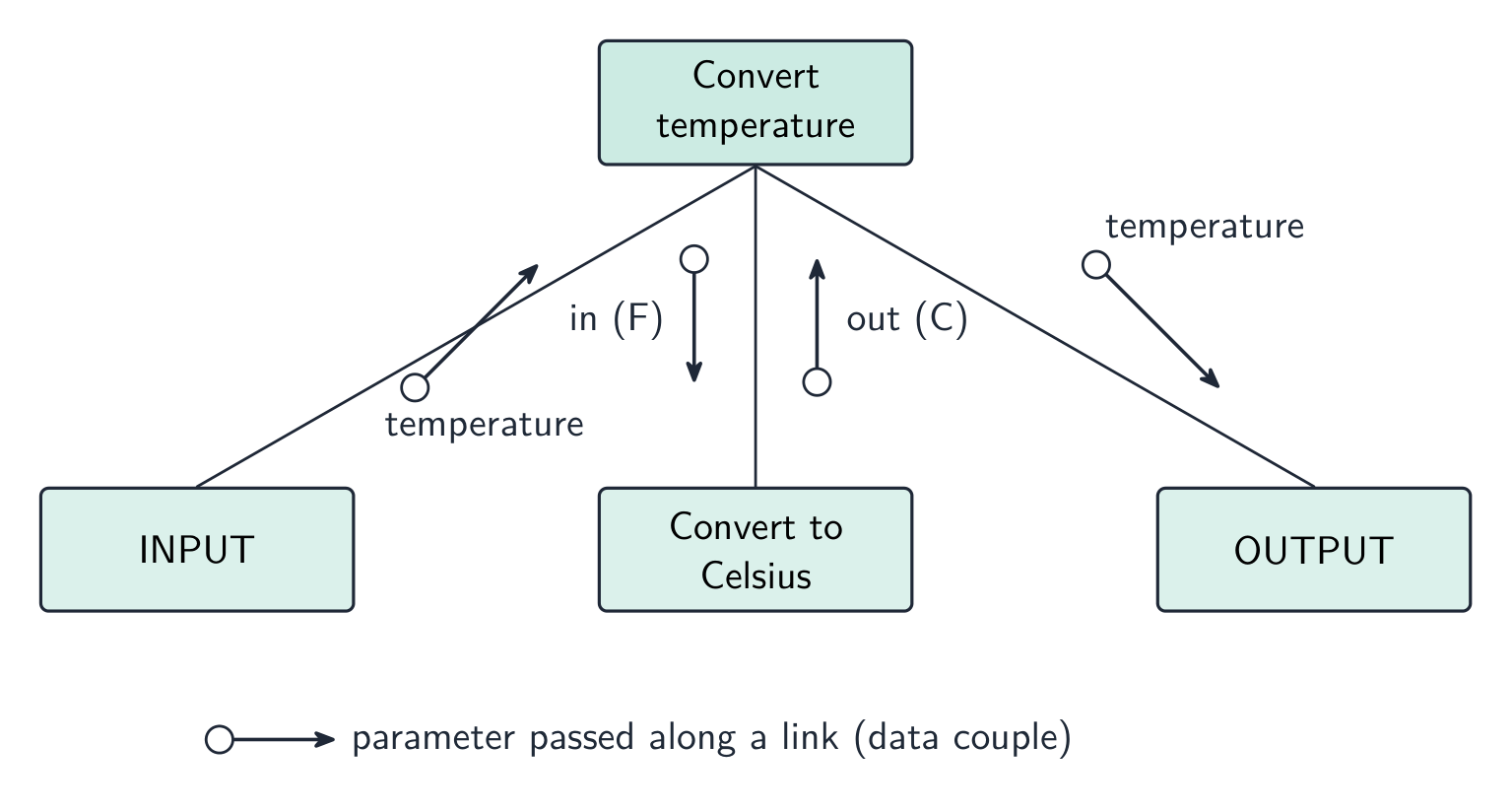
A structure chart 结构图 shows the hierarchical decomposition 分解 of a program into modules (subroutines 子程序) and the parameters 参数 passed between them. Each module is a rectangle; lines link caller (above) to callee (below); small arrows show data going down and results coming back up. The design can then be turned into equivalent pseudocode 伪代码.
It is a design-stage tool, and you can read the procedure signatures off it.
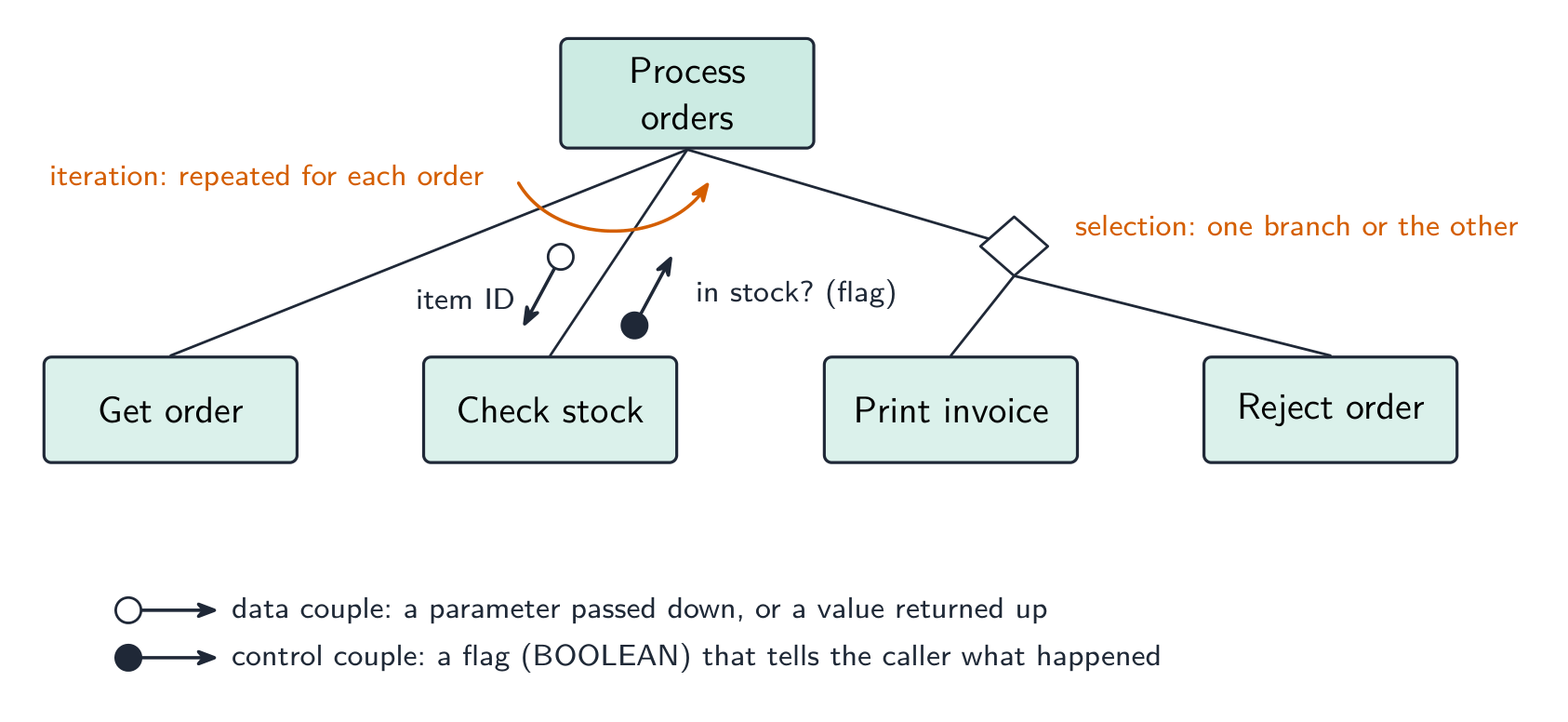
The symbols the examiner asks about. A box is a module; a line links a caller (above) to the modules it calls (below), read left to right in the order they are called. A small arrow with an open circle at its tail is a data couple — a parameter passed down into a module or a value returned up; an arrow with a filled circle is a control couple, a flag (usually BOOLEAN) that tells the caller what happened. A diamond at a branch means selection: only one of the modules below it is called, depending on a condition. A curved arrow sweeping across the links means iteration: the modules under it are called repeatedly in a loop.
Worked example. Four modules are defined as PROCEDURE Main(), PROCEDURE ReadData(BYREF Count : INTEGER), FUNCTION IsValid(Value : INTEGER) RETURNS BOOLEAN and PROCEDURE Report(Total : INTEGER, Count : INTEGER). Main calls ReadData, then calls IsValid once for each value read, then calls Report. Describe the structure chart.
Main at the top; ReadData, IsValid and Report in a row beneath it, left to right in calling order. On the ReadData link an upward data couple Count (a BYREF parameter comes back). On the IsValid link a downward data couple Value and an upward control couple (the BOOLEAN result), with a curved iteration arrow across that link because it is called for each value. On the Report link two downward data couples, Total and Count. Reading the other way, a function is any module that returns a value — its header needs RETURNS and the returned type.
State-transition diagram
A state-transition diagram 状态转换图 shows the states 状态 a system can be in and the events that move it between them — good for vending machines, traffic lights, user interfaces. State-transition diagrams are used to document the behaviour of an algorithm or system. Each state is a circle; each transition is an arrow labelled with the event.
It makes missing transitions easy to spot ("what if a second coin is inserted while awaiting selection?").
Reading and drawing one. Each transition is labelled input | output (or condition | action): what happened, then what the system does as it changes state. A question gives a table of current state, input, output, next state and asks for the diagram, or the reverse — every row of the table is exactly one arrow. Check that every state has an arrow leaving it for every input that can occur, including the ones that leave the state unchanged (an arrow that loops back to the same state).
Worked example. A pump controller has states pump off and pump on. In pump off, the input low level detected produces the output activate pump and moves to pump on; in pump on, normal level detected produces deactivate pump and moves to pump off. Any other input leaves the state unchanged. Draw the table.
Current state
Input
Output
Next state
pump off
low level detected
activate pump
pump on
pump off
normal level detected
—
pump off
pump on
normal level detected
deactivate pump
pump off
pump on
low level detected
—
pump on
The two "no change" rows become loop arrows on the diagram; leaving them out loses the mark for completeness.
العربية
المخطط الهيكلي
المخطط الهيكلي يُظهر التفكيك الهرمي للبرنامج إلى وحدات (وحدات فرعية) والمعلمات المارة بينها. كل وحدة عبارة عن مستطيل؛ تربط الخطوط بين المُدْعِي (أعلى) والمُدْعَى إليه (أسفل)؛ تظهر الأسهم الصغيرة البيانات المتجهة للأسفل والنتائج العائدة للأعلى. يمكن بعد ذلك تحويل التصميم إلى كود وهمي مكافئ.
إنه أداة في مرحلة التصميم، ويمكنك قراءة التوقيعات الإجرائية منه.
مخطط هيكلي: الوحدات والمعلمات المارة بينها
الرموز التي يسأل عنها الفاحص. الصندوق يمثل وحدة؛ يربط خط مُدّعياً (أعلى) بالوحدات التي يستدعيها (أسفل)، يُقرأ من اليسار إلى اليمين حسب ترتيب الاستدعاء. سهم صغير مع دائرة مفتوحة في ذيله هو زوج بيانات — معلمة تمرر لأسفل داخل وحدة أو قيمة تُرجع لأعلى؛ سهم مع دائرة مغلقة هو زوج تحكم، وهو علم (عادة BOOLEAN) يخبر المُدّعِ بما حدث. معين عند الفرع يعني الاختيار: يُستدعى أحد الوحدات أسفله فقط، اعتماداً على شرط. سهم منحني يمتد عبر الروابط يعني التكرار: تُستدعى الوحدات تحته مراراً في حلقة.
رموز المخطط الهيكلي: أزواج البيانات والتحكم، معين الاختيار وسهم التكرار
مثال محلل. تم تعريف أربع وحدات وهي PROCEDURE Main()، PROCEDURE ReadData(BYREF Count : INTEGER)، FUNCTION IsValid(Value : INTEGER) RETURNS BOOLEAN وPROCEDURE Report(Total : INTEGER, Count : INTEGER). تستدعي Main ReadData، ثم تستدعي IsValid مرة واحدة لكل قيمة مقروءة، ثم تستدعي Report. صف المخطط الهيكلي.
Main في الأعلى؛ ReadData, IsValid وReport في صف أسفله، من اليسار إلى اليمين حسب ترتيب الاستدعاء. على رابط ReadData زوج بيانات صاعد Count (معامل BYREF يعود). على رابط IsValid زوج بيانات نازل Value وزوج تحكم صاعد (النتيجة BOOLEAN)، مع سهم تكرار منحني عبر ذلك الرابط لأنه يُستدعى لكل قيمة. على رابط Report زوجان بيانات نازلان، Total وCount. قراءة الاتجاه الآخر، الدالة هي أي وحدة تُرجع قيمة — تحتاج ترويتها إلى RETURNS والنوع المُرجع.
مخطط انتقال الحالة
مخطط انتقال الحالة يُظهر الحالات التي يمكن أن يكون فيها النظام والأحداث التي تحركه بينها — مفيد للآلات vending، إشارات المرور، وواجهات المستخدم. تُستخدم مخططات انتقال الحالة لتوثيق سلوك الخوارزمية أو النظام. كل حالة دائرة؛ كل انتقال سهم مُسمى بالحدث.
إنه يجعل اكتشاف الانتقالات المفقودة سهلاً ("ماذا لو أُدخلت عملة ثانية أثناء انتظار الاختيار؟").
مخطط انتقال حالة لقفل باب بكود 259
قراءته ورسمه. كل انتقال مُسمى مدخل | مخرج (أو شرط | إجراء): ما حدث، ثم ما يفعله النظام أثناء تغيير حالته. قد تعطي سؤال جدولاً من الحالة الحالية، المدخل، المخرج، الحالة التالية ويطلب المخطط، أو العكس — كل صف في الجدول يمثل سهماً واحداً تماماً. تأكد من أن كل حالة له سهم مغادر لها لكل مدخل يمكن أن يحدث، بما في ذلك تلك التي تترك الحالة دون تغيير (سهم يدور عائداً لنفس الحالة).
مثال محلل. متحكم مضخة له حالتا pump off وpump on. في pump off، المدخل low level detected ينتج المخرج activate pump وينتقل إلى pump on؛ في pump on، normal level detected ينتج deactivate pump وينتقل إلى pump off. أي مدخل آخر يترك الحالة دون تغيير. ارسم الجدول.
الحالة الحالية
المدخل
المخرج
الحالة التالية
pump off
low level detected
activate pump
pump on
مضخة مطفأة
تم اكتشاف مستوى طبيعي
—
مضخة مطفأة
مضخة مفعّلة
تم اكتشاف مستوى طبيعي
إيقاف المضخة
مضخة مطفأة
مضخة مفعّلة
تم اكتشاف مستوى منخفض
—
مضخة مفعّلة
تتحول الصفان "بدون تغيير" إلى أسهم دائرية في المخطط؛ استبعادهما يؤدي إلى فقدان العلامة بسبب عدم الإكتمال.
Explore · استكشف
Software process lab · معمل عملية البرمجيات
Classify development examples by the stage or tool they belong to. · صنّف أمثلة التطوير حسب المرحلة أو الأداة التي تنتمي إليها.
Source: Cambridge International syllabus · المصدر: منهج كامبريدج الدولي
English
syntax error 语法错误 — breaks the language's grammar (missing bracket, misspelled keyword). Caught at translation time; the program won't run until fixed.
run-time error 运行时错误 — happens while running (divide by zero, file not found, array index out of range). The program crashes or raises an exception; fix by adding checks.
logic error 逻辑错误 — the program runs but gives wrong results (using + for -, an off-by-one loop, conditions in the wrong order). The hardest to find; the only sign is wrong output, so use careful testing and tracing.
Exposing and avoiding faults. Faults are exposed by testing against a test plan, by a dry run or trace table, by a walkthrough with colleagues, and by the IDE's debugger (breakpoints, single stepping, watching variables). They are avoided by designing before coding (structure chart, pseudocode), by modular code with meaningful identifiers and comments, by validation of every input, by handling exceptions rather than letting a run-time error crash the program, and by the IDE's dynamic syntax checks as you type.
Worked example. State the type of error in each case and how it shows itself. (a) Result <- STR_TO_NUM(x) / STR_TO_NUM(y) is run with y = "0". (b) The same line is run with x = "12a". (c) A loop written as FOR i <- 1 TO 9 processes a ten-element array. (d) OUTPUT "Total: " Total is missing a comma.
(a) Run-time error — division by zero; the program crashes when this line is executed with that data. (b) Run-time error — the string cannot be converted to a number. (c) Logic error — the program runs but the tenth element is never processed, so the output is wrong. (d) Syntax error — the statement breaks the language's rules and is reported by the translator before the program runs.
Worked example. Correct the errors in this pseudocode, which should output the average of ten marks.
The division should be by 10, not 9 (a logic error); the output line needs a comma or an & between the string and the value (a syntax error); and Average is never declared as REAL (a syntax or run-time error, depending on the language). Say which line and what the corrected line is: Average <- Total / 10.
العربية
خطأ في الصياغة — يكسر قواعد اللغة (قوس مفقود، كلمة مفتاحية مكتوبة بشكل خاطئ). يُكتشف وقت الترجمة؛ لن يعمل البرنامج حتى يتم إصلاحه.
خطأ أثناء التشغيل — يحدث أثناء التنفيذ (القسمة على صفر، ملف غير موجود، فهرس مصفوفة خارج النطاق). ينهار البرنامج أو يرفع استثناءً؛ يُصلح بإضافة فحوصات.
خطأ منطقي — يعمل البرنامج لكن يعطي نتائج خاطئة (استخدام + بدلاً من -، حلقة بمقدار واحد زائد أو ناقص، شروط بترتيب خاطئ). الأصعب في العثور عليه؛ الدليل الوحيد هو الخرج الخاطئ، لذا استخدم الاختبار المتأنّي وتتبع التنفيذ.
متى يظهر كل خطأ: أخطاء الصياغة عند الترجمة، وأخطاء التشغيل أثناء التنفيذ، والأخطاء المنطقية في الخرج
كشف الأخطاء وتجنبها. تُكشف الأخطاء عبر الاختبار ضد خطة اختبار، أو عبر تشغيل جاف أو جدول تتبع، أو عبر مراجعة جماعية مع الزملاء، ومبرمج IDE (نقاط توقف، تنفيذ خطوة بخطوة، مراقبة المتغيرات). وتُتجنب عن طريق التصميم قبل البرمجة (المخطط الهيكلي، الكود الوهمي)، والكود المعياري بمعرفات ذات معنى وتعليقات، والتحقق من كل مدخلات، والتعامل مع الاستثناءات بدلاً من السماح لخطأ تشغيل بهدم البرنامج، وفحوصات IDE للتركيب النحوي الديناميكية أثناء الكتابة.
مثال محلّل. حدد نوع الخطأ في كل حالة وكيف يظهر. (أ) يتم تشغيل Result <- STR_TO_NUM(x) / STR_TO_NUM(y) باستخدام y = "0". (ب) نفس السطر يتم تشغيله باستخدام x = "12a". (ج) حلقة كُتبت بصيغة FOR i <- 1 TO 9 تعالج مصفوفة مكونة من عشرة عناصر. (د) OUTPUT "Total: " Total يفتقر إلى فاصلة.
(أ) خطأ أثناء التشغيل — القسمة على صفر؛ ينهار البرنامج عند تنفيذ هذا السطر مع تلك البيانات. (ب) خطأ أثناء التشغيل — لا يمكن تحويل السلسلة النصية إلى رقم. (ج) خطأ منطقي — يعمل البرنامج لكن العنصر العاشر لم يُعالَج أبداً، لذا الخرج خاطئ. (د) خطأ في الصياغة — الجملة تخالف قواعد اللغة ويُبلغ عنها المترجم قبل تشغيل البرنامج.
مثال محلّل. صحح الأخطاء في هذا الكود الوهمي، الذي يجب أن يُخرج متوسط عشر علامات.
Total <- 0
FOR i <- 1 TO 10
    INPUT Mark
    Total <- Total + Mark
NEXT i
Average <- Total / 9
OUTPUT "Average" Average
يجب أن تكون القسمة على 10 وليس 9 (خطأ منطقي)؛ سطر الخرج يحتاج فاصلة أو & بين النص والقيمة (خطأ في الصياغة)؛ وAverage لم يُعلن أبداً كنوع REAL (خطأ في الصياغة أو أثناء التشغيل حسب اللغة). حدد أي سطر وما هو السطر المُصحَّح: Average <- Total / 10.
dry run 手工跟踪 — trace the code on paper, writing each variable's value in a table.
walkthrough 走查 — a team review of the code.
white-box testing 白盒测试 — designed from the code's internal structure, covering every statement, branch and loop.
black-box testing 黑盒测试 — designed from the specification only: feed inputs, check outputs.
integration testing 集成测试 — combine modules and test the interfaces between them.
alpha testing α测试 — by the developers/in-house before release; beta testing β测试 — by a limited group of real users in their own environment.
acceptance testing 验收测试 — by the customer, to decide if the product is fit for purpose.
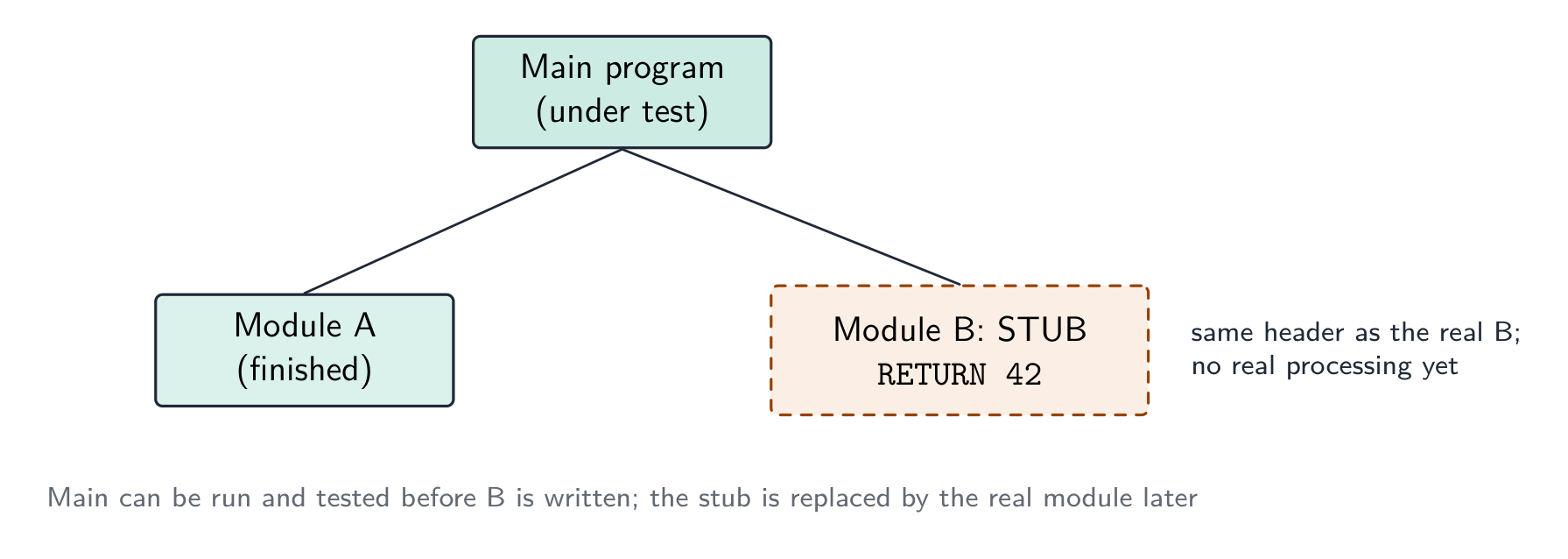
stub 桩 — a placeholder for a module that does not exist yet, so the structure can be tested top-down.
Which method, when. A dry run and a walkthrough need no computer — the dry run is you, tracing the algorithm with a trace table 跟踪表; the walkthrough is a meeting in which the author explains the code line by line and colleagues look for faults, so it also spreads knowledge of the code through the team and checks it against the design. White-box tests are written by someone who can see the code and aims to exercise every path; black-box tests are written from the specification and check only inputs against expected outputs, so a user or a separate tester can do them. Integration testing follows module testing: modules that pass alone can still fail when the data passed between them is the wrong type or in the wrong order. Alpha testing is in-house; beta testing gives a release candidate to a sample of real users, who report faults from real use; acceptance testing is the customer checking the finished product against the requirements before paying for it. A stub lets top-down testing start before every module exists.
Worked example. After the program passed its in-house tests it was given to a group of users to try before release. Name this type of testing, and state what happens next.
Beta testing — real users in their own environment, reporting faults the developers did not find. The faults are corrected, then the customer carries out acceptance testing against the requirements and the program is released; faults found in live use are then handled by corrective maintenance.
Worked example. Give three benefits of testing a program by walkthrough.
Errors are found by people who did not write the code and so read it without assumptions; the logic is checked against the design and specification, not only against test data; several people learn how the code works, which helps later maintenance; and no test data or working computer is needed, so it can be done early.
العربية
التشغيل الجاف — تتبع الكود على الورق، وتسجيل قيمة كل متغير في جدول.
المراجعة الجماعية — مراجعة جماعية للكود.
اختبار الصندوق الأبيض — مصمم بناءً على البنية الداخلية للكود، ويغطي كل جملة وفرع وحلقة.
اختبار الصندوق الأسود — مصمم بناءً على المواصفات فقط: إدخال مدخلات، والتحقق من المخرجات.
اختبار ألفا α — بواسطة المطورين/داخل المؤسسة قبل الإطلاق؛ اختبار بيتا β — بواسطة مجموعة محدودة من المستخدمين الحقيقيين في بيئتهم الخاصة.
اختبار القبول — بواسطة العميل، لتحديد ما إذا كان المنتج مناسباً للغرض.
وحدة وهمية (stub) — مكان محجوز لوحدة لم تُكتب بعد، بحيث يمكن اختبار الهيكلية من الأعلى للأسفل.
اختبار الصندوق الأسود يفحص المواصفات؛ اختبار الصندوق الأبيض يفحص مسارات الكود
أي طريقة ومتى.التشغيل الجاف والمراجعة الجماعية لا يتطلبان حاسوباً — التشغيل الجاف أنت تتبع فيه الخوارزمية بجدول تتبع؛ والمراجعة الجماعية اجتماع يشرح فيه المؤلف الكود سطراً بسطر وزملاؤه يبحثون عن الأخطاء، مما ينشر معرفة الكود داخل الفريق ويتحقق منه مقابل التصميم. اختبارات الصندوق الأبيض يكتبها شخص يرى الكود ويستهدف تفعيل كل مسار؛ اختبارات الصندوق الأسود تُكتب من المواصفات وتحقق المدخلات فقط مقابل المخرجات المتوقعة، لذا يمكن للمستخدم أو مختبر مستقل إجرائها. اختبار التكامل يلي اختبار الوحدات: الوحدات التي تجتاز اختبارات فردية قد تفشل عندما تكون البيانات الممررة بينها من نوع خاطئ أو بترتيب خاطئ. اختبار ألفا داخل المؤسسة؛ اختبار بيتا يمن مرشح إطلاق لعينة من المستخدمين الحقيقيين الذين يبلغون عن أخطاء من الاستخدام الفعلي؛ اختبار القبول هو تحقق العميل من المنتج النهائي مقابل المتطلبات قبل الدفع. الوحدة الوهمية تسمح باختبار من الأعلى للأسفل قبل وجود جميع الوحدات.
الوحدة الوهمية تحل محل وحدة لم تُكتب بعد، مما يسمح باختشاف الوحدات العلوية الآن
مثال محلّل. بعد اجتياز البرنامج لاختساته الداخلية، مُنحَ لمجموعة من المستخدمين لتجربته قبل الإطلاق. سمِّ هذا النوع من الاختبارات، وحدد ماذا يحدث بعد ذلك.
اختبار بيتا — مستخدمون حقيقيون في بيئتهم الخاصة، يبلغون عن أخطاء لم يكتشفها المطورون. تُصحَّح الأخطاء، ثم يقوم العميل بإجراء اختبار القبول ضد المتطلبات ويُطلق البرنامج؛ الأخطاء التي تُكتشف في الاستخدام المباشر تُعالَج لاحقاً عبر الصيانة التصحيحية.
مثال محلّل. اذكر ثلاث فوائد للاختبار عن طريق المراجعة الجماعية.
تُكتشف الأخطاء من قبل أشخاص لم يكتبوا الكود، وبالتالي يقرؤونهم دون افتراضات؛ يُتحقق المنطق من التصميم والمواصفات، وليس فقط من بيانات الاختبار؛ يتعلم عدة أشخاص كيفية عمل الكود، مما يساعد في الصيانة اللاحقة؛ ولا حاجة لبيانات اختبار أو جهاز كمبيوتر يعمل، لذا يمكن القيام بذلك مبكرًا.
Test strategy and test plan · استراتيجية الاختبار وخطة الاختبار
English
A test strategy 测试策略 is the high-level approach — which kinds of testing, who does them, when, and the criteria to move on. A test plan 测试计划 is the detailed list of tests — each with input data, expected output, and a column for the actual output.
What each contains. A test strategy states which testing methods will be used at which stage (module testing by the programmer, then integration, alpha, beta, acceptance), who is responsible for each, what test data is required, and the criteria for passing to the next stage. A test plan lists the individual tests: for each, the module or feature under test, the input data, the reason the data was chosen (normal, abnormal, extreme, boundary), the expected result, a space for the actual result, and what to do if they differ. The plan is written at the design stage, from the specification, so that it tests what the program should do rather than what it happens to do.
Choosing test data
For each field or condition, include three kinds:
normal data 正常数据 — typical values inside the valid range (for marks 0–100: 50, 75).
abnormal data 异常数据 — values that should be rejected (-10, 200, "abc").
extreme data 极端数据 — the largest and smallest values still accepted (0 and 100).
boundary data 边界数据 — values at the edges, where off-by-one errors hide (each accepted extreme and the rejected value just outside it: 0/-1, 100/101).
Worked example. A field accepts an exam mark from 0 to 100. Give test data of each kind with its expected result. Normal: 50 - accepted, a typical value inside the range. Abnormal: -10, 200, "abc" - all rejected, being out of range or the wrong data type. Extreme: 0 and 100 - the largest and smallest values that are still accepted. Boundary: the pairs straddling each edge - -1 rejected alongside 0 accepted, and 100 accepted alongside 101 rejected. Every value must carry its expected result, or the test plan proves nothing. Extreme and boundary are the pair most often confused: an extreme value sits inside and is accepted, while a boundary test is always a pair either side of the edge - which is exactly where off-by-one errors hide.
Worked example. A component passes if its weight, measured to the nearest gram, is within 3 g of the target of 50 g, i.e. from 47 g to 53 g inclusive. Draw up the test-plan rows for the check.
Test data
Type
Reason
Expected result
50
normal
a typical value well inside the range
accepted
47, 53
extreme (boundary)
the smallest and largest values that must still be accepted
accepted
46, 54
boundary
the values just outside the range, where an off-by-one error would accept them
rejected
20, 90
abnormal
values far outside the range
rejected
"abc", −5
abnormal
the wrong type, a negative weight
rejected
Each row must say why the value was chosen and what should happen; a bare list of numbers earns nothing.
العربية
استراتيجية الاختبار هي النهج عالي المستوى — أي أنواع الاختبارات، ومن يقوم بها، ومتى، وما هي معايير الانتقال. خطة الاختبار هي القائمة التفصيلية للاختبارات — كل منها يحتوي على بيانات الإدخال، والخرج المتوقع، وعمود للخرج الفعلي.
ما يحتويه كل منهما. تُحدد استراتيجية الاختبار أي طرق اختبار ستُستخدم في أي مرحلة (اختبار الوحدات بواسطة المبرمج، ثم التكامل، وألفا، وبيتا، والقبول)، ومن المسؤول عن كل منها، وما هي بيانات الاختبار المطلوبة، ومعايير الانتقال إلى المرحلة التالية. تُدرج خطة الاختبار الاختبارات الفردية: لكل اختبار، الوحدة أو الميزة قيد الاختبار، وبيانات الإدخال، والسبب الذي جعل اختيار هذه البيانات (طبيعي، غير طبيعي، متطرف، حدودي)، والنتيجة المتوقعة، ومساحة للنتيجة الفعلية، وما يجب فعله إذا اختلفتا. تُكتب الخطة في مرحلة التصميم، بناءً على المواصفات، بحيث تختبر ما يجب أن يفعله البرنامج بدلاً مما يفعل بالصدفة.
اختيار بيانات الاختبار
لكل حقل أو شرط، تتضمن ثلاثة أنواع:
بيانات طبيعية — قيم نموذجية داخل النطاق المقبول (للدرجات 0–100: 50، 75).
بيانات شاذة — قيم يجب رفضها (-10، 200، "abc").
بيانات متطرفة — أكبر وأصغر القيم التي لا تزال مقبولة (0 و100).
بيانات حدودية — قيم عند الحواف، حيث تختبئ أخطاء الانحراف بمقدار واحد (كل قيمة متطرفة مقبولة والقيمة المرفوضة مباشرة خارجها: 0/-1، 100/101).
بيانات اختبار لحقل 0–100: طبيعية داخل النطاق، متطرفة عند الحدود، غير طبيعية خارج النطاق
مثال محلول. يقبل الحقل درجة امتحان من 0 إلى 100. قدم بيانات اختبار من كل نوع مع نتيجتها المتوقعة. طبيعي: 50 - مقبول، وهي قيمة نموذجية داخل النطاق. غير طبيعي: -10، 200، "abc" - جميعها مرفوضة لأنها خارج النطاق أو من النوع الخطأ. متطرف: 0 و100 - أكبر وأصغر القيم التي لا تزال مقبولة. حدودي: الأزواج التي تمتد عبر كل حافة - -1 مرفوض جنبًا إلى 0 مقبول، و100 مقبول جنبًا إلى 101 مرفوض. يجب أن تحمل كل قيمة نتيجة متوقعة، وإلا فإن خطة الاختبار لا تثبت شيئًا. المتطرف والحدودي هما الأكثر تداخلًا: القيمة المتطرفة تقع داخل النطاق وتُقَبَل، بينما اختبار الحدود دائمًا هو زوج على جانبي الحافة - وهو بالضبط حيث تختبئ أخطاء الانحراف بمقدار واحد.
مثال محلول. تمرر المكون إذا كانت وزنه، مقاسًا لأقرب جرام، ضمن 3 g من الهدف البالغ 50 g، أي من 47 g إلى 53 g شاملاً. أعد صفاوف خطة الاختبار للتحقق.
بيانات الاختبار
النوع
السبب
النتيجة المتوقعة
50
طبيعي
قيمة نموذجية بعيدة داخل النطاق
مقبول
47، 53
متطرف (حدودي)
أصغر وأكبر القيم التي يجب قبولها
مقبول
46، 54
حدودي
القيم خارج النطاق مباشرة، حيث سيقبل خطأ الانحراف بمقدار واحد
مرفوض
20، 90
غير طبيعي
قيم بعيدة جدًا خارج النطاق
مرفوض
"abc"، −5
غير طبيعي
نوع خاطئ، وزن سلبي
مرفوض
يجب أن تقول كل صف لماذا تم اختيار القيمة وماذا يجب أن يحدث؛ قائمة عارية من الأرقام لا تحصل على شيء.
12.3
Maintenance · الصيانة
English
Most of a program's lifetime cost is in maintenance. Three kinds:
perfective maintenance 完善性维护 — improving performance or features even though it works (a faster query, a new option).
adaptive maintenance 适应性维护 — keeping it working in a changing environment (a new OS, a new API, a legal change).
corrective maintenance 纠正性维护 — fixing bugs found in use.
A program may need all three throughout its life.
Why each is needed — the reasons the mark scheme lists.Corrective: a fault is reported by a user after release, or an incorrect output is noticed in particular circumstances that testing did not cover. Adaptive: the operating system, hardware or browser is upgraded; a law or company rule changes (tax rates, data-protection requirements); the program must work with a new external system or file format. Perfective: users ask for extra features or a better interface; the program is made faster or made to use less memory; the code is tidied to make future changes easier.
Worked example. (a) A released program outputs a wrong value under certain circumstances. (b) The hardware that runs a program is replaced. (c) Customers ask for the coffee-shop loyalty program to send a message on a customer's birthday. Name the maintenance type in each case.
(a) Corrective — a fault in the delivered program is being fixed. (b) Adaptive — the program is changed to run in its new environment. (c) Perfective — a feature is added to a program that already works.
العربية
معظم تكلفة دورة حياة البرنامج تكون في الصيانة. ثلاثة أنواع:
ثلاثة أنواع من الصيانة: مثالية، تكييفية، وتصحيحية
الصيانة المثالية — تحسين الأداء أو الميزات حتى لو كان يعمل (استعلام أسرع، خيار جديد).
الصيانة التكييفية — إبقائه يعمل في بيئة متغيرة (نظام تشغيل جديد، واجهة برمجة تطبيقات جديدة، تغيير قانوني).
الصيانة التصحيحية — إصلاح الأخطاء التي اكتشفت أثناء الاستخدام.
قد يحتاج البرنامج إلى جميع الأنواع الثلاثة طوال حياته.
لماذا كل نوع مطلوب — الأسباب التي يذكرها مفتاح الدرجات.التصحيحية: يتم الإبلاغ عن عيب من قبل مستخدم بعد الإطلاق، أو لوحظ مخرجات خاطئة في ظروف معينة لم يغطِ الاختبار. التكييفية: يتم ترقية نظام التشغيل أو الأجهزة أو المتصفح؛ تتغير قوانين أو قواعد الشركة (معدلات الضرائب، متطلبات حماية البيانات)؛ يجب أن يعمل البرنامج مع نظام خارجي جديد أو تنسيق ملفات. المثالية: يطلب المستخدمون ميزات إضافية أو واجهة أفضل؛ يتم جعل البرنامج أسرع أو استخدام ذاكرة أقل؛ يتم ترتيب الكود لتسهيل التغييرات المستقبلية.
مثال محلول. (أ) يخرج برنامج مُطلق قيمة خاطئة تحت ظروف معينة. (ب) يتم استبدال الأجهزة التي تشغل برنامجًا. (ج) يطلب العملاء من برنامج وفاء مقهى القهوة إرسال رسالة في يوم ميلاد العميل. سمِّ نوع الصيانة في كل حالة.
(أ) تصحيحية — يتم إصلاح عيب في البرنامج المُسلم. (ب) تكيفية — يتم تغيير البرنامج ليعمل في بيئته الجديدة. (ج) مثالية — إضافة ميزة إلى برنامج يعمل بالفعل.
Amending an existing program · تعديل برنامج موجود
English
When asked to add a feature or fix a bug:
read the existing code until you understand the algorithm and data flow.
find where the change goes — which subroutine, which lines.
make the change as small as possible — don't rewrite working code.
update related parts — every caller of a changed parameter list, every routine using a changed data structure.
test the new behaviour and the old (regression testing 回归测试 — check you broke nothing).
document the change.
Clear comments, meaningful names, decomposed subroutines and a structure chart make a program much easier to amend — which is why the design tools matter even after the first release.
Analysing a program you did not write. Start from the identifier table and the module headers: they tell you what each module receives and returns before you read a line of its body. Then trace the algorithm with a trace table for one small input, noting where each output value comes from. Only then decide where the enhancement goes — usually a new module called from the existing one, so the working code is disturbed as little as possible — and write the pseudocode for the change and the test data that proves it.
العربية
عند طلب إضافة ميزة أو إصلاح خطأ:
اقرأ الكود الحالي حتى تفهم الخوارزمية وتدفق البيانات.
أين تذهب التغييرات — أي دالة فرعية، أي أسطر.
اجعل التغيير صغيرًا قدر الإمكان — لا تقم بإعادة كتابة كود يعمل بشكل صحيح.
حدّث الأجزاء ذات الصلة — كل مستدعٍ لقائمة معاملات متغيرة، وكل إجراء يستخدم بنية بيانات متغيرة.
اختبر السلوك الجديد و السلوك القديم (اختبار الانحدار — تأكد من عدم إحداث أي خلل).
وثّق التغيير.
التعليقات الواضحة، والأسماء ذات المعنى، والإجراءات الفرعية المجزأة ومخطط البنية يجعلان تعديل البرنامج أسهل بكثير — ولهذا السبب تُعد أدوات التصميم مهمة حتى بعد الإصدار الأول.
تحليل برنامج لم تكتبه أنت. ابدأ من جدول المعرّفات وعناوين الوحدات: فهي تخبرك بما تستقبله وتُرجعه كل وحدة قبل أن تقرأ سطرًا واحدًا من جسمها. ثم تتبع الخوارزمية باستخدام جدول التتبع لمدخل صغير واحد، مسجلًا来源 كل قيمة مخرجة. فقط بعد ذلك حدد مكان إضافة التحسين — عادةً في وحدة جديدة يتم استدعاؤها من الوحدة الحالية، بحيث يُضطرب الكود العامل بأقل قدر ممكن — واكتب الكود الوهمي للتغيير وبيانات الاختبار التي تثبته.
12.3
Definitions the examiner accepts · التعريفات التي يقبلها المصحح
English
A definition question is marked against fixed wording. Learn these exactly, and give one answer only.
Term
Definition
development life cycle
the sequence of stages, from analysis to maintenance, followed to produce and support a program
waterfall model
a life cycle in which the stages are carried out in a fixed order, each completed before the next begins
iterative model
a life cycle in which a working version is produced and then repeatedly refined until it is complete
rapid application development
a life cycle that builds prototypes quickly, refining them with user feedback until they are accepted
structure chart
a diagram that shows how a program is decomposed into modules, the order in which they are called and the parameters passed between them
state-transition diagram
a diagram that shows the states a system can be in and the inputs that cause it to move between them
syntax error
an error in the way a statement is written, so it breaks the rules of the language and cannot be translated
logic error
an error in the algorithm, so the program runs but produces the wrong result
run-time error
an error that occurs while the program is running, such as division by zero, and stops it
dry run
working through the algorithm by hand, recording the values of the variables in a trace table
walkthrough
a review in which the author steps through the code with colleagues who look for errors
stub
a placeholder module with the correct header that returns a fixed value, used so the modules that call it can be tested
test plan
a list of the tests to be carried out, each with its test data, the reason for the data and the expected result
boundary data
values at each edge of the valid range, both the last value accepted and the first value rejected
corrective / adaptive / perfective maintenance
fixing faults found in use / changing the program to suit a changed environment / improving a program that already works
العربية
تُصنّف أسئلة التعريف بناءً على صياغة ثابتة. احفظ هذه التعريفات بدقة، وقدم إجابة واحدة فقط.
مصطلح
تعريف
دورة حياة التطوير
تسلسل المراحل، من التحليل إلى الصيانة، المتبعة لإنتاج برنامج ودعمه
نموذج الشلال
دورة حياة تُنفذ فيها المراحل بترتيب ثابت، مع إكمال كل مرحلة قبل بدء التالية
النموذج التكراري
دورة حياة يتم فيها إنتاج نسخة تعمل ثم تحسينها مرارًا وتكرارًا حتى تكتمل
تطوير التطبيقات السريعة
دورة حياة تبني نماذج أولية بسرعة، ويتم تحسينها بتغذية راجعة من المستخدمين حتى يتم قبولها
مخطط البنية
رسم بياني يوضح كيف يتم تجزئة البرنامج إلى وحدات، وترتيب استدعاءاتها، والمعاملات المنقولة بينها
مخطط انتقال الحالة
رسم بياني يوضح الحالات التي يمكن أن يكون عليها النظام والمدخلات التي تسبب انتقاله بينها
خطأ في القواعد النحوية
خطأ في طريقة كتابة جملة، مما يخالف قواعد اللغة ويمنع ترجمتها
خطأ منطقي
خطأ في الخوارزمية، بحيث يعمل البرنامج لكنه ينتج نتيجة خاطئة
خطأ أثناء التشغيل
خطأ يحدث أثناء تشغيل البرنامج، مثل القسمة على صفر، ويتسبب في توقفه
المحاكاة اليدوية
تنفيذ الخوارزمية يدويًا، وتسجيل قيم المتغيرات في جدول التتبع
الجولة الاستعراضية
مراجعة يقوم فيها المؤلف بتتبع الكود مع زملائه الذين يبحثون عن الأخطاء
الوصلة (Stubs)
وحدة مؤقتة بعنوان صحيح تُرجع قيمة ثابتة، تُستخدم لتتمكن الوحدات التي تستدعيها من الاختبار
خطة الاختبار
قائمة بالاختبارات التي سيتم إجراؤها، لكل منها بيانات الاختبار وسبب اختيارها والنتيجة المتوقعة
بيانات الحدود
القيم عند حواف النطاق المقبول، سواء آخر قيمة مقبولة وأول قيمة مرفوضة
الصيانة التصحيحية / التكيفية / المثابرة
إصلاح الأخطاء المكتشفة أثناء الاستخدام / تغيير البرنامج ليتناسب مع بيئة متغيرة / تحسين برنامج يعمل بالفعل
12.3
Exam tips · نصائح للامتحان
English
Compare development models (waterfall, iterative, RAD) by principle, benefit, drawback, and know the five stages of the program development life cycle and what each produces.
Distinguish syntax, logic and run-time errors by when each shows itself: at translation, in the output, during the run.
Choose test data of every kind — normal, abnormal, extreme and boundary — and give each value with its reason and expected result.
Distinguish the types of maintenance (corrective, adaptive, perfective) by why the change is being made.
On a structure chart, name every symbol: box, calling line, data couple, control couple, selection diamond, iteration arrow. Reading module headers off a chart, remember a function has RETURNS.
Common mistakes
Describing a life cycle stage by its name only ("in the design stage the program is designed"). Say what is produced: structure chart, pseudocode, test plan.
Calling a wrong output a "run-time error". If the program runs to the end, it is a logic error.
Giving boundary data as just the extremes. The mark needs the values on both sides of the edge.
Treating alpha and beta testing as the same. Alpha is in-house by the developers; beta is by real users outside.
Confusing adaptive and perfective maintenance. Adaptive responds to a change outside the program; perfective improves a program nobody had to change.
Drawing a structure chart with the modules in any order. They read left to right in the order they are called, and each parameter needs its arrow.
العربية
قارن بين نماذج التطوير (الشلال، التكرارية، RAD) من حيث المبدأ، الفائدة، العيب، واعرف مراحل دورة حياة تطوير البرنامج الخمس وما تنتجه كل منها.
اميز بين أخطاء القواعد النحوية والمنطقية وأثناء التشغيل حسب متى تظهر: أثناء الترجمة، في المخرجات، أو أثناء التشغيل.
اختر بيانات الاختبار من كل نوع — طبيعية، غير طبيعية، متطرفة وحدودية — واذكر لكل قيمة سبب اختيارها والنتيجة المتوقعة.
اميز بين أنواع الصيانة (التصحيحية، التكيفية، المثابرة) حسب لماذا يتم التغيير.
على مخطط البنية، سمِّ كل رمز: صندوق، خط استدعاء، زوج بيانات، زوج تحكم، معين للاختيار، سهم للتكرار. عند قراءة عناوين الوحدات من المخطط، تذكر أن الدالة لها RETURNS.
أخطاء شائعة
وصف مرحلة من مراحل دورة الحياة باسمها فقط (مثل "في مرحلة التصميم يتم تصميم البرنامج"). ما هو المنتَج: مخطط البنية، الكود الوهمي، خطة الاختبار.
تسمية مخرج خاطئ بأنه "خطأ أثناء التشغيل". إذا انتهى البرنامج بالعمل دون توقف، فهو خطأ منطقي.
تقديم بيانات حدودية كالأطراف القصوى فقط. الدرجة تتطلب القيم على كلا جانبي الحافة.
اعتبار اختبارات ألفا وبيتا متشابهتين. اختبار ألفا داخلي يقوم به المطورون؛ اختبار بيتا بواسطة مستخدمين حقيقيين خارجيين.
الخلط بين الصيانة التكيفية والمثابرة. التكيفية تستجيب لتغير خارج البرنامج؛ المثابرة تحسن برنامجًا لم يكن هناك داعٍ لتغييره.
رسم مخطط بنية بالوحدات بأي ترتيب. تُقرأ من اليسار إلى اليمين حسب ترتيب الاستدعاء، وكل معامل يحتاج سهمًا خاصًا به.
Interactive lessons on this topic · دروس تفاعلية حول هذا الموضوع
Work through it step by step, with instant-check exercises. · ا-working عليه خطوة بخطوة، مع تمارين تحقق فوري.
Pick one and the site follows you — notes, papers, videos and practice all open on it. · اختر واحدًا وسيتبعك الموقع — الملاحظات، الأوراق، الفيديوهات والتدريب جميعها تفتح عليه.
Type to search notes, lessons, code, vocabulary and past-paper questions across every subject. · اكتب للبحث عن ملاحظات، دروس، أكواد، مفردات وأسئلة امتحانات سابقة عبر جميع المواد.




 *تطوير التطبيقات السريعة: تعمل الفرق على الأجزاء بالتوازي