| Candidates should be able to: | Notes and guidance |
|---|---|
| Implement and write pseudocode from a given design presented as either a program flowchart or structured English | |
| Write pseudocode statements for: • the declaration and initialisation of constants • the declaration of variables • the assignment of values to variables • expressions involving any of the arithmetic or logical operators input from the keyboard and output to the console | |
| Use built-in functions and library routines | Any functions not given in the pseudocode guide will be provided String manipulation functions will always be given |
Programming
A-Level Computer Science · Topic 11
 23:32
23:32
Programming Basics
A program must ask for a password, and keep asking until it is right. Simple — but which loop do you use? Programs make decisions and repeat work, and choosing…
English narration · English + 中文 subtitles burned in
11.1
Programming basics
Syllabus
Source: Cambridge International syllabus

From design to code
You should be able to turn a design — a flowchart 流程图 (program flowchart) or structured English 结构化英语 — into pseudocode 伪代码, and then into a real language:
- find the variables 变量 and their data types 数据类型.
- turn input/output boxes into
INPUT/OUTPUT. - turn decision diamonds into
IF...ELSE...ENDIF(orCASE). - turn loop arrows into
WHILE,REPEAT...UNTIL, orFOR. - turn process boxes into assignments or calculations.
- check by tracing a small input.

Constants and variables
A constant 常量 holds a value that never changes; a variable holds one that may change. Declare them with a type:

CONSTANT Pi = 3.14159
DECLARE Radius : REAL
DECLARE Area : REAL

Radius ← 5
Area ← Pi * Radius * Radius
Use constants for fixed values that recur (Pi, MaxScore); they make code clearer and easy to change in one place.
In the exam, a constant is the answer to "identify a more appropriate way of representing" a fixed value, such as a tax rate or a maximum score, that appears at several places in the pseudocode. The benefits the scheme lists: the value is set once and cannot be changed accidentally by the program; a change is made in one place and reaches every statement that uses it; the identifier gives the value a meaning (MaxScore rather than 100), so the code is easier to read and to check; and there is less risk of a typing error in a long value such as 3.14159. A "state a value that could be replaced by a constant" question wants the literal from the pseudocode (0.2, 40), not a new name.
Every variable is declared once, with an identifier 标识符 (its name) and a data type, before it is used. The six types in the 9618 pseudocode guide:
| Type | Holds | Written in the code as | Typical use |
|---|---|---|---|
INTEGER |
whole numbers | 42, -3 |
a count, an array index, a loop counter |
REAL |
numbers with a fractional part | 3.75 |
a price, an average |
CHAR |
one character | 'A' (single quotes) |
a grade letter, a menu key |
STRING |
a sequence of characters | "Hello" (double quotes) |
a name, a postcode |
BOOLEAN |
TRUE or FALSE |
TRUE |
a flag such as Found |
DATE |
a calendar date | 12/05/2026 |
a date of birth |
A "give the appropriate data type" question is answered from how the variable is used in the pseudocode: a value with a decimal point is REAL; something set to TRUE or FALSE is BOOLEAN; a value in single quotes is CHAR; a value used as an array index, or with DIV and MOD, is INTEGER. Write the type in capitals, spelled as the guide spells it.
Worked example. State the appropriate data type for each variable.
Found ← FALSE
Initial ← 'K'
Price ← 12.99
Count ← Count + 1
Name ← "Li Wei"
Found is BOOLEAN (it holds FALSE); Initial is CHAR (one character in single quotes); Price is REAL (a decimal value); Count is INTEGER (a counter that goes up by one); Name is STRING (text in double quotes).
Assignment and expressions
Use ← for assignment 赋值:
Total ← Total + 1
Average ← Sum / Count
Expressions use operators 运算符:
- arithmetic
+ - * /, plusDIV(integer division) andMOD(remainder):7 DIV 2 = 3;7 MOD 2 = 1. - comparisons
=,<>,<,>,<=,>=. - logic
AND,OR,NOT.
Precedence 优先级 (highest to lowest): NOT → * / DIV MOD → + - → comparisons → AND → OR. Use brackets when unsure.
Input and output
OUTPUT "Enter your name:"
INPUT Name
OUTPUT "Hello, ", Name
Built-in functions and library routines
Many tasks have ready-made library routines 库例程, so you need not write them. The Paper 2 insert 附页 lists the ones you may use, with their exact names, parameters and return types; any other function a question needs is given in the question. The names below are the insert's names. VAL and STR are IGCSE names and appear in neither 9618 document, so they earn nothing. UCASE and LCASE are a different case: they are 9618, defined in the Pseudocode Guide, but they take a single CHAR, and the insert does not list them at all — for a whole string on Paper 2 the routine is TO_UPPER.
A program library 程序库 holds routines that have already been written, compiled and tested; a program calls them instead of writing its own. The benefits the scheme accepts, for a "state three benefits" question: the routines are already tested, so they are less likely to contain errors; they save development time; they may do things the programmer could not write (complex statistics, graphics); they are written by experts and reused across many programs; and a routine with a fixed interface can be called from anywhere in the program.
| Routine | Returns | Example |
|---|---|---|
LENGTH(s) |
the number of characters in s |
LENGTH("Hello") = 5 |
LEFT(s, n) / RIGHT(s, n) |
the first / last n characters |
RIGHT("Hello", 2) = "lo" |
MID(s, start, n) |
n characters from position start (positions count from 1) |
MID("Hello", 2, 3) = "ell" |
TO_UPPER(s) / TO_LOWER(s) |
s in capitals / in small letters |
TO_UPPER("ab1") = "AB1" |
NUM_TO_STR(x) / STR_TO_NUM(s) |
a number as a string / a string as a number | STR_TO_NUM("3.5") = 3.5 |
IS_NUM(s) |
TRUE if s is a valid number |
IS_NUM("12a") = FALSE |
ASC(c) / CHR(n) |
the character code of c / the character with code n |
ASC('A') = 65, CHR(66) = 'B' |
INT(x) |
the whole-number part of x |
INT(7.9) = 7 |
RAND(n) |
a random real number from 0 up to, but not including, n |
INT(RAND(6)) + 1 is a dice roll |
DAY(d), MONTH(d), YEAR(d) |
the parts of a DATE |
YEAR(TODAY()) |
DAYINDEX(d), SETDATE(d, m, y), TODAY() |
the day of the week (1 = Sunday); a date built from three integers; today's date | |
EOF(f) |
TRUE when the file f has no more lines to read |
WHILE NOT EOF("data.txt") |
Strings are joined with & (concatenation 连接): "A" & "BC" is "ABC". Use the exact names from the insert, with the parameters in its order.
Dates and random numbers come up as one-line statements. SETDATE(17, 11, 2007) builds 17 November 2007; 12 - MONTH(MyDOB) is the number of months from the month of birth to the end of the year; IF DAYINDEX(MyDOB) = 5 THEN tests for a Thursday, because Sunday is day 1. RAND(n) returns a real number from 0 up to, but not including, n, so a random integer from Low to High inclusive is INT(RAND(High - Low + 1)) + Low: INT(RAND(21)) - 10 gives a value from -10 to 10.

s = "COMPUTER" (positions 1–8)Worked example. Evaluate each expression, given Word ← "Program", Code ← 'Q' and N ← 7.
| Expression | Value | Why |
|---|---|---|
LENGTH(Word) |
7 |
seven characters |
MID(Word, 4, 2) |
"gr" |
two characters, starting at position 4 |
LEFT(Word, 3) & "!" |
"Pro!" |
joined with & |
TO_UPPER(RIGHT(Word, 2)) |
"AM" |
the inner function runs first |
ASC(Code) - ASC('A') |
16 |
'Q' is 81 and 'A' is 65 |
N DIV 2 + N MOD 2 |
4 |
3 + 1 |
NUM_TO_STR(N) & "th" |
"7th" |
the number becomes a string first |
INT(N / 2) |
3 |
3.5 cut to its whole part |
Work from the inside out, and keep the quotes: "7" is a string and 7 is a number.
Worked example. Each statement may contain an error in its use of a function or operator. Describe the error, or write NO ERROR. (Assume every variable has the correct type.)
| Statement | Error |
|---|---|
Result ← 2 & 4 |
& joins strings; 2 and 4 are integers, so + is needed |
SubString ← MID("pseudocode", 4, 1) |
NO ERROR: one character from position 4, "u" |
IF x = 3 OR 4 THEN |
OR needs a Boolean on each side: IF x = 3 OR x = 4 THEN |
Result ← Status AND INT(x / 2) |
AND needs two Booleans; INT(x / 2) is an integer |
Message ← "Done" + LENGTH(MyString) |
+ cannot add a string to an integer: "Done" & NUM_TO_STR(LENGTH(MyString)) |
Every operator works on particular types: & on strings, + - * / DIV MOD on numbers, AND OR NOT on Booleans, and = <> on two values of the same type. An "evaluate each expression, or write ERROR" table is marked the same way: LENGTH(42) and "A" + 1 are ERROR, because the type does not match the function or the operator.
Worked example. With Points ← 100, Active ← TRUE and Exempt ← FALSE, evaluate each expression.
| Expression | Value | Why |
|---|---|---|
(Points > 99) OR Active |
TRUE |
both sides are true; one would do |
(Points MOD 2 = 0) OR Exempt |
TRUE |
100 MOD 2 is 0 |
(Points <= 75) AND (Active OR Exempt) |
FALSE |
the first side is false, and AND needs both |
(Active OR NOT Active) AND NOT Exempt |
TRUE |
Active OR NOT Active is always true |
The last expression simplifies: X OR NOT X is TRUE whatever X is, so the whole expression is just NOT Exempt. Evaluate the brackets first, then NOT, then AND, then OR.
Explore
A variable is a labelled box
Each assignment stores one value in a named box; reassigning the same name overwrites it. Step through the program and watch each box take its current value.
Vocabulary
Train
| English |
|---|
| flowchart/ˈfləʊtʃɑːt/ |
| structured English/ˈstrʌktʃəd ˈɪŋɡlɪʃ/ |
| pseudocode/ˈsuːdəʊkəʊd/ |
| variables/ˈveərɪəblz/ |
| data types/ˈdeɪtə taɪps/ |
| assignment/əˈsaɪnmənt/ |
| constant/ˈkɒnstənt/ |
| identifier/aɪˈdentɪfaɪə/ |
| operators/ˈɒpəreɪtəz/ |
| precedence/ˈpresɪdəns/ |
| library routines/ˈlaɪbrəri ruːˈtiːnz/ |
| insert/ˈɪnsɜːt/ |
| program library/ˈprəʊɡræm ˈlaɪbrəri/ |
| concatenation/kənˌkætəˈneɪʃn/ |
11.2
Selection

Syllabus
| Candidates should be able to: | Notes and guidance |
|---|---|
| Use pseudocode to write: • an ‘IF’ statement including the ‘ELSE’ clause and nested IF statements • a ‘CASE’ structure • a ‘count-controlled’ loop: • a ‘post-condition’ loop • a ‘pre-condition’ loop | |
| Justify why one loop structure may be better suited to solve a problem than the others |
Source: Cambridge International syllabus
Selection 选择 chooses which steps run.
IF age >= 18 THEN
    OUTPUT "Adult"
ELSE
    OUTPUT "Minor"
ENDIF
For more than two cases you can use a nested 嵌套 IF, but deep nesting is hard to read — a CASE is cleaner when testing one value against several options:
CASE OF Grade
    "A": OUTPUT "Excellent"
    "B": OUTPUT "Good"
    OTHERWISE: OUTPUT "Try again"
ENDCASE
Cambridge CASE allows single values, value lists (1, 2, 3:), and ranges (1 TO 5:).
A nested IF is an IF inside a branch of another IF. Each IF needs its own ENDIF, and the examiner checks that every construct is closed:
IF Mark >= 50 THEN
    IF Mark >= 80 THEN
        OUTPUT "Distinction"
    ELSE
        OUTPUT "Pass"
    ENDIF
ELSE
    OUTPUT "Fail"
ENDIF
Boundaries are where marks are lost. "A mark of 50 or more passes" is Mark >= 50, not Mark > 50; the last CASE branch, for "anything else", is written OTHERWISE, not a condition such as > 200. A wrong comparison here is a logic error 逻辑错误: the program runs, but gives the wrong output for some inputs — and a trace table with a boundary value such as 50 is how you find it.

Worked example. Rewrite this with the same functionality, without using a CASE structure.
CASE OF MySwitch
    1: ThisChar ← 'a'
    2: ThisChar ← 'y'
    3: ThisChar ← '7'
    OTHERWISE: ThisChar ← '*'
ENDCASE
Each value becomes a branch of a chain of IFs, and OTHERWISE becomes the last ELSE:
IF MySwitch = 1 THEN
    ThisChar ← 'a'
ELSE
    IF MySwitch = 2 THEN
        ThisChar ← 'y'
    ELSE
        IF MySwitch = 3 THEN
            ThisChar ← '7'
        ELSE
            ThisChar ← '*'
        ENDIF
    ENDIF
ENDIF
Two clauses that assign the same value are merged into one clause with a value list: 1, 2: ThisChar ← 'a'. The guards are tested in order: with ranges such as 1 TO 50: followed by 40 TO 60:, a value of 45 takes the first branch that matches, so an assignment in a later branch may never be performed — and when the earlier branches already cover every possible value, the OTHERWISE branch is never reached either.
Going the other way, nested IFs that test several Booleans are clearer as one condition per outcome: IF A AND B AND C THEN CALL Sub1(), then IF A AND B AND NOT C THEN CALL Sub2(), and so on. Joining tests with AND and OR removes the nesting, and IF A THEN is accepted in place of IF A = TRUE THEN.
Explore
Selection (IF / ELSE)
Change the input and see which branch runs — the essence of selection.
Vocabulary
Train
| English |
|---|
| selection/sɪˈlekʃn/ |
| nested/ˈnestɪd/ |
| logic error/ˈlɒdʒɪk ˈerə/ |
11.2
Iteration

Iteration 迭代 repeats a block. Three loops differ in how many times the body runs.
Count-controlled (FOR) loop
A count-controlled loop 计数循环 — use it when you know how many times to repeat:
FOR i ← 1 TO 10
    OUTPUT i
NEXT i
A STEP can change the count (e.g. FOR i ← 10 TO 1 STEP -1). Best for a fixed number of repeats or processing each element of an array 数组.
Pre-condition (WHILE) loop
A pre-condition loop 前测循环 tests the condition before each pass, so it may run zero times:
WHILE total < 100 DO
    INPUT n
    total ← total + n
ENDWHILE
Post-condition (REPEAT...UNTIL) loop
A post-condition loop 后测循环 tests the condition after each pass, so it always runs at least once:
REPEAT
    INPUT password
UNTIL password = correctPassword
Choosing the right loop
- count known up front → FOR.
- may need zero passes → WHILE.
- always at least one pass → REPEAT...UNTIL.
Justify your choice by whether the count is known and whether the body must run at least once. A typical question gives a scenario ("ask for a password until correct, but always ask at least once") and asks which loop fits.
The two marks are for the name of the loop and the reason, in the scheme's words: count-controlled, because the number of iterations is known before the loop starts; post-condition, because the loop body must be executed at least once; pre-condition, because the loop may not need to execute at all. A loop over the four elements of an array that has been written as a WHILE with a counter is "not the most appropriate": the count, four, is known, so a FOR loop fits.
Worked example. Which loop suits each task? (a) print the 12 times table; (b) keep reading numbers until the user enters 0; (c) ask for a password until it is correct. Choose by asking how many times the body runs and when the test happens. (a) The count is known in advance (12), so use a FOR loop. (b) The count is unknown, and the very first input might already be 0 - so the test must come before the body: a WHILE loop, which runs zero or more times. (c) The count is unknown, but you must always ask at least once before there is anything to test - so the test comes after the body: a REPEAT...UNTIL, which runs one or more times. The deciding question is whether the body must run at least once: WHILE may run zero times, REPEAT always runs once.
Dry running with a trace table
A trace table 跟踪表 records the value of each variable as you dry run 手工跟踪 (work through by hand) an algorithm. It is how you test a loop on paper, and a six-mark question on most Paper 2s.
DECLARE Count, Total : INTEGER
Count ← 1
Total ← 0
WHILE Total < 10
    Total ← Total + Count * 2
    Count ← Count + 1
ENDWHILE
OUTPUT Count, Total
| Count | Total | Total < 10 | OUTPUT |
|---|---|---|---|
| 1 | 0 | TRUE | |
| 2 | 2 | TRUE | |
| 3 | 6 | TRUE | |
| 4 | 12 | FALSE | 4, 12 |
Rules that earn the marks: one column per variable, in the order the question gives; write a value only when it changes; start a new row each time the loop repeats; evaluate the condition with the current values, and stop the moment it is FALSE; put the output in its own column, exactly as it would appear. Trace the algorithm as written, not the one you think was intended — if it never stops, say so.
Worked example. Which constructs does each line use — selection, iteration or a subroutine call?
| Pseudocode | Selection | Iteration | Subroutine |
|---|---|---|---|
| IF Ready = TRUE THEN |
CALL Start()
ENDIF
| FOR I ← 1 TO 20 ... NEXT I | | yes | |
| WHILE NOT IsFull() ... ENDWHILE | | yes | yes |
| CASE OF Key ... OTHERWISE ... ENDCASE | yes | | |
IF and CASE are selection; FOR, WHILE and REPEAT are iteration; a name followed by brackets — Start(), IsFull() — is a call to a procedure or a function, wherever it appears, including inside a condition.
Explore
Trace a loop, pass by pass
A trace table records each variable after every pass of the loop. Watch the counter i climb while the running total builds up — exactly what an exam trace question asks you to fill in.
Explore
Tracing a loop
Step through the loop and watch the variables change each pass — exactly what a trace table records.
Vocabulary
Train
| English |
|---|
| array/əˈreɪ/ |
| trace table/treɪs ˈteɪbl/ |
| iteration/ˌɪtəˈreɪʃn/ |
| count-controlled loop/kaʊnt kənˈtrəʊld luːp/ |
| pre-condition loop/priː kənˈdɪʃn luːp/ |
| post-condition loop/pəʊst kənˈdɪʃn luːp/ |
| dry run/draɪ rʌn/ |
11.3
Procedures and functions

Syllabus
| Candidates should be able to: | Notes and guidance |
|---|---|
| Define and use a procedure | |
| Explain where in the construction of an algorithm it would be appropriate to use a procedure | |
| Use parameters | A procedure may have none, one or more parameters A parameter can be passed by reference or by value |
| Define and use a function | |
| Explain where in the construction of an algorithm it is appropriate to use a function | A function is used in an expression, e.g. the return value replaces the call |
| Use the terminology associated with procedures and functions | including procedure/function header, procedure/function interface, parameter, argument, return value |
| Write efficient pseudocode |
Source: Cambridge International syllabus
Structured programming 结构化编程 builds a program from small named subroutines 子程序, each with one job.
Procedure
A procedure 过程 is a named block that does an action; it may take parameters 参数 but does not return a value.
PROCEDURE Greet(name : STRING)
    OUTPUT "Hello, ", name
ENDPROCEDURE

CALL Greet("Ada")
Function
A function 函数 is like a procedure but it returns a value that becomes part of an expression.
FUNCTION Square(x : INTEGER) RETURNS INTEGER
    RETURN x * x
ENDFUNCTION

result ← Square(5) + 1     // result = 26
Use a procedure when the subroutine performs an action; use a function when it computes a value for the caller.
The syllabus asks where in the construction of an algorithm each is appropriate. A procedure is appropriate where the same group of steps is needed at several points (validate an input, print a menu, swap two values): the steps are written once and CALLed by name. A function is appropriate where a single value must be calculated and then used in an expression — a total, a TRUE/FALSE result, the larger of two numbers — because the return value 返回值 replaces the call: IF IsValid(Code) THEN.
Parameters
A parameter is a variable a subroutine declares to receive input; the values the caller supplies are arguments 实参. Two ways to pass them:
- pass by value 传值 — the routine gets a copy; changes inside it do not affect the caller. Use for inputs it only reads.
- pass by reference 传引用 — the routine gets a reference to the caller's variable; changes do affect the caller. Use when it must update a parameter.

PROCEDURE Swap(BYREF a : INTEGER, BYREF b : INTEGER)
    DECLARE temp : INTEGER
    temp ← a
    a ← b
    b ← temp
ENDPROCEDURE
Cambridge pseudocode writes the mode in the header, BYVAL or BYREF, before each parameter. If neither is written, BYVAL is assumed, so a routine that must change the caller's variable — Swap, or a procedure that updates a running total — needs BYREF in its header.
Worked example. What is output?
PROCEDURE Adjust(BYREF X : INTEGER, BYVAL Y : INTEGER)
    X ← X + Y
    Y ← Y * 2
ENDPROCEDURE

A ← 5
B ← 3
CALL Adjust(A, B)
OUTPUT A, B
X is a reference to A, so A becomes 8. Y is a copy of B, so doubling Y leaves B at 3. The output is 8, 3. Had the header said BYVAL X, A would still be 5.
Local vs global variables
A local variable 局部变量 is declared inside a subroutine and exists only while it runs. A global variable 全局变量 is declared outside and is visible everywhere. Prefer locals and parameters — heavy use of globals makes code hard to follow and test. (The region where a name is visible is its scope 作用域.)
The one-line difference: a global variable can be accessed from anywhere in the program, a local variable only inside the subroutine that declares it. Benefits of local variables the scheme accepts: the same identifier can be used in another subroutine without a clash; the value cannot be changed accidentally by other parts of the program; the memory is released when the subroutine ends; and the subroutine is self-contained, so it can be tested on its own and reused in another program.
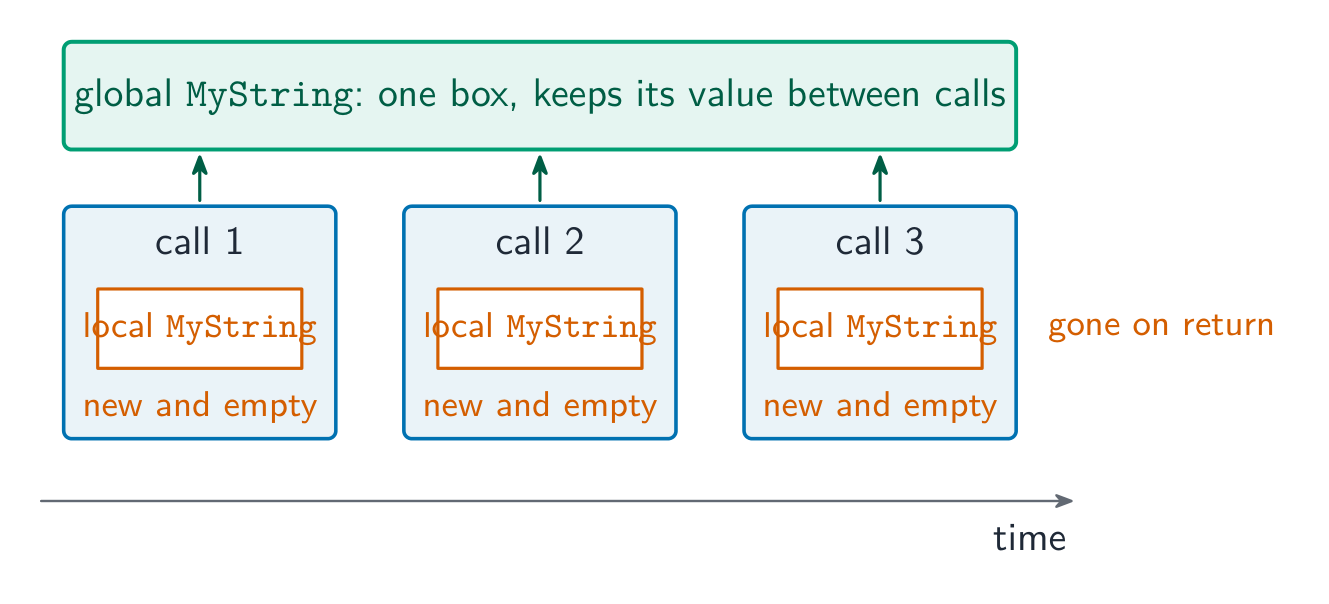
A local variable is created each time the subroutine is called and destroyed when it returns, so it cannot carry a value from one call to the next. A procedure that builds up a string over repeated calls therefore needs that string to be global (or passed BYREF). If MyString is changed from a global to a local declared inside MyOutput(), every call starts with a new, empty MyString, the text added by earlier calls is lost, and the procedure "does not work as expected".

When to use a subroutine
Use a subroutine when:
- the same logic appears in more than one place — write it once, call it many times.
- a block has a clear named purpose — the name documents what it does.
- the program is complex — break it into parts (decomposition 分解).
- you want to test a piece in isolation.
Don't make them so tiny that the call costs more than the work inside.
Terminology
- definition — the
PROCEDURE ... ENDPROCEDURE(or function) block. - call — where it is invoked. argument — a value passed in. parameter — the variable that receives it.
- return value — what a function passes back.
- procedure/function header — the first line giving the name and parameters (
PROCEDURE Name(params)orFUNCTION Name(params) RETURNS type). - procedure/function interface / signature 签名 — name + parameters + return type: what a caller must know to use it.
Worked example. Describe each term used in the header FUNCTION Pass2(Count : INTEGER) RETURNS BOOLEAN.
| Term | Meaning |
|---|---|
FUNCTION |
a subroutine that returns a value |
Pass2 |
the identifier used to call it |
Count |
the parameter: the identifier that receives the argument passed in |
INTEGER |
the data type of the parameter |
RETURNS BOOLEAN |
the data type of the value the function returns |
The two identifiers in PROCEDURE MyProc(Count : INTEGER, Message : STRING) are parameters: they receive the values passed in when the procedure is called, and are used inside it like local variables.
To convert a procedure into a function: change PROCEDURE to FUNCTION and add RETURNS <type>; replace the OUTPUT (or the BYREF parameter that carried the result out) with a RETURN statement; and change every call so that the returned value is used, Result ← Unpack(Text) instead of CALL Unpack(Text, Result). For a "write the header" question, write the whole line: FUNCTION Calculate(Expression : STRING) RETURNS INTEGER. An array parameter is passed by reference, so a procedure that writes into an array changes the caller's array.
When a program gains a new module, the interface is what is agreed first: the name, the parameters (how many, in what order, of what type) and the return type, plus any global data the module reads or writes. A module that sends a reminder before a due date needs the record (or its index) as a parameter and returns nothing, so it is a procedure; the main program calls it once per record.
Writing a module for Paper 2
Half of Paper 2 is "write pseudocode for module X". The scheme awards a mark per feature, so a module that is not finished still scores for every correct part. The parts the examiner looks for:

- The header, as the question describes it:
PROCEDURE Name(Param : TYPE)orFUNCTION Name(Param : TYPE) RETURNS TYPE, withBYREFwhere the routine must change the argument. - Local declarations:
DECLAREevery local variable with its type, and initialise counters and totals (Count ← 0). - The loop that visits every element:
FOR Index ← 1 TO 50for an array whose size is given;WHILE NOT EOF(...)for a file. - The condition, with the right comparison and boundary, on the right item:
IF Score[Index] > Limit THEN. - The update inside the branch: the count increased, the value stored, or the message output.
- The end:
RETURNonce, after the loop, in a function;ENDFUNCTIONorENDPROCEDURE; and everyIF,FORandWHILEclosed.
Worked example. A global array Score : ARRAY[1:50] OF INTEGER holds test scores. Write a function CountAbove(Limit : INTEGER) that returns how many scores are greater than Limit.
FUNCTION CountAbove(BYVAL Limit : INTEGER) RETURNS INTEGER
    DECLARE Index, Count : INTEGER
    Count ← 0
    FOR Index ← 1 TO 50
        IF Score[Index] > Limit THEN
            Count ← Count + 1
        ENDIF
    NEXT Index
    RETURN Count
ENDFUNCTION
Marks: the header with its parameter and RETURNS INTEGER; Count declared and set to 0; a loop over all 50 elements; the comparison > Limit (not >=); the count updated inside the IF; RETURN Count after the loop. The main program uses the return value in an expression or an output: OUTPUT "Above 70: ", CountAbove(70).
Worked example. Write a function IsValid(Code : STRING) that returns TRUE when Code is two capital letters followed by four digits — the format 格式 AB1234 — and FALSE otherwise.
FUNCTION IsValid(BYVAL Code : STRING) RETURNS BOOLEAN
    DECLARE Index : INTEGER
    DECLARE Ch : STRING
    IF LENGTH(Code) <> 6 THEN
        RETURN FALSE
    ENDIF
    FOR Index ← 1 TO 6
        Ch ← MID(Code, Index, 1)
        IF Index <= 2 THEN
            IF Ch < "A" OR Ch > "Z" THEN
                RETURN FALSE
            ENDIF
        ELSE
            IF Ch < "0" OR Ch > "9" THEN
                RETURN FALSE
            ENDIF
        ENDIF
    NEXT Index
    RETURN TRUE
ENDFUNCTION
The length check comes first, so MID is never asked for a position that does not exist. Validation 验证 like this returns a BOOLEAN so the caller can write IF IsValid(Entry) THEN ... ELSE OUTPUT "Invalid code" ENDIF: a message to the user is output by the caller, not by the function — a function calculates, a procedure acts.
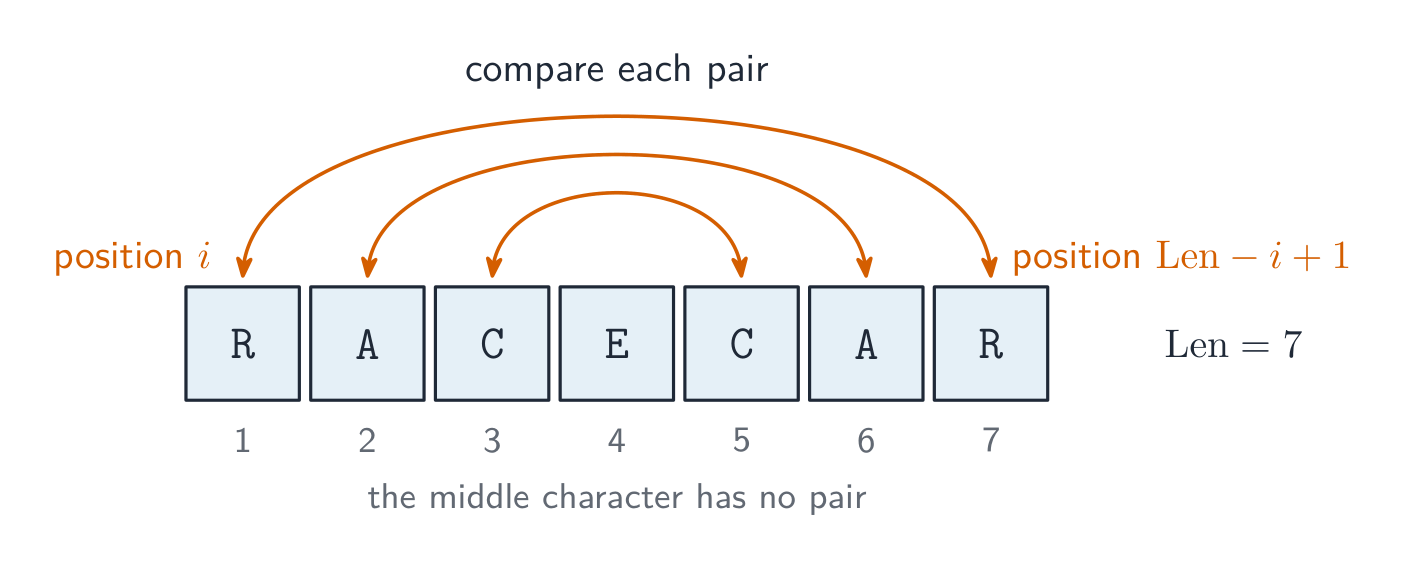
Worked example. Write a function IsPalindrome(Word : STRING) that returns TRUE when Word reads the same backwards, such as "RACECAR".
Compare the characters from the two ends, moving inwards: position Index is paired with position Len - Index + 1, and only the first half needs testing.
i with position Len - i + 1 and stops at the middleFUNCTION IsPalindrome(BYVAL Word : STRING) RETURNS BOOLEAN
DECLARE Len, Index : INTEGER
Len ← LENGTH(Word)
FOR Index ← 1 TO Len DIV 2
IF MID(Word, Index, 1) <> MID(Word, Len - Index + 1, 1) THEN
RETURN FALSE
ENDIF
NEXT Index
RETURN TRUE
ENDFUNCTION
The same three tools — a FOR over the positions, MID(s, i, 1) to read one character, and & to build a new string — answer most string modules on Paper 2: counting how often a character occurs (IF MID(s, i, 1) = Ch THEN Count ← Count + 1), replacing every instance of a character (add either NewChar or the original character to NewString at each position), hiding all but the last four digits of a card number (add '*' for every position up to Len - 4), or writing your own MID() by joining the characters from Start to Start + Length - 1. Asking MID for a position past the end of the string is a run-time error, so check LENGTH first.
Files. Values in variables disappear when the program ends, so a module that must keep data for the next run writes it to a file: OPENFILE "scores.txt" FOR WRITE, one WRITEFILE "scores.txt", NUM_TO_STR(Score[Index]) per line inside the loop, and CLOSEFILE "scores.txt" once, after the loop; reading back uses FOR READ, READFILE and WHILE NOT EOF("scores.txt"). Topic 10 has the full file section; here the marks are for opening in the right mode, the read or write inside the loop, and closing once after it.
Explore
The call stack: push on call, pop on return
Calling a subroutine pushes a new frame on top; returning pops it and hands a value back to the caller. The call that is running is always the frame on top.
Vocabulary
Train
| English |
|---|
| function/ˈfʌŋkʃn/ |
| parameters/pəˈræmɪtəz/ |
| procedure/prəˈsiːdʒə/ |
| structured programming/ˈstrʌktʃəd ˈprəʊɡræmɪŋ/ |
| subroutines/ˈsʌbruːtiːnz/ |
| return value/rɪˈtɜːn ˈvæljuː/ |
| arguments/ˈɑːɡjuːmənts/ |
| pass by value/pæs baɪ ˈvæljuː/ |
| pass by reference/pæs baɪ ˈrefrəns/ |
| global variable/ˈɡləʊbl ˈveərɪəbl/ |
| local variable/ˈləʊkl ˈveərɪəbl/ |
| scope/skəʊp/ |
| decomposition/ˌdiːkɒmpəˈzɪʃn/ |
| signature/ˈsɪɡnɪtʃə/ |
| format/ˈfɔːmæt/ |
| Validation/ˌvælɪˈdeɪʃn/ |
11.3
Writing efficient pseudocode
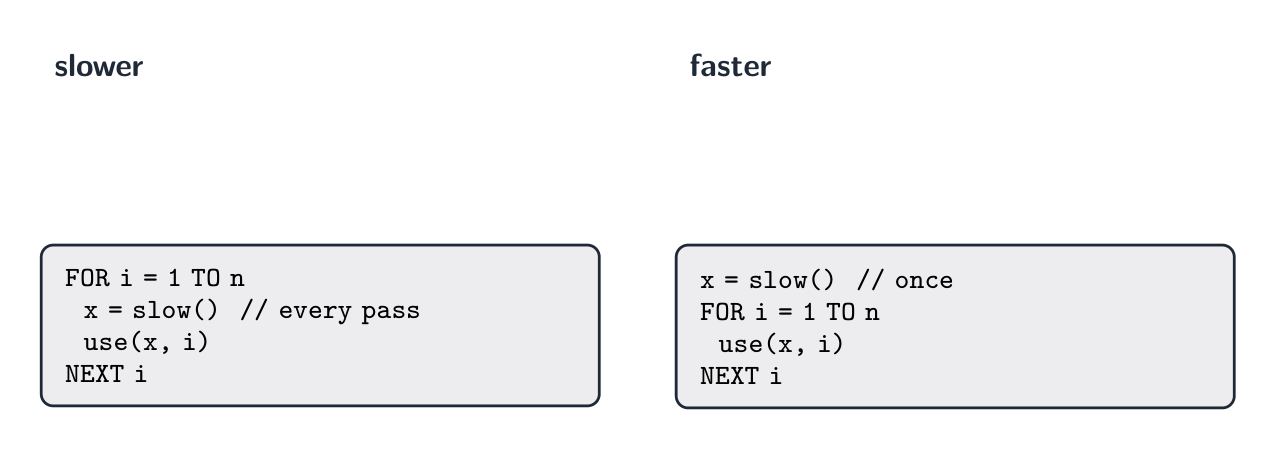
Three features that make pseudocode easier to understand — the answer to a "state three features" question — are meaningful identifiers (Total, not t), indentation of the statements inside each construct, and comments (// ...) that explain the purpose; keywords in capitals, one statement per line and blank lines between sections are also accepted. Efficient pseudocode goes further:
- move invariants out of loops — if a value (an invariant 不变量) does not change with the loop counter, compute it once before the loop.
- exit a loop early when the answer is found (stop a linear search 线性查找 as soon as the target appears).
- avoid redundant work — store a result and reuse it instead of recomputing.
- choose the right data structure — an array beats many separate variables when the items belong together.
- replace deep nested IFs with CASE when testing one value against many.
- comment the intent, not the mechanics (
// validate the postcode, not// loop 6 times). - use meaningful names (
numberOfPupils, notn) and initialise variables before use.
Vocabulary
Train
| English |
|---|
| invariant/ɪnˈveərɪənt/ |
| linear search/ˈlɪnɪə sɜːtʃ/ |
11.3
Testing and errors
Three kinds of error, each found in a different way:
| Error | What it is | Example | Found by |
|---|---|---|---|
| syntax error 语法错误 | a statement that breaks the rules of the language | a missing ENDIF; OUTPT "Hi" |
the translator, before the program runs |
| run-time error 运行时错误 | the program runs, but a statement cannot be carried out | division by zero; an array index of 0 or 51; a function called with an invalid parameter; a loop that never ends, so the program "freezes" | while running: the program stops or hangs |
| logic error | the program runs to the end, but the output is wrong | > where >= was needed; a total never set to 0 |
testing with a trace table and chosen test data |
An IDE 集成开发环境 helps find the last two: a breakpoint 断点 stops the program at a chosen line; single stepping 单步执行 then runs one statement at a time; and the report (or watch) window shows the value of each variable at that moment, so the line where a value goes wrong is seen directly. Test methods and test data are in topic 12.
Vocabulary
Train
| English |
|---|
| run-time error/rʌn taɪm ˈerə/ |
| syntax error/ˈsɪntæks ˈerə/ |
| IDE/ˌaɪ diː ˈiː/ |
| breakpoint/ˈbreɪkpɔɪnt/ |
| single stepping/ˈsɪŋɡl ˈstepɪŋ/ |
11.3
Definitions the examiner accepts
A definition question is marked against fixed wording. Learn these exactly.
| Term | Definition |
|---|---|
| procedure | a subroutine that carries out a task (a sequence of steps) and does not return a value; it is called with CALL |
| function | a subroutine that returns a single value to the point where it was called, so it can be used in an expression |
| parameter | the identifier in a subroutine header that receives a value or a reference when the subroutine is called |
| argument | the value (or variable) supplied in the call, matched to a parameter |
| passing by value | a copy of the argument's value is given to the subroutine, so changes inside it do not affect the original variable |
| passing by reference | the address of the variable is given to the subroutine, so changes inside it change the original variable |
| header | the first line of a subroutine definition: its name, its parameters and, for a function, its return type |
| interface | what a calling program must know to use a subroutine: its name, its parameters (number, order, type) and its return type |
| return value | the value a function passes back to the expression that called it |
| local variable | declared inside a subroutine; it exists only while the subroutine runs and can be used only inside it |
| global variable | declared outside every subroutine; it can be used anywhere in the program |
| count-controlled loop | repeats a fixed number of times, controlled by a counter (FOR ... NEXT) |
| pre-condition loop | tests its condition before each iteration, so the body may never run (WHILE ... ENDWHILE) |
| post-condition loop | tests its condition after each iteration, so the body runs at least once (REPEAT ... UNTIL) |
| constant | a named value that cannot change while the program runs |
| subroutine | a self-contained block of code that performs a task and is called by name: a procedure or a function |
| library routine | a subroutine that has already been written and tested, and is available to be called from a program |
11.3
Exam tips
- Distinguish a procedure (no return value) from a function (returns a value); know pass by value vs by reference.
- Choose the right loop: count-controlled (FOR) when the number of repeats is known, condition-controlled (WHILE/REPEAT) otherwise.
- Distinguish local vs global variables and scope; prefer local variables in reusable modules.
- Use the insert's exact routine names and parameter order.
VALandSTRare IGCSE names and score nothing;UCASEandLCASEare real 9618 routines from the Pseudocode Guide but act on one character, so on Paper 2 a whole string takesTO_UPPERorTO_LOWER. - In a "write pseudocode" answer the header, the declarations, the loop, the condition, the update and the
RETURNeach carry a mark: write all six parts, even if one is uncertain.
Common mistakes
- Calling a function and not using what it returns. Assign the result, or use it in the expression or output:
Sorted ← BubbleSort(MyArray, 7). - Passing a length one out:
6for a seven-element array, or the last index where the length was wanted. Decide whether the parameter is a length or an index, and check that the last element is visited. - Closing a file inside the loop that reads it. Open once, close once, after the loop.
- Using the input as a filename directly. Add the extension the question gave:
FileName ← Choice & ".txt". - Leaving constructs open. Every
IFneeds itsENDIF, everyFORitsNEXT, everyWHILEitsENDWHILE, and every function itsRETURN; the scheme has a mark for it. - Wrong boundaries:
>for "at least" (which is>=), or aFORthat starts at0for an array declared[1:50]. - A counter or total that is never set to
0before the loop. - In a trace table, rewriting every variable on every row, or changing a value before the statement that changes it has run.
- Half a condition:
IF x = 3 OR 4— each side ofORandANDmust be a complete comparison. And+does not join strings;&does. - Declaring as local a value that must survive between calls. A running total or a string built up over several calls is global or
BYREF.
Interactive lessons on this topic
Work through it step by step, with instant-check exercises.