Performance, the fetch-execute cycle and interrupts · 性能、取指-执行周期与中断
| English | 中文 | Pinyin · 拼音 |
|---|---|---|
| interrupt/ˈɪntərʌpt/ | 中断 | zhōng duàn |
| clock speed/klɒk spiːd/ | 时钟频率 | shí zhōng pín lǜ |
| fetch-execute cycle/fetʃ ˈeksɪkjuːt ˈsaɪkl/ | 取指-执行周期 | qǔ zhǐ - zhí xíng zhōu qī |
| cores/kɔːz/ | 核心 | hé xīn |
| cache/kæʃ/ | 高速缓存 | gāo sù huǎn cún |
| word size/wɜːd saɪz/ | 字长 | zì zhǎng |
| port/pɔːt/ | 端口 | duān kǒu |
| peripheral/pəˈrɪfərəl/ | 外围设备 | wài wéi shè bèi |
| register transfer notation/ˈredʒɪstə ˈtrænsfɜː nəʊˈteɪʃn/ | 寄存器传送记法 | jì cún qì chuán sòng jì fǎ |
| stack/stæk/ | 栈 | zhàn |
| interrupt service routine/ˈɪntərʌpt ˈsɜːvɪs ruːˈtiːn/ | 中断服务程序 | zhōng duàn fú wù chéng xù |
| interrupt register/ˈɪntərʌpt ˈredʒɪstə/ | 中断寄存器 | zhōng duàn jì cún qì |
Why your laptop drops everything when you press a key
- A processor runs billions of cycles a second. If it had to stop and ask the keyboard "anything yet?" between instructions, it would waste most of them asking.
- Instead the keyboard sends an interrupt 中断. The processor finishes its current instruction, saves its place, deals with the key, and returns as if nothing had happened.
- That one mechanism is how a single processor appears to run your music, your browser and your typing at once.
- This lesson covers what makes a processor fast, how it connects to devices, exactly how it runs one instruction, and how an interrupt cuts in.
为什么你一按键笔记本电脑就放下一切
- 处理器每秒运行几十亿个周期。如果它必须在指令之间停下来问键盘"有事吗?",大部分周期都会浪费在问上。
- 取而代之,键盘发送一个中断(interrupt)。处理器完成当前指令,保存自己的位置,处理这个按键,然后像什么都没发生一样回来。
- 这一个机制就是一个处理器看起来能同时运行你的音乐、浏览器和打字的原因。
- 这一课讲什么让处理器快、它怎样连接设备、它究竟怎样运行一条指令,以及中断怎样插进来。
What affects performance
- Clock speed 时钟频率: more fetch-execute cycles a second, so more instructions a second, until heat sets the limit.
- Number of cores 核心: each core fetches and executes its own instruction at the same time, so several programs or threads run in parallel. A program must be written to use them, so doubling the cores does not double the speed.
- Bus width: a wider data bus moves more bits per transfer, so fewer transfers; a wider address bus reaches more memory.
- Cache 高速缓存: a small, fast memory next to the processor holding the instructions and data used most recently, so fewer slow trips to RAM. Word size 字长, the amount of RAM and the storage type help too.
什么影响性能
- 时钟频率(clock speed):每秒更多取指-执行周期,所以每秒更多指令,直到发热设定上限。
- 核心数(cores):每个核心同时取出并执行自己的指令,所以多个程序或线程并行运行。程序必须写成能用上它们,所以核心翻倍并不让速度翻倍。
- 总线宽度:更宽的数据总线每次传输更多比特,所以传输次数更少;更宽的地址总线能到达更多存储器。
- 高速缓存(cache):紧靠处理器的一块小而快的存储器,保存最近用过的指令和数据,所以去 RAM 的慢速往返更少。字长(word size)、RAM 容量和存储类型也有帮助。
Select all · 所有 the factors that affect CPU performance. · 选出所有影响 CPU 性能的因素。
Clock speed, cores and cache (plus word size, RAM, storage and bus width) all affect performance. The case colour does not. · 时钟速度、核心和缓存(加上字长、RAM、存储和总线宽度)都影响性能。机箱颜色不影响。
A multi-core CPU is especially helpful for: · 一个多核 CPU 对以下尤其有帮助:
Extra cores run tasks in parallel. A purely single-threaded job benefits more from higher per-core speed. · 额外的核心并行运行任务。一个纯单线程的作业更受益于更高的单核速度。
____ memory is a small, fast store next to the processor that holds recently used instructions and data, so fewer slow trips to RAM are needed. · ____ 是紧靠处理器的一块小而快的存储器,保存最近用过的指令和数据,所以去 RAM 的慢速往返更少。
More cache means more of the working set sits next to the processor, which is the reason it appears in every performance comparison. · 更多高速缓存意味着更多工作集放在处理器旁边,这就是它出现在每次性能比较里的原因。
Worked example: "explain why the new computer is faster"
- Compare the two specifications line by line, each with its reason.
- 3.8 GHz against 2.4 GHz: more cycles a second, so more instructions executed a second.
- 8 cores against 4: twice as many instructions can be fetched and executed at the same time, for software that uses them.
- 16 MB of cache against 4 MB: more of the working set is held next to the processor, so fewer waits for RAM. Each line is two marks: the factor and its consequence.
例题:"解释为什么新电脑更快"
- 逐行比较两份规格,每行给出理由。
- 3.8 GHz 对 2.4 GHz:每秒更多周期,所以每秒执行更多指令。
- 8 核对 4 核:能同时取出并执行两倍的指令,对能利用它们的软件而言。
- 16 MB 高速缓存对 4 MB:更多工作集放在处理器旁边,所以等待 RAM 的次数更少。每行两分:因素和它的后果。
Ports
- A port 端口 is a physical socket that connects a peripheral 外围设备.
- USB (Universal Serial Bus) is general-purpose: keyboards, drives, phones. It is plug-and-play: the computer detects the device, identifies it, loads its driver and can power it, with no restart.
- HDMI (High Definition Multimedia Interface) carries digital video and audio down one cable, so nothing is converted to analogue and the picture is not degraded. VGA (Video Graphics Array) is the older analogue video socket.
端口
- 端口(port)是连接外围设备(peripheral)的物理插座。
- USB(Universal Serial Bus)是通用的:键盘、驱动器、手机。它即插即用:计算机检测到设备,识别它,加载它的驱动程序并可以为它供电,无需重启。
- HDMI(High Definition Multimedia Interface)用一根线同时传输数字视频和音频,所以不需要转换成模拟信号,画面不会劣化。VGA(Video Graphics Array)是较老的模拟视频插座。
Match each port to what it carries. · 把每种端口与它传输的内容配对。
Different signals, different sockets: an HDMI cable will not fit a USB port. · 不同的信号,不同的插座:HDMI 线插不进 USB 口。
The fetch stage
- Once per instruction the processor runs the fetch-execute cycle 取指-执行周期. Fetch comes first, and the exam wants it in register transfer notation 寄存器传送记法.
- A read signal travels on the control bus, the address on the address bus, and the instruction comes back on the data bus. The PC is incremented straight after its address is copied, so that a jump executed later can still overwrite it.
PC → MAR → memory → MDR → CIR, with the PC incremented on the way
取指阶段
- 每条指令处理器都运行一次取指-执行周期(fetch-execute cycle)。取指在前,考试要求用寄存器传送记法(register transfer notation)写出它。
MAR ← [PC]          the address of the next instruction goes to the MAR
PC  ← [PC] + 1      the PC now points to the following instruction
MDR ← [[MAR]]       the instruction at that address is read into the MDR
CIR ← [MDR]         the instruction is copied into the CIR for decoding
- 读信号在控制总线上传送,地址在地址总线上,指令沿数据总线返回。PC 在它的地址被复制后立刻加一,这样之后执行的跳转仍然可以覆盖它。
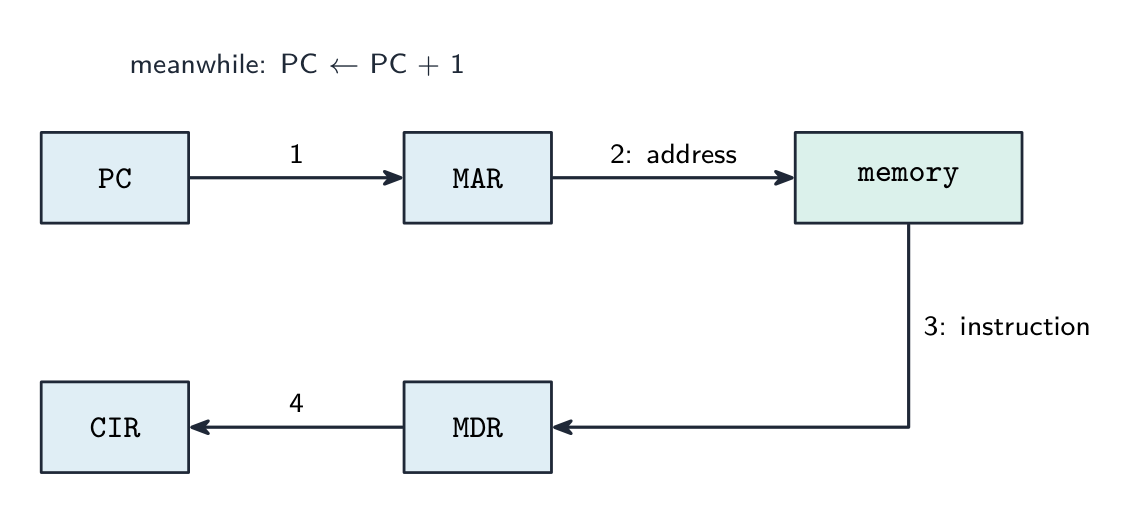
PC → MAR → 存储器 → MDR → CIR,途中 PC 加一
Put the fetch steps in the correct order. · 把取指步骤按正确顺序排列。
PC → MAR, increment PC, read signal, then the instruction travels MDR → CIR ready to decode. · PC → MAR,递增 PC,读信号,然后指令经 MDR → CIR 准备好解码。
The PC is incremented during the fetch stage so the next cycle fetches the following instruction. · PC 在取指阶段被递增,这样下一个周期就取下一条指令。
Incrementing the PC early means it already points at the next instruction by the time this one executes (unless a jump changes it). · 提早递增 PC 意味着当这一条执行时它已经指向下一条指令(除非一个跳转改变它)。
Decode, execute, repeat
- Decode: the control unit works out from the instruction in the CIR which operation it is and where its operands are.
- Execute: arithmetic and logic go to the ALU with the result in the ACC; a load or store moves data between memory and a register; a jump writes a new address into the PC.
- Then the cycle repeats from
MAR ← [PC]. At the end of every cycle the processor also checks whether an interrupt is waiting.
One LOAD and one ADD walk the registers: fetch, decode, execute, repeat
解码、执行、重复
- 解码:控制单元从 CIR 中的指令弄清它是哪种操作、操作数在哪里。
- 执行:算术和逻辑交给 ALU,结果放在 ACC;加载或存储在存储器和寄存器之间搬数据;跳转把一个新地址写进 PC。
- 然后周期从
MAR ← [PC]重新开始。每个周期结束时处理器还会检查是否有中断在等待。
一条 LOAD 和一条 ADD 走过寄存器:取指、解码、执行、重复
The fetch-execute cycle · 取指-执行周期
Tap round the loop the CPU repeats billions of times a second. Watch how fetch uses the PC/MAR/MDR/CIR registers, then decode and execute act on what was fetched. · 点击绕一圈 CPU 每秒重复几十亿次的循环。看取指如何使用 PC/MAR/MDR/CIR 寄存器,然后解码和执行对取来的东西起作用。
Worked example: executing two instructions in notation
- Execute
LDD 200(load the contents of address 200 into the ACC):MAR ← 200, thenMDR ← [[MAR]], thenACC ← [MDR]. - Execute
ADD 201:MAR ← 201,MDR ← [[MAR]],ACC ← [ACC] + [MDR]. - Execute
STO 202:MAR ← 202,MDR ← [ACC],[[MAR]] ← [MDR]. - Every line moves one value between two places. The double brackets always mean "the memory location whose address is in the MAR".
例题:用记法执行两条指令
- 执行
LDD 200(把地址 200 的内容加载到 ACC):MAR ← 200,然后MDR ← [[MAR]],然后ACC ← [MDR]。 - 执行
ADD 201:MAR ← 201,MDR ← [[MAR]],ACC ← [ACC] + [MDR]。 - 执行
STO 202:MAR ← 202,MDR ← [ACC],[[MAR]] ← [MDR]。 - 每一行在两个地方之间搬一个值。双层方括号永远表示"地址在 MAR 里的那个存储单元"。
Put the register transfers that execute LDD 200 in order. · 把执行 LDD 200 的寄存器传送按顺序排列。
Address to the MAR, contents of that address to the MDR, then into the accumulator. · 地址进 MAR,该地址的内容进 MDR,然后进累加器。
Interrupts
- An interrupt is a signal that pauses the normal cycle so the processor can deal with an urgent event.
- Causes: a hardware device (a key pressed, a printer buffer empty, a network packet arriving), a software fault (division by zero, an illegal instruction, arithmetic overflow), the operating system's timer marking the end of a time slice, a power-failure warning.
- Interrupts let the system respond promptly without the processor constantly checking devices, and they are how the operating system multitasks.
The cycle, with the interrupt check at the end of each pass
中断
- 中断是暂停正常周期、让处理器处理紧急事件的信号。
- 原因:硬件设备(按下一个键、打印机缓冲区空了、网络数据包到达)、软件故障(除以零、非法指令、算术溢出)、操作系统计时器标记一个时间片结束、电源故障警告。
- 中断让系统能及时响应而不必让处理器不断检查设备,也是操作系统实现多任务的方式。
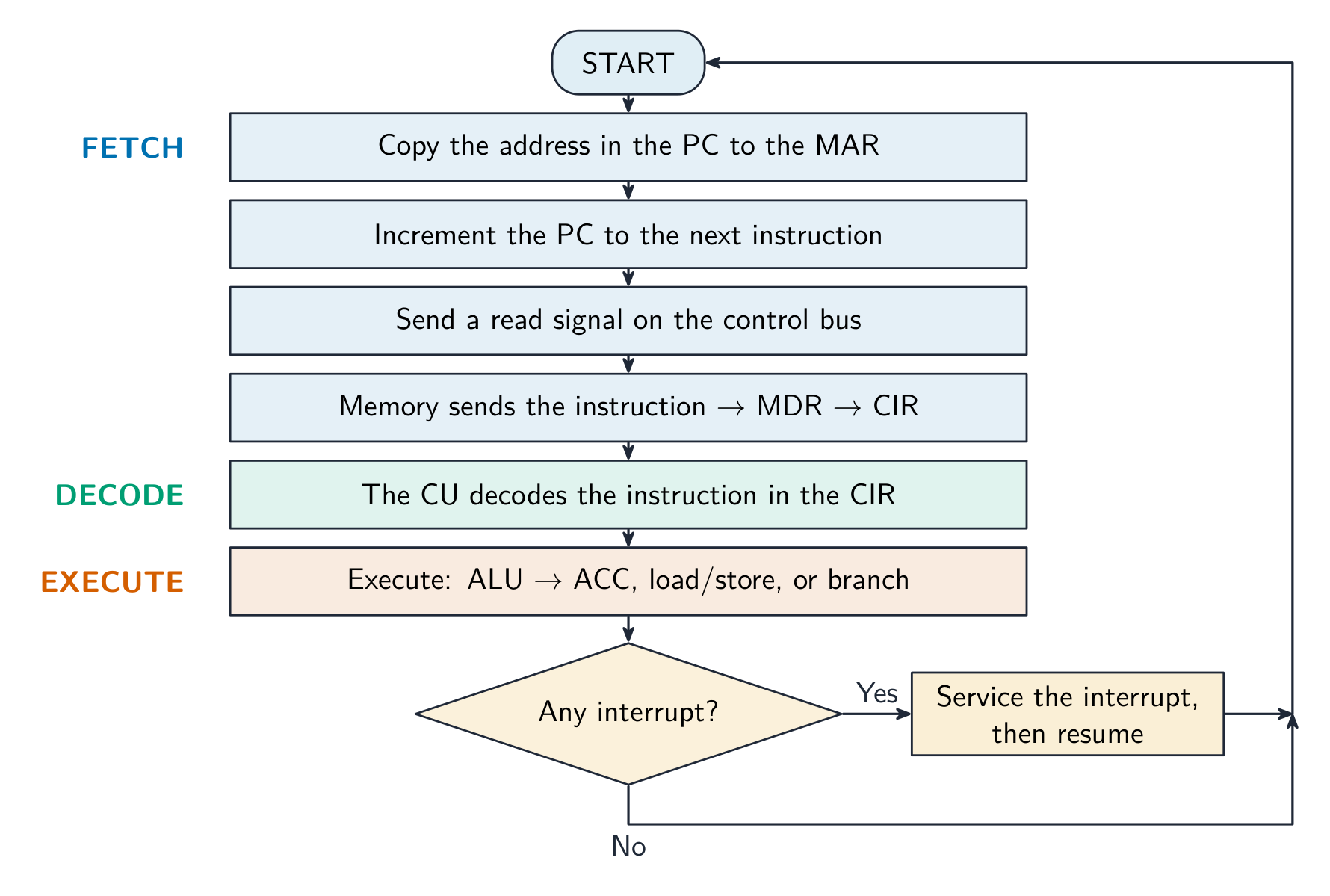
周期,每一轮结束时做中断检查
An interrupt is: · 一个中断是:
An interrupt temporarily pauses the fetch-execute cycle so the CPU can service an urgent event, then resumes. · 一个中断临时暂停取指-执行周期,使 CPU 能服务一个紧急事件,然后恢复。
Which of these can cause an interrupt? Select all · 所有 that apply. · 以下哪些能引起中断?选出所有适用的。
Hardware events, software faults and the OS timer all raise interrupts. A loop ending is ordinary program flow handled by a jump, not an interrupt. · 硬件事件、软件故障和操作系统计时器都会引发中断。循环结束是由跳转处理的普通程序流程,不是中断。
Handling an interrupt
- Finish the current instruction. Save the state: the contents of the PC and the other registers go onto the stack 栈.
- Load the address of the interrupt service routine 中断服务程序 (ISR) into the PC and run it. The ISR handles the event.
- Restore the saved state from the stack and carry on with the interrupted program exactly where it left off.
Save, service, restore, resume
处理一个中断
- 完成当前指令。保存状态:PC 和其他寄存器的内容压入栈(stack)。
- 把中断服务程序(interrupt service routine,ISR)的地址加载到 PC 并运行它。ISR 处理该事件。
- 从栈中恢复保存的状态,从被中断的程序停下的地方继续。
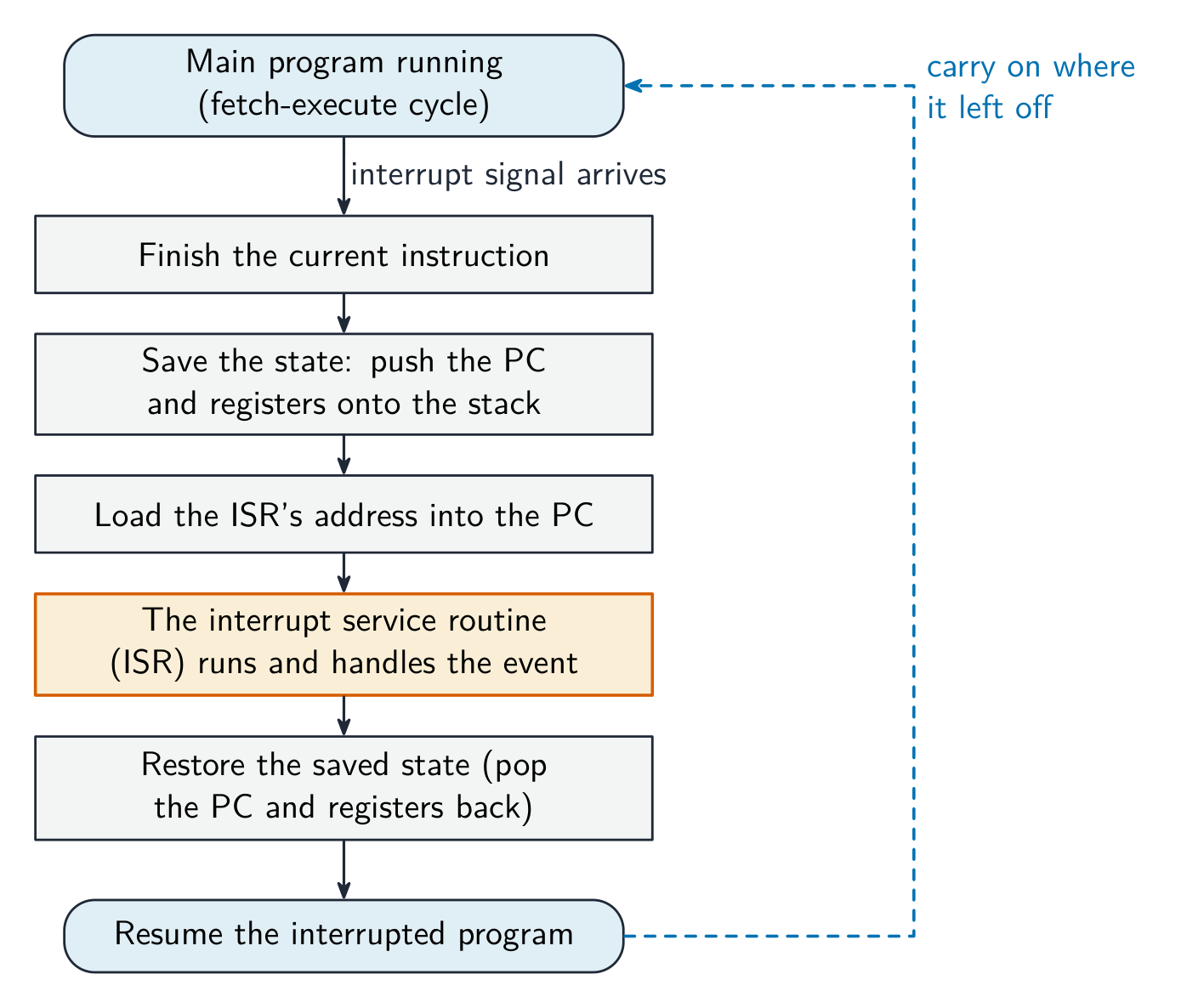
保存、服务、恢复、继续
When an interrupt occurs, the CPU first finishes the current instruction, then: · 当一个中断发生时,CPU 先完成当前指令,然后:
It saves the PC and registers, runs the interrupt service routine, then restores the state and continues where it left off. · 它保存 PC 和寄存器,运行中断服务程序,然后恢复状态并从离开的地方继续。
Worked example: the four-mark interrupt answer
- Explain how an interrupt from an input device is detected and handled in the fetch-execute cycle.
- The device sends an interrupt signal that sets a flag in the interrupt register 中断寄存器. The processor checks that register at the end of every cycle, after the current instruction has finished executing.
- If a flag is set and the interrupt has a higher priority than the current task, the PC and the other registers are saved on the stack. The address of the ISR is loaded into the PC and the routine runs.
- When it finishes, the registers are restored from the stack and the interrupted program resumes. Four points, in that order.
例题:四分的中断答案
- 解释来自输入设备的中断如何在取指-执行周期中被检测和处理。
- 设备发送中断信号,在中断寄存器(interrupt register)中置一个标志。处理器在每个周期结束时、当前指令执行完之后检查该寄存器。
- 如果标志被置位且该中断的优先级高于当前任务,PC 和其他寄存器被保存到栈上。ISR 的地址被加载到 PC,例程运行。
- 它完成后,寄存器从栈中恢复,被中断的程序继续。四个要点,按这个顺序。
The processor checks for interrupts at the end of every fetch-execute cycle, after the current instruction has finished. · 处理器在每个取指-执行周期结束时、当前指令完成后检查中断。
That timing is what lets the state be saved cleanly: no instruction is ever left half done. · 这个时机让状态能被干净地保存:没有任何指令会被留在半路。
Marks that slip away
- The PC is incremented during the fetch, not after the execute. Put
PC ← [PC] + 1second, straight afterMAR ← [PC]. - Interrupts are checked at the end of a cycle, never in the middle of an instruction.
- The state goes onto the stack and comes back from it. "The CPU stops" or "the program is lost" is wrong: it resumes exactly where it was.
- More cores do not double the speed; the software has to use them. Say so when comparing specifications.
容易丢掉的分
- PC 在取指期间加一,不是在执行之后。把
PC ← [PC] + 1放在第二行,紧跟MAR ← [PC]。 - 中断在一个周期结束时检查,绝不在一条指令的中间。
- 状态压入栈并从栈中恢复。"CPU 停止"或"程序丢失"是错的:它从原地继续。
- 核心更多不等于速度翻倍;软件必须能利用它们。比较规格时要说明这一点。
You've got it
- performance: clock speed, cores, bus width, cache (plus word size, RAM, storage), each with its consequence
- ports: USB general-purpose and plug-and-play, HDMI digital video and audio, VGA analogue video
- fetch:
MAR ← [PC],PC ← [PC] + 1,MDR ← [[MAR]],CIR ← [MDR]; then decode, execute, repeat - an interrupt is checked at the end of each cycle: save state on the stack, run the ISR, restore, resume
你掌握了
- 性能:时钟频率、核心、总线宽度、高速缓存(还有字长、RAM、存储),每个都带上后果
- 端口:USB 通用且即插即用,HDMI 数字视频和音频,VGA 模拟视频
- 取指:
MAR ← [PC]、PC ← [PC] + 1、MDR ← [[MAR]]、CIR ← [MDR];然后解码、执行、重复 - 中断在每个周期结束时检查:状态压栈、运行 ISR、恢复、继续