Computer components and embedded systems · 计算机组件与嵌入式系统
| English | 中文 | Pinyin · 拼音 |
|---|---|---|
| embedded system/emˈbedɪd ˈsɪstəm/ | 嵌入式系统 | qiàn rù shì xì tǒng |
| input devices/ˈɪnpʊt dɪˈvaɪsɪz/ | 输入设备 | shū rù shè bèi |
| output devices/ˈaʊtpʊt dɪˈvaɪsɪz/ | 输出设备 | shū chū shè bèi |
| primary memory/ˈpraɪməri ˈmeməri/ | 主存储器 | zhǔ cún chǔ qì |
| RAM/ræm/ | 随机存取存储器 | suí jī cún qǔ cún chǔ qì |
| ROM/rɒm/ | 只读存储器 | zhī dú cún chǔ qì |
| secondary storage/ˈsekəndəri ˈstɔːrɪdʒ/ | 辅助存储器 | fǔ zhù cún chǔ qì |
| volatile/ˈvɒlətaɪl/ | 易失性 | yì shī xìng |
| removable storage/rɪˈmuːvəbl ˈstɔːrɪdʒ/ | 可移动存储 | kě yí dòng cún chǔ |
| buffer/ˈbʌfə/ | 缓冲 | huǎn chōng |
| firmware/ˈfɜːmweə/ | 固件 | gù jiàn |
The hundred computers you never see
- A new car carries around a hundred small computers. None has a keyboard or a screen, and most will never receive a software update.
- One runs the engine, one the brakes, one each window. Each does a single job for the life of the car.
- They are embedded systems 嵌入式系统, and there are far more of them in the world than laptops and phones put together.
- Before we get to them, we need the four blocks that every computer, hidden or not, is built from.
你从未见过的一百台计算机
- 一辆新车里装着大约一百台小型计算机。没有一台有键盘或屏幕,而且大多数永远不会收到软件更新。
- 一台管发动机,一台管刹车,每扇车窗各一台。每台在整个车的寿命里只做一件事。
- 它们是嵌入式系统(embedded system),世界上它们的数量远远超过笔记本电脑和手机的总和。
- 在讲它们之前,我们先要认识每台计算机——不管藏不藏起来——都由之构成的四个组成部分。
The four blocks
- Input devices 输入设备 get data in: keyboard, mouse, microphone, scanner, sensors.
- Output devices 输出设备 give results out: monitor, speakers, printer, actuators.
- Primary memory 主存储器 is the fast memory the processor reaches directly: RAM 随机存取存储器 and ROM 只读存储器. It holds the running program and its data.
- Secondary storage 辅助存储器 is slower but larger, and keeps programs and data when the power is off: hard disk, SSD, optical disc, USB stick.
A monitor: the most familiar output device
四个组成部分
- 输入设备(input devices)把数据送进来:键盘、鼠标、麦克风、扫描仪、传感器。
- 输出设备(output devices)把结果送出去:显示器、扬声器、打印机、执行器。
- 主存储器(primary memory)是处理器能直接访问的快速存储器:RAM(随机存取存储器)和 ROM(只读存储器)。它保存正在运行的程序和它的数据。
- 辅助存储器(secondary storage)更慢但更大,断电后仍保存程序和数据:硬盘、SSD、光盘、U 盘。

显示器:最常见的输出设备
Tap the blocks of a computer system · 点击一个计算机系统的模块
Explore the four blocks plus the CPU. Data flows input → processing → output, while primary memory holds the running program and secondary storage keeps it for later. · 探索四个模块加上 CPU。数据流动 输入 → 处理 → 输出,而主存储器保存运行中的程序,辅助存储为以后保留它。
Which of these is an input device? · 这些中哪个是一个输入设备?
A scanner brings data in. Monitors, speakers and printers are output devices. · 一个扫描仪把数据弄进来。显示器、扬声器和打印机是输出设备。
Why each block is needed
- Input: the computer can only work on data and instructions that have been entered.
- Output: results have to be presented in a form people, or other machines, can use.
- Primary memory: the processor can only execute instructions and use data held in memory it can address directly, and it must reach them fast.
- Secondary storage: primary memory is small and volatile 易失性, so programs and data must survive between sessions and when the power is off.
为什么每个部分都需要
- 输入:计算机只能处理已经输入的数据和指令。
- 输出:结果必须以人或其他机器能使用的形式呈现。
- 主存储器:处理器只能执行并使用它能直接寻址的存储器里的指令和数据,而且必须快速访问它们。
- 辅助存储器:主存储器小而且易失(volatile),所以程序和数据必须在两次使用之间、在断电时保存下来。
Match each block to the reason it is needed. · 把每个部分与它被需要的原因配对。
The syllabus asks for the need for each block, so each reason is a mark on its own. · 大纲问的是每个部分的必要性,所以每个原因都单独算一分。
Primary against secondary
- Primary memory is measured in gigabytes and answers in nanoseconds; secondary storage is measured in terabytes and answers in microseconds or milliseconds.
- RAM is volatile: its contents vanish without power. Secondary storage is non-volatile.
- The processor cannot run a program straight from a disk. The program is loaded from secondary storage into RAM first, and only then executed.
RAM: fast, volatile primary memory
A hard disk: slow but large, non-volatile secondary storage
主存储器对比辅助存储器
- 主存储器以 GB 计、以纳秒响应;辅助存储器以 TB 计、以微秒或毫秒响应。
- RAM 是易失的:断电后内容消失。辅助存储器是非易失的。
- 处理器不能直接从磁盘运行程序。程序先从辅助存储器加载到 RAM,然后才执行。
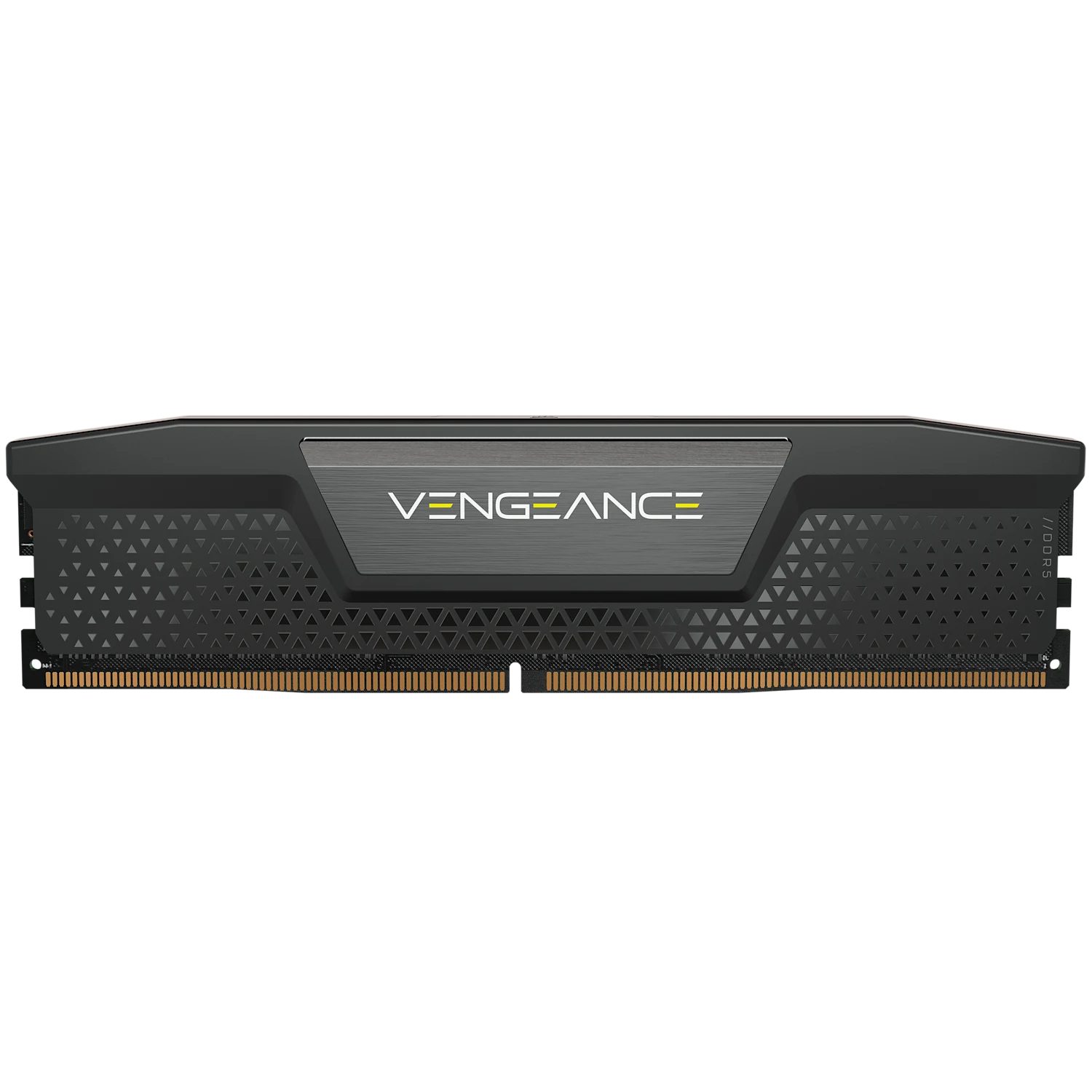
RAM:快速、易失的主存储器

硬盘:慢但大、非易失的辅助存储器
Match each part to its category. · 把每个部分与它的类别配对。
Keyboard = input, monitor = output, RAM = fast primary memory, SSD = non-volatile secondary storage. · 键盘 = 输入,显示器 = 输出,RAM = 快速主存储器,SSD = 非易失辅助存储。
Primary memory differs from secondary storage because it: · 主存储器与辅助存储不同,因为它:
Primary memory (RAM/ROM) is fast and directly accessible by the CPU; secondary storage is slower, larger and non-volatile. · 主存储器(RAM/ROM)快且可被 CPU 直接访问;辅助存储更慢、更大且非易失。
Put the steps of running a stored program in order. · 把运行一个存储程序的步骤按顺序排列。
The CPU can only run code from primary memory, so a program is loaded from storage into RAM first. · CPU 只能从主存储器运行代码,所以一个程序先从存储被加载到 RAM。
RAM is volatile (its contents are lost without power), while secondary storage keeps data when the power is off. · RAM 是易失的(它的内容没有电就丢失),而辅助存储在断电时保留数据。
That is why your work must be saved to storage — RAM only holds it while the computer is on. · 这就是为什么你的工作必须保存到存储——RAM 只在计算机开着时保存它。
Removable storage
- Removable storage 可移动存储 is secondary storage that can be taken out of one computer and put into another: USB flash drives, memory cards, optical discs, external drives.
- It is needed to move data between machines that are not networked, to keep a backup away from the computer, and to distribute software or media.
- Its drawbacks are the reasons for the rest of the syllabus's security topic: it can be lost, stolen, or carry malware.
Optical discs: removable secondary storage read by a laser
可移动存储
- 可移动存储(removable storage)是能从一台计算机取出、放进另一台的辅助存储器:U 盘、存储卡、光盘、外置硬盘。
- 需要它来在没有联网的机器之间传送数据、把备份保存在计算机之外,以及分发软件或媒体。
- 它的缺点正是大纲里安全主题的由来:它可能丢失、被盗,或携带恶意软件。

光盘:用激光读取的可移动辅助存储器
Which of these are removable secondary storage? Select all · 所有 that apply. · 以下哪些是可移动的辅助存储器?选出所有适用的。
RAM and the firmware ROM are primary memory, fixed inside the machine. Flash drives, discs and memory cards are non-volatile and move between computers. · RAM 和固件 ROM 是固定在机器内部的主存储器。U 盘、光盘和存储卡是非易失的,并且能在计算机之间移动。
Buffers
- A buffer 缓冲 is a temporary area of memory that holds data while it passes between two devices working at different speeds.
- A printer buffer accepts a whole document in a moment, so the processor can carry on with other work while the printer takes minutes to print it.
- A video stream buffers a few seconds ahead, so a brief slowdown in the network does not stop the picture.
- The exam asks why: the two devices work at different rates, and the buffer lets the faster one continue instead of waiting.
缓冲
- 缓冲(buffer)是一块临时的存储区域,在数据于两台速度不同的设备之间传递时保存它。
- 打印机缓冲可以在一瞬间接收整份文档,这样处理器就能继续做别的工作,而打印机用几分钟把它打印出来。
- 视频流会提前缓冲几秒,这样网络短暂变慢不会让画面停下。
- 考试问的是为什么:两台设备以不同的速率工作,缓冲让更快的那台继续运行而不必等待。
A ____ is a temporary area of memory that holds data while it passes between two devices working at different speeds. · ____ 是一块临时的存储区域,在数据于两台速度不同的设备之间传递时保存它。
The printer buffer is the standard example: the processor hands over the whole document and carries on while the slow printer works through it. · 打印机缓冲是标准例子:处理器交出整份文档后继续工作,而慢速的打印机逐步处理它。
Embedded systems
- An embedded system is a computer built into another device to do one fixed job: a washing machine, a microwave, a car's engine controller, a thermostat.
- Its program is stored in ROM as firmware 固件 and is usually never changed.
- Inputs are sensors and buttons; outputs are motors, heaters and small displays. There is no general-purpose operating system and no user installing software.
嵌入式系统
- 嵌入式系统是内置于另一台设备中、只做一件固定工作的计算机:洗衣机、微波炉、汽车发动机控制器、温控器。
- 它的程序以固件(firmware)的形式存放在 ROM 里,通常永远不改。
- 输入是传感器和按钮;输出是电机、加热器和小显示屏。没有通用操作系统,也没有用户安装软件。
An embedded system is: · 一个嵌入式系统是:
Embedded systems (in a washing machine, microwave, car…) are dedicated to a single fixed task. · 嵌入式系统(在一个洗衣机、微波炉、汽车里……)专用于一个单一的固定任务。
Worked example: benefits and drawbacks in exam form
- Each point needs the feature and its consequence for the user.
- Benefit: it is optimised for one task, so it is small, cheap in volume and uses little power. It runs one fixed program, so it is reliable and starts instantly with no set-up.
- Drawback: the firmware is hard or impossible to update, so a security fault found later cannot be fixed. It does one task only, so it cannot be upgraded to do more. When it fails the whole device is usually replaced, because it cannot be repaired.
- "Optimised" or "hard to update" on its own is half a point. The "so" clause earns the other half.
例题:考试格式的好处与缺点
- 每一点都需要特征和它对用户的后果。
- 好处:它针对一项任务优化,所以体积小、批量生产便宜、耗电少。它运行一个固定程序,所以可靠,而且无需设置就能立刻启动。
- 缺点:固件难以或无法更新,所以之后发现的安全漏洞无法修补。它只做一件事,所以无法升级去做更多。它出故障时通常整台设备都要更换,因为它无法维修。
- 单独的"优化过"或"难以更新"只算半分。"所以"这一句挣到另外半分。
A drawback of an embedded system is that it: · 一个嵌入式系统的一个缺点是它:
Being dedicated makes it efficient but inflexible — it cannot easily be repurposed and its firmware is hard to update. · 专用使它高效但不灵活——它不能轻易被改作他用,而且它的固件难以更新。
Worked example: choosing components for a scenario
- A supermarket self-checkout. Name a device for each block and say why it fits.
- Input: a barcode scanner (reads the product code faster and more accurately than typing), a touchscreen (customer choices), a card reader (payment).
- Output: the screen (prompts and totals), a receipt printer, a speaker (the "unexpected item" warning).
- Primary memory: RAM holds the running till program and the current basket.
- Secondary storage: an SSD holds the product database and the day's transactions between power cycles.
例题:为一个情境选择组件
- 一台超市自助结账机。为每个部分说出一种设备并说明为什么合适。
- 输入:条码扫描器(比手打更快更准地读取商品编码)、触摸屏(顾客的选择)、读卡器(付款)。
- 输出:屏幕(提示和总额)、收据打印机、扬声器("购物区有异常物品"的警告)。
- 主存储器:RAM 保存正在运行的收银程序和当前的购物篓。
- 辅助存储器:SSD 在两次开机之间保存商品数据库和当天的交易。
At the self-checkout, which of these are input · 输入 devices? Select all · 所有 that apply. · 在自助结账机上,以下哪些是输入设备?选出所有适用的。
The scanner and the card reader bring data in; the printer and the speaker give results out. A touchscreen would count as both. · 扫描器和读卡器把数据送进来;打印机和扬声器把结果送出去。触摸屏则两者都算。
Marks that slip away
- "Memory" and "storage" are not interchangeable. RAM does not keep a program permanently, and a hard disk is not where a program runs.
- A buffer is not a cache. A cache speeds up repeated access to the same data; a buffer smooths a one-way transfer between devices of different speeds.
- A drawback of an embedded system needs its consequence: "cannot be updated, so a later security fault stays unfixed".
- A touchscreen is both input and output. Say which role you mean.
容易丢掉的分
- "存储器"和"存储"不能互换。RAM 不会永久保存程序,硬盘也不是程序运行的地方。
- 缓冲不是缓存(cache)。缓存加速对同一数据的反复访问;缓冲平滑不同速度设备之间的单向传输。
- 嵌入式系统的一个缺点需要写出后果:"无法更新,所以之后的安全漏洞得不到修补"。
- 触摸屏既是输入也是输出。要说明你指的是哪个角色。
A buffer and a cache do the same job. · 缓冲和缓存做的是同一件事。
A cache keeps copies of recently used data so repeated access is fast; a buffer holds data in transit between devices of different speeds. · 缓存保存最近使用数据的副本,使重复访问变快;缓冲保存在不同速度设备之间传输中的数据。
You've got it
- four blocks: input, output, primary memory (RAM/ROM, fast, volatile, CPU-direct), secondary storage (large, non-volatile; removable moves data between machines)
- a program is loaded from secondary storage into RAM before it runs
- a buffer holds data between two devices of different speeds so the faster one can carry on
- an embedded system does one fixed job from firmware: cheap, reliable, instant, but hard to update or upgrade
你掌握了
- 四个部分:输入、输出、主存储器(RAM/ROM,快速、易失、处理器直接访问)、辅助存储器(大、非易失;可移动的可在机器之间传送数据)
- 程序在运行之前先从辅助存储器加载到 RAM
- 缓冲在两台速度不同的设备之间保存数据,让更快的那台继续工作
- 嵌入式系统用固件做一件固定的事:便宜、可靠、即开即用,但难以更新或升级