Number systems and conversions · 数制与转换
| English | 中文 | Pinyin · 拼音 |
|---|---|---|
| byte/baɪt/ | 字节 | zì jié |
| denary/ˈdiːnəri/ | 十进制 | shí jìn zhì |
| binary/ˈbaɪnəri/ | 二进制 | èr jìn zhì |
| bit/bɪt/ | 位 | wèi |
| nibble/ˈnɪbl/ | 半字节 | bàn zì jié |
| hexadecimal/ˌheksəˈdesɪml/ | 十六进制 | shí liù jìn zhì |
| register width/ˈredʒɪstə wɪtθ/ | 寄存器宽度 | jì cún qì kuān dù |
| kibi/ˈkɪbi/ | 二进制千 | èr jìn zhì qiān |
The terabyte that was not a terabyte
- In 2005 a Californian bought a hard drive labelled 80 GB. His computer reported 74.5 GB. He sued, and the manufacturers eventually paid out: they had counted a gigabyte as a thousand million bytes, and the operating system had counted it as $2^{30}$.
- Neither was lying. There are two families of prefix, one built on powers of ten and one on powers of two, and they drift further apart the bigger the number gets.
- The whole of data representation rests on that idea: a computer stores nothing but 0s and 1s, and everything else is an agreement about how to read them.
- This lesson is the three number systems, the conversions between them, and the two prefix families.
那个不是 TB 的 TB
- 2005 年,一位加州人买了一块标着 80 GB 的硬盘。他的计算机显示 74.5 GB。他起诉了,厂商最终赔了钱:厂商把一个 GB 算作十亿字节,而操作系统把它算作 $2^{30}$。
- 两边都没撒谎。前缀有两个家族,一个建立在十的幂上,一个建立在二的幂上,数字越大,它们分得越开。
- 整个数据表示都建立在这个想法上:计算机只存 0 和 1,其余一切都是关于怎样读它们的约定。
- 这一课讲三种数制、它们之间的转换,以及两个前缀家族。
The three number systems
- Denary 十进制 (base 10) uses digits 0 to 9, with place values that are powers of ten. It is the everyday system.
- Binary 二进制 (base 2) uses 0 and 1, with place values that are powers of two. One digit is a bit 位; 4 bits are a nibble 半字节; 8 bits are a byte 字节.
- Hexadecimal 十六进制 (base 16) uses 0 to 9 then A to F for 10 to 15. One hex digit stands for exactly 4 bits, which is why it is the shorthand programmers use for binary.
| Denary | Binary | Hex |
|---|---|---|
| 10 | 1010 |
A |
| 15 | 1111 |
F |
| 16 | 0001 0000 |
10 |
| 255 | 1111 1111 |
FF |
Every system is place value; only the base changes
三种数制
- 十进制(denary,基数 10)用数字 0 到 9,位值是十的幂。它是日常系统。
- 二进制(binary,基数 2)用 0 和 1,位值是二的幂。一位是一个位(bit);4 位是一个半字节(nibble);8 位是一个字节(byte)。
- 十六进制(hexadecimal,基数 16)用 0 到 9 再用 A 到 F 表示 10 到 15。一个十六进制数位恰好代表 4 位,这就是程序员用它作二进制简写的原因。
| 十进制 | 二进制 | 十六进制 |
|---|---|---|
| 10 | 1010 |
A |
| 15 | 1111 |
F |
| 16 | 0001 0000 |
10 |
| 255 | 1111 1111 |
FF |
每种系统都是位值;变的只是基数
Number systems · 数制
byte = Σ place values · 字节 = Σ 位值
Each bit is worth a power of two — flip the bits and watch the decimal and hex update. · 每一位值 2 的一个幂——翻转这些位,看十进制和十六进制更新。
How many bits does one hexadecimal digit represent? · 一个十六进制数字表示多少位?
One hex digit (0–F) covers 16 values = $2^4$, so it maps to exactly 4 bits (a nibble). · 一个十六进制数字(0–F)覆盖 16 个值 = $2^4$,所以它恰好映射到 4 位(一个半字节)。
How many bits are in one byte? · 一个字节里有多少位?
A byte is 8 bits (and a nibble is 4 bits). · 一个字节是 8 位(一个半字节是 4 位)。
Denary to binary
- Method 1, place values: write the powers of two, $128, 64, 32, 16, 8, 4, 2, 1$, and subtract the largest that fits, repeating with what is left. Put a 1 under each one you used.
- Method 2, repeated division: divide by 2 over and over, writing down each remainder, then read the remainders bottom-up.
- $42 = 32 + 8 + 2$, so the bits under 32, 8 and 2 are 1 and the rest are 0:
0010 1010.
Subtract the biggest power of two that fits, and repeat
十进制转二进制
- 方法一,位值:写出二的幂 $128, 64, 32, 16, 8, 4, 2, 1$,减去装得下的最大的一个,对剩下的重复。在用到的每一个下面写 1。
- 方法二,反复除法:不断除以 2,记下每个余数,然后从下往上读余数。
- $42 = 32 + 8 + 2$,所以 32、8、2 下面的位是 1,其余是 0:
0010 1010。
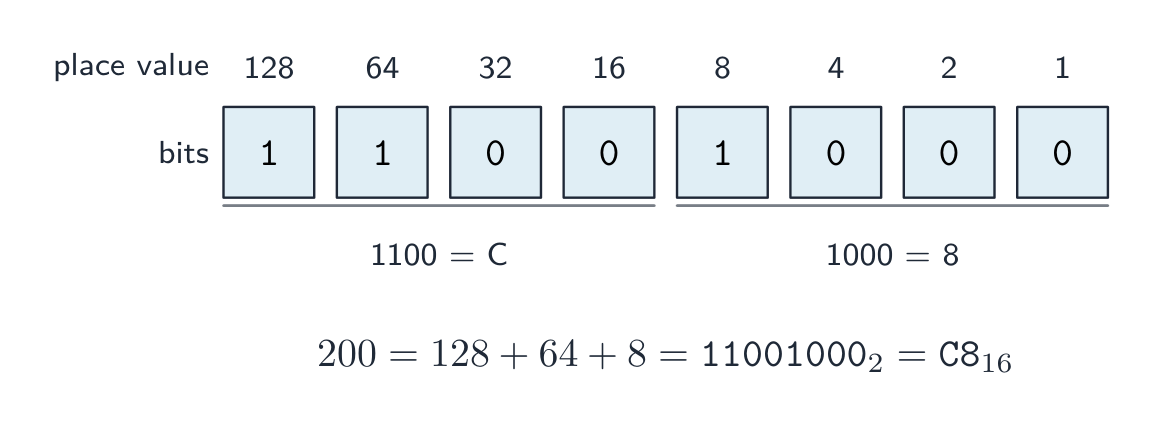
减去装得下的最大的二的幂,然后重复
Convert denary $13$ to binary (8-bit not required — just the significant bits). · 把十进制 $13$ 转换成二进制(不需要 8 位——只要有效位)。
$13 = 8 + 4 + 1$, so the columns 8, 4, 1 are set: 1101. · $13 = 8 + 4 + 1$,所以 8、4、1 这几列被置位:1101。
Convert binary 00101010 to denary. · 把二进制 00101010 转换成十进制。
$32 + 8 + 2 = 42$ (the 32, 8 and 2 columns are set). · $32 + 8 + 2 = 42$(32、8 和 2 这几列被置位)。
Worked example: denary 200 to binary and hex
- $200 = 128 + 64 + 8$, so the 8-bit binary is
1100 1000. - Split into nibbles from the right:
1100is 12, which is C;1000is 8. So the hexadecimal isC8. - Check by place value the other way:
C8$= 12 \times 16 + 8 = 200$. ✓ Always show the working; the conversion itself carries the marks.
例题:十进制 200 转二进制和十六进制
- $200 = 128 + 64 + 8$,所以 8 位二进制是
1100 1000。 - 从右往左分成半字节:
1100是 12,即 C;1000是 8。所以十六进制是C8。 - 反过来用位值检查:
C8$= 12 \times 16 + 8 = 200$。✓ 一定要写出过程;转换本身就是得分点。
Binary and hex, both directions
- Binary to hex: group the bits into nibbles from the right, padding the leftmost group with zeros, and convert each nibble.
0010 0010 1110becomes2 2 E, so22E. - Hex to binary: replace each hex digit with its own 4-bit pattern. No arithmetic needed.
- Hex to denary: multiply each digit by its place value, $16^2 = 256$, $16^1 = 16$, $16^0 = 1$.
22E$= 2 \times 256 + 2 \times 16 + 14 = 558$.
二进制与十六进制,两个方向
- 二进制转十六进制:从右往左把位分成半字节,最左边一组用零补齐,再逐个转换。
0010 0010 1110变成2 2 E,即22E。 - 十六进制转二进制:把每个十六进制数位换成它自己的 4 位模式。不需要算术。
- 十六进制转十进制:每个数位乘以它的位值,$16^2 = 256$、$16^1 = 16$、$16^0 = 1$。
22E$= 2 \times 256 + 2 \times 16 + 14 = 558$。
Convert hexadecimal 2E to denary. · 把十六进制 2E 转换成十进制。
$2 \times 16 + 14 = 32 + 14 = 46$ (E is 14). · $2 \times 16 + 14 = 32 + 14 = 46$(E 是 14)。
Convert the binary number 0010 0010 1110 to hexadecimal. · 把二进制数 0010 0010 1110 转换成十六进制。
Each nibble converts on its own, from the right: 0010 = 2, 0010 = 2, 1110 = 14 = E. · 每个半字节各自转换,从右往左:0010 = 2,0010 = 2,1110 = 14 = E。
How many bits does a value need?
- Exam questions fix the register width 寄存器宽度 (8, 12 or 16 bits), and you must pad with leading zeros to that width. $558$ in 12 bits is
0010 0010 1110, never10 0010 1110. - An unsigned integer from 0 to $2^n - 1$ needs $n$ bits: 200 needs 8 bits (8 bits reach 255), 1000 needs 10 bits (10 bits reach 1023), 16 needs 5 bits (4 bits stop at 15).
- One hexadecimal digit needs 4 bits, one BCD digit needs 4 bits, and one ASCII character needs 7 bits, or 8 for extended ASCII.
一个值需要多少位?
- 考题会固定寄存器宽度(register width,8、12 或 16 位),你必须用前导零补到那个宽度。$558$ 在 12 位里是
0010 0010 1110,绝不是10 0010 1110。 - 从 0 到 $2^n - 1$ 的无符号整数需要 $n$ 位:200 需要 8 位(8 位到 255),1000 需要 10 位(10 位到 1023),16 需要 5 位(4 位只到 15)。
- 一个十六进制数位需要 4 位,一个 BCD 数位需要 4 位,一个 ASCII 字符需要 7 位,扩展 ASCII 是 8 位。
Write denary 558 as a 12-bit binary number (four bits per group, spaces allowed). · 把十进制 558 写成 12 位二进制数(每组四位,可以有空格)。
558 = 512 + 32 + 8 + 4 + 2. Pad with leading zeros to the 12 bits the question asks for; an unpadded answer loses the mark. · 558 = 512 + 32 + 8 + 4 + 2。用前导零补到题目要求的 12 位;不补零会丢分。
Worked example: the minimum number of bits
- A system must store values from 0 to 1000. What is the smallest number of bits?
- Ask which power of two first exceeds 1000. $2^9 = 512$, too small; $2^{10} = 1024$, so ten bits hold 0 to 1023 and 1000 fits.
- The answer is 10 bits, and the reason is the range, not the digit count. A common trap: 16 needs five bits, because four bits stop at 15.
例题:最少需要多少位
- 一个系统必须存储 0 到 1000 的值。最少需要多少位?
- 问哪个二的幂first超过 1000。$2^9 = 512$,太小;$2^{10} = 1024$,所以十位保存 0 到 1023,1000 装得下。
- 答案是 10 位,理由是范围,不是数位个数。常见陷阱:16 需要五位,因为四位只到 15。
What is the smallest number of bits that can store any unsigned value from 0 to 1000? · 能存储 0 到 1000 之间任何无符号值的最少位数是多少?
Nine bits reach 511, ten bits reach 1023. The question is about the range the bits cover, not the number of digits. · 九位到 511,十位到 1023。问题问的是这些位覆盖的范围,不是数位个数。
Binary prefixes and decimal prefixes
- Decimal prefixes are powers of ten and are used for drive capacities and network speeds: kilo $= 10^3$, mega $= 10^6$, giga $= 10^9$, tera $= 10^{12}$.
- Binary prefixes are powers of two and are used for memory sizes: kibi 二进制千 (Ki) $= 2^{10} = 1024$, mebi (Mi) $= 2^{20}$, gibi (Gi) $= 2^{30}$, tebi (Ti) $= 2^{40}$.
- So a "1 TB" drive holds $10^{12}$ bytes, but an operating system reporting in TiB divides by $2^{40}$ and shows about 0.91. Nothing has been lost; two different units were used.
二进制前缀和十进制前缀
- 十进制前缀是十的幂,用于硬盘容量和网络速度:kilo $= 10^3$、mega $= 10^6$、giga $= 10^9$、tera $= 10^{12}$。
- 二进制前缀是二的幂,用于内存大小:二进制千(kibi,Ki)$= 2^{10} = 1024$、mebi(Mi)$= 2^{20}$、gibi(Gi)$= 2^{30}$、tebi(Ti)$= 2^{40}$。
- 所以一块"1 TB"的硬盘装 $10^{12}$ 字节,而以 TiB 报告的操作系统除以 $2^{40}$,显示约 0.91。什么都没少;只是用了两种不同的单位。
How many bytes are in 1 kibibyte (KiB)? · 1 kibibyte(KiB)里有多少字节?
A kibibyte is $2^{10} = 1024$ bytes (a binary prefix, used for memory). · 一个 kibibyte 是 $2^{10} = 1024$ 字节(一个二进制前缀,用于内存)。
A drive sold as 1 TB holds fewer bytes than 1 TiB of memory. · 标称 1 TB 的硬盘装的字节比 1 TiB 内存少。
1 TB is 10^12 bytes; 1 TiB is 2^40, about 1.1 x 10^12. Decimal prefixes for drives, binary prefixes for memory. · 1 TB 是 10^12 字节;1 TiB 是 2^40,约 1.1 x 10^12。硬盘用十进制前缀,内存用二进制前缀。
Where hexadecimal is actually used
- Memory addresses and machine code, because one hex digit is exactly one nibble and a byte is exactly two hex digits, so a dump is readable at a glance.
- Colour codes in web pages:
#FF8800is one byte each of red, green and blue. MAC addresses and error codes likewise. - The reason is always the same: hex is a shorthand for binary that a person can read and write without mistakes, not a system the computer itself uses.
十六进制究竟用在哪里
- 内存地址和机器码,因为一个十六进制数位恰好是一个半字节,一个字节恰好是两个十六进制数位,所以内存转储一眼就能读。
- 网页中的颜色代码:
#FF8800是红、绿、蓝各一个字节。MAC 地址和错误代码也一样。 - 理由永远相同:十六进制是人能无误地读写的二进制简写,不是计算机自己使用的系统。
Where is hexadecimal used in practice? Select all · 所有 that apply. · 十六进制在实践中用在哪里?选出所有适用的。
Hex is a human-readable shorthand for binary: one digit per nibble, two per byte. The processor itself works in binary. · 十六进制是人可读的二进制简写:一个数位一个半字节,两个数位一个字节。处理器本身用二进制工作。
Marks that slip away
- Pad to the width the question gives. An unpadded answer loses the mark even when the bits are right.
- Group nibbles from the right, not the left, or every hex digit shifts.
- 4 bits reach 15, 8 bits reach 255, 10 bits reach 1023. "How many bits" is a question about the range.
- A kibibyte is 1024 bytes and a kilobyte is 1000. Say which you used in any size calculation.
容易丢掉的分
- **补到题目给的宽度。**位对了但没补零,照样丢分。
- 从右往左分半字节,不是从左,否则每个十六进制数位都会错位。
- 4 位到 15,8 位到 255,10 位到 1023。"要多少位"问的是范围。
- 一个 kibibyte 是 1024 字节,一个 kilobyte 是 1000。任何大小计算都要说明你用的是哪个。
You've got it
- denary base 10, binary base 2 (bit, nibble = 4 bits, byte = 8 bits), hexadecimal base 16 where one digit is exactly one nibble
- denary to binary by subtracting powers of two or by repeated division reading remainders bottom-up; binary to hex by grouping nibbles from the right; hex to denary by place value
- pad to the register width; an unsigned value needs $n$ bits where $2^n$ first exceeds it
- decimal prefixes are powers of ten (drives, networks), binary prefixes powers of two (memory): kibi $= 1024$
你掌握了
- 十进制基数 10、二进制基数 2(位、半字节 = 4 位、字节 = 8 位)、十六进制基数 16,一个数位恰好一个半字节
- 十进制转二进制靠减二的幂或反复除法从下往上读余数;二进制转十六进制靠从右分半字节;十六进制转十进制靠位值
- 补到寄存器宽度;无符号值需要 $n$ 位,其中 $2^n$ 首次超过它
- 十进制前缀是十的幂(硬盘、网络),二进制前缀是二的幂(内存):kibi $= 1024$