| Candidates should be able to: | Notes and guidance |
|---|---|
| 1 (a) Understand the role of the central processing unit (CPU) in a computer | • The CPU processes instructions and data that are input into the computer so that the result can be output |
| (b) Understand what is meant by a microprocessor | • A microprocessor is a type of integrated circuit on a single chip |
| 2 (a) Understand the purpose of the components in a CPU, in a computer that has a Von Neumann architecture | • Including: – units: arithmetic logic unit (ALU) and control unit (CU) – registers: program counter (PC), memory address register (MAR), memory data register (MDR), current instruction register (CIR) and accumulator (ACC) – buses: address bus, data bus and control bus |
| (b) Describe the process of the fetch–decode–execute (FDE) cycle, including the role of each component in the process | • How instructions and data are fetched from random access memory (RAM) into the CPU, how they are processed using each component and how they are then executed • Storing data and addresses into specific registers • Using buses to transmit data, addresses and signals • Using units to fetch, decode and execute data and instructions |
| 3 Understand what is meant by a core, cache and clock in a CPU and explain how they can affect the performance of a CPU | • The number of cores, size of the cache and speed of the clock can affect the performance of a CPU |
| 4 Understand the purpose and use of an instruction set for a CPU | • An instruction set is a list of all the commands that can be processed by a CPU, and the commands are machine code |
| 5 Describe the purpose and characteristics of an embedded system and identify devices in which they are commonly used | • An embedded system is used to perform a dedicated functions. For example in, domestic appliances, cars, security systems, lighting systems or vending machines. This is different to a general purpose computer that is used to perform many different functions. For example in, a personal computer (PC) or a laptop |
硬件
IGCSE 计算机科学 · 第 3 主题
 18:05
18:05
The CPU
The processor in your phone is doing something almost stupidly simple. Fetch one instruction. Work out what it means. Do it. Then fetch the next one. That is…
英文讲解 · 内嵌中英文字幕
3.1
计算机体系结构

大纲
来源:剑桥国际大纲
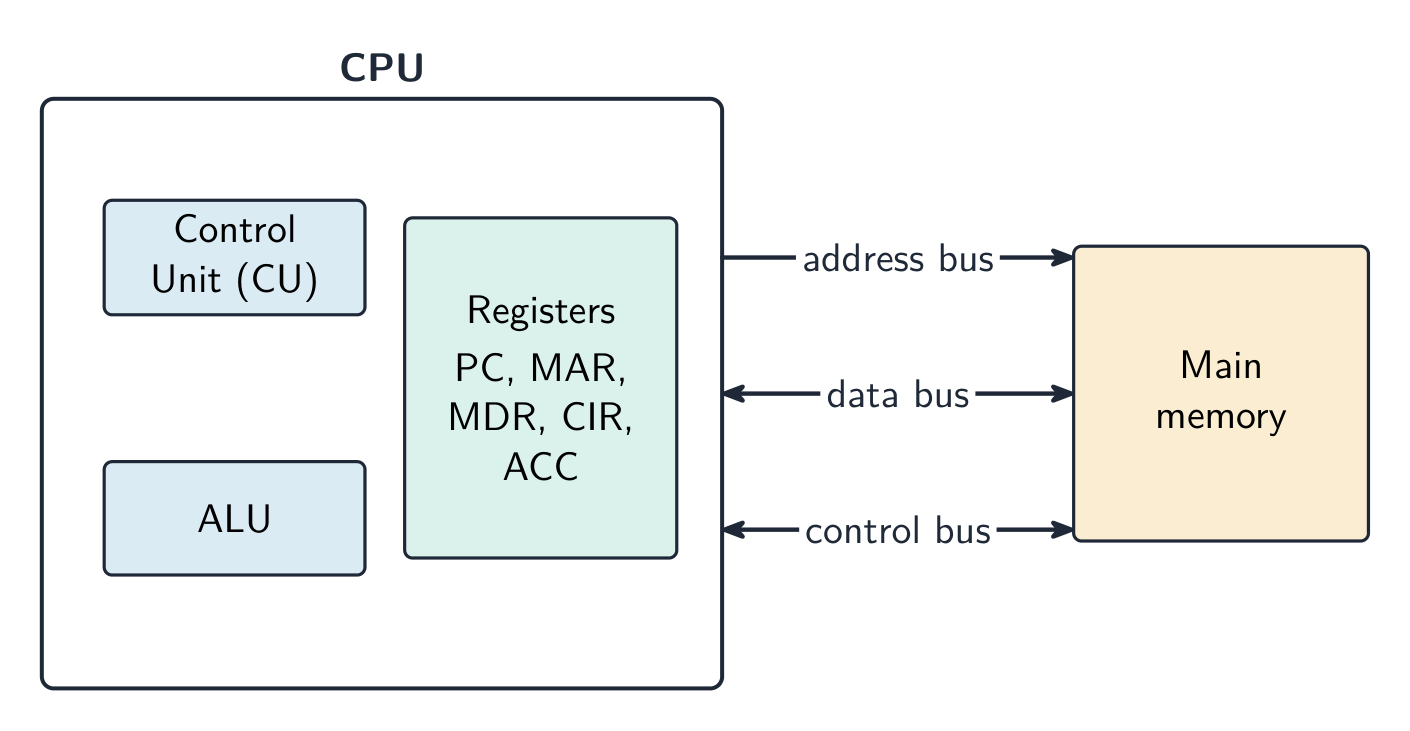
中央处理器(central processing unit,CPU)是计算机处理数据并执行指令(instructions)的部分。它通过重复一个周期、每秒数百万次来运行程序。
Parts of the CPU
| 部分 | 它做什么 |
|---|---|
| 算术逻辑单元(arithmetic logic unit,ALU) | 做计算(加、减)和逻辑操作(比较) |
| 控制单元(control unit,CU) | 发送控制信号以管理所有部分并告诉它们做什么 |
| 寄存器(registers) | 非常小、非常快的存储,一次容纳一份数据 |
各部分由总线(buses,携带信息的成组导线)连接:
- 地址总线(address bus)携带内存地址(一个方向);
- 数据总线(data bus)携带数据和指令(两个方向);
- 控制总线(control bus)携带控制信号。
Special registers
这些寄存器在取指-执行周期期间被使用。
| 寄存器 | 目的 |
|---|---|
| 程序计数器(program counter,PC) | 容纳下一条指令的地址 |
| 内存地址寄存器(memory address register,MAR) | 容纳要读取或写入的地址 |
| 内存数据寄存器(memory data register,MDR) | 容纳刚取的数据或指令 |
| 当前指令寄存器(current instruction register,CIR) | 容纳现在正被执行的指令 |
| 累加器(accumulator,ACC) | 容纳 ALU 计算的结果 |
The fetch–execute cycle
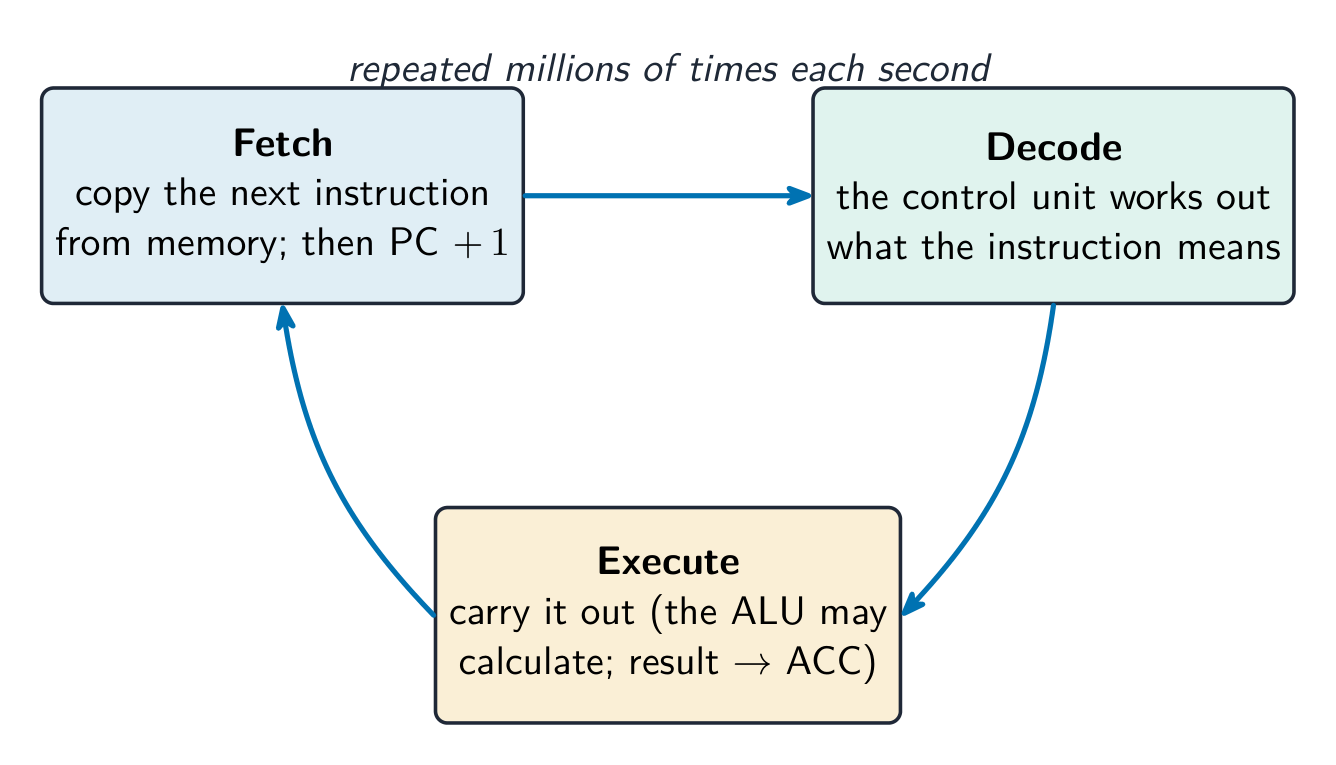
取指执行周期(fetch–execute cycle)有三个阶段,一遍又一遍地重复:
- 取指——指令从内存(memory)被复制进 CPU(用 PC、MAR 和 MDR)。PC 随即增加 1。
- 译码——控制单元算出指令的意思。
- 执行——指令被执行(ALU 可能做一个计算,结果去累加器)。
Cache memory
高速缓存(cache)是 CPU 内部或靠近它的少量非常快的内存。它存储 CPU 常用的数据和指令。CPU 从高速缓存读取比从主存快得多,所以计算机运行得更快。
What affects CPU performance
| 特性 | 效果 |
|---|---|
| 核心(cores)的数目 | 每个核心能自己运行指令,所以更多的核心能同时做更多的工作 |
| 高速缓存大小 | 一个更大的高速缓存为 CPU 容纳更多准备好的数据,所以它等得更少 |
| 时钟速度(clock speed) | 每秒的周期数;一个更高的时钟速度每秒运行更多的指令 |
例题。 两台电脑除以下不同外完全相同:A 是 3.0 GHz 单核 CPU,带 2 MB 缓存;B 是 2.4 GHz 四核 CPU,带 8 MB 缓存。哪一台更适合视频剪辑?为什么?视频剪辑可以拆成许多能同时进行的任务,所以 B 的四个核心可以并行处理多路数据,而 A 一次只能处理一路。B 更大的缓存也把更多常用数据留在离 CPU 很近的地方,所以它需要从 RAM 取数的次数更少。尽管 A 的主频更高,B 仍是更好的选择。不要只凭主频作答:要把核心数、缓存和主频放在一起权衡,并把每一项都联系到具体要做的工作。
Embedded systems
一个嵌入式系统(embedded system)是建在一个更大的设备内部做一件固定工作的一台小计算机。它专门用于那个任务,通常小而低成本,而且没有通用操作系统。例子:一台洗衣机、一个微波炉、一个机顶盒。
探索
The fetch-execute cycle
Tap round the loop the CPU repeats billions of times a second — fetch the instruction, decode what it means, execute it, then do it all again.
词汇表
训练
| 英文 | 中文 | 拼音 |
|---|---|---|
| central processing unit | 中央处理器 | zhōng yāng chǔ lǐ qì |
| instructions | 指令 | zhǐ lìng |
| arithmetic logic unit | 算术逻辑单元 | suàn shù luó jí dān yuán |
| control unit | 控制单元 | kòng zhì dān yuán |
| registers | 寄存器 | jì cún qì |
| buses | 总线 | zǒng xiàn |
| address bus | 地址总线 | dì zhǐ zǒng xiàn |
| data bus | 数据总线 | shù jù zǒng xiàn |
| control bus | 控制总线 | kòng zhì zǒng xiàn |
| program counter | 程序计数器 | chéng xù jì shù qì |
| memory address register | 内存地址寄存器 | nèi cún dì zhǐ jì cún qì |
| memory data register | 内存数据寄存器 | nèi cún shù jù jì cún qì |
| current instruction register | 当前指令寄存器 | dāng qián zhǐ lìng jì cún qì |
| accumulator | 累加器 | lěi jiā qì |
| fetch–execute cycle | 取指执行周期 | qǔ zhǐ zhí xíng zhōu qī |
| Cache | 高速缓存 | gāo sù huǎn cún |
| cores | 核心 | hé xīn |
| clock speed | 时钟速度 | shí zhōng sù dù |
| embedded system | 嵌入式系统 | qiàn rù shì xì tǒng |
| memory | 内存 | nèi cún |
3.2
输入与输出设备

大纲
| Candidates should be able to: | Notes and guidance |
|---|---|
| 1 Understand what is meant by an input device and why it is required | • Including: – barcode scanner – digital camera – keyboard – microphone – optical mouse – QR code scanner – touch screen (resistive, capacitive and infra-red) – two-dimensional (2D) and three-dimensional (3D) scanners |
| 2 Understand what is meant by an output device and why it is required | • Including: – actuator – digital light processing (DLP) projector – inkjet printer – laser printer – light emitting diode (LED) screen – liquid crystal display (LCD) projector – liquid crystal display (LCD) screen – speaker – 3D printer |
| 3 (a) Understand what is meant by a sensor and the purposes of sensors | • Limited to: – acoustic – accelerometer – flow – gas – humidity – infra-red – level – light – magnetic field – moisture – pH – pressure – proximity – temperature |
| (b) Identify the type of data captured by each sensor and understand when each sensor would be used, including selecting the most suitable sensor for a given context |
来源:剑桥国际大纲
一个输入设备把数据发送进计算机。
| 设备 | 它如何工作 |
|---|---|
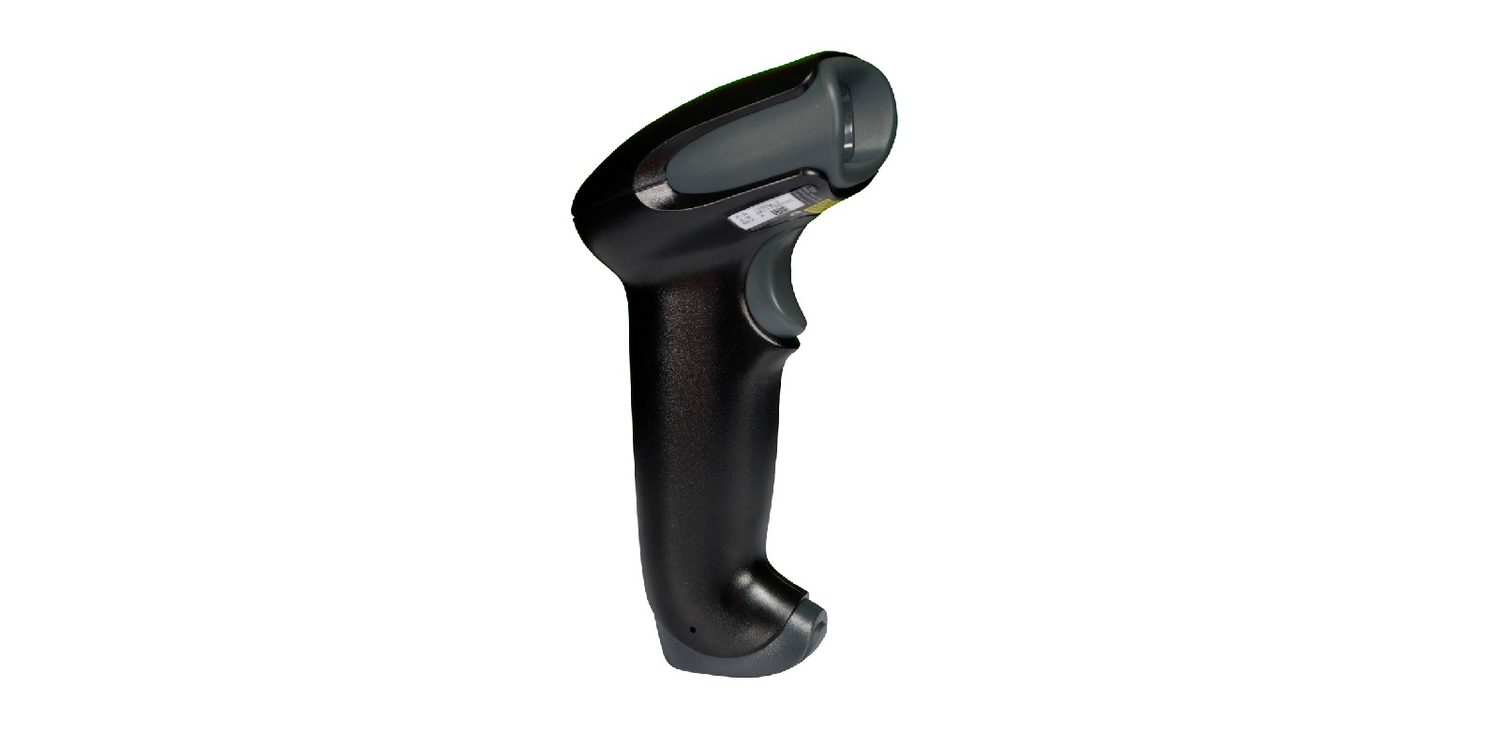
| 条形码扫描器(barcode scanner) | 向条照光并读取反射回来的图案 |
| 二维码扫描器(QR code scanner) | 一个摄像头读取黑白块的一个方形图案 |
| 键盘 | 按一个键发送那个字符的一个代码 |
| 光电鼠标(optical mouse) | 一个光和一个传感器跟踪跨一个表面的移动 |
| 麦克风 | 把声波变成一个电信号 |
| 数码相机 | 一个镜头把光聚焦到一个记录像素的传感器上 |
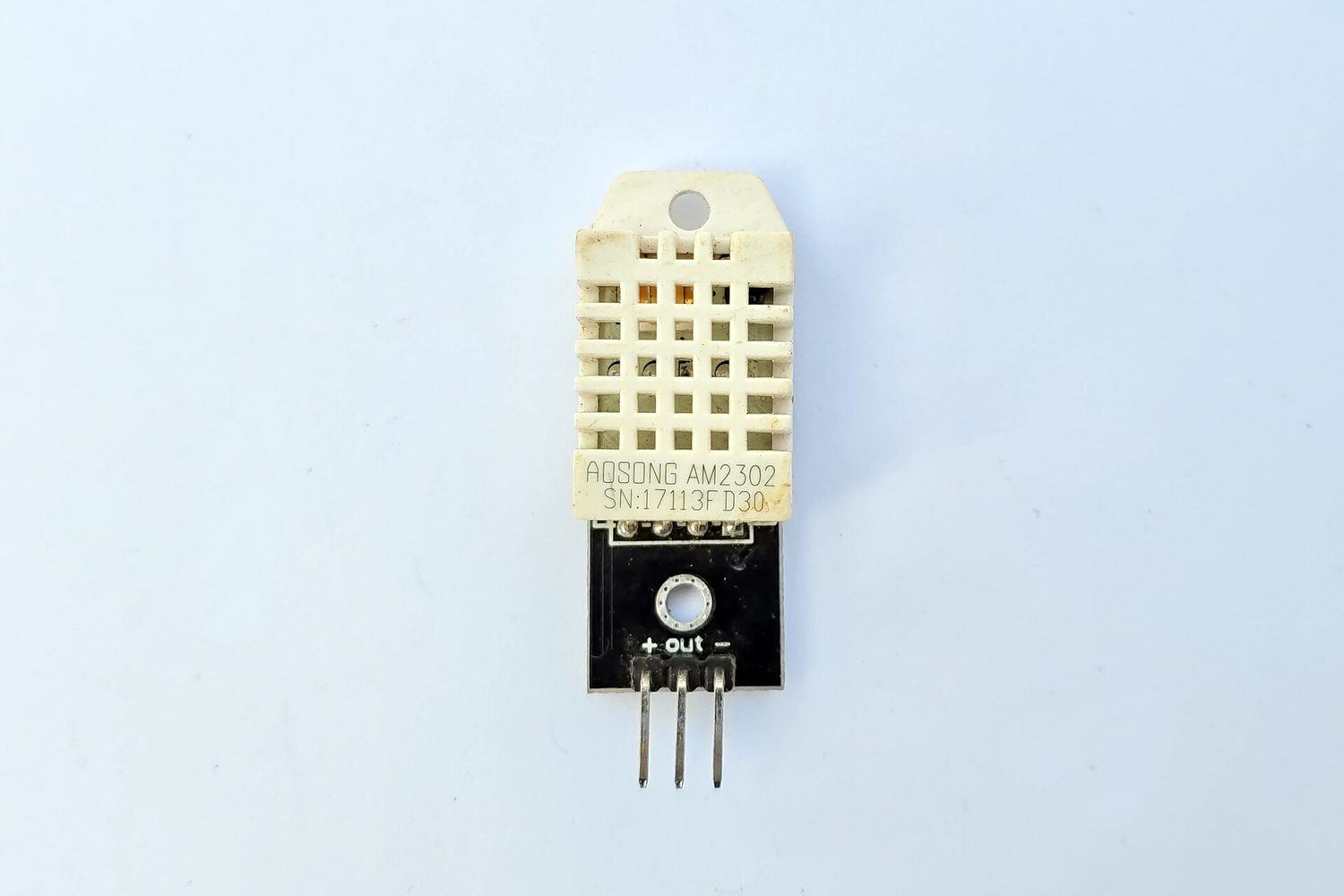
| 传感器(sensors) | 测量一个物理量(如温度或光)并把它作为数据发送 |
| 触摸屏(touch screen) | 检测你的手指触碰屏幕的地方 |




一个触摸屏能以三种方式工作:
- 电阻式(resistive)——两层在你触碰的地方被压在一起;
- 电容式(capacitive)——它感知你手指的微小电荷;
- 红外线(infrared)——你的手指打破一个光束的网格。

探索
Device and storage lab
Classify computing examples by what job they do in a system.
词汇表
训练
| 英文 | 中文 | 拼音 |
|---|---|---|
| barcode scanner | 条形码扫描器 | tiáo xíng mǎ sǎo miáo qì |
| QR code scanner | 二维码扫描器 | èr wéi mǎ sǎo miáo qì |
| sensors | 传感器 | chuán gǎn qì |
| touch screen | 触摸屏 | chù mō píng |
| resistive | 电阻式 | diàn zǔ shì |
| capacitive | 电容式 | diàn róng shì |
| infrared | 红外线 | hóng wài xiàn |
| optical mouse | 光电鼠标 | guāng diàn shǔ biāo |
3.2
输出设备

一个输出设备把数据从计算机发送出到用户。
| 设备 | 它如何工作 |
|---|---|
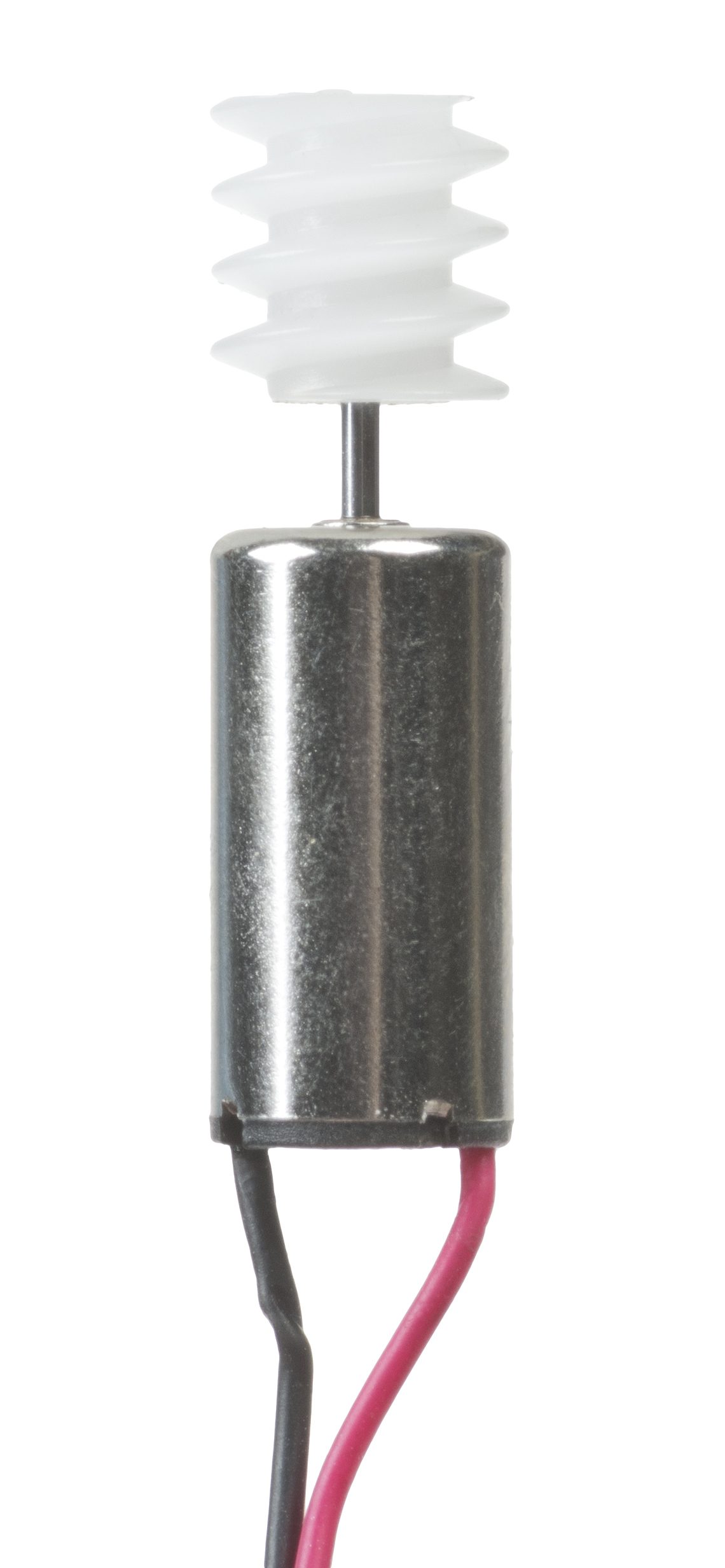
| 执行器(actuator) | 把一个电信号变成运动(例如一个马达或阀门) |
| LCD/LED 屏幕 | 用一个微小彩色点的网格显示图像 |
| 投影仪(projector) | 把一个放大的图像照到一面墙或屏幕上 |
| 喷墨打印机(inkjet printer) | 向纸喷微小的墨滴 |
| 激光打印机(laser printer) | 用一个激光和被热固定到纸上的粉末(碳粉) |
| 3D 打印机 | 一层一层地构建一个固体物体 |
| 扬声器(speaker) | 把一个电信号变成声音 |



词汇表
训练
| 英文 | 中文 | 拼音 |
|---|---|---|
| actuator | 执行器 | zhí xíng qì |
| projector | 投影仪 | tóu yǐng yí |
| inkjet printer | 喷墨打印机 | pēn mò dǎ yìn jī |
| laser printer | 激光打印机 | jī guāng dǎ yìn jī |
| speaker | 扬声器 | yáng shēng qì |
3.3
数据存储
大纲
| Candidates should be able to: | Notes and guidance |
|---|---|
| 1 Understand what is meant by primary storage | • Primary storage is directly accessed by the CPU • Including the role of: – random access memory (RAM) – read only memory (ROM) • Including why a computer needs both RAM and ROM, and the difference between them |
| 2 Understand what is meant by secondary storage | • Secondary storage is not directly accessed by the CPU and is necessary for more permanent storage of data |
| 3 Describe the operation of magnetic, optical and solid-state (flash memory) storage and give examples of each | • Magnetic storage uses platters which are divided into tracks and sectors. Data is read and written using electromagnets. Including hard disk drive (HDD) • Optical storage uses lasers to create and read pits and lands. Including: CD, DVD and Blu-ray • Solid-state (flash memory) uses NAND or NOR technology. Transistors are used as control gates and floating gates. Including: solid-state drive (SSD), SD card and USB drive |
| 4 Describe what is meant by virtual memory, how it is created and used and why it is necessary | • Pages of data are transferred between RAM and virtual memory when needed |
| 5 Understand what is meant by cloud storage | • Cloud storage can be accessed remotely in comparison to storing data locally |
| 6 Explain the advantages and disadvantages of storing data on the cloud in comparison to storing it locally | • Physical servers and storage are needed to store data in cloud storage |
来源:剑桥国际大纲
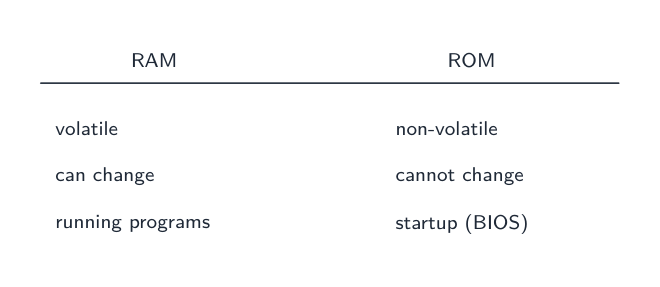
主存储器(primary storage)是 CPU 能直接使用的内存。有两种。
| RAM | ROM | |
|---|---|---|
| 全名 | 随机存取存储器(random access memory) | 只读存储器(read only memory) |
| 读/写 | 读和写 | 只读 |
| 没有电时保留数据? | 否——它是易失性(volatile)的 | 是——它是非易失性(non-volatile)的 |
| 容纳 | 现在使用中的程序和数据 | 启动指令(如何引导计算机) |
两者都需要:ROM 告诉计算机如何启动,然后 RAM 容纳你运行的程序。

词汇表
训练
| 英文 | 中文 | 拼音 |
|---|---|---|
| Primary storage | 主存储器 | zhǔ cún chǔ qì |
| random access memory | 随机存取存储器 | suí jī cún qǔ cún chǔ qì |
| read only memory | 只读存储器 | zhī dú cún chǔ qì |
| volatile | 易失性 | yì shī xìng |
| non-volatile | 非易失性 | fēi yì shī xìng |
3.3
辅助存储

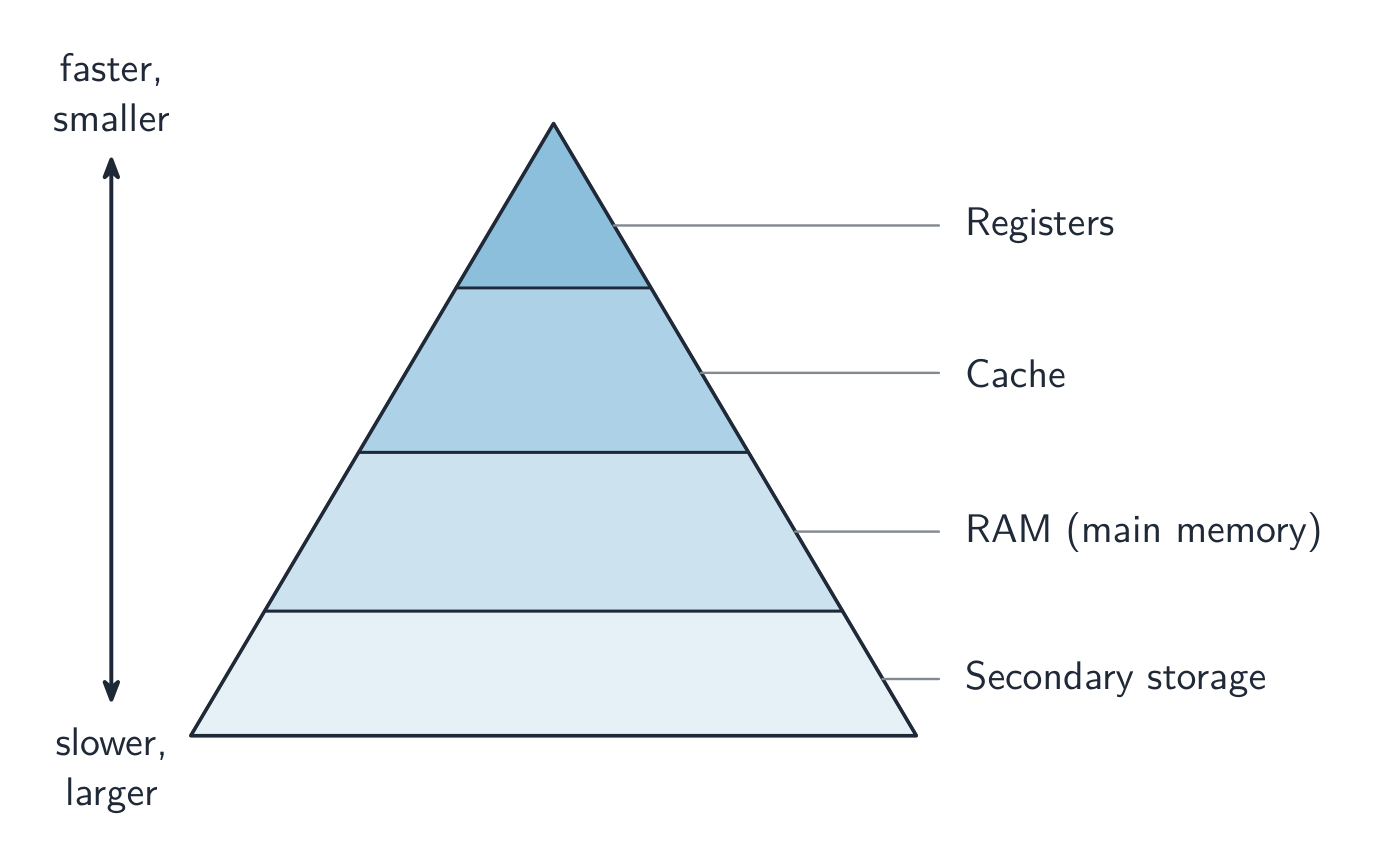
辅助存储器(secondary storage)永久地保留数据,即使电关了。它是非易失性的,被用于长期存储。有三种类型。
| 类型 | 它如何存储数据 | 例子 |
|---|---|---|
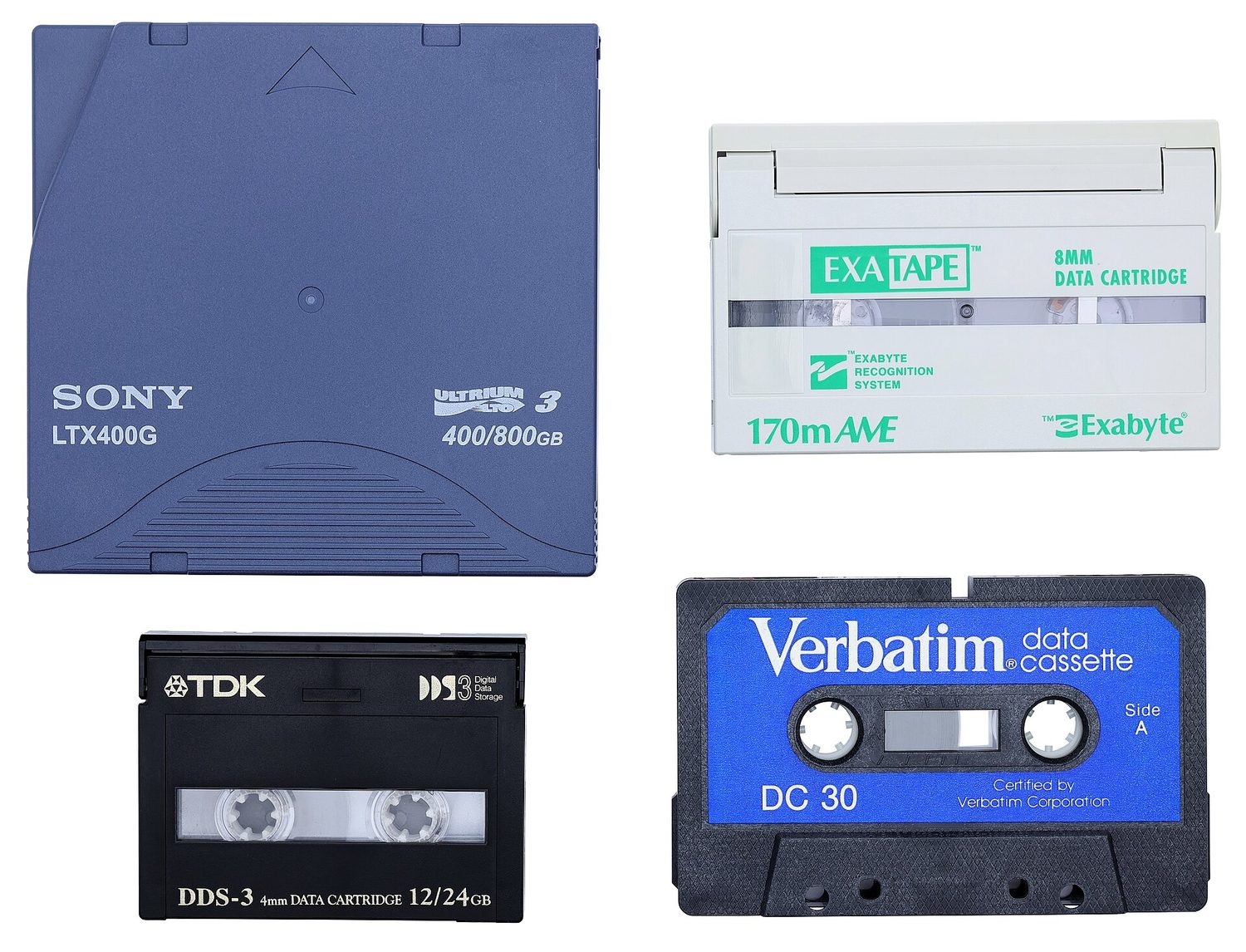
| 磁存储(magnetic storage) | 数据作为旋转磁盘上被磁化的斑点存储 | 硬盘驱动器(HDD)、磁带 |
| 光存储(optical storage) | 数据作为被一个激光读取的标记存储 | CD、DVD、蓝光 |
| 固态存储(solid state storage) | 数据存储在闪存(flash memory)中,没有移动部件 | SSD、USB 闪存盘、存储卡 |


探索
Device and storage lab
Classify computing examples by what job they do in a system.
词汇表
训练
| 英文 | 中文 | 拼音 |
|---|---|---|
| Secondary storage | 辅助存储器 | fǔ zhù cún chǔ qì |
| magnetic storage | 磁存储 | cí cún chǔ |
| optical storage | 光存储 | guāng cún chǔ |
| solid state storage | 固态存储 | gù tài cún chǔ |
| flash memory | 闪存 | shǎn cún |
3.3
虚拟内存

当 RAM 变满时,计算机能把辅助存储的一部分用作额外的、假装的 RAM。这叫虚拟内存(virtual memory)。
现在不需要的数据被从 RAM 移出到磁盘上,这为其他程序在 RAM 中腾出空间。这让你运行比单独的 RAM 能容纳的更多的程序。它更慢,因为辅助存储比 RAM 慢得多。
词汇表
训练
| 英文 | 中文 | 拼音 |
|---|---|---|
| virtual memory | 虚拟内存 | xū nǐ nèi cún |
3.3
数据存储
大纲
| Candidates should be able to: | Notes and guidance |
|---|---|
| 1 Understand what is meant by primary storage | • Primary storage is directly accessed by the CPU • Including the role of: – random access memory (RAM) – read only memory (ROM) • Including why a computer needs both RAM and ROM, and the difference between them |
| 2 Understand what is meant by secondary storage | • Secondary storage is not directly accessed by the CPU and is necessary for more permanent storage of data |
| 3 Describe the operation of magnetic, optical and solid-state (flash memory) storage and give examples of each | • Magnetic storage uses platters which are divided into tracks and sectors. Data is read and written using electromagnets. Including hard disk drive (HDD) • Optical storage uses lasers to create and read pits and lands. Including: CD, DVD and Blu-ray • Solid-state (flash memory) uses NAND or NOR technology. Transistors are used as control gates and floating gates. Including: solid-state drive (SSD), SD card and USB drive |
| 4 Describe what is meant by virtual memory, how it is created and used and why it is necessary | • Pages of data are transferred between RAM and virtual memory when needed |
| 5 Understand what is meant by cloud storage | • Cloud storage can be accessed remotely in comparison to storing data locally |
| 6 Explain the advantages and disadvantages of storing data on the cloud in comparison to storing it locally | • Physical servers and storage are needed to store data in cloud storage |
来源:剑桥国际大纲
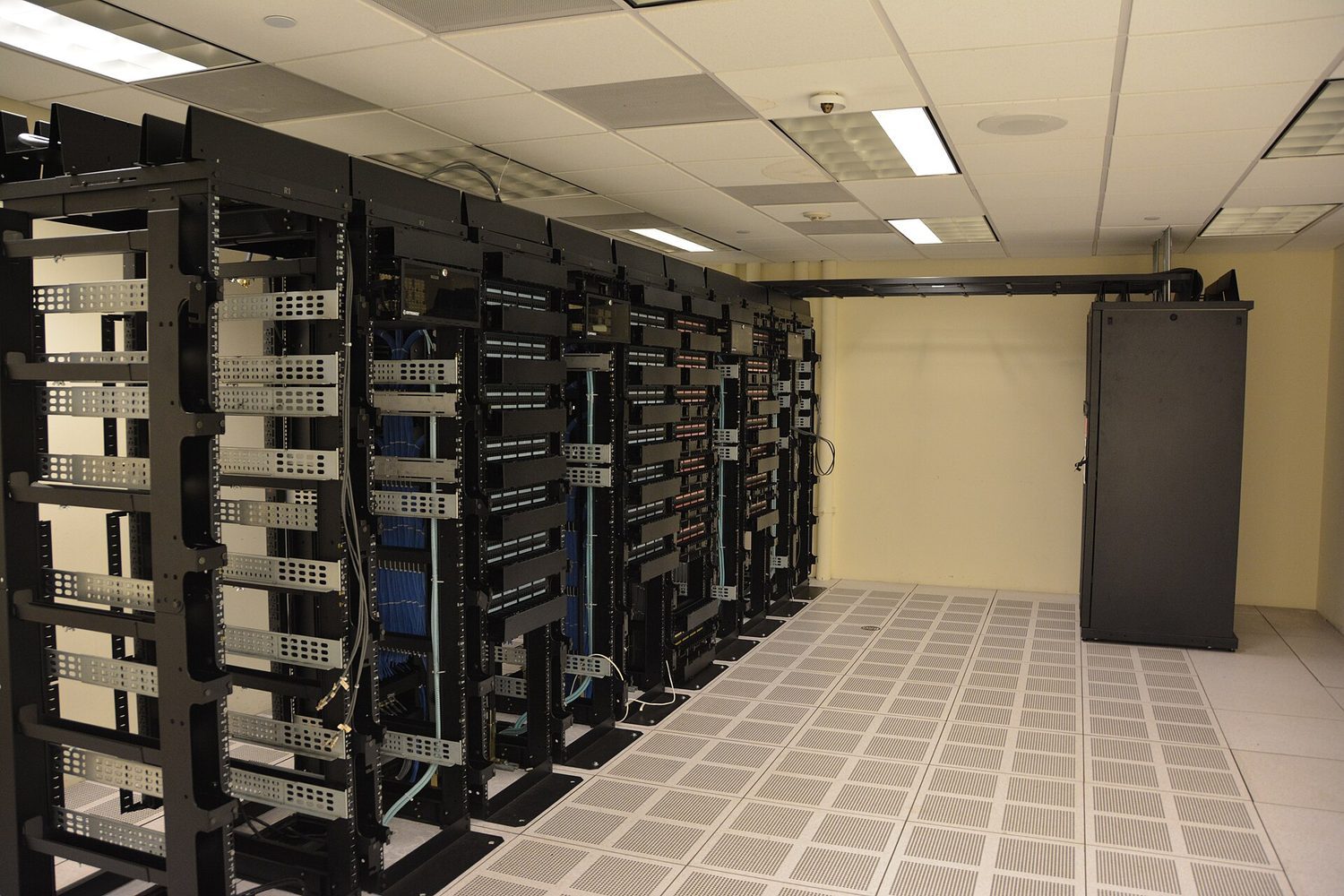
云存储(cloud storage)把你的数据保存在通过互联网访问的远程物理服务器上,而不是在你自己的设备上。
- 优点:从任何地方任何设备访问它;没有本地存储硬件要购买或维护;容易分享文件和自动备份。
- 缺点:需要一个可用的互联网连接;持续的订阅成本;安全和隐私取决于提供商;你依赖那个提供商保持可用和在营。
词汇表
训练
| 英文 | 中文 | 拼音 |
|---|---|---|
| Cloud storage | 云存储 | yún cún chǔ |
3.4
网络硬件

大纲
| Candidates should be able to: | Notes and guidance |
|---|---|
| 1 Understand that a computer needs a network interface card (NIC) to access a network | |
| 2 Understand what is meant by, and the purpose of, a media access control (MAC) address, including its structure | • A network interface card is given a MAC address at the point of manufacture • MAC addresses are usually written as hexadecimal • MAC addresses are created using the manufacturer code and the serial code |
| 3 (a) Understand what is meant by, and the purpose of, an internet protocol (IP) address (b) Understand that there are different types of IP address | • An IP address is allocated by the network and it can be static or dynamic • Including the characteristics of, and differences between, IPv4 and IPv6 |
| 4 Describe the role of a router in a network | • A router sends data to a specific destination on a network • A router can assign IP addresses • A router can connect a local network to the internet |
来源:剑桥国际大纲
Network interface card (NIC)
一个网络接口卡(network interface card,NIC)是让一个设备加入一个网络并发送和接收数据的硬件。每个 NIC 有一个内建的 MAC 地址。
MAC address and IP address
- 一个 MAC 地址(media access control 介质访问控制 地址)是一个识别一个物理设备的数。制造商设定它,而它通常不改变。它用十六进制书写。
- 一个 IP 地址(internet protocol 网际协议 地址)是一个识别一个网络上的一个设备的数。它由网络给出并能改变。
所以一个 MAC 地址随设备,而一个 IP 地址取决于设备正在使用的网络。
IP 地址有两个版本。IPv4 是 32 位的,写成四个 0–255 的十进制数(例如 192.168.0.1);较新的 IPv6 是 128 位的,写成用冒号分隔的八组十六进制数,提供多得多的地址。一个地址还要么是静态(static)的(固定、手动设置、从不改变),要么是动态(dynamic)的(每次设备连接时由路由器/网络分发,所以能改变)。
Router
一个路由器(router)把不同的网络连接在一起——例如,你的家庭网络连到互联网。它读每个数据包中的 IP 地址并把它转发向正确的网络。
探索
Network route lab
Follow data from a device through network hardware and protocols.
词汇表
训练
| 英文 | 中文 | 拼音 |
|---|---|---|
| network interface card | 网络接口卡 | wǎng luò jiē kǒu kǎ |
| static | 静态 | jìng tài |
| dynamic | 动态 | dòng tài |
| router | 路由器 | lù yóu qì |
| fetch-execute cycle | 取指执行周期 | qǔ zhǐ zhí xíng zhōu qī |
| media access control | 介质访问控制 | jiè zhì fǎng wèn kòng zhì |
| internet protocol | 网际协议 | wǎng jì xié yì |
3.4
考试技巧
- 学习取指-译码-执行周期和特殊寄存器:程序计数器容纳下一条指令的地址,MAR/MDR 携带地址/数据,而累加器容纳 ALU 的结果。
- CPU 性能随更多的核心、一个更大的高速缓存和一个更高的时钟速度改善。
- RAM 是易失性的(它在没有电时失去它的数据)并容纳使用中的程序;ROM 是非易失性的且只读(启动指令)。
- 匹配辅助存储类型:磁(HDD、磁带)、光(CD/DVD,被一个激光读取)、固态(SSD、USB、闪存——没有移动部件)。
- 一个 MAC 地址识别物理设备且通常不改变;一个 IP 地址由网络给出并能改变。
本主题的互动课程
逐步学习,并即时检测练习。