Forms · 表单
This page needs a recent browser (with SharedArrayBuffer support). Please update Chrome, Edge, Firefox or Safari to the latest version. · 此页面需较新浏览器(支持 SharedArrayBuffer)。请升级 Chrome、Edge、Firefox 或 Safari 至最新版本。
English
Forms
- A form lets people type things in — a name, a message, a search.
- The boxes you type in are called inputs.
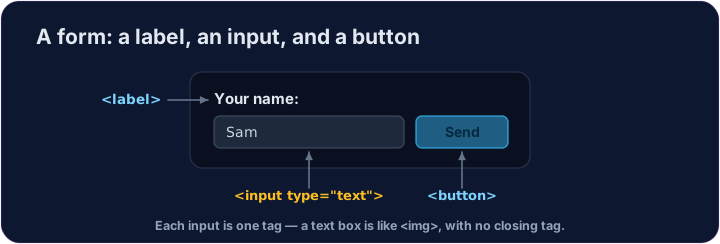
- A text box is
<input type="text">— a single tag, like<img>.
中文
表单
- 表单让人们能输入内容 —— 名字、留言、搜索词。
- 你打字的那些框,叫做输入框(input)。
- 文本框是
<input type="text">—— 单标签,和<img>一样。
English
Labels and buttons
- A
<label>is the words next to an input, telling the user what it is for. - A
<button>is something to click — like Send or Search. - We won't actually send anything here — we're just learning the tags.
中文
标签和按钮
<label>是输入框旁边的文字,告诉用户这个框是干什么的。<button>是可以点的按钮 —— 比如 Send(发送)或 Search(搜索)。- 这里我们不会真的发送什么 —— 只是学这些标签。
<label>Your name:</label>
<input type="text">
<button>Send</button>
English
Common mistakes
- Every input should have a matching
<label>. - A button in a form submits it by default — use
type="button"to stop that.
中文
常见错误
- 每个输入都应有对应的
<label>。 - 表单里的按钮默认会提交——用
type="button"阻止。
English
Now you try
- Inputs and buttons are the building blocks of every form on the web.
- Add a text box, then a button.
中文
现在你来试试
- 输入框和按钮,是网上每一个表单的基本零件。
- 加一个文本框,再加一个按钮。
Add a box the user can type in. Use <input type="text"> (a single tag, like <img>). · 加一个用户可以打字的输入框。用 <input type="text">(单标签,和 <img> 一样)。
Add a button that says Send · 发送. Use <button>Send</button>. · 加一个写着 Send · 发送 的按钮。用 <button>Send</button>。