Programs and processes · 程序与进程
This page needs a recent browser (with SharedArrayBuffer support). Please update Chrome, Edge, Firefox or Safari to the latest version. · 此页面需较新浏览器(支持 SharedArrayBuffer)。请升级 Chrome、Edge、Firefox 或 Safari 至最新版本。
English
What is a process?
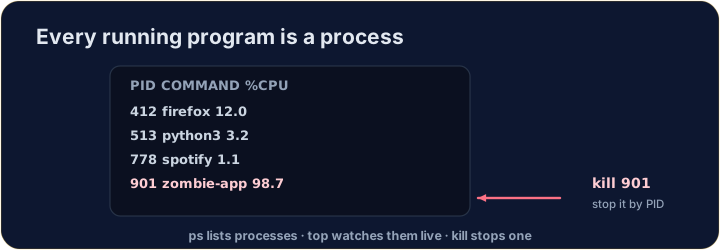
- A process is a running program. Your browser, your editor, and the shell itself are all processes.
- Each has a number — a PID (process ID) — that the system uses to keep track of it.
- (These commands talk to the real operating system, so they aren't part of our simulator — but here is what you'll use on a real machine.)
中文
什么是进程?
- 进程就是一个正在运行的程序。你的浏览器、编辑器,以及 shell 本身,都是进程。
- 每个进程都有一个编号 —— PID(进程 ID)—— 系统用它来追踪这个进程。
- (这些命令要和真实的操作系统打交道,所以不在我们的模拟器里 —— 但下面就是你在真实机器上会用到的内容。)
English
Seeing what is running
pslists your processes;ps auxlists all of them.top(or the nicerhtop) shows a live view that updates every second — handy to spot a program using too much CPU or memory:
- Press
qto quittop.
中文
查看正在运行的程序
ps列出你的进程;ps aux列出所有进程。top(或更好用的htop)显示一个实时视图,每秒刷新 —— 很适合用来揪出占用过多 CPU 或内存的程序:
top
- 按
q退出top。
English
Stopping a process
- If a program is frozen, you can stop it. In the terminal, Ctrl-C stops the program running right now.
- For another process, find its PID with
psand thenkillit:
killpolitely asks the process to stop;kill -9forces it. Use force only as a last resort.
中文
停止一个进程
- 如果某个程序卡死了,你可以停掉它。在终端里,Ctrl-C 会停止当前正在运行的程序。
- 对于其他进程,先用
ps找到它的 PID,然后kill掉它:
kill 1234
kill是礼貌地请求进程停止;kill -9则是强制结束。强制手段只在万不得已时才用。
English
Now you try
ps,topandkilltalk to the real OS, so they are not in our simulator.- Instead, a snapshot of
psoutput is saved inprocesses.txt. Use the file tools you already know —grepandwc— to find the CPU-hog and count the processes.
中文
现在你来试
ps、top和kill要和真实操作系统打交道,所以不在我们的模拟器里。- 作为替代,一份
ps输出的快照保存在processes.txt里。用你已经会的文件工具 ——grep和wc—— 找出占用 CPU 的进程并数出进程数量。
English
Common mistakes
pslists running processes;killstops one by its PID.- A trailing
&runs a command in the background.
中文
常见错误
ps列出运行中的进程;kill按 PID 停止某个进程。- 末尾的
&让命令在后台运行。
You cannot run ps in this simulator, but a teammate saved its output to processes.txt (each line is PID name cpu%). Find the frozen, CPU-hogging firefox line with grep firefox processes.txt. · 你没法在这个模拟器里运行 ps,但队友把它的输出保存到了 processes.txt(每行是 PID 名称 cpu%)。用 grep firefox processes.txt 找出那个卡死、占用 CPU 的 firefox 行。
How many processes were running when the snapshot was taken? Count the lines with cat processes.txt | wc -l. · 拍下这张快照时有多少个进程在运行?用 cat processes.txt | wc -l 数一数行数。