Wildcards · 通配符
This page needs a recent browser (with SharedArrayBuffer support). Please update Chrome, Edge, Firefox or Safari to the latest version. · 此页面需较新浏览器(支持 SharedArrayBuffer)。请升级 Chrome、Edge、Firefox 或 Safari 至最新版本。
English
One command, many files
- A wildcard is a symbol that stands for "anything". The most common is
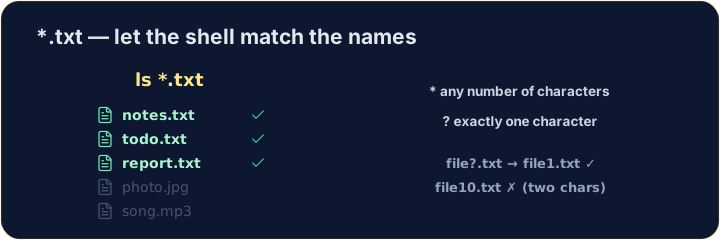
*. *.txtmeans "every name ending in.txt". The shell fills in the matches for you:
中文
一条命令,多个文件
- 通配符是代表“任意内容”的符号。最常见的是
*。 *.txt表示“所有以.txt结尾的名字”。shell 会替你把匹配项填进去:
ls *.txt
English
The two main wildcards
*matches any number of characters (even none).?matches exactly one character.
- So
file?.txtmatchesfile1.txtandfileA.txt, but notfile10.txt.
中文
两个主要的通配符
*匹配任意数量的字符(哪怕是零个)。?匹配恰好一个字符。
ls file?.txt
- 所以
file?.txt能匹配file1.txt和fileA.txt,但匹配不到file10.txt。
English
Be careful with delete
- Wildcards are powerful — and that cuts both ways:
- That deletes every
.txtfile at once. Runls *.txtfirst to see exactly what will go.
中文
删除时要小心
- 通配符很强大 —— 而这是一把双刃剑:
rm *.txt
- 这会一次性删除所有
.txt文件。先运行ls *.txt,看清楚到底有哪些会被删掉。
English
Common mistakes
*matches any text and?matches one character.- Quote a name that has spaces, or the shell splits it into two.
中文
常见错误
*匹配任意文本,?匹配一个字符。- 带空格的名字要加引号,否则 shell 会把它拆成两个。
List only the .txt files using the * wildcard: ls *.txt. · 用 * 通配符只列出 .txt 文件:ls *.txt。
Delete · 删除 all · 所有 the .txt files at once with rm *.txt. The check lists what is left. · 用 rm *.txt 一次性删除所有 .txt 文件。检查时会列出剩下的内容。