Reading files · 读取文件
This page needs a recent browser (with SharedArrayBuffer support). Please update Chrome, Edge, Firefox or Safari to the latest version. · 此页面需较新浏览器(支持 SharedArrayBuffer)。请升级 Chrome、Edge、Firefox 或 Safari 至最新版本。
English
Reading a file
catprints a file's contents straight to the screen:
- It is named after "concatenate" — it can also join several files together.
中文
读取文件
cat把文件内容直接打印到屏幕上:
cat poem.txt
- 它的名字来自 “concatenate(连接)” —— 它也能把好几个文件拼接在一起。
English
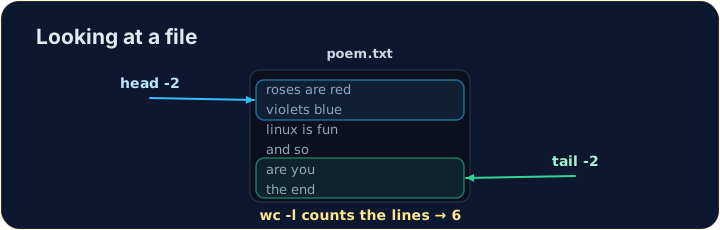
Just the start or end
- For a long file you often want only a peek:
headshows the first lines,tailshows the last lines.
- The
-noption chooses how many lines.
中文
只看开头或结尾
- 对于很长的文件,你常常只想瞄一眼:
head显示开头几行,tail显示结尾几行。
head -n 2 poem.txt
tail -n 1 poem.txt
-n选项用来选择显示多少行。
English
Counting
wc(word count) measures a file. The most useful option is-lfor lines:
wc -wcounts words andwc -ccounts characters. Now try the tasks.
中文
计数
wc(word count,字数统计)用来度量一个文件。最常用的选项是-l,统计行数:
wc -l poem.txt
wc -w统计单词数,wc -c统计字符数。现在来试试任务吧。
English
Common mistakes
catprints a whole file at once; uselessto scroll a large one.- Press Tab to complete a long file name.
中文
常见错误
cat一次打印整个文件;大文件用less滚动查看。- 按 Tab 补全长文件名。
Use cat to print the whole contents of poem.txt. · 用 cat 打印出 poem.txt 的全部内容。
How many lines does the poem have? Use wc -l poem.txt to count them. · 这首诗有多少行?用 wc -l poem.txt 数一数。