Array methods · 数组方法
This page needs a recent browser (with SharedArrayBuffer support). Please update Chrome, Edge, Firefox or Safari to the latest version. · 此页面需较新浏览器(支持 SharedArrayBuffer)。请升级 Chrome、Edge、Firefox 或 Safari 至最新版本。
English
Array methods
.map(fn)makes a new array by transforming each item..filter(fn)makes a new array of only the items wherefnreturnstrue..forEach(fn)runsfnfor each item, making no new array.
中文
数组方法
.map(fn)通过转换每个元素,生成一个新数组。.filter(fn)只把fn返回true的元素组成一个新数组。.forEach(fn)对每个元素运行fn,不生成新数组。
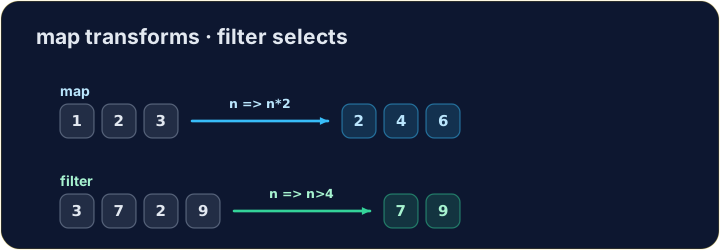
let nums = [1, 2, 3];
let doubled = nums.map((n) => n * 2);
console.log(doubled);   // → [2,4,6]
English
Filtering keeps some items
.filterkeeps each item for which the test returnstrue.
中文
筛选保留部分元素
.filter保留每个让测试返回true的元素。
let nums = [3, 7, 2, 9];
let big = nums.filter((n) => n > 4);
console.log(big);   // → [7,9]
English
Watch out
.mapand.filterreturn a new array — the original is untouched.- You hand each one an arrow function that says what to do with one item.
中文
注意
.map和.filter返回一个新数组 —— 原数组保持不变。- 你给它们各自一个箭头函数,说明对一个元素要做什么。
English
Common mistakes
mapandfilterreturn a NEW array — they do not change the original.forEachjust loops and returns nothing.
中文
常见错误
map和filter返回新数组——不改变原数组。forEach只是循环,不返回任何东西。
English
Now you try
- Use
.map,.filteror.forEach. - Press Check answer to test it.
中文
现在轮到你
- 使用
.map、.filter或.forEach。 - 按检查答案来测试它。
Use .map to double every number in [1, 2, 3] and store the new array in result (it should be [2, 4, 6]). · 用 .map 把 [1, 2, 3] 中的每个数字翻倍,把新数组存进 result(应为 [2, 4, 6])。
Click Run to see the output here. · 点击“运行”查看此处输出。
Use .filter to keep only the numbers greater than 4 from [3, 7, 2, 9, 1], in a variable big (it should be [7, 9]). · 用 .filter 从 [3, 7, 2, 9, 1] 中只保留大于 4 的数字,存进变量 big(应为 [7, 9])。
Click Run to see the output here. · 点击“运行”查看此处输出。
Use .forEach to add every number in [4, 8, 15] to · 到 total (it should end up 27). · 用 .forEach 把 [4, 8, 15] 中的每个数字加到 total 上(最终应为 27)。
Click Run to see the output here. · 点击“运行”查看此处输出。