Writing a class: fields, constructor, methods · 编写类:字段、构造方法和方法
Make your own type
- So far you used classes like
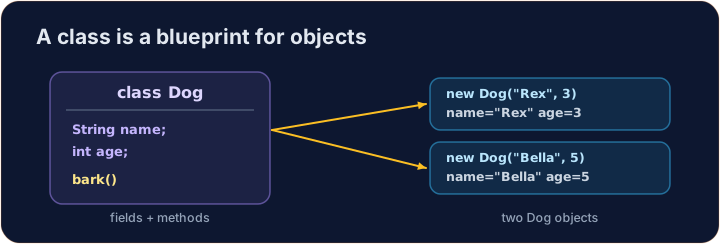
StringandMaththat Java gave you. - Now you will write your own class. A class is a plan for an object.
- An object holds data (its own values) and methods (things it can do).
创建你自己的类型
- 到目前为止,你用过 Java 提供的类,比如
String和Math。 - 现在你要写自己的类(class)。类是对象的蓝图。
- 一个对象保存数据(它自己的值)和方法(它能做的事)。
Instance variables
- Data that each object keeps is stored in instance variables (also called fields).
- You declare them inside the class, but outside any method.
- Each object gets its own copy of these variables.
实例变量
- 每个对象保存的数据存放在实例变量(instance variable,也叫字段)里。
- 你在类的里面、但在任何方法的外面声明它们。
- 每个对象都有它自己的一份这些变量。
public class Dog {
    String name;   // instance variable
    int age;       // instance variable
}
A constructor
- A constructor sets up a new object. It runs when you write
new. - It has the same name as the class and no return type (not even
void). - Use the word
thisto mean "this object's own variable".
构造方法
- 构造方法(constructor)用来初始化一个新对象。当你写
new时它会运行。 - 它的名字和类名相同,并且没有返回类型(连
void都没有)。 - 用
this这个词来表示“这个对象自己的变量”。
public class Dog {
    String name;
    int age;

    // Constructor: runs when we make a new Dog
    public Dog(String name, int age) {
        this.name = name;   // this.name is the field; name is the parameter
        this.age = age;
    }
}
Instance methods
- An instance method is an action an object can do.
- It can read and change the object's own instance variables.
- You call it on an object with a dot:
myDog.speak().
实例方法
- 实例方法(instance method)是一个对象能做的动作。
- 它可以读取并修改这个对象自己的实例变量。
- 你用点号在一个对象上调用它:
myDog.speak()。
public class Dog {
    String name;
    int age;

    public Dog(String name, int age) {
        this.name = name;
        this.age = age;
    }

    // Instance method: returns a sentence about this dog
    public String describe() {
        return this.name + " is " + this.age;
    }
}
Make and use an object
- Use
new ClassName(...)to build an object. This calls the constructor. - Store it in a variable whose type is the class name.
- Then call its methods with a dot.
创建并使用一个对象
- 用
new ClassName(...)来创建一个对象。这会调用构造方法。 - 把它存进一个变量里,变量的类型就是类名。
- 然后用点号调用它的方法。
public class Main {
    public static void main(String[] args) {
        Dog d = new Dog("Rex", 4);
        System.out.println(d.describe());   // Rex is 4
    }
}

class Dog {
    String name;
    int age;

    public Dog(String name, int age) {
        this.name = name;
        this.age = age;
    }

    public String describe() {
        return this.name + " is " + this.age;
    }
}
Why this?
- A parameter and a field can have the same name (like
name). - Inside the constructor,
namemeans the parameter;this.namemeans the field. thisalways means the object the method was called on.
为什么要用 this?
- 一个参数和一个字段可以有相同的名字(比如
name)。 - 在构造方法里面,
name表示参数;this.name表示字段。 this永远表示调用该方法的那个对象。
Common mistakes
- A constructor has no return type and matches the class name.
- Use
this.fieldto tell a field from a parameter of the same name.
常见错误
- 构造方法没有返回类型,且与类同名。
- 用
this.field区分字段和同名参数。
Now you try
- Each task gives you a class skeleton with a TODO. Fill it in so it compiles and works.
- A hidden Harness builds your object and checks the results.
- Press Run to compile, then Check answer.
现在轮到你
- 每个任务都给你一个带 TODO 的类骨架。把它补全,让它能编译并正确运行。
- 一个隐藏的 Harness 会创建你的对象并检查结果。
- 按运行来编译,然后按检查答案。
Complete the Counter class. It has an int field · 场 count that starts at 0. increment() adds 1 to it. getCount() returns the current value. · 完成 Counter 类。它有一个 int 字段 count,初始为 0。increment() 让它加 1。getCount() 返回当前的值。
Click Run to see the output here. · 点击“运行”查看此处输出。
Complete the Rectangle class. The constructor takes width w and height h and stores them. area() returns width times height. perimeter() returns 2 times (width plus height). · 完成 Rectangle 类。构造方法接收宽 w 和高 h 并把它们存起来。area() 返回宽乘以高。perimeter() 返回 2 乘以(宽加高)。
Click Run to see the output here. · 点击“运行”查看此处输出。
Complete the Greeter class. The constructor takes a String name and stores it in the field name. greet() returns the text Hello, followed by the name and a ! (for "Ana" it returns Hello, Ana!). · 完成 Greeter 类。构造方法接收一个 String name 并把它存进字段 name。greet() 返回文字 Hello, 加上名字再加一个 !(对 "Ana" 返回 Hello, Ana!)。
Click Run to see the output here. · 点击“运行”查看此处输出。