Wildcards · Ký tự đại diện
This page needs a recent browser (with SharedArrayBuffer support). Please update Chrome, Edge, Firefox or Safari to the latest version. · Trang này cần trình duyệt gần đây (hỗ trợ SharedArrayBuffer). Vui lòng cập nhật Chrome, Edge, Firefox hoặc Safari lên phiên bản mới nhất.
English
One command, many files
- A wildcard is a symbol that stands for "anything". The most common is
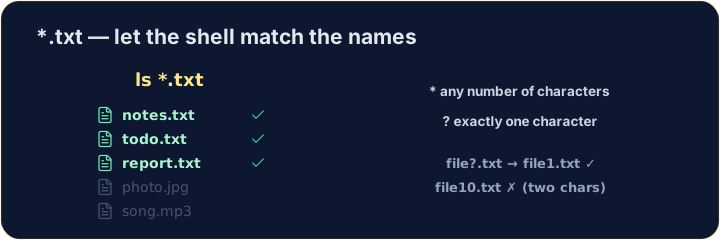
*. *.txtmeans "every name ending in.txt". The shell fills in the matches for you:
Tiếng Việt
Một lệnh, nhiều file
- Một wildcard (ký tự đại diện) là biểu tượng đại diện cho "bất cứ thứ gì". Phổ biến nhất là
*. *.txtcó nghĩa là "mọi tên kết thúc bằng.txt". Shell sẽ tự điền các tên khớp cho bạn:
ls *.txt
English
The two main wildcards
*matches any number of characters (even none).?matches exactly one character.
- So
file?.txtmatchesfile1.txtandfileA.txt, but notfile10.txt.
Tiếng Việt
Hai wildcard chính
*khớp bất kỳ số lượng ký tự nào (kể cả không có).?khớp chính xác một ký tự.
ls file?.txt
- Vì vậy,
file?.txtkhớp vớifile1.txtvàfileA.txt, nhưng không khớp vớifile10.txt.
English
Be careful with delete
- Wildcards are powerful — and that cuts both ways:
- That deletes every
.txtfile at once. Runls *.txtfirst to see exactly what will go.
Tiếng Việt
Cẩn thận khi xóa
- Các ký tự đại diện (wildcards) rất mạnh mẽ — và điều đó có hai mặt:
rm *.txt
- Lệnh này sẽ xóa mọi tập tin
.txtcùng lúc. Hãy chạyls *.txttrước để xem chính xác những gì sẽ bị loại bỏ.
English
Common mistakes
*matches any text and?matches one character.- Quote a name that has spaces, or the shell splits it into two.
Tiếng Việt
Lỗi thường gặp
*khớp bất kỳ văn bản nào và?khớp một ký tự.- Đặt tên trong dấu ngoặc kép nếu nó có khoảng trắng, hoặc shell sẽ tách nó thành hai phần riêng biệt.
List only the .txt files using the * wildcard: ls *.txt. · Liệt kê chỉ các tệp .txt bằng ký tự đại diện *: ls *.txt.
Delete all the .txt files at once with rm *.txt. The check lists what is left. · Xóa toàn bộ các tệp .txt cùng lúc với rm *.txt. Lệnh kiểm tra liệt kê những gì còn lại.