Reading files · Đọc tệp
This page needs a recent browser (with SharedArrayBuffer support). Please update Chrome, Edge, Firefox or Safari to the latest version. · Trang này cần trình duyệt gần đây (hỗ trợ SharedArrayBuffer). Vui lòng cập nhật Chrome, Edge, Firefox hoặc Safari lên phiên bản mới nhất.
English
Reading a file
catprints a file's contents straight to the screen:
- It is named after "concatenate" — it can also join several files together.
Tiếng Việt
Đọc tập tin
catin nội dung của một file trực tiếp lên màn hình:
cat poem.txt
- Nó được đặt tên theo "concatenate" — nó cũng có thể ghép nhiều file lại với nhau.
English
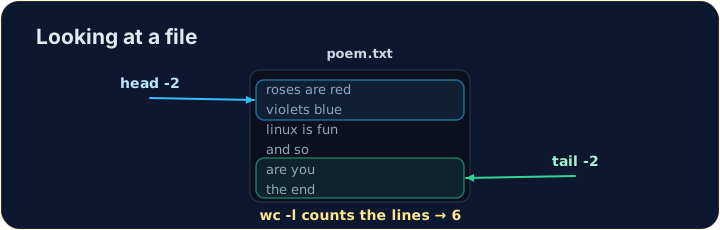
Just the start or end
- For a long file you often want only a peek:
headshows the first lines,tailshows the last lines.
- The
-noption chooses how many lines.
Tiếng Việt
Chỉ phần đầu hoặc cuối
- Đối với một file dài, bạn thường muốn chỉ xem lướt:
headhiển thị các dòng đầu,tailhiển thị các dòng cuối.
head -n 2 poem.txt
tail -n 1 poem.txt
- Tùy chọn
-nchọn bao nhiêu dòng.
English
Counting
wc(word count) measures a file. The most useful option is-lfor lines:
wc -wcounts words andwc -ccounts characters. Now try the tasks.
Tiếng Việt
Đếm số lượng
wc(word count) đo lường một file. Tùy chọn hữu ích nhất là-lđể đếm dòng:
wc -l poem.txt
wc -wđếm từ vàwc -cđếm ký tự. Bây giờ hãy thử các nhiệm vụ.
English
Common mistakes
catprints a whole file at once; uselessto scroll a large one.- Press Tab to complete a long file name.
Tiếng Việt
Lỗi thường gặp
catin toàn bộ file cùng lúc; hãy dùnglessđể cuộn qua file lớn.- Nhấn Tab để hoàn thành tên file dài.
Use cat to print the whole contents of poem.txt. · Dùng cat để in toàn bộ nội dung của poem.txt.
How many lines does the poem have? Use wc -l poem.txt to count them. · Bài thơ có bao nhiêu dòng? Dùng wc -l poem.txt để đếm chúng.