Skip to content · ⁨ข้ามไปยังเนื้อหา⁩

Databases · ⁨ฐานข้อมูล⁩

IGCSE Computer Science · ⁨Computer Science IGCSE⁩ · Topic 9 · ⁨หัวข้อ 9⁩

Video lesson for this topic · ⁨บทเรียนวิดีโอสำหรับหัวข้อนี้⁩ Open the video page · ⁨เปิดหน้าวิดีโอ⁩
8:17

ฐานข้อมูล

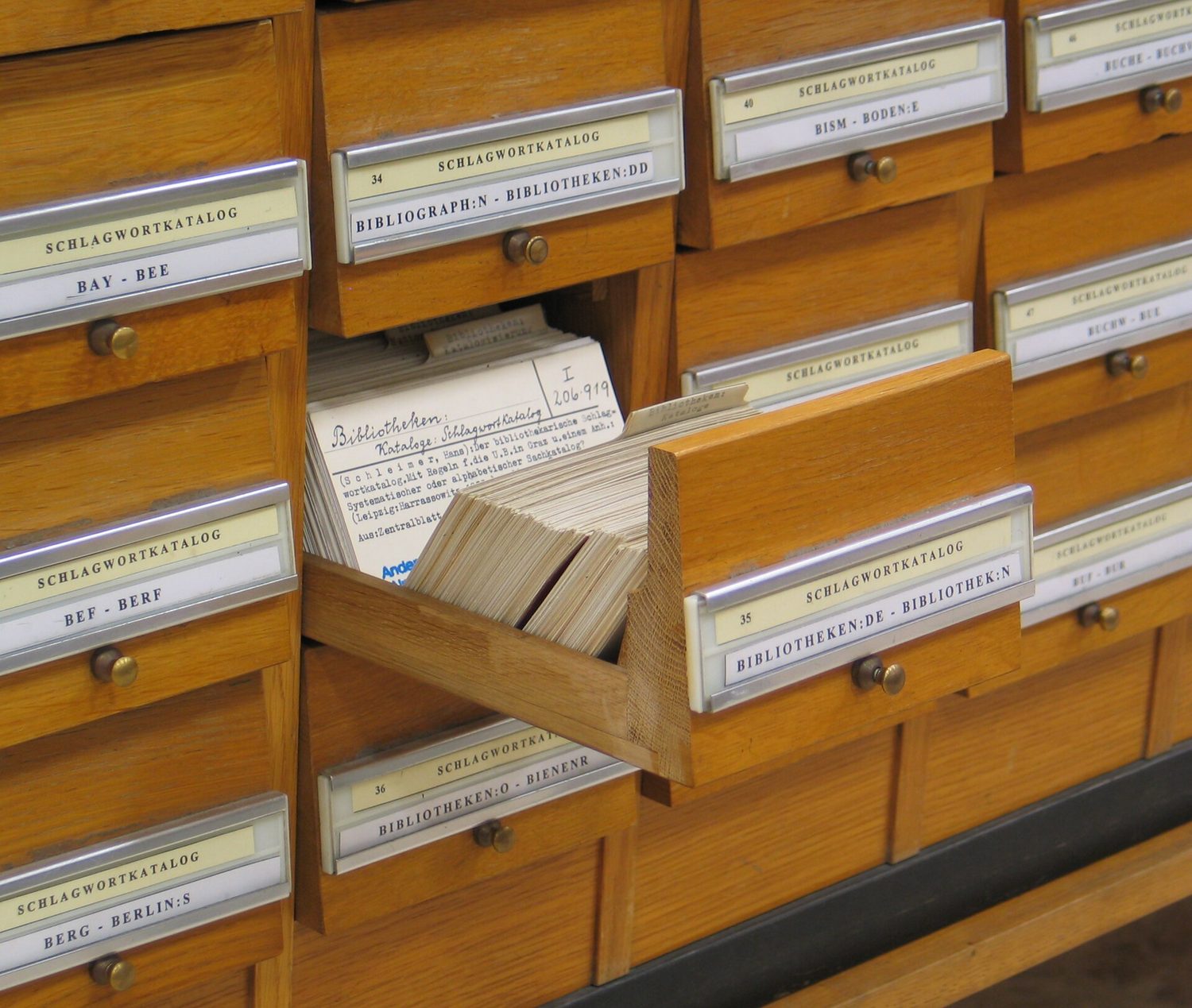
ก่อนมีคอมพิวเตอร์ หอสมุดใช้ลิ้นชักแบบนี้ เก็บบัตรหนึ่งใบต่อหนังสือ Each holding the same few facts, all kept in order — so a librarian could find any book…

English narration · English + 中文 subtitles burned in · ⁨การบรรยายภาษาอังกฤษ · คำบรรยายภาษาอังกฤษ + 中文 ลอยตัวบนภาพ⁩

Syllabus · ⁨หลักสูตร⁩
English
Candidates should be able to: Notes and guidance
1 Define a single-table database from given data storage requirements • Including: – fields – records – validation
2 Suggest suitable basic data types • Including: – text/alphanumeric – character – Boolean – integer – real – date/time
3 Understand the purpose of a primary key and identify a suitable primary key for a given database table
4 Read, understand and complete structured query language (SQL) scripts to query data stored in a single database table • Limited to: – SELECT – FROM – WHERE – ORDER BY DESCENDING – ORDER BY ASCENDING – SUM – COUNT – AND – OR • Identifying the output given by an SQL statement that will query the given contents of a database table
ไทย
ผู้เข้าสอบควรสามารถ: หมายเหตุและคำแนะนำ
1 นิยาม ฐานข้อมูลตารางเดียว จากข้อกำหนดการจัดเก็บข้อมูลที่กำหนดให้ • รวมถึง: – ฟیلด์ – บันทึก – การตรวจสอบความถูกต้อง
2 เสนอ ประเภทข้อมูลพื้นฐาน ที่เหมาะสม • รวมถึง: – ข้อความ/อัลphanumeric – ตัวอักษร – บูลีน – จำนวนเต็ม – จริง – วันที่/เวลา
3 เข้าใจวัตถุประสงค์ของ คีย์หลัก และระบุคีย์หลักที่เหมาะสมสำหรับตารางฐานข้อมูลที่กำหนดให้
4 อ่าน ทำความเข้าใจ และเติม สคริปต์ structured query language (SQL) เพื่อค้นหาข้อมูลที่จัดเก็บในตารางฐานข้อมูลเดียว •จำกัดอยู่ที่: – SELECT – FROM – WHERE – ORDER BY DESCENDING – ORDER BY ASCENDING – SUM – COUNT – AND – OR • ระบุผลลัพธ์ที่ได้จากคำสั่ง SQL ที่จะค้นหาเนื้อหาที่กำหนดของตารางฐานข้อมูล

Source: Cambridge International syllabus · ⁨แหล่งที่มา: หลักสูตร Cambridge International⁩

9.1

What is a database? · ⁨ฐานข้อมูลคืออะไร?⁩

English

A database 数据库 is an organised store of data, kept so that it is easy to search, sort and update. At IGCSE you work with a single-table database 单表数据库 — all the data is held in one table.

ไทย

ฐานข้อมูล เป็นที่เก็บข้อมูลที่จัดระเบียบไว้ เพื่อให้ค้นหา เรียงลำดับ และแก้ไขได้ง่าย ในระดับ IGCSE คุณจะทำงานกับ ฐานข้อมูลแบบตารางเดียว — ข้อมูลทั้งหมดอยู่ในตารางเดียว

ลิ้นชักขนาดเล็กติดฉลากเรียงกันในบัตรรายการห้องสมุด
สมุดบัตรสมาชิกห้องสมุดเป็นฐานข้อมูลบนกระดาษ — บันทึกที่คุณสามารถค้นหาและเรียงลำดับตามดัชนีชี้ตำแหน่งได้
แถวของเซิร์ฟเวอร์ในศูนย์ข้อมูล
ฐานข้อมูลขนาดใหญ่สมัยใหม่จัดเก็บอยู่บนเซิร์ฟเวอร์ในศูนย์ข้อมูล
9.2

Records and fields · ⁨บันทึกและฟิลด์⁩

English

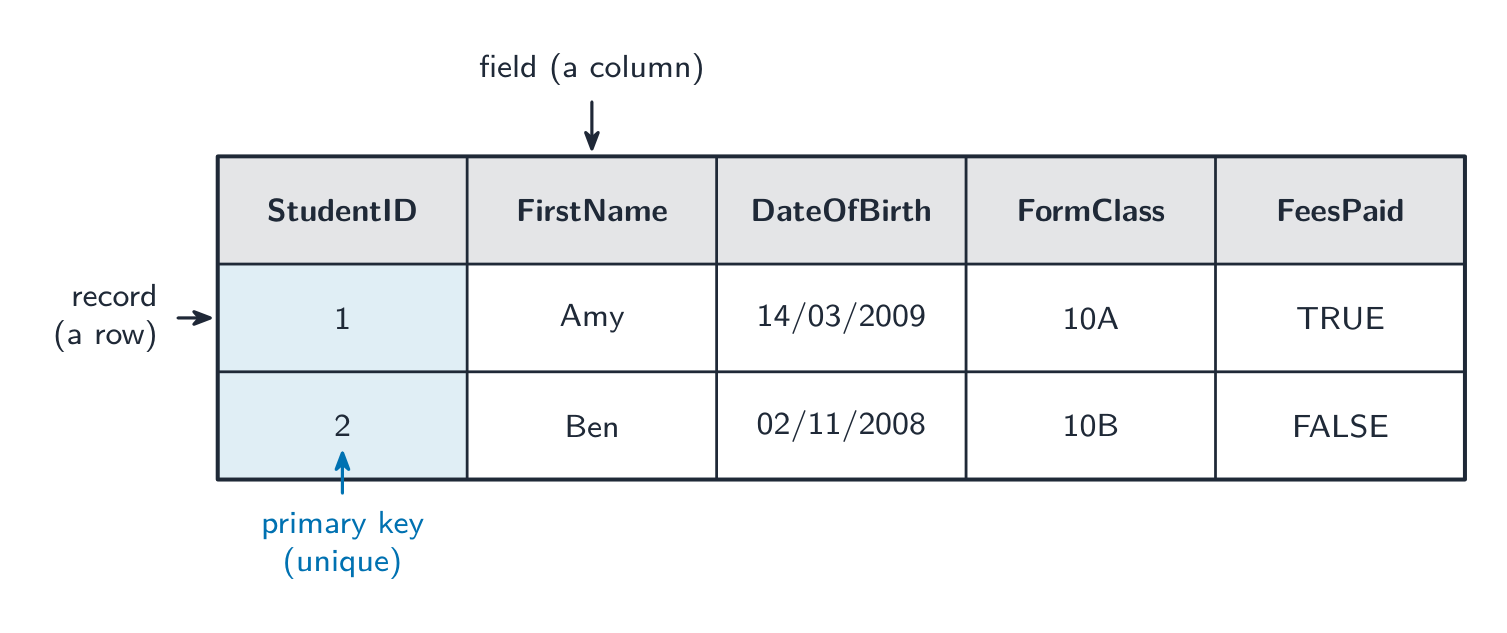
A database table is made of records and fields.

  • A record 记录 is one row in the table — all the data about one thing (for example one student).
  • A field 字段 is one column in the table — one piece of data that every record has (for example "First name").
StudentID FirstName DateOfBirth FormClass FeesPaid
1 Amy 14/03/2009 10A TRUE
2 Ben 02/11/2008 10B FALSE

Here each row is a record, and each column is a field.

ไทย

ตารางฐานข้อมูลประกอบด้วยบันทึกและฟิลด์

  • บันทึก คือแถวเดียวในตาราง — ข้อมูลทั้งหมดเกี่ยวกับสิ่งใดสิ่งหนึ่ง (เช่น นักเรียนคนหนึ่ง)
  • ฟิลด์ คือคอลัมน์เดียวในตาราง — ข้อมูลหนึ่งหน่วยที่ทุกบันทึกมี (เช่น "ชื่อ")
StudentID FirstName DateOfBirth FormClass FeesPaid
1 Amy 14/03/2009 10A TRUE
2 Ben 02/11/2008 10B FALSE

ในที่นี้ แถว แต่ละเส้นคือบันทึก และ คอลัมน์ แต่ละเส้นคือฟิลด์

ตาราง Student ที่แต่ละแถวติดฉลากว่าเป็นบันทึก คอลัมน์ติดฉลากว่าเป็นฟิลด์ และคอลัมน์ StudentID ถูกเน้นว่าเป็น primary key
แต่ละแถวคือบันทึกและแต่ละคอลัมน์คือฟิลด์; คีย์หลัก (StudentID) เป็นเอกลักษณ์สำหรับทุกบันทึก
Vocabulary · ⁨คำศัพท์⁩ Train · ⁨ฝึกฝน⁩
English ไทย
primary key/ˈpraɪməri kiː/ คีย์หลัก
unique/juːˈniːk/ ไม่ซ้ำกัน
9.3

Data types for fields · ⁨ประเภทข้อมูลสำหรับฟิลด์⁩

English

Each field stores one data type 数据类型. You choose the type that best fits the data.

Data type Used for Example
text/alphanumeric 文本 letters, digits and symbols "10A", "Amy"
character 字符 a single character 'M'
Boolean 布尔值 one of two values TRUE / FALSE
integer 整数 a whole number 42
real 实数 a number with a decimal point 3.5
date/time 日期时间 a date or a time 14/03/2009
ไทย

แต่ละฟิลด์จะเก็บ ประเภทข้อมูล เดียวกัน คุณเลือกประเภทที่เหมาะสมที่สุดกับข้อมูลนั้น

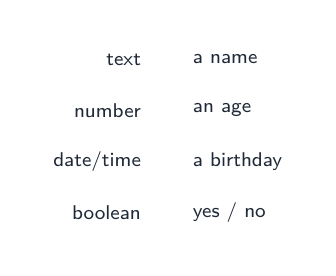
ประเภทฟิลด์: ข้อความ (ชื่อ), จำนวน (อายุ), วันที่/เวลา (วันเกิด), บูลีน (ใช่/ไม่ใช่)
ประเภทของช่องข้อมูล: ข้อความ, ตัวเลข, วันที่/เวลา และ布尔
Data type Used for Example
text/alphanumeric ตัวอักษร ตัวเลข และสัญลักษณ์ "10A", "Amy"
character ตัวอักษรเดียว 'M'
Boolean ค่าใดค่าหนึ่งจากสองค่า TRUE / FALSE
integer จำนวนเต็ม 42
real ตัวเลขที่มีทศนิยม 3.5
date/time วันหรือเวลา 14/03/2009
Vocabulary · ⁨คำศัพท์⁩ Train · ⁨ฝึกฝน⁩
English ไทย
field/fiːld/ ฟิลด์
data type/ˈdeɪtə taɪp/ ชนิดของข้อมูล
text/alphanumeric/tekst ˌælfənjuːˈmerɪk/ ข้อความ/อัลphanumeric
character/ˈkærɪktə/ ตัวละคร / บทร้อยกรอง
Boolean/ˈbuːlɪən/ Boolean
integer/ˈɪntɪdʒə/ integer
real/rɪəl/ จริง
date/time/deɪt taɪm/ วันที่/เวลา
9.4

The primary key · ⁨Primary Key⁩

English

A primary key 主键 is a field that holds a unique 唯一的 value for every record. No two records can have the same primary key, so it lets you pick out exactly one record.

In the table above, StudentID is a good primary key because every student has a different number. A field like FormClass would be a bad primary key, because many students share the same class.

ไทย

primary key คือฟิลด์ที่เก็บค่า ไม่ซ้ำ สำหรับทุกบันทึก ไม่มีสองบันทึกใดที่มี primary key เดียวกัน ทำให้คุณสามารถระบุบันทึกได้อย่างชัดเจน

ในตารางข้างต้น StudentID เหมาะสมที่จะเป็น primary key เพราะนักเรียนทุกคนมีหมายเลขต่างกัน ฟิลด์อย่าง FormClass จะไม่ดีเพราะนักเรียนหลายคนอยู่ในชั้นเดียวกัน

9.5

Validation in a database · ⁨การตรวจสอบความถูกต้องในฐานข้อมูล⁩

English

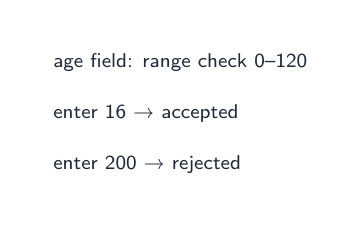
When data is put into a database, validation 验证 checks make sure it is sensible — for example a range check on an age field, or a presence check so a field is not left empty. (You saw these checks in topic 7.)

ไทย

เมื่อใส่ข้อมูลลงในฐานข้อมูล การ ตรวจสอบความถูกต้อง (validation) จะตรวจสอบว่าข้อมูลสมเหตุสมผลหรือไม่ — เช่น การตรวจสอบช่วง (range check)对于ฟิลด์อายุ หรือการตรวจสอบการมีอยู่ (presence check) เพื่อให้แน่ใจว่าฟิลด์ไม่ว่างเปล่า (คุณเคยเห็นการตรวจสอบเหล่านี้ในหัวข้อ 7.)

Range check trênฟิลด์อายุที่ยอมรับ 16 แต่ปฏิเสธ 200
การตรวจสอบช่วงค่า (range check) ยอมรับค่าที่สมเหตุสมผลและปฏิเสธส่วนที่เหลือ
Vocabulary · ⁨คำศัพท์⁩ Train · ⁨ฝึกฝน⁩
English ไทย
validation/ˌvælɪˈdeɪʃn/ validation
9.6

Structured Query Language (SQL)

English

Structured Query Language 结构化查询语言 (SQL) is a language used to query 查询 a database — to pick out the records you want. You must understand and complete SQL scripts.

SELECT, FROM and WHERE

  • SELECT says which fields to show.
  • FROM says which table to use.
  • WHERE gives a condition 条件, so only matching records are shown.

This shows the first name and class of every student who has paid the fees.

Use * to select all fields:

ORDER BY

ORDER BY sorts the results. Use ASC for ascending 升序 (smallest first, A→Z) or DESC for descending 降序 (largest first, Z→A).

AND and OR

Join conditions with AND (both must be true) or OR (at least one must be true).

SUM and COUNT

  • SUM adds up the values in a number field.
  • COUNT counts how many records match.

This counts how many students have not paid. SUM works the same way but adds a number field instead of counting rows.

Working out the output

To find the output of an SQL script, read it in this order:

  1. FROM — which table;
  2. WHERE — keep only the records that match the condition;
  3. SELECT — show only the chosen fields;
  4. ORDER BY — put the results in order.

Following these steps, you can write down exactly which rows and columns the query returns.

Worked example. A Book table has the fields Title, Author, Price and InStock. Write a query showing the title and price of every book by Orwell that is in stock, cheapest first.

Build it in the reading order: FROM names the table; WHERE keeps only the matching records, and because there are two conditions they need AND; SELECT shows only the two fields asked for; ORDER BY … ASC sorts them. Text values go in quotes, and only the fields the question asks for belong in SELECT - adding Author just because you filtered on it is the commonest way to lose a mark here.

ไทย

Structured Query Language (SQL) เป็นภาษาที่ใช้ ค้นหา ฐานข้อมูล — เพื่อดึงบันทึกที่ต้องการ你必须理解并执行 SQL scripts。

SELECT, FROM และ WHERE

  • SELECT บอก ฟิลด์ ใดควรแสดง
  • FROM บอก ตาราง ใดควรใช้
  • WHERE กำหนด เงื่อนไข เพื่อให้แสดงเฉพาะบันทึกที่ตรงเงื่อนไข
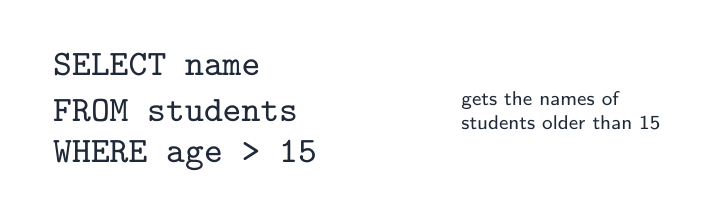
คำสั่ง SQL: SELECT name FROM students WHERE age > 15
SELECT เลือกฟิลด์, FROM ชื่อบทบาท, WHERE กำหนดเงื่อนไข
SELECT FirstName, FormClass
FROM Student
WHERE FeesPaid = TRUE;

นี่แสดงชื่อและชั้นของนักเรียนทุกคนที่จ่ายค่าเทอมแล้ว

ใช้ * เพื่อเลือก ทุก ฟิลด์:

SELECT *
FROM Student
WHERE FormClass = '10A';

ORDER BY

ORDER BY จัดเรียงผลลัพธ์ ใช้ ASC สำหรับ เพิ่ม ascending (เล็กสุดก่อน A→Z) หรือ DESC สำหรับ ลด descending (ใหญ่สุดก่อน Z→A).

SELECT FirstName, DateOfBirth
FROM Student
ORDER BY DateOfBirth ASC;

AND และ OR

เชื่อมเงื่อนไขด้วย AND (ทั้งสองต้องเป็นจริง) หรือ OR (อย่างน้อยหนึ่งต้องเป็นจริง).

SELECT FirstName
FROM Student
WHERE FormClass = '10A' AND FeesPaid = FALSE;

SUM และ COUNT

  • SUM รวมค่าในฟิลด์ตัวเลข
  • COUNT นับว่ามีกี่บันทึกที่ตรงเงื่อนไข
SELECT COUNT(StudentID)
FROM Student
WHERE FeesPaid = FALSE;

นี่นับว่ามีนักเรียนเท่าไหร่ที่ไม่จ่าย SUM ทำเหมือนกันแต่รวมฟิลด์ตัวเลขแทนการนับแถว

การคำนวณผลลัพธ์

ในการหาผลลัพธ์ของสคริปต์ SQL อ่านตามลำดับนี้:

  1. FROM — ตารางใด;
  2. WHERE —保留符合条件的记录;
  3. SELECT — แสดงเฉพาะฟิลด์ที่เลือก;
  4. ORDER BY — จัดเรียงผลลัพธ์
สี่ขั้นตอนตามลำดับ: FROM (ตารางใด), WHERE (เก็บแถวที่ตรงกัน), SELECT (แสดงฟิลด์ที่เลือก), ORDER BY (เรียงผลลัพธ์)
อ่านคำสั่ง SQL ตามลำดับนี้: FROM (ตารางใด), WHERE (แถวไหน), SELECT (ฟิลด์ไหน), ORDER BY (เรียง)

เมื่อทำตามขั้นตอนเหล่านี้ คุณสามารถระบุได้ว่าคำสั่งจะคืนข้อมูลแถวและคอลัมน์อะไรบ้างอย่างชัดเจน

ตัวอย่างวิธีทำ ตาราง Book มีฟิลด์คือ Title, Author, Price และ InStock เขียนคำสั่งเพื่อแสดงหัวข้อและราคาของหนังสือทุกเล่มโดย Orwell ที่มีในสต็อก โดยเริ่มจากราคาถูกที่สุดก่อน

SELECT Title, Price
FROM Book
WHERE Author = 'Orwell' AND InStock = TRUE
ORDER BY Price ASC;

สร้างคำสั่งตามลำดับการอ่าน: FROM ชื่อบทความ; WHERE กรองเฉพาะบันทึกที่ตรงเงื่อนไข และเนื่องจากมีสองเงื่อนไขจึงต้องใช้ AND; SELECT แสดงเพียงสองฟิลด์ที่โจทย์ถาม; ORDER BY … ASC เรียงลำดับ ข้อความตัวอักษรต้องใส่ใน เครื่องหมายคำพูด และให้ใส่เฉพาะฟิลด์ที่โจทย์ต้องการลงใน SELECT - การเพิ่ม Author เพียงเพราะคุณใช้มันในการกรองเป็นสาเหตุหลักที่ทำให้เสียคะแนนในข้อนี้

Explore · ⁨สำรวจ⁩

SELECT … WHERE

Step through a query: WHERE filters rows, SELECT picks columns. · ⁨เดินผ่านคำสั่ง: WHERE กรองแถว, SELECT เลือกคอลัมน์⁩

Vocabulary · ⁨คำศัพท์⁩ Train · ⁨ฝึกฝน⁩
English ไทย
structured query language/ˈstrʌktʃəd ˈkwɪərɪ ˈlæŋɡwɪdʒ/ ภาษา query โครงสร้าง
query/ˈkwɪərɪ/ การค้นหาข้อมูล
condition/kənˈdɪʃn/ เงื่อนไข
ascending/əˈsendɪŋ/ เรียงลำดับเพิ่มขึ้น
descending/dɪˈsendɪŋ/ เรียงลำดับลดลง
9.7

Exam tips · ⁨ข้อแนะนำสำหรับการสอบ⁩

English
  • A record is a row (all the data about one thing); a field is a column (one item that every record has).
  • A primary key must be unique for every record, so it picks out exactly one record (StudentID, not FormClass).
  • Learn the SQL parts: SELECT (which fields), FROM (which table), WHERE (the condition), ORDER BY (sort, ASC or DESC).
  • Read a query in the order FROM → WHERE → SELECT → ORDER BY to work out its output.
  • COUNT counts the matching records; SUM adds up a number field.
ไทย
  • Record คือแถว (ข้อมูลทั้งหมดเกี่ยวกับสิ่งหนึ่ง); Field คือกอลัมน์ (ข้อมูลหนึ่งรายการที่มีในทุกบรรทัด)
  • Primary key ต้องเป็น ค่าที่ไม่ซ้ำ สำหรับแต่ละบรรทัด เพื่อระบุบรรทัดได้เพียงบรรทัดเดียว (StudentID ไม่ใช่ FormClass)
  • จำส่วนประกอบของ SQL ให้ได้: SELECT (ฟิลด์อะไร), FROM (ตารางอะไร), WHERE (เงื่อนไขอะไร), ORDER BY (การเรียง, ASC หรือ DESC)
  • อ่านคำสั่งตามลำดับ FROM → WHERE → SELECT → ORDER BY เพื่อดูผลลัพธ์ที่จะเกิดขึ้น
  • COUNTนับจำนวนบันทึกที่ตรงเงื่อนไข; SUMรวมผลบวกของฟิลด์ตัวเลข
Vocabulary · ⁨คำศัพท์⁩ Train · ⁨ฝึกฝน⁩
English ไทย
database/ˈdeɪtəbeɪs/ ฐานข้อมูล
single-table database/ˈsɪŋɡl ˈteɪbl ˈdeɪtəbeɪs/ ฐานข้อมูลตารางเดียว
record/ˈrekɔːd/ record

Interactive lessons on this topic · ⁨บทเรียนเชิงโต้ตอบสำหรับหัวข้อนี้⁩

Work through it step by step, with instant-check exercises. · ⁨ทำทีละขั้นตอน พร้อมแบบฝึกหัดตรวจสอบผลทันที⁩

Past Papers · ⁨ข้อสอบย้อนหลัง⁩

More topics in IGCSE Computer Science · ⁨Computer Science IGCSE⁩ · ⁨หัวข้อเพิ่มเติมใน IGCSE Computer Science · ⁨Computer Science IGCSE⁩⁩

Log in or create account · ⁨เข้าสู่ระบบหรือสร้างบัญชี⁩

IGCSE, A-Level & AP