Skip to content · ⁨ข้ามไปยังเนื้อหา⁩

Algorithm design and problem-solving · ⁨การออกแบบอัลกอริทึมและการแก้ปัญหา⁩

IGCSE Computer Science · ⁨Computer Science IGCSE⁩ · Topic 7 · ⁨หัวข้อ 7⁩

Video lesson for this topic · ⁨บทเรียนวิดีโอสำหรับหัวข้อนี้⁩ Open the video page · ⁨เปิดหน้าวิดีโอ⁩
9:17

รอบชีวิตการพัฒนาโปรแกรม

ทุกแอปในโทรศัพท์ของคุณเขียนโดยบุคคลเช่นนี้ แต่เขาไม่ได้เริ่มด้วยการพิมพ์โค้ด ก่อนบรรทัดแรก ปัญหาถูกศึกษา, ทางออก…

English narration · English + 中文 subtitles burned in · ⁨การบรรยายภาษาอังกฤษ · คำบรรยายภาษาอังกฤษ + 中文 ลอยตัวบนภาพ⁩

Syllabus · ⁨หลักสูตร⁩
English
Candidates should be able to: Notes and guidance
1 Understand the program development life cycle, limited to: analysis, design, coding and testing • Including identifying each stage and performing these tasks for each stage: – analysis: abstraction, decomposition of the problem, identification of the problem and requirements – design: decomposition, structure diagrams, flowcharts, pseudocode – coding: writing program code and iterative testing – testing: testing program code with the use of test data
2 (a) Understand that every computer system is made up of sub-systems, which are made up of further sub-systems (b) Understand how a problem can be decomposed into its component parts • Including: – inputs – processes – outputs – storage
(c) Use different methods to design and construct a solution to a problem • Including: – structure diagrams – flowcharts – pseudocode
3 Explain the purpose of a given algorithm • Including: – stating the purpose of an algorithm – describing the processes involved in an algorithm
4 Understand standard methods of solution • Limited to: – linear search – bubble sort – totalling – counting – finding maximum, minimum and average values
5 (a) Understand the need for validation checks to be made on input data and the different types of validation check • Including: – range check – length check – type check – presence check – format check – check digit
(b) Understand the need for verification checks to be made on input data and the different types of verification check • Including: – visual check – double entry check
6 Suggest and apply suitable test data • Limited to: – normal – abnormal – extreme – boundary • Extreme data is the largest/smallest acceptable value • Boundary data is the largest/smallest acceptable value and the corresponding smallest/largest rejected value
7 Complete a trace table to document a dry-run of an algorithm • Including, at each step in an algorithm: – variables – outputs – user prompts
8 Identify errors in given algorithms and suggest ways of correcting these errors
9 Write and amend algorithms for given problems or scenarios, using: pseudocode, program code and flowcharts • Precision is required when writing algorithms, e.g. x > y is acceptable but x is greater than y is not acceptable • See section 4 for flowchart symbols • See section 4 for pseudocode
ไทย
ผู้เข้าสอบควรสามารถ: หมายเหตุและคำแนะนำ
1 เข้าใจ วงจรการพัฒนาโปรแกรม ซึ่งจำกัดอยู่ที่: การวิเคราะห์, การออกแบบ, การเขียนโค้ด และ การทดสอบ • รวมถึงการระบุแต่ละขั้นตอนและดำเนินการตามงานเหล่านี้ในแต่ละขั้นตอน: – การวิเคราะห์: การ추่นาม, การแยกย่อยปัญหา, การระบุปัญหาและข้อกำหนด – การออกแบบ: การแยกย่อย, แผนภาพโครงสร้าง,แผนผังการไหล, รหัสเทียม – การเขียนโค้ด: การเขียนโค้ดโปรแกรมและการทดสอบแบบวนซ้ำ – การทดสอบ: การทดสอบโค้ดโปรแกรมโดยใช้ข้อมูลทดสอบ
2 (a) เข้าใจว่าระบบคอมพิวเตอร์ทุก系统将ประกอบด้วยระบบย่อยซึ่งประกอบด้วยระบบย่อยต่อไป (b) เข้าใจว่าปัญหาสามารถถูก แยกย่อย ออกเป็นส่วนประกอบต่างๆ ได้อย่างไร • รวมถึง: – ข้อมูลเข้า – กระบวนการ – ข้อมูลออก – การจัดเก็บ
(c) ใช้วิธีการต่างๆ ในการออกแบบและสร้างคำตอบสำหรับปัญหา • รวมถึง: – แผนภาพโครงสร้าง – แผนผังการไหล – รหัสเทียม
3 อธิบายวัตถุประสงค์ของอัลกอริทึมที่กำหนดให้ • รวมถึง: – การระบุวัตถุประสงค์ของอัลกอริทึม – การอธิบายกระบวนการที่เกี่ยวข้องในอัลกอริทึม
4 เข้าใจ วิธีแก้ปัญหามาตรฐาน • จำกัดเฉพาะ: – การค้นหาแบบเชิงเส้น – การเรียงลำดับฟองอากาศ – การรวมผล – การนับ – การหาค่าสูงสุด ต่ำสุด และค่าเฉลี่ย
5 (a) เข้าใจถึงความจำเป็นของการตรวจสอบ ข้อมูลนำเข้า และการตรวจสอบ不同类型的 validation check • รวมถึง: – การตรวจสอบช่วง – การตรวจสอบความยาว – การตรวจสอบประเภท – การตรวจสอบการมีอยู่ – การตรวจสอบรูปแบบ – ตัวเลขตรวจสอบ
(b) เข้าใจถึงความจำเป็นของการตรวจสอบ ข้อมูลนำเข้า และการตรวจสอบ不同类型的 verification check • รวมถึง: – การตรวจสอบด้วยสายตา – การตรวจสอบการป้อนข้อมูลสองครั้ง
6 เสนอและใช้ ข้อมูลทดสอบ ที่เหมาะสม • จำกัดเฉพาะ: – ปกติ – ผิดปกติ – ขอบเขตสุดขั้ว – ขอบเขต • ข้อมูลขอบเขตสุดขั้วคือค่าที่ยอมรับได้มากที่สุด/น้อยที่สุด • ข้อมูลขอบเขตคือค่าที่ยอมรับได้มากที่สุด/น้อยที่สุดและค่าที่ปฏิเสธได้สอดคล้องกันมากที่สุด/น้อยที่สุด
7 เติม ตารางติดตาม เพื่อบันทึก การ试运行 ของอัลกอริทึม • รวมถึง ในแต่ละขั้นตอนของอัลกอริทึม: – ตัวแปร – ข้อมูลออก – ข้อความกระตุ้นผู้ใช้
8 ระบุข้อผิดพลาดในอัลกอริทึมที่กำหนดและเสนอวิธีแก้ไขข้อผิดพลาดเหล่านี้
9 เขียนและแก้ไข อัลกอริทึม สำหรับปัญหาหรือสถานการณ์ที่กำหนด โดยใช้: รหัสเทียม โค้ดโปรแกรม และแผนผังการไหล • ต้องมีความแม่นยำในการเขียนอัลกอริทึม เช่น x > y ยอมรับได้ แต่ x is greater than y ไม่ยอมรับ • ดูส่วนที่ 4 สำหรับสัญลักษณ์ในแผนผังการไหล • ดูส่วนที่ 4 สำหรับรหัสเทียม

Source: Cambridge International syllabus · ⁨แหล่งที่มา: หลักสูตร Cambridge International⁩

7.1

The program development life cycle · ⁨วัฏจักรการพัฒนาโปรแกรม⁩

English

The program development life cycle 程序开发生命周期 is the set of stages used to make a program. There are four stages.

Stage What you do
analysis 分析 study the problem and work out what is needed
design 设计 plan how the program will work
coding 编码 write the program code and test it as you go
testing 测试 run the finished program with test data to find errors

Analysis

In analysis you understand the problem. Two key skills help:

  • abstraction 抽象 — keep only the important details and ignore the rest;
  • decomposition 分解 — break a big problem into smaller, easier parts.

Design

In design you plan the solution, often using decomposition. You can show the parts as sub-systems 子系统 in a structure diagram 结构图 (a chart that splits a system into smaller boxes).

Coding and testing

In coding you write the program code. You use iterative testing 迭代测试 — test small parts again and again as you build them. In testing you run the whole program with test data 测试数据 to check it works.

ไทย

วัฏจักรการพัฒนาโปรแกรม คือชุดขั้นตอนที่ใช้ในการสร้างโปรแกรม มีสี่ขั้นตอน

นักพัฒนาโปรแกรมกำลังพิมพ์โค้ดที่คอมพิวเตอร์
ซอฟต์แวร์ถูกเขียนโดยนักพัฒนาโปรแกรม ซึ่งปฏิบัติตามวัฏจักรการพัฒนา
ขั้นตอน สิ่งที่คุณทำ
การวิเคราะห์ ศึกษาปัญหาและกำหนดสิ่งที่ต้องการ
การออกแบบ วางแผนว่าโปรแกรมจะทำงานอย่างไร
การเขียนโค้ด เขียนโค้ดโปรแกรมและทดสอบไปพร้อมกัน
การทดสอบ รันโปรแกรมที่เสร็จสมบูรณ์ด้วยข้อมูลทดสอบเพื่อหาข้อผิดพลาด
สี่ขั้นตอนเรียงต่อกัน — การวิเคราะห์, การออกแบบ, การเขียนโค้ด, การทดสอบ — พร้อมลูกศรย้อนกลับจากการทดสอบไปยังการออกแบบ
สี่ขั้นตอนของการพัฒนาโปรแกรม; การทดสอบมีการย้อนกลับเพื่อแก้ไขและปรับปรุงการออกแบบ
แผนผังการทำงานของโปรแกรมที่มีกล่องกระบวนการและเพชรตัดสินใจ
แผนผังการทำงานของโปรแกรมระบุขั้นตอนและการตัดสินใจของโปรแกรมในช่วงการออกแบบ

การวิเคราะห์

ในการวิเคราะห์ คุณต้องเข้าใจปัญหา ทักษะสำคัญสองอย่างช่วยได้:

  • การลดทอนรายละเอียด (abstraction) – เก็บรายละเอียดที่สำคัญไว้เท่านั้นและละเลยสิ่งอื่น;
  • การแยกย่อย (decomposition) – แยกปัญหาใหญ่ให้อยู่ในส่วนย่อยๆ ที่เล็กลงและจัดการง่ายขึ้น

การออกแบบ

ในการออกแบบ คุณวางแผนทางออก มักใช้การแยกย่อย คุณสามารถแสดงส่วนประกอบต่างๆ เป็น ระบบย่อย (sub-systems) ใน แผนผังโครงสร้าง (structure diagram) (แผนภูมิที่แบ่งระบบออกเป็นกล่องเล็กๆ)

การเขียนโค้ดและการทดสอบ

ในการ เขียนโค้ด คุณเขียนโค้ดโปรแกรม คุณใช้ การทดสอบแบบ迭代 (iterative testing) – ทดสอบส่วนย่อยซ้ำแล้วซ้ำอีกขณะสร้างมัน ใน การทดสอบ คุณรันโปรแกรมทั้งตัวด้วย ข้อมูลทดสอบ (test data) เพื่อตรวจสอบว่ามันทำงานถูกต้องหรือไม่

Vocabulary · ⁨คำศัพท์⁩ Train · ⁨ฝึกฝน⁩
English ไทย
program development life cycle/ˈprəʊɡræm dɪˈveləpmənt laɪf ˈsaɪkl/ วงจรชีวิตการพัฒนาโปรแกรม
analysis/əˈnæləsɪs/ การวิเคราะห์
design/dɪˈzaɪn/ design
coding/ˈkəʊdɪŋ/ coding
testing/ˈtestɪŋ/ testing
abstraction/əbˈstrækʃn/ การห่อหุ้ม (abstraction)
decomposition/ˌdiːkɒmpəˈzɪʃn/ การสลายตัว
sub-systems/sʌb ˈsɪstəmz/ 子系统
structure diagram/ˈstrʌktʃə ˈdaɪəɡræm/ แผนผังโครงสร้าง
iterative testing/ˈɪtərətɪv ˈtestɪŋ/ การทดสอบแบบวนซ้ำ
test data/test ˈdeɪtə/ ข้อมูลทดสอบ
flowchart/ˈfləʊtʃɑːt/ แผนภูมิไหล
7.2

Design tools · ⁨เครื่องมือสำหรับการออกแบบ⁩

English

You can plan a solution in three main ways.

  • a structure diagram — shows the parts of a system and how they fit together;
  • a flowchart 流程图 — a diagram using boxes and arrows to show the steps in order;
  • pseudocode 伪代码 — steps written in simple, code-like English (not a real language).
ไทย

คุณสามารถวางแผนทางออกได้สามวิธีหลัก

  • แผนผังโครงสร้าง – แสดงส่วนประกอบของระบบและวิธีการจับคู่กัน;
  • แผนผังการทำงาน – แผนภาพใช้กล่องและลูกศรเพื่อแสดงขั้นตอนตามลำดับ;
  • ไวยากรณ์เทียม (pseudocode) – ขั้นตอนเขียนเป็นภาษาอังกฤษแบบง่ายคล้ายโค้ด (ไม่ใช่ภาษาจริง)
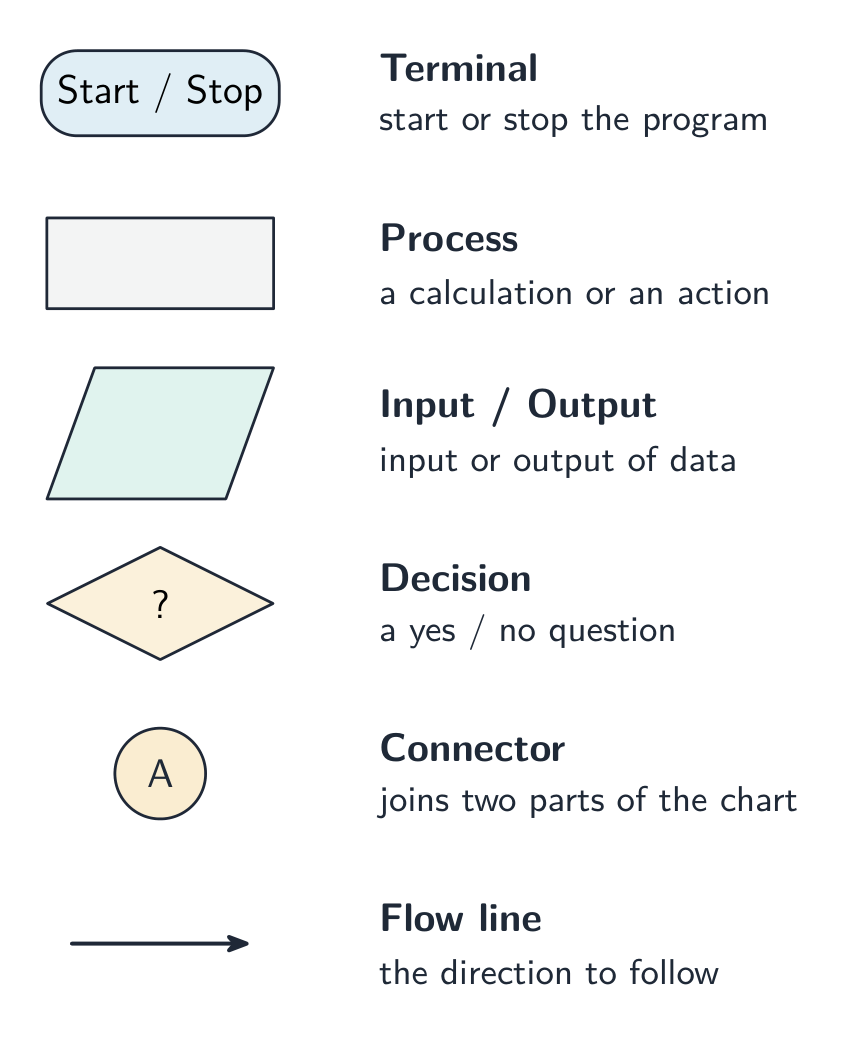
แผนผังการทำงานสำหรับบวกตัวเลข 1 ถึง n, พร้อมสัญลักษณ์เริ่ม/สิ้นสุด, เข้า/ออก, กระบวนการ และตัดสินใจ รวมถึงคำอธิบายชื่อแต่ละรูปทรง
แผนผังการทำงานสำหรับอัลกอริทึมผลรวม, ใช้สัญลักษณ์มาตรฐาน (เริ่ม/สิ้นสุด, เข้า/ออก, กระบวนการ, ตัดสินใจ)
Vocabulary · ⁨คำศัพท์⁩ Train · ⁨ฝึกฝน⁩
English ไทย
pseudocode/ˈsuːdəʊkəʊd/ โค้ดเทียม (pseudocode)
algorithm/ˈælɡərɪθəm/ อัลกอริทึม
7.3

Algorithms · ⁨อัลกอริทึม⁩

English
Bubble sort, pass by pass

An algorithm 算法 is a set of steps, in the right order, that solves a problem. Every algorithm can be split into three parts:

  • input 输入 — the data that goes in;
  • processing 处理 — the work done on the data;
  • output 输出 — the result that comes out.

This is called decomposition into inputs, processes and outputs. For example, for "find the average of three marks": the inputs are the three marks; the processing is adding them and dividing by 3; the output is the average.

ไทย
Bubble sort, pas-by-pass

อัลกอริทึม คือชุดขั้นตอนที่ถูกต้องตามลำดับเพื่อแก้ปัญหา ทุกอัลกอริทึมสามารถแบ่งออกเป็นสามส่วน:

  • อินพุต (input) – ข้อมูลที่ป้อนเข้า;
  • การประมวลผล (processing) – งานที่ทำต่อข้อมูล;
  • เอาต์พุต (output) – ผลลัพธ์ที่ได้ออกมา

นี่เรียกว่าการแยกย่อยเป็นอินพุต กระบวนการ และเอาต์พุต ตัวอย่างเช่น สำหรับ "หาค่าเฉลี่ยของคะแนนสามข้อ": อินพุตคือคะแนนสามข้อ; การประมวลผลคือการบวกกันและหารด้วย 3; เอาต์พุตคือค่าเฉลี่ย

สามกล่อง — INPUT (คะแนน 3 ข้อ), PROCESS (บวกกัน หารด้วย 3), OUTPUT (ค่าเฉลี่ย) — เชื่อมต่อกันด้วยลูกศร
ทุกอัลกอริทึมแยกย่อยเป็นอินพุต, กระบวนการ และเอาต์พุต — ที่นี่คือการหาค่าเฉลี่ยของคะแนนสามข้อ
Vocabulary · ⁨คำศัพท์⁩ Train · ⁨ฝึกฝน⁩
English ไทย
input/ˈɪnpʊt/ input (อินพุต)
processing/ˈprəʊsesɪŋ/ processing (การประมวลผล)
output/ˈaʊtpʊt/ ผลผลิต
bubble sort/ˈbʌbl sɔːt/ bubble sort
7.4

Validation and verification · ⁨การตรวจสอบและยืนยัน⁩

English

When data is entered, you check it to reduce mistakes.

Validation 验证 checks that the data is sensible and follows the rules. It cannot check that the data is true, only that it is allowed.

Validation check What it checks
range check 范围检查 the value is between a lowest and highest allowed value
length check 长度检查 the number of characters is allowed (e.g. a password ≥ 8)
type check 类型检查 the data is the right type (e.g. a number, not letters)
presence check 存在性检查 something has actually been entered (not left blank)
format check 格式检查 the data is in the right pattern (e.g. a date as dd/mm/yyyy)
check digit 校验码 an extra digit confirms a number was entered correctly

Verification 核实 checks that data was copied or entered correctly (no mistakes while typing it in). Two methods:

  • visual check 目视检查 — a person compares the typed data with the original;
  • double entry 双重输入 — the data is entered twice and the two copies are compared.
ไทย

เมื่อป้อนข้อมูลแล้ว คุณควรตรวจสอบเพื่อลดข้อผิดพลาด

การตรวจสอบความถูกต้อง (Validation) ตรวจสอบว่าข้อมูลมี เหตุผล และปฏิบัติตามกฎเกณฑ์หรือไม่ มันไม่สามารถตรวจสอบว่าข้อมูลนั้นเป็นความจริงได้ แต่จะตรวจสอบเพียงว่าข้อมูลนั้นได้รับอนุญาตให้ใช้หรือไม่

การตรวจสอบความถูกต้อง สิ่งที่ตรวจสอบ
การตรวจสอบช่วง (range check) ค่าอยู่ระหว่างค่าต่ำสุดและค่าสูงสุดที่อนุญาต
การตรวจสอบความยาว (length check) จำนวนตัวอักษรที่ได้รับอนุญาต (เช่น รหัสผ่าน ≥ 8 ตัว)
การตรวจสอบประเภท (type check) ข้อมูลเป็นประเภทที่ถูกต้อง (เช่น เป็นตัวเลข ไม่ใช่ตัวอักษร)
การตรวจสอบการกรอกข้อมูล (presence check) มีการป้อนข้อมูลจริง (ไม่เว้นว่าง)
การตรวจสอบรูปแบบ (format check) ข้อมูลอยู่ในรูปแบบที่ถูกต้อง (เช่น วันที่ dd/mm/yyyy)
เลขยืนยัน (check digit) หลักเลขเพิ่มเติมเพื่อยืนยันว่าป้อนตัวเลขมาอย่างถูกต้อง

การตรวจสอบความถูกต้อง (Verification) ตรวจสอบว่าข้อมูลถูก คัดลอกหรือป้อนเข้ามาอย่างถูกต้อง (ไม่มีข้อผิดพลาดขณะพิมพ์) มีสองวิธี:

  • การตรวจสอบด้วยสายตา (visual check) — บุคคลหนึ่งเปรียบเทียบข้อมูลที่พิมพ์เข้ากับต้นฉบับ;
  • การป้อนข้อมูลซ้ำ (double entry) — ป้อนข้อมูลสองครั้งแล้วนำสำเนาทั้งสองมาเปรียบเทียบกัน
Vocabulary · ⁨คำศัพท์⁩ Train · ⁨ฝึกฝน⁩
English ไทย
validation/ˌvælɪˈdeɪʃn/ validation
range check/reɪndʒ tʃek/ การตรวจสอบช่วง
length check/leŋθ tʃek/ การตรวจสอบความยาว
type check/taɪp tʃek/ การตรวจสอบประเภท
presence check/ˈprezəns tʃek/ การตรวจสอบการมีอยู่
format check/ˈfɔːmæt tʃek/ การตรวจสอบรูปแบบ
check digit/tʃek ˈdɪdʒɪt/ ตัวเลขตรวจสอบ
verification/ˌverɪfɪˈkeɪʃn/ verification
visual check/ˈvɪʒuːəl tʃek/ visual check
double entry/ˈdʌbl ˈentri/ double entry
7.5

Trace tables · ⁨ตารางติดตาม (Trace tables)⁩

English

A trace table 追踪表 records the value of each variable as an algorithm runs, step by step. It helps you:

  • check that an algorithm works correctly;
  • work out what an algorithm does by following it with given data.

Example: trace this algorithm with the input 5.

i total OUTPUT
1 1
2 3
3 6
4 10
5 15 15

The trace shows the algorithm adds up 1 to n. With input 5 the output is 15.

Worked example. Trace this algorithm and give the output.

DIV gives only the whole-number part of a division. Take one row per pass: x becomes 10 (count 1), then 5 (count 2), then 2 (count 3), then 1 (count 4). Now x > 1 is false, so the loop stops and the output is 4. Two habits protect these marks: test the condition before each pass rather than after, and write a new row for every pass - trying to hold the values in your head is what makes traces go wrong.

ไทย

ตารางติดตาม บันทึกค่าของตัวแปรแต่ละตัวเมื่ออัลกอริทึมทำงานไปทีละขั้นตอน ช่วยให้คุณ:

ตารางติดตามที่มีคอลัมน์ count, total, output
ตารางติดตามบันทึกค่าของแต่ละตัวแปรขณะที่โปรแกรมทำงาน
  • ตรวจสอบว่าอัลกอริทึมทำงานถูกต้องหรือไม่;
  • คำนวณหาว่า อัลกอริทึมทำอะไร โดยติดตามการทำงานด้วยข้อมูลที่กำหนดให้

ตัวอย่าง: ติดตามอัลกอริทึมนี้โดยป้อนค่าเริ่มต้นเป็น 5

INPUT N
Total ← 0
FOR I ← 1 TO N
    Total ← Total + I
NEXT I
OUTPUT Total
i total OUTPUT
1 1
2 3
3 6
4 10
5 15 15

ตารางติดตามแสดงว่าอัลกอริทึมนี้รวมผลบวกจาก 1 ถึง n เมื่อป้อนค่าเริ่มต้น 5 ผลลัพธ์ที่ได้คือ 15

ตัวอย่างแบบฝึกหัด ติดตามอัลกอริทึมนี้และระบุผลลัพธ์

X ← 20
Count ← 0
WHILE X > 1
    X ← DIV(X, 2)
    Count ← Count + 1
ENDWHILE
OUTPUT Count

DIV ให้เพียงส่วนจำนวนเต็มของการหาร นำแถวหนึ่งต่อรอบ: x จะกลายเป็น 10 (นับ 1), แล้ว 5 (นับ 2), แล้ว 2 (นับ 3), แล้ว 1 (นับ 4). ตอนนี้ x > 1 เป็นเท็จ ดังนั้นลูปจะหยุดลง และผลลัพธ์คือ 4. สองนิสัยที่ช่วยป้องกันความผิดพลาดเหล่านี้: ตรวจสอบเงื่อนไข ก่อน แต่ละรอบแทนที่จะหลัง และเขียนแถวใหม่สำหรับ ทุก รอบ - การพยายามจดค่าไว้ในหัวคือสิ่งที่ทำให้ตารางติดตามผลคลาดเคลื่อน

Explore · ⁨สำรวจ⁩

A trace table · ⁨ตารางติดตาม (Trace table)⁩

Step through the loop and fill in the trace table, one row per pass. · ⁨เดินผ่านลูปและเติมใน ตารางติดตาม,หนึ่งแถวต่อรอบการทำงาน⁩

Vocabulary · ⁨คำศัพท์⁩ Train · ⁨ฝึกฝน⁩
English ไทย
trace table/treɪs ˈteɪbl/ ตารางติดตาม
7.6

Test data · ⁨ข้อมูลทดสอบ⁩

English

Test data is data you use to test a program. There are four types you must know.

Type Meaning Example (age 0–120 allowed)
normal 正常数据 sensible data that should be accepted 25
abnormal 异常数据 wrong data that should be rejected -4 or "cat"
extreme 极端数据 the largest and smallest values still allowed 0 and 120
boundary 边界数据 the values on each side of a limit (one allowed, one not) 120 and 121
ไทย

ข้อมูลทดสอบ คือข้อมูลที่คุณใช้เพื่อทดสอบโปรแกรม มีสี่ประเภทที่คุณต้องรู้

ประเภท ความหมาย ตัวอย่าง (อายุ 0–120接受 allowed)
ปกติ (normal) ข้อมูลที่มีเหตุผลซึ่งควรจะถูกยอมรับ 25
ผิดปกติ (abnormal) ข้อมูลที่ผิดพลาดซึ่งควรจะถูกปฏิเสธ -4 หรือ "cat"
ขอบเขตสุด (extreme) ค่ามากที่สุดและน้อยที่สุดที่ยังได้รับอนุญาต 0 และ 120
ขอบเขต (boundary) ค่าที่อยู่ด้านข้างของขีดจำกัด (รับได้หนึ่งอย่าง ไม่รับอีกอย่าง) 120 และ 121
Vocabulary · ⁨คำศัพท์⁩ Train · ⁨ฝึกฝน⁩
English ไทย
normal/ˈnɔːml/ เส้นปกติ
abnormal/əbˈnɔːml/ ผิดปกติ
extreme/ekˈstriːm/ สุดขั้ว / มากมาย
boundary/ˈbaʊndəri/ พรมแดน
7.7

Standard methods of solution · ⁨วิธีการแก้ปัญหามาตรฐาน⁩

English

You must know these common algorithms.

Linear search

A linear search 线性查找 checks each item in a list, one by one, until it finds the value it wants or reaches the end.

Bubble sort

A bubble sort 冒泡排序 puts a list in order. It compares each pair of side-by-side items and swaps them if they are in the wrong order. It repeats this until no more swaps are needed.

Totalling and counting

  • totalling 求和 — keep adding values to a running total (Total ← Total + Value).
  • counting 计数 — add 1 to a counter each time something happens (Count ← Count + 1).

Maximum, minimum and average

  • to find the maximum 最大值: keep the largest value seen so far.
  • to find the minimum 最小值: keep the smallest value seen so far.
  • to find the average 平均值: divide the total by how many values there are.
ไทย

คุณต้องรู้ถึงอัลกอริทึมทั่วไปเหล่านี้

Linear search

การค้นหาเชิงเส้น (linear search) ตรวจสอบแต่ละรายการในรายการหนึ่งต่อหนึ่ง จนกว่าจะพบค่าที่ต้องการหรือไปถึงท้ายรายการ

Found ← FALSE
FOR I ← 0 TO 9
    IF List[I] = SearchValue
      THEN
        Found ← TRUE
    ENDIF
NEXT I
OUTPUT Found
รายการตัวเลขแปดตัวกำลังถูกสแกนจากซ้ายไปขวา เพื่อค้นหา 5; สี่รายการแรกไม่ตรงกันและรายการที่ห้าถูกพบ
การค้นหาเชิงเส้นตรวจสอบแต่ละรายการตามลำดับตั้งแต่ต้นจนกว่าจะพบค่า

Bubble sort

การเรียงลำดับฟองสบู่ (bubble sort) จัดลำดับรายการให้อยู่ในระเบียบ它可以它比较每对相邻的项目并在顺序错误时交换它们。它会重复此操作直到不再需要交换为止。

FOR I ← 0 TO 8
    IF List[I] > List[I + 1]
      THEN
        Temp ← List[I]
        List[I] ← List[I + 1]
        List[I + 1] ← Temp
    ENDIF
NEXT I
รายการที่คู่แรก 5 และ 2 อยู่ผิดลำดับ แสดงการสลับเป็น 2 และ 5 พร้อมหมายเหตุให้ทำซ้ำสำหรับแต่ละคู่
การเรียงลำดับฟองสบู่เปรียบเทียบแต่ละคู่ที่อยู่ติดกันและสลับหาก顺序ผิด ทำซ้ำจนกว่าจะเรียงเสร็จ

การรวมผลและการนับ

  • การรวมผล (totalling) — เพิ่มค่าเข้าไปในผลรวมสะสมต่อเนื่อง (Total ← Total + Value)
  • การนับ (counting) — เพิ่ม 1 เข้ากับตัวนับทุกครั้งที่เกิดเหตุการณ์ (Count ← Count + 1)

ค่าสูงสุด ค่าต่ำสุด และค่าเฉลี่ย

  • เพื่อหาค่า สูงสุด: เก็บค่าที่ใหญ่ที่สุดที่พบมาจนถึงตอนนี้
  • เพื่อหาค่า ต่ำสุด: เก็บค่าน้อยที่สุดที่พบมาจนถึงตอนนี้
  • เพื่อหาค่า เฉลี่ย: นำผลรวมหารด้วยจำนวนค่าทั้งหมด
Total ← 0
FOR I ← 0 TO 9
    Total ← Total + List[I]
NEXT I
Average ← Total / 10
OUTPUT Average
Vocabulary · ⁨คำศัพท์⁩ Train · ⁨ฝึกฝน⁩
English ไทย
linear search/ˈlɪnɪə sɜːtʃ/ linear search
totalling/ˈtəʊtəlɪŋ/ การรวมยอด
counting/ˈkaʊntɪŋ/ นับจำนวน
maximum/ˈmæksɪməm/ สูงสุด
minimum/ˈmɪnɪməm/ ต่ำสุด
average/ˈævrɪdʒ/ ค่าเฉลี่ย
7.8

Exam tips · ⁨ข้อแนะนำสำหรับการสอบ⁩

English
  • Learn the four life-cycle stages: analysis → design → coding → testing. Abstraction keeps only the important details; decomposition breaks a problem into smaller parts.
  • Validation checks data is sensible (range, length, type, presence, format checks); verification checks it was copied correctly (a visual check or double entry).
  • Learn the four test-data types: normal (accepted), abnormal (rejected), extreme (the largest/smallest still allowed), boundary (the values either side of a limit).
  • To work out what an algorithm does, fill in a trace table — write down every variable's value at each step.
  • Know the standard algorithms: linear search (check each item in turn) and bubble sort (swap side-by-side pairs until no swaps are needed).
ไทย
  • จำระยะชีวิตสี่ขั้นตอน: การวิเคราะห์ → การออกแบบ → การเขียนโค้ด → การทดสอบ **การลดทอน (Abstraction)**保留重要的细节;**分解 (decomposition)**将问题拆分为更小的部分。
  • การตรวจสอบความถูกต้อง (Validation) ตรวจสอบข้อมูลว่า มีเหตุผล (ตรวจสอบช่วง ความยาว ประเภท การกรอกข้อมูล รูปแบบ); การตรวจสอบความถูกต้อง (verification) ตรวจสอบว่าถูก คัดลอกอย่างถูกต้อง (การตรวจสอบด้วยสายตาหรือการป้อนข้อมูลซ้ำ)
  • จำประเภทข้อมูลทดสอบสี่ชนิด: ปกติ (รับ), ผิดปกติ (ปฏิเสธ), ขอบเขตสุด (ค่ามาก/น้อยที่ยังรับได้), ขอบเขต (ค่าทั้งสองข้างของขีดจำกัด)
  • เพื่อคำนวณหาว่าอัลกอริทึมทำอะไร ให้เติม ตารางติดตาม — เขียนค่าของตัวแปรแต่ละตัวในแต่ละขั้นตอน
  • รู้จักอัลกอริทึมมาตรฐาน: การค้นหาเชิงเส้น (ตรวจสอบแต่ละรายการตามลำดับ) และ การเรียงลำดับฟองสบู่ (สลับคู่ที่อยู่ติดกันจนกว่าจะไม่มีการสลับอีกต่อไป)

Interactive lessons on this topic · ⁨บทเรียนเชิงโต้ตอบสำหรับหัวข้อนี้⁩

Work through it step by step, with instant-check exercises. · ⁨ทำทีละขั้นตอน พร้อมแบบฝึกหัดตรวจสอบผลทันที⁩

Past Papers · ⁨ข้อสอบย้อนหลัง⁩

More topics in IGCSE Computer Science · ⁨Computer Science IGCSE⁩ · ⁨หัวข้อเพิ่มเติมใน IGCSE Computer Science · ⁨Computer Science IGCSE⁩⁩

Log in or create account · ⁨เข้าสู่ระบบหรือสร้างบัญชี⁩

IGCSE, A-Level & AP