Skip to content · ⁨ข้ามไปยังเนื้อหา⁩

System Software · ⁨ซอฟต์แวร์ระบบ⁩

A-Level Computer Science · ⁨Computer Science A-Level⁩ · Topic 5 · ⁨หัวข้อ 5⁩

Video lesson for this topic · ⁨บทเรียนวิดีโอสำหรับหัวข้อนี้⁩ Open the video page · ⁨เปิดหน้าวิดีโอ⁩
21:02

ระบบปฏิบัติการ

คุณไม่เคยเห็นมัน และคุณจะไม่มีวันเห็น — แต่มันก็อยู่ตรงนั้นเสมอ ด้านหลังแอปที่คุณเปิด ไฟล์ที่คุณบันทึก และการแตะหน้าจอทุกครั้ง มีสิ่งที่ไม่อาจมองเห็นได้…

English narration · English + 中文 subtitles burned in · ⁨การบรรยายภาษาอังกฤษ · คำบรรยายภาษาอังกฤษ + 中文 ลอยตัวบนภาพ⁩

5.1

Operating systems · ⁨ระบบปฏิบัติการ⁩

Syllabus · ⁨หลักสูตร⁩
English
Candidates should be able to: Notes and guidance
Explain why a computer system requires an Operating System (OS)
Explain the key management tasks carried out by the Operating System Including memory management, file management, security management, hardware management (input/output/peripherals), process management
Show understanding of the need for typical utility software provided with an Operating System Including disk formatter, virus checker, defragmentation software, disk contents analysis / disk repair software, file compression, back-up software
Show understanding of program libraries Including: • software under development is often constructed using existing code from program libraries • the benefits to the developer of software constructed using library files, including Dynamic Link Library (DLL) files
ไทย
ผู้เข้าสอบควรสามารถ: หมายเหตุและคำแนะนำ
อธิบายเหตุผลที่ระบบคอมพิวเตอร์จำเป็นต้องมี ระบบปฏิบัติการ (Operating System - OS)
อธิบายงานบริหารจัดการหลักที่ทำโดยระบบปฏิบัติการ รวมถึง การจัดการหน่วยความจำ, การจัดการไฟล์, การจัดการความปลอดภัย, การจัดการฮาร์ดแวร์ (อินพุต/เอาต์พุต/อุปกรณ์เสริม), การจัดการโปรเซส (process management)
แสดงความเข้าใจถึงความจำเป็นของซอฟต์แวร์ utility ทั่วไปที่มาพร้อมกับระบบปฏิบัติการ รวมถึง โปรแกรมฟอร์แมตดิสก์, โปรแกรมตรวจไวรัส, โปรแกรมจัดระเบียบดิสก์ (defragmentation), โปรแกรมวิเคราะห์/ซ่อมแซมดิสก์, การบีบอัดไฟล์, โปรแกรมสำรองข้อมูล
แสดงความเข้าใจเกี่ยวกับ ไลบรารีโปรแกรม (program libraries) รวมถึง: • ซอฟต์แวร์ที่กำลังพัฒนาอาจสร้างขึ้นจากโค้ดที่มีอยู่แล้วจากไลบรารีโปรแกรม • ประโยชน์ต่อผู้พัฒนาเมื่อสร้างซอฟต์แวร์โดยใช้ไฟล์ไลบรารี รวมถึงไฟล์ Dynamic Link Library (DLL)

Source: Cambridge International syllabus · ⁨แหล่งที่มา: หลักสูตร Cambridge International⁩

English

Why a computer needs an OS

Hardware on its own can only fetch and run instructions — it knows nothing about files, programs, networks or users. The operating system 操作系统 (OS) is the software layer that:

  • manages the hardware (processor 处理器, memory, I/O, storage) for the running programs.
  • provides services (file system, network, user accounts) through a clear interface, so programs need not talk to the hardware directly.
  • provides a user interface (command line, GUI, touch).
  • lets several programs share the hardware safely — each gets fair CPU time and is kept out of the others' memory.

Without an OS, every program would need its own drivers, and only one program could safely run at a time.

"Describe the purpose of an OS" — the five-mark list. The OS (1) provides an interface between the user and the hardware; (2) hides the complexity of the hardware from the user and from application programs; (3) manages the hardware resources — processor time, memory, storage and input/output devices — and shares them between programs; (4) loads application software into memory and runs it, giving every program the same platform to run on; (5) lets several programs run at once (multitasking 多任务处理) while keeping them, and the users' data, secure. Give five different points; "it runs the computer" or "it manages resources" alone earns nothing.

Key management tasks

The syllabus names five. Each point below is one thing the OS actually does, which is what a "describe" question wants.

  • memory management 内存管理 — allocates memory to each program when it is loaded, keeps every program's memory separate (memory protection 内存保护) so one cannot overwrite another, frees the memory when a program ends, and swaps pages between RAM 随机存取存储器 and secondary storage 辅助存储器 (the disk) (virtual memory 虚拟内存 / paging 分页) so more programs can be open than physical memory allows.
  • process management 进程管理 — a running program is a process 进程. The OS creates and ends processes, decides which process gets the CPU next (scheduling 调度) and for how long (a time slice 时间片), switches between them, resolves conflicts when two want the same resource, and can kill one that stops responding.
  • hardware management (input/output and peripherals) — talks to each device through its device driver 设备驱动, queues and buffers data going to slow devices such as a printer, responds to interrupts 中断 from devices, and shares one device between several programs.
  • file management — creates, names, copies, moves and deletes files and folders, keeps the directory 目录 structure and a record of where each file is stored on the disk, allocates disk space to files, and enforces access rights 访问权限 (read / write / execute) for each user.
  • security management — user accounts and passwords (authentication 身份验证), access rights, encryption of stored data, a firewall, automatic security updates, and a log of who did what.

How memory and process management support multitasking (a four-mark favourite). Memory management loads several programs into memory at the same time, each in its own protected area, and keeps track of which addresses belong to which; process management shares the processor between them — each process runs for a time slice, the OS saves its state and switches to the next, and the switching is so fast that all the programs appear to run together. Interrupts let the OS take the processor back from a process whenever a device needs attention.

Interrupts. A hardware interrupt 硬件中断 comes from a device: a key pressed, a mouse click, a printer out of paper, a disk finishing a transfer, a power failure. A software interrupt 软件中断 comes from a program: division by zero, an invalid instruction, an attempt to use memory it does not own, or a request for an OS service. The OS's interrupt handler 中断处理程序 saves the state of the running process, deals with the interrupt, then restores the process (topic 4 covers the fetch–execute detail).

Utility software

Utility programs 实用程序 are system software that maintain, repair or optimise the computer rather than doing a user's task; the examiner accepts "performs a specific maintenance task that improves performance or security". Most OSes bundle these:

  • disk formatter — prepares a new disk (or wipes an old one) for use: sets up its file system and partitions, deleting any existing data.
  • virus checker (antivirus 杀毒软件) — scans files and memory, compares code against a database of known virus signatures 签名 and watches for suspicious behaviour, then quarantines or deletes what it finds; runs on a schedule and on every download, and needs updating as new viruses appear.
  • defragmentation software (disk defragmenter 碎片整理) — a hard disk stores a file in whatever free blocks it finds, so after many saves and deletes a file is scattered (fragmented 碎片化) across the platter and the read/write head must jump between the pieces. The defragmenter moves the pieces of each file next to each other and gathers the free space into one region, so files load faster and new files are not fragmented. Not needed on an SSD, which has no moving head.
  • disk contents analysis / disk repair software — shows what is using the disk space (large, duplicate or temporary files) so they can be removed; finds and repairs bad sectors, lost clusters and file-system errors.
  • file compression (compression 压缩) — shrinks files so they need less storage and transfer faster; archiving bundles many files into one.
  • back-up software (backup 备份) — copies files to another medium (external disk, network, cloud) on a schedule so data can be restored after loss, corruption or a ransomware attack; a full copy is followed by incremental backups 增量备份 of only what changed.
  • a firewall 防火墙 (filters network traffic by rules) and encryption tools, for security; a system monitor and automatic updates.

Bundling these with the OS saves the user installing each one.

Which utility does what. Performance: defragmentation (faster file access), disk repair (a disk with errors is slow or fails), disk contents analysis (free space by deleting junk), compression (more fits on the disk). Security: virus checker, firewall, encryption, and backup (the only recovery from ransomware). A "draw one line" question pairs each utility with exactly one purpose — learn the pairs above and use the syllabus names.

Worked example. Explain how defragmentation can improve the performance of a computer (3 marks).

Over time a file is stored in blocks scattered across the hard disk, so reading it needs many movements of the read/write head. The defragmenter rearranges the blocks so each file is stored contiguously and the free space is together. Files are then read with fewer head movements, so they load faster, and new files can be written into one continuous space.

ไทย

ทำไมคอมพิวเตอร์ถึงต้องการ OS

ฮาร์ดแวร์เพียงอย่างเดียวสามารถดึงและรันคำสั่งได้เท่านั้น — มันไม่รู้จักไฟล์, โปรแกรม, เครือข่ายหรือผู้ใช้. ระบบปฏิบัติการ (OS) เป็น ชั้นซอฟต์แวร์ ที่:

  • จัดการฮาร์ดแวร์ (โปรเซสเซอร์, หน่วยความจำ, I/O, การจัดเก็บ) สำหรับโปรแกรมที่กำลังทำงาน.
  • ให้บริการ (ระบบไฟล์, เครือข่าย, บัญชีผู้ใช้) ผ่านอินเทอร์เฟซที่ชัดเจน ทำให้โปรแกรมไม่จำเป็นต้องสื่อสารกับฮาร์ดแวร์โดยตรง
  • ให้อินเทอร์เฟซผู้ใช้งาน (บรรทัดคำสั่ง, GUI, หน้าจอสัมผัส)
  • อนุญาตให้หลายโปรแกรมใช้ฮาร์ดแวร์ร่วมกันได้อย่างปลอดภัย — แต่ละโปรแกรมได้รับเวลา CPU ที่เท่าเทียมกัน และถูกป้องกันไม่ให้เข้าถึงหน่วยความจำของโปรแกรมอื่น

หากไม่มีระบบปฏิบัติการ ทุกโปรแกรมจะต้องมีไดรเวอร์ของตัวเอง และจะมีได้เพียงโปรแกรมเดียวที่ทำงานได้อย่างปลอดภัยในขณะใดหนึ่ง

"อธิบายวัตถุประสงค์ของระบบปฏิบัติการ" — รายการสำหรับคะแนน 5 ระบบปฏิบัติการ (1) สร้างอินเทอร์เฟซ ระหว่างผู้ใช้กับฮาร์ดแวร์; (2) ซ่อนความซับซ้อน ของฮาร์ดแวร์จากผู้ใช้และโปรแกรมแอปพลิเคชัน; (3) จัดการทรัพยากรฮาร์ดแวร์ — เวลาโปรเซสเซอร์, หน่วยความจำ, พื้นที่จัดเก็บ และอุปกรณ์เข้า/ออก — และแบ่งปันระหว่างโปรแกรม; (4)โหลดซอฟต์แวร์แอปพลิเคชันลงในหน่วยความจำและรันมัน ให้ทุกโปรแกรมมีแพลตฟอร์มเดียวกันในการทำงาน; (5) อนุญาตให้หลายโปรแกรมทำงานพร้อมกันได้ (**multitasking) พร้อมรักษาความปลอดภัยของโปรแกรมเหล่านั้นและข้อมูลของผู้ใช้ ให้ระบุ 5 จุดที่ ต่างกัน หากตอบว่า "มันทำให้คอมพิวเตอร์ทำงาน" หรือ "มันจัดการทรัพยากร" เพียงอย่างเดียวจะไม่ได้รับคะแนน

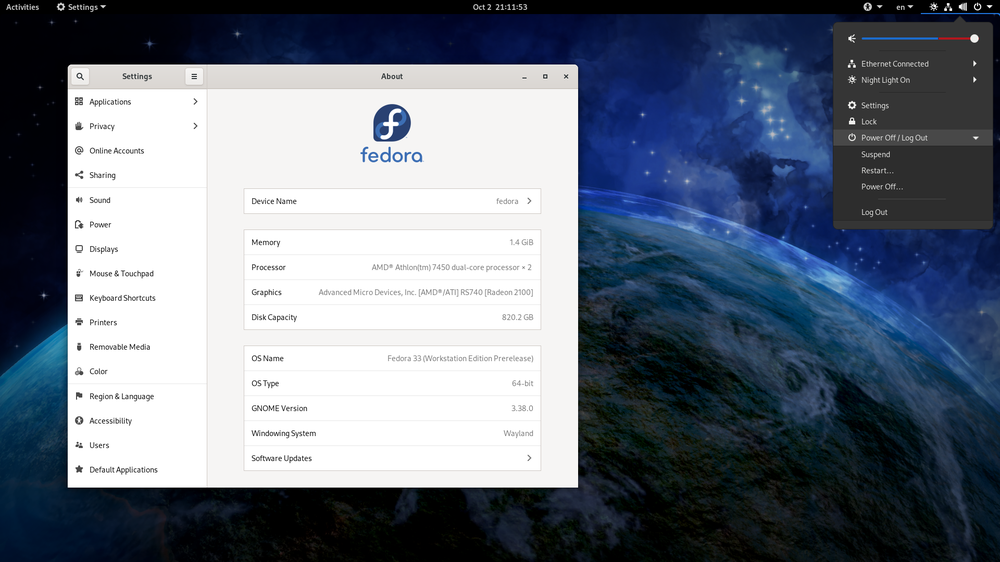
ระบบปฏิบัติการเดสก์ท็อปบนหน้าจอ
ระบบปฏิบัติการเดสก์ท็อปจัดการหน้าจอ ไฟล์ และโปรแกรมสำหรับผู้ใช้งาน
สมาร์ทโฟนถือด้วยมือหนึ่ง แสดงหน้าหลัก Android ที่มีไอคอนแอปฯ
โทรศัพท์ก็ต้องการอย่างนี้เช่นกัน: นี่คือระบบปฏิบัติการแบบมือถือ, Android

งานบริหารหลัก

หลักสูตรระบุไว้ 5 อย่าง ข้อความด้านล่างแต่ละข้อคือสิ่งที่ระบบปฏิบัติการทำได้จริง ซึ่งเป็นสิ่งที่คำถามประเภท "อธิบาย" ต้องการ

  • การจัดการหน่วยความจำ —分配的หน่วยความจำให้กับแต่ละโปรแกรมเมื่อโหลด, แยกหน่วยความจำของแต่ละโปรแกรมออกจากกัน (การปกป้องหน่วยความจำ) เพื่อให้โปรแกรมหนึ่งไม่สามารถเขียนทับอีกโปรแกรมหนึ่งได้, ปลดปล่อยหน่วยความจำเมื่อโปรแกรมสิ้นสุดการทำงาน, และสลับหน้าระหว่าง RAM กับ พื้นที่จัดเก็บรอง (ดิสก์) (หน่วยความจำเสมือน / การสลับหน้า) เพื่อให้เปิดโปรแกรมได้มากกว่าขนาดหน่วยความจำทางกายภาพที่รองรับ
  • การจัดการกระบวนการ — โปรแกรมที่กำลังทำงานเรียกว่า กระบวนการ. ระบบปฏิบัติการสร้างและจบกระบวนการ, ตัดสินใจว่ากระบวนการไหนจะได้รับการ CPU ต่อไป (การจัดตาราง) และนานเท่าไร (ช่วงเวลา time slice), สลับระหว่างกระบวนการ, แก้ไขความขัดแย้งเมื่อสองกระบวนการต้องการทรัพยากรเดียวกัน, และสามารถปิดกระบวนการที่ไม่ตอบสนองได้
  • การจัดการฮาร์ดแวร์ (เข้า/ออก และอุปกรณ์เสริม) — สื่อสารกับแต่ละอุปกรณ์ผ่าน ไดรเวอร์อุปกรณ์, จัดคิวและบัฟเฟอร์ข้อมูลที่ส่งไปยังอุปกรณ์ช้า เช่น เครื่องพิมพ์, ตอบรับ สัญญาณรบกวน จากอุปกรณ์, และแบ่งปันอุปกรณ์หนึ่งระหว่างหลายโปรแกรม
  • การจัดการไฟล์ — สร้าง ตั้งชื่อ คัดย้าย ลบไฟล์และโฟลเดอร์, รักษาระบบโครงสร้าง ไดเรกทอรี และบันทึกตำแหน่งที่เก็บไฟล์แต่ละไฟล์บนดิสก์,分配พื้นที่ดิสก์ให้กับไฟล์, และบังคับใช้ สิทธิ์การเข้าถึง (อ่าน / เขียน / ทำงาน) สำหรับผู้ใช้แต่ละคน
  • การจัดการความปลอดภัย — บัญชีผู้ใช้และรหัสผ่าน (การยืนยันตัวตน), สิทธิ์การเข้าถึง, การเข้ารหัสข้อมูลที่จัดเก็บ, เพล Firewall, อัปเดตความปลอดภัยอัตโนมัติ, และบันทึกกิจกรรมว่าใครทำอะไรบ้าง
แผนภาพ Hub ที่มีระบบปฏิบัติการอยู่ตรงกลาง เชื่อมโยงด้วยก้านรัศมีไปยังการจัดการหน่วยความมา, กระบวนการ, ไฟล์, อุปกรณ์ และความปลอดภัย พร้อมอินเทอร์เฟซผู้ใช้งาน
งานหลักที่ระบบปฏิบัติการดูแล
แผนที่หน่วยความจำที่มีระบบปฏิบัติการและแอปพลิเคชันสามตัวอยู่ในบล็อค各自的自己的 own各自 separated by boundary addresses; an access inside a block is allowed but an access that strays past a boundary is blocked
การปกป้องหน่วยความจำแยกแต่ละแอปพลิเคชันให้อยู่ในบล็อคหน่วยความจำของตนเอง

วิธีการที่การจัดการหน่วยความมาและการจัดการกระบวนการสนับสนุนการทำงานหลายอย่างพร้อมกัน (ข้อสอบชอบถาม 4 คะแนน) การจัดการหน่วยความมาโหลดหลายโปรแกรมลงในหน่วยความมาในเวลาเดียวกัน แต่ละโปรแกรมอยู่ในพื้นที่ที่ป้องกันตัวเอง และมีบันทึกว่าที่อยู่ไหนเป็นของใคร; การจัดการกระบวนการแบ่งปันโปรเซสเซอร์ระหว่างพวกเขา — แต่ละกระบวนการทำงานเป็นเวลา time slice, ระบบปฏิบัติการบันทึกสถานะแล้วสลับไปยังถัดไป, และการสลับนั้นเร็วมากจนดูเหมือนโปรแกรมทั้งหมดทำงานพร้อมกัน สัญญาณรบกวนช่วยให้ระบบปฏิบัติการดึงโปรเซสเซอร์กลับมาจากกระบวนการ.annotations需要一个attention from a device.

สัญญาณรบกวน. สัญญาณรบกวนฮาร์ดแวร์ มาจากอุปกรณ์: การกดคีย์, คลิกเมาส์, เครื่องพิมพ์หมดกระดาษ, ดิสก์ส่งข้อมูลเสร็จสิ้น, การขาดไฟ สัญญาณรบกวนซอฟต์แวร์ มาจากโปรแกรม: การหารด้วยศูนย์, คำสั่งที่ไม่ถูกต้อง, การพยายามใช้หน่วยความมาที่ไม่ใช่ของตน, หรือคำขอบริการจากระบบปฏิบัติการ ตัวจัดการสัญญาณรบกวน ของระบบปฏิบัติการบันทึกสถานะของกระบวนการที่กำลังทำงาน,和处理 signals, แล้วคืนสถานะกลับให้กระบวนการ (หัวข้อ 4 อธิบายรายละเอียด fetch–execute)

ซอฟต์แวร์ช่วยงาน

โปรแกรมช่วยงาน คือซอฟต์แวร์ระบบที่ทำหน้าที่บำรุงรักษา ซ่อมแซม หรือปรับปรุงประสิทธิภาพคอมพิวเตอร์ แทนที่จะทำหน้าที่ตามความต้องการของผู้ใช้; กรรมการข้อสอบยอมรับคำตอบว่า "ทำงานบำรุงรักษาเฉพาะด้านที่เพิ่มประสิทธิภาพหรือความปลอดภัย" ส่วนใหญ่ระบบปฏิบัติการรวมโปรแกรมเหล่านี้ไว้:

โปรแกรมช่วยงานทั่วไป: แอนติไวรัส,สำรอง,压缩ไฟล์, และ disk defragmenter
โปรแกรมช่วยงาน: แอนติไวรัส,สำรอง, compression และ defragmenter
  • disk formatter — เตรียมดิสก์ใหม่ (หรือลบข้อมูลเก่า) เพื่อใช้งาน: ตั้งค่า ระบบไฟล์ และ partition ของมัน, ลบข้อมูลที่มีอยู่เดิมออก
  • virus checker (antivirus) — สแกนไฟล์และหน่วยความมา, เปรียบเทียบโค้ดกับฐานข้อมูล ลายเซ็น ของไวรัสที่รู้จัก, และเฝ้าระวังพฤติกรรมน่าสงสัย, จากนั้น quarantine หรือลบสิ่งที่พบ; ทำงานตามกำหนดเวลาและทุกครั้งที่ดาวน์โหลด, และต้องอัปเดตเมื่อมีไวรัสใหม่ปรากฏ
  • ซอฟต์แวร์จัดระเบียบดิสก์ (disk defragmenter) — ฮาร์ดไดรฟ์เก็บไฟล์ในบล็อกฟรีที่พบได้เสมอ, ดังนั้นหลังจากบันทึกและลบหลายครั้ง ไฟล์จะกระจาย (fragmented) ไปทั่วจานดิสก์และหัวอ่าน/เขียนต้องกระโดดระหว่างชิ้นส่วน The defragmenter ย้ายชิ้นส่วนของแต่ละไฟล์ให้อยู่ติดกันและรวมพื้นที่ว่างให้เป็นภูมิภาคเดียว, เพื่อให้ไฟล์โหลดเร็วขึ้นและไฟล์ใหม่ไม่ fragmented. ไม่จำเป็นใน SSD, ซึ่งไม่มีหัวเคลื่อนที่
  • การวิเคราะห์เนื้อหาไดรฟ์ / ซอฟต์แวร์ซ่อมแซมไดรฟ์ — แสดงว่าอะไรใช้พื้นที่ไดรฟ์ (ไฟล์ใหญ่, ไฟล์ซ้ำ หรือไฟล์ชั่วคราว) เพื่อสามารถลบออก; ค้นหาและซ่อมแซม bad sectors, lost clusters และข้อผิดพลาดของระบบไฟล์
  • การบีบอัดไฟล์ (compression) — ลดขนาดไฟล์เพื่อให้ใช้พื้นที่จัดเก็บน้อยลงและถ่ายโอนเร็วขึ้น; การจัดเก็บรวม档案 bundled หลายไฟล์เข้าด้วยกันเป็นหนึ่ง
  • ซอฟต์แวร์สำรองข้อมูล (backup) — คัดลอกไฟล์ไปยังสื่ออื่น (ไดรฟ์ภายนอก, เครือข่าย, คลาวด์) ตามตารางเวลาเพื่อให้สามารถกู้คืนข้อมูลได้หลังจากสูญเสีย, เสียหาย หรือการโจมตี ransomware; สำเนาทั้งหมดจะถูกตามด้วย incremental backups ของสิ่งที่เปลี่ยนแปลงเท่านั้น
  • ไฟร์วอลล์ (กรองการจราจรเครือข่ายตามกฎ) และเครื่องมือเข้ารหัส, เพื่อความปลอดภัย; ระบบตรวจสอบ และ อัปเดตอัตโนมัติ

การรวมสิ่งเหล่านี้กับ OS ช่วยประหยัดให้ผู้ติดตั้งแต่ละอย่างเอง

** utility做什么 What each utility does. ประสิทธิภาพ: defragmentation (เข้าถึงไฟล์เร็วขึ้น), disk repair (ไดรฟ์ที่มีข้อผิดพลาดช้าหรือล้มเหลว), disk contents analysis (พื้นที่ว่างโดยการลบขยะ), compression (ใส่ได้มากขึ้นบนไดรฟ์) ความปลอดภัย: Virus checker, firewall, encryption, และ backup (การกู้คืนเดียวจาก ransomware). คำถาม "draw one line" จับคู่แต่ละ utility กับวัตถุประสงค์ที่เฉพาะเจาะจงหนึ่งอย่าง — เรียนรู้คู่ข้างต้นและใช้ชื่อในหลักสูตร

ตัวอย่างวิธีทำ. อธิบายวิธีการจัดระเบียบดิสก์ช่วยเพิ่มประสิทธิภาพของคอมพิวเตอร์ (3 คะแนน)

เมื่อเวลาผ่านไปไฟล์จะถูกจัดเก็บในบล็อกที่กระจายอยู่ทั่วฮาร์ดไดรฟ์, ดังนั้นการอ่านต้องใช้การเคลื่อนย้ายของหัวอ่าน/เขียนหลายครั้ง The defragmenter จัดเรียง ulangบล็อกเพื่อให้แต่ละไฟล์จัดเก็บ ต่อเนื่อง และพื้นที่ว่างอยู่รวมกัน ไฟล์จึงอ่านด้วยการเคลื่อนย้ายหัวน้อยลง, sehingga โหลดเร็วขึ้น, และไฟล์ใหม่สามารถเขียนลงในพื้นที่ต่อเนื่องได้

Explore · ⁨สำรวจ⁩

Where the operating system sits · ⁨ตำแหน่งของระบบปฏิบัติการ⁩

Tap each layer. The OS is the middle layer — it sits between your applications and the hardware, sharing the machine safely so programs never touch the hardware directly. · ⁨แตะแต่ละชั้น OS อยู่ตรงกลาง — nằm ระหว่างแอปพลิเคชันของคุณกับฮาร์ดแวร์ แบ่งปันเครื่องอย่างปลอดภัยเพื่อให้โปรแกรมไม่สัมผัสฮาร์ดแวร์โดยตรง⁩

Vocabulary · ⁨คำศัพท์⁩ Train · ⁨ฝึกฝน⁩
English ไทย
operating system/ˈɒpəreɪtɪŋ ˈsɪstəm/ operating system
processor/ˈprəʊsesə/ หน่วยประมวลผล
multitasking/ˈmʌltitæskɪŋ/ การทำงานหลายอย่างพร้อมกัน
memory management/ˈmeməri ˈmænɪdʒmənt/ memory management
memory protection/ˈmeməri prəˈtekʃn/ memory protection
RAM/ræm/ RAM
secondary storage/ˈsekəndəri ˈstɔːrɪdʒ/ การจัดเก็บรอง
virtual memory/ˈvɜːtʃuːəl ˈmeməri/ หน่วยความจำเสมือน
paging/ˈpeɪdʒɪŋ/ Paging
process management/ˈprəʊses ˈmænɪdʒmənt/ process management
process/ˈprəʊses/ โปรเซส (process)
scheduling/ˈʃedjuːlɪŋ/ scheduling
time slice/taɪm slaɪs/ time slice
firewall/ˈfaɪəwɔːl/ ไฟวอลล์
hardware interrupt/ˈhɑːdweə ˈɪntərʌpt/ hardware interrupt
software interrupt/ˈsɒftweə ˈɪntərʌpt/ software interrupt
interrupt handler/ˈɪntərʌpt ˈhændlə/ interrupt handler
utility program/juːˈtɪlɪti ˈprəʊɡræm/ โปรแกรมช่วย
antivirus/ˌæntɪˈvaɪrəs/ antivirus
backup/ˈbækʌp/ backup
compression/kəmˈpreʃn/ การอัดตัว
disk defragmenter/dɪsk ˌdiːˈfræɡmentə/ โปรแกรมจัดระเบียบดิสก์
signatures/ˈsɪɡnɪtʃəz/ signatures
fragmented/fræɡˈmentɪd/ fragmented (ขาด fragmentation / แตกแยก)
incremental backups/ˌɪŋkrɪˈmentl ˈbækʌps/ incremental backups
5.1

Program libraries · ⁨ห้องสมุดโปรแกรม⁩

English

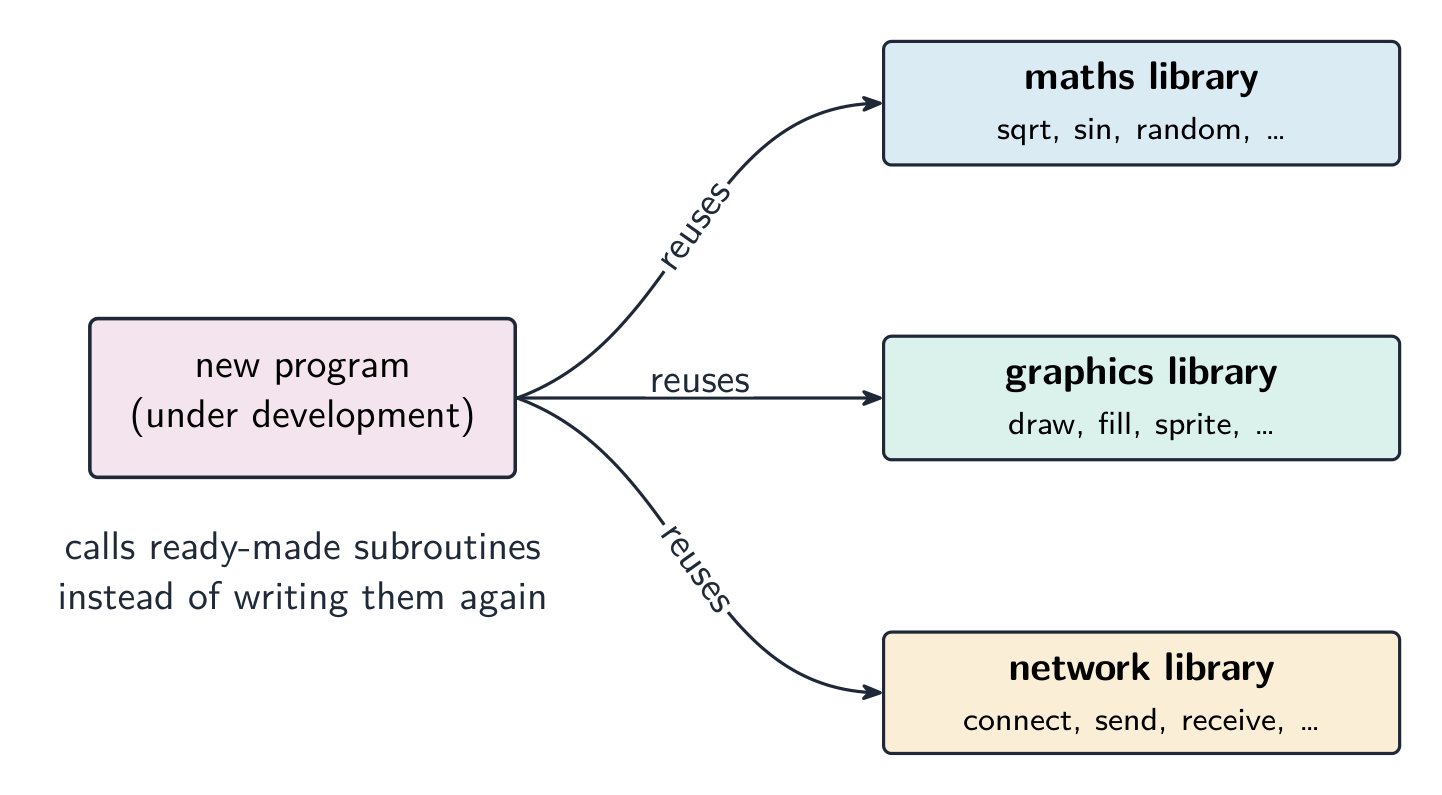
A program library 程序库 is pre-written code (subroutines 子程序, classes, modules) that programs reuse instead of writing it themselves — e.g. a maths library, a network library, a graphics library.

Benefits: saves time (off-the-shelf code), reliable (well-tested, widely used), and standardised (consistent behaviour).

The examiner's benefit list, for the developer. The library routines 库例程 are already written and tested, so development is faster and cheaper; they are reliable and, being used by many programs, largely error-free; the developer needs no expertise in that area (graphics, compression, encryption, path-finding); the program is easier to maintain because common code lives in one place; and a whole team can use the same routines, giving consistent results. Drawbacks: a routine may not do exactly what you need and you cannot change it; your program depends on the library being available, correct and secure — a bug or a security hole in the library is a bug in your program; and you must learn how to call it.

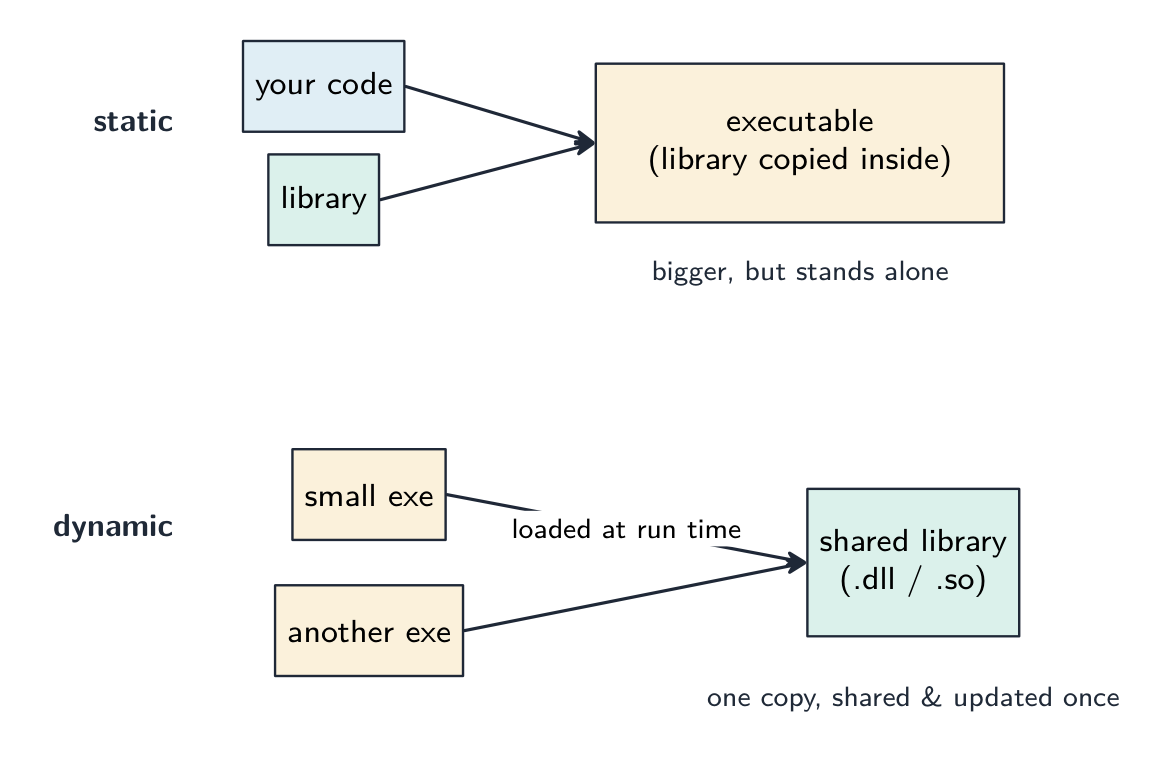
  • a static library 静态库 is copied into the executable at compile time (stands alone, but larger and needs rebuilding to update).
  • a dynamic library 动态库 (DLL, Dynamic Link Library; .so) is loaded at run time (smaller executables, shared by many programs, updated once for all).

Dynamic Link Library (DLL) files. A DLL is a library that is loaded into memory only when a program calls it, at run time, and stays as a separate file rather than being copied into the executable. Benefits: the executable is smaller; several running programs share one copy of the DLL in memory; a DLL can be updated (bug fix, new device) without recompiling the programs that use it; and memory is used only while the routine is needed. Drawbacks: the program will not run if the DLL is missing, moved or the wrong version; an updated DLL can break a program that relied on the old behaviour; and a fake DLL put in its place runs with the program's rights.

Worked example. A team writing the software for a restaurant robot uses a program library that includes a routine to find the shortest path between tables. Explain two benefits and one drawback to the team.

Benefits: the routine is already written and tested, so the team saves time and can trust the result; the team need not understand path-finding algorithms themselves and can spend the time on the robot's own features. Drawback: the routine may not handle the restaurant's exact needs (moving chairs, one-way aisles) and the team cannot alter it, so they may have to work around its limits.

ไทย

ห้องสมุดโปรแกรม คือโค้ดที่เขียนไว้ล่วงหน้า (subroutines, classes, modules) ที่โปรแกรมสามารถนำมาใช้ซ้ำได้โดยไม่ต้องเขียนเอง — ตัวอย่างเช่น ห้องสมุดคณิตศาสตร์, ห้องสมุดเครือข่าย, หรือห้องสมุดกราฟิก

โปรแกรมใหม่ที่กำลังพัฒนาซึ่งนำdirname ที่พร้อมใช้จากห้องสมุดคณิตศาสตร์, ห้องสมุดกราฟิก และห้องสมุดเครือข่ายมาใช้งานซ้ำ
โปรแกรมใหม่กำลังนำdirname ที่พร้อมใช้จากห้องสมุดต่างๆ มาใช้ซ้ำ

ประโยชน์: ประหยัดเวลา (โค้ดสำเร็จรูป), เชื่อถือได้ (ผ่านการทดสอบดีแล้วและมีการใช้งานอย่างกว้างขวาง), และ เป็นมาตรฐาน (มีพฤติกรรมที่สอดคล้องกัน)

รายการข้อดีสำหรับผู้ตรวจสอบ เพื่อผู้พัฒนาdirname ของห้องสมุดถูกเขียนและทดสอบไว้แล้ว ทำให้การพัฒนาเร็วขึ้นและมีต้นทุนต่ำกว่า; มีความน่าเชื่อถือสูงและเป็นAlmost error-free เนื่องจากถูกใช้งานโดยหลายโปรแกรม; ผู้พัฒนาไม่จำเป็นต้องมีความเชี่ยวชาญในด้านนั้นๆ (เช่น กราฟิก, การบีบอัดข้อมูล, การเข้ารหัส, การหาเส้นทาง); โปรแกรมจะดูแลรักษาง่ายขึ้นเพราะโค้ดส่วนกลางอยู่ในที่เดียว; และทีมทั้งหมดสามารถใช้dirname เดียวกันได้ مماให้ผลลัพธ์ที่สม่ำเสมอ ข้อเสีย: routine อาจไม่ทำงานตามที่ต้องการเป๊ะๆ และไม่อาจแก้ไขได้; โปรแกรมของคุณขึ้นอยู่กับว่าห้องสมุดจะมีอยู่จริง ถูกต้อง และปลอดภัย — หากมีbugหรือช่องโหว่ความปลอดภัยในห้องสมุด ก็视作เป็นbugของโปรแกรมคุณด้วย; และคุณต้องเรียนรู้วิธีการเรียกใช้มัน

  • static library จะถูกคัดลอกเข้าไปในไฟล์ اجر executable ในขณะ compile (แยกต่างหากได้แต่มีขนาดใหญ่กว่าและต้อง build ใหม่เพื่ออัปเดต)
  • dynamic library (DLL, Dynamic Link Library; .so) จะถูกโหลดเข้าหน่วยความจำในช่วง run time (ไฟล์ اجرมีขนาดเล็กกว่า, ใช้ร่วมกันได้โดยหลายโปรแกรม, อัปเดตครั้งเดียวใช้ได้ตลอด)
Static library จะถูกคัดลอกเข้าไปในไฟล์ اجرในช่วง compile ทำให้เป็นโปรแกรมที่แยกต่างหากได้แต่มีขนาดใหญ่ขึ้น; ไฟล์ dynamic library (.dll หรือ .so) จะแยกออกมา, ถูกโหลดในช่วง run time, และถูกแชร์โดยหลายโปรแกรม
Static: ห้องสมุดจะถูกคัดลอกเข้าไปในไฟล์ اجر. Dynamic: ไฟล์ห้องสมุดที่แชร์จะถูกโหลดในช่วง run time

ไฟล์ Dynamic Link Library (DLL). DLL เป็นห้องสมุดที่จะถูกโหลดเข้าหน่วยความจำก็ต่อเมื่อโปรแกรมเรียกใช้งาน它在run timeเท่านั้น และยังคงเป็นไฟล์แยกต่างหากแทนที่จะถูกคัดลอกเข้าไปในไฟล์ اجر ประโยชน์: ไฟล์ اجرมีขนาดเล็กลง; โปรแกรมที่กำลังรันหลายตัวสามารถแชร์สำเนา DLL ตัวเดียวกันในหน่วยความจำได้; สามารถอัปเดต DLL (แก้bug, เพิ่มอุปกรณ์ใหม่) ได้โดยไม่จำเป็นต้อง compile ใหม่โปรแกรมที่ใช้มัน; และหน่วยความจำจะถูกใช้เฉพาะตอนที่dirname ต้องการใช้งาน ข้อเสีย: โปรแกรมจะไม่ทำงานถ้า DLL หายไป, ถูกย้าย, หรือเป็นเวอร์ชันผิด; DLL เวอร์ชันใหม่อาจทำให้โปรแกรมที่พึ่งพาพฤติกรรมเก่าพังได้; และ DLL ปลอมที่ถูกใส่เข้ามาแทนที่ จะทำงานภายใต้สิทธิ์ของโปรแกรมนั้น

ตัวอย่างวิธีทำ ทีมงานที่เขียนซอฟต์แวร์สำหรับหุ่นยนต์ร้านอาหารใช้ห้องสมุดโปรแกรมที่มีdirname สำหรับหาเส้นทางสั้นที่สุดระหว่างโต๊ะอาหาร อธิบายประโยชน์สองข้อและข้อเสียหนึ่งข้อต่อทีมงานนี้

*ประโยชน์:*dirname ถูกเขียนและทดสอบไว้แล้ว ทำให้ทีมงานประหยัดเวลาและมั่นใจในผลลัพธ์; ทีมงานไม่จำเป็นต้องเข้าใจอัลกอริทึมการหาเส้นทางเองและใช้เวลาไปกับฟีเจอร์เฉพาะของหุ่นยนต์แทน *ข้อเสีย:*dirname อาจจัดการกับความต้องการที่แม่นยำของร้านไม่ได้ (เช่น การเคลื่อนย้ายเก้าอี้, ทางเดินแบบทางเดียว) และทีมงานไม่สามารถแก้ไขdirname ได้ ดังนั้นอาจต้องหามุม来处理ข้อจำกัดของมัน

Explore · ⁨สำรวจ⁩

Computing concept lab · ⁨ห้องปฏิบัติการแนวคิดการคำนวณ⁩

Classify concrete examples by the computing idea they demonstrate. · ⁨จัดกลุ่มตัวอย่างที่เป็นรูปธรรมตาม idea การคำนวณที่แสดงออก⁩

Vocabulary · ⁨คำศัพท์⁩ Train · ⁨ฝึกฝน⁩
English ไทย
subroutines/ˈsʌbruːtiːnz/ subroutines
library routines/ˈlaɪbrəri ruːˈtiːnz/ library routines
static library/ˈstætɪk ˈlaɪbrəri/ static library
executable/ɪɡˈzekjʊtəbl/ executable
dynamic library/daɪˈnæmɪk ˈlaɪbrəri/ dynamic library
translator/trænˈsleɪtə/ translator
5.2

Language translators · ⁨เครื่องแปลภาษา⁩

Syllabus · ⁨หลักสูตร⁩
English
Candidates should be able to: Notes and guidance
Show understanding of the need for: • assembler software for the translation of an assembly language program • a compiler for the translation of a high-level language program • an interpreter for translation and execution of a high-level language program
Explain the benefits and drawbacks of using either a compiler or interpreter and justify the use of each
Show awareness that high-level language programs may be partially compiled and partially interpreted, such as Java (console mode)
Describe features found in a typical Integrated Development Environment (IDE) Including: • for coding, including context-sensitive prompts • for initial error detection, including dynamic syntax checks • for presentation, including prettyprint, expand and collapse code blocks • for debugging, including single stepping, breakpoints, i.e. variables, expressions, report window
ไทย
ผู้เข้าสอบควรสามารถ: หมายเหตุและคำแนะนำ
แสดงความเข้าใจถึงความจำเป็นของ: • ซอฟต์แวร์ assembler เพื่อแปลงโปรแกรมภาษาแอสsembly • compiler เพื่อแปลงโปรแกรมภาษา high-level • interpreter เพื่อแปลงและรันโปรแกรมภาษา high-level
อธิบายข้อดีและข้อเสียของการใช้ compiler หรือ interpreter และให้เหตุผลในการเลือกใช้แต่ละชนิด
แสดงความตระหนักว่าโปรแกรมภาษา high-level บางครั้งอาจถูก compile และ interpret ผสมกัน เช่น Java (mode console)
อธิบายคุณสมบัติที่พบใน Integrated Development Environment (IDE) ทั่วไป รวมถึง: สำหรับเขียนโค้ด ซึ่งมีการแจ้งเตือนตามบริบท; สำหรับการตรวจจับข้อผิดพลาดเบื้องต้น ซึ่งมีการตรวจสอบไวยากรณ์แบบ dynamic;สำหรับการนำเสนอ ซึ่งมีการprettyprint, ขยายและหดบล็อกโค้ด;สำหรับการแก้ไขข้อผิดพลาด (debugging) ซึ่งมีการ single stepping, breakpoints, ตัวแปร,-expression, หน้าต่างรายงาน

Source: Cambridge International syllabus · ⁨แหล่งที่มา: หลักสูตร Cambridge International⁩

English

You write source code; the computer runs machine code 机器码. A translator 翻译器 converts between them.

Assembler

An assembler 汇编器 translates assembly language 汇编语言 into machine code: each mnemonic instruction (LDD, ADD, JMP) becomes exactly one machine-code instruction, and symbolic addresses and labels are replaced by real addresses. It is needed because the processor executes only machine code, and assembly is used where the programmer needs direct control of the hardware (embedded systems, device drivers).

Compiler

A compiler 编译器 translates a high-level program into machine code once, before it runs.

  • it reports all errors at compile time; once clean, it produces a stand-alone executable 可执行文件 that runs without the compiler installed and can be run many times.
  • generally faster at run time (no translation while running), but tied to one CPU/OS — recompile for each platform.

The two-mark description: a compiler translates the whole high-level program into machine code (object code 目标代码) before it is run, produces an executable file, and reports all the syntax errors together as a list at the end of translation. It does not run the program.

Interpreter

An interpreter 解释器 translates and runs a high-level program one line at a time, producing no executable.

  • it reports an error when it reaches that line, then stops; you can fix it and continue — good for development.
  • the interpreter must be installed to run the program; generally slower (each run re-translates), but easy to port across platforms.

The two-mark description: an interpreter translates one statement of the high-level program at a time and executes it immediately before moving to the next; no executable file is produced; it stops at the first error it meets and reports it. Both the source code and the interpreter must be present every time the program runs.

Choosing between them

Use a compiler when: Use an interpreter when:
run-time speed matters you want fast edit–run cycles
distributing to users without dev tools writing cross-platform scripts
the program runs many times the program is small or run once
teaching beginners

Benefits and drawbacks, as the mark scheme lists them.

compiler interpreter
execution speed fast — already machine code slower — translated on every run
what the user needs only the executable; no translator, and the source code stays private the source code and the interpreter
finding errors all errors listed at once, after the whole program is translated each error reported at the line where it occurs, as you develop
changing the code recompile the whole program after every change edit and run again immediately
portability machine code runs on one platform only; recompile for each the same source runs wherever an interpreter exists

Worked example. A developer uses an interpreter while writing a program and a compiler when it is finished. Explain how each is used (4 marks).

During development the interpreter runs the partly written program at once, without waiting for a complete translation; when it meets an error it reports the line, so the developer fixes it and runs again immediately — a fast edit–run cycle that is easier for debugging. When the program is finished, the compiler translates the whole program into an executable that runs faster, needs no translator on the user's computer, and does not reveal the source code, so it can be sold to the public.

Hybrid: Java

Java is compiled into bytecode 字节码 (a platform-independent intermediate form), which a virtual machine 虚拟机 (the JVM) then interprets — or uses just-in-time compilation 即时编译 to turn hot parts into native code. So errors are caught early, the bytecode runs anywhere with a JVM ("write once, run anywhere"), and long-running programs reach near-native speed. C# and Python use similar designs.

The syllabus phrase is "partially compiled and partially interpreted": the compiler stage catches syntax errors and produces compact, portable 可移植的 bytecode; the interpreting stage lets that one bytecode file run on any machine that has a virtual machine, at the cost of some speed. Java in console mode (a text program run from the command line) is the syllabus's example.

Worked example. Java source is compiled to bytecode, which a JVM then interprets. Why use both, instead of compiling straight to machine code? A compiler produces machine code for one processor and operating system, so a program compiled on one machine will not run on another. Java's compiler instead targets a virtual machine, so the bytecode it produces is identical everywhere; each platform then supplies its own JVM to interpret that bytecode into its own native instructions. One compiled file therefore runs anywhere a JVM exists - "write once, run anywhere". The price is speed: interpreting bytecode is slower than running native code, which is why a real JVM also uses JIT compilation to turn frequently-run bytecode into native code while the program runs. Name both sides - the marks are for portability bought at the cost of speed.

ไทย

คุณเขียน source code; คอมพิวเตอร์จะรัน machine code เครื่องแปล ทำหน้าที่แปลงระหว่างทั้งสองชนิดนี้

Assembler

Assembler แปล assembly language ให้เป็น machine code: คำสั่ง mnemonics แต่ละตัว (LDD, ADD, JMP) จะกลายเป็นคำสั่ง machine code พอดีหนึ่งตัว, และที่อยู่แบบสัญลักษณ์ (symbolic addresses) กับฉลาก (labels) จะถูกแทนที่ด้วยที่อยู่จริง จำเป็นต้องใช้เนื่องจากโปรเซสเซอร์รันได้เฉพาะ machine code เท่านั้น, และ assembly มักใช้ในกรณีที่นักพัฒนาต้องการควบคุมฮาร์ดแวร์โดยตรง (embedded systems, device drivers)

Compiler

Compiler แปลโปรแกรม high-level ให้เป็น machine code เพียงครั้งเดียว ก่อนที่มันจะรัน

  • มันรายงาน ทุก ความผิดพลาดที่เวลา compile; เมื่อสะอาดแล้ว มันจะสร้าง executable ที่ทำงานได้เองซึ่งรัน โดยไม่จำเป็นต้องติดตั้งคอมไพเลอร์ และสามารถรันซ้ำได้หลายครั้ง
  • โดยทั่วไป มีความเร็วสูงกว่าในขณะรัน (ไม่มีการแปลขณะทำงาน), แต่ถูกผูกติดกับ CPU/OS เฉพาะตัว — ต้องคอมไพลใหม่สำหรับแต่ละแพลตฟอร์ม

คำอธิบายคะแนนสองข้อ: คอมไพลเลอร์จะทำการแปล ทั้งโปรแกรมระดับสูงให้เป็นโค้ดเครื่อง (object code) ก่อนจะนำไปรัน, สร้างไฟล์ที่รันได้, และรายงาน ทั้งหมดของข้อผิดพลาดทางไวยากรณ์เป็นรายการรวมกัน ณ จุดสิ้นสุดของการแปล ไม่มีการรันโปรแกรม在此期间

อินเทอร์พรีเตอร์

อินเทอร์พรีเตอร์จะทำการแปลและรันโปรแกรมระดับสูง ทีละบรรทัด, โดยไม่สร้างไฟล์ที่รันได้

  • จะรายงานข้อผิดพลาด เมื่อถึงบรรทัดนั้นๆ, แล้วหยุด; คุณสามารถแก้ไขแล้วรันต่อได้ — เหมาะสำหรับการพัฒนา
  • ต้องติดตั้งอินเทอร์พรีเตอร์ จึงจะรันโปรแกรมได้; โดยทั่วไป ช้ากว่า (การรันแต่ละครั้งจะทำการแปลใหม่), แต่ง่ายต่อการ ย้ายไปใช้บนแพลตฟอร์มอื่น

คำอธิบายคะแนนสองข้อ: อินเทอร์พรีเตอร์จะทำการแปล คำสั่งหนึ่ง ของโปรแกรมระดับสูงทีละส่วนและ ดำเนินการ ทันที ก่อนที่จะไปต่อที่ส่วนถัดไป; ไม่สร้างไฟล์ที่รันได้; จะหยุดที่ ข้อผิดพลาดแรก ที่พบและรายงาน; ทั้งโค้ดต้นฉบับและอินเทอร์พรีเตอร์ต้องมีอยู่ทุกครั้งที่รันโปรแกรม

คอมไพเลอร์แปลซอร์สโค้ดครั้งเดียวเป็น executable ที่ затем รันซ้ำได้หลายครั้งโดยไม่มีตัวแปลอยู่; อินเทอร์พรีเตอร์แปลและรันซอร์สโค้ดทีบรรทัดต่อครั้งในทุกครั้งที่รัน
คอมไพลเลอร์จะทำการแปลครั้งเดียวเพื่อสร้างโปรแกรมแยกต่างหาก; อินเทอร์พรีเตอร์จะแปลทีละบรรทัด ทุกครั้งที่รัน

การเลือกระหว่างทั้งสอง

ใช้ คอมไพลเลอร์ เมื่อ: ใช้ อินเทอร์พรีเตอร์ เมื่อ:
ความเร็วในช่วงรันสำคัญ ต้องการรอบการทำงานแบบแก้ไข–รัน เร็ว
จัดส่งไปยังผู้ใช้ที่ไม่มีเครื่องมือพัฒนา เขียนสคริปต์ข้ามแพลตฟอร์ม
โปรแกรมรันหลายครั้ง โปรแกรมมีขนาดเล็กหรือรันเพียงครั้งเดียว
สอนผู้เริ่มต้น

ข้อดีและข้อเสีย ตามที่แผนการให้คะแนนระบุไว้

Compiler Interpreter
ความเร็วในการ اجرا เร็ว — เป็นโค้ดเครื่องอยู่แล้ว ช้ากว่า — ถูกแปลในทุกครั้งที่รัน
สิ่งที่ผู้ใช้ต้องการ มีเพียงไฟล์ที่รันได้; ไม่ต้องมีตัวแปล, และโค้ดต้นฉบับยังคงเป็นความลับ โค้ดต้นฉบับและอินเทอร์พรีเตอร์
การค้นหาข้อผิดพลาด รายงานข้อผิดพลาดทั้งหมดพร้อมกัน หลังการแปลจบทั้งโปรแกรม รายงานข้อผิดพลาดทีละจุด ณ บรรทัดที่เกิดwhileกำลังพัฒนา
การแก้ไขโค้ด คอมไพลทั้งโปรแกรมหลังจากการเปลี่ยนแปลงทุกครั้ง แก้ไขและรันทันที
ความพกพา โค้ดเครื่องรันได้เฉพาะบนแพลตฟอร์มเดียว; ต้องคอมไพล์ใหม่สำหรับแต่ละแพลตฟอร์ม ซอร์สโค้ดเดียวกันสามารถรันได้ทุกที่ที่มีอินเทอร์พรีเตอร์

ตัวอย่างวิธีทำ. นักพัฒนาใช้ インเทอร์พรีเตอร์ ขณะเขียนโปรแกรม และใช้ คอมไพเลอร์ เมื่อโปรแกรมเสร็จสิ้น อธิบายวิธีการใช้งานของแต่ละตัว (4 คะแนน)

ในช่วงการพัฒนา อินเทอร์พรีเตอร์จะรันโปรแกรมที่ยังเขียนไม่เสร็จทันที โดยไม่ต้องรอการแปลทั้งหมดเมื่อเจอข้อผิดพลาดจะระบุบรรทัด ทำให้ผู้พัฒนาแก้ไขและรันใหม่ได้ทันที — เป็นรอบการทำงานแบบแก้ไข-รันที่รวดเร็ว ซึ่งง่ายต่อการดีบัก เมื่อโปรแกรมเสร็จสิ้น คอมไพเลอร์จะแปลโปรแกรมทั้งหมดเป็นไฟล์ที่รันได้ซึ่งทำงานเร็วขึ้น ไม่ต้องมีอินเทอร์พรีเตอร์ในคอมพิวเตอร์ของผู้ใช้ และไม่เปิดเผยซอร์สโค้ด จึงสามารถนำไปขายให้公众ได้

แบบผสม: Java

Java ถูกคอมไพล์เป็น bytecode (รูปแบบกลางที่เป็นอิสระจากแพลตฟอร์ม) ซึ่ง virtual machine (JVM) จะทำการอินเทอร์พรีต หรือใช้ just-in-time compilation เพื่อแปลงส่วนที่ใช้งานบ่อยให้เป็นโค้ดnative ดังนั้นข้อผิดพลาดจึงถูกตรวจจับได้ตั้งแต่เนิ่นๆ bytecode รันได้ทุกที่ที่มี JVM (

ข้อความในหลักสูตรคือ **

Java source code ถูกคอมไพล์ครั้งเดียวเป็น bytecode ที่เป็นอิสระจากแพลตฟอร์ม (.class) ซึ่ง JVM บน Windows, macOS หรือ Linux จะทำการอินเทอร์พรีตหรือ JIT-compile เป็นโค้ดnative
Java 컴파일เป็น bytecode ที่พกพาได้ซึ่ง JVM ใดๆ สามารถรันได้ — เขียนครั้งเดียว รันได้ทุกที่

ตัวอย่างวิธีทำ. ซอร์สโค้ด Java ถูกคอมไพล์เป็น bytecode ซึ่ง JVM จะทำการอินเทอร์พรีต ทำไมต้องใช้ทั้งสองอย่างแทนที่จะคอมไพล์ตรงไปตรงมาสู่โค้ดเครื่อง? คอมไพเลอร์ผลิตโค้ดเครื่องสำหรับ **,

Explore · ⁨สำรวจ⁩

The compiler route: source to running program · ⁨เส้นทางของคอมไพล์: จากซอร์สโค้ดไปสู่โปรแกรมที่运行的ได้⁩

Step through how a compiler works — translating the whole program once, before it runs. Contrast it with an interpreter, which translates and runs one line at a time. · ⁨ติดตามขั้นตอนการทำงานของคอมไพล์ — การแปลทั้งโปรแกรมครั้งเดียว ก่อนที่จะ运行的 เปรียบเทียบกับอินเทอร์พรีเตอร์ซึ่งจะแปลและ运行的บรรทัดละบรรทัด⁩

Vocabulary · ⁨คำศัพท์⁩ Train · ⁨ฝึกฝน⁩
English ไทย
device driver/dɪˈvaɪs ˈdraɪvə/ ไดรเวอร์อุปกรณ์
interrupts/ˈɪntərʌpts/ การขัดจังหวะ
directory/daɪˈrektəri/ directory
access rights/ˈækses raɪts/ access rights
authentication/ɔːˌθentɪˈkeɪʃn/ authentication
machine code/məˈʃiːn kəʊd/ เครื่องมิกซ์โค้ด (machine code)
assembler/əˈsemblə/ assembler
assembly language/əˈsemblɪ ˈlæŋɡwɪdʒ/ Assembly Language
compiler/kəmˈpaɪlə/ compiler
object code/ˈɒbdʒekt kəʊd/ object code
interpreter/ɪnˈtɜːprɪtə/ interpreter
bytecode/ˈbaɪtkəʊd/ 字节码
virtual machine/ˈvɜːtʃuːəl məˈʃiːn/ virtual machine
just-in-time compilation/dʒʌst ɪn taɪm ˌkɒmpɪˈleɪʃn/ just-in-time compilation
portable/ˈpɔːtəbl/ portable
integrated development environment/ˈɪntɪɡreɪtɪd dɪˈveləpmənt enˈvaɪrənmənt/ integrated development environment
5.2

Integrated Development Environment (IDE) · ⁨สภาพแวดล้อมการพัฒนาแบบบูรณาการ (IDE)⁩

English

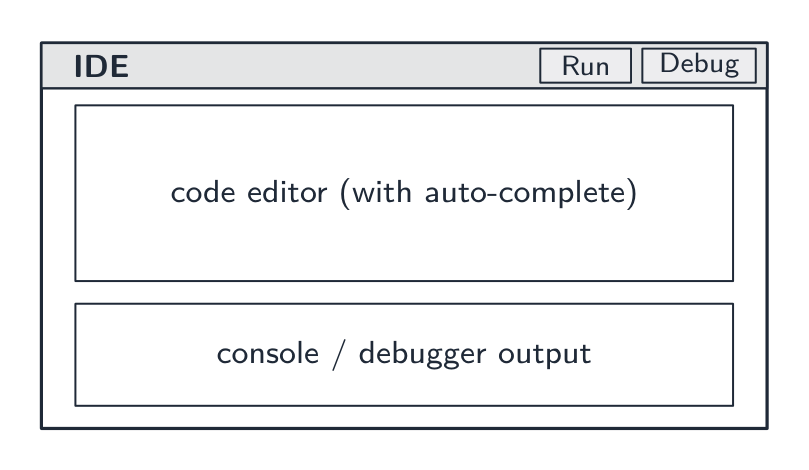
An integrated development environment 集成开发环境 (IDE) brings the tools to write, test and debug code into one application:

The syllabus groups the features into four kinds. Learn which feature belongs to which, because questions ask you to sort them and to describe one from each group.

  • For coding: context-sensitive prompts 上下文相关提示 — as you type, the IDE pops up the identifiers, keywords or parameters that fit at that point in the code; auto-complete 自动补全 finishes the name for you; automatic indentation and bracket matching keep the layout right as you type.
  • For initial error detection: dynamic syntax checks 动态语法检查 — the editor checks the syntax as you type and underlines or highlights a mistake immediately, before the program is translated; after translation, error messages with line numbers.
  • For presentation: prettyprint 代码美化 — keywords, identifiers, strings and comments shown in different colours or fonts (syntax highlighting 语法高亮) with consistent indentation, so the structure is visible at a glance; expand and collapse code blocks — hide the body of a loop, an IF or a subroutine so you see the outline.
  • For debugging: breakpoints 断点 — the program pauses when it reaches a marked line; single stepping 单步执行 — from the pause, run one line at a time; a window that shows the current values of variables and expressions as they change; and a report window 报告窗口 that lists errors, warnings and output.

Other features: translator integration (compile or run with one key, errors shown inline), a debugger 调试器 that drives the debugging features above, version control 版本控制 integration (git), project management, a help system, refactoring 重构 tools (safe renaming) and unit test 单元测试 integration.

An IDE speeds development by putting writing → running → debugging → fixing behind one interface. Common IDEs: Visual Studio, PyCharm, Eclipse, VS Code.

Worked example. A function Calculate() returns an unexpected value when the program runs. Describe how the debugging features of a typical IDE help find the cause (4 marks).

Set a breakpoint on the first line of Calculate(), so the program pauses there instead of running through. Then single-step through the function one line at a time. After each step read the values of the variables and of any expression you have asked the IDE to watch, and compare them with the values you expected; the first line after which a value is wrong is where the logic error is. The report window shows any run-time error message and the output produced so far.

Worked example. Put each feature in its syllabus group: prettyprint, context-sensitive prompt, dynamic syntax check, breakpoint, expand/collapse code blocks, report window.

Coding: context-sensitive prompt. Initial error detection: dynamic syntax check. Presentation: prettyprint, expand/collapse code blocks. Debugging: breakpoint, report window.

ไทย

สภาพแวดล้อมการพัฒนาแบบบูรณาการ (IDE) รวบรวมเครื่องมือสำหรับการเขียน ทดสอบ และแก้ไขข้อผิดพลาดของโค้ดไว้ในแอปพลิเคชันเดียว:

IDE รวบรวมตัวแก้ไขโค้ด ปุ่มรัน และไดบักเกอร์เข้าด้วยกันในโปรแกรมเดียว
IDE รวมตัวแก้ไขโค้ด ปุ่มรัน และไดบักเกอร์เข้าด้วยกัน

หลักสูตรจัดกลุ่มคุณสมบัติออกเป็นสี่ประเภท คุณควรเรียนรู้ว่าแต่ละคุณสมบัติอยู่ในกลุ่มใด เนื่องจากคำถามจะขอให้คุณจำแนกประเภทและอธิบายหนึ่งคุณสมบัติจากแต่ละกลุ่ม

  • สำหรับการเขียนโค้ด: คำแนะนำตามบริบท — เมื่อคุณพิมพ์ IDE จะแสดงชื่อตัวแปร คำสำคัญ หรือพารามิเตอร์ที่เหมาะสมปรากฏขึ้นที่จุดนั้นในโค้ด; การเติมอัตโนมัติ จะช่วยเติมชื่อให้เสร็จสมบูรณ์; การจัดรูปแบบด้วยช่องว่างอัตโนมัติและการจับคู่วงเล็บช่วยให้การจัดวางถูกต้องขณะพิมพ์
  • สำหรับการตรวจจับข้อผิดพลาดเบื้องต้น: การตรวจสอบไวยากรณ์แบบพลวัต — ตัวแก้ไขจะตรวจสอบไวยากรณ์ขณะพิมพ์และขีดเส้นใต้หรือเน้นสีความผิดพลาดทันที ก่อนที่โปรแกรมจะถูกแปลภาษา; หลังจากการแปลภาษาแล้ว จะมีข้อความแจ้งข้อพร้อมระบุบรรทัด
  • สำหรับการนำเสนอ: prettyprint — แสดงคำสำคัญ ชื่อตัวแปร สตริง และคอมเมนต์ด้วยสีหรือฟอนต์ที่แตกต่างกัน (การเน้นไวยากรณ์) พร้อมการจัดรูปแบบด้วยช่องว่างที่สม่ำเสมอ เพื่อให้โครงสร้างมองเห็นได้ชัดเจนในพริบตา; ขยายและหดบล็อกโค้ด — ซ่อนส่วนเนื้อหาภายในของลูป,语句 IF หรือ subroutine เพื่อให้เห็นเพียงโครงร่าง
  • การแก้ไขข้อผิดพลาด: จุดหยุด (breakpoints) — โปรแกรมจะหยุดเมื่อถึงบรรทัดที่กำหนดไว้; การก้าวทีละบรรทัด (single stepping) — จากสถานะหยุด ให้รันทีละบรรทัด; หน้าจอแสดงผลค่าปัจจุบันของ ตัวแปรและนิพจน์ เมื่อมีการเปลี่ยนแปลง; และ หน้าต่างรายงาน ที่แสดงรายการข้อผิดพลาด ข้อเตือน และการแสดงผล

คุณสมบัติอื่นๆ: การรวมระบบแปลภาษา (คอมไพล์หรือรันได้ด้วยปุ่มเดียว ข้อผิดพลาดแสดงในบรรทัด), ไดบักเกอร์ ที่ควบคุมคุณสมบัติการแก้ไขข้อผิดพลาดข้างต้น, การควบคุมเวอร์ชัน (git), การจัดการโปรเจกต์, ระบบช่วยเหลือ, เครื่องมือ refactoring (การเปลี่ยนชื่ออย่างปลอดภัย) และการรวมระบบ unit test

หน้าต่าง IDE ที่มีป้ายกำกับตัวเลข: คำสำคัญที่มีสี (prettyprint), บล็อกโค้ดที่ถูกหด, คำแนะนำที่เด้งขึ้นมาเพื่อเสนอชื่อ, เส้นคลื่นจากการตรวจสอบไวยากรณ์แบบพลวัต, จุดหยุดในขอบด้านข้าง, ลูกศรบนบรรทัดปัจจุบันระหว่างการใช้ single stepping, แผงตัวแปร และหน้าต่างรายงาน
คุณสมบัติของ IDE ตามชื่อบอกในหลักสูตร ปรากฏในตำแหน่งที่คุณจะเห็น它们在หน้าจอ

IDE ช่วยเร่งกระบวนการพัฒนาโดยนำขั้นตอนการเขียน → รัน → แก้ไขข้อผิดพลาด → แก้ไข ไว้ภายใต้อินเทอร์เฟซเดียว IDE ที่นิยมใช้: Visual Studio, PyCharm, Eclipse, VS Code

กระบวนการทำงานของไดบักเกอร์: ตั้งจุดหยุด, รันโปรแกรม, เมื่อถึงจุดหยุดโปรแกรมจะหยุดเพื่อให้คุณตรวจสอบตัวแปร จากนั้นก้าวทีละบรรทัดหรือดำเนินต่อ
ไดบักเกอร์: ตั้งจุดหยุด, รัน, แล้วหยุดเพื่อตรวจสอบตัวแปรและก้าวผ่านโค้ดทีละบรรทัด

ตัวอย่างฝึกปฏิบัติ. ฟังก์ชัน Calculate()/value output ที่ไม่คาดคิดเมื่อโปรแกรมถูกเรียกใช้งาน อธิบายว่าคุณสมบัติการแก้ไขข้อผิดพลาดของ IDE แบบทั่วไปช่วยหาสาเหตุได้อย่างไร (4 คะแนน).

ตั้ง จุดหยุด บนบรรทัดแรกของ Calculate() เพื่อให้โปรแกรมหยุดที่นั่นแทนที่จะรันต่อเนื่องจากนั้น ก้าวทีละบรรทัด ผ่านฟังก์ชันหนึ่งบรรทัดต่อหนึ่งบรรทัด หลังจากแต่ละขั้น ให้อ่านค่าของตัวแปรและนิพจน์ใดๆ ที่คุณสั่งให้ IDE ติดตามดู แล้วเปรียบเทียบกับค่าที่คุณคาดหวัง บรรทัดแรกหลังจากที่ค่าผิดไปคือตำแหน่งที่มีข้อผิดพลาดทางตรรกะ หน้าต่างรายงาน จะแสดงข้อความข้อผิดพลาดขณะรันและผลลัพธ์ที่ได้สร้างมาจนถึงตอนนี้

ตัวอย่างฝึกปฏิบัติ. จัดกลุ่มคุณสมบัติแต่ละชนิดลงในหมวดหมู่ของหลักสูตร: prettyprint, คำแนะนำตามบริบท, การตรวจสอบไวยากรณ์แบบพลวัต, จุดหยุด, ขยาย/หดบล็อกโค้ด, หน้าต่างรายงาน

การเขียนโค้ด: คำแนะนำตามบริบท. การตรวจจับข้อผิดพลาดเบื้องต้น: การตรวจสอบไวยากรณ์แบบพลวัต. การนำเสนอ: prettyprint, ขยาย/หดบล็อกโค้ด. การแก้ไขข้อผิดพลาด: จุดหยุด, หน้าต่างรายงาน.

Vocabulary · ⁨คำศัพท์⁩ Train · ⁨ฝึกฝน⁩
English ไทย
debugger/ˈdiːbʌɡə/ โปรแกรมตรวจสอบ
context-sensitive prompts/ˈkɒntekst ˈsensɪtɪv prɒmpts/ context-sensitive prompts
auto-complete/ˈɔːtəʊ kəmˈpliːt/ auto-complete
dynamic syntax checks/daɪˈnæmɪk ˈsɪntæks tʃeks/ dynamic syntax checks
prettyprint/ˈpretɪprɪnt/ prettyprint
syntax highlighting/ˈsɪntæks ˈhaɪlaɪtɪŋ/ การเน้นสีไวยากรณ์
breakpoints/ˈbreɪkpɔɪnts/ breakpoints
single stepping/ˈsɪŋɡl ˈstepɪŋ/ single stepping
report window/rɪˈpɔːt ˈwɪndəʊ/ report window
version control/ˈvɜːʃn kənˈtrəʊl/ การควบคุมเวอร์ชัน
refactoring/rɪˈfæktərɪŋ/ การจัดโค้ดใหม่
unit test/ˈjuːnɪt test/ การทดสอบหน่วย
5.2

Definitions the examiner accepts · ⁨คำนิยามที่ผู้สอบยอมรับ⁩

English

A definition question is marked against fixed wording. Learn these exactly, and give one answer only.

Term Definition
operating system software that manages the computer's hardware and resources and provides an interface between the user, the application programs and the hardware
utility software system software that performs a specific task to maintain, optimise or protect the computer, such as a virus checker or a defragmenter
program library a collection of pre-written, tested routines (subroutines, classes, modules) that a program can use instead of writing its own
Dynamic Link Library (DLL) a program library whose routines are loaded into memory only when the program calls them, at run time, and are shared between programs
assembler a translator that converts an assembly language program into machine code, one instruction for each instruction
compiler a translator that converts the whole of a high-level language program into machine code before it is run, producing an executable file
interpreter a translator that translates and executes a high-level language program one statement at a time
integrated development environment a single application that provides the tools for writing, translating, running and debugging a program
context-sensitive prompt a pop-up that suggests identifiers, keywords or parameters that fit at the current point in the code
dynamic syntax check checking the syntax of the code as it is typed and flagging an error before the program is translated
prettyprint displaying code with keywords, identifiers and comments in different colours or fonts and with consistent indentation
breakpoint a marked line at which the running program pauses so that variables can be inspected
single stepping running a paused program one statement at a time under the programmer's control
ไทย

คำถามคำนิยามจะให้คะแนนตามข้อความที่กำหนดไว้你必须 exact. เรียนรู้ให้ถูกต้องและตอบเพียงคำตอบเดียวเท่านั้น

พจน์ นิยาม
ระบบปฏิบัติการ ซอฟต์แวร์ที่จัดการฮาร์ดแวร์และทรัพยากรของคอมพิวเตอร์并提供อินเทอร์เฟซระหว่างผู้ใช้ แอปพลิเคชัน และฮาร์ดแวร์
ซอฟต์แวร์ utility ซอฟต์แวร์ระบบที่ทำหน้าที่เฉพาะเจาะจงเพื่อรักษา ปรับปรุงความปลอดภัย หรือปกป้องคอมพิวเตอร์ เช่น โปรแกรมตรวจไวรัสหรือโปรแกรมจัดเรียงข้อมูล
คลังโค้ด (program library) ชุดของdirname ที่เขียนไว้ล่วงหน้าและทดสอบแล้ว (subroutines, classes, modules) ที่โปรแกรมสามารถนำไปใช้แทนการเขียนของตัวเอง
Dynamic Link Library (DLL) คลังโค้ด whose routines ถูกโหลดเข้าสู่หน่วยความจำก็ต่อเมื่อโปรแกรมเรียกใช้它们 during runtime และ被 sharing ระหว่างโปรแกรม
assembler เครื่องแปล that converts assembly language program into machine code, one instruction for each instruction
compiler เครื่องแปล that converts the whole of a high-level language program into machine code before it is run, producing an executable file
interpreter machine that translates and executes a high-level language program one statement at a time
สภาพแวดล้อมการพัฒนาแบบบูรณาการ แอปพลิเคชันเดียวที่มอบเครื่องมือสำหรับการเขียน แปล รัน และแก้ไขข้อผิดพลาดของโปรแกรม
คำแนะนำตามบริบท pop-up that suggests identifiers, keywords or parameters that fit at the current point in the code
การตรวจสอบไวยากรณ์แบบพลวัต การตรวจสอบไวยากรณ์ของโค้ดขณะพิมพ์และระบุข้อผิดพลาดก่อนที่โปรแกรมจะถูกแปล
prettyprint แสดงโค้ดด้วยคำสำคัญ ชื่อตัวแปร และคอมเมนต์ในสีหรือฟอนต์ที่แตกต่างกัน พร้อมการจัดรูปแบบด้วยช่องว่างที่สม่ำเสมอ
จุดหยุด บรรทัดที่กำหนดไว้ where running program pauses so that variables can be inspected
การก้าวทีละบรรทัด running a paused program one statement at a time under the programmer's control
Vocabulary · ⁨คำศัพท์⁩ Train · ⁨ฝึกฝน⁩
English ไทย
program library/ˈprəʊɡræm ˈlaɪbrəri/ program library
5.2

Exam tips · ⁨ข้อแนะนำสำหรับการสอบ⁩

English
  • List the OS's jobs by their syllabus names (memory, process, hardware, file and security management) and say what each does — "manages resources" alone is too vague.
  • Compare compiler vs interpreter vs assembler: what each translates, when it translates it, and how errors are reported.
  • Explain what an IDE provides using the syllabus groups: coding, initial error detection, presentation, debugging.
  • A "benefit to the developer" answer names the developer's saving: time, cost, expertise, reliability or maintenance. A "drawback" names a dependence: availability, version, fit, security.
  • For "describe the operation of" a translator, give three things: what is translated (whole program or one statement), when (before running or while running), and how errors are reported (all at once or at the first error).

Common mistakes

  • Writing "the OS controls the computer" or "manages resources" with no example task. Each mark is one named task with what it does.
  • Saying an interpreter "compiles line by line". An interpreter translates and executes each statement; it never produces an executable.
  • Saying a compiler runs the program. It only translates; the executable runs later, without the compiler.
  • Putting a DLL "inside" the executable. That is a static library; a DLL stays a separate file loaded at run time.
  • Saying defragmentation "deletes" or "compresses" files, or is needed on an SSD. It only moves blocks so each file is stored contiguously.
  • Filing prettyprint or collapsing blocks under "debugging". They are presentation features; debugging is breakpoints, single stepping, watching variables and the report window.
ไทย
  • จดรายการงานของระบบปฏิบัติการตามชื่อในหลักสูตร (การจัดการหน่วยความจำ การจัดการกระบวนการ การจัดการฮาร์ดแวร์ การจัดการไฟล์ และการจัดการความปลอดภัย) และอธิบายว่าแต่ละอย่างมีหน้าที่อะไร — คำว่า "จัดการทรัพยากร" เพียงอย่างเดียวนั้นกว้างเกินไป
  • เปรียบเทียบ คอมไพล์เลอร์ vs อินเทอร์พรีเตอร์ vs แอสเซมบเลอร์: สิ่งที่จะถูกแปล, เวลาที่ทำการแปล, และการรายงานข้อผิดพลาด
  • อธิบายว่า IDE ให้บริการอะไรบ้าง โดยใช้กลุ่มหัวข้อในหลักสูตร: การเขียนโค้ด, การตรวจจับข้อผิดพลาดเบื้องต้น, การนำเสนอ, และการดีบัก
  • คำตอบที่ระบุว่า "ประโยชน์ต่อผู้พัฒนา" ต้องระบุการประหยัดของผู้พัฒนา เช่น เวลา ค่าใช้จ่าย ความเชี่ยวชาญ ความน่าเชื่อถือ หรือการบำรุงรักษา ส่วน "ข้อเสีย" ต้องระบุถึงความพึ่งพา เช่น การเข้าถึงได้, เวอร์ชัน, ความเหมาะสม, หรือความปลอดภัย
  • สำหรับคำถาม "อธิบายการทำงานของการแปล", ให้ให้สามสิ่ง: สิ่งที่ถูกรวม (โปรแกรมทั้งหมดหรือบรรทัดเดียว), เวลา (ก่อนรันหรือขณะรัน), และการรายงานข้อผิดพลาด (พร้อมกันทั้งหมดหรือที่ข้อผิดพลาดแรก)

ข้อผิดพลาดที่พบบ่อย

  • การเขียนว่า "ระบบปฏิบัติการควบคุมคอมพิวเตอร์" หรือ "จัดการทรัพยากร" โดยไม่มีตัวอย่างงาน Each mark คือหนึ่งงานที่มีชื่อและสิ่งที่มันทำ
  • การบอกว่าอินเทอร์พรีเตอร์ "คอมไพล์บรรทัดต่อบรรทัด" อินเทอร์พรีเตอร์จะแปล และดำเนินการ ทุกคำสั่ง; มันไม่ pernahสร้างไฟล์ที่รันได้
  • การบอกว่าคอมไพล์เลอร์รันโปรแกรม มันแค่แปล; ไฟล์ที่รันได้จะถูกรันทีหลังโดยไม่มีการใช้คอมไพล์เลอร์อีกต่อไป
  • การวาง DLL "อยู่ใน" ไฟล์ที่รันได้ นั่นคือไลบรารีแบบสแตติก; DLL จะคงเป็นไฟล์แยกต่างหากที่ถูกโหลดในช่วงรัน
  • การบอกว่า defragmentation "ลบ" หรือ "บีบอัด" ไฟล์, หรือจำเป็นสำหรับ SSD มันแค่ย้ายบล็อกเพื่อให้แต่ละไฟล์จัดเก็บต่อเนื่องกัน
  • การบันทึกprettyprint หรือการยุบบล็อก تحتหมวดหมู่ "debugging" พวกมันเป็นคุณสมบัติการนำเสนอ; debugging คือ breakpoint, single stepping, การดูค่าตัวแปร และหน้าต่างรายงาน

Interactive lessons on this topic · ⁨บทเรียนเชิงโต้ตอบสำหรับหัวข้อนี้⁩

Work through it step by step, with instant-check exercises. · ⁨ทำทีละขั้นตอน พร้อมแบบฝึกหัดตรวจสอบผลทันที⁩

Past Papers · ⁨ข้อสอบย้อนหลัง⁩

More topics in A-Level Computer Science · ⁨Computer Science A-Level⁩ · ⁨หัวข้อเพิ่มเติมใน A-Level Computer Science · ⁨Computer Science A-Level⁩⁩

Log in or create account · ⁨เข้าสู่ระบบหรือสร้างบัญชี⁩

IGCSE, A-Level & AP