Tables · ตาราง
This page needs a recent browser (with SharedArrayBuffer support). Please update Chrome, Edge, Firefox or Safari to the latest version. · หน้านี้ต้องใช้เบราว์เซอร์ล่าสุด (รองรับ SharedArrayBuffer) กรุณาอัปเดต Chrome, Edge, Firefox หรือ Safari เป็นเวอร์ชันล่าสุด
English
Tables
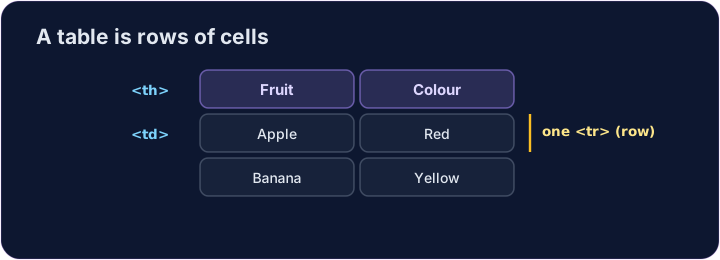
- A table shows information in rows and columns.
- Start with
<table>. - Each row is a
<tr>(table row).
ไทย
ตาราง
- ตาราง แสดงข้อมูลในรูปแบบแถวและคอลัมน์
- เริ่มต้นด้วย ⟨
<table>⟩ - แต่ละ แถว คือ ⟨
<tr>⟩ (แถวตาราง)
English
Cells
- Inside each row, each cell is a
<td>(table data). - For a heading cell, like a column title, use
<th>— it shows in bold. - Give every row the same number of cells.
ไทย
เซลล์
- ภายในแต่ละแถว แต่ละ เซลล์ คือ ⟨
<td>⟩ (ข้อมูลตาราง) - สำหรับเซลล์ หัวข้อ เช่น ชื่อคอลัมน์ ให้ใช้ ⟨
<th>⟩ — จะแสดงตัวหนา - กำหนดจำนวนเซลล์ให้เท่ากันในทุกแถว
<table>
  <tr><th>Fruit</th><th>Colour</th></tr>
  <tr><td>Apple</td><td>Red</td></tr>
  <tr><td>Banana</td><td>Yellow</td></tr>
</table>
English
Common mistakes
- Cells (
<td>) go inside rows (<tr>). - Use
<th>for header cells.
ไทย
ข้อผิดพลาดที่พบบ่อย
- เซลล์ (
<td>) อยู่ภายในแถว (<tr>). - ใช้ ⟨
<th>⟩ สำหรับเซลล์หัวตาราง
English
Now you try
- A table is rows (
<tr>) holding cells (<td>or<th>). - Build a small table, then add a header cell.
ไทย
ลองดูเลย
- ตารางประกอบด้วยแถว (
<tr>) ที่เก็บเซลล์ (<td>หรือ ⟨<th>⟩) - สร้างตารางขนาดเล็ก แล้วเพิ่มเซลล์หัวตาราง
Make a table with two rows. Each row is a <tr>, and put a <td> cell inside each row. · สร้างตารางที่มี สอง แถว แต่ละแถวคือ <tr> และใส่เซลล์ <td> ภายในแต่ละแถว
Add a header cell so the column has a title. Use <th> instead of <td> for it. · เพิ่มเซลล์หัวตารางเพื่อให้คอลัมน์มีชื่อใช้ <th> แทน <td> สำหรับส่วนนี้