Images · รูปภาพ
This page needs a recent browser (with SharedArrayBuffer support). Please update Chrome, Edge, Firefox or Safari to the latest version. · หน้านี้ต้องใช้เบราว์เซอร์ล่าสุด (รองรับ SharedArrayBuffer) กรุณาอัปเดต Chrome, Edge, Firefox หรือ Safari เป็นเวอร์ชันล่าสุด
English
Images
- Show a picture with the
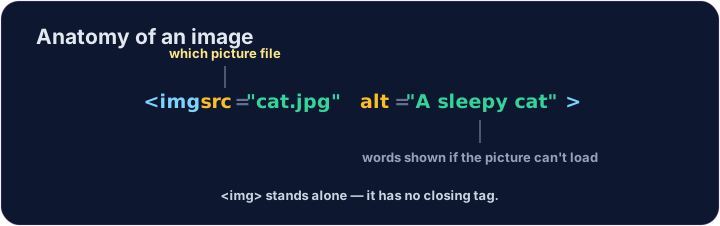
<img>tag. <img>is a single tag — no closing tag, like<br>.- It needs two attributes:
src(where the picture is) andalt(a description).
ไทย
รูปภาพ
- แสดงรูปภาพด้วยแท็ก
<img> <img>เป็น แท็กเดียว — ไม่มีแท็กปิด เช่นเดียวกับ<br>- ต้องใช้แอททริบิวต์สองอย่าง:
src(ตำแหน่งของรูปภาพ) และalt(คำอธิบาย)
<img src="/static/code/web-basics/cat.svg" alt="A cartoon cat">
English
Why alt text matters
altis text that describes the picture.- It shows if the image cannot load, and screen readers read it aloud.
- Always add a short, clear
alt— it makes your page kinder to everyone.
ไทย
ทำไม text alt จึงสำคัญ
altคือข้อความที่ใช้ อธิบาย รูปภาพ- มันแสดงเมื่อโหลดรูปภาพไม่ได้ และโปรแกรมอ่านหน้าจอจะ อ่านออกเสียง
- ควรเพิ่ม
altสั้นๆ ที่ชัดเจนเสมอ จะทำให้หน้าเว็บของคุณเป็นมิตรกับทุกคนมากขึ้น
English
Common mistakes
- An image needs
src(the file) andalt(a description). <img>has no separate closing tag.
ไทย
ข้อผิดพลาดที่พบบ่อย
- รูปภาพต้องการ
src(ไฟล์ภาพ) และalt(คำอธิบาย) <img>ไม่มีแท็กปิดแยกต่างหาก
English
Now you try
- The picture lives at
/static/code/web-basics/cat.svg. - Show it, then add
alttext to an image.
ไทย
ลองดูเลย
- รูปภาพอยู่ที่
/static/code/web-basics/cat.svg - แสดงภาพออกมาก่อน แล้วเพิ่มข้อความ
altลงไปในรูปภาพ
Show the cat picture. Add an <img> with src="/static/code/web-basics/cat.svg". · แสดงรูปแมว เพิ่ม <img> ที่มี src="/static/code/web-basics/cat.svg"
This image has no description. Add an alt attribute that describes it, like alt="A cartoon cat". · ภาพนี้ไม่มีคำอธิบาย เพิ่ม atribut alt ที่อธิบายภาพ เช่น alt="A cartoon cat"