Headings and paragraphs · หัวข้อและย่อหน้า
This page needs a recent browser (with SharedArrayBuffer support). Please update Chrome, Edge, Firefox or Safari to the latest version. · หน้านี้ต้องใช้เบราว์เซอร์ล่าสุด (รองรับ SharedArrayBuffer) กรุณาอัปเดต Chrome, Edge, Firefox หรือ Safari เป็นเวอร์ชันล่าสุด
English
Headings
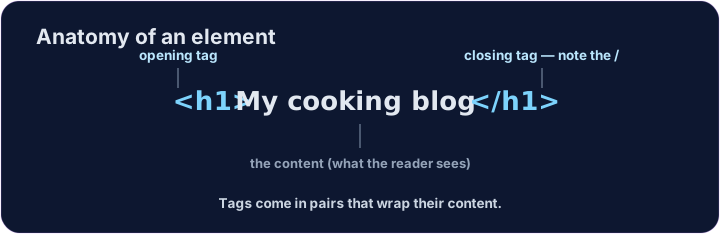
- A heading is a title on your page.
- Use
<h1>for the biggest, most important heading. - Like all HTML, it comes in a pair:
<h1>...</h1>.
ไทย
หัวข้อ
- หัวข้อ (heading) คือชื่อเรื่องบนหน้าเว็บของคุณ
- ใช้
<h1>สำหรับ หัวข้อที่ใหญ่ที่สุดและสำคัญที่สุด - เหมือนกับ HTML อื่นๆ มันจะมากำหนดเป็นคู่:
<h1>...</h1>
<h1>My cooking blog</h1>
<p>Welcome! Here are my favourite recipes.</p>
English
Six sizes
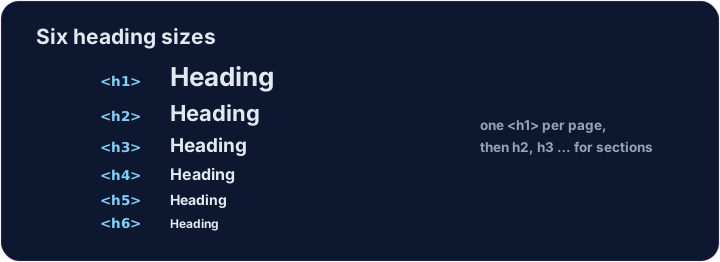
- There are six headings, from
<h1>down to<h6>. <h1>is the largest;<h6>is the smallest.- Use one
<h1>for the page's main title, then smaller ones for sections.
ไทย
หกขนาด
- มีหัวข้อทั้งหมดหกระดับ ตั้งแต่
<h1>ลงมาถึง<h6> <h1>เป็น ขนาดใหญ่;<h6>เป็น ขนาดเล็กที่สุด- ใช้ หนึ่ง
<h1>สำหรับหัวข้อหลักของหน้า แล้วใช้ขนาดที่เล็กลงสำหรับส่วนย่อย
<h1>Biggest</h1>
<h2>Smaller</h2>
<h3>Smaller still</h3>
English
Common mistakes
- Headings run
<h1>(biggest) to<h6>— do not pick one just for its size. - A paragraph is
<p>...</p>.
ไทย
ข้อผิดพลาดที่พบบ่อย
- หัวข้อเรียงลำดับจาก
<h1>(ใหญ่สุด) ถึง<h6>— อย่าเลือกใช้เพียงเพราะขนาดเท่านั้น - ย่อหน้าคือ
<p>...</p>
English
Now you try
- A page is just headings and paragraphs stacked together.
- Build the two little tasks below.
ไทย
ลองดูเลย
- หน้าเว็บประกอบด้วยแค่หัวข้อและย่อหน้าที่ซ้อนกัน
- สร้างงานเล็กๆ ทั้งสองด้านล่าง
Add a big heading that says My Blog. Use an <h1> … </h1> pair. · เพิ่มหัวข้อใหญ่ที่บอกว่า บล็อกของฉัน ใช้คู่ <h1> … </h1>
Make a heading About me, and under it a paragraph that says I love coding. · สร้าง heading เกี่ยวกับฉัน, และใต้它有ย่อหน้าที่บอกว่า ฉันรักการเขียนโค้ด