Creating tables · การสร้างตาราง
Two kinds of SQL command
SQL has two halves:
- DDL (Data Definition Language) changes the structure — the tables themselves.
- DML (Data Manipulation Language) works with the data inside the tables — reading it with
SELECT, and adding, changing, or removing it withINSERT/UPDATE/DELETE. Everything so far (SELECT) is DML.
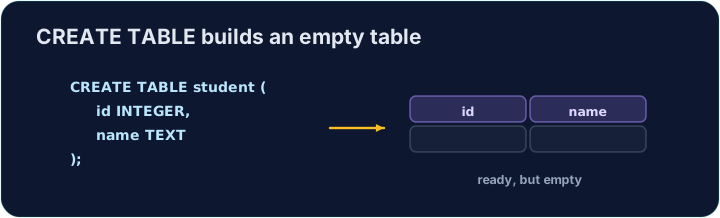
CREATE TABLE is the main DDL command. It lists each column with a data type and marks the primary key:
คำสั่ง SQL สองประเภท
SQL มีสองส่วน:
- DDL (Data Definition Language) เปลี่ยน โครงสร้าง — ตัวตารางเอง
- DML (Data Manipulation Language) ทำงานกับ ข้อมูล ภายในตาราง — อ่านข้อมูลด้วย
SELECTและเพิ่ม เปลี่ยน หรือลบด้วยINSERT/UPDATE/DELETEทุกสิ่งที่ผ่านมา (SELECT) คือ DML
CREATE TABLE เป็นคำสั่ง DDL หลัก แสดงรายการคอลัมน์พร้อม data type และกำหนด primary key
CREATE TABLE customer (
  id   INTEGER PRIMARY KEY,
  name VARCHAR(20),
  city VARCHAR(15)
);
Data types and foreign keys
Common data types:
INTEGER— whole numbersVARCHAR(n)/CHAR(n)— text, up to / exactlyncharactersDECIMAL(p, s)— a number withsdecimal placesDATE,BOOLEAN
To link to another table, add a FOREIGN KEY:
The checker reads back your table's structure to see which columns you created.
Data types และ foreign keys
Data type ที่พบบ่อย:
INTEGER— จำนวนเต็มVARCHAR(n)/CHAR(n)— ข้อความ, สูงสุด / พอดีnตัวอักษรDECIMAL(p, s)— จำนวนที่มีsตำแหน่งทศนิยมDATE,BOOLEAN
เพื่อเชื่อมต่อกับตารางอื่น ให้เพิ่ม FOREIGN KEY:
CREATE TABLE orders (
  id          INTEGER PRIMARY KEY,
  customer_id INTEGER,
  FOREIGN KEY (customer_id) REFERENCES customer(id)
);
ตัวตรวจสอบจะอ่านกลับโครงสร้างตารางของคุณเพื่อดูว่าคุณสร้างคอลัมน์อะไรบ้าง
Common mistakes
- Every column needs a data type (e.g.
INTEGER,TEXT). - Declare the PRIMARY KEY when you create the table.
ข้อผิดพลาดทั่วไป
- ทุกคอลัมน์ต้องมี data type (เช่น
INTEGER,TEXT) - Declare PRIMARY KEY เมื่อสร้างตาราง
Create a table called teacher with three columns: id (INTEGER, the primary key), name (VARCHAR(20)), and subject (VARCHAR(15)). · สร้างตารางชื่อ teacher ที่มีสามคอลัมน์: id (INTEGER, คีย์หลัก), name (VARCHAR(20)), และ subject (VARCHAR(15))
Click Run to see the output here. · คลิก Run เพื่อดูผลลัพธ์ที่นี่
Design another table. Create event with id (INTEGER PRIMARY KEY), title (VARCHAR(30)), and price (DECIMAL(6,2) — a money column with 2 decimal places). · ออกแบบตารางอีกชุดหนึ่ง สร้าง event ด้วย id (INTEGER PRIMARY KEY), title (VARCHAR(30)), และ price (DECIMAL(6,2) — คอลัมน์เงินที่มี 2 ตำแหน่งทศนิยม)
Click Run to see the output here. · คลิก Run เพื่อดูผลลัพธ์ที่นี่