Pipes — joining commands · Pipes — การเชื่อมต่อคำสั่ง
This page needs a recent browser (with SharedArrayBuffer support). Please update Chrome, Edge, Firefox or Safari to the latest version. · หน้านี้ต้องใช้เบราว์เซอร์ล่าสุด (รองรับ SharedArrayBuffer) กรุณาอัปเดต Chrome, Edge, Firefox หรือ Safari เป็นเวอร์ชันล่าสุด
English
The big idea: pipes
- This is what makes the shell powerful. A pipe
|sends one command's output straight into the next command:
catproduces the lines;sortreceives them and puts them in order. No file in between.
ไทย
ความคิดหลัก: ท่อ (Pipes)
- นี่คือสิ่งที่ทำให้ shell มีอำนาจ ท่อ
|ส่งผลลัพธ์ของคำสั่งหนึ่ง直接进入คำสั่งถัดไป:
cat fruits.txt | sort
catสร้างบรรทัด;sortรับและเรียงลำดับ它们在 No file in between.
English
Build a chain
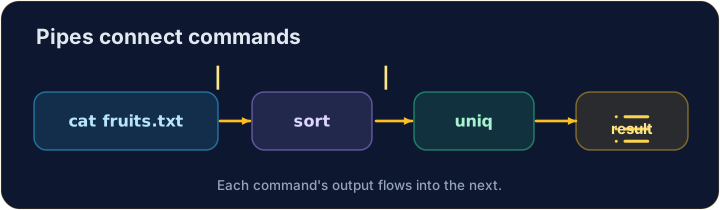
- You can join as many as you like, like an assembly line:
sortorders the lines, thenuniqremoves neighbouring duplicates — so you get each fruit once.
ไทย
สร้างสายโซ่
- คุณสามารถเชื่อมต่อกันได้越多เท่าที่ต้องการ เหมือนสายพานการผลิต:
cat fruits.txt | sort | uniq
sortเรียงลำดับบรรทัด จากนั้นuniqลบคู่ซ้ำที่ติดกัน — คุณจะได้ผลไม้แต่ละชนิดเพียงครั้งเดียว
English
Small tools, big results
- Each command does one job well. Pipes let you combine them to answer real questions:
- "How many different fruits are there?" — sort, dedupe, then count. That is the Unix way.
ไทย
เครื่องมือเล็ก ผลลัพธ์ใหญ่
- แต่ละคำสั่งทำ หนึ่ง งานได้ดี ท่อช่วยให้คุณสามารถรวมพวกมันเพื่อตอบคำถามจริงได้:
cat fruits.txt | sort | uniq | wc -l
- "มีผลไม้ ต่าง กันกี่ชนิด?" — เรียบเรียง, ลบซ้ำ, แล้วนับ นั่นคือวิธี Unix
English
Common mistakes
|sends one command's output into the next.- Order matters:
sort | uniq, not the other way round.
ไทย
ข้อผิดพลาดที่พบบ่อย
|ส่งผลลัพธ์ของคำสั่งหนึ่ง进入了คำสั่งถัดไป- ลำดับมีความสำคัญ:
sort | uniqไม่ใช่ในทางตรงกันข้าม
Explore · สำรวจ
Pipes join commands · Pipes เชื่อมต่อคำสั่ง
A pipe feeds one command's output into the next's input. · Pipe ส่ง เอาต์พุต ของคำสั่งหนึ่งไปยัง อินพุต ของคำสั่งถัดไป
Send the output of cat fruits.txt into wc -l with a pipe |, to count the lines. · ส่งเอาต์พุตของ cat fruits.txt เข้า wc -l ด้วย pipe |, เพื่อ นับจำนวนบรรทัด
List each fruit once, in order. Pipe sort into uniq: cat fruits.txt | sort | uniq. · แสดงผลไม้แต่ละชนิดครั้งเดียว, ตามลำดับ Pipe sort เข้า uniq: cat fruits.txt | sort | uniq