Wildcards
This page needs a recent browser (with SharedArrayBuffer support). Please update Chrome, Edge, Firefox or Safari to the latest version. · หน้านี้ต้องใช้เบราว์เซอร์ล่าสุด (รองรับ SharedArrayBuffer) กรุณาอัปเดต Chrome, Edge, Firefox หรือ Safari เป็นเวอร์ชันล่าสุด
English
One command, many files
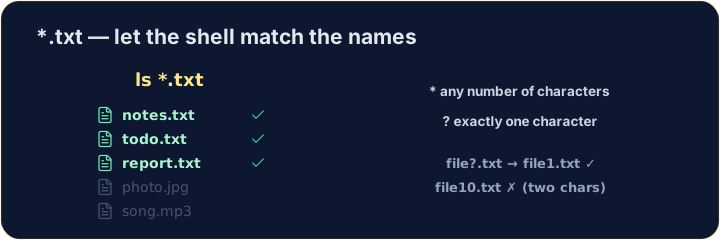
- A wildcard is a symbol that stands for "anything". The most common is
*. *.txtmeans "every name ending in.txt". The shell fills in the matches for you:
ไทย
คำสั่งเดียวสำหรับหลายไฟล์
- Wildcard เป็นสัญลักษณ์แทนคำว่า "อะไรก็ได้" ที่พบบ่อยที่สุดคือ
* - คำสั่ง
*.txtหมายความว่า "ทุกชื่อที่ลงท้ายด้วย.txt" Shell จะเติมชื่อที่ตรงกับเงื่อนไขให้คุณ:
ls *.txt
English
The two main wildcards
*matches any number of characters (even none).?matches exactly one character.
- So
file?.txtmatchesfile1.txtandfileA.txt, but notfile10.txt.
ไทย
Wildcard หลักสองชนิด
- คำสั่ง
*ตรงกับ จำนวน ตัวอักษรเท่าใดก็ได้ (รวมถึงไม่มีเลย) ?ตรงกับ ตัวอักษรหนึ่ง ตัวเท่านั้น
ls file?.txt
- ดังนั้น
file?.txtจึงตรงกับfile1.txtและfileA.txtแต่ไม่ตรงกับfile10.txt
English
Be careful with delete
- Wildcards are powerful — and that cuts both ways:
- That deletes every
.txtfile at once. Runls *.txtfirst to see exactly what will go.
ไทย
ระวังการลบไฟล์
- Wildcards มีพลังมาก — และสิ่งนี้ใช้ได้ในทั้งสองด้าน:
rm *.txt
- คำสั่งนี้จะลบ ทุก ไฟล์
.txtพร้อมกัน ให้รันls *.txtก่อนเพื่อดูว่าอะไรจะถูกนำไปจริงๆ
English
Common mistakes
*matches any text and?matches one character.- Quote a name that has spaces, or the shell splits it into two.
ไทย
ข้อผิดพลาดที่พบบ่อย
*ตรงกับข้อความใดๆ และ?ตรงกับตัวอักษรหนึ่งตัว- ให้ใส่เครื่องหมายอัญประกาศรอบชื่อที่มีช่องว่าง หรือ shell จะแยกมันออกเป็นสองส่วน
List only the .txt files using the * wildcard: ls *.txt. · แสดงเฉพาะไฟล์ .txt โดยใช้ wildcard *: ls *.txt
Delete all the .txt files at once with rm *.txt. The check lists what is left. · ลบ ทั้งหมด ไฟล์ .txt พร้อมกันด้วย rm *.txt การตรวจสอบจะแสดงสิ่งที่เหลืออยู่