Citations and bibliography · การอ้างอิงและบรรณานุกรม
This page needs a recent browser (with SharedArrayBuffer support). Please update Chrome, Edge, Firefox or Safari to the latest version. · หน้านี้ต้องใช้เบราว์เซอร์ล่าสุด (รองรับ SharedArrayBuffer) กรุณาอัปเดต Chrome, Edge, Firefox หรือ Safari เป็นเวอร์ชันล่าสุด
English
Citing your sources
- Academic writing must say where facts came from. LaTeX makes this tidy.
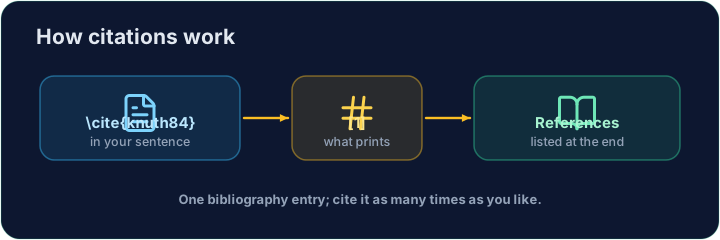
- You keep a list of sources, each with a key, and cite the key in your text.
ไทย
การอ้างอิงแหล่งที่มาของคุณ
- การเขียนทางวิชาการต้องระบุว่าข้อเท็จจริงมาจากไหน LaTeX ทำให้สิ่งนี้เรียบร้อย
- คุณเก็บรายการแหล่งที่มา, แต่ละรายการมี key, และ cite key นั้นในข้อความของคุณ
English
The bibliography
- List your sources in a
thebibliographyenvironment, each as a\bibitem:
- The
{9}just says "numbers are one digit wide".lamportis the key you choose.
ไทย
รายการอ้างอิง
- รายการแหล่งที่มาของคุณใน environment
thebibliography, แต่ละรายการเป็น\bibitem:
\begin{thebibliography}{9}
  \bibitem{lamport} Leslie Lamport. \emph{LaTeX}. 1986.
\end{thebibliography}
{9}บอกว่า "numbers are one digit wide".lamportคือ key ที่คุณเลือก
English
Citing in the text
- Anywhere in the document, write
\cite{lamport}:
- LaTeX prints
[1]and keeps the numbers in order. Add a source and everything renumbers.
ไทย
การอ้างอิงในข้อความ
- ที่ใดก็ตามในเอกสาร, เขียน
\cite{lamport}:
LaTeX is powerful~\cite{lamport}.
- LaTeX แสดง
[1]และรักษาลำดับตัวเลขไว้ เมื่อเพิ่มแหล่งอ้างอิงทั้งหมดจะถูกจัดลำดับใหม่
English
Common mistakes
\cite{key}needs that key defined in your bibliography.- Compile twice, or the citations show as
?.
ไทย
ข้อผิดพลาดที่พบบ่อย
\cite{key}จำเป็นต้องมีคีย์นี้ในบรรณานุกรมของคุณ- รันคอมไพล์สองครั้ง หรือการอ้างอิงจะแสดงเป็น
?
Cite the book in the sentence with \cite{lamport}, and add a matching \bibitem{lamport} entry inside the bibliography. The same key links the two. · อ้างอิงหนังสือในประโยคด้วย \cite{lamport} และเพิ่มรายการที่ตรงกัน \bibitem{lamport} ภายในบรรณานุกรม คีย์เดียวกันจะเชื่อมโยงทั้งสองส่วนเข้าด้วยกัน
Click Run to compile and preview the PDF. · คลิก Run เพื่อคอมไพล์และดูตัวอย่าง PDF
Add a second source. Give the second book a \bibitem{knuth} entry, then cite it in the sentence with \cite{knuth}. Watch LaTeX number them in citation order. · เพิ่ม แหล่งข้อมูลที่สอง กำหนดให้หนังสือเล่มที่สองมีรายการ \bibitem{knuth} แล้วอ้างอิง它在ในประโยคด้วย \cite{knuth}. สังเกตว่า LaTeX จะกำหนดหมายเลขตามลำดับการอ้างอิง
Click Run to compile and preview the PDF. · คลิก Run เพื่อคอมไพล์และดูตัวอย่าง PDF