Drawing with TikZ · วาดรูปด้วย TikZ
This page needs a recent browser (with SharedArrayBuffer support). Please update Chrome, Edge, Firefox or Safari to the latest version. · หน้านี้ต้องใช้เบราว์เซอร์ล่าสุด (รองรับ SharedArrayBuffer) กรุณาอัปเดต Chrome, Edge, Firefox หรือ Safari เป็นเวอร์ชันล่าสุด
English
Drawing inside LaTeX
- You can draw diagrams with code using the TikZ package — no image files needed.
- Load it once, then draw inside a
tikzpicture:
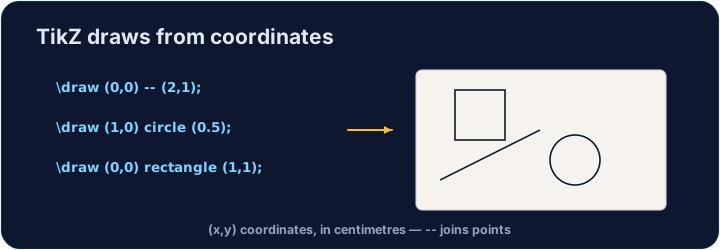
\draw (0,0) -- (2,1);draws a line from one point to another. Every command ends with;.
ไทย
วาดภาพภายใน LaTeX
- คุณสามารถวาดแผนภูมิ ด้วยโค้ด โดยใช้แพ็กเกจ TikZ — ไม่ต้องใช้ไฟล์รูปภาพ
- โหลดมันครั้งเดียว แล้ววาดภายใน
tikzpicture:
\usepackage{tikz}
...
\begin{tikzpicture}
  \draw (0,0) -- (2,1);
\end{tikzpicture}
\draw (0,0) -- (2,1);วาดเส้นจากจุดหนึ่งไปยังอีกจุดหนึ่ง คำสั่งทุกอย่างลงท้ายด้วย;
English
Shapes and paths
- Chain points with
--to make any shape;cyclereturns to the start:
ไทย
รูปร่างและเส้นทาง
- เชื่อมจุดด้วย
--เพื่อสร้างรูปร่างใดๆ;cycleกลับไปที่จุดเริ่มต้น:
\draw (0,0) -- (2,0) -- (1,1.5) -- cycle;   % a triangle
\draw (0,0) circle (1);                      % a circle, radius 1
\draw (0,0) rectangle (3,2);                 % a box
English
Why code a drawing?
- It stays sharp at any size (it is vector graphics, not a photo).
- It is exact — perfect for geometry, graphs, and circuit diagrams.
- Now draw your own triangle in the task.
ไทย
ทำไมต้องโค้ดภาพ?
- มันคงความ คมชัดในทุกขนาด (เพราะเป็น vector graphics ไม่ใช่ภาพถ่าย)
- มัน แม่นยำ — เหมาะสำหรับการคำนวณเรขาคณิต กราฟ และแผนวงจรไฟฟ้า
- ตอนนี้จงวาดรูปสามเหลี่ยมของคุณเองในโจทย์
English
Common mistakes
- Every
\drawcommand ends with a semicolon;. - Wrap the drawing in a
tikzpictureenvironment.
ไทย
ข้อผิดพลาดที่พบบ่อย
- ทุก
\drawcommand ลงท้ายด้วยเครื่องหมายกึ่งจุล; - ห่อภาพวาดไว้ใน environment
tikzpicture
Inside the tikzpicture, \draw a triangle: connect the points (0,0), (3,0) and (1.5,2) and close it with cycle. The tikz package is loaded for you. · ภายใน tikzpicture, \draw สามเหลี่ยม: เชื่อมต่อจุด (0,0), (3,0) และ (1.5,2) และปิดด้วย cycle. package tikz ถูกโหลดให้แล้ว
Click Run to compile and preview the PDF. · คลิก Run เพื่อคอมไพล์และดูตัวอย่าง PDF
Draw two shapes this time. Add a circle of radius 1 with \draw (0,0) circle (1); and a rectangle with \draw (2,-1) rectangle (4,1);. · 这回 draw สองรูปร่าง. เพิ่ม วงกลมรัศมี 1 ด้วย \draw (0,0) circle (1); และ สี่เหลี่ยมผืนผ้าด้วย \draw (2,-1) rectangle (4,1);.
Click Run to compile and preview the PDF. · คลิก Run เพื่อคอมไพล์และดูตัวอย่าง PDF