Tables · ตาราง
This page needs a recent browser (with SharedArrayBuffer support). Please update Chrome, Edge, Firefox or Safari to the latest version. · หน้านี้ต้องใช้เบราว์เซอร์ล่าสุด (รองรับ SharedArrayBuffer) กรุณาอัปเดต Chrome, Edge, Firefox หรือ Safari เป็นเวอร์ชันล่าสุด
English
Tables
- A table uses the
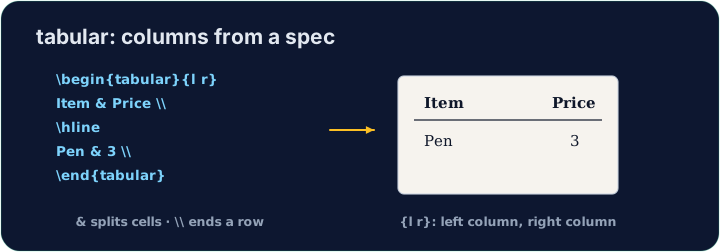
tabularenvironment. You first describe the columns:
{l c r}means three columns: left-aligned, centred, right-aligned.
ไทย
ตาราง
- ตารางใช้ environment
tabularคุณต้องอธิบาย คอลัมน์ ก่อน:
\begin{tabular}{l c r}
  left & centre & right \\
\end{tabular}
{l c r}หมายถึงสามคอลัมน์: left-aligned (ชิดซ้าย), centred (กึ่งกลาง), right-aligned (ชิดขวา)
English
Rows and cells
- Inside,
&jumps to the next column and\\starts a new row:
- The number of cells in each row must match the number of columns you declared.
ไทย
แถวและเซลล์
- ภายใน,
&ข้ามไปยัง คอลัมน์ ถัดไป และ\\เริ่ม แถว ใหม่:
\begin{tabular}{l l}
  Apple & 5 \\
  Banana & 3 \\
\end{tabular}
- จำนวนเซลล์ในแต่ละแถวต้องตรงกับจำนวนคอลัมน์ที่คุณประกาศไว้
English
Lines (optional)
- Add
|between column letters for vertical lines, and\hlinefor horizontal ones:
- For a cleaner look, professionals use the
booktabspackage instead of many lines.
ไทย
เส้น (ตัวเลือก)
- เพิ่ม
|ระหว่างตัวอักษรคอลัมน์เพื่อสร้างเส้นแนวนอน, และ\hlineสำหรับเส้นแนวนอน:
\begin{tabular}{|l|l|}
  \hline
  Apple & 5 \\ \hline
\end{tabular}
- เพื่อความสะอาดตา ผู้เชี่ยวชาญมักใช้แพ็กเกจ
booktabsแทนการใช้เส้นจำนวนมาก
English
Common mistakes
tabularneeds a column spec like{lcr}; separate cells with&and end rows with\\.- The number of
&per row must fit the column spec.
ไทย
ข้อผิดพลาดที่พบบ่อย
tabularต้องการ column spec แบบ{lcr}; แยกเซลล์ด้วย&และจบแถวด้วย\\- จำนวน
&ต่อแถวต้องสอดคล้องกับ column spec
Build a small two-column table with \begin{tabular}{l l}. Separate the two cells in a row with &, and end each row with \\. Add the rows for Bob (30) and Mei (25). · สร้างตารางสองคอลัมน์เล็กด้วย \begin{tabular}{l l}. แยกเซลล์สองเซลล์ในแถวด้วย & และจบแต่ละแถวด้วย \\. เพิ่มแถวของ Bob (30) และ Mei (25)
Click Run to compile and preview the PDF. · คลิก Run เพื่อคอมไพล์และดูตัวอย่าง PDF
Add lines to the table. Put \hline at the top, after the header row, and at the bottom, and use |l|l| in the column spec for vertical lines. · เพิ่มเส้นให้กับตาราง. วาง \hline ด้านบน, หลังแถว header, และด้านล่าง, และใช้ |l|l| ใน column spec สำหรับเส้นแนวตั้ง
Click Run to compile and preview the PDF. · คลิก Run เพื่อคอมไพล์และดูตัวอย่าง PDF