Aligning equations · การจัดแนวสมการ
This page needs a recent browser (with SharedArrayBuffer support). Please update Chrome, Edge, Firefox or Safari to the latest version. · หน้านี้ต้องใช้เบราว์เซอร์ล่าสุด (รองรับ SharedArrayBuffer) กรุณาอัปเดต Chrome, Edge, Firefox หรือ Safari เป็นเวอร์ชันล่าสุด
English
Lining equations up
- When you show working, readers like the
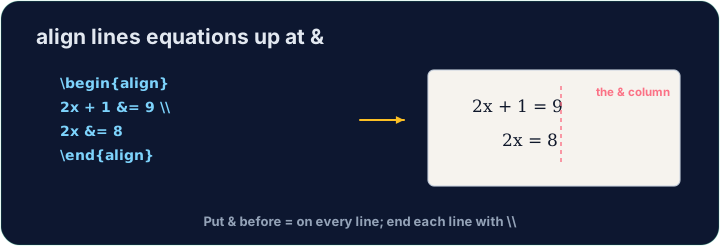
=signs to line up. Thealign*environment does this:
- The
&marks where to align (just before each=), and\\ends each line.
ไทย
จัดแนวสมการ
- เมื่อแสดงวิธีทำ ผู้อ่านชอบให้เครื่องหมาย
=เรียงแนวกัน Environmentalign*ทำสิ่งนี้ได้:
\begin{align*}
  y &= 2(x + 3) \\
  y &= 2x + 6
\end{align*}
&บ่งบอก จุดที่จะจัดแนว (ทันทีก่อนแต่ละ=), และ\\จบแต่ละบรรทัด
English
Numbered or not
align*(with the star) gives no equation numbers.- Drop the star —
align— and LaTeX numbers each line(1),(2), … for you to refer to.
ไทย
มีหมายเลขหรือไม่
align*(ที่มีดาว) จะไม่ให้หมายเลขสมการ- ลืมดาวออก —
align— แล้ว LaTeX จะตั้งหมายเลขแต่ละบรรทัด(1),(2), … ให้คุณอ้างอิง
English
Matrices
amsmathalso gives matrices.bmatrixdraws square brackets:
- Again
&separates columns and\\separates rows — the same idea as alignment.
ไทย
เมทริกซ์
amsmathยังใช้สร้างเมทริกซ์ได้bmatrixวาดกรอบสี่เหลี่ยม:
\[
  \begin{bmatrix} 1 & 2 \\ 3 & 4 \end{bmatrix}
\]
- อีกครั้ง
&แยกคอลัมน์ และ\\แยกแถว — แนวคิดเดียวกับการจัดแนว
English
Common mistakes
- In
align, line up on&and end each line with\\. - Use
align*when you do not want equation numbers.
ไทย
ข้อผิดพลาดที่พบบ่อย
- ภายใน
align, จัดแนวที่&และจบบรรทัดด้วย\\ - ใช้
align*เมื่อคุณไม่ต้องการหมายเลขสมการ
Show the two steps lined up at the = sign. Put them in an align* environment, with & just before each = and \\ between the lines. · แสดงขั้นตอนทั้งสองเรียงกันที่สัญลักษณ์ =. วาง它们在ใน environment align*, โดยให้ & อยู่ก่อนแต่ละ = และ \\ อยู่ระหว่างบรรทัด
Click Run to compile and preview the PDF. · คลิก Run เพื่อคอมไพล์และดูตัวอย่าง PDF
Draw a 2×2 matrix with bmatrix (square brackets). Separate columns with & and rows with \\, e.g. \begin{bmatrix} 1 & 2 \\ 3 & 4 \end{bmatrix}. · วาด matrix 2×2 ด้วย bmatrix (วงเล็บเหลี่ยม). แยกคอลัมน์ด้วย & และแยกแถวด้วย \\ เช่น \begin{bmatrix} 1 & 2 \\ 3 & 4 \end{bmatrix}.
Click Run to compile and preview the PDF. · คลิก Run เพื่อคอมไพล์และดูตัวอย่าง PDF