Your first document · เอกสารฉบับแรกของคุณ
This page needs a recent browser (with SharedArrayBuffer support). Please update Chrome, Edge, Firefox or Safari to the latest version. · หน้านี้ต้องใช้เบราว์เซอร์ล่าสุด (รองรับ SharedArrayBuffer) กรุณาอัปเดต Chrome, Edge, Firefox หรือ Safari เป็นเวอร์ชันล่าสุด
Your first LaTeX document
- LaTeX lets you make beautiful documents — reports, books, and especially maths.
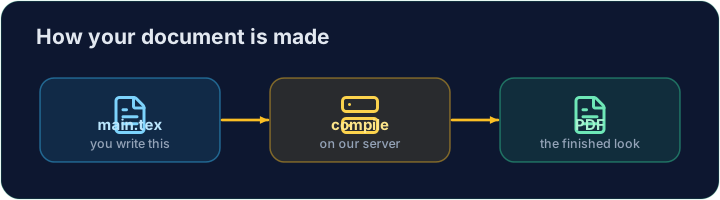
- You write plain text with commands, and the computer turns it into a polished PDF.
- Your LaTeX is compiled on our server — press Run and the PDF appears next to your code.
The shape of every document
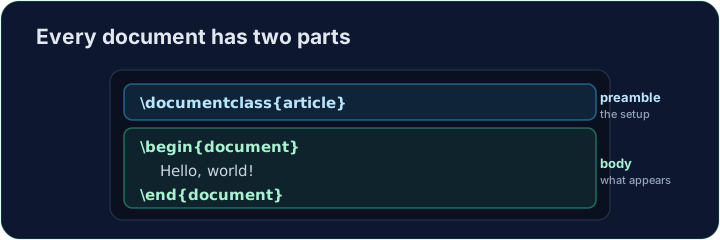
- Every document has two parts — a preamble and a body:
\documentclass{article}
\begin{document}
Hello, world!
\end{document}
\documentclass{article}is the preamble: it sets the kind of document.- Everything between
\begin{document}and\end{document}is the body — the part that actually appears in the PDF.
Now you try
- Below is a document skeleton. Add a greeting in the body.
- Press Run to compile it and see the PDF, then Check when you think it is right.
Common mistakes
- A document needs
\documentclass{...}and a\begin{document} ... \end{document}. - The text you want to see goes inside the document environment.
The skeleton below is a complete LaTeX document. Replace the comment in the body with a greeting (any text containing the word Hello), then click Run to compile it and see the PDF. · โครงร่างด้านล่างนี้เป็นเอกสาร LaTeX แบบสมบูรณ์ ให้แทนที่คอมเมนต์ใน ส่วนเนื้อหา ด้วยคำทักทาย (ข้อความใดๆ ที่มีคำว่า Hello) แล้วคลิก Run เพื่อคอมไพล์และดู PDF
Click Run to compile and preview the PDF. · คลิก Run เพื่อคอมไพล์และดูตัวอย่าง PDF
Options in square brackets change the whole document. Make the text bigger by adding the [12pt] option: \documentclass[12pt]{article}. Run and see every letter grow. · ตัวเลือกในวงเล็บเหลี่ยมจะเปลี่ยนแปลงทั้งเอกสาร เพิ่มขนาดข้อความโดยใส่ตัวเลือก [12pt]: \documentclass[12pt]{article}. รันเพื่อดูตัวอักษรทุกตัวขยายขนาด
Click Run to compile and preview the PDF. · คลิก Run เพื่อคอมไพล์และดูตัวอย่าง PDF