HTTPS, SSL/TLS and certificates · HTTPS, SSL/TLS และใบรับรอง
The padlock in your browser
- When you see HTTPS and a padlock, your connection to the website is encrypted.
- The "S" stands for Secure. It uses a protocol called TLS (the modern version of SSL).
กุญแจในเบราว์เซอร์ของคุณ
- เมื่อคุณเห็น HTTPS และไอคอนกุญแจ การเชื่อมต่อกับเว็บไซต์ของคุณถูก เข้ารหัส
- "S" ย่อมาจาก Secure ใช้โปรโตคอลที่เรียกว่า TLS (เวอร์ชันปัจจุบันของ SSL)
How the secure connection is set up
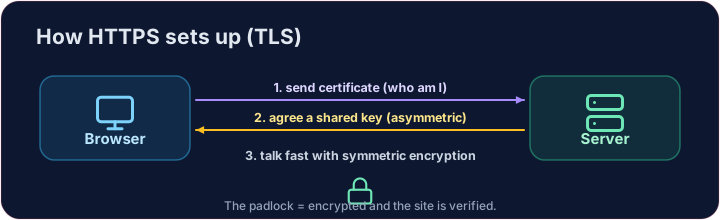
- TLS cleverly combines both kinds of encryption you have learned:
- It uses asymmetric encryption to safely agree on a shared secret key.
- Then it switches to fast symmetric encryption for the rest of the conversation.
- This "handshake" happens in a fraction of a second, before any page loads.
การตั้งค่าการเชื่อมต่อที่ปลอดภัย
- TLS รวมสองประเภทของการเข้ารหัสที่คุณเรียนรู้เข้าด้วยกันอย่างชาญฉลาด:
- ใช้ การเข้ารหัสแบบไม่สมมาตร เพื่อตกลงเกี่ยวกับคีย์ลับร่วมกันอย่างปลอดภัย
- จากนั้นสลับไปใช้ การเข้ารหัสแบบสมมาตร ที่เร็วขึ้นสำหรับการสนทนาที่เหลือ
- กระบวนการ "จับมือ" นี้เกิดขึ้นในเสี้ยววินาที ก่อนที่หน้าเว็บโหลด
How do you know the site is real?
- Encryption is useless if you are talking to an impostor. That is what digital certificates solve.
- A website's certificate is issued by a trusted Certificate Authority (CA) and signed with the CA's key.
- Your browser checks the signature. If it is valid, you know the site is who it claims to be.
คุณจะรู้ได้อย่างไรว่าเว็บไซต์นั้นแท้จริง?
- การเข้ารหัสไร้ประโยชน์หากคุณกำลังคุยกับ คนปลอมแปลง นั่นคือสิ่งที่ ใบรับรองดิจิทัล แก้ไข
- ใบรับรองของเว็บไซต์ออกโดย ** Authority (CA)** ที่เชื่อถือได้และเซ็นด้วยคีย์ของ CA
- เบราว์เซอร์ของคุณตรวจสอบลายเซ็น หากถูกต้อง คุณทราบว่าเป็นเว็บไซต์ที่อ้างถึง
Putting it together
- Certificate → proves who the site is. TLS → keeps the conversation secret.
- That tiny padlock means: encrypted, and verified. No padlock on a login page? Walk away.
Covers: IGCSE 5.3 (SSL), A-Level 17.1 (SSL/TLS, digital certificates).
การรวมกัน
- Certificate → ยืนยันว่า ใคร คือเว็บไซต์ TLS → รักษาการสนทนา เป็นความลับ
- ไอคอนกุญแจเล็กๆ นั้นหมายถึง: เข้ารหัสแล้ว และตรวจสอบแล้ว ไม่มีกุญแจบนหน้าล็อกอิน? ให้เดินออกไป
ครอบคลุม: IGCSE 5.3 (SSL), A-Level 17.1 (SSL/TLS, ใบรับรองดิจิทัล).
Now you try
- First put the four handshake steps in the right order — the exam loves this sequence.
- Then be the browser: look at a certificate's details and decide whether to trust it.
ลองดูเลย
- เรียงลำดับขั้นตอนจับมือทั้งสี่ตามลำดับที่ถูกต้อง — ข้อสอบชอบลำดับนี้
- จากนั้น角色扮演เบราว์เซอร์: ดูรายละเอียดใบรับรองและตัดสินใจว่าจะเชื่อถือหรือไม่
Common mistakes
- HTTPS encrypts the traffic; the certificate proves the site's identity.
- A certificate warning is a real warning — do not click through it.
ข้อผิดพลาดที่พบบ่อย
- HTTPS เข้ารหัสการจราจร; ใบรับรองยืนยันตัวตนของเว็บไซต์
- คำเตือนเกี่ยวกับใบรับรองคือคำเตือนที่แท้จริง — อย่าคลิกข้ามมัน
The TLS handshake · การจับมือ TLS
HTTPS sets up a secure channel before any data is sent. · HTTPS สร้างช่องทางการสื่อสารที่ปลอดภัย ก่อน ส่งข้อมูลใดๆ
Put the TLS handshake in order. Fill the list order with the four steps, first to last: hello, certificate, key exchange, secure data. · เรียงลำดับ TLS handshake เติมรายการ order ด้วยขั้นตอนทั้งสี่ จากแรกไปหลัง: hello, certificate, key exchange, secure data
Click Run to see the output here. · คลิก Run เพื่อดูผลลัพธ์ที่นี่
Be the browser. Trust the certificate only if the name matches the site you asked for, the issuer is trusted, AND it has not expired (expires ≥ 2026). Print valid or invalid. · บทบาทเป็นเบราว์เซอร์. เชื่อถือใบรับรองก็ต่อเมื่อ name ตรงกับ site ที่คุณร้องขอ, ผู้ออกเชื่อถือได้, AND ยังไม่หมดอายุ (expires ≥ 2026). พิมพ์ valid หรือ invalid
Click Run to see the output here. · คลิก Run เพื่อดูผลลัพธ์ที่นี่