Defending a system · ป้องกันระบบ
This page needs a recent browser (with SharedArrayBuffer support). Please update Chrome, Edge, Firefox or Safari to the latest version. · หน้านี้ต้องใช้เบราว์เซอร์ล่าสุด (รองรับ SharedArrayBuffer) กรุณาอัปเดต Chrome, Edge, Firefox หรือ Safari เป็นเวอร์ชันล่าสุด
English
Walls at the edge
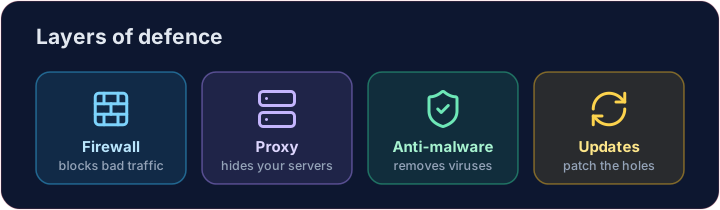
- A firewall sits between your network and the internet, blocking traffic that breaks the rules.
- A proxy server stands in front of your servers, hiding them and filtering requests.
- Together they keep unwanted visitors out before they reach anything important.
ไทย
กำแพงที่ขอบเขต
- Firewall ตั้งอยู่ระหว่างเครือข่ายของคุณกับอินเทอร์เน็ต ป้องกันการรับส่งข้อมูลที่ผิดกฎ
- Proxy server ยืนอยู่หน้าเซิร์ฟเวอร์ของคุณ ล่องหนเซิร์ฟเวอร์และกรองคำขอ
- ทั้งคู่ช่วยป้องกันผู้เยี่ยมชมที่ไม่พึงประสงค์ไม่ให้เข้าถึงสิ่งสำคัญใดๆ ก่อน
English
Software defences
- Anti-malware (anti-virus / anti-spyware) scans for and removes known malware.
- Automatic updates patch weaknesses as soon as fixes are released — most attacks use old, known holes.
ไทย
การป้องกันด้วยซอฟต์แวร์
- Anti-malware (แอนติไวรัส / แอนติสไปแวร์) สแกนหาและลบมัลแวร์ที่รู้จัก
- การอัปเดตอัตโนมัติ แก้ไขช่องโหว่ทันทีเมื่อมีการปล่อยแก้ไข — การโจมตีส่วนใหญ่ใช้ ช่องโหว่เก่า ที่รู้จักกันแล้ว
English
Limiting the damage
- Access levels give each person only the rights they need — a student cannot change a teacher's grades.
- Privacy settings control who can see your data on a service.
- If one account is broken into, good access levels stop the attacker reaching everything.
ไทย
การจำกัดความเสียหาย
- Access levels ให้สิทธิ์แต่ละคนเพียงเท่าที่จำเป็น — นักเรียนไม่สามารถเปลี่ยนเกรดของครูได้
- Privacy settings ควบคุมว่าใครสามารถมองเห็นข้อมูลของคุณบนบริการนั้นได้
- หากบัญชีหนึ่งถูกเจาะเข้า ระบบการควบคุมสิทธิ์จะช่วยป้องกันไม่ให้ผู้โจมตีเข้าถึงข้อมูลทั้งหมดได้
English
Smart habits
- Check the URL of a link before clicking, and the spelling and tone of messages.
- Look for HTTPS (the padlock) before entering a password — that is encryption at work, which we'll cover soon.
Covers: IGCSE 5.3 (solutions), A-Level 6.1 (security measures).
ไทย
พฤติกรรมที่ชาญฉลาด
- ตรวจสอบ URL ของลิงก์ก่อนคลิก และ คำสะกดและน้ำเสียงของข้อความ
- ตรวจสอบ HTTPS (ไอคอนลูกกุญแจ) ก่อนกรอกรหัสผ่าน — นั่นคือการเข้ารหัสที่กำลังทำงานอยู่ ซึ่งเราจะมาเรียนกันเร็วๆ นี้
ครอบคลุม: IGCSE 5.3 (คำตอบ), A-Level 6.1 (มาตรการความปลอดภัย).
English
Now you try
- First act as a firewall: let the allowed ports through and collect everything else in a blocked list.
- Then match each threat to the defence that stops it.
ไทย
ลองดูเลย
- ทำหน้าที่เป็นไฟร์วอลล์ก่อน: อนุญาตให้พอร์ตที่รับได้ผ่าน และเก็บทุกอย่างอื่นไว้ในรายการบล็อก
- จากนั้นจับคู่ภัยคุกคามแต่ละชนิดกับกลไกป้องกันที่จะหยุดมันไว้
English
Common mistakes
- Use layers: firewall, updates, anti-malware and backups.
- No single measure is enough — this is defence in depth.
ไทย
ข้อผิดพลาดที่พบบ่อย
- ใช้หลายชั้น: ไฟร์วอลล์, การอัปเดต, แอนติ-มัลแวร์ และการสำรองข้อมูล
- มาตรการเดียวไม่เพียงพอ — นี่คือระบบป้องกันแบบลึก (defence in depth)
Act as a firewall. Only ports in allowed may pass. Build a list blocked of every requested port that is not allowed, and print it. · ทำหน้าที่เป็นไฟwalls. พอร์ตที่อยู่ใน allowed เท่านั้นที่ผ่านได้ สร้างรายการ blocked ของพอร์ตทุกตัวที่ถูกขอซึ่ง ไม่ใช่ ที่อนุญาต และพิมพ์รายการนั้น
Click Run to see the output here. · คลิก Run เพื่อดูผลลัพธ์ที่นี่
Match each problem to the defence that stops it: anti-malware, updates or access levels. · จับคู่ปัญหาแต่ละข้อกับกลไกป้องกันที่เหมาะสม: anti-malware, updates หรือ access levels
Click Run to see the output here. · คลิก Run เพื่อดูผลลัพธ์ที่นี่