Security threats
| English | Chinese | Pinyin |
|---|---|---|
| worm | 蠕虫 | rú chóng |
| ransomware | 勒索软件 | lè suǒ ruǎn jiàn |
| security | 安全 | ān quán |
| privacy | 隐私 | yǐn sī |
| integrity | 完整性 | wán zhěng xìng |
| unauthorised | 未授权 | wèi shòu quán |
| virus | 病毒 | bìng dú |
| Trojan | 木马 | mù mǎ |
| spyware | 间谍软件 | jiàn dié ruǎn jiàn |
| adware | 广告软件 | guǎng gào ruǎn jiàn |
| phishing | 网络钓鱼 | wǎng luò diào yú |
| pharming | 域名欺骗 | yù míng qī piàn |
| social engineering | 社会工程 | shè huì gōng chéng |
| hackers | 黑客 | hēi kè |
| denial of service | 拒绝服务 | jù jué fú wù |
| eavesdropping | 窃听 | qiè tīng |
| man-in-the-middle | 中间人攻击 | zhōng jiān rén gōng jī |
The Friday the hospitals went dark
- On 12 May 2017 a program called WannaCry spread to more than 200,000 computers in 150 countries in a single day. It needed no one to click anything: it found a flaw in Windows file sharing and copied itself from machine to machine.
- On each one it encrypted every file and demanded $300 in bitcoin. In the UK, a third of hospital trusts were hit; 19,000 appointments were cancelled and ambulances were diverted.
- The patch that closed the flaw had been published two months earlier. The computers that were hit had not installed it.
- Worm, ransomware, missing update: three words from this lesson in one afternoon. This lesson is the threats to data and to the systems that hold it.
Security, privacy, integrity
- Security 安全 is keeping data safe from loss and from unauthorised 未授权 access, change or deletion.
- Privacy 隐私 is keeping data confidential, so that only those with the right to see it can, with consent and for a clear purpose.
- Integrity 完整性 is the data being accurate, consistent and complete.
- A file can be secure but corrupted, or accurate but readable by anyone. The exam asks for the difference in one sentence each.
Which best describes data "integrity"?
Integrity = accurate and complete. Security = blocking unauthorised access; privacy = control over personal data.
Privacy is about a person controlling who sees their personal data, while security is about stopping unauthorised access.
They overlap but differ: security blocks intruders; privacy is control over personal data; integrity is about accuracy.
Two things to protect
- The data: it is personal and confidential, so it must not be read, changed or deleted by an unauthorised person, and losing it would stop the organisation working.
- The computer system: an intruder who reaches it can install malware, use it to attack other systems, damage hardware or software, or lock it with ransomware.
- A secure system is the first line of defence for the data on it. "Why must a school keep both secure?" wants one reason for each.
Risk and responsibility lab
Sort examples by the rule, risk or protection involved.
Why must a school keep its computer system secure, not only its data? Select all that apply.
System security is the first line of defence: a compromised machine attacks, steals and can be held to ransom. Accuracy is integrity, a different property.
Malware
| Type | What it does |
|---|---|
| virus 病毒 | self-copying code that attaches to other programs and spreads when they run |
| worm 蠕虫 | self-copying code that spreads over networks with no user action |
| Trojan 木马 | looks useful but hides malicious code |
| spyware 间谍软件 | secretly records key presses and actions and sends them to a third party |
| ransomware 勒索软件 | encrypts your files and demands payment |
| adware 广告软件 | pushes unwanted adverts |
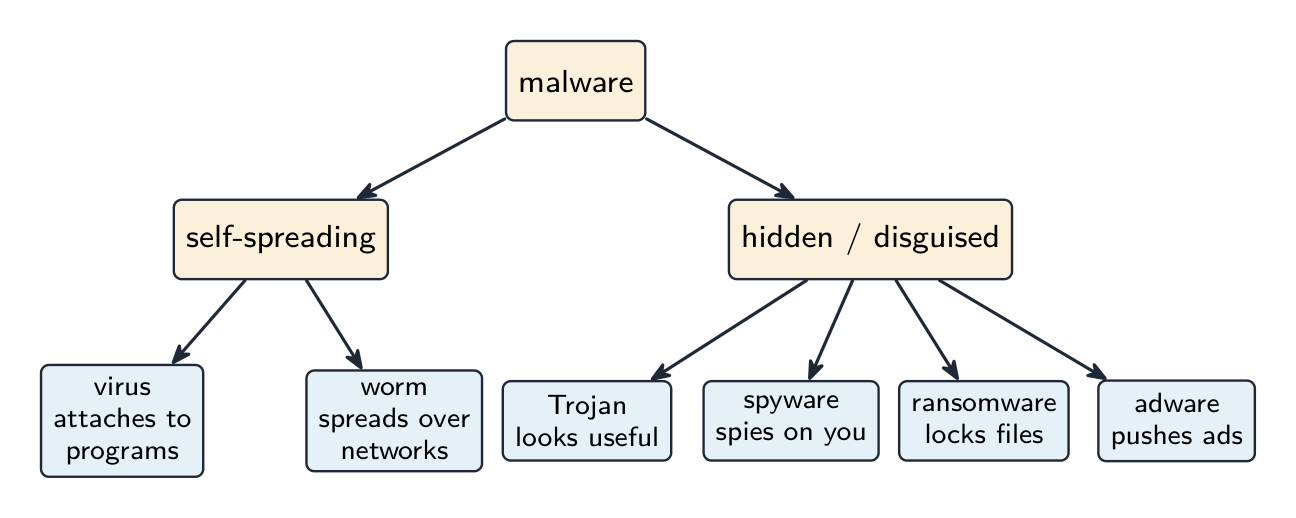
Two families: the ones that spread themselves and the ones that hide
How does a worm differ from a virus?
A worm self-propagates across networks without user action; a virus needs an infected program to be run.
Malware that encrypts your files and demands payment for the key is called ______.
Ransomware encrypts the victim's files and demands a ransom for the decryption key.
Match each type of malware to its behaviour.
Spyware spies, a Trojan disguises itself, and a worm self-spreads across networks.
Worked example: describe a virus and spyware
- Describe what is meant by a virus and by spyware. [4]
- A virus is malicious software that replicates, copying itself and attaching to other files, and deletes or corrupts data.
- Spyware is malicious software that records the user's key presses and actions and sends them to a third party, to obtain passwords and personal data.
- Two facts each: how it behaves, and what it does to the victim. Swapping "replicates" and "records" loses both marks.
Tricking people
- Phishing 网络钓鱼: an email pretending to come from a legitimate organisation leads the user to a fake website that collects their credentials or personal data.
- Pharming 域名欺骗: malicious code redirects the user to a fake website even when they type the correct address.
- Social engineering 社会工程: tricking a person into giving up information, by phone, by email or in person.
- The difference the exam marks: phishing needs the user to follow a link; pharming works on a correct address.
Phishing is:
Phishing deceives users into revealing passwords or details via fake messages/sites.
A user types their bank's correct web address and still arrives at a fake site. This is:
Pharming redirects a correct address; phishing needs the user to follow a link in a fake email.
Attacks on the network
- Hacking by hackers 黑客: unauthorised access, often through a weak password or a software flaw.
- Denial of service 拒绝服务 (DoS/DDoS): a server is flooded with requests until real users cannot reach it.
- Eavesdropping 窃听: capturing data in transit, a risk on open Wi-Fi. Man-in-the-middle 中间人攻击: an attacker secretly relays or alters the messages between two parties.

Both parties believe they are talking to each other
A denial-of-service (DoS/DDoS) attack:
DoS/DDoS overwhelms a server with traffic so legitimate requests can't get through.
Worked example: two threats to a school network
- Identify and describe two threats to the data on a school network, and give a different prevention method for each. [6]
- Malware: a virus copied onto a computer from an email attachment or a download replicates and corrupts or deletes files. Prevention: anti-virus software that scans files and is kept up to date.
- Hacking: an unauthorised person gains access to the network, for example by guessing a weak password, and reads or changes the data. Prevention: a firewall that blocks unauthorised traffic, and strong passwords.
- Threat, what it does, a prevention that actually stops it. Two threats with the same prevention lose a mark.
Match each threat to a prevention that actually stops it.
Each prevention fits its threat. The exam deducts for reusing one measure or for a measure that would not stop the threat named.
Restricting the risk of malware
- Install anti-malware software and keep it updated, so that new malware is recognised.
- Use a firewall. Keep the operating system and applications patched, which is exactly what WannaCry's victims had not done.
- Do not open attachments or download files from unknown sources, and train users to recognise phishing.
Marks that slip away
- The replicating one is the virus; the recording one is spyware. Do not swap the verbs.
- Phishing arrives by email and needs a click; pharming redirects a correct address.
- Give a different prevention for each threat, and one that fits it. "Antivirus" does not stop hacking.
- A measure earns marks with how it works: "a firewall that compares traffic with set criteria and blocks what fails".
You've got it
- security keeps data safe from loss and unauthorised access · privacy keeps it seen only by those with the right · integrity keeps it accurate, consistent and complete
- protect both the data and the computer system: a compromised system attacks others, steals credentials and can be held to ransom
- virus replicates and attaches · worm spreads over networks by itself · Trojan hides in something useful · spyware records and sends · ransomware encrypts for payment
- phishing by email link · pharming on a correct address · hacking, DoS, eavesdropping, man-in-the-middle on the network