| Candidates should be able to: | Notes and guidance |
|---|---|
| Show understanding of binary magnitudes and the difference between binary prefixes and decimal prefixes | Understand the difference between and use: • kibi and kilo • mebi and mega • gibi and giga • tebi and tera |
| Show understanding of different number systems | Use the binary, denary, hexadecimal number bases and Binary Coded Decimal (BCD) and one’s complement and two’s complement representation for binary numbers |
| Convert an integer value from one number base/ representation to another | |
| Perform binary addition and subtraction | Using positive and negative binary integers |
| Show understanding of how overflow can occur | |
| Describe practical applications where Binary Coded Decimal (BCD) and Hexadecimal are used | |
| Show understanding of and be able to represent character data in its internal binary form, depending on the character set used | Students are expected to be familiar with ASCII (American Standard Code for Information Interchange), extended ASCII and Unicode. Students will not be expected to memorise any particular character codes |
Information representation
A-Level Computer Science · Topic 1
1.1
Number systems

Syllabus
Source: Cambridge International syllabus
The three number systems 数制 you must use:
- denary 十进制 (decimal, base 10) — uses digits 0–9. Place values are powers of ten.
- binary 二进制 (base 2) — uses 0 and 1. Place values are powers of two. Every byte 字节 is 8 bits 位.
- hexadecimal 十六进制 (base 16) — uses 0–9 then A–F for 10–15. Each hex digit 数位 stands for exactly 4 bits.
Conversions
Denary → binary: keep dividing by 2 and record the remainders, read bottom-up. Or subtract the largest place value 位值 (power of 2) that fits.
Example: $558_{10}$: $558 = 512 + 32 + 8 + 4 + 2 = 2^{9} + 2^{5} + 2^{3} + 2^{2} + 2^{1}$. In 12 bits: 0010 0010 1110.
Binary → hex: group the bits into nibbles 半字节 (4 bits) from the right and convert each. 0010 0010 1110 → 2 2 E → 22E.
Hex → binary: replace each hex digit with its 4-bit pattern. Hex → denary: multiply each digit by its place value. 22E $= 2 \times 256 + 2 \times 16 + 14 = 558$.
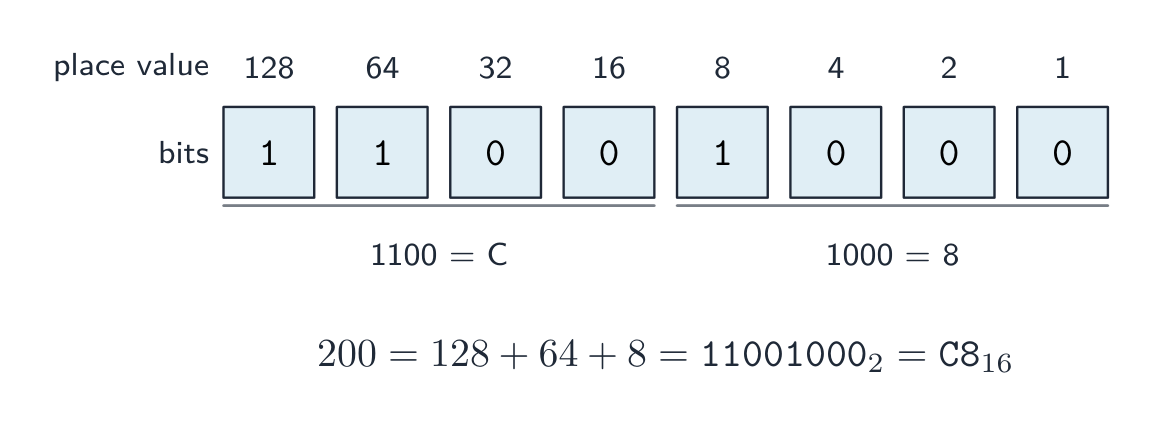
Worked example. Convert denary 200 to 8-bit binary, then to hexadecimal.
$200 = 128 + 64 + 8$, so the binary is 11001000. In nibbles, 1100 1000 $= 12$ and $8$, i.e. $\text{C}$ and $8$, so the hexadecimal is C8.
How many bits?
Exam questions fix the register width 寄存器宽度 (8, 12 or 16 bits). Pad with leading zeros to that width: $558$ in 12 bits is 0010 0010 1110, never 10 0010 1110.
To find the minimum number of bits that can store a value, ask which place values you need:
- an unsigned integer from $0$ to $2^{n} - 1$ needs $n$ bits: $200$ needs 8 bits (the top is $255$), $1000$ needs 10 bits (the top is $1023$), $16$ needs 5 bits (4 bits stop at $15$).
- a signed two's-complement integer from $-2^{n-1}$ to $2^{n-1} - 1$ needs $n$ bits: $-200$ needs 9 bits, because 8 bits stop at $-128$.
- one hexadecimal digit needs 4 bits, one BCD digit needs 4 bits, and one ASCII character needs 7 bits (8 for extended ASCII).
Binary vs decimal prefixes
Two prefix families look similar but differ — decimal (powers of 10) and binary (powers of 2):
| Decimal (SI) | Binary (memory) |
|---|---|
| kilo $= 10^{3}$ | kibi (Ki) $= 2^{10} = 1024$ |
| mega $= 10^{6}$ | mebi (Mi) $= 2^{20}$ |
| giga $= 10^{9}$ | gibi (Gi) $= 2^{30}$ |
| tera $= 10^{12}$ | tebi (Ti) $= 2^{40}$ |
So a tebibyte (TiB) is slightly more than a terabyte (TB). A "1 TB" drive holds $10^{12}$ bytes, but an operating system that reports in TiB shows a smaller number.
Explore
Binary, denary and hex
Type a number and see it in binary, denary and hexadecimal at once — and how the place values add up.
Vocabulary
Train
| English | Chinese | Pinyin |
|---|---|---|
| number systems | 数制 | shù zhì |
| denary | 十进制 | shí jìn zhì |
| binary | 二进制 | èr jìn zhì |
| byte | 字节 | zì jié |
| bits | 位 | wèi |
| hexadecimal | 十六进制 | shí liù jìn zhì |
| digit | 数位 | shù wèi |
| place value | 位值 | wèi zhí |
| nibbles | 半字节 | bàn zì jié |
| register width | 寄存器宽度 | jì cún qì kuān dù |
1.1
Binary arithmetic
Binary addition
Add column by column from the right, carrying as in denary:
| Bit A | Bit B | Carry in | Sum bit | Carry out |
|---|---|---|---|---|
| 0 | 0 | 0 | 0 | 0 |
| 0 | 0 | 1 | 1 | 0 |
| 0 | 1 | 0 | 1 | 0 |
| 0 | 1 | 1 | 0 | 1 |
| 1 | 1 | 0 | 0 | 1 |
| 1 | 1 | 1 | 1 | 1 |
Overflow 溢出 happens when the result needs more bits than the register 寄存器 can hold — the carry-out of the leftmost column is the overflow bit.
Worked example. Add the 8-bit unsigned integers $10110101$ and $01101100$, and comment on the result.
$10110101 + 01101100 = 1\,00100001$. The answer needs 9 bits, so it does not fit in an 8-bit register: overflow has occurred. A full answer names the error and says why, using the word size the question gave: "Overflow: the true result ($289$) is larger than the largest value an 8-bit register can hold ($255$), so the carry out of the most significant bit is lost and the stored result ($00100001 = 33$) is wrong."
Binary subtraction
The usual way is two's complement 补码 addition: to do $A - B$, form the two's complement of $B$ (invert every bit and add 1), then add, and discard any final carry-out.
To subtract $00011110$ from $01100100$ (unsigned 8-bit):
- two's complement of $00011110$: invert → $11100001$, add 1 → $11100010$.
- add to $01100100$: result $1\,01000110$ (9 bits) — discard the leading 1 → $01000110 = 70_{10}$. Check: $100 - 30 = 70$. ✓
Two's complement signed integers
In an $n$-bit two's-complement number:
- the most significant bit 最高有效位 (MSB) is the sign bit 符号位: 0 = positive, 1 = negative.
- to read a negative number: invert every bit, add 1, then negate.
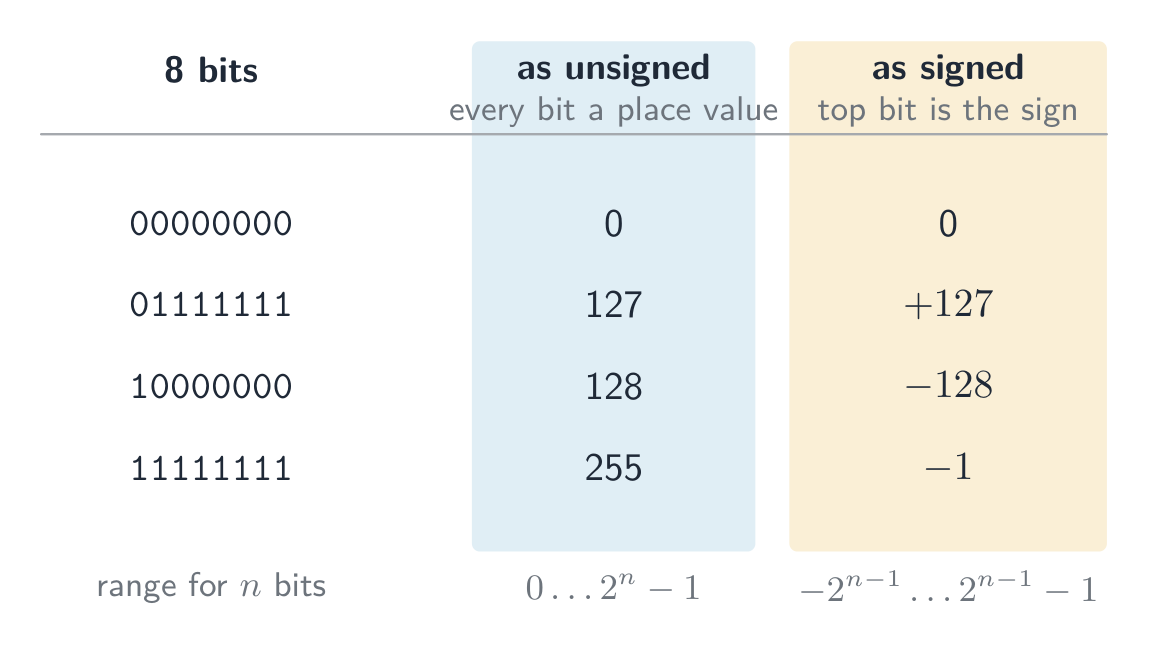
So $11100010$ is negative; invert → $00011101$, add 1 → $00011110 = 30$, so it is $-30$. This is a signed integer 有符号整数 (unlike an unsigned 无符号 one). The range for $n$ bits is $-2^{n-1}$ to $+2^{n-1} - 1$; for 8 bits, $-128$ ($10000000$) to $+127$ ($01111111$).
The same bits mean different numbers depending on the agreed reading. As an unsigned integer every bit is a place value, so 8 bits run from $0$ to $255$; as a signed two's-complement integer the top bit is the sign, so the same 8 bits run from $-128$ to $+127$. The pattern $11111111$ is $255$ read one way and $-1$ read the other — nothing in the bits themselves says which.
 8-bit two's complement: the sign bit splits the range into negative ($-128$ to $-1$) and positive ($0$ to $127$)
Worked example. What denary value does the 8-bit two's-complement number $10110100$ represent?
The MSB is 1, so it is negative. Invert → $01001011$, add 1 → $01001100 = 76$, so the value is $-76$. Check with place values: $-128 + 32 + 16 + 4 = -76$.
Worked example. Write $-108$ as a 12-bit two's-complement integer.
Start from $+108$ in 12 bits: $108 = 64 + 32 + 8 + 4$, so 0000 0110 1100. Invert every bit: 1111 1001 0011. Add 1: 1111 1001 0100. Check with place values, where the top bit is worth $-2^{11} = -2048$: $-2048 + 1024 + 512 + 256 + 128 + 16 + 4 = -108$. ✓
For 12 bits the range is $-2048$ (1000 0000 0000) to $+2047$ (0111 1111 1111). Questions that ask for the smallest and largest values want these two patterns, so learn the rule: the most negative number is a 1 followed by zeros; the most positive is a 0 followed by ones.
An arithmetic shift 算术移位 moves every bit left or right but keeps the sign: a shift right by one place halves the value and copies the sign bit into the empty space on the left, so a negative number stays negative (1111 1001 0100 shifted right three places is 1111 1111 0010, which is $-14$: $-108 / 8 = -13.5$, and a shift right rounds down). A shift left doubles the value. Shifts belong to the assembly instruction set in topic 4, but this question is asked with the number work here.
Overflow in signed arithmetic happens when the true result falls outside this range — spotted when the sign bit flips wrongly (two positives giving a negative, or two negatives giving a positive).
One's complement
Before two's complement, an older scheme called one's complement 反码 represented a negative number by simply inverting every bit of the positive — there is no "add 1" step.
- $+30 = 00011110$, so in one's complement $-30 = 11100001$ (just the inverse).
- Drawback: it has two zeros — $00000000$ ($+0$) and $11111111$ ($-0$) — which wastes a bit pattern and makes arithmetic awkward.
Two's complement (invert and add 1) removes the negative zero: it has a single zero and lets addition and subtraction use the same circuit. That is why modern computers store signed integers in two's complement, not one's complement.
Explore
Binary & signed integers
byte = Σ place values
See how an 8-bit pattern maps to a number (and how it would overflow past 255).
Explore
Two's complement signed bits
The leftmost bit carries a negative place value. Flip any bit — or hit Negate (invert every bit, then add 1) — and watch the signed value change.
Vocabulary
Train
| English | Chinese | Pinyin |
|---|---|---|
| Overflow | 溢出 | yì chū |
| register | 寄存器 | jì cún qì |
| two's complement | 补码 | bǔ mǎ |
| most significant bit | 最高有效位 | zuì gāo yǒu xiào wèi |
| sign bit | 符号位 | fú hào wèi |
| signed integer | 有符号整数 | yǒu fú hào zhěng shù |
| unsigned | 无符号 | wú fú hào |
| arithmetic shift | 算术移位 | suàn shù yí wèi |
| one's complement | 反码 | fǎn mǎ |
1.1
Binary Coded Decimal (BCD)
In BCD 二进码十进数, each denary digit is written as its own 4-bit pattern. The number $93$ is 1001 0011 in BCD — not binary 93 ($01011101$). Each nibble uses only 0–9; patterns $1010$–$1111$ are invalid.
BCD reading: 0010 0111 0101 → 2, 7, 5 → 275.
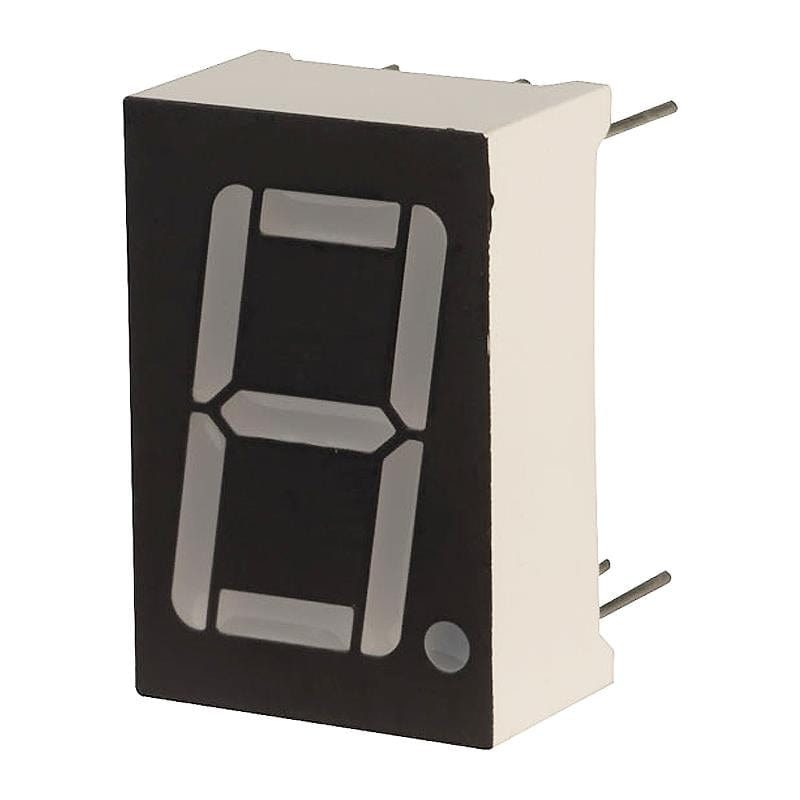
Use: calculators, digital clocks, and devices that show denary digits — each digit drives a 7-segment display 七段显示器. Currency code often uses BCD to avoid the rounding errors of converting fractions like 0.1 to binary.
A "justify" answer must link the use to a property of BCD: each denary digit has its own 4 bits, so a digit can be sent straight to its display, or added digit by digit, with no conversion of the whole number; and a decimal fraction such as $0.10$ is stored exactly, which a binary fraction cannot do.
Vocabulary
Train
| English | Chinese | Pinyin |
|---|---|---|
| BCD | 二进码十进数 | èr jìn mǎ shí jìn shù |
| 7-segment display | 七段显示器 | qī duàn xiǎn shì qì |
1.1
Hexadecimal — practical uses

Hex is a compact way to write binary (1 hex digit = 4 bits):
- memory addresses 内存地址 in low-level programming —
0x7FFE. - colour values in HTML/CSS —
#FF8800. - MAC addresses —
AC:DE:48:00:11:22.
Hex does not change the stored data — it just makes binary easier for humans.
Vocabulary
Train
| English | Chinese | Pinyin |
|---|---|---|
| memory addresses | 内存地址 | nèi cún dì zhǐ |
1.1
Character codes

Computers store text as numbers; each character has a numeric code point 码点 set by a character set 字符集.
ASCII
- ASCII uses 7 bits — 128 code points. Basic Latin letters, digits, punctuation, and control codes.
- Extended ASCII uses 8 bits — 256 code points; the lower 128 match ASCII, the upper 128 vary by region.
Unicode
- Unicode is a universal character set covering almost every script, plus symbols and emoji.
- common encodings 编码: UTF-8 (1–4 bytes, ASCII-compatible), UTF-16 (2 or 4 bytes), UTF-32 (fixed 4 bytes).
Why Unicode beats ASCII
- it represents far more characters (every script, emoji); ASCII covers only basic English.
- files are portable with no code-page confusion, and allow multilingual text in one document.
- trade-off: Unicode files are usually larger for English-only text.
When a question asks for differences, give them in pairs with numbers: ASCII uses 7 bits (extended ASCII 8), so 128 (256) characters; Unicode uses up to 32 bits (UTF-8 uses 1 to 4 bytes), so more than a million code points. ASCII covers basic English only; Unicode covers every script, and its first 128 code points are the ASCII ones. In UTF-8 an English letter still takes 1 byte, so a 40-letter English file name is 40 bytes in ASCII and in UTF-8 alike, while a Chinese character takes 3 bytes.
Explore
A character is stored as a number
Each character has a code number — 'A' is 65. Flip the bits to see that code in binary and hex, exactly how the computer holds it.
Vocabulary
Train
| English | Chinese | Pinyin |
|---|---|---|
| code point | 码点 | mǎ diǎn |
| character set | 字符集 | zì fú jí |
| encodings | 编码 | biān mǎ |
1.2
Bitmap images
Syllabus
| Candidates should be able to: | Notes and guidance |
|---|---|
| Show understanding of how data for a bitmapped image are encoded | Use and understand the terms: pixel, file header, image resolution, screen resolution, colour depth / bit depth |
| Perform calculations to estimate the file size for a bitmap image | |
| Show understanding of the effects of changing elements of a bitmap image on the image quality and file size | Use the terms: image resolution, colour depth / bit depth |
| Show understanding of how data for a vector graphic are encoded | Use the terms: drawing object, property, drawing list |
| Justify the use of a bitmap image or a vector graphic for a given task | |
| Show understanding of how sound is represented and encoded | Use the terms: sampling, sampling rate, sampling resolution, analogue and digital data |
| Show understanding of the impact of changing the sampling rate and resolution | Including the impact on file size and accuracy |
Source: Cambridge International syllabus
A bitmap 位图 image (also called a bitmapped image) stores the colour of every pixel 像素 in a grid. At the start of the file a file header 文件头 records the image's metadata — its width, height and colour depth — so software knows how to read the pixel data that follows.
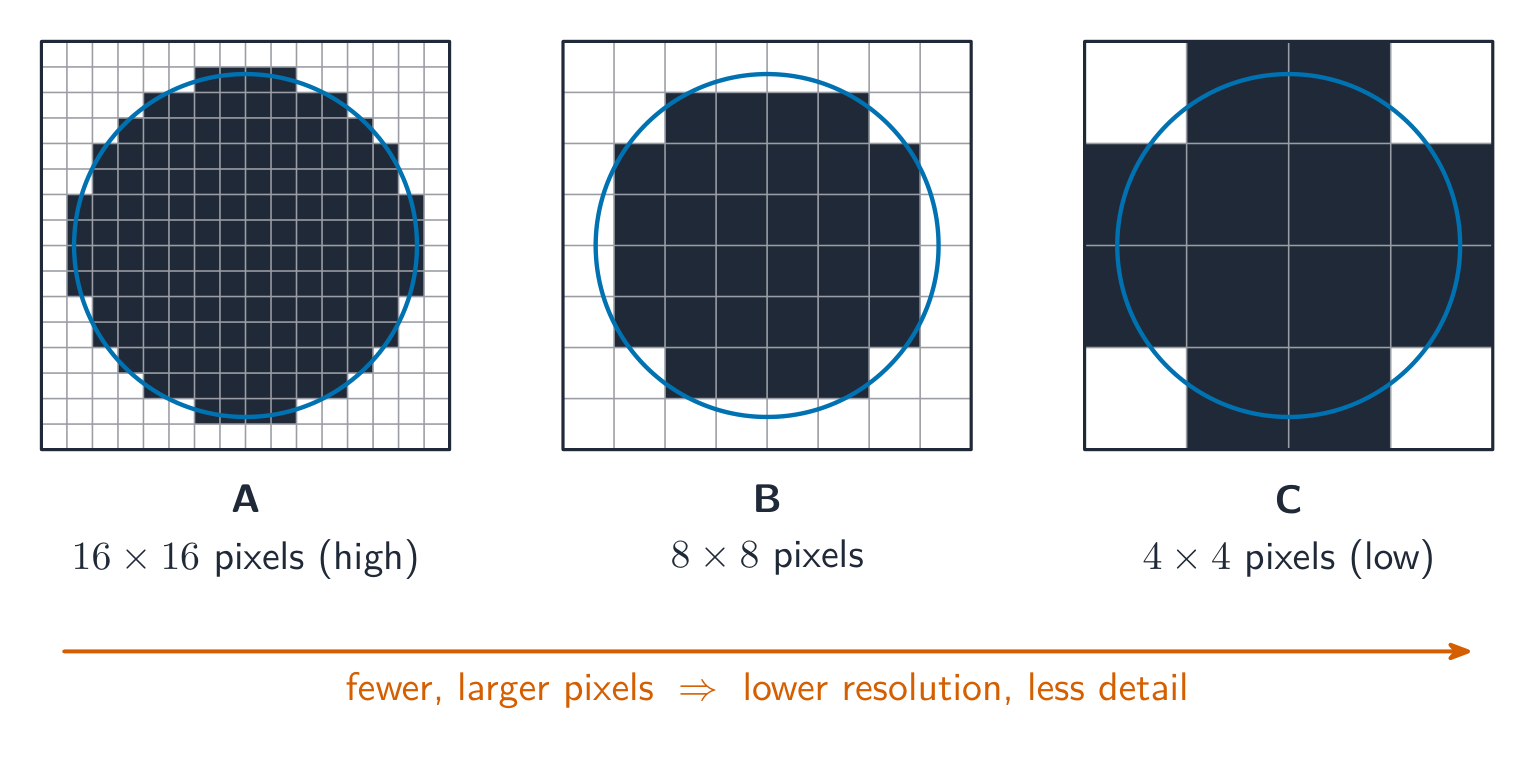
- image resolution 图像分辨率: the bitmap's own size, width × height in pixels (e.g. 1920 × 1080).
- screen resolution 屏幕分辨率: the width × height the display can show. If an image's resolution is larger than the screen it is scaled down to fit; a low-resolution image looks blocky when stretched onto a higher-resolution screen.
- colour depth 颜色深度 (bit depth 位深度): bits per pixel. 1 bit → black/white; 8 bits → 256 colours; 24 bits → 16.7 million ("true colour").
File size
$$\text{size in bits} = \text{width} \times \text{height} \times \text{bit depth}.$$
Divide by 8 for bytes, by 1024 for KiB, etc. Example: a $3000 \times 2000$ image at 24 bpp is $3000 \times 2000 \times 24 = 1.44 \times 10^{8}$ bits $\approx 17.2\ \text{MiB}$.
State the units you used. The mark scheme accepts $1\ \text{MB} = 10^{6}$ bytes (the SI prefix) or $1\ \text{MiB} = 1024 \times 1024$ bytes (the binary prefix), as long as your working shows which one; the same image is $18.0\ \text{MB}$ or $17.2\ \text{MiB}$. Add the size of the file header if the question gives one.
A video is a sequence of bitmap images, each one a frame 帧. Before compression its size is the size of one frame $\times$ the frame rate 帧率 (frames per second) $\times$ the duration in seconds: 30 frames per second of $1920 \times 1080$ pixels at 24 bits is $30 \times 1920 \times 1080 \times 24 \approx 1.5 \times 10^{9}$ bits, about $187\ \text{MB}$, for every second. That is why video is always compressed.
Changing settings
- lower resolution → smaller file, less detail (looks blocky when enlarged).
- lower colour depth → smaller file, but smooth shades show banding.
- higher of either → larger file, better quality.
Vocabulary
Train
| English | Chinese | Pinyin |
|---|---|---|
| bitmap | 位图 | wèi tú |
| pixel | 像素 | xiàng sù |
| file header | 文件头 | wén jiàn tóu |
| image resolution | 图像分辨率 | tú xiàng fēn biàn lǜ |
| screen resolution | 屏幕分辨率 | píng mù fēn biàn lǜ |
| colour depth | 颜色深度 | yán sè shēn dù |
| bit depth | 位深度 | wèi shēn dù |
| frame | 帧 | zhēn |
| frame rate | 帧率 | zhēn lǜ |
1.2
Vector graphics
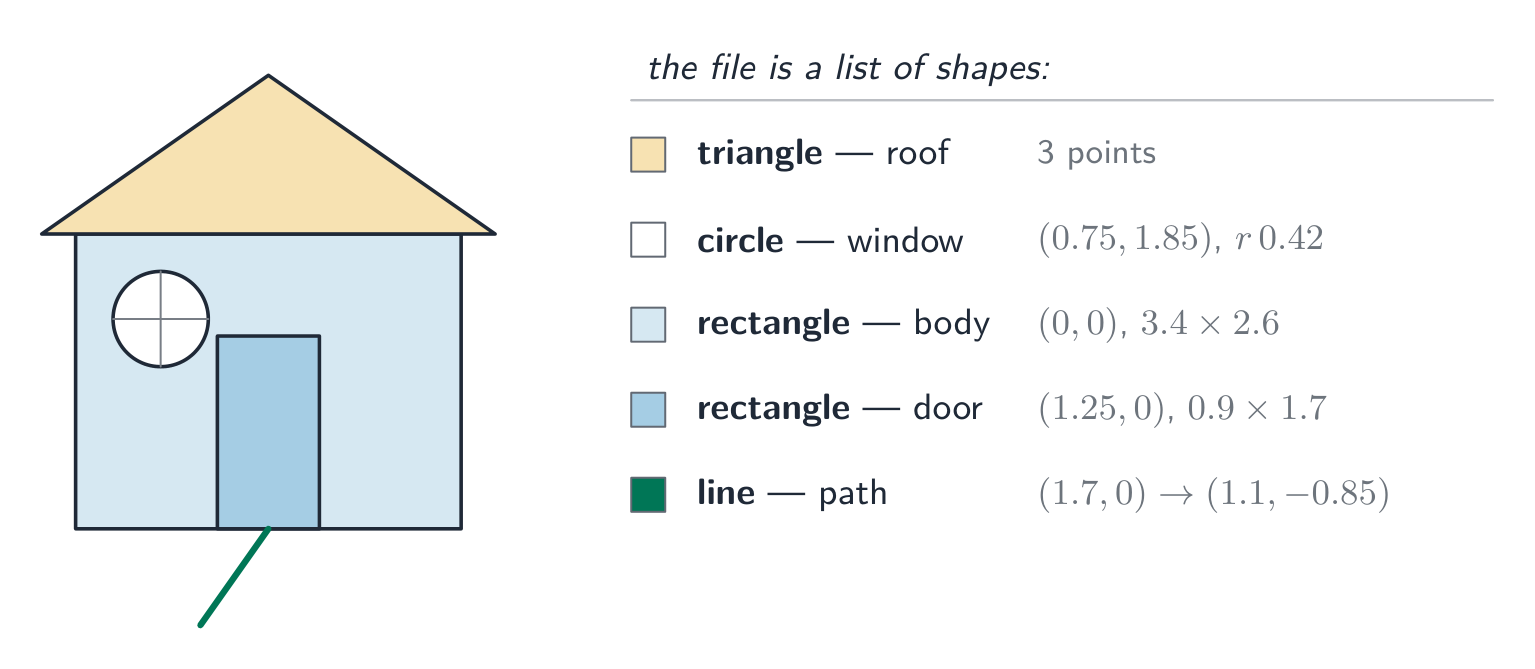
A vector graphic 矢量图形 stores the instructions to draw the image as a drawing list 绘图列表 — an ordered list of drawing objects 绘图对象 (geometric primitives 图元: lines, curves, polygons, circles). Each drawing object has properties 属性 such as colour, fill, line width and position (coordinates). To show it, the program renders 渲染 the drawing list at any resolution needed.
Bitmap vs vector
| Task | Better choice | Why |
|---|---|---|
| Photograph | Bitmap | Complex pixel-level detail can't be described as shapes. |
| Logo, icon, sign | Vector | Sharp edges; scales to any size without blur. |
| Engineering drawing | Vector | Precise geometry and scaling. |
| Painting, texture | Bitmap | Smooth tonal detail per area. |
Vector advantage: it scales without losing quality — a vector logo stays sharp at any size, while a bitmap blurs when enlarged. Vector disadvantage: it cannot describe arbitrary pixel detail (photographs).
A "justify" answer links the choice to the task. "The logo must appear on a business card and on a billboard, so it should be a vector graphic: it is stored as drawing objects and is re-rendered sharply at any size, whereas a bitmap would show its pixels when enlarged." For a photograph the argument runs the other way: there are no shapes to describe, so every pixel's colour must be stored.

Explore
Computing concept lab
Classify concrete examples by the computing idea they demonstrate.
Vocabulary
Train
| English | Chinese | Pinyin |
|---|---|---|
| vector graphic | 矢量图形 | shǐ liàng tú xíng |
| drawing list | 绘图列表 | huì tú liè biǎo |
| drawing objects | 绘图对象 | huì tú duì xiàng |
| primitives | 图元 | tú yuán |
| properties | 属性 | shǔ xìng |
| renders | 渲染 | xuàn rǎn |
1.2
Sound
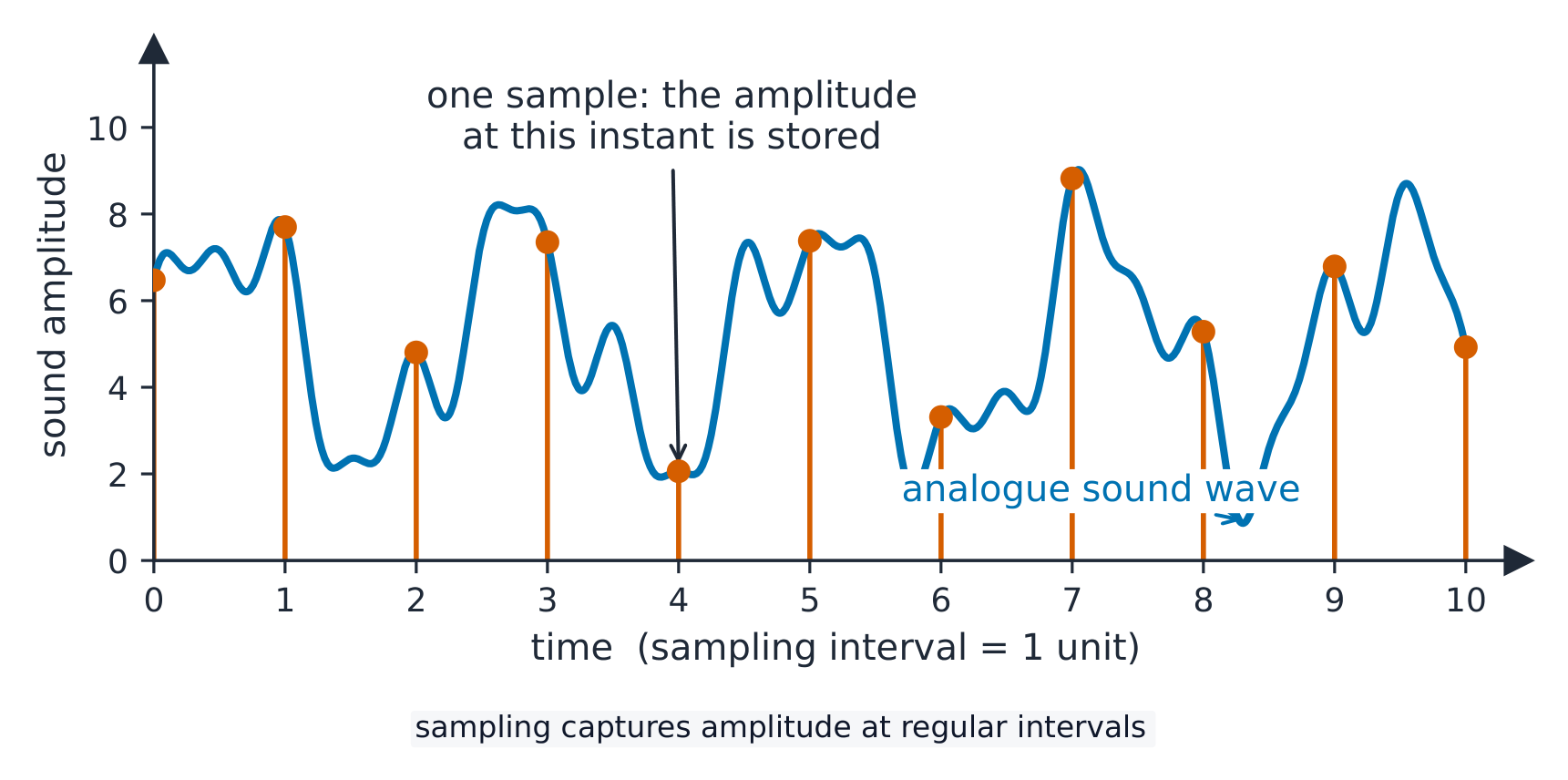
A continuous wave of analogue data 模拟数据 (the sound) is converted into digital data 数字数据 by sampling 采样:
- sampling rate 采样率 — samples per second (Hz). CD quality is $44.1\ \text{kHz}$.
- sampling resolution 采样分辨率 (bit depth) — bits per sample's amplitude 振幅. CD quality is 16 bits.
File size
$$\text{size in bits} = \text{sampling rate} \times \text{resolution} \times \text{duration} \times \text{channels}.$$
A 10-second stereo CD clip: $44100 \times 16 \times 10 \times 2 = 14\,112\,000$ bits $\approx 1.68\ \text{MiB}$.
Changing settings
- higher sampling rate → captures higher pitches, larger file.
- higher sample resolution → finer amplitude steps, less quantisation 量化 noise, larger file.
- lower of either → smaller file, clear quality loss.
(The sampling rate must be at least twice the highest frequency you want to keep.)
Explore
Sound sampling
y = a sin(bt + c)
Sampling measures a sound wave at regular intervals — a higher rate copies it more truly.
Vocabulary
Train
| English | Chinese | Pinyin |
|---|---|---|
| analogue data | 模拟数据 | mó nǐ shù jù |
| digital data | 数字数据 | shù zì shù jù |
| sampling | 采样 | cǎi yàng |
| sampling rate | 采样率 | cǎi yàng lǜ |
| sampling resolution | 采样分辨率 | cǎi yàng fēn biàn lǜ |
| amplitude | 振幅 | zhèn fú |
| quantisation | 量化 | liàng huà |
1.3
Compression
Syllabus
| Candidates should be able to: | Notes and guidance |
|---|---|
| Show understanding of the need for and examples of the use of compression | |
| Show understanding of lossy and lossless compression and justify the use of a method in a given situation | |
| Show understanding of how a text file, bitmap image, vector graphic and sound file can be compressed | Including the use of run-length encoding (RLE) |
Source: Cambridge International syllabus
Compression 压缩 reduces file size, saving storage and transmission bandwidth 带宽. Two kinds:
- lossless 无损 — the original data is recovered exactly (text, programs, ZIP/PNG).
- lossy 有损 — some detail is dropped for much smaller files (JPEG, MP3, video).
When to use which
- lossless for documents, source code, medical images — anything needing exact data.
- lossy for streaming media. Real-time video streaming uses lossy compression because it must send huge amounts of data in real time over limited bandwidth; lossless would not shrink it enough. Raw HD video is gigabytes per minute, so without compression the picture would keep freezing.
A "justify" answer names the method, then the reason from the situation: "Lossless, because the spreadsheet must be restored exactly; a single changed value would make the accounts wrong." Or: "Lossy, because the photographs are viewed on a phone screen where the dropped detail is not visible, and the smaller files upload faster and use less storage."
Lossless methods
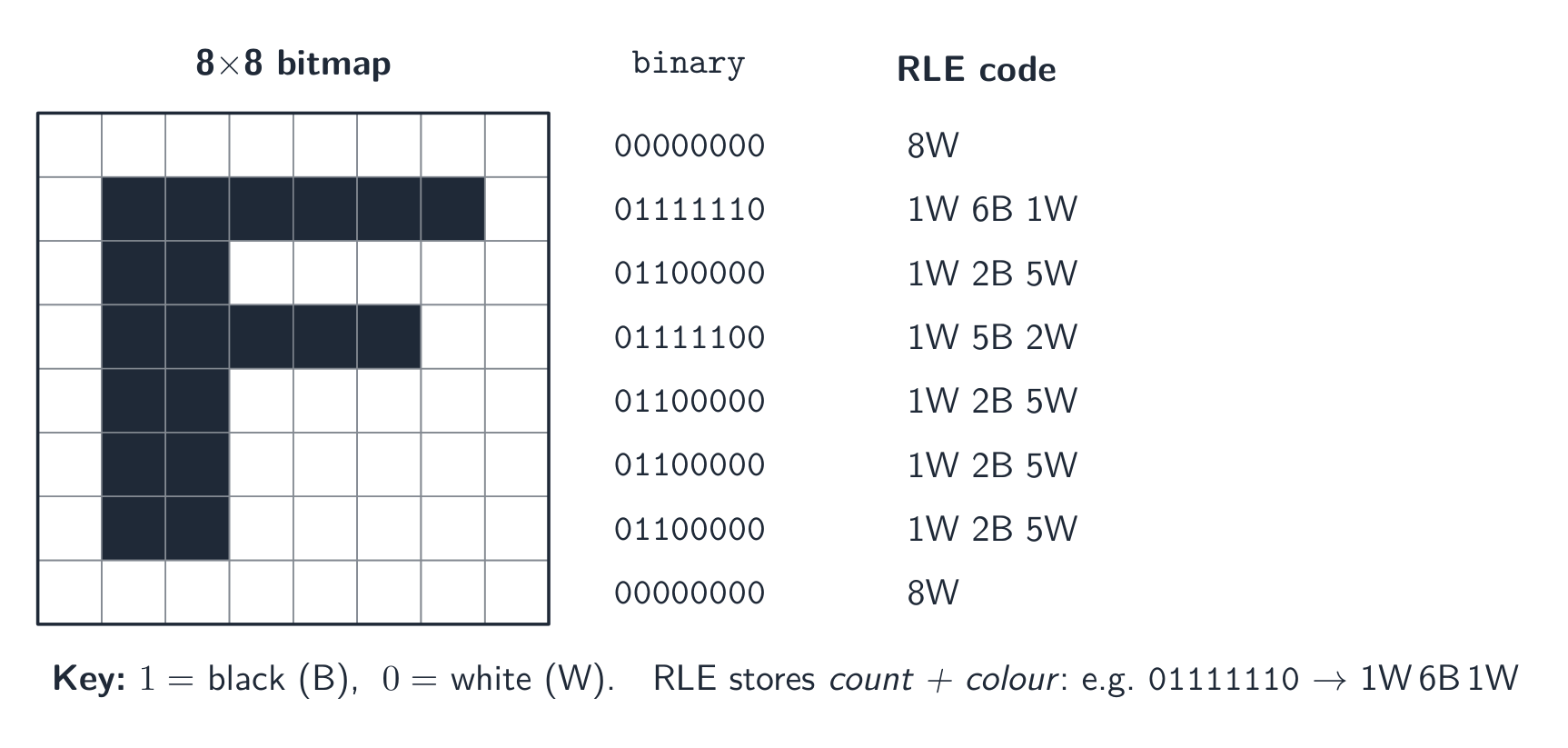
- run-length encoding 行程编码 (RLE): store "the next $n$ values are $x$" instead of repeating $x$. Great for flat areas; useless for noisy data.
- dictionary methods 字典编码 (ZIP, PNG): replace repeated byte sequences with a short reference. Good for text and code.
- Huffman coding 霍夫曼编码: give short codes to common symbols and long codes to rare ones, bringing the average code length near the data's entropy 熵.
How each kind of file is compressed:
- text file: dictionary methods and Huffman coding turn repeated words and common characters into short codes. Text must stay lossless, because one changed character changes the meaning.
- bitmap image: RLE for runs of identical pixels (icons, diagrams, black-and-white scans); lossy JPEG for photographs, or a lower colour depth or resolution.
- vector graphic: the drawing list is already small; remove drawing objects that are not needed, store coordinates to fewer decimal places, or apply a lossless method such as ZIP to the file.
- sound file: lossy MP3 or AAC removes what the ear cannot hear; a lower sampling rate or resolution is also lossy; lossless formats keep every sample and shrink the file much less.


Lossy methods
- images (JPEG): drop fine detail and colour differences the eye barely sees.
- sound (MP3, AAC): drop pitches we hear less well, and quiet sounds hidden by louder ones.
- video combines spatial 空间 compression (within each frame, like JPEG) with temporal 时间 compression (most frames store only the differences from the previous frame).

Explore
Run-length encoding
Watch a run of repeated symbols get squashed into a count — simple lossless compression.
Vocabulary
Train
| English | Chinese | Pinyin |
|---|---|---|
| Compression | 压缩 | yā suō |
| bandwidth | 带宽 | dài kuān |
| lossless | 无损 | wú sǔn |
| lossy | 有损 | yǒu sǔn |
| run-length encoding | 行程编码 | xíng chéng biān mǎ |
| dictionary methods | 字典编码 | zì diǎn biān mǎ |
| Huffman coding | 霍夫曼编码 | huò fū màn biān mǎ |
| entropy | 熵 | shāng |
| spatial | 空间 | kōng jiān |
| temporal | 时间 | shí jiān |
1.3
Definitions the examiner accepts
A definition question is marked against fixed wording. Learn these exactly, and give one answer only.
| Term | Definition |
|---|---|
| bit | a single binary digit, 0 or 1 |
| byte | a group of 8 bits |
| binary prefix | a multiplier that is a power of 2 (kibi = 1024) rather than a power of 10 (kilo = 1000) |
| two's complement | a way of representing signed integers in which the most significant bit has a negative place value |
| overflow | the result of a calculation is too large to be represented in the number of bits available |
| Binary Coded Decimal | each denary digit is stored as its own 4-bit binary pattern |
| character set | the set of characters a computer can represent, each with its own binary code |
| pixel | the smallest element of a bitmap image, storing one colour value |
| image resolution | the number of pixels in an image, given as width by height |
| screen resolution | the number of pixels a display can show, given as width by height |
| colour depth | the number of bits used to store the colour of one pixel |
| sampling rate | the number of samples of the sound taken per second |
| sampling resolution | the number of bits used to store the amplitude of one sample |
| lossless compression | compression from which the original data can be recovered exactly |
| lossy compression | compression that permanently removes some data, so the original cannot be recovered |
| run-length encoding | replacing a run of repeated values with one value and a count |
1.3
Exam tips
- Show working for base conversions: denary → binary by place values, binary → hexadecimal in nibbles (groups of 4 bits).
- For two's complement the MSB is negative; to negate, invert and add 1; watch for overflow when the sign bit flips wrongly.
- Distinguish bitmap (pixels; file size $=$ width $\times$ height $\times$ colour depth) from vector (drawing commands; scales without loss).
- Sound file size depends on sample rate $\times$ bit depth $\times$ time — more of each means better quality but a bigger file.
- Compare lossless vs lossy compression and give a use for each.
Common mistakes
- Explaining an overflow with "the answer was greater than 255" or "it has 9 bits". State the word size the question gave, then say the result cannot be represented in it.
- Making a negative number by setting the top bit to 1 and leaving the rest (sign and magnitude). Two's complement means invert every bit of the positive value, then add 1.
- Forgetting to pad a converted number to the register width the question asks for.
- Mixing bits and bytes in a file-size calculation. Work in bits, divide by 8 once, and say whether you used 1000 or 1024.
- Answering "describe" in everyday words ("the picture gets worse"). Use the syllabus terms: fewer colours, banding, lower image resolution, larger pixels.
Interactive lessons on this topic
Work through it step by step, with instant-check exercises.
A-Level Computer Science Past Papers