Inserting rows
Adding rows with INSERT
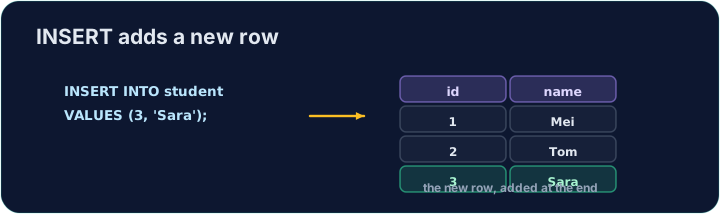
INSERT adds a new row to a table. List the columns, then a matching set of VALUES:
Text goes in single quotes; numbers do not. The values must line up with the columns, in the same order.
Добавление строк с помощью INSERT
INSERT добавляет новую строку в таблицу. Перечислите столбцы, затем соответствующий набор VALUES:
INSERT INTO product (code, title, price, in_stock)
VALUES ('P04', 'Ruler', 1.20, 75);
Текст берётся в одинарные кавычки; числа — нет. Значения должны совпадать со столбцами в том же порядке.
Seeing the effect
INSERT changes the data but returns no rows itself, so Run just reports how many rows changed. To see the new row, run a SELECT afterwards.
The checker does this for you: it runs your INSERT, then reads the table back to confirm your row is there.
Просмотр результата
INSERT изменяет данные, но сам по себе не возвращает строки, поэтому Выполнить просто сообщает, сколько строк было изменено. Чтобы увидеть новую строку, выполните после неё SELECT.
Проверитель делает это за вас: он выполняет ваш INSERT, затем считывает таблицу обратно, чтобы подтвердить наличие вашей строки.
Common mistakes
- The values must line up with the columns in order and type.
- Quote text values with single quotes.
Частые ошибки
- Значения должны совпадать со столбцами по порядку и типу.
- Текст берите в одинарные кавычки.
Add a new product to the product table: code 'P04', title 'Ruler', price 1.20, in_stock 75.
Click Run to see the output here. · Нажмите Запустить, чтобы увидеть результат здесь.
Add a new customer to the customer table: id 5, name 'Eve', city 'York'. List the columns you are filling, then give the matching VALUES.
Click Run to see the output here. · Нажмите Запустить, чтобы увидеть результат здесь.