Performance, the fetch-execute cycle and interrupts
Introduced| English | Meaning |
|---|---|
| interrupt/ˈɪntərʌpt/ | A signal or event that causes the processor to suspend normal execution and run an appropriate service routine. |
| clock speed/klɒk spiːd/ | The number of cycles of a processor's clock per second; it alone does not determine how quickly every program runs. |
| fetch-execute cycle/fetʃ ˈeksɪkjuːt ˈsaɪkl/ | The repeated processor sequence of fetching an instruction, decoding it and carrying out its operation. |
| cores/kɔːz/ | Processing units within a processor that can execute instruction streams. |
| cache/kæʃ/ | Fast storage holding copies of frequently needed data or instructions to reduce access time. |
| word size/wɜːd saɪz/ | The number of bits in a processor's usual data word. |
| port/pɔːt/ | In this hardware topic, a physical socket or connection used to attach a peripheral. |
| peripheral/pəˈrɪfərəl/ | A device connected to a computer to provide functions such as input, output or additional storage. |
| register transfer notation/ˈredʒɪstə ˈtrænsfɜː nəʊˈteɪʃn/ | A symbolic notation showing data movement and simple operations involving processor registers and memory. |
| stack/stæk/ | A last-in, first-out data structure in which items are added and removed at the same end. |
| interrupt service routine/ˈɪntərʌpt ˈsɜːvɪs ruːˈtiːn/ | A routine executed to handle a particular interrupt before control returns to an appropriate point in the interrupted processing. |
| interrupt register/ˈɪntərʌpt ˈredʒɪstə/ | In the taught processor model, a register holding flags or information about interrupt requests awaiting attention. |
Why your laptop drops everything when you press a key
- A processor runs billions of cycles a second. If it had to stop and ask the keyboard "anything yet?" between instructions, it would waste most of them asking.
- Instead the keyboard sends an interrupt 中断. The processor finishes its current instruction, saves its place, deals with the key, and returns as if nothing had happened.
- That one mechanism is how a single processor appears to run your music, your browser and your typing at once.
- This lesson covers what makes a processor fast, how it connects to devices, exactly how it runs one instruction, and how an interrupt cuts in.
What affects performance
- Clock speed 时钟频率: more fetch-execute cycles a second, so more instructions a second, until heat sets the limit.
- Number of cores 核心: each core fetches and executes its own instruction at the same time, so several programs or threads run in parallel. A program must be written to use them, so doubling the cores does not double the speed.
- Bus width: a wider data bus moves more bits per transfer, so fewer transfers; a wider address bus reaches more memory.
- Cache 高速缓存: a small, fast memory next to the processor holding the instructions and data used most recently, so fewer slow trips to RAM. Word size 字长, the amount of RAM and the storage type help too.
Select all the factors that affect CPU performance.
Difficulty 2/5 · 140 coins + a small bonus on first completion today
Clock speed, cores and cache (plus word size, RAM, storage and bus width) all affect performance. The case colour does not.
A multi-core CPU is especially helpful for:
Difficulty 1/5 · 100 coins + a small bonus on first completion today
Extra cores run tasks in parallel. A purely single-threaded job benefits more from higher per-core speed.
____ memory is a small, fast store next to the processor that holds recently used instructions and data, so fewer slow trips to RAM are needed.
Difficulty 1/5 · 100 coins + a small bonus on first completion today
More cache means more of the working set sits next to the processor, which is the reason it appears in every performance comparison.
Worked example: "explain why the new computer is faster"
- Compare the two specifications line by line, each with its reason.
- 3.8 GHz against 2.4 GHz: more cycles a second, so more instructions executed a second.
- 8 cores against 4: twice as many instructions can be fetched and executed at the same time, for software that uses them.
- 16 MB of cache against 4 MB: more of the working set is held next to the processor, so fewer waits for RAM. Each line is two marks: the factor and its consequence.
Ports
- A port 端口 is a physical socket that connects a peripheral 外围设备.
- USB (Universal Serial Bus) is general-purpose: keyboards, drives, phones. It is plug-and-play: the computer detects the device, identifies it, loads its driver and can power it, with no restart.
- HDMI (High Definition Multimedia Interface) carries digital video and audio down one cable, so nothing is converted to analogue and the picture is not degraded. VGA (Video Graphics Array) is the older analogue video socket.
Match each port to what it carries.
Difficulty 2/5 · 140 coins + a small bonus on first completion today
Different signals, different sockets: an HDMI cable will not fit a USB port.
The fetch stage
- Once per instruction the processor runs the fetch-execute cycle 取指-执行周期. Fetch comes first, and the exam wants it in register transfer notation 寄存器传送记法.
MAR ← [PC]          the address of the next instruction goes to the MAR
PC  ← [PC] + 1      the PC now points to the following instruction
MDR ← [[MAR]]       the instruction at that address is read into the MDR
CIR ← [MDR]         the instruction is copied into the CIR for decoding
- A read signal travels on the control bus, the address on the address bus, and the instruction comes back on the data bus. The PC is incremented straight after its address is copied, so that a jump executed later can still overwrite it.
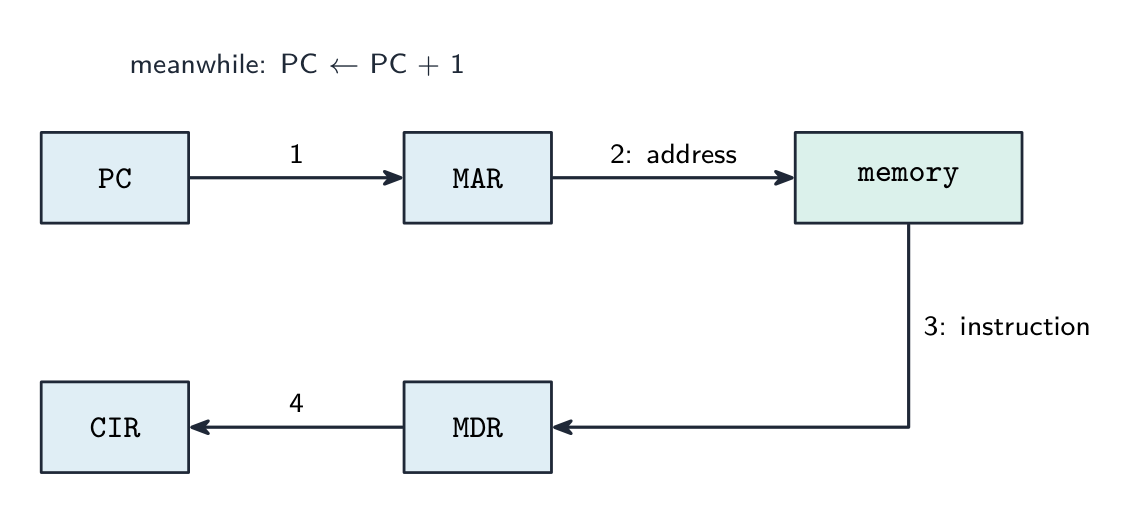
PC → MAR → memory → MDR → CIR, with the PC incremented on the way
Put the fetch steps in the correct order.
Difficulty 3/5 · 200 coins + a small bonus on first completion today
PC → MAR, increment PC, read signal, then the instruction travels MDR → CIR ready to decode.
The PC is incremented during the fetch stage so the next cycle fetches the following instruction.
Difficulty 1/5 · 100 coins + a small bonus on first completion today
Incrementing the PC early means it already points at the next instruction by the time this one executes (unless a jump changes it).
Decode, execute, repeat
- Decode: the control unit works out from the instruction in the CIR which operation it is and where its operands are.
- Execute: arithmetic and logic go to the ALU with the result in the ACC; a load or store moves data between memory and a register; a jump writes a new address into the PC.
- Then the cycle repeats from
MAR ← [PC]. At the end of every cycle the processor also checks whether an interrupt is waiting.
One LOAD and one ADD walk the registers: fetch, decode, execute, repeat
The fetch-execute cycle
Tap round the loop the CPU repeats billions of times a second. Watch how fetch uses the PC/MAR/MDR/CIR registers, then decode and execute act on what was fetched.
Worked example: executing two instructions in notation
- Execute
LDD 200(load the contents of address 200 into the ACC):MAR ← 200, thenMDR ← [[MAR]], thenACC ← [MDR]. - Execute
ADD 201:MAR ← 201,MDR ← [[MAR]],ACC ← [ACC] + [MDR]. - Execute
STO 202:MAR ← 202,MDR ← [ACC],[[MAR]] ← [MDR]. - Every line moves one value between two places. The double brackets always mean "the memory location whose address is in the MAR".
Put the register transfers that execute LDD 200 in order.
Difficulty 3/5 · 200 coins + a small bonus on first completion today
Address to the MAR, contents of that address to the MDR, then into the accumulator.
Interrupts
- An interrupt is a signal that pauses the normal cycle so the processor can deal with an urgent event.
- Causes: a hardware device (a key pressed, a printer buffer empty, a network packet arriving), a software fault (division by zero, an illegal instruction, arithmetic overflow), the operating system's timer marking the end of a time slice, a power-failure warning.
- Interrupts let the system respond promptly without the processor constantly checking devices, and they are how the operating system multitasks.
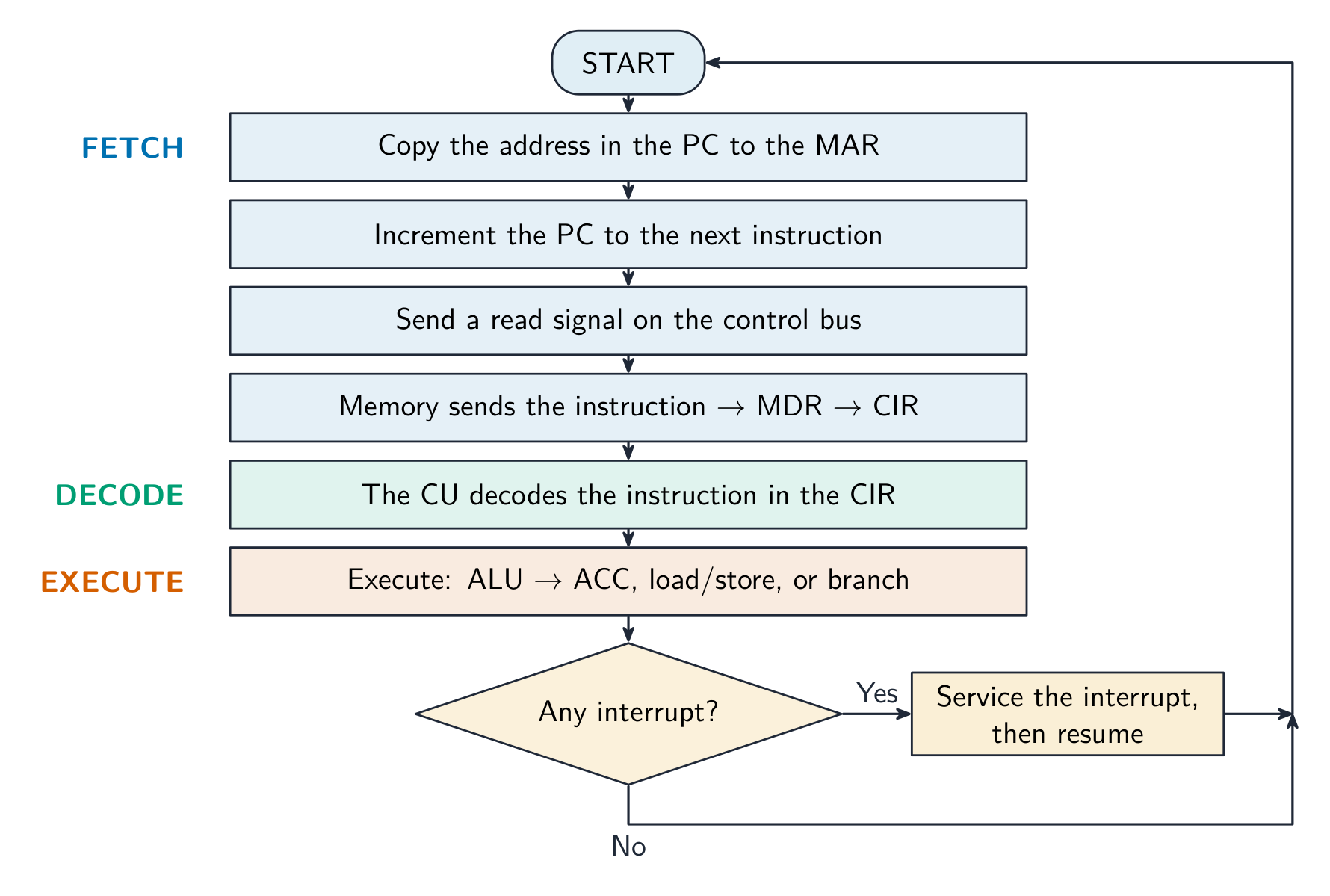
The cycle, with the interrupt check at the end of each pass
An interrupt is:
Difficulty 1/5 · 100 coins + a small bonus on first completion today
An interrupt temporarily pauses the fetch-execute cycle so the CPU can service an urgent event, then resumes.
Which of these can cause an interrupt? Select all that apply.
Difficulty 2/5 · 140 coins + a small bonus on first completion today
Hardware events, software faults and the OS timer all raise interrupts. A loop ending is ordinary program flow handled by a jump, not an interrupt.
Handling an interrupt
- Finish the current instruction. Save the state: the contents of the PC and the other registers go onto the stack 栈.
- Load the address of the interrupt service routine 中断服务程序 (ISR) into the PC and run it. The ISR handles the event.
- Restore the saved state from the stack and carry on with the interrupted program exactly where it left off.
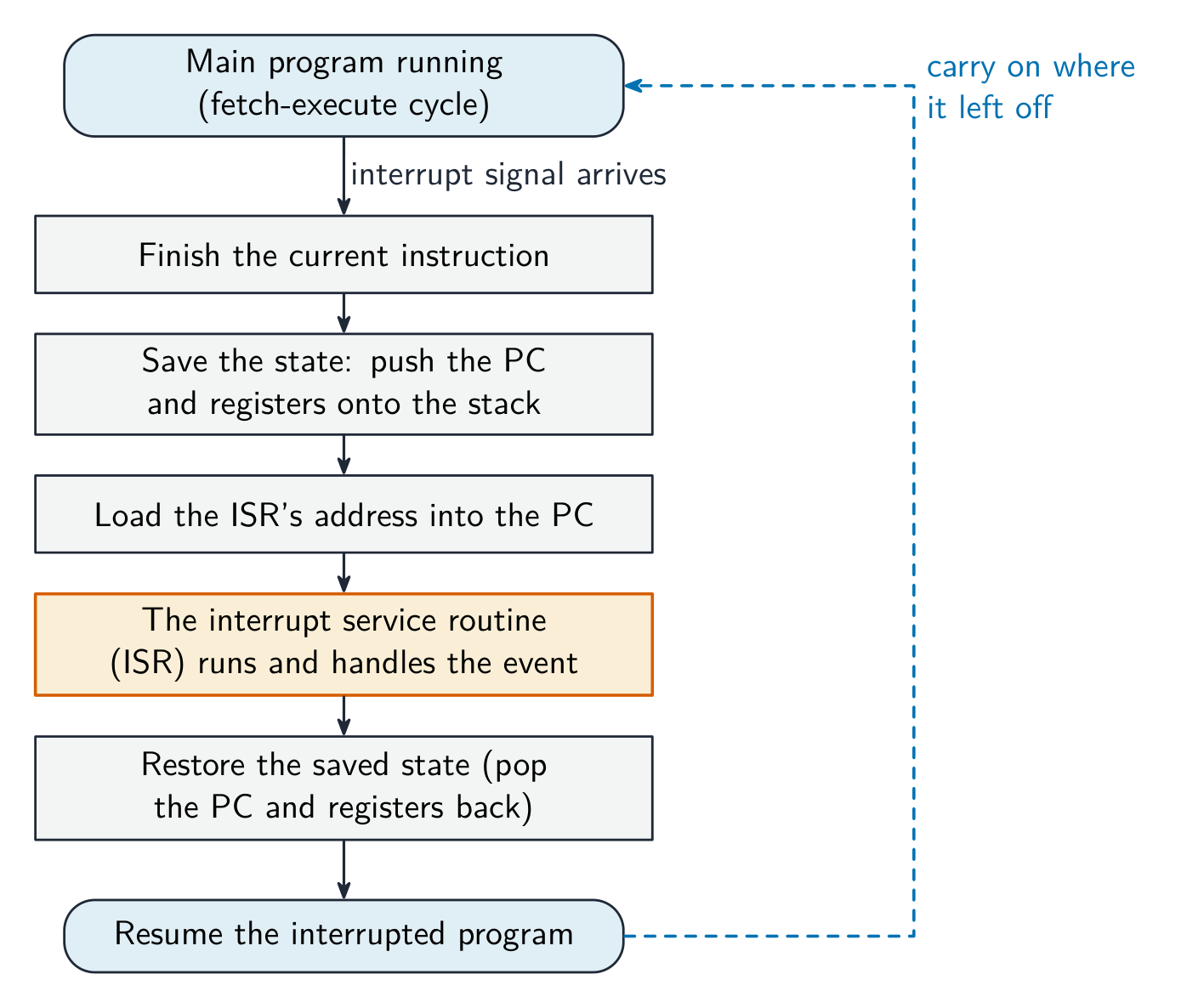
Save, service, restore, resume
When an interrupt occurs, the CPU first finishes the current instruction, then:
Difficulty 1/5 · 100 coins + a small bonus on first completion today
It saves the PC and registers, runs the interrupt service routine, then restores the state and continues where it left off.
Worked example: the four-mark interrupt answer
- Explain how an interrupt from an input device is detected and handled in the fetch-execute cycle.
- The device sends an interrupt signal that sets a flag in the interrupt register 中断寄存器. The processor checks that register at the end of every cycle, after the current instruction has finished executing.
- If a flag is set and the interrupt has a higher priority than the current task, the PC and the other registers are saved on the stack. The address of the ISR is loaded into the PC and the routine runs.
- When it finishes, the registers are restored from the stack and the interrupted program resumes. Four points, in that order.
The processor checks for interrupts at the end of every fetch-execute cycle, after the current instruction has finished.
Difficulty 1/5 · 100 coins + a small bonus on first completion today
That timing is what lets the state be saved cleanly: no instruction is ever left half done.
Marks that slip away
- The PC is incremented during the fetch, not after the execute. Put
PC ← [PC] + 1second, straight afterMAR ← [PC]. - Interrupts are checked at the end of a cycle, never in the middle of an instruction.
- The state goes onto the stack and comes back from it. "The CPU stops" or "the program is lost" is wrong: it resumes exactly where it was.
- More cores do not double the speed; the software has to use them. Say so when comparing specifications.
You've got it
- performance: clock speed, cores, bus width, cache (plus word size, RAM, storage), each with its consequence
- ports: USB general-purpose and plug-and-play, HDMI digital video and audio, VGA analogue video
- fetch:
MAR ← [PC],PC ← [PC] + 1,MDR ← [[MAR]],CIR ← [MDR]; then decode, execute, repeat - an interrupt is checked at the end of each cycle: save state on the stack, run the ISR, restore, resume