Skip to content · ⁨본문 바로가기⁩

Algorithm design and problem-solving · ⁨알고리즘 설계 및 문제 해결⁩

IGCSE Computer Science · ⁨IGCSE 컴퓨터 과학⁩ · Topic 7 · ⁨주제 7⁩

Video lesson for this topic · ⁨이 주제용 영상 수업⁩ Open the video page · ⁨영상 페이지 열기⁩
9:17

프로그래밍 개발 수명 주기

휴대폰의 모든 앱은 이런 사람이 작성했습니다. 하지만 그들은 코드를 타이핑하기 시작하지 않았습니다. 첫 줄보다 먼저, 문제를 연구하고, 해결책을…

English narration · English + 中文 subtitles burned in · ⁨영어 내레이션 · 영어 + 중국어 자막 burned-in⁩

Syllabus
English
Candidates should be able to: Notes and guidance
1 Understand the program development life cycle, limited to: analysis, design, coding and testing • Including identifying each stage and performing these tasks for each stage: – analysis: abstraction, decomposition of the problem, identification of the problem and requirements – design: decomposition, structure diagrams, flowcharts, pseudocode – coding: writing program code and iterative testing – testing: testing program code with the use of test data
2 (a) Understand that every computer system is made up of sub-systems, which are made up of further sub-systems (b) Understand how a problem can be decomposed into its component parts • Including: – inputs – processes – outputs – storage
(c) Use different methods to design and construct a solution to a problem • Including: – structure diagrams – flowcharts – pseudocode
3 Explain the purpose of a given algorithm • Including: – stating the purpose of an algorithm – describing the processes involved in an algorithm
4 Understand standard methods of solution • Limited to: – linear search – bubble sort – totalling – counting – finding maximum, minimum and average values
5 (a) Understand the need for validation checks to be made on input data and the different types of validation check • Including: – range check – length check – type check – presence check – format check – check digit
(b) Understand the need for verification checks to be made on input data and the different types of verification check • Including: – visual check – double entry check
6 Suggest and apply suitable test data • Limited to: – normal – abnormal – extreme – boundary • Extreme data is the largest/smallest acceptable value • Boundary data is the largest/smallest acceptable value and the corresponding smallest/largest rejected value
7 Complete a trace table to document a dry-run of an algorithm • Including, at each step in an algorithm: – variables – outputs – user prompts
8 Identify errors in given algorithms and suggest ways of correcting these errors
9 Write and amend algorithms for given problems or scenarios, using: pseudocode, program code and flowcharts • Precision is required when writing algorithms, e.g. x > y is acceptable but x is greater than y is not acceptable • See section 4 for flowchart symbols • See section 4 for pseudocode
한국어
응시자가 다음을 수행할 수 있어야 함: 참고 사항 및 가이드라인
1 프로그램 개발 생명 주기를 이해하기 (다음으로 제한: 분석, 설계, 코딩 및 테스트) • 각 단계 식별 및 다음 작업을 각 단계별로 수행: – 분석: 추상화, 문제 분해, 문제 및 요구사항 식별 – 설계: 분해, 구조도, 플로우차트, 가짜 코드 – 코딩: 프로그램 코드 작성 및 반복 테스트 – 테스트: 테스트 데이터 사용하여 프로그램 코드 테스트
2 (a) 모든 컴퓨터 시스템이 서브 시스템으로 구성되어 있으며, 이 서브 시스템은 다시 더 작은 서브 시스템으로 이루어져 있음을 이해하기 (b) 문제를 구성 요소로 어떻게 분해할 수 있는지 이해하기 • 다음을 포함: – 입력 – 처리 – 출력 – 저장
(c) 다양한 방법을 사용하여 문제에 대한 해결책을 설계하고 구축하기 • 다음을 포함: – 구조도 – 플로우차트 – 가짜 코드
3 주어진 알고리즘의 목적을 설명하기 • 다음을 포함: – 알고리즘의 목적 명시 – 알고리즘에 포함된 프로세스 설명
4 표준 해결 방법을 이해하기 • 다음으로 제한: – 선형 탐색 – 버블 정렬 – 합산 – 세기 – 최대값, 최소값 및 평균값 찾기
5 (a) 입력 데이터에 대해 검증 체크가 필요하며, 검증 체크의 다양한 유형을 이해하기 • 다음을 포함: – 범위 체크 – 길이 체크 – 타입 체크 – 존재 체크 – 형식 체크 – 체크 디지트
(b) 입력 데이터에 대해 확인 체크가 필요하며, 확인 체크의 다양한 유형을 이해하기 • 다음을 포함: – 시각적 체크 – 이중 입력 체크
6 적절한 테스트 데이터를 제안하고 적용하기 • 다음으로 제한: – 정상 – 비정상 – 극단 – 경계 • 극단 데이터는 허용 가능한 최대/최소 값이다. • 경계 데이터는 허용 가능한 최대/최소 값 및 그에 대응하는 비허용 최소/최대 값이다.
7 알고리즘의 드라이 런을 문서화하기 위해 트레이스 표를 완성하기 • 알고리즘의 각 단계마다 다음을 포함: – 변수 – 출력 – 사용자 프롬프트
8 주어진 알고리즘에서 오류를 식별하고 이를 수정할 방법을 제안하기
9 주어진 문제나 시나리오에 대해 알고리즘을 작성하고 수정하기: 가짜 코드, 프로그램 코드 및 플로우차트를 사용 • 알고리즘 작성 시 정확성이 필요하다. 예를 들어 x > y는 허용되지만 x is greater than y는 허용되지 않는다. • 플로우차트 기호는 4절 참조 • 가짜 코드는 4절 참조

Source: Cambridge International syllabus · ⁨출처: Cambridge International syllabus⁩

7.1

The program development life cycle · ⁨프로그램 개발 수명 주기⁩

English

The program development life cycle 程序开发生命周期 is the set of stages used to make a program. There are four stages.

Stage What you do
analysis 分析 study the problem and work out what is needed
design 设计 plan how the program will work
coding 编码 write the program code and test it as you go
testing 测试 run the finished program with test data to find errors

Analysis

In analysis you understand the problem. Two key skills help:

  • abstraction 抽象 — keep only the important details and ignore the rest;
  • decomposition 分解 — break a big problem into smaller, easier parts.

Design

In design you plan the solution, often using decomposition. You can show the parts as sub-systems 子系统 in a structure diagram 结构图 (a chart that splits a system into smaller boxes).

Coding and testing

In coding you write the program code. You use iterative testing 迭代测试 — test small parts again and again as you build them. In testing you run the whole program with test data 测试数据 to check it works.

한국어

프로그램 개발 수명 주기는 프로그램을 만드는 데 사용되는 단계들의 집합입니다. 네 가지 단계가 있습니다.

컴퓨터에서 코드를 입력하는 프로그래머
소프트웨어는 프로그래머에 의해 작성되며, 이들은 개발 수명 주기를 따름
단계 하는 일
분석 문제를 연구하고 필요한 것을 파악함
설계 프로그램이 어떻게 작동할지 계획함
코딩 프로그램 코드를 작성하고 진행하면서 테스트함
테스트 완성된 프로그램을 테스트 데이터로 실행하여 오류를 찾음
나란히 있는 네 가지 단계 — 분석, 설계, 코딩, 테스트 — 테스트에서 설계로 돌아가는 화살표 포함
프로그램 개발의 네 단계; 테스트를 통해 설계를 수정하고 정제함
프로세스 상자와 의사결정 다이아몬드가 포함된 프로그램 플로우차트
프로그램 플로우차트는 설계 단계 동안 프로그램의 단계와 의사결정을 보여줌

분석

분석에서는 문제를 이해합니다. 두 가지 핵심 기술이 도움이 됩니다:

  • 추상화 — 중요한 세부사항만 남기고 나머지는 무시함;
  • 분해 — 큰 문제를 더 작고 쉬운 부분으로 나누기.

설계

설계에서는 해법을 계획하며, 종종 분해를 사용합니다. 구조도(시스템을 더 작은 상자로 나누는 차트)에서 서브시스템으로서 부분들을 보여줄 수 있습니다.

코딩 및 테스트

코딩에서는 프로그램 코드를 작성합니다. 반복적 테스트를 사용하여 부품을 만들면서 작은 부분을 반복적으로 테스트합니다. 테스트에서는 전체 프로그램을 테스트 데이터로 실행하여 작동 여부를 확인합니다.

Vocabulary · ⁨어휘⁩ Train · ⁨연습하기⁩
English 한국어
program development life cycle/ˈprəʊɡræm dɪˈveləpmənt laɪf ˈsaɪkl/ 프로그램 개발 수명 주기
analysis/əˈnæləsɪs/ 분석
design/dɪˈzaɪn/ 설계
coding/ˈkəʊdɪŋ/ 코딩
testing/ˈtestɪŋ/ 테스트
abstraction/əbˈstrækʃn/ 추상화
decomposition/ˌdiːkɒmpəˈzɪʃn/ 분해
sub-systems/sʌb ˈsɪstəmz/ 서브시스템(sub-systems)
structure diagram/ˈstrʌktʃə ˈdaɪəɡræm/ 구조도(structure diagram)
iterative testing/ˈɪtərətɪv ˈtestɪŋ/ 반복 테스트(iterative testing)
test data/test ˈdeɪtə/ 테스트 데이터
flowchart/ˈfləʊtʃɑːt/ 플로우차트
7.2

Design tools · ⁨설계 도구⁩

English

You can plan a solution in three main ways.

  • a structure diagram — shows the parts of a system and how they fit together;
  • a flowchart 流程图 — a diagram using boxes and arrows to show the steps in order;
  • pseudocode 伪代码 — steps written in simple, code-like English (not a real language).
한국어

해법을 계획하는 세 가지 주요 방법이 있습니다.

  • 구조도 — 시스템의 부분들과 이들이 어떻게 결합되는지를 보여줌;
  • 플로우차트 — 단계를 순서대로 상자와 화살표를 사용하여 보여주는 다이어그램;
  • 가성 코드 — 코드의 형식을 닮은 간단한 영어로 쓰인 단계(실제 언어 아님).
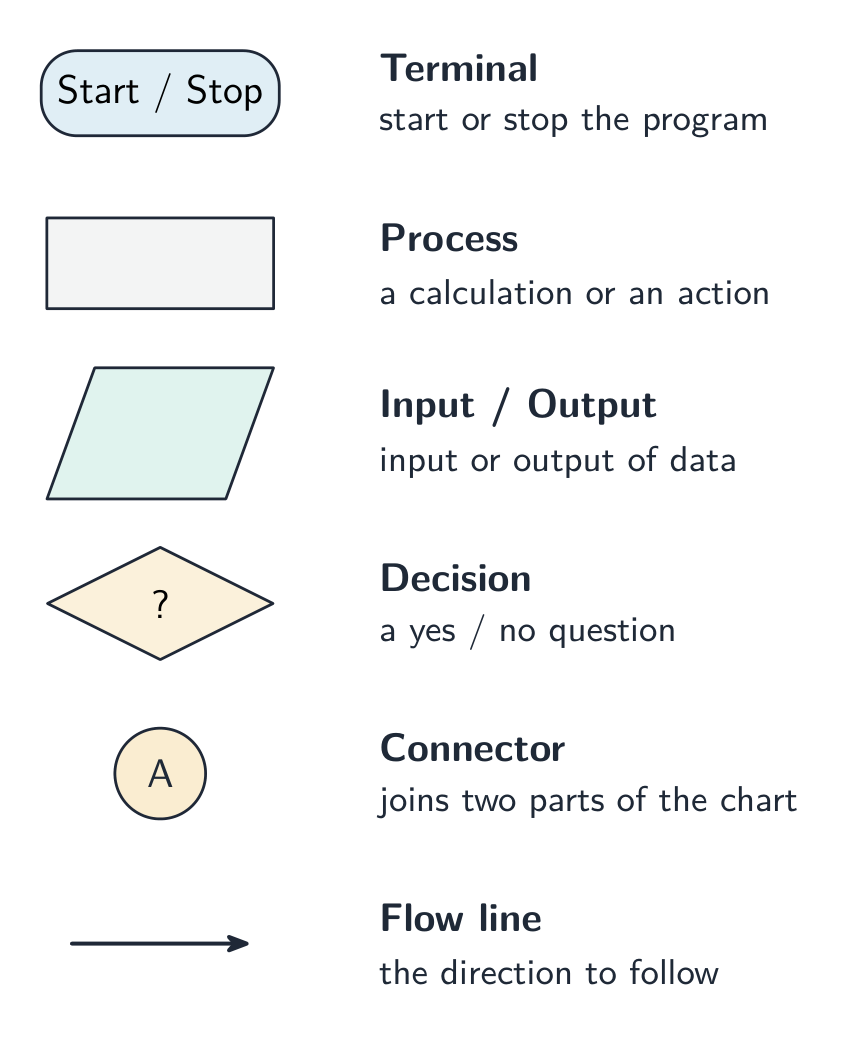
1부터 n까지의 숫자를 더하는 플로우차트; 시작/종료, 입력/출력, 프로세스, 의사결정 기호 포함 및 각 형태별 키 제공
표준 기호(시작/종료, 입력/출력, 프로세스, 의사결정)를 사용한 합계 알고리즘용 플로우차트
7.3

Algorithms · ⁨알고리즘⁩

English
Bubble sort, pass by pass

An algorithm 算法 is a set of steps, in the right order, that solves a problem. Every algorithm can be split into three parts:

  • input 输入 — the data that goes in;
  • processing 处理 — the work done on the data;
  • output 输出 — the result that comes out.

This is called decomposition into inputs, processes and outputs. For example, for "find the average of three marks": the inputs are the three marks; the processing is adding them and dividing by 3; the output is the average.

한국어
버블 정렬, 패스별

알고리즘은 문제를 해결하기 위해 올바른 순서로 배치된 단계들의 집합입니다. 모든 알고리즘은 세 부분으로 나눌 수 있습니다:

  • 입력 — 들어오는 데이터;
  • 처리 — 데이터에 수행되는 작업;
  • 출력 — 나오는 결과물.

이를 입력, 처리, 출력로의 분해라고 합니다. 예를 들어 "세 점수의 평균을 구하다": 입력은 세 점수; 처리는 더하기와 3으로 나누기; 출력은 평균입니다.

세 상자 — INPUT(3점수), PROCESS(더하기, 3으로 나누기), OUTPUT(평균) — 화살표로 연결됨
모든 알고리즘은 입력, 처리, 출력으로 분해됩니다—여기서는 세 점수의 평균을 구하는 예시
Vocabulary · ⁨어휘⁩ Train · ⁨연습하기⁩
English 한국어
input/ˈɪnpʊt/ 입력(input)
processing/ˈprəʊsesɪŋ/ 처리(processing)
output/ˈaʊtpʊt/ 输出
validation/ˌvælɪˈdeɪʃn/ 검증
range check/reɪndʒ tʃek/ 범위 검사
length check/leŋθ tʃek/ 길이 검사
type check/taɪp tʃek/ 타입 체크(type check)
presence check/ˈprezəns tʃek/ 존재 검사
format check/ˈfɔːmæt tʃek/ 양식 검사
check digit/tʃek ˈdɪdʒɪt/ 검증 숫자
verification/ˌverɪfɪˈkeɪʃn/ 확인
visual check/ˈvɪʒuːəl tʃek/ 시각적 검사
double entry/ˈdʌbl ˈentri/ 이중 입력
bubble sort/ˈbʌbl sɔːt/ 버블 정렬
7.4

Validation and verification · ⁨검증 및 검증⁩

English

When data is entered, you check it to reduce mistakes.

Validation 验证 checks that the data is sensible and follows the rules. It cannot check that the data is true, only that it is allowed.

Validation check What it checks
range check 范围检查 the value is between a lowest and highest allowed value
length check 长度检查 the number of characters is allowed (e.g. a password ≥ 8)
type check 类型检查 the data is the right type (e.g. a number, not letters)
presence check 存在性检查 something has actually been entered (not left blank)
format check 格式检查 the data is in the right pattern (e.g. a date as dd/mm/yyyy)
check digit 校验码 an extra digit confirms a number was entered correctly

Verification 核实 checks that data was copied or entered correctly (no mistakes while typing it in). Two methods:

  • visual check 目视检查 — a person compares the typed data with the original;
  • double entry 双重输入 — the data is entered twice and the two copies are compared.
한국어

데이터가 입력될 때, 실수를 줄이기 위해 그것을 확인합니다.

검증은 데이터가 타당하고 규칙을 준수하는지 확인합니다. 데이터가 사실임을 확인할 수는 없으며, 허용 가능한 값인지만 확인할 수 있습니다.

검증 체크 확인 내용
범위 체크 값이 허용된 최소값과 최대값 사이에 있는지
길이 체크 문자열 길이가 허용范围内的지 (예: 비밀번호 ≥ 8)
유형 체크 데이터가 올바른 유형인지 (예: 숫자, 문자 아님)
존재 체크 실제로 입력되었는지 (공란으로 두지 않았는지)
양식 체크 데이터가 올바른 패턴인지 (예: dd/mm/yyyy 형식의 날짜)
체크 디ジット 추가된 한 자릿수 숫자가 정확한 입력을 확인함

확인은 데이터가 올바르게 복사되거나 입력되었는지(타입 중 오류가 없는지) 확인합니다. 두 가지 방법이 있습니다:

  • 시각적 체크 — 사용자가 입력한 데이터를 원본과 비교함;
  • 이중 입력 — 데이터를 두 번 입력하여 두 사본을 비교함.
7.5

Trace tables · ⁨추적 표⁩

English

A trace table 追踪表 records the value of each variable as an algorithm runs, step by step. It helps you:

  • check that an algorithm works correctly;
  • work out what an algorithm does by following it with given data.

Example: trace this algorithm with the input 5.

i total OUTPUT
1 1
2 3
3 6
4 10
5 15 15

The trace shows the algorithm adds up 1 to n. With input 5 the output is 15.

Worked example. Trace this algorithm and give the output.

DIV gives only the whole-number part of a division. Take one row per pass: x becomes 10 (count 1), then 5 (count 2), then 2 (count 3), then 1 (count 4). Now x > 1 is false, so the loop stops and the output is 4. Two habits protect these marks: test the condition before each pass rather than after, and write a new row for every pass - trying to hold the values in your head is what makes traces go wrong.

한국어

추적 표는 알고리즘이 실행될 때 매 단계마다 각 변수의 값을 기록합니다. 이를 통해 다음을 할 수 있습니다:

카운트, 총합, 출력 열이 포함된 추적 표 이미지
트레이스 표는 프로그램 실행 시 각 변수의 값을 기록합니다
  • 알고리즘이 올바르게 작동하는지 확인하기 위해;
  • 주어진 데이터를 따라가며 알고리즘이 무엇을 하는지 파악하기 위해.

예: 입력 5로 이 알고리즘을 추적해 보십시오.

INPUT N
Total ← 0
FOR I ← 1 TO N
    Total ← Total + I
NEXT I
OUTPUT Total
i total OUTPUT
1 1
2 3
3 6
4 10
5 15 15

이 추적을 보면 알고리즘이 1부터 n까지 더합니다. 입력이 5일 때 출력은 15입니다.

해설 예시. 이 알고리즘을 추적하여 출력을 구하십시오.

X ← 20
Count ← 0
WHILE X > 1
    X ← DIV(X, 2)
    Count ← Count + 1
ENDWHILE
OUTPUT Count

DIV는 나눈 결과의 정수 부분만 반환합니다. 한 번의 반복마다 한 줄씩 작성합니다: x가 10로 변하고(카운트 1), 이후 5로 변하고(카운트 2), 이후 2로 변하고(카운트 3), 이후 1로 변하고(카운트 4)됩니다. 이제 x > 1가 거짓(true)이 아니므로 루프가 종료되고 출력은 4입니다. 이러한 표를 올바르게 작성하기 위한 두 가지 습관이 필요합니다: 각 반복 전에 조건을 테스트해야 반복 후에 테스트하는 것이 아니며, 모든 반복에 대해 새로운 줄을 작성해야 합니다. 값을 머릿속에만 유지하려 하려다 보면 추적이 틀어지는 원인이 됩니다.

Explore · ⁨탐색하기⁩

A trace table · ⁨추적 표⁩

Step through the loop and fill in the trace table, one row per pass. · ⁨루프를 한 단계씩 진행하며 추적 표에 각 반복마다 한 줄씩 값을 채우세요.⁩

Vocabulary · ⁨어휘⁩ Train · ⁨연습하기⁩
English 한국어
pseudocode/ˈsuːdəʊkəʊd/ 가짜 코드(pseudocode)
algorithm/ˈælɡərɪθəm/ 알고리즘
trace table/treɪs ˈteɪbl/ trace table (테이스 테이블)
7.6

Test data · ⁨테스트 데이터⁩

English

Test data is data you use to test a program. There are four types you must know.

Type Meaning Example (age 0–120 allowed)
normal 正常数据 sensible data that should be accepted 25
abnormal 异常数据 wrong data that should be rejected -4 or "cat"
extreme 极端数据 the largest and smallest values still allowed 0 and 120
boundary 边界数据 the values on each side of a limit (one allowed, one not) 120 and 121
한국어

테스트 데이터는 프로그램을 테스트하기 위해 사용하는 데이터입니다. 반드시 알아야 하는 네 가지 유형이 있습니다.

유형 의미 예시 (나이 0–120 허용)
일반적(normal) 수락되어야 할 합리적인 데이터 25
비정상(abnormal) 거절되어야 할 잘못된 데이터 -4 또는 "cat"
극단적(extreme) 여전히 허용되는 최대 및 최소 값 0와 120
경계(boundary) 한 계정의 양쪽에 있는 값(一个是允许,一个是不允许) 120와 121
Vocabulary · ⁨어휘⁩ Train · ⁨연습하기⁩
English 한국어
normal/ˈnɔːml/ 수직선
abnormal/əbˈnɔːml/ 비정상적인/異常な
extreme/ekˈstriːm/ 극단적인
boundary/ˈbaʊndəri/ boundary
7.7

Standard methods of solution · ⁨표준 해결 방법⁩

English

You must know these common algorithms.

Linear search

A linear search 线性查找 checks each item in a list, one by one, until it finds the value it wants or reaches the end.

Bubble sort

A bubble sort 冒泡排序 puts a list in order. It compares each pair of side-by-side items and swaps them if they are in the wrong order. It repeats this until no more swaps are needed.

Totalling and counting

  • totalling 求和 — keep adding values to a running total (Total ← Total + Value).
  • counting 计数 — add 1 to a counter each time something happens (Count ← Count + 1).

Maximum, minimum and average

  • to find the maximum 最大值: keep the largest value seen so far.
  • to find the minimum 最小值: keep the smallest value seen so far.
  • to find the average 平均值: divide the total by how many values there are.
한국어

이러한 일반적인 알고리즘들을 알고 있어야 합니다.

선형 검색

**선형 검색(linear search)**은 원하는 값을 찾거나 끝까지 도달할 때까지 목록의 각 항목을 하나씩 확인합니다.

Found ← FALSE
FOR I ← 0 TO 9
    IF List[I] = SearchValue
      THEN
        Found ← TRUE
    ENDIF
NEXT I
OUTPUT Found
여덟 개의 숫자 목록을 왼쪽에서 오른쪽으로 스캔하며 5를 검색; 첫 번째 네 개는 일치하지 않고 다섯 번째가 발견됨
선형 검색은 시작점에서 순서대로 각 항목을 확인하여 값을 찾음

버블 정렬

**버블 정렬(bubble sort)**은 목록을 순서대로 배열합니다. 옆에 있는 두 항목을 비교하여 순서가 잘못되면 위치를 바꿉니다. 더 이상 위치를 바꾸는 일이 필요 없을 때까지 이를 반복합니다.

FOR I ← 0 TO 8
    IF List[I] > List[I + 1]
      THEN
        Temp ← List[I]
        List[I] ← List[I + 1]
        List[I + 1] ← Temp
    ENDIF
NEXT I
첫 번째 쌍 5과 2이 순서를 잃고, 위치를 바꿔 2과 5으로 변경된 목록, 모든 쌍에 대해 반복해야 함을 나타내는 주석 포함
버블 정렬은 옆에 있는 쌍을 비교하여 순서가 맞지 않으면 위치를 바꾸고, 정렬될 때까지 반복함

총합 계산 및 카운팅

  • 총합 계산(totalling) — 누적 합계(Total ← Total + Value)에 값을 계속 더함
  • 카운팅 — 어떤 일이 발생할 때마다 카운터에 1을 더합니다 (Count ← Count + 1).

최대, 최소 및 평균

  • 최대값을 구하려면: 지금까지 본 가장 큰 값을 유지합니다.
  • 최소값을 구하려면: 지금까지 본 가장 작은 값을 유지합니다.
  • 평균을 구하려면: 총합을 값의 개수로 나니다.
Total ← 0
FOR I ← 0 TO 9
    Total ← Total + List[I]
NEXT I
Average ← Total / 10
OUTPUT Average
Vocabulary · ⁨어휘⁩ Train · ⁨연습하기⁩
English 한국어
linear search/ˈlɪnɪə sɜːtʃ/ 선형 검색(linear search)
totalling/ˈtəʊtəlɪŋ/ 합계 계산
counting/ˈkaʊntɪŋ/ 세기
maximum/ˈmæksɪməm/ 최대
minimum/ˈmɪnɪməm/ 최소값일 때의 거리입니다.
average/ˈævrɪdʒ/ 평균
7.8

Exam tips · ⁨시험 팁⁩

English
  • Learn the four life-cycle stages: analysis → design → coding → testing. Abstraction keeps only the important details; decomposition breaks a problem into smaller parts.
  • Validation checks data is sensible (range, length, type, presence, format checks); verification checks it was copied correctly (a visual check or double entry).
  • Learn the four test-data types: normal (accepted), abnormal (rejected), extreme (the largest/smallest still allowed), boundary (the values either side of a limit).
  • To work out what an algorithm does, fill in a trace table — write down every variable's value at each step.
  • Know the standard algorithms: linear search (check each item in turn) and bubble sort (swap side-by-side pairs until no swaps are needed).
한국어
  • 개발 수명주기의 네 단계인 분석 → 설계 → 코딩 → 테스트를 익히십시오. 추상화는 중요한 세부 사항만 남기고, 분해는 문제를 더 작은 부분으로 나누어 해결합니다.
  • 검증은 데이터가 타당한지(범위, 길이, 유형, 존재 여부, 형식 확인) 확인하고, 확인은 올바르게 복사되었는지(시각적 확인 또는 이중 입력) 검증합니다.
  • 네 가지 테스트 데이터 유형을 익히십시오: 정상(수용됨), 비정상(거절됨), 극단(허용되는 최대/최소값), 경계(한계 양쪽의 값).
  • 알고리즘이 무엇을 하는지 파악하려면 추적 표를 작성하십시오 — 각 단계에서 모든 변수의 값을 기록하십시오.
  • 표준 알고리즘을 숙지하십시오: 선형 검색(각 항목을 순서대로 확인)과 버블 정렬(모든 스왑이 필요 없을 때까지 옆에 있는 쌍을交換).

Interactive lessons on this topic · ⁨이 주제에 대한 인터랙티브 수업⁩

Work through it step by step, with instant-check exercises. · ⁨즉시 체크 기능 exercises를 통해 단계별로 진행하세요.⁩

Past Papers · ⁨과거 시험지⁩

More topics in IGCSE Computer Science · ⁨IGCSE 컴퓨터 과학⁩ · ⁨IGCSE Computer Science · ⁨IGCSE 컴퓨터 과학⁩ 내 추가 주제⁩

Log in or create account · ⁨로그인 또는 계정 만들기⁩

IGCSE, A-Level & AP